
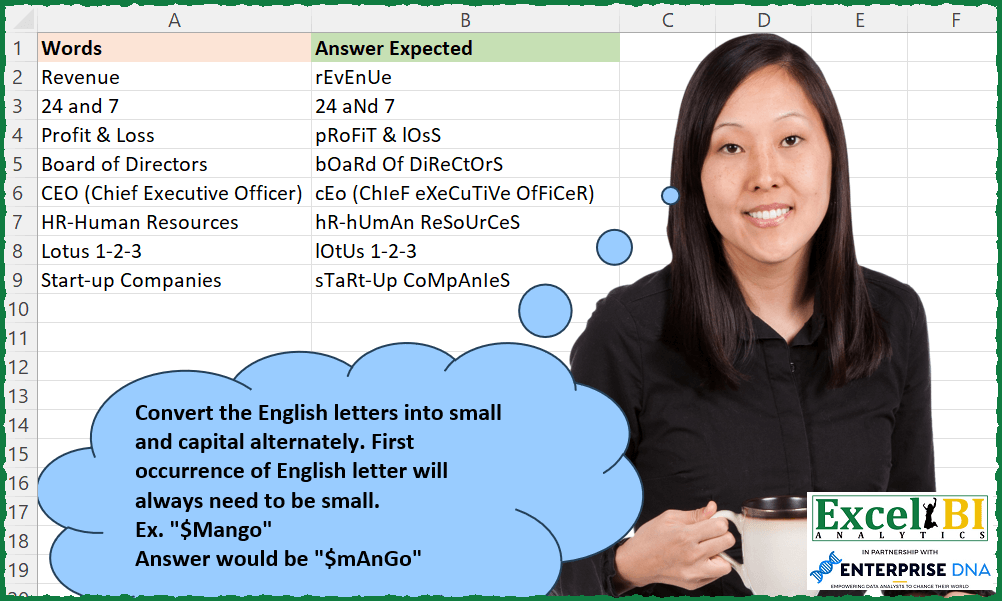
Convert the English letters into small and capital alternately. First occurrence of English letter will always need to be small. Ex. “$Mango” Answer would be “$mAnGo”
📌 Challenge Details and Links
ExcelBI Excel Challenge Number: 241
Challenge Difficulty: ⭐️
📥Download Sample File
📥Link to the solutions on LinkedIn
Solving the challenge of Alternate Letter Casing with Power Query
Power Query solution 1 for Alternate Letter Casing, proposed by Bo Rydobon 🇹🇭:
let
  Source = Excel.CurrentWorkbook(){[Name = "Table1"]}[Content],
  Ans = Table.TransformRows(
    Source,
    each List.Accumulate(
      Text.ToList(Text.Lower([Words])),
      {0, ""},
      (s, l) =>
        let
          b = s{0} + Number.From(l > "`")
        in
          {b, s{1} & (if Number.IsOdd(b) then l else Text.Upper(l))}
    ){1}
  )
in
  Ans
Power Query solution 2 for Alternate Letter Casing, proposed by Zoran Milokanović:
let
  Source = Excel.CurrentWorkbook(){[Name = "Input"]}[Content],
  S = Table.TransformRows(
    Source,
    each Text.Combine(
      List.Accumulate(
        Text.ToList([Words]),
        {},
        (s, c) =>
          let
            l = List.Last(
              List.Select(s, each List.Contains({"A" .. "Z"}, _, Comparer.OrdinalIgnoreCase)),
              "X"
            )
          in
            s & {if Text.Upper(l) = l then Text.Lower(c) else Text.Upper(c)}
      )
    )
  )
in
  S
Power Query solution 3 for Alternate Letter Casing, proposed by Alejandro Simón 🇵🇦 🇪🇸:
let
 Source = Excel.CurrentWorkbook(){[Name="Table1"]}[Content],
 Sol = Table.AddColumn(Source, "Answer", each
 let
 a = Text.ToList([Words]),
 b = List.Positions(a),
 c = List.Zip({b,a}),
 d = List.Transform(c, each List.RemoveMatchingItems(_, {" ", "&", "(", ")", "-"}&{"0".."9"})),
 e = List.Select(d, each List.Count(_) > 1),
 f = List.Transform({0..List.Count(e)-1}, each if Number.IsEven(_) then {e{_}{0}}&{Text.Lower(e{_}{1})} else {e{_}{0}}&{Text.Upper(e{_}{1})}),
 g = List.ReplaceMatchingItems(b, f)
 in Text.Combine(List.ReplaceMatchingItems(g,c)))[[Answer]]
in
 Sol

Aplicando la técnica de Luan Rodrigues en el reto Vowel Sort
Power Query solution 4 for Alternate Letter Casing, proposed by Luan Rodrigues:
let
  Fonte = Query_Tabela1,
  res = Table.AddColumn(
    Fonte,
    "Personalizar",
    each [
      a = Text.ToList(Text.Lower([Words])),
      b = {1 .. List.Count(List.Positions(a))},
      c = List.Zip({a, b}),
      d = List.Alternate(List.Select(c, (x) => List.ContainsAny({"a" .. "z"}, x)), 1, 1),
      e = List.Zip({{"a" .. "z"}, {"A" .. "Z"}}),
      f = List.Transform(d, each List.Reverse(List.ReplaceMatchingItems(_, e))),
      g = List.Zip({b, a}),
      h = List.Transform(g, each List.ReplaceMatchingItems(_, f){0}),
      i = Text.Combine(List.ReplaceMatchingItems(h, g))
    ][i]
  )
in
  res
Power Query solution 5 for Alternate Letter Casing, proposed by Venkata Rajesh:
let
  Source = Data,
  Output = Table.AddColumn(
    Source,
    "Expected",
    each [
      x = Text.ToList([Words]),
      y = List.Select({0 .. List.Count(x) - 1}, each List.Contains({"A" .. "Z", "a" .. "z"}, x{_})),
      z = List.Accumulate(
        {0 .. List.Count(y) - 1},
        [Words],
        (state, current) =>
          Text.ReplaceRange(
            state,
            y{current},
            1,
            if Number.IsEven(current) then Text.Lower(x{y{current}}) else Text.Upper(x{y{current}})
          )
      )
    ][z]
  )
in
  Output
Solving the challenge of Alternate Letter Casing with Excel
Excel solution 1 for Alternate Letter Casing, proposed by Bo Rydobon 🇹🇭:
=MAP(UPPER(A2:A9),LAMBDA(w,LET(c,CODE(MID(w,SEQUENCE(LEN(w)),1)),d,c>64,CONCAT(CHAR(c+d*32*ISODD(SCAN(0,d,LAMBDA(x,v,x+v))))))))Excel solution 2 for Alternate Letter Casing, proposed by John V.:
=ordenar(Caracter(secuencia(255)))Excel solution 3 for Alternate Letter Casing, proposed by John V.:
=MAP(
    A2:A9,
    LAMBDA(
        x,
        LET(
            w,
            MID(
                x,
                ROW(
                    1:30
                ),
                1
            ),
            CONCAT(
                IF(
                    ISODD(
                        SCAN(
                            0,
                            w>"†",
                            LAMBDA(
                                a,
                                v,
                                a+v
                            )
                        )
                    ),
                    LOWER(
                        w
                    ),
                    UPPER(
                        w
                    )
                )
            )
        )
    )
)
Excel solution 4 for Alternate Letter Casing, proposed by محمد حلمي:
=MAP(A2:A9,LAMBDA(a,LET(i,MID(a,ROW(1:30),1),CONCAT(IF(ISODD(SCAN(0,i>="A",LAMBDA(a,d,d+a))),LOWER(i),UPPER(i))))))Excel solution 5 for Alternate Letter Casing, proposed by Kris Jaganah:
=MAP(A2:A9,LAMBDA(w,LET(a,MID(w,SEQUENCE(LEN(w)),1),b,SCAN(0,MAP(a,LAMBDA(v,SUM(--(v=BASE(SEQUENCE(26,,10),36))))),LAMBDA(x,y,x+y)),CONCAT(IF(MOD(b,2),LOWER(a),UPPER(a))))))Excel solution 6 for Alternate Letter Casing, proposed by Julian Poeltl:
=MAP(A2:A9,LAMBDA(W,LET(SP,MID(W,SEQUENCE(LEN(W)),1),L,LOWER(SP),U,UPPER(SP),C,CODE(U),I,(C<91)*(C>64),CONCAT(IF(ISEVEN(SCAN(0,I,LAMBDA(A,B,A+B))),U,L)))))Excel solution 7 for Alternate Letter Casing, proposed by Timothée BLIOT:
=MAP(
    A2:A9,
    LAMBDA(
        z,
         LET(
             A,
             LOWER(
                 MID(
                     z,
                     SEQUENCE(
                         LEN(
                             z
                         )
                     ),
                     1
                 )
             ),

             B,
             MAP(
                 A,
                 LAMBDA(
                     x,
                     AND(
                         CODE(
                             x
                         )>96,
                         CODE(
                             x
                         )<123
                     )
                 )
             ),
              D,
             SCAN(
                 0,
                 SEQUENCE(
                     ROWS(
                         A
                     )
                 ),
                 LAMBDA(
                     a,
                     v,
                     IF(
                         INDEX(
                             B,
                             v
                         ),
                         a+1,
                         a
                     )
                 )
             ),

             CONCAT(
                 MAP(
                     SEQUENCE(
                     ROWS(
                         A
                     )
                 ),
                     LAMBDA(
                         x,
                         IF(
                             INDEX(
                                 B,
                                 x
                             ),
                             IF(
                                 MOD(
                                     INDEX(
                                         D,
                                         x
                                     ),
                                     2
                                 )=1,
                                 LOWER(
                                     INDEX(
                                         A,
                                         x
                                     )
                                 ),
                                 UPPER(
                                     INDEX(
                                         A,
                                         x
                                     )
                                 )
                             ),
                             INDEX(
                                         A,
                                         x
                                     )
                         )
                     )
                 )
             )
         )
    )
)
Excel solution 8 for Alternate Letter Casing, proposed by Hussein SATOUR:
=MAP(A2:A9,
     LAMBDA(x,
     LET(
a,
     SEQUENCE(
         LEN(
             x
         )
     ),

b,
     MID(
         x,
          a,
          1
     ),

c,
     FILTER(a,
     (CODE(
         UPPER(
             b
         )
     )>64) * (CODE(
         UPPER(
             b
         )
     )<91)),

d,
     FILTER(b,
     (CODE(
         UPPER(
             b
         )
     )>64) * (CODE(
         UPPER(
             b
         )
     )<91)),

e,
     SEQUENCE(
         COUNT(
             c
         )
     ),

f,
     IF(
         MOD(
             e,
             2
         )=1,
         LOWER(
             d
         ),
          UPPER(
             d
         )
     ),

 CONCAT(
     IFNA(
         XLOOKUP(
             a,
              c,
              f
         ),
          XLOOKUP(
              a,
               a,
               b
          )
     )
 ))))
Excel solution 9 for Alternate Letter Casing, proposed by Oscar Mendez Roca Farell:
=MAP(A2:A9,
     LAMBDA(a,
     LET(_s,
    SEQUENCE(
        LEN(
            a
        )
    ),
    _w,
     MID(
         UPPER(
            a
        ),
         _s,
          1
     ),
    _c,
     CODE(
         _w
     ),
     CONCAT(IFERROR(CHAR( _c+32*IF(_c>64,
     MOD(SCAN(,
    --(_c>64),
     LAMBDA(
         i,
          x,
          IF(
              x,
               i+x,
               i
          )
     )),
     2),
     NOD())),
    _w)))))
Excel solution 10 for Alternate Letter Casing, proposed by Sunny Baggu:
=MAP(
 A2:A9,
 LAMBDA(d,
 LET(
 _m, MID(LOWER(d), SEQUENCE(LEN(LOWER(d))), 1),
 _cm, CODE(_m),
 _cond, MAP(_cm, LAMBDA(a, N(AND(a <= 122, a >= 97)))),
 _cri, SCAN(0, _cond, LAMBDA(a, v, IF(v, a + v, 0))),
 CONCAT(MAP(_m, _cri, LAMBDA(a, b, IF(b = 0, a, IF(ISODD(b), LOWER(a), UPPER(a))))))
 )
 )
)
Excel solution 11 for Alternate Letter Casing, proposed by Charles Roldan:
=LET(δ,
     LAMBDA(
         a,
          b,
          EXACT(
              a,
               b
          )
     ),

 f,
     LAMBDA(x,
     y,
     (IF(SCAN(,
     δ(x,
     y),
     δ),
     x,
     y))),

 g,
     LAMBDA(
         c,
          CONCAT(
              f(
                  UPPER(
                      c
                  ),
                   LOWER(
                      c
                  )
              )
          )
     ),

 h,
     LAMBDA(
         x,
          MID(
              x,
               SEQUENCE(
                   LEN(
                       x
                   )
               ),
               1
          )
     ),

 MAP(
     A2:A9,
      LAMBDA(
          w,
           g(
               h(
                   w
               )
           )
      )
 ))
Excel solution 12 for Alternate Letter Casing, proposed by Charles Roldan:
=LET(
 δ,
     LAMBDA(
         i,
         j,
          EXACT(
              i,
               j
          )
     ),

 F,
     LAMBDA(c,
     LET(u,
     UPPER(
         c
     ),
     l,
     LOWER(
         c
     ),

CONCAT(IF(SCAN(,
     δ(u,
     l),
     δ),
     u,
     l)))),


 Apply,
     LAMBDA(
         f,
          LAMBDA(
              x,
               MAP(
                   x,
                    f
               )
          )
     ),

 Compose,
     LAMBDA(
         f,
          LAMBDA(
              g,
               LAMBDA(
                   x,
                    f(
                        g(
                            x
                        )
                    )
               )
          )
     ),

 ByChar,
     LAMBDA(
         x,
          MID(
              x,
               SEQUENCE(
                   LEN(
                            x
                        )
               ),
               1
          )
     ),


 Apply(Compose(
     F
 )(ByChar)))(A2:A9)
Excel solution 13 for Alternate Letter Casing, proposed by JvdV -:
=MAP(A2:A9,LAMBDA(s,LET(z,MID(LOWER(s),ROW(1:99),1),CONCAT(IF(SCAN(1,z,LAMBDA(x,y,ABS(x-(y>">")))),UPPER(z),z)))))Excel solution 14 for Alternate Letter Casing, proposed by Julien Lacaze:
=MAP(UPPER(A2:A9),LAMBDA(data,LET(
split,LAMBDA(text,MID(text,SEQUENCE(LEN(text)),1)),
isLetter,LAMBDA(text, (CODE(text)>=CODE("A")) * (CODE(text)<=CODE("Z"))),
letterNumber,SCAN(0,split(data),LAMBDA(a,v,a+isLetter(v))),
CONCAT(MAP(split(data),letterNumber,LAMBDA( a,b,IF(isLetter(a)*ISODD(b),LOWER(a),a)))))))
Excel solution 15 for Alternate Letter Casing, proposed by Nicolas Micot:
Ouf j'ai encore à apprendre quand je vois tous les LAMBDA,
     SCAN,
     et MAP dans cette formule!
J'ai mis du temps à lire et comprendre tout ce qu'il se passe,
     chapeau!


        Show translation
Excel solution 16 for Alternate Letter Casing, proposed by Daniel Garzia:
=MAP(A2:A9,
    LAMBDA(x,
    LET(l,
    MID(
        UPPER(
            x
        ),
        SEQUENCE(
            LEN(
            x
        )
        ),
        1
    ),
    c,
    CODE(
        l
    ),
    t,
    (c>64)*(c<91),
    CONCAT(
        IFS(
            t=0,
            l,
            MOD(
                SCAN(
                    0,
                    t,
                    LAMBDA(
                        a,
                        b,
                        a+b
                    )
                ),
                2
            ),
            LOWER(
        l
    ),
            1,
            UPPER(
        l
    )
        )
    ))))
Excel solution 17 for Alternate Letter Casing, proposed by Quadri Olayinka Atharu:
=MAP(A2:A9,LAMBDA(w,LET(m,MID(w,SEQUENCE(LEN(w)),1),
il,N(ISNUMBER(XMATCH(m,CHAR&(SEQUENCE(26,,65))))),
s,SCAN(0,il,LAMBDA(x,y,x+y)),r,CONCAT(IF(ISODD(s),LOWER(m),UPPER(m))),r)))
Excel solution 18 for Alternate Letter Casing, proposed by Ricardo Alexis Domínguez Hernández:
=BYROW(
    A2:A9,
    LAMBDA(
        y,
        CONCAT(
            IF(
                BYCOL(
                    MID(
                        y,
                        SEQUENCE(
                            ,
                            LEN(
                                y
                            )
                        ),
                        1
                    ),
                    LAMBDA(
                        x,
                        IF(
                            OR(
                                AND(
                                    CODE(
                                        x
                                    )>=97,
                                    CODE(
                                        x
                                    )<=122
                                ),
                                AND(
                                    CODE(
                                        x
                                    )>=65,
                                    CODE(
                                        x
                                    )<=90
                                )
                            ),
                            1,
                            0
                        )
                    )
                )=0,
                MID(
                        y,
                        SEQUENCE(
                            ,
                            LEN(
                                y
                            )
                        ),
                        1
                    ),
                IF(
                    MOD(
                        SCAN(
                            0,
                            BYCOL(
                    MID(
                        y,
                        SEQUENCE(
                            ,
                            LEN(
                                y
                            )
                        ),
                        1
                    ),
                    LAMBDA(
                        x,
                        IF(
                            OR(
                                AND(
                                    CODE(
                                        x
                                    )>=97,
                                    CODE(
                                        x
                                    )<=122
                                ),
                                AND(
                                    CODE(
                                        x
                                    )>=65,
                                    CODE(
                                        x
                                    )<=90
                                )
                            ),
                            1,
                            0
                        )
                    )
                ),
                            LAMBDA(
                                a,
                                b,
                                a+b
                            )
                        ),
                        2
                    )=1,
                    LOWER(
                        MID(
                        y,
                        SEQUENCE(
                            ,
                            LEN(
                                y
                            )
                        ),
                        1
                    )
                    ),
                    UPPER(
                        MID(
                        y,
                        SEQUENCE(
                            ,
                            LEN(
                                y
                            )
                        ),
                        1
                    )
                    )
                )
            )
        )
    )
)
Excel solution 19 for Alternate Letter Casing, proposed by Harry Seiders:
=MAP(A2:A9,LAMBDA(Words,LET(convert,Words,Break,MID(convert,SEQUENCE(LEN(convert)),1),
Ckletter,MAP(Break,LAMBDA(B,LET(A,CODE(B),--OR(AND(A>=65,A<=90),AND(A>=97,A<=122))))),
Ev,ISEVEN((SCAN(0,Ckletter,LAMBDA(a,v,a+v)))),
CONCAT(MAP(Break,Ckletter,Ev,LAMBDA(letter,change,Up,IF(change,IF(Up,UPPER(letter),LOWER(letter)),letter)))))))
Solving the challenge of Alternate Letter Casing with Excel VBA
Excel VBA solution 1 for Alternate Letter Casing, proposed by Nicolas Micot:
VBA solution:
Function f_convertEnglishLetters(ByVal texte As String) As String
Dim isCapital As Boolean
Dim resultat As String, lettre As String
texte = LCase(texte)
For i = 1 To Len(texte)
 lettre = Mid(texte, i, 1)
 Select Case lettre
 Case "a" To "z"
 If isCapital Then lettre = UCase(lettre)
 isCapital = Not isCapital
 End Select
 resultat = resultat & lettre
Next i
f_convertEnglishLetters = resultat
End Function
&&