
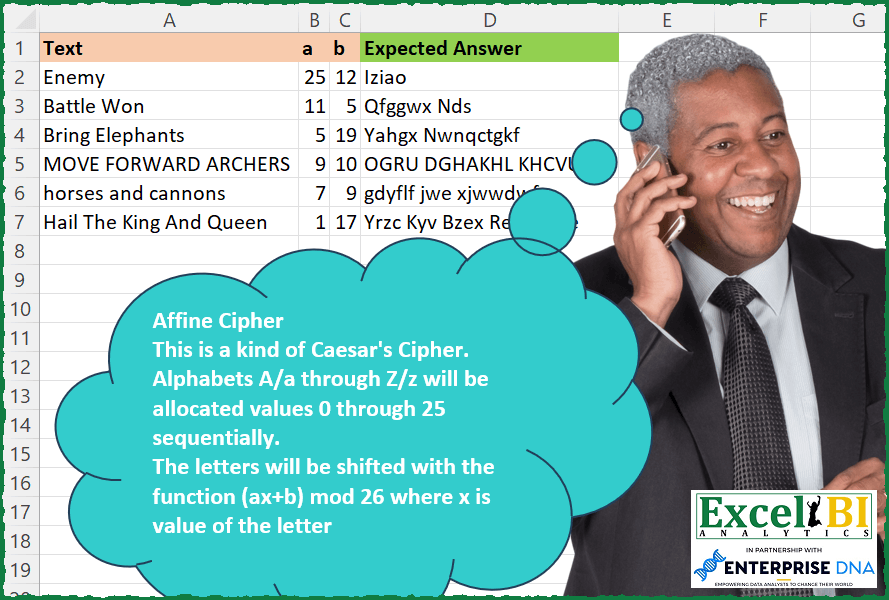
Affine Cipher This is a kind of Caesar’s Cipher. Alphabets A/a through Z/z will be allocated values 0 through 25 sequentially. The letters will be shifted with the function (ax+b) mod 26 where x is the value of the letter. Hence, if a = 7 and b = 5, then if word is Horn, encrypted word will be Czus. Taking example of H whose value is 7. ax+b mod 26 = 7*7+5 mod 26 = 54 mod 26 = 2 which is equal to C Space will not be shifted.
📌 Challenge Details and Links
ExcelBI Excel Challenge Number: 232
Challenge Difficulty: ⭐️
📥Download Sample File
📥Link to the solutions on LinkedIn
Solving the challenge of Encrypt Using Affine Cipher with Power Query
Power Query solution 1 for Encrypt Using Affine Cipher, proposed by Bo Rydobon 🇹🇭:
let
  Source = Excel.CurrentWorkbook(){[Name = "Table1"]}[Content],
  Ans = Table.TransformRows(
    Source,
    each Text.Combine(
      List.Transform(
        Text.ToList([Text]),
        (t) =>
          let
            c = Character.ToNumber(t)
          in
            if c = 32 then
              " "
            else
              Character.FromNumber(
                Number.Mod(Number.Mod(c, 32) * [a] - [a] + [b], 26) + 65 + 32 * Number.From(c > 96)
              )
      )
    )
  )
in
  Ans
Power Query solution 2 for Encrypt Using Affine Cipher, proposed by Zoran Milokanović:
let
  Source = Excel.CurrentWorkbook(){[Name = "Input"]}[Content],
  S = Table.TransformRows(
    Source,
    each Text.Combine(
      List.ReplaceMatchingItems(
        Text.ToList([Text]),
        List.Transform(
          {0 .. 51},
          (p) => {
            {"A" .. "Z", "a" .. "z"}{p},
            {"A" .. "Z", "a" .. "z"}{
              26 * Number.RoundDown(p / 26) + Number.Mod([a] * Number.Mod(p, 26) + [b], 26)
            }
          }
        )
      )
    )
  )
in
  S
Power Query solution 3 for Encrypt Using Affine Cipher, proposed by Alejandro Simón 🇵🇦 🇪🇸:
let
  Source = Excel.CurrentWorkbook(){[Name = "Table1"]}[Content],
  Sol = Table.AddColumn(
    Source,
    "Answer",
    (x) =>
      let
        a = Text.ToList(x[Text]),
        b = List.Zip({{"A" .. "Z"}, {0 .. 25}}),
        c = List.ReplaceMatchingItems(a, b, Comparer.OrdinalIgnoreCase),
        d = List.Transform(c, each Number.Mod(x[a] * _ + x[b], 26)),
        e = Text.Combine(
          List.Transform(
            {0 .. List.Count(d) - 1},
            each try
              if a{_} = Text.Upper(a{_}) then {"A" .. "Z"}{d{_}} else {"a" .. "z"}{d{_}}
            otherwise
              " "
          )
        )
      in
        e
  )[[Answer]]
in
  Sol
Power Query solution 4 for Encrypt Using Affine Cipher, proposed by Venkata Rajesh:
let
  Source = Data,
  Output = Table.AddColumn(
    Source,
    "Answer",
    each [
      a = [a],
      b = [b],
      c = Text.Combine(
        List.Transform(
          Text.ToList([Text]),
          each [
            x = List.PositionOf({"a" .. "z"}, Text.Lower(_)),
            y = Number.Mod(a * x + b, 26),
            z =
              if _ = " " then
                " "
              else if _ = Text.Upper(_) then
                {"A" .. "Z"}{y}
              else
                {"a" .. "z"}{y}
          ][z]
        )
      )
    ][c]
  )
in
  Output
Solving the challenge of Encrypt Using Affine Cipher with Excel
Excel solution 1 for Encrypt Using Affine Cipher, proposed by Bo Rydobon 🇹🇭:
=MAP(A2:A7,B2:B7,C2:C7,LAMBDA(t,a,b,LET(c,CODE(MID(t,SEQUENCE(LEN(t)),1)),CONCAT(IF(c=32," ",CHAR(MOD(a*MOD(c,32)-a+b,26)+65+32*(c>96)))))))Excel solution 2 for Encrypt Using Affine Cipher, proposed by John V.:
=MAP(A2:A7,B2:B7,C2:C7,LAMBDA(t,a,b,LET(c,CODE(MID(t,SEQUENCE(LEN(t)),1)),d,97-32*(c<91),CONCAT(CHAR(IF(c=32,c,d+MOD(a*(c-d)+b,26)))))))
✅=MAP(A2:A7,B2:B7,C2:C7,LAMBDA(t,a,b,LET(c,CODE(MID(t,SEQUENCE(LEN(t)),1)),d,MOD(c,32)-1,CONCAT(CHAR(c+IF(c>64,MOD(a*d+b,26)-d))))))
Excel solution 3 for Encrypt Using Affine Cipher, proposed by محمد حلمي:
=MAP(A2:A7,B2:B7,C2:C7,LAMBDA(a,b,c, LET(v,CODE(
MID(a,SEQUENCE(LEN(a)),1)),CONCAT(CHAR(
IF(v=32,32,MOD((MOD(v,32)-1)*b+c,26)+IF(v<91,65,97)))))))
Excel solution 4 for Encrypt Using Affine Cipher, proposed by محمد حلمي:
=MAP(A2:A7,B2:B7,C2:C7,LAMBDA(a,b,c, LET(v,CODE(
MID(a,SEQUENCE(LEN(a)),1)),CONCAT(CHAR(IF(v=32,32,
MOD(IF(v<91,v-65,v-97)*b+c,26)+IF(v<91,65,97)))))))
Excel solution 5 for Encrypt Using Affine Cipher, proposed by Kris Jaganah:
=MAP(A2:A7,B2:B7,C2:C7,LAMBDA(x,y,z,LET(a,SEQUENCE(26,,10),b,BASE(a,36),c,MID(x,SEQUENCE(LEN(x)),1),d,MOD((y*(XMATCH(c,b)-1))+z,26),e,IFNA(XLOOKUP(d,a-10,b)," "),CONCAT(IF(--EXACT(UPPER(c),c),UPPER(e),LOWER(e))))))Excel solution 6 for Encrypt Using Affine Cipher, proposed by Julian Poeltl:
=MAP(A2:A7,B2:B7,C2:C7,LAMBDA(T,A,B,LET(SP,MID(T,SEQUENCE(LEN(T)),1),L,LOWER(SP),C,CHAR(MOD((CODE(L)-97)*A+B,26)+97),CONCAT(IF(SP=" "," ",IF(EXACT(L,SP),C,UPPER(C)))))))Excel solution 7 for Encrypt Using Affine Cipher, proposed by Aditya Kumar Darak 🇮🇳:
=LET(
 _uc, REPT(CONCAT(CHAR(SEQUENCE(26, , 65))), 2),
 _lc, LOWER(_uc),
 _r, MAP(
 A2:A7,
 B2:B7,
 C2:C7,
 LAMBDA(t, a, b,
 LET(
 splt, MID(t, SEQUENCE(LEN(t)), 1),
 e, LAMBDA(x,
 MID(x, MOD((FIND(splt, x) - 1) * a + b, 26) + 1, 1)
 ),
 m1, e(_uc),
 m2, e(_lc),
 f, IFERROR(m1, IFERROR(m2, splt)),
 r, CONCAT(f),
 r
 )
 )
 ),
 _r
)
Excel solution 8 for Encrypt Using Affine Cipher, proposed by Timothée BLIOT:
=MAP(A2:A7,B2:B7,C2:C7,LAMBDA(r,s,t,TEXTJOIN(" ",,LET(A,TEXTSPLIT(r," "),MAP(A,LAMBDA(x,CONCAT(LET(B,MID(x,SEQUENCE(LEN(x)),1),D,MAP(B,LAMBDA(y,EXACT(y,UPPER(y)))),E,CODE(LOWER(B))-97,F,CHAR(MOD((E*s)+t,26)+97),MAP(SEQUENCE(ROWS(F)),LAMBDA(z,IF(INDEX(D,z),UPPER(INDEX(F,z)),INDEX(F,z))))))))))))Excel solution 9 for Encrypt Using Affine Cipher, proposed by Sunny Baggu:
=MAP(
 A2:A7,
 B2:B7,
 C2:C7,
 LAMBDA(_t, _a, _b,
 LET(
 _m, MID(_t, SEQUENCE(LEN(_t)), 1),
 _c, CODE(_m),
 _num, SEQUENCE(26) - 1,
 _up, CHAR(_num + 65),
 _low, LOWER(_up),
 _x, XLOOKUP(_m, _up, _num),
 _cri, MAP(_x, LAMBDA(a, MOD(_a * a + _b, 26))),
 CONCAT(
 MAP(
 _c,
 _cri,
 LAMBDA(a, b,
 IFNA(IF(a <= 90, XLOOKUP(b, _num, _up, " "), XLOOKUP(b, _num, _low, " ")), " ")
 )
 )
 )
 )
 )
)
Excel solution 10 for Encrypt Using Affine Cipher, proposed by Charles Roldan:
=MAP(A2:A7, B2:B7, C2:C7,
LAMBDA(t,a,b, LET(
v, MID(t, SEQUENCE(LEN(t)), 1),
x, SEARCH(v, "abcdefghijklmnopqrstuvwxyz") - 1,
CONCAT(CHAR(CODE(v) + IFERROR(MOD(a * x + b, 26) - x, ))))))
Excel solution 11 for Encrypt Using Affine Cipher, proposed by JvdV -:
=MAP(A2:A7,B2:B7,C2:C7,LAMBDA(a,b,c,LET(x,CODE(MID(a,SEQUENCE(LEN(a)),1)),y,65+32*(x>96),CONCAT(CHAR(IF(x-32,MOD((x-y)*b+c,26)+y,x))))))Excel solution 12 for Encrypt Using Affine Cipher, proposed by Julien Lacaze:
=LET(t,A2:A7,a,B2:B7,b,C2:C7,
f,LAMBDA(x,a,b,MOD(a*x+b,26)),
isUpper,LAMBDA(text,LET(c,CODE(text),--(c>=CODE("A"))*(c<=CODE("Z")))),
isLower,LAMBDA(text,LET(c,CODE(text),--(c>=CODE("a"))*(c<=CODE("z")))),
Cipher,LAMBDA(text,a,b,
 LET(split,MID(text,SEQUENCE(LEN(text)),1),
 IFS(isUpper(split),CHAR(f(CODE(split)-CODE("A"),a,b)+CODE("A")),
 isLower(split),CHAR(f(CODE(split)-CODE("a"),a,b)+CODE("a")),
 1,split
 )
 )),
MAP(t,a,b,LAMBDA(t,a,b,CONCAT(Cipher(t,a,b)))))
Excel solution 13 for Encrypt Using Affine Cipher, proposed by Pieter de Bruijn:
=MAP(A2:A7,B2:B7,C2:C7,LAMBDA(t,a,b,LET(c,CODE(MID(t,SEQUENCE(LEN(t)),1)),x,c<97,y,c-97+32*x,CONCAT(CHAR(IF(c=32,c,MOD(y*a+b,26)+97-32*x))))))Excel solution 14 for Encrypt Using Affine Cipher, proposed by Abhishek Kumar Jain:
=MAP(A2:A7,B2:B7,C2:C7,LAMBDA(x,y,z,CONCAT(LET(c,CODE(MID(x,SEQUENCE(LEN(x)),1)),d,IFS(c=32," ",c>96,CHAR(97+MOD((y*(c-97))+z,26)),TRUE,CHAR(65+MOD((y*(c-65))+z,26))),d))))Excel solution 15 for Encrypt Using Affine Cipher, proposed by Daniel Garzia:
=MAP(A2:A7,B2:B7,C2:C7,LAMBDA(l,a,b,LET(c,CODE(MID(l,SEQUENCE(LEN(l)),1)),t,IF(c<97,65,97),CONCAT(IF(c<65," ",CHAR(t+MOD(a*(c-t)+b,26)))))))Excel solution 16 for Encrypt Using Affine Cipher, proposed by Quadri Olayinka Atharu:
=MAP(A2:A7,B2:B7,C2:C7,LAMBDA(_t,a,b,
LET(
_c,CHAR(SEQUENCE(26,,65)),
m,MID(_t,SEQUENCE(LEN(_t)),1),
u,EXACT(m,UPPER(m)),
x,XMATCH(m,_c)-1,
s,MOD((a*x)+b,26),
r,IFNA(INDEX(_c,(s+1))," "),
f,CONCAT(IF(u,r,LOWER(r))),
f)))
Excel solution 17 for Encrypt Using Affine Cipher, proposed by Henriette Hamer:
=MAP(A2:A7;B2:B7;C2:C7;LAMBDA(_alltext;_all_a;_all_b;LET(_text;_alltext;_a;_all_a;_b;_all_b;_much_used_1;CODE(MID(_text;SEQUENCE(;LEN(_text));1));TEXTJOIN("";FALSE;CHAR(IF(_much_used_1=32;32;IF(_much_used_1<90;MOD(+IF(_much_used_1=32;32;IF(_much_used_1<90;_much_used_1-65;_much_used_1-97))*_a+_b;26)+65;MOD(+IF(_much_used_1=32;32;IF(_much_used_1<90;_much_used_1-65;_much_used_1-97))*_a+_b;26)+97)))))))
I guess it can be even more compact, didn't feel like it :-)
Excel solution 18 for Encrypt Using Affine Cipher, proposed by Hussain Ali Nasser:
=MAP(
 A2:A7,
 B2:B7,
 C2:C7,
 LAMBDA(_text, _a, _b,
 LET(
 _split, MID(_text, SEQUENCE(LEN(_text)), 1),
 _code, CODE(_split),
 _case, IF(_code < 97, 65, 97),
 _x, MOD(_code, _case),
 _shifted, MOD((_a * _x) + _b, 26),
 _restored, _shifted + _case,
 _char, CHAR(IF(_code = 32, 32, _restored)),
 CONCAT(_char)
 )
 )
)
Solving the challenge of Encrypt Using Affine Cipher with Excel VBA
Excel VBA solution 1 for Encrypt Using Affine Cipher, proposed by Nicolas Micot:
VBA solution:
Function f_affineCipher(ByVal texte As String, ByVal a As Integer, ByVal b As Integer) As String
Dim lettre As String, resultat As String
Dim valMin As Integer, code As Integer, valeur As Integer
For i = 1 To Len(texte)
 lettre = Mid(texte, i, 1)
 Select Case lettre
 Case "A" To "Z"
 valMin = Asc("A")
 GoSub cipher
 Case "a" To "z"
 valMin = Asc("a")
 GoSub cipher
 Case Else
 resultat = resultat & lettre
 End Select
Next i
f_affineCipher = resultat
Exit Function
cipher:
code = Asc(lettre)
valeur = code - valMin
resultat = resultat & Chr(valMin + (a * valeur + b) Mod 26)
Return
End Function
&&&