
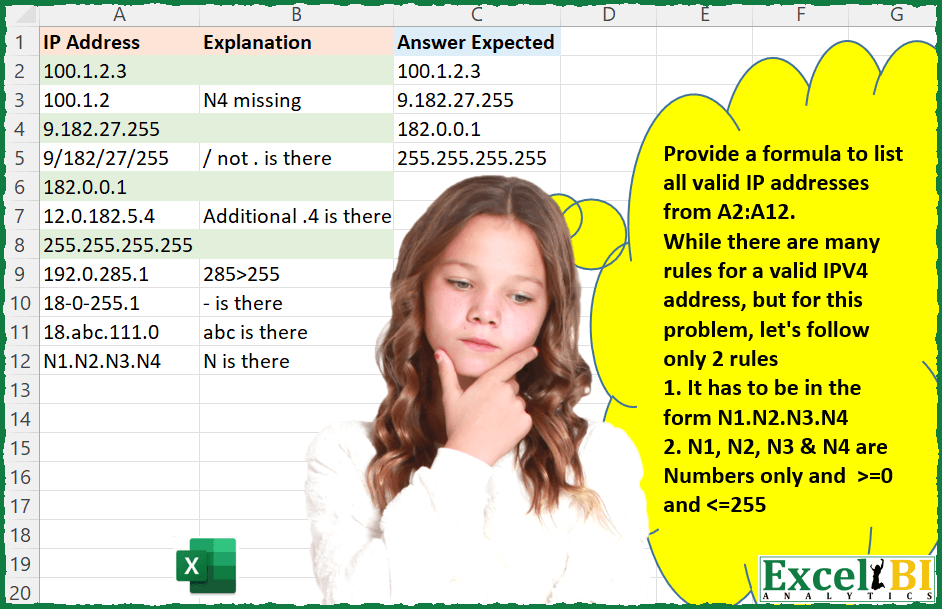
Provide a formula to list all valid IP addresses from A2:A12. While there are many rules for a valid IPV4 address, but for this problem, let’s follow only 2 rules 1. It has to be in the form N1.N2.N3.N4 2. N1, N2, N3 & N4 are Numbers only and >=0 and <=255 Valid entries are highlighted and Explanation column lists the reason why it is not a valid entry.
📌 Challenge Details and Links
ExcelBI Excel Challenge Number: 22
Challenge Difficulty: ⭐️⭐️
📥Download Sample File
📥Link to the solutions on LinkedIn
Solving the challenge of List Valid IP Addresses with Power Query
Power Query solution 1 for List Valid IP Addresses, proposed by Aditya Kumar Darak 🇮🇳:
let
  Source = Excel.CurrentWorkbook(){[Name = "data"]}[Content],
  Calc = Table.AddColumn(
    Source,
    "Calc",
    each [
      Split         = Text.Split([IP Address], "."),
      SelectionFrom = List.Transform({0 .. 255}, Text.From),
      Selected      = List.Select(Split, (f) => List.Contains(SelectionFrom, f)),
      Count         = List.Count(Selected) = 4
    ][Count]
  ),
  Result = Table.SelectRows(Calc, each ([Calc] = true))[[IP Address]]
in
  Result
Power Query solution 2 for List Valid IP Addresses, proposed by Brian Julius:
let
  Source = Table.SplitColumn(
    Table.DuplicateColumn(#"IP Raw", "IP Address", "IP2"),
    "IP2",
    Splitter.SplitTextByDelimiter(".", QuoteStyle.Csv),
    {"IP2.1", "IP2.2", "IP2.3", "IP2.4", "IP2.5"}
  ),
  UnpivotedOther = Table.TransformColumnTypes(
    Table.UnpivotOtherColumns(Source, {"IP Address"}, "Attribute", "Value"),
    {"Value", Int64.Type}
  ),
  CreateNumCols = Table.TransformColumnTypes(
    Table.SplitColumn(
      UnpivotedOther,
      "Attribute",
      Splitter.SplitTextByEachDelimiter({"."}, QuoteStyle.Csv, true),
      {"Attribute.1", "Attribute.2"}
    ),
    {"Attribute.2", Int64.Type}
  ),
  ValidNums = Table.ReplaceErrorValues(
    Table.AddColumn(
      CreateNumCols,
      "NumValid",
      each if List.AllTrue({[Value] >= 0, [Value] <= 255}) then 1 else 0,
      Int64.Type
    ),
    {"NumValid", 0}
  ),
  GroupedRows = Table.Group(
    ValidNums,
    {"IP Address"},
    {
      {"MaxColNum", each List.Max([Attribute.2]), type nullable number},
      {"TotValidNums", each List.Sum([NumValid]), type nullable number}
    }
  ),
  #"Filtered&Clean" = Table.RenameColumns(
    Table.SelectColumns(
      Table.SelectRows(GroupedRows, each ([MaxColNum] = 4) and ([TotValidNums] = 4)),
      "IP Address"
    ),
    {"IP Address", "Answer Expected"}
  )
in
  #"Filtered&Clean"
Power Query solution 3 for List Valid IP Addresses, proposed by Matthias Friedmann:
let
  Source = Excel.CurrentWorkbook(){[Name = "IPaddress"]}[Content],
  #"Filtered Rows" = Table.SelectRows(
    Source,
    each (
      [IP Address]
        = Text.Select([IP Address], {".", "0" .. "9"}) and Text.Select([IP Address], {"."})
        = "..."
    )
      and Number.From(List.Max(Text.SplitAny([IP Address], Text.Combine({" " .. "/", ":" .. "~"}))))
      < 256
  )
in
  #"Filtered Rows"
Power Query solution 4 for List Valid IP Addresses, proposed by Sergei Baklan:
let
  Source = Excel.CurrentWorkbook(){[Name = "range"]}[Content],
  #"Promoted Headers" = Table.PromoteHeaders(Source, [PromoteAllScalars = true]),
  SelectIP = Table.SelectRows(
    #"Promoted Headers",
    each [
      t = Text.Split([IP Address], "."),
      n = try
        List.MatchesAll(t, each Number.From(_) >= 0 and Number.From(_) < 256) and List.Count(t) = 4
      otherwise
        false
    ][n]
  )
in
  SelectIP
Power Query solution 5 for List Valid IP Addresses, proposed by Sue Bayes:
let
  Source = Data,
  Duplicate = Table.DuplicateColumn(Source, "IPAddress", "IP"),
  Split = Table.SplitColumn(
    Duplicate,
    "IP",
    Splitter.SplitTextByDelimiter(".", QuoteStyle.Csv),
    {"IP.1", "IP.2", "IP.3", "IP.4", "IP.5"}
  ),
  Filter = Table.SelectRows(Split, each ([IP.5] = null) and ([IP.4] <> null)),
  Number = Table.TransformColumnTypes(
    Filter,
    {
      {"IP.1", Int64.Type},
      {"IP.2", Int64.Type},
      {"IP.3", Int64.Type},
      {"IP.4", Int64.Type},
      {"IP.5", Int64.Type}
    }
  ),
  Errors = Table.RemoveRowsWithErrors(Number, {"IP.1", "IP.2", "IP.3", "IP.4", "IP.4"}),
  Unpivot = Table.UnpivotOtherColumns(Errors, {"IPAddress"}, "Attribute", "Value"),
  Filter1 = Table.SelectRows(Unpivot, each [Value] >= 0 and [Value] <= 255),
  Pivot = Table.Pivot(Filter1, List.Distinct(Filter1[Attribute]), "Attribute", "Value", List.Sum),
  Text = Table.TransformColumnTypes(
    Pivot,
    {{"IP.1", typetext}, {"IP.2", typetext}, {"IP.3", typetext}, {"IP.4", typetext}}
  ),
  Null = Table.ReplaceValue(
    Text,
    null,
    "Delete",
    Replacer.ReplaceValue,
    {"IP.1", "IP.2", "IP.3", "IP.4"}
  ),
  No = Table.TransformColumnTypes(
    Null,
    {{"IP.1", Int64.Type}, {"IP.2", Int64.Type}, {"IP.3", Int64.Type}, {"IP.4", Int64.Type}}
  ),
  Remove1 = Table.RemoveRowsWithErrors(No, {"IP.1", "IP.2", "IP.3", "IP.4"}),
  Col = Table.SelectColumns(Remove1, {"IPAddress"})
in
  Col
Power Query solution 6 for List Valid IP Addresses, proposed by Thomas DUCROQUETZ:
let
  Source = Table.FromRows(
    Json.Document(
      Binary.Decompress(
        Binary.FromText(
          "TYzRDcAgCAV38bs+AWvUJVzA+NF2/x0KGpuGkPCOg94dE4EhiG4cX5pzBReBZEhKCwQFQXLYwPakxStZMJRwTqAafr2kapaUtI+KJ2/CjrjuB8wMmqAxmqBFNP05Xg==",
          BinaryEncoding.Base64
        ),
        Compression.Deflate
      )
    ),
    let
      _t = ((type nullable text) meta [Serialized.Text = true])
    in
      type table [IP_address = _t]
  ),
  SplitByPoint = List.Transform(Source[IP_address], each Text.Split(_, ".")),
  Filtered = List.Select(
    SplitByPoint,
    each
      let
        Itemtest = List.Select(
          _,
          each List.AllTrue(List.Transform(Text.ToList(_), each List.Contains({"0" .. "9"}, _)))
        )
      in
        List.Count(_) = 4 and List.Count(Itemtest) = 4
  )
in
  List.Transform(Filtered, each Text.Combine(_, "."))
Solving the challenge of List Valid IP Addresses with Excel
Excel solution 1 for List Valid IP Addresses, proposed by Rick Rothstein:
=FILTER(A2:A13,BYROW(A2:A13,LAMBDA(x,IFERROR(LET(A,TEXTSPLIT(x,"."),(COUNT(0+A)=4)*AND(ABS(A-127.5)<=128)),))))
EDIT NOTE
---------------------
Replacing my ABS value test with the standard >=0 and <256 combo turns out to be shorter and reduces the function count by one. Now my formula (below) is 102 characters long and only 8 function calls...
=FILTER(A2:A13,BYROW(A2:A13,LAMBDA(x,IFERROR(LET(A,0+TEXTSPLIT(x,"."),AND(COUNT(A)=4,A>=0,A<256)),))))
Excel solution 2 for List Valid IP Addresses, proposed by Rick Rothstein:
=LET(R,A2:A13,S,"*.*.*.*",FILTER(R,IFERROR(SEARCH(S,R)*ISERROR(SEARCH(S&".*",R))*BYROW(R,LAMBDA(x,AND(LET(A,TEXTSPLIT(x,"."),ABS(INDEX(A,,{1,2,3,4})-127.5)<=127.5))))=1,)))
NOTE: The example file is missing the <=255 condition in its explanation panel.
EDIT NOTE: I replaced my original formula with the modified version above in response to a comment made by Agah Dikici in the sub-thread below. This change was made ate 10:47am (EDT)
Excel solution 3 for List Valid IP Addresses, proposed by John V.:
=FILTER(A2:A12,IFERROR(MAP(A2:A12,LAMBDA(i,LET(n,--TEXTSPLIT(i,"."),AND(COUNT(n)=4,n>=0,n<=255)))),))Excel solution 4 for List Valid IP Addresses, proposed by محمد حلمي:
=FILTER(A2:A12,MAP(A2:A12,LAMBDA(a,LET(i,--TEXTSPLIT(a,,"."),IFERROR((MAX(i)<256)/(ROWS(i)=4),)))))Excel solution 5 for List Valid IP Addresses, proposed by Julian Poeltl:
=LET(I,A2:A12,FILTER(I,IFERROR(MAP(I,LAMBDA(A,SUM(--(--TEXTSPLIT(A,".")<256)))),0)=4))Excel solution 6 for List Valid IP Addresses, proposed by Aditya Kumar Darak 🇮🇳:
= FILTER(
 data,
 MAP(
 data,
 LAMBDA(a,
 LET(
 _splt,
 IFERROR(--TEXTSPLIT(a, "."), FALSE),
 AND(ISNUMBER(_splt),
 COLUMNS(_splt) = 4,
 _splt >= 0,
 _splt <= 255)))))
Excel solution 7 for List Valid IP Addresses, proposed by Timothée BLIOT:
=LET(array,
BYROW(A2:A12,
LAMBDA(r,
LET(IPV,TEXTSPLIT(r,".",,TRUE),
IF(COLUMNS(
IFERROR(FILTER(IPV,(IPV>=0)*(IPV)<=255,""),"")
)=4,r,"")))),
FILTER(array,array<>""))
Excel solution 8 for List Valid IP Addresses, proposed by Charles Roldan:
=LAMBDA(f, LAMBDA(x, FILTER(x, MAP(x, f))))(LAMBDA(x, AND(IFERROR((2 * TEXTSPLIT(x, ".") - 255) ^ 2 <= 255 ^ 2 * {1,1,1,1}, ))))(A2:A12)Excel solution 9 for List Valid IP Addresses, proposed by Owen Price:
=LET(fn,
 LAMBDA(x,LET(ts,--TEXTSPLIT(x,"."),
 f,FILTER(ts,(ts>-1)*(ts<256)),
 IFERROR(TEXTJOIN(".",,FILTER(f,COUNT(f)=4)),""))),
 m,MAP(A2:A12,fn),
 FILTER(m,m<>"")
)
Excel solution 10 for List Valid IP Addresses, proposed by Stefan Olsson:
=byrow(query(arrayformula(split(
byrow(A2:A42, lambda(ip, count(split(ip,".",true,true))&"."&ip))
,".", true,true)),"select Col2,Col3,Col4,Col5 where Col1=4 and Col5<256 and Col4<256 and Col3<256 and Col2<256 and Col5>=0 and Col4>=0 and Col3>=0 and Col2>0 order by Col2, Col3, Col4, Col5", 0),lambda(row,textjoin(".",true,row)))
Excel solution 11 for List Valid IP Addresses, proposed by Peter Bartholomew:
= IPFilterλ(IPAddress)
where
IPFilterλ
= LAMBDA(IPAddr,
 FILTER(IPAddr,
 BYROW(IPAddr,
 LAMBDA(addr,
 LET(
 s, TEXTSPLIT(addr, "."),
 n, COUNTA(s),
 v, IFERROR(VALUE(s), -1),
 AND((n = 4) * (v >= 0) * (v < 256))
 )
 )
 )
 )
)
Excel solution 12 for List Valid IP Addresses, proposed by Abdelrahman Omer, MBA, PMP:
=FILTER(A2:A13,BYROW(A2:A13,LAMBDA(x,IFERROR(LET(A,TEXTSPLIT(x,"."),SUM(--(ABS(A-127.5)<=128))=4),))))Excel solution 13 for List Valid IP Addresses, proposed by Sergei Baklan:
=LET(
 isCorrect, LAMBDA( str,
 LET(
 arr, --TEXTSPLIT(str,"."),
 IFERROR( AND(
 ( arr >= 0 ) *
 ( arr < 256 )*
 COUNTA( arr ) = 4 )
 , false )
 ) ),
 FILTER( data, BYROW( data, isCorrect))
)
Excel solution 14 for List Valid IP Addresses, proposed by Viswanathan M B:
=Let(RemoveDot, Substitute(A2:A10,".",""),
 Isnum, NOT(Iserror(value(RemoveDot))),
 IsthreeDots, (Len(A2:A10)-Len(RemoveDot))=3,
 IsNoTwoContDots, Iserror(Search("..",A2:A10),
 DotNotFirst, Left(A2:A10,1)<>".",
 DotNotLast, Right(A2:A10,1)<>".",
 Filter(A2:A10, Isnum*IsthreeDots*IsNoTwoContDots*DotNotfirst*DotNotLast)
 )
Excel solution 15 for List Valid IP Addresses, proposed by Viswanathan M B:
=LET(Rng, A2:A12,
 Func, LAMBDA(Txt, LET(a, VALUE(TEXTSPLIT(Txt,".")),
 IFERROR(AND(( a<=255),(a>=0),(COUNT(a)=4)), FALSE))),
 Condition, MAP(Rng, LAMBDA(a, Func(a))),
 Return, FILTER(Rng, Condition),
 Return)
Excel solution 16 for List Valid IP Addresses, proposed by Charalampos Dimitrakopoulos:
=IFERROR(4=(SUM(--((--TEXTSPLIT(A2,"."))<{256,256,256,256}))),FALSE)
or =IFERROR(SUM(--(--TEXTSPLIT(A2,".")<256))=4,FALSE)
Excel solution 17 for List Valid IP Addresses, proposed by Agah Dikici:
=LET(a,A2:A12,b,--TEXTSPLIT(TEXTJOIN("#",FALSE,a),".","#"),FILTER(a,BYROW(--IFERROR((b<=255)*(b>=0)*LEN(a)-LEN(SUBSTITUTE(a,".",""))=3,0),LAMBDA(x,SUM(x)))=4))