
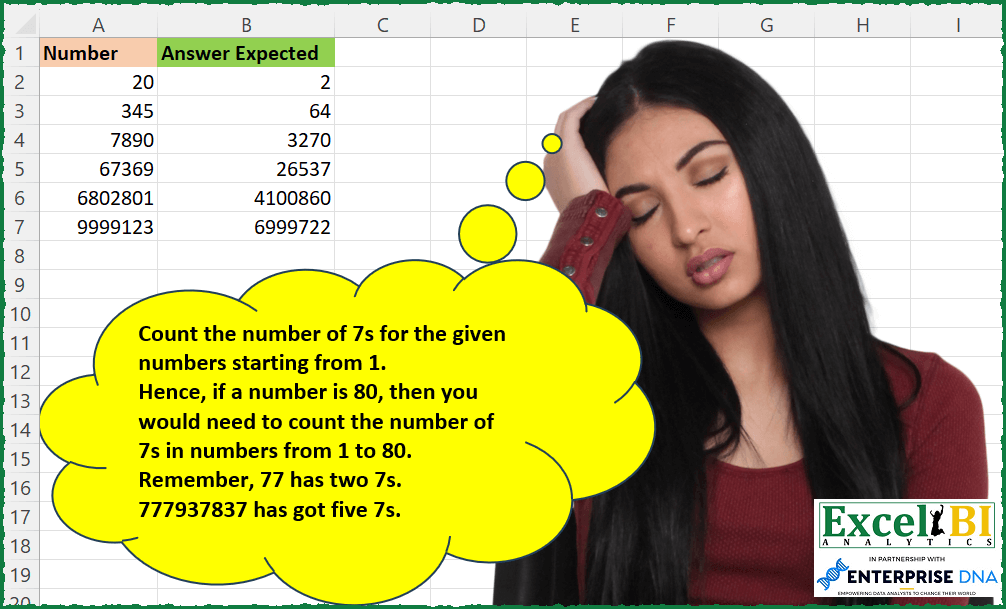
Count the number of 7s for the given numbers starting from 1. Hence, if a number is 80, then you would need to count the number of 7s in numbers from 1 to 80. Hence, till 69, there are seven 7s (7, 17, 27, 37, 47, 57, 67). 70 to 76 has seven 7s. 77 has two sevens. 78 & 79 are one 7 each. Hence, total 7s = 18 Note – It is being reported that last 2 numbers are causing issues. If you want, you can ignore these last 2 numbers and make the formula for A2:A5 only.
📌 Challenge Details and Links
ExcelBI Excel Challenge Number: 219
Challenge Difficulty: ⭐️⭐️⭐️
📥Download Sample File
📥Link to the solutions on LinkedIn
Solving the challenge of Count Total 7s Appeared with Power Query
Power Query solution 1 for Count Total 7s Appeared, proposed by Bo Rydobon 🇹🇭:
let
  Source = Excel.CurrentWorkbook(){[Name = "Table1"]}[Content],
  Ans = Table.TransformRows(
    Source,
    each
      let
        y = 7,
        p = List.Transform(
          {0 .. 9},
          (p) =>
            let
              l = Number.Power(10, p),
              n = p * l / 10,
              b = Number.Mod(Number.IntegerDivide([Number], l), 10)
            in
              b
                * n + Number.From(y > 0)
                * (Number.From(b > y) * l + (Number.From(b = y) * (1 + Number.Mod([Number], l))))
        )
      in
        List.Sum(p)
  )
in
  Ans
Power Query solution 2 for Count Total 7s Appeared, proposed by Zoran Milokanović:
let
  Source = Excel.CurrentWorkbook(){[Name = "Input"]}[Content],
  S = Table.TransformRows(
    Source,
    each List.Sum(
      List.Transform({1 .. [Number]}, each Text.Length(Text.Select(Number.ToText(_), "7")))
    )
  )
in
  S
Power Query solution 3 for Count Total 7s Appeared, proposed by Aditya Kumar Darak 🇮🇳:
let
  Source = Excel.CurrentWorkbook(){[Name = "data"]}[Content],
  Criteria = 7,
  Return = Table.AddColumn(
    Source,
    "Answer",
    each [
      Seq = {1 .. [Number]},
      Calc = List.Transform(
        Seq,
        (f) =>
          [
            Text = Text.From(f),
            Rplc = Text.Replace(Text, Text.From(Criteria), ""),
            Len  = Text.Length(Text) - Text.Length(Rplc)
          ][Len]
      ),
      Total = List.Sum(Calc)
    ][Total]
  )
in
  Return
Power Query solution 4 for Count Total 7s Appeared, proposed by Alejandro Simón 🇵🇦 🇪🇸:
let
  Source = Excel.CurrentWorkbook(){[Name = "Table1"]}[Content],
  Sol = Table.AddColumn(
    Source,
    "Answer",
    each
      let
        a = {1 .. [Number]},
        b = List.Combine(List.Transform(a, each Text.ToList(Text.From(_)))),
        c = List.Count(List.Select(b, each Text.Contains(_, "7")))
      in
        c
  )[[Answer]]
in
  Sol
Power Query solution 5 for Count Total 7s Appeared, proposed by Luan Rodrigues:
let
  Fonte = Tabela1,
  res = Table.AddColumn(
    Fonte,
    "Personalizar",
    each List.Count(
      List.Select(
        List.Combine(List.Transform({1 .. [Number]}, each Text.ToList(Text.From(_)))),
        each _ = "7"
      )
    )
  )
in
  res
Power Query solution 6 for Count Total 7s Appeared, proposed by Brian Julius:
let
  Source = Table.SelectRows(
    Excel.CurrentWorkbook(){[Name = "Table1"]}[Content],
    each [Number] <> null
  ),
  AddNumList = Table.AddColumn(
    Source,
    "NumList",
    each [
      a = {1 .. [Number]},
      b = List.Transform(a, Text.From),
      c = List.Select(b, each Text.Contains(_, "7")),
      d = List.Transform(c, Text.ToList)
    ][d]
  ),
  ExpandNumList = Table.ExpandListColumn(AddNumList, "NumList"),
  Filter7s = Table.SelectRows(
    Table.ExpandListColumn(ExpandNumList, "NumList"),
    each [NumList] = "7"
  ),
  CountGroupedRows = Table.Group(
    Filter7s,
    {"Number"},
    {{"Count", each Table.RowCount(_), Int64.Type}}
  )
in
  CountGroupedRows
Power Query solution 7 for Count Total 7s Appeared, proposed by Rafael González B.:
let
  Source = Excel.CurrentWorkbook(){[Name = "Tabla1"]}[Content],
  TC = Table.TransformColumnTypes(Source, {{"Number", Int64.Type}}),
  Result = Table.AddColumn(
    TC,
    "Result",
    each
      let
        a = List.Transform({1 .. [Number]}, each Text.From(_)),
        b = Table.FromList(a, Splitter.SplitByNothing(), {"Numbers"}),
        c = Table.SelectRows(b, each Text.Contains([Numbers], "7")),
        d = Table.AddColumn(c, "Counting", each Text.Length(Text.Select([Numbers], "7"))),
        e = List.Sum(d[Counting])
      in
        e
  )
in
  Result[[Result]]
Solving the challenge of Count Total 7s Appeared with Excel
Excel solution 1 for Count Total 7s Appeared, proposed by Bo Rydobon 🇹🇭:
=LET(z,A2:A7,p,SEQUENCE(,9,0),l,10^p,b,MOD(INT(z/l),10),MMULT(b*p*l/10+(b>7)*l+(b=7)*(1+MOD(z,l)),TOCOL(p)*0+1))Excel solution 2 for Count Total 7s Appeared, proposed by John V.:
=MAP(A2:A7,LAMBDA(x,LET(s,SEQUENCE(1+x%,100),SUM((s<=x)*(LEN(s)-LEN(SUBSTITUTE(s,7,)))))))Excel solution 3 for Count Total 7s Appeared, proposed by محمد حلمي:
=MAP(A2:A5,LAMBDA(a,SUM(MMULT(--(0&
MID(SEQUENCE(a),SEQUENCE(,5),1)="07"),ROW(1:5)^0))))
Excel solution 4 for Count Total 7s Appeared, proposed by محمد حلمي:
=MAP(A2:A5,LAMBDA(a,SUM(MAP(SEQUENCE(a),LAMBDA(a,SUM(--(--(MID(a,SEQUENCE(LEN(a)),1))=7)))))))Excel solution 5 for Count Total 7s Appeared, proposed by Julian Poeltl:
=MAP(A2:A7,LAMBDA(N,LET(S,SEQUENCE(ROUNDUP(N/10,0),10),C,IF(S>N,0,S),SUM(LEN(C)-LEN(SUBSTITUTE(C,"7",""))))))Excel solution 6 for Count Total 7s Appeared, proposed by Aditya Kumar Darak 🇮🇳:
=MAP(
 A2:A5,
 LAMBDA(a,
 LET(
 n, 7,
 sq, SEQUENCE(a),
 splt, MID(sq, SEQUENCE(1, LEN(a)), 1),
 r, SUM(N(splt = n & "")),
 r
 )
 )
)
Excel solution 7 for Count Total 7s Appeared, proposed by Timothée BLIOT:
=MAP(A2:A7,LAMBDA(z,LET(A,MAKEARRAY(MIN(z,10^6),ROUNDUP(z/10^6,0),LAMBDA(x,y,LET(W,x+((y-1)*(10^6)),IF(W<=z,W,0)))),SUM(LEN(A))-SUM(LEN(SUBSTITUTE(A,"7",""))))))Excel solution 8 for Count Total 7s Appeared, proposed by Oscar Mendez Roca Farell:
=MAP(A2:A7, LAMBDA(a, LET(_n,10^(LEN(a)-1),_e, INT(a/_n)+1,_s, SEQUENCE(_n,_e),_m, IF(_s>a,,_s), SUM(BYROW(_m, LAMBDA(r, LET(_t, ARRAYTOTEXT(r), LEN(_t)-LEN(SUSBTITUTE(_t, "7", "")))))))))Excel solution 9 for Count Total 7s Appeared, proposed by Sunny Baggu:
=MAP(
 A2:A7,
 LAMBDA(a,
 LET(
 _num, SEQUENCE(1048576, 15, a, -1),
 _fnum, IF(_num > 0, _num, ""),
 _ffnum, FILTER(_fnum, BYROW(_fnum, LAMBDA(x, NOT(AND(x = ""))))),
 SUM(IFERROR(MAP(_ffnum, LAMBDA(x, ROWS(TOCOL(SEARCH(7, MID(x, SEQUENCE(LEN(x)), 1)), 3)))), 0))
 )
 )
)
Excel solution 10 for Count Total 7s Appeared, proposed by LEONARD OCHEA 🇷🇴:
=MAP(A2:A7,LAMBDA(a,LET(n,7,l,LEN(a),s,SEQUENCE(l)-1,e,10^s*MID(a,l-s,1),SUM(s*e/10+10^s*(e/10^s>n)+(e/10^s=n)*(MOD(a,10^s)+1)))))Excel solution 11 for Count Total 7s Appeared, proposed by Daniel Garzia:
=MAP(A2:A5,LAMBDA(l,SUM(MAP(SEQUENCE(l),LAMBDA(r,ROWS(TEXTSPLIT(r,,7))-1)))))Excel solution 12 for Count Total 7s Appeared, proposed by Henriette Hamer:
=MAP(A2:A7;LAMBDA(c;LET(b;SEQUENCE(;c;1;1);SUM(MAP(b;LAMBDA(a;SUM(IF(MID(a;SEQUENCE(LEN(a));1)="7";1;0))))))))Solving the challenge of Count Total 7s Appeared with Excel VBA
Excel VBA solution 1 for Count Total 7s Appeared, proposed by Rick Rothstein:
Function Count7s(Rng As Range) As Variant()
 Dim X As Long, N As Long
 Dim Cell As Range, Arr As Variant
 ReDim Arr(1 To Rng.Count, 1 To 1)
 For Each Cell In Rng
 N = N + 1
 For X = 1 To Cell.Value
 Arr(N, 1) = Arr(N, 1) + Len(CStr(X)) - Len(Replace(X, 7, ""))
 Next
 Next
 Count7s = Arr
End Function
Excel VBA solution 2 for Count Total 7s Appeared, proposed by Mungunbayar Bat-Ochir:
dumb but easy. VBA:
Option Explicit
Function countSevens(num As Long)
 Dim iterator As Long
 Dim total As Long
 Dim str As String

 For iterator = 7 To num
 str = CStr(iterator)
 If InStr(1, str, "7") > 0 Then
 total = total + Len(str) - Len(Replace(str, "7", ""))
 End If
 Next iterator
 countSevens = total

End Function
&&&