
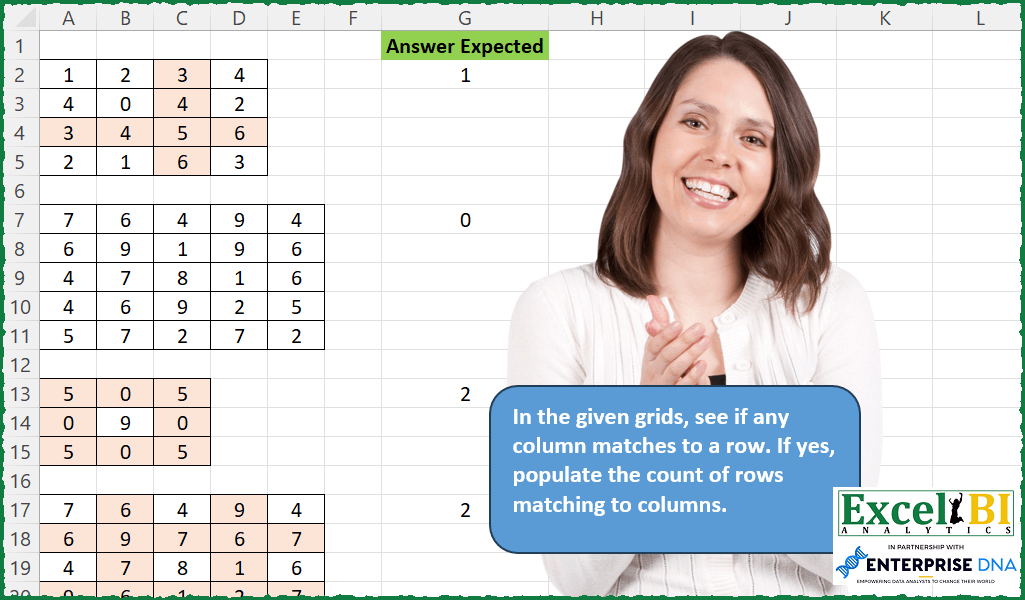
In the given grids, see if any column matches to a row. If yes, populate the count of rows matching to columns.
📌 Challenge Details and Links
ExcelBI Excel Challenge Number: 213
Challenge Difficulty: ⭐️⭐️
📥Download Sample File
📥Link to the solutions on LinkedIn
Solving the challenge of Count Matching Rows and Columns with Power Query
Power Query solution 1 for Count Matching Rows and Columns, proposed by Bo Rydobon 🇹🇭:
let
  Source = Excel.CurrentWorkbook(){[Name = "Table1"]}[Content],
  X      = (x) => List.Transform(x, each Text.Combine(List.Transform(_, Text.From))),
  Count  = List.Count(List.Intersect({X(Table.ToColumns(Source)), X(Table.ToRows(Source))}))
in
  Count
Power Query solution 2 for Count Matching Rows and Columns, proposed by Zoran Milokanović:
let
  Source   = Excel.CurrentWorkbook(){[Name = "Input"]}[Content],
  Solution = List.Count(List.Intersect({Table.ToRows(Source), Table.ToColumns(Source)}))
in
  Solution
Power Query solution 3 for Count Matching Rows and Columns, proposed by Zoran Milokanović:
let
  Source = Excel.CurrentWorkbook(){[Name = "Input"]}[Content],
  Solution = Table.RowCount(
    Table.SelectRows(Source, each List.Contains(Table.ToColumns(Source), Record.ToList(_)))
  )
in
  Solution
Power Query solution 4 for Count Matching Rows and Columns, proposed by Alejandro Simón 🇵🇦 🇪🇸:
let
 Source = Excel.CurrentWorkbook()[[Content]],
 Sol = Table.AddColumn(Source, "Answer", each
 let
 Source = [Content],
 Rows = List.Transform({0..List.Count(Table.ToColumns(Source))-1}, each Text.Combine(List.Transform(Table.ToColumns(Source){_}, Text.From), "")),
 Cols = List.Transform({0..List.Count(Table.ToRows(Source))-1}, each Text.Combine(List.Transform(Table.ToRows(Source){_}, Text.From), "")),
 Sol = List.Count(List.Intersect({Rows, Cols}))
 in
 Sol)
in
 Sol

Utilicé esta query para todos los cuadros y funcionó en todos menos el tercero, el cual me da 3, ya que la segunda columna y la segunda fila, también son iguales.


        Show translation


        Show translation of this comment
Power Query solution 5 for Count Matching Rows and Columns, proposed by Luan Rodrigues:
let
  Fonte = Excel.CurrentWorkbook(),
  res = Table.AddColumn(
    Fonte,
    "Personalizar",
    each [
      a = Table.ToColumns([Content]),
      b = Table.ToRows([Content]),
      c = List.Count(List.Select(List.Transform(List.Zip({a, b}), each _{0} = _{1}), each _ = true))
    ][c]
  )
in
  res
Solving the challenge of Count Matching Rows and Columns with Excel
Excel solution 1 for Count Matching Rows and Columns, proposed by Bo Rydobon 🇹🇭:
=SUM(
    --BYROW(
        A2:D5=TRANSPOSE(
            A2:D5
        ),
        LAMBDA(
            a,
            AND(
                a
            )
        )
    )
)
Excel solution 2 for Count Matching Rows and Columns, proposed by Bo Rydobon 🇹🇭:
=LET(
    z,
    A2:D5,
    r,
    ROW(
        z
    ),
    COUNT(
        XMATCH(
            MMULT(
                z,
                10^r
            ),
            MMULT(
                10^TOROW(
                    r
                ),
                z
            )
        )
    )
)
Excel solution 3 for Count Matching Rows and Columns, proposed by Rick Rothstein:
=LET(
    a,
    A23:D26,
    SUM(
        0+BYCOL(
            a,
            LAMBDA(
                c,
                ISNUMBER(
                    FIND(
                        CONCAT(
                            c
                        ),
                        TEXTJOIN(
                            " ",
                            ,
                            BYROW(
                                a,
                                LAMBDA(
                                    r,
                                    CONCAT(
                                        r
                                    )
                                )
                            )
                        )
                    )
                )
            )
        )
    )
)
Excel solution 4 for Count Matching Rows and Columns, proposed by John V.:
=SUM(
    --BYROW(
        A2:D5=TRANSPOSE(
            A2:D5
        ),
        LAMBDA(
            x,
            AND(
                x
            )
        )
    )
)
Excel solution 5 for Count Matching Rows and Columns, proposed by محمد حلمي:
= 2

Excel BI

=LET(

    b,
    A1:F26,

    e,
    ROW(
        b
    ),

    y,
    LOOKUP(
        e,
        IF(
            TAKE(
                b,
                ,
                1
            )="",
            e
        )
    ),

    f,
    UNIQUE(
        y
    ),

    IF(
        y=e,
        XLOOKUP(
            y,
            f,
            DROP(
                REDUCE(
                    0,
                    f,
                    LAMBDA(
                        a,
                        d,
                        LET(

                            r,
                            DROP(
                                FILTER(
                                    b,
                                    y=d
                                ),
                                1
                            ),

                            i,
                            ROWS(
                                r
                            ),

                            l,
                            TAKE(
                                r,
                                ,
                                i
                            ),

                            h,
                            i/2+0.5,

                            VSTACK(
                                a,
                                SUM(
                                    N(
                                        BYROW(
                                            N(
                                                l=TRANSPOSE(
                                                    l
                                                )
                                            ),

                                            LAMBDA(
                                                a,
                                                SUM(
                                                    a
                                                )
                                            )
                                        )=i
                                    )
                                )-ISODD(
                                    i
                                )*
                                AND(
                                    INDEX(
                                        l,
                                        h,

                                    )=TOROW(
                                        INDEX(
                                            l,
                                            ,
                                            h
                                        )
                                    )
                                )
                            )
                        )
                    )
                ),
                1
            )
        ),
        ""
    )
)
Excel solution 6 for Count Matching Rows and Columns, proposed by محمد حلمي:
= 3

=LET(

    b,
    A1:F26,

    e,
    ROW(
        b
    ),

    y,
    LOOKUP(
        e,
        IF(
            TAKE(
                b,
                ,
                1
            )="",
            e
        )
    ),

    f,
    UNIQUE(
        y
    ),

    IF(
        y=e,
        XLOOKUP(
            y,
            f,
            DROP(
                REDUCE(
                    0,
                    f,
                    LAMBDA(
                        a,
                        d,
                        LET(

                            r,
                            DROP(
                                FILTER(
                                    b,
                                    y=d
                                ),
                                1
                            ),

                            y,
                            ROWS(
                                r
                            ),

                            l,
                            TAKE(
                                r,
                                ,
                                y
                            ),

                            VSTACK(
                                a,
                                SUM(
                                    N(
                                        BYROW(
                                            N(
                                                l=TRANSPOSE(
                                                    l
                                                )
                                            ),

                                            LAMBDA(
                                                a,
                                                SUM(
                                                    a
                                                )
                                            )
                                        )=y
                                    )
                                )
                            )
                        )
                    )
                ),
                1
            )
        ),
        ""
    )
)
Excel solution 7 for Count Matching Rows and Columns, proposed by 🇰🇷 Taeyong Shin:
=LAMBDA(x,
     LET(n,
     ROWS(
         x
     ),
     mt,
     (x = TRANSPOSE(
         x
     )),
     SUM(--(BYCOL(
         --mt,
          LAMBDA(
              c,
               SUM(
                   c
               )
          )
     ) = n)) - AND(
         mt
     ) + (MAX(
         COUNTIF(
             x,
              x
         )
     ) = COUNT(
         x
     ))))(A13:C15)
Excel solution 8 for Count Matching Rows and Columns, proposed by Kris Jaganah:
=LET(a,
    A1:E26,
    b,
    TAKE(
        a,
        ,
        1
    ),
    c,
    SCAN(
        0,
        b,
        LAMBDA(
            x,
            y,
            IF(
                y="",
                x+1,
                x
            )
        )
    ),
    d,
    IF(
        b="",
        "",
        c
    ),
    e,
    VSTACK(
        @d,
        DROP(
            IF(
                d="",
                c,
                ""
            ),
            -1
        )
    ),
    f,
    UNIQUE(
        c
    ),
    g,
    TOCOL(
        BYCOL(
            IFNA(
                DROP(
                    REDUCE(
                        "",
                        f,
                        LAMBDA(
                            x,
                            y,
                            HSTACK(
                                x,
                                FILTER(
                                    IF(
                                        a="",
                                        "",
                                        a
                                    ),
                                    d=y
                                )
                            )
                        )
                    ),
                    ,
                    1
                ),
                ""
            ),
            LAMBDA(
                z,
                TEXTJOIN(
                    "",
                    1,
                    z
                )
            )
        )
    ),
    h,
    FILTER(
        g,
        g<>""
    ),
    i,
    BYROW(FILTER(
        IF(
            a="",
            "",
            a
        ),
        d<>""
    ),
    LAMBDA(z,
    (CONCAT(
        z
    )))),
    j,
    FILTER(
        d,
        b<>""
    ),
    k,
    MAP(f,
    LAMBDA(u,
    SUM(--(h=i)*(j=u)))),
    XLOOKUP(
        e,
        f,
        k,
        ""
    ))
Excel solution 9 for Count Matching Rows and Columns, proposed by Julian Poeltl:
=LET(
    A,
    A2:D5,
    SUM(
        --BYCOL(
            TRANSPOSE(
                A
            )=A,
            LAMBDA(
                A,
                SUM(
                    --A
                )=ROWS(
                A
            )
            )
        )
    )
)
Excel solution 10 for Count Matching Rows and Columns, proposed by Timothée BLIOT:
=LAMBDA(A,
     LET(B,
     SEQUENCE(
         ROWS(
             A
         )
     ),
     SUM(MAP(B,
     LAMBDA(x,
     --(CONCAT(
         INDEX(
             A,
             x,
             B
         )
     )=CONCAT(
         INDEX(
             TRANSPOSE(
             A
         ),
             x,
             B
         )
     )) )))))(A2:D5)
Excel solution 11 for Count Matching Rows and Columns, proposed by Hussein SATOUR:
=LET(a,
     A2:D5,
     SUM((BYCOL(
         a-TRANSPOSE(
             a
         ),
          LAMBDA(
              x,
               COUNT(
                   FILTER(
                       x,
                       x=0
                   )
               )
          )
     )=ROWS(
             a
         ))*1))
Excel solution 12 for Count Matching Rows and Columns, proposed by Oscar Mendez Roca Farell:
=LET(_d,
     A2:A26,
    _c,
     FREQUENCY(
         IF(
             _d<>"",
             ROW(
                 _d
             )
         ),
         IF(
             _d="",
             ROW(
                 _d
             )
         )
     ),
     _f,
     SCAN(
          ,
         _c,
          LAMBDA(
              i,
              x,
              i+x+1
          )
     ),
     MAP(_f,
    _c,
     LAMBDA(a,
     b ,
    LET(_m,
     DROP(
         TAKE(
             A2:F26,
              a,
              b
         ),
          a-b
     ),
     SUM(--(MMULT(--(_m=TRANSPOSE(
         _m
     )),
     SEQUENCE(
         b
     )^0)=b))))))
Excel solution 13 for Count Matching Rows and Columns, proposed by Sunny Baggu:
=LAMBDA(
    array,
    SUM(
        N(
            BYCOL(
                TRANSPOSE(
                    array
                )=array,
                LAMBDA(
                    a,
                    AND(
                        a
                    )
                )
            )
        )
    )
)(A2:D5)
Excel solution 14 for Count Matching Rows and Columns, proposed by Pieter de B.:
=LET(
    a,
    A2:D5,
    b,
    ROWS(
        a
    ),
    SUM(
        N(
            MAP(
                SEQUENCE(
                    b
                ),
                LAMBDA(
                    x,
                    SUM(
                        N(
                            INDEX(
                                a,
                                x
                            )=TOROW(
                                INDEX(
                                    a,
                                    ,
                                    x
                                )
                            )
                        )
                    )
                )
            )=b
        )
    )
)
Excel solution 15 for Count Matching Rows and Columns, proposed by Giorgi Goderdzishvili:
=LET(
table,A2:D5,
rows, ROWS(table),
rowConcat, BYROW(table, LAMBDA(r, CONCAT(r))),
colConcat, BYCOL(table, LAMBDA(c, CONCAT(c))),
maping, MAP(rowConcat, LAMBDA(l,--(SUM( IF(l=colConcat,1,0))>0))),
SUM(maping))
Excel solution 16 for Count Matching Rows and Columns, proposed by Hussain Ali Nasser:
=LET(_grid,
    A2:D5,
    _lambda,
    LAMBDA(
        _grid,
        CONCAT(
            _grid
        )
    ),
    _row,
    BYROW(
        _grid,
        _lambda
    ),
    _col,
    TOCOL(
        BYCOL(
        _grid,
        _lambda
    )
    ),
    SUM(--(_row=_col)))
Excel solution 17 for Count Matching Rows and Columns, proposed by Ali ELBaitam:
= to compare values,
     you would needlessly compare all the values when the answer can be known from the first values. The row {1,
    .....} doesn't equal column {2;.........} just by comparing the first values. To compare lazily,
     don't use = to compare the rows and columns,
     use a recursive lambda that short-circuits as soon as it finds an answer:
Eq =
LAMBDA(
    row,
     col,

     IF(
         AND(
             COLUMNS(
                 row
             ) = 1,
              ROWS(
                  col
              ) = 1
         ),

          INDEX(
              row,
               1,
               1
          ) = INDEX(
              col,
               1,
               1
          ),

          IF(
              INDEX(
              row,
               1,
               1
          ) <> INDEX(
              col,
               1,
               1
          ),

               FALSE,

               Eq(
                   DROP(
                       row,
                       ,
                       1
                   ),
                    DROP(
                        col,
                        1
                    )
               )
          )
     )
)
&&