
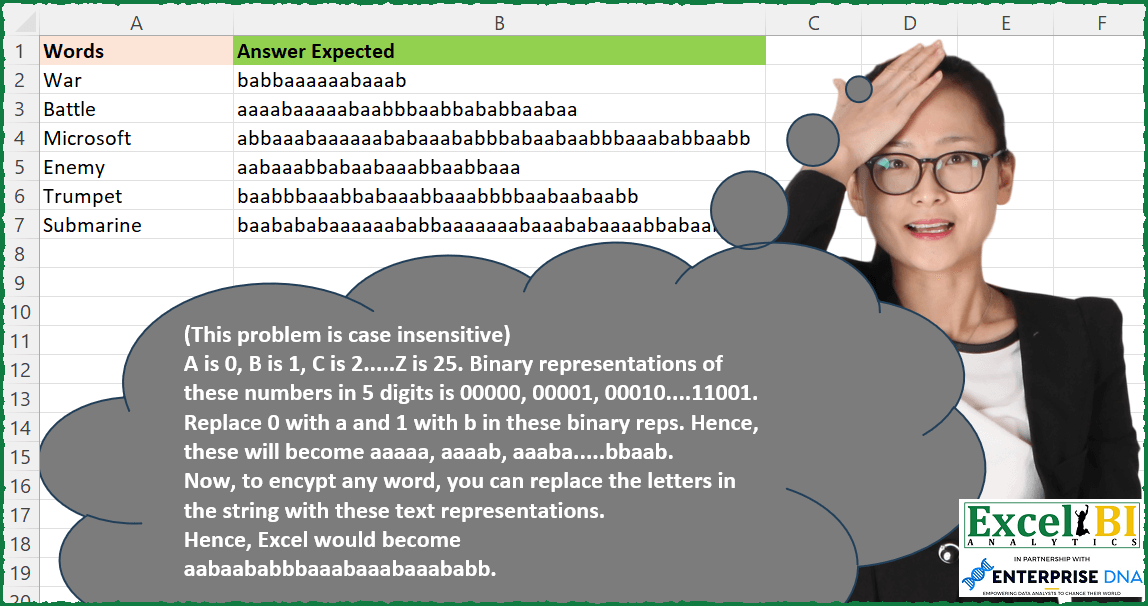
Baconian Cipher (This problem is case insensitive) A is 0, B is 1, C is 2…..Z is 25. Binary representations of these numbers in 5 digits is 00000, 00001, 00010….11001. Replace 0 with a and 1 with b in these binary reps. Hence, these will become aaaaa, aaaab, aaaba…..bbaab. Now, to encypt any word, you can replace the letters in the string with these text representations. Hence, Excel would become aabaababbbaaabaaabaaababb.
📌 Challenge Details and Links
ExcelBI Excel Challenge Number: 203
Challenge Difficulty: ⭐️
📥Download Sample File
📥Link to the solutions on LinkedIn
Solving the challenge of Encrypt Using Baconian Cipher with Power Query
Power Query solution 1 for Encrypt Using Baconian Cipher, proposed by Bo Rydobon 🇹🇭:
let
  Source = Excel.CurrentWorkbook(){[Name = "Table1"]}[Content],
  Ans = Table.TransformRows(
    Source,
    each Text.Combine(
      List.Transform(
        Text.ToList(Text.Upper([Words])),
        each List.Accumulate(
          {0 .. 4},
          {Character.ToNumber(_) - 65, ""},
          (s, l) =>
            let
              n = Number.Power(2, 4 - l)
            in
              {Number.Mod(s{0}, n), s{1} & Character.FromNumber(Number.IntegerDivide(s{0}, n) + 97)}
        ){1}
      )
    )
  )
in
  Ans
Power Query solution 2 for Encrypt Using Baconian Cipher, proposed by Zoran Milokanović:
let
  Source = Excel.CurrentWorkbook(){[Name = "Input"]}[Content],
  ToBinary = (n) =>
    Text.PadStart(
      Text.Combine(
        List.Transform(
          List.Reverse(
            List.Generate(
              () => [Q = Number.IntegerDivide(n, 2), R = Number.Mod(n, 2)],
              each [Q] <> 0 or [R] <> 0,
              each [Q = Number.IntegerDivide([Q], 2), R = Number.Mod([Q], 2)],
              each [R]
            )
          ),
          each if _ = 0 then "a" else "b"
        ),
        ""
      ),
      5,
      "a"
    ),
  Solution = Table.TransformRows(
    Source,
    each Text.Combine(
      List.Transform(
        Text.ToList([Words]),
        each ToBinary(Number.Mod(Number.Mod(Character.ToNumber(_), 97), 65))
      ),
      ""
    )
  )
in
  Solution
Power Query solution 3 for Encrypt Using Baconian Cipher, proposed by Alejandro Simón 🇵🇦 🇪🇸:
let
  Origen = Excel.CurrentWorkbook(){[Name = "Tabla1"]}[Content],
  Bin = List.Transform(
    {0 .. 25},
    (x) =>
      try
        List.Transform(
          List.Reverse({0 .. Number.RoundDown(Number.Log(x, 2))}),
          (y) => Number.RoundDown(Number.Mod(x / Number.Power(2, y), 2))
        )
      otherwise
        {0}
  ),
  Zip = List.Zip(
    {
      {"a" .. "z"},
      List.Transform(
        Bin,
        each
          let
            a = Text.PadStart(Text.Combine(List.Transform(_, Text.From), ""), 5, "0"),
            b = Text.Replace(a, "0", "a"),
            c = Text.Replace(b, "1", "b")
          in
            c
      )
    }
  ),
  Sol = Table.AddColumn(
    Origen,
    "Answer",
    each
      let
        a = Text.ToList(Text.Lower([Words])),
        b = List.Transform({0 .. List.Count(a) - 1}, each List.ReplaceMatchingItems({a{_}}, Zip){0})
      in
        Text.Combine(b, "")
  )
in
  Sol
Power Query solution 4 for Encrypt Using Baconian Cipher, proposed by Brian Julius:
let
  Source = TableRaw,
  Letters = Table.ExpandListColumn(
    Table.AddColumn(Source, "Letters", each Text.ToList(Text.Lower([Words]))),
    "Letters"
  ),
  RScript = R.Execute(
    "dec_to_5bit_binary <- function(dec) {#(lf) binary <- paste(rev(as.integer(intToBits(dec))[1:5]), collapse = """")#(lf) while(nchar(binary) < 5) {#(lf)  binary <- paste(""0"", binary, sep="""")#(lf) }#(lf) return(binary)#(lf)}#(lf)#(lf)letters <- tolower(LETTERS)#(lf)#(lf)binary_letters <- sapply(letters, function(x) {#(lf) dec_to_5bit_binary(as.integer(charToRaw(x)) - 96)#(lf)})#(lf)#(lf)binary_letters_ab <- gsub(""0"", ""a"", gsub(""1"", ""b"", binary_letters))#(lf)#(lf)df <- data.frame(#(lf) letters = letters,#(lf) binary_letters = binary_letters,#(lf) binary_letters_ab = binary_letters_ab#(lf))",
    [dataset = Letters]
  ),
  BinTable = RScript{[Name = "df"]}[Value],
  Join = Table.Join(Letters, "Letters", BinTable, "letters", JoinKind.LeftOuter),
  GroupNCombine = Table.Group(
    Join,
    {"Words"},
    {{"Answer", each Text.Combine([binary_letters_ab], ""), type nullable text}}
  )
in
  GroupNCombine
Power Query solution 5 for Encrypt Using Baconian Cipher, proposed by Tyler N.:
let
  Src = Excel.CurrentWorkbook(){[Name = "Table1"]}[Content],
  AList = Table.AddIndexColumn(Table.FromList({"A" .. "Z"}, null, {"A_Z"}), "Idx", 0, 1),
  Res = Table.AddColumn(
    Src,
    "Result",
    each Lines.ToText(
      Table.AddColumn(
        Table.FromList(Text.ToList(Text.Upper([Words])), null, {"Letters"}),
        "Trans",
        each
          let
            a = [Letters],
            b = Table.SelectRows(AList, each [A_Z] = a),
            c = Table.AddColumn(
              b,
              "Binary",
              each Lines.ToText(
                List.Transform(
                  List.Reverse(
                    Table.AddColumn(
                      Table.FromRecords(
                        {
                          [a = [Idx]],
                          [a = Number.IntegerDivide([Idx], 2)],
                          [a = Number.IntegerDivide([Idx], 4)],
                          [a = Number.IntegerDivide([Idx], 8)],
                          [a = Number.IntegerDivide([Idx], 16)]
                        }
                      ),
                      "Res",
                      each [a] - (Number.IntegerDivide([a], 2)) * 2
                    )[Res]
                  ),
                  each Text.From(_)
                ),
                ""
              )
            ),
            d = Table.AddColumn(
              c,
              "ToAB",
              each Text.Replace(Text.Replace([Binary], "0", "a"), "1", "b")
            )
          in
            d[ToAB]{0}
      )[Trans],
      ""
    )
  )
in
  Res
Solving the challenge of Encrypt Using Baconian Cipher with Excel
Excel solution 1 for Encrypt Using Baconian Cipher, proposed by Bo Rydobon 🇹🇭:
=MAP(A2:A7,LAMBDA(a,CONCAT(CHAR(MID(BASE(CODE(MID(UPPER(a),SEQUENCE(LEN(a)),1))-65,2,5),SEQUENCE(,5),1)+97))))Excel solution 2 for Encrypt Using Baconian Cipher, proposed by Bo Rydobon 🇹🇭:
=MAP(A2:A7,LAMBDA(a,CONCAT(SUBSTITUTE(SUBSTITUTE(BASE(CODE(MID(UPPER(a),SEQUENCE(LEN(a)),1))-65,2,5),0,"a"),1,"b"))))Excel solution 3 for Encrypt Using Baconian Cipher, proposed by Rick Rothstein:
=MAP(A2:A7,LAMBDA(x,SUBSTITUTE(SUBSTITUTE(CONCAT(DEC2BIN(CODE(MID(LOWER(x),SEQUENCE(LEN(x)),1))-97,5)),0,"a"),1,"b")))Excel solution 4 for Encrypt Using Baconian Cipher, proposed by Rick Rothstein:
=MAP(A2:A7,LAMBDA(a,CONCAT(CHAR(MID(BASE(CODE(MID(UPPER(a),SEQUENCE(LEN(a)),1))-65,2,5),{1,2,3,4,5},1)+97))))Excel solution 5 for Encrypt Using Baconian Cipher, proposed by John V.:
=MAP(A2:A7,LAMBDA(x,CONCAT(SUBSTITUTE(SUBSTITUTE(BASE(XMATCH(MID(x,SEQUENCE(LEN(x)),1),CHAR(ROW(65:90)))-1,2,5),0,"a"),1,"b"))))Excel solution 6 for Encrypt Using Baconian Cipher, proposed by محمد حلمي:
=MAP(A2:A7,LAMBDA(a,LET(r,ROW(1:26),CONCAT(XLOOKUP(MID(a,r,1),CHAR(65+r-1),
SUBSTITUTE(SUBSTITUTE(BASE(r-1,2,5),0,"a"),1,"b"),"")))))
Excel solution 7 for Encrypt Using Baconian Cipher, proposed by Kris Jaganah:
=MAP(A2:A7,LAMBDA(y,LET(a,SEQUENCE(26,,65),CONCAT(XLOOKUP(MID(y,SEQUENCE(LEN(y)),1),CHAR(a),SUBSTITUTE(SUBSTITUTE(MAP(a-65,LAMBDA(x,TEXT(DEC2BIN(x),"00000"))),"0","a"),"1","b"))))))Excel solution 8 for Encrypt Using Baconian Cipher, proposed by Timothée BLIOT:
=MAP(A2:A7,LAMBDA(a,CONCAT(SUBSTITUTE(SUBSTITUTE(BASE(CODE(UPPER(MID(a,SEQUENCE(LEN(a)),1)))-65,2,5),"0","a"),"1","b"))))

Computing base 2 manually: =MAP(A2:A7,LAMBDA(w,LET(F,LAMBDA(Me,i,o,IF(i=0,o,Me(Me,((i-MOD(i,2))/2),CONCAT(o,MOD(i,2))))),G,LAMBDA(y,IFERROR(1*CONCAT(SORTBY(MID(y,SEQUENCE(LEN(y)),1),SEQUENCE(LEN(y),,LEN(y),-1))),0)),
A,CODE(UPPER(MID(w,SEQUENCE(LEN(w)),1)))-65,
B,MAP(A,LAMBDA(a,G(F(F,a,"")))),
CONCAT(SUBSTITUTE(SUBSTITUTE(MAP(B,LAMBDA(z,IF(LEN(z)=5,z,REPT(0,5-LEN(z))&z))),"0","a"),"1","b")))))
Excel solution 9 for Encrypt Using Baconian Cipher, proposed by Hussein SATOUR:
=MAP(A2:A7, LAMBDA(x, LET(a, CHAR(SEQUENCE(26,,65)), b, SUBSTITUTE(SUBSTITUTE(DEC2BIN(INDEX(SEQUENCE(26,,0), XMATCH(a,a)), 5), 0,"a"), 1,"b"), CONCAT(XLOOKUP(UPPER(MID(x, SEQUENCE(LEN(x)),1)), a, b)))))Excel solution 10 for Encrypt Using Baconian Cipher, proposed by Sunny Baggu:
=LET(_let,CHAR(SEQUENCE(26,,CODE("a"))),
_num,SEQUENCE(26)-1,_dec,BYROW(_num,LAMBDA(a,DEC2BIN(a))),_bin,REPT("0",5-LEN(_dec))&_dec,
_alpha,MAP(_bin,LAMBDA(x,SUBSTITUTE(SUBSTITUTE(x,"0","a"),"1","b"))),
MAP(A2:A7,LAMBDA(w,CONCAT(XLOOKUP(MID(LOWER(w),SEQUENCE(LEN(w)),1),_let,_alpha)))))
Excel solution 11 for Encrypt Using Baconian Cipher, proposed by Md. Zohurul Islam:
=LET(u,LOWER(A2:A7),s,SUBSTITUTE,
w,MAP(u,LAMBDA(x,LET(p,CODE(MID(x,SEQUENCE(LEN(x)),1))-97,q,CONCAT(DEC2BIN(p,5)),
s(s(q,0,"a"),1,"b")
))),
w)
Excel solution 12 for Encrypt Using Baconian Cipher, proposed by Pieter de B.:
=LET(d,A2:A7,MAP(d,LAMBDA(a,LET(b,MID(LOWER(a),SEQUENCE(LEN(a)),1),c,CONCAT(DEC2BIN(CODE(b)-97,5)),SUBSTITUTE(SUBSTITUTE(c,0,"a"),1,"b")))))Excel solution 13 for Encrypt Using Baconian Cipher, proposed by Charles Roldan:
=LET(
 Recurse, LAMBDA(Ω, Ω(Ω)),
 MapOver, LAMBDA(f, LAMBDA(x, MAP(x, f))),
 Compose, LAMBDA(f, LAMBDA(g, LAMBDA(x, f(g(x))))),
 byChar, LAMBDA(f, Recurse(LAMBDA(Ω, LAMBDA(x, IF(LEN(x), f((LEFT(x))) & Ω(Ω)(REPLACE(x, 1, 1, )), ))))),
 LetterValue, LAMBDA(x, CODE(LOWER(x)) - CODE("a")),
 Encipher, Recurse(LAMBDA(Ω, LAMBDA(x, [y], IF(y < 5, Ω(Ω)(INT(x / 2), y + 1) & IF(ISEVEN(x), "a", "b"), "")))),
 MapOver(byChar(Compose(Encipher)(LetterValue)))
)(A2:A7)
Excel solution 14 for Encrypt Using Baconian Cipher, proposed by Charles Roldan:
=REDUCE(LOWER(A2:A7), SEQUENCE(26, , 0), LAMBDA(x,y,
SUBSTITUTE(x, CHAR(y + CODE("a")),
 SUBSTITUTE(SUBSTITUTE(TEXT(BASE(y, 2),"00000"),
 "0", "a"), "1", "b"))))
Excel solution 15 for Encrypt Using Baconian Cipher, proposed by JvdV -:
=MAP(A2:A7,LAMBDA(a,CONCAT(MID("ab",MID(DEC2BIN(CODE(MID(UPPER(a),SEQUENCE(LEN(a)),1))-65,5),{1,2,3,4,5},1)+1,1))))Excel solution 16 for Encrypt Using Baconian Cipher, proposed by Tolga Demirci, PMP, PMI-ACP, MOS-Expert:
=MAP(A2:A7;LAMBDA(s;TEXTJOIN(;;XLOOKUP(MID(s;SEQUENCE(LEN(s));1);CHAR(ROW(A97:A122));SUBSTITUTE(SUBSTITUTE(SUBSTITUTE(SUBSTITUTE(SUBSTITUTE(SUBSTITUTE(SUBSTITUTE(SUBSTITUTE(SUBSTITUTE(TRIM(MAP(LET(a;MAP(VSTACK(0;TOCOL(SEQUENCE(1;11001)));LAMBDA(p;LET(x;VALUE(MID(p;SEQUENCE(LEN(p));1));IF(AND(OR(x=1;x=0;);AND(x<>2;x<>3;x<>4;x<>5;x<>6;x<>7;x<>8;x<>9));p;""))));FILTER(a;a<>""));LAMBDA(m;IF(LEN(m)=5;m;REPT("0";5-LEN(m))&m))));"0";"a";1);"0";"a";1);"0";"a";1);"0";"a";1);"0";"a";1);"1";"b";1);"1";"b";1);"1";"b";1);"1";"b";1)))))Excel solution 17 for Encrypt Using Baconian Cipher, proposed by Julien Lacaze:
=MAP(A2:A7,LAMBDA(a,SUBSTITUTE(SUBSTITUTE(CONCAT(DEC2BIN(CODE(MID(UPPER(a),SEQUENCE(LEN(a)),1))-65,5)),"0","a"),"1","b")))Excel solution 18 for Encrypt Using Baconian Cipher, proposed by Pieter de Bruijn:
=LET(a,TEXTJOIN(",",,A2:A7),b,MID(LOWER(a),SEQUENCE(LEN(a)),1),c,CONCAT(IF(b=",",b,DEC2BIN(CODE(b)-97,5))),TEXTSPLIT(SUBSTITUTE(SUBSTITUTE(c,0,"a"),1,"b"),,","))Excel solution 19 for Encrypt Using Baconian Cipher, proposed by Guillermo Arroyo:
=MAP(A2:A7,LAMBDA(a,LET(u,MID(a,SEQUENCE(LEN(a)),1),CONCAT(SUBSTITUTE(SUBSTITUTE(BASE(CODE(LOWER(u))-97,2,5),"1","b"),"0","a")))))Excel solution 20 for Encrypt Using Baconian Cipher, proposed by Daniel Garzia:
=MAP(A2:A7,LAMBDA(x,SUBSTITUTE(SUBSTITUTE(CONCAT(MAP(MOD(CODE(MID(UPPER(x),SEQUENCE(LEN(x)),1)),65),LAMBDA(r,TEXT(DEC2BIN(r),"00000")))),0,"a"),1,"b")))Excel solution 21 for Encrypt Using Baconian Cipher, proposed by Quadri Olayinka Atharu:
=MAP(A2:A7,
LAMBDA(_words,
LET(_str,CHAR(SEQUENCE(26,,65)),
_spl,MID(_words,SEQUENCE(LEN(_words)),1),
_codes,XMATCH(_spl,_str)-1,
_binary,CONCAT(DEC2BIN(_codes,5)),
SUBSTITUTE(SUBSTITUTE(_binary,0,"a"),1,"b"))))
Excel solution 22 for Encrypt Using Baconian Cipher, proposed by Quadri Olayinka Atharu:
=DROP(REDUCE("",A2:A7,
LAMBDA(x,_words,
LET(_str,CHAR(SEQUENCE(26,,65)),
_strcode,SEQUENCE(26,,0),
_digits,5,
_spl,MID(_words,SEQUENCE(LEN(_words)),1),
_codes,XLOOKUP(_spl,_str,_strcode),
_binary,CONCAT(DEC2BIN(_codes,5)),
_sub,SUBSTITUTE(SUBSTITUTE(_binary,0,"a"),1,"b"),
VSTACK(x,_sub)))),1)
Excel solution 23 for Encrypt Using Baconian Cipher, proposed by Rayan S.:
=MAP(
 A2:A7,
 LAMBDA(x,
 L&ET(
 text, CHAR(SEQUENCE(26, , 97)),
 s, SEQUENCE(26, , 0),
 bin, DEC2BIN(s, 5),
 rep, SUBSTITUTE(SUBSTITUTE(bin, 0, "a"), 1, "b"),
 TEXTJOIN("", , XLOOKUP(LOWER(MID(x, SEQUENCE(LEN(x)), 1)), text, rep))
 )
 )
)
Excel solution 24 for Encrypt Using Baconian Cipher, proposed by Henriette Hamer:
=MAP(A2:A7;LAMBDA(list;SUBSTITUTE(SUBSTITUTE(CONCAT(LET(_text;UPPER(list);_length;LEN(_text);_seq;SEQUENCE(;_length);BASE(CODE(MID(_text;_seq;1))-65;2;5)));"0";"a");"1";"b")))Excel solution 25 for Encrypt Using Baconian Cipher, proposed by Hussain Ali Nasser:
=MAP(
 A2:A7,
 LAMBDA(_string,
 LET(
 _split, MID(_string, SEQUENCE(LEN(_string)), 1),
 _lookuptable, HSTACK(UNICHAR(SEQUENCE(26, , 97, 1)), SEQUENCE(26, , 0, 1)),
 _lookup, XLOOKUP(_split, TAKE(_lookuptable, , 1), TAKE(_lookuptable, , -1)),
 _binary, DEC2BIN(_lookup, 5),
 _concat, CONCAT(_binary),
 _result, SUBSTITUTE(SUBSTITUTE(_concat, 0, "a"), 1, "b"),
 _result
 )
 )
)
Excel solution 26 for Encrypt Using Baconian Cipher, proposed by Victor Yemitan:
=MAP(A2:A7,LAMBDA(x,CONCAT(SUBSTITUTE(SUBSTITUTE(DEC2BIN(CODE(MID(UPPER(x), SEQUENCE(LEN(x)),1 ))-65,5),0,"a"),1,"b"))))&&