
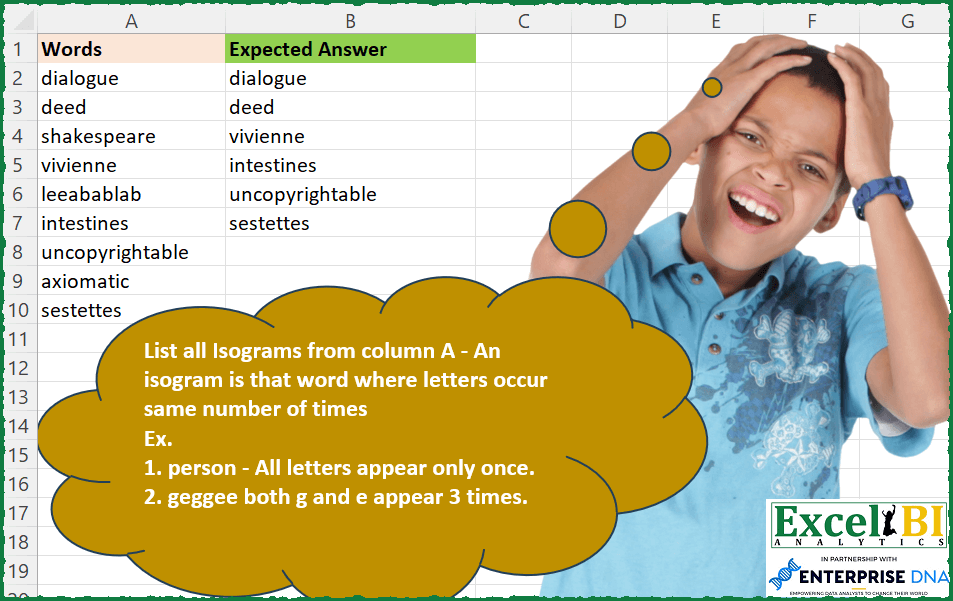
List all isograms from column A – An isogram is that word where letters occur same number of times Ex. 1. person – All letters appear only once. 2. geggee both g and e appear 3 times.
📌 Challenge Details and Links
ExcelBI Excel Challenge Number: 200
Challenge Difficulty: ⭐️
📥Download Sample File
📥Link to the solutions on LinkedIn
Solving the challenge of List Isogram Words Only with Power Query
_x000D_Power Query solution 1 for List Isogram Words Only, proposed by Bo Rydobon 🇹🇭:
let
  Source = Excel.CurrentWorkbook(){[Name = "Table1"]}[Content],
  Ans = Table.SelectRows(
    Source,
    each List.Count(
      List.Distinct(
        List.Transform(Text.ToList([Words]), (a) => Text.Length(Text.Replace([Words], a, "")))
      )
    )
      = 1
  )
in
AnsPower Query solution 2 for List Isogram Words Only, proposed by Zoran Milokanović:
let
  Solution = List.Select(
    Excel.CurrentWorkbook(){[Name = "Input"]}[Content][Words],
    each
      let
        l = Text.ToList(_)
      in
        List.Distinct(l) = List.Modes(l)
  )
in
SolutionPower Query solution 3 for List Isogram Words Only, proposed by Aditya Kumar Darak 🇮🇳:
let
  Source = Excel.CurrentWorkbook(){[Name = "data"]}[Content],
  Return = Table.SelectRows(
    Source,
    each [
      S = Text.ToList([Words]),
      C = List.Transform(S, (f) => List.Count(List.Select(S, (x) => f = x))),
      R = List.Count(List.Distinct(C)) = 1
    ][R]
  )
in
ReturnPower Query solution 4 for List Isogram Words Only, proposed by Alejandro Simón 🇵🇦 🇪🇸:
let
  Source = Excel.CurrentWorkbook(){[Name = "Table1"]}[Content],
  Sol = Table.SelectRows(
    Table.AddColumn(
      Source,
      "Custom",
      each
        let
          a = Table.FromColumns({Text.ToList([Words])}),
          b = List.Distinct(
            Table.Group(a, {"Column1"}, {"Count", each List.Count([Column1])})[Count]
          )
        in
          b
    ),
    each List.Count([Custom]) = 1
  )[[Words]]
in
SolPower Query solution 5 for List Isogram Words Only, proposed by Luan Rodrigues:
let
  Fonte = Tabela1,
  res = Table.SelectRows(
    Fonte,
    each List.Count(
      List.Distinct(
        Table.Group(
          Table.FromColumns({Text.ToList([Words])}),
          {"Column1"},
          {{"Count", each Table.RowCount(_)}}
        )[Count]
      )
    )
      = 1
  )
in
resPower Query solution 6 for List Isogram Words Only, proposed by Brian Julius:
let
  Source = Excel.CurrentWorkbook(){[Name = "Table1"]}[Content],
  ToList = Table.ExpandListColumn(
    Table.AddColumn(Source, "Letters", each Text.ToList([Words])),
    "Letters"
  ),
  Group1 = Table.Distinct(
    Table.RemoveColumns(
      Table.Group(ToList, {"Words", "Letters"}, {{"Count", each Table.RowCount(_), Int64.Type}}),
      "Letters"
    )
  ),
  Group2 = Table.Group(Group1, {"Words"}, {{"Count", each Table.RowCount(_), Int64.Type}}),
  FilterNClean = Table.RenameColumns(
    Table.RemoveColumns(Table.SelectRows(Group2, each ([Count] = 1)), "Count"),
    {"Words", "Expected Answer"}
  )
in
FilterNCleanPower Query solution 7 for List Isogram Words Only, proposed by Rafael González B.:
let
  Source = Excel.CurrentWorkbook(){[Name = "Table1"]}[Content],
  ChangeType = Table.TransformColumnTypes(Source, {{"Words", type text}}),
  WordTransf = Table.AddColumn(
    ChangeType,
    "Anwer",
    each
      let
        a = Text.ToList([Words]),
        b = Table.FromList(a, Splitter.SplitByNothing(), {"Letters"}, null, ExtraValues.Error),
        c = Table.Group(b, {"Letters"}, {{"Count", each Table.RowCount(_), Int64.Type}})[[Count]],
        d = Table.Distinct(c)
      in
        d
  ),
  CountRows = Table.AddColumn(WordTransf, "AnwerDef", each Table.RowCount([Anwer])),
  Result = Table.SelectRows(CountRows, each ([AnwerDef] = 1))[[Words]]
in
ResultPower Query solution 8 for List Isogram Words Only, proposed by Guillermo Arroyo:
let
  Origen = Excel.CurrentWorkbook(){[Name = "Tabla1"]}[Content],
  a = List.Transform(
    Origen[Words],
    (x) =>
      List.Count(
        List.Select(
          List.Distinct(List.Transform({"a" .. "z"}, each List.Count(Text.Split(x, _)) - 1)),
          each _ > 0
        )
      )
        = 1
  ),
  b = List.Select(Origen[Words], each a{List.PositionOf(Origen[Words], _)})
in
bSolving the challenge of List Isogram Words Only with Excel
_x000D_Excel solution 1 for List Isogram Words Only, proposed by Bo Rydobon 🇹🇭:
=FILTER(A2:A10,MAP(A2:A10,LAMBDA(a,ROWS(UNIQUE(LEN(SUBSTITUTE(a,MID(a,SEQUENCE(LEN(a)),1),))))=1)))Excel solution 2 for List Isogram Words Only, proposed by Rick Rothstein:
=FILTER(A2:A10,MAP(A2:A10,LAMBDA(x,LET(s,LEN(SUBSTITUTE(x,UNIQUE(MID(x,SEQUENCE(,LEN(x)),1)),"")),AND(s=INDEX(s,,1))))))Excel solution 3 for List Isogram Words Only, proposed by John V.:
=FILTER(A2:A10,MAP(A2:A10,LAMBDA(x,LET(c,CODE(MID(x,SEQUENCE(LEN(x)),1)),ROWS(UNIQUE(FREQUENCY(c,c)))=2))))Excel solution 4 for List Isogram Words Only, proposed by محمد حلمي:
=FILTER(A2:A10,MAP(A2:A10,LAMBDA(a,LET(v,SEQUENCE(50),r,MID(a,v,1),ROWS(UNIQUE(MMULT(--(r=TOROW(r)),
v^0)))=2))))Excel solution 5 for List Isogram Words Only, proposed by محمد حلمي:
=FILTER(A2:A10,MAP(A2:A10,LAMBDA(a,LET(v,SEQUENCE(50),r,MID(a,v,1),ROWS(UNIQUE(MMULT(--(r=TOROW(r)),
v^0)))=2))))Excel solution 6 for List Isogram Words Only, proposed by محمد حلمي:
=FILTER(A2:A10,MAP(A2:A10,LAMBDA(a,MOD(LEN(a)/ROWS(UNIQUE(MID(a,SEQUENCE(LEN(a)),1))),1)=0)))Excel solution 7 for List Isogram Words Only, proposed by Kris Jaganah:
=FILTER(A2:A10,MAP(A2:A10,LAMBDA(y,LET(a,MID(y,SEQUENCE(LEN(y)),1),COUNT(UNIQUE(MAP(UNIQUE(a),LAMBDA(x,SUM(--(a=x)))))))))=1)Excel solution 8 for List Isogram Words Only, proposed by Timothée BLIOT:
=FILTER(A2:A10,MAP(A2:A10,LAMBDA(z,LET(A,MID(z,SEQUENCE(LEN(z)),1),COUNT(UNIQUE(MAP(A,LAMBDA(x,SUMPRODUCT(1*(x=A))))))=1))))Excel solution 9 for List Isogram Words Only, proposed by Hussein SATOUR:
=LET(w,A2:A10,FILTER(w, MAP(w,LAMBDA(y,LET(a, MID(y,SEQUENCE(LEN(y)),1),b,MAP(UNIQUE(a),LAMBDA(x, SUM((a=x)*1))),SUM((b=AVERAGE(b))*1)=COUNTA(UNIQUE(a)))))))Excel solution 10 for List Isogram Words Only, proposed by Oscar Mendez Roca Farell:
=LET(_d, A2:A10, FILTER(_d, MAP(_d, LAMBDA(a, LET(_s, SEQUENCE(LEN(a)),_w, MID(a,_s, 1), MOD(AVERAGE(MMULT(--(_w=TOROW(_w)),_s^0)), 1))))=0))Excel solution 11 for List Isogram Words Only, proposed by Sunny Baggu:
=FILTER(
 A2:A10,
 MAP(
 A2:A10,
 LAMBDA(a,
 LET(
 _tsplit, MID(a, SEQUENCE(LEN(a)), 1),
 _uniq, UNIQUE(_tsplit),
 _cnt, SCAN("", _uniq, LAMBDA(a, v, ROWS(FILTER(_tsplit, _tsplit = v)))),
 _cri, AND(DROP(_cnt, 1) = DROP(_cnt, -1)),
 _cri
 )
 )
 )
)Excel solution 12 for List Isogram Words Only, proposed by LEONARD OCHEA 🇷🇴:
=FILTER(A2:A10,MAP(A2:A10,LAMBDA(a,LET(x,MID(a,SEQUENCE(,LEN(a)),1),u,UNIQUE(x),ROWS(UNIQUE(BYROW(--(x=TOCOL(u)),LAMBDA(y,SUM(y)))))=1))))Excel solution 13 for List Isogram Words Only, proposed by LEONARD OCHEA 🇷🇴:
=FILTER(A2:A10,MAP(A2:A10,LAMBDA(a,LET(e,MID(a,SEQUENCE(LEN(a)),1),u,UNIQUE(e),MOD(ROWS(e),ROWS(u))=0))))

Solution2 : whit TOCOL
=TOCOL(MAP(A2:A10,LAMBDA(a,LET(e,MID(a,SEQUENCE(LEN(a)),1),u,UNIQUE(e),IF(MOD(ROWS(e),ROWS(u))=0,a,NA())))),2)Excel solution 14 for List Isogram Words Only, proposed by Md. Zohurul Islam:
=LET(z,A2:A10,
p,MAP(z,LAMBDA(x,LET(
 a,MID(x,SEQUENCE(LEN(x)),1),
 b,MAP(UNIQUE(a),LAMBDA(y,SUM(ABS(a=y)))),
 d,COUNT(UNIQUE(b))=1,
 d))),
q,FILTER(z,p),q)Excel solution 15 for List Isogram Words Only, proposed by Pieter de B.:
=LET(a,A2:A10,FILTER(a,MAP(a,LEN(a),LAMBDA(x,y,LET(b,MID(x,SEQUENCE(y),1),c,XMATCH(b,b),ROWS(UNIQUE(MMULT(N(TOROW(c)=c),SEQUENCE(y)^0)))=1)))))Excel solution 16 for List Isogram Words Only, proposed by Guillermo Arroyo:
=FILTER(A2:A10,MAP(A2:A10,LAMBDA(a,LET(b,CODE(MID(a,SEQUENCE(LEN(a)),1)),COUNT(UNIQUE(FREQUENCY(b,b)))=2))))Excel solution 17 for List Isogram Words Only, proposed by Daniel Garzia:
=LET(l,A2:A10,FILTER(l,MAP(l,LAMBDA(w,LET(m,MID(w,SEQUENCE(LEN(w)),1),ROWS(UNIQUE(MAP(m,LAMBDA(x,SUM(--(m=x)))))))))=1))Excel solution 18 for List Isogram Words Only, proposed by roberto mensa:
=FILTER(A2:A10,MMULT(--(LEN(SUBSTITUTE(A2:A10,MID(A2:A10,SEQUENCE(,20),1),""))=LEN(SUBSTITUTE(A2:A10,MID(A2:A10,1,1),""))),SEQUENCE(20,,,0))=LEN(A2:A10))Excel solution 19 for List Isogram Words Only, proposed by Stevenson Yu:
=FILTER(A2:A10, MAP(A2:A10, LAMBDA(X, LET(A,X,
B,MID(A,SEQUENCE(LEN(A)),1),
C,UNIQUE(B),
D,MOD(ROWS(B)/ROWS(C),1)=0,
D))))Excel solution 20 for List Isogram Words Only, proposed by Victor Yemitan:
=LET(r, A2:A10,FILTER(r,MAP(r,LAMBDA(x,ROWS(UNIQUE(LEN(x)-LEN(SUBSTITUTE(x,MID(x,SEQUENCE(LEN(x)),1),""))))))=1))