
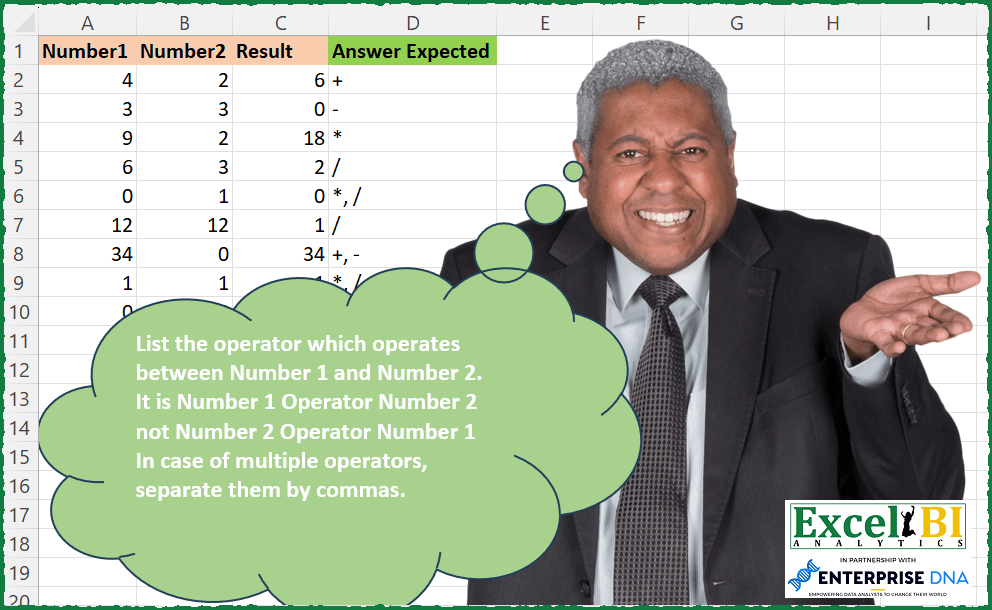
List the operator which operates between Number 1 and Number 2. It is Number 1 Operator Number 2 not Number 2 Operator Number 1 In case of multiple operators, separate them by commas.
📌 Challenge Details and Links
ExcelBI Excel Challenge Number: 198
Challenge Difficulty: ⭐️
📥Download Sample File
📥Link to the solutions on LinkedIn
Solving the challenge of Detect Operators Between Numbers with Power Query
Power Query solution 1 for Detect Operators Between Numbers, proposed by Bo Rydobon 🇹🇭:
let
  Source = Excel.CurrentWorkbook(){[Name = "Table1"]}[Content],
  Ans = Table.TransformRows(
    Source,
    each
      let
        a = [Number1],
        b = [Number2],
        c = [Result]
      in
        Text.Combine(
          {
            if a + b = c then "+" else null,
            if a - b = c then "-" else null,
            if a * b = c then "*" else null,
            if a / b = c then "/" else null
          },
          ", "
        )
  )
in
  Ans
Power Query solution 2 for Detect Operators Between Numbers, proposed by Zoran Milokanović:
let
  Source = Excel.CurrentWorkbook(){[Name = "Input"]}[Content],
  Solution = Table.TransformRows(
    Source,
    (o) =>
      Text.Combine(
        List.Select(
          {"+", "-", "*", "/"},
          each Expression.Evaluate(
            Text.From(o[Number1]) & _ & Text.From(o[Number2]) & "=" & Text.From(o[Result])
          )
        ),
        ", "
      )
  )
in
  Solution
Power Query solution 3 for Detect Operators Between Numbers, proposed by Alejandro Simón 🇵🇦 🇪🇸:
let
  Source = Excel.CurrentWorkbook(){[Name = "Table1"]}[Content],
  a = Table.ToRows(Source),
  Sol = List.Transform(
    a,
    each Text.Combine(
      {if _{0} + _{1} = _{2} then "+" else null}
        & {if _{0} - _{1} = _{2} then "-" else null}
        & {if _{0} * _{1} = _{2} then "*" else null}
        & {if _{0} / _{1} = _{2} then "/" else null},
      ", "
    )
  )
in
  Sol
Power Query solution 4 for Detect Operators Between Numbers, proposed by Luan Rodrigues:
let
  Fonte = Tabela1,
  res = Table.AddColumn(
    Fonte,
    "Personalizar",
    each Text.Combine(
      Table.SelectRows(
        Table.FromValue(
          [
            a1 = [Number1],
            a2 = [Number2],
            a3 = [Result],
            a  = if a1 + a2 = a3 then "+" else null,
            b  = if a1 - a2 = a3 then "-" else null,
            c  = if a1 * a2 = a3 then "*" else null,
            d  = if a1 / a2 = a3 then "/" else null
          ]
        ),
        each [Value] is text
      )[Value],
      ", "
    )
  )
in
  res
Power Query solution 5 for Detect Operators Between Numbers, proposed by Victor Wang:
let
  Source = Excel.CurrentWorkbook(){[Name = "Table1"]}[Content],
  Answer = Table.TransformRows(
    Source,
    each Text.Combine(
      List.Select(
        {"+", "-", "*", "/"},
        (a) => [Result] = Expression.Evaluate(Text.From([Number1]) & a & Text.From([Number2]))
      ),
      ","
    )
  )
in
  Answer
Power Query solution 6 for Detect Operators Between Numbers, proposed by Guillermo Arroyo:
let
  Origen = Excel.CurrentWorkbook(){[Name = "Tabla1"]}[Content],
  a = {"+", "-", "*", "/"},
  b = List.Transform(
    List.Zip({Origen[Number1], Origen[Number2]}),
    each {_{0} + _{1}, _{0} - _{1}, _{0} * _{1}, _{0} / _{1}}
  ),
  c = List.Transform(List.Zip({Origen[Result], b}), (x) => List.Transform(x{1}, each _ = x{0})),
  d = List.Transform(c, (y) => Text.Combine(List.Select(a, each y{List.PositionOf(a, _)}), ", "))
in
  d
Solving the challenge of Detect Operators Between Numbers with Excel
Excel solution 1 for Detect Operators Between Numbers, proposed by Bo Rydobon 🇹🇭:
=MAP(A2:A10,B2:B10,C2:C10,LAMBDA(a,b,c,TEXTJOIN(", ",,REPT({"+","-","*","/"},HSTACK(a+b,a-b,a*b,IF(b,a/b))=c))))Excel solution 2 for Detect Operators Between Numbers, proposed by Bo Rydobon 🇹🇭:
=MAP(A2:A10,B2:B10,C2:C10,LAMBDA(a,b,c,ARRAYTOTEXT(FILTER({"+","-","*","/"},HSTACK(a+b,a-b,a*b,IF(b,a/b))=c))))Excel solution 3 for Detect Operators Between Numbers, proposed by Rick Rothstein:
=LET(a,A2:A10,b,B2:B10,c,C2:C10,SUBSTITUTE(TRIM(IF(a+b=c,"+ ","")&IF(ABS(a-b)=c,"- ","")&IF(a*b=c,"* ","")&IF(IFERROR(a/b=c,0)+IFERROR(b/a=c,0),"/ ",""))," ",", "))Excel solution 4 for Detect Operators Between Numbers, proposed by John V.:
=MAP(A2:A10,B2:B10,C2:C10,LAMBDA(a,b,c,TEXTJOIN(", ",,REPT({"+","-","*","/"},HSTACK(a+b,a-b,a*b,IF(b,a/b))=c))))

Define name g: =LAMBDA(x,EVALUATE(x)) and then use:
✅=LET(o,{"+","-","*","/"},BYROW(REPT(o,IFERROR(g(A2:A10&o&B2:B10)=C2:C10,)),LAMBDA(x,TEXTJOIN(", ",,x))))
Excel solution 5 for Detect Operators Between Numbers, proposed by محمد حلمي:
=LET(a,A2:A10,b,B2:B10,BYROW(IFERROR(HSTACK(a+b,a-b,a*b,a/b)=C2:C10,),LAMBDA(a,TEXTJOIN(", ",,REPT({"+","-","*","/"},a)))))Excel solution 6 for Detect Operators Between Numbers, proposed by Kris Jaganah:
=LET(a,A2:A10,b,B2:B10,c,C2:C10,d,{1,2,3,4},BYROW(XLOOKUP(HSTACK(a+b=c,a-b=c,a*b=c,IFERROR(a/b=c,0))*d,d,{"+","-","*","/"},""),LAMBDA(x,TEXTJOIN(", ",1,x))))Excel solution 7 for Detect Operators Between Numbers, proposed by Julian Poeltl:
=MAP(A2:A10,B2:B10,C2:C10,LAMBDA(O,T,R,TEXTJOIN(", ",,FILTER(HSTACK("+","-","*","/"),HSTACK(O+T=R,O-T=R,O*T=R,IFERROR(O/T=R,0))))))Excel solution 8 for Detect Operators Between Numbers, proposed by Timothée BLIOT:
=MAP(A2:A10,B2:B10,C2:C10,LAMBDA(a,b,c,TEXTJOIN(",",1,IF(c=a+b,"+",""),IF(c=a-b,"-",""),IF(c=a*b,"*",""),IFERROR(IF(c=a/b,"/",""),""))))Excel solution 9 for Detect Operators Between Numbers, proposed by Hussein SATOUR:
=LET(a, A2:A10, b, B2:B10, BYROW(IFERROR(HSTACK(a+b, a-b, a*b, a/b)=C2:C10,0), LAMBDA(x, TEXTJOIN(", ",, FILTER({"+","-","*","/"},x)))))Excel solution 10 for Detect Operators Between Numbers, proposed by Oscar Mendez Roca Farell:
=MAP(A2:A10, B2:B10, C2:C10, LAMBDA(a, b, c, LET(_f, LAMBDA(i, j, APILARV(i+j, i-j ,i*j, IFERROR(i/j, ""))), TEXTJOIN(", ", , FILTER({"+","-","*","/"},_f(a, b)=c)))))Excel solution 11 for Detect Operators Between Numbers, proposed by Sunny Baggu:
=MAP(A2:A10,B2:B10,C2:C10,LAMBDA(a,b,c,TEXTJOIN(", ",,
IFERROR(IF(a+b=c,"+",""),""),
IFERROR(IF(a-b=c,"-",""),""),
IFERROR(IF(a*b=c,"*",""),""),
IFERROR(IF(a/b=c,"/",""),""))))
Excel solution 12 for Detect Operators Between Numbers, proposed by Sunny Baggu:
=MAP(
 A2:A10,
 B2:B10,
 C2:C10,
 LAMBDA(a, b, c,
 ARRAYTOTEXT(
 FILTER(
 {"+"; "-"; "*"; "/"},
 VSTACK((a + b = c) + 0, (a - b = c) + 0, (a * b = c) + 0, IFERROR(a / b = c, 0))
 )
 )
 )
)
Excel solution 13 for Detect Operators Between Numbers, proposed by Sunny Baggu:
=MAP(
 A2:A10,
 B2:B10,
 C2:C10,
 LAMBDA(a, b, c,
 TEXTJOIN(
 ", ",
 ,
 XLOOKUP(
 VSTACK(
 IF(a + b = c, 1, 0),
 IF(a - b = c, 2, 0),
 IF(a * b = c, 3, 0),
 IFERROR(IF(a / b = c, 4), 0)
 ),
 {1; 2; 3; 4},
 {"+"; "-"; "*"; "/"},
 ""
 )
 )
 )
)
Excel solution 14 for Detect Operators Between Numbers, proposed by LEONARD OCHEA 🇷🇴:
=BYROW(LET(a,A2:A10,b,B2:B10,c,C2:C10,IFERROR(CHOOSE(HSTACK((a+b=c)*1,(a-b=c)*2,(a*b=c)*3,(a/b=c)*4),"+","-","*","/"),"")),LAMBDA(x,TEXTJOIN(", ",,x)))Excel solution 15 for Detect Operators Between Numbers, proposed by Md. Zohurul Islam:
=LET(u,A2:A10,v,B2:B10,w,C2:C10,z,{"+","-","*","/"},
a,IFERROR(HSTACK(u+v,u-v,u*v,u/v),""),
b,BYROW(IF(a=w,z,""),LAMBDA(x,TEXTJOIN(", ",1,x))),
b)
Excel solution 16 for Detect Operators Between Numbers, proposed by JvdV –:
=LET(s,{"+","-","*","/"},BYROW(REPT(s,IFERROR(z(A2:A10&s&B2:B10)=C2:C10,)),LAMBDA(r,TEXTJOIN(",",,r))))

Where z() is a named function refering to:

=LAMBDA(x,EVALUATE(x))
Excel solution 17 for Detect Operators Between Numbers, proposed by Julien Lacaze:
=LET(_n1,A2:A10,_n2,B2:B10,_r,C2:C10,
_add,--((_n1+_n2)=_r),
_sub,--((_n1-_n2)=_r),
_mul,--((_n1*_n2)=_r),
_div,--(IFERROR(_n1/_n2,"")=_r),
MAP(_add,_sub,_mul,_div,LAMBDA(a,s,m,d,TEXTJOIN(", ",TRUE,IF(a,"+",""),IF(s,"-",""),IF(m,"*",""),IF(d,"/",""))
)))
Excel solution 18 for Detect Operators Between Numbers, proposed by Guillermo Arroyo:
=MAP(A2:A10,B2:B10,C2:C10,LAMBDA(a,b,c,TEXTJOIN(", ",1,FILTER({"+";"-";"*";"/"},VSTACK(a+b,a-b,a*b,IFERROR(a/b,""))=c,""))))Excel solution 19 for Detect Operators Between Numbers, proposed by Daniel Garzia:
=MAP(A2:A10,B2:B10,C2:C10,LAMBDA(a,b,r,TEXTJOIN(", ",,IF(VSTACK(a+b,a-b,a*b,IFERROR(a/b,""))=r,{"+";"-";"*";"/"},""))))Excel solution 20 for Detect Operators Between Numbers, proposed by Rayan S.:
=LET(x, A2:A10, y, B2:B10, z, C2:C10, sol, IFERROR(HSTACK(IF(x *y = z, "*", ""), IF(x + y = z, "+", ""), IF(x - y = z, "-", ""), IF(x / y = z, "/", "")), ""), a, TAKE(sol, , 1), b, TAKE(sol, , -1), c, DROP(TAKE(sol, , 2), , 1), d, DROP(TAKE(sol, , -2), , -1), MAP(a,b,c,d,LAMBDA(a,b,c,d,TEXTJOIN(", ",,a,c,d,b))))Excel solution 21 for Detect Operators Between Numbers, proposed by Juliano Santos Lima:
=CHOOSE(MATCH(C2,CHOOSE({1,2,3,4},A2+B2,A2-B2,A2*B2,A2/B2),0),"+","-","*","/")

Another version...

=CHOOSE(MATCH(C2,HSTACK(A2+B2,A2-B2,A2*B2,A2/B2),0),"+","-","*","/")
Excel solution 22 for Detect Operators Between Numbers, proposed by Miguel Angel Franco García:
=LET(a; APILARH("*";" /";" +";" -");b;SÍ. ERROR(A2*B2,""); c;SÍ. ERROR(A2/B2,""); d;SÍ. ERROR(A2+B2,""); e;SÍ. ERROR(A2-B2,""); UNIRCADENAS(","; VERDADERO;SI(APILARH(b;c;d;e)=C2,a;"")))Excel solution 23 for Detect Operators Between Numbers, proposed by Stevenson Yu:
=MAP(A2:A10,B2:B10,C2:C10, LAMBDA(X,Y,Z,
LET(A, X, B, Y, C, Z,
D, IF(C=A+B,"+",""),
E, IF(C=A-B,"-",""),
F, IF(C=A*B,"*",""),
G, IFERROR(IF(C=A/B,"/",""),""),
TEXTJOIN(", ",1,D,E,F,G))))
Excel solution 24 for Detect Operators Between Numbers, proposed by Surendra Reddy:
=LET(a,{"+";"-";"*";"/"},MAP(A2:A10,B2:B10,C2:C10,LAMBDA(x,y,z,TEXTJOIN(", ",,FILTER(a,VSTACK(x+y,x-y,x*y,IFERROR(x/y,""))=z)))))Excel solution 25 for Detect Operators Between Numbers, proposed by Surendra Reddy:
=MAP(A2:A10,B2:B10,C2:C10,LAMBDA(x,y,z,TEXTJOIN(", ",,IF(x+y=z,"+",""),IF(x-y=z,"-",""),IF(x*y=z,"*",""),IF((IFERROR(x/y,"")=z),"/",""))
))
Excel solution 26 for Detect Operators Between Numbers, proposed by Surendra Reddy:
=LET(a,{"+","-","*","/"},MAP(A2:A10,B2:B10,C2:C10,LAMBDA(x,y,z,TEXTJOIN(", ",,FILTER(a,HSTACK(x+y,x-y,x*y,IFERROR(x/y,""))=z)))))Solving the challenge of Detect Operators Between Numbers with Python in Excel
Python in Excel solution 1 for Detect Operators Between Numbers, proposed by Alejandro Campos:
df = xl("A1:C10", headers=True)
def find_operator(row):
 n1, n2, result = row['Number1'], row['Number2'], row['Result']
 operators = []
 if n1 + n2 == result:
 operators.append('+')
 if n1 - n2 == result:
 operators.append('-')
 if n1 * n2 == result:
 operators.append('*')
 if n2 != 0 and n1 / n2 == result:
 operators.append('/')
 return ', '.join(operators)
df['Operator'] = df.apply(find_operator, axis=1)
df
&&&