
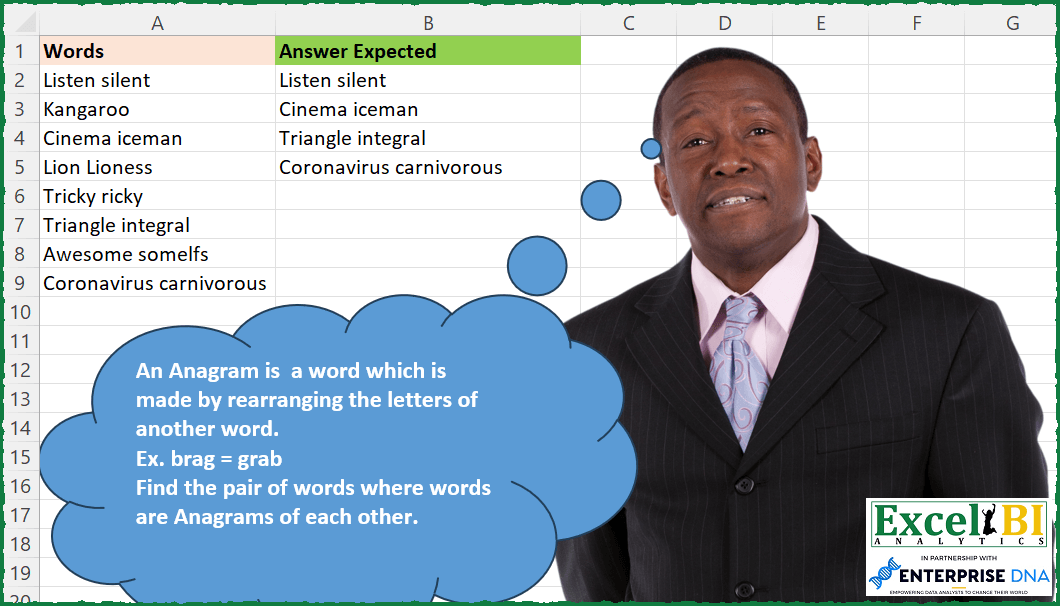
An Anagram is a word which is made by rearranging the letters of another word. Ex. brag = grab Find the pair of words where words are Anagrams of each other.
📌 Challenge Details and Links
ExcelBI Excel Challenge Number: 187
Challenge Difficulty: ⭐️
📥Download Sample File
📥Link to the solutions on LinkedIn
Solving the challenge of Find Anagram Word Pairs with Power Query
Power Query solution 1 for Find Anagram Word Pairs, proposed by Omid Motamedisedeh:
= [X=Table.SelectRows(Source, each Text.Contains(_[Words]," ")),A=Table.SplitColumn(X,"Words",Splitter.SplitTextByAnyDelimiter({" "}),2),B=(X)=>List.Sort(List.Transform({1..Text.Length(X)}, each Text.Range(Text.Lower(X),Text.Length(X)-_,1))),C=Table.SelectRows(A, each B(_[Words.1])=B(_[Words.2])),D=Table.ToList(C)][D]Power Query solution 2 for Find Anagram Word Pairs, proposed by Bo Rydobon 🇹🇭:
let
  Source = Excel.CurrentWorkbook(){[Name = "Table1"]}[Content],
  Ans = Table.SelectRows(
    Source,
    each
      let
        t = Text.Split(Text.Lower([Words] & " "), " ")
      in
        Text.Combine(List.Sort(Text.ToList(t{0}))) = Text.Combine(List.Sort(Text.ToList(t{1})))
  )
in
  Ans
Power Query solution 3 for Find Anagram Word Pairs, proposed by Zoran Milokanović:
let
  Source = Excel.CurrentWorkbook(){[Name = "Input"]}[Content],
  Solution = List.Select(
    Source[Words],
    (w) =>
      let
        c = List.Transform(Text.Split(w, " "), each List.Sort(Text.ToList(Text.Lower(_))))
      in
        c{0} = c{1}? ?? {}
  )
in
  Solution
Power Query solution 4 for Find Anagram Word Pairs, proposed by 🇰🇷 Taeyong Shin:
let
  Source = Excel.CurrentWorkbook(){[Name = "tblData"]}[Content],
  Result = Table.SelectRows(
    Source,
    each
      let
        Split = Text.Split([Words], " "),
        Count = List.Count(Text.PositionOfAny(Split{1}, Text.ToList(Split{0}), Occurrence.All))
      in
        try Count = Text.Length(Split{1}) - 1 otherwise false
  )
in
  Result
Power Query solution 5 for Find Anagram Word Pairs, proposed by Alejandro Simón 🇵🇦 🇪🇸:
let
  Source = Excel.CurrentWorkbook(){[Name = "Table1"]}[Content],
  Sol = Table.SelectRows(
    Table.AddColumn(
      Source,
      "Custom",
      each
        let
          a = Text.Split(Text.Lower([Words]), " "),
          b = List.Transform(a, each Text.ToList(_)),
          c = List.Transform({0, 1}, each List.Sort(b{_}))
        in
          try c{0} = c{1} otherwise null
    ),
    each [Custom] = true
  )[[Words]]
in
  Sol
Power Query solution 6 for Find Anagram Word Pairs, proposed by Luan Rodrigues:
let
  Fonte = Tabela1,
  res = Table.SelectRows(
    Fonte,
    each List.IsDistinct(
      List.Transform(
        Text.Split([Words], " "),
        (x) => Text.Combine(List.Sort(List.Reverse(Text.ToList(Text.Lower(Text.From(x))))))
      )
    )
      = false
  )
in
  res
Power Query solution 7 for Find Anagram Word Pairs, proposed by Brian Julius:
let
  Source = Excel.CurrentWorkbook(){[Name = "Table1"]}[Content],
  Dupe = Table.DuplicateColumn(Source, "Words", "Word"),
  SplitBySpace = Table.SelectRows(
    Table.SplitColumn(
      Dupe,
      "Word",
      Splitter.SplitTextByDelimiter(" ", QuoteStyle.Csv),
      {"Word1", "Word2"}
    ),
    each [Word2] <> null
  ),
  Compare = Table.AddColumn(
    SplitBySpace,
    "Compare",
    each [
      a = Text.Combine(List.Sort(Text.ToList(Text.Lower([Word1])), Order.Ascending), ""),
      b = Text.Combine(List.Sort(Text.ToList(Text.Lower([Word2])), Order.Ascending), ""),
      c = if a = b then 1 else 0
    ][c]
  ),
  FilterNClean = Table.SelectColumns(Table.SelectRows(Compare, each ([Compare] = 1)), "Words")
in
  FilterNClean
Power Query solution 8 for Find Anagram Word Pairs, proposed by Fatemeh Heydari:
let
  Source = Excel.CurrentWorkbook(){[Name = "Table1_3"]}[Content],
  #"Changed Type" = Table.TransformColumnTypes(Source, {{"Words", type text}}),
  #"Filtered Rows" = Table.SelectRows(
    #"Changed Type",
    each
      let
        A = try List.Sort(try Text.ToList(Text.Trim([Words]{0}), ""), ""),
        B = try List.Sort(try Text.ToList(Text.Trim([Words]{1}), ""), "")
      in
        A = B
  )
in
  #"Filtered Rows"
Solving the challenge of Find Anagram Word Pairs with Excel
Excel solution 1 for Find Anagram Word Pairs, proposed by Bo Rydobon 🇹🇭:
=FILTER(A2:A9,MAP(A2:A9,LAMBDA(a,LET(m,MID(TEXTSPLIT(a&" "," "),SEQUENCE(20),1),AND(SORT(TAKE(m,,1))=SORT(INDEX(m,,2)))))))Excel solution 2 for Find Anagram Word Pairs, proposed by Rick Rothstein:
=FILTER(A2:A9,IFNA(MAP(A2:A9,LAMBDA(x,LET(s,SEQUENCE(99),a,TEXTAFTER(x," "),b,TEXTBEFORE(x," "),AND(SORT(MID(b,s,1))=SORT(MID(a,s,1)))))),))Excel solution 3 for Find Anagram Word Pairs, proposed by John V.:
=FILTER(A2:A9,MAP(A2:A9&" ",LAMBDA(x,LET(f,LAMBDA(a,SORT(MID(INDEX(TEXTSPLIT(x," "),a),ROW(1:15),1))),AND(f(1)=f(2))))))Excel solution 4 for Find Anagram Word Pairs, proposed by محمد حلمي:
=FILTER(A2:A9,MAP(A2:A9,LAMBDA(a,LET(
v,TEXTSPLIT(a,," "),
n,SEQUENCE(20),
IFERROR(AND(SORT(MID(TAKE(v,1),n,1))=
SORT(MID(DROP(v,1),n,1))),)))))
Excel solution 5 for Find Anagram Word Pairs, proposed by 🇰🇷 Taeyong Shin:
=TOCOL(IF(MAP(A2:A9, LAMBDA(m, LET(t, TEXTSPLIT(m, " "), c, MID(t, SEQUENCE(MAX(LEN(t))), 1), AND(XMATCH(TAKE(c, , 1), DROP(c, , 1)))))), A2:A9), 2)Excel solution 6 for Find Anagram Word Pairs, proposed by Kris Jaganah:
=FILTER(A2:A9,MAP(A2:A9,LAMBDA(v,LET(b,DROP(REDUCE("",TEXTSPLIT(v," "),LAMBDA(x,y,HSTACK(x,MID(y,SEQUENCE(LEN(y)),1)))),,1),IFERROR(IF(FIND(" ",v)>0,MIN(--(SORT(TAKE(b,,1))=SORT(TAKE(b,,-1)))),0),0)))))Excel solution 7 for Find Anagram Word Pairs, proposed by Julian Poeltl:
=FILTER(A2:A9,MAP(A2:A9,LAMBDA(W,LET(R,MAP(TEXTSPLIT(W," "),LAMBDA(A,CONCAT(SORT(MID(A,SEQUENCE(LEN(A)),1))))),IFERROR(INDEX(R,,1)=INDEX(R,,2),0)))))Excel solution 8 for Find Anagram Word Pairs, proposed by Timothée BLIOT:
=LET(A, TEXTBEFORE(A2:A9," ",,,,""), B, TEXTAFTER(A2:A9," ",,,,""),
FILTER(A2:A9,IFERROR(--MAP(A,B, LAMBDA(a,b, CONCAT(SORT(MID(a,SEQUENCE(LEN(a)),1)))=CONCAT(SORT(MID(b,SEQUENCE(LEN(b)),1))) )),0) ))
Excel solution 9 for Find Anagram Word Pairs, proposed by Oscar Mendez Roca Farell:
=TOCOL(MAP(A2:A9, LAMBDA(n, IF( SUM( CODE( TAKE( MID( TEXTSPLIT(LOWER(n)&" "," "), SEQUENCE( LEN(n)/2), 1), , 2))*{1-1})=0, n, n+1))), 3)Excel solution 10 for Find Anagram Word Pairs, proposed by Sunny Baggu:
=FILTER(
 A2:A9,
 MAP(
 A2:A9,
 LAMBDA(a,
 LET(
 _tb, TEXTBEFORE(a, " "),
 _ta, TEXTAFTER(a, " "),
 _e1, LAMBDA(x, SORT(MID(x, SEQUENCE(LEN(x)), 1))),
 _cri, AND(_e1(_ta) = _e1(_tb)),
 IFERROR(N(_cri) = 1, 0)
 )
 )
 )
)
Excel solution 11 for Find Anagram Word Pairs, proposed by Sunny Baggu:
=FILTER(
 A2:A9,
 MAP(
 A2:A9,
 LAMBDA(a,
 LET(
 _ts, MID(a, SEQUENCE(LEN(a)), 1),
 _num, (LEN(a) - 1) / 2,
 _left, SORT(TAKE(_ts, _num)),
 _right, SORT(TAKE(_ts, -_num)),
 IFERROR(AND(_left = _right), 0)
 )
 )
 )
)
Excel solution 12 for Find Anagram Word Pairs, proposed by Md. Zohurul Islam:
=FILTER(
    A2:A9,
    MAP(
        A2:A9,
        LAMBDA(
            x,
            LET(
                a,
                TEXTSPLIT(
                    x,
                    ,
                    " "
                ),
                sq,
                SEQUENCE(
                    99
                ),
                j,
                SORT(
                    MID(
                        TAKE(
                            a,
                            1
                        ),
                        sq,
                        1
                    )
                ),
                k,
                SORT(
                    MID(
                        TAKE(
                            a,
                            -1
                        ),
                        sq,
                        1
                    )
                ),
                IF(
                    AND(
                        j=k,
                        COUNTA(
                            a
                        )>1
                    ),
                    1,
                    0
                )
            )
        )
    )
)
Excel solution 13 for Find Anagram Word Pairs, proposed by Charles Roldan:
=LET(
 _isAnagram, LAMBDA(F, F(F))(
 LAMBDA(f,
 LAMBDA(String,
 IF(
 ISERROR(SEARCH(LEFT(String), String, 2)),
 String = " ",
 f(f)(SUBSTITUTE(LOWER(String), LOWER(LEFT(String)), ""))
 )
 )
 )
 ),
 LAMBDA(x, f, FILTER(x, MAP(x, f)))(A2:A9, _isAnagram)
)
Excel solution 14 for Find Anagram Word Pairs, proposed by Julien Lacaze:
=LET(values,A2:A9,
cleanDatas,LOWER(HSTACK(TEXTBEFORE(values," "),TEXTAFTER(values," "))),
lengths,LEN(cleanDatas),
reordered,MAKEARRAY(ROWS(values),2,LAMBDA(r,c,TEXTJOIN("",TRUE,SORT(MID(INDEX(cleanDatas,r,c),SEQUENCE(INDEX(lengths,r,c)),1))))),
flag,IFERROR(MAKEARRAY(ROWS(values),1,LAMBDA(r,c,--(INDEX(reordered,r,c)=INDEX(reordered,r,c+1)))),0),
FILTER(values,flag))
Excel solution 15 for Find Anagram Word Pairs, proposed by Quadri Olayinka Atharu:
=LET(w,A2:A9,
_col1,TEXTBEFORE(w," ",,,,""),
_col2,TEXTAFTER(w," ",,,,""),
_s,LAMBDA(x,CONCAT(SORT(MID(x,SEQUENCE(LEN(x)),1)))),
r,IFERROR(MAP(_col1,_col2,LAMBDA(x,y,_s(x)=_s(y))),0),
FILTER(w,r))
Excel solution 16 for Find Anagram Word Pairs, proposed by Amardeep Singh:
=FILTER(A2:A9,BYROW(A2:A9,LAMBDA(r,
LET(f,TEXTBEFORE(r," "),s,TEXTAFTER(r," "),fs,MID(f,SEQUENCE(LEN(f)),1),ss,MID(s,SEQUENCE(LEN(s)),1),SUM(--ISNA(XMATCH(fs,ss)))=0))))
Excel solution 17 for Find Anagram Word Pairs, proposed by Hussain Ali Nasser:
=FILTER(A2:A9,MAP(A2:A9,LAMBDA(_range,LET(_rangelen,LEN(_range),_splitnum,(_rangelen-1)/2,_splitrange,MID(_range,SEQUENCE(_rangelen),1),_leftrange,SORT(TAKE(_splitrange,_splitnum)),_rightrange,SORT(TAKE(_splitrange,-_splitnum)),_checklist,IFERROR(AND(_leftrange=_rightrange),0),_checklist))))Excel solution 18 for Find Anagram Word Pairs, proposed by Amr Tawfik CMA®,FMVA,Lean Coach:
=FILTER(A2:A9,MAP(A2:A9,LAMBDA(x,IFNA(IF(COUNTA(UNIQUE(SORT(TOCOL(MID(x,SEQUENCE(,LEN(x),1,1),1)),1,,FALSE)))-1=LEN(TEXTAFTER(x," ")),TRUE,FALSE),"")))=TRUE)Excel solution 19 for Find Anagram Word Pairs, proposed by Stevenson Yu:
=LET(Q, A2:A9, W, MAP(Q, LAMBDA(X,
LET(A, X, B, MID(LOWER(A), SEQUENCE(,LEN(A)),1),
C, WRAPROWS(B, FIND(" ",A),""),
D, TRIM(CONCAT(SORT(INDEX(C,1,0),,,1))),
E, TRIM(CONCAT(SORT(INDEX(C,2,0),,,1))),
IFERROR(D=E, FALSE)))), FILTER(Q, W))

An alternative approach to SEQUENCE/WRAPROWS but probably way more volatile:

=LET(X, A2:A9,
Y, MAP(X, LAMBDA(X,
LET(A, X, B, TEXTSPLIT(A," "),
C, LOWER(MID(B, ROW(INDIRECT("1:"&MAX(LEN(B)))), 1)),
IFERROR(CONCAT(SORT(INDEX(C,0,1)))=CONCAT(SORT(INDEX(C,0,2))),)))),
FILTER(X,Y))
&&&