
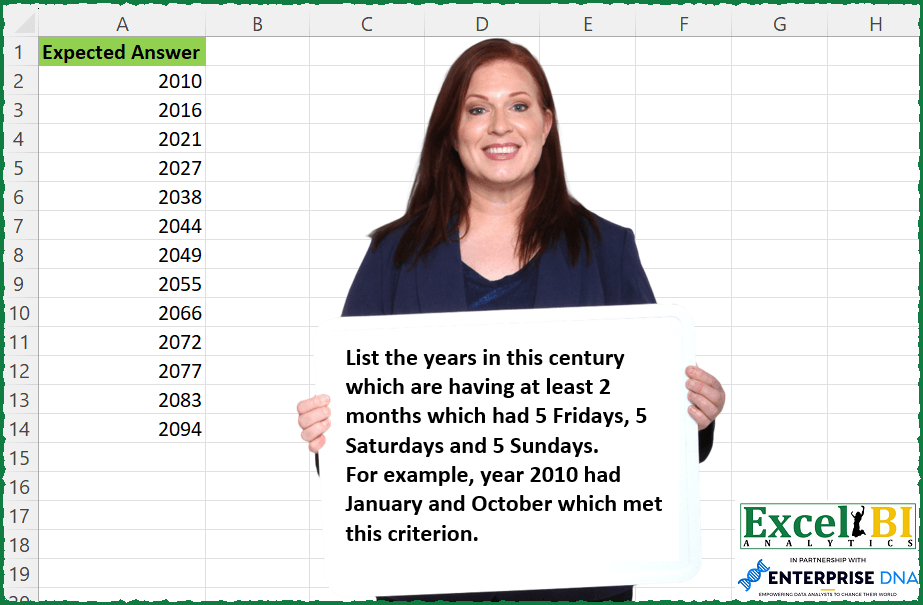
List the years in this century which are having at least 2 months which had 5 Fridays, 5 Saturdays and 5 Sundays. For example, year 2010 had January and October which met this criterion.
📌 Challenge Details and Links
ExcelBI Excel Challenge Number: 184
Challenge Difficulty: ⭐️
📥Download Sample File
📥Link to the solutions on LinkedIn
Solving the challenge of Months With 5 Weekends with Power Query
Power Query solution 1 for Months With 5 Weekends, proposed by Bo Rydobon 🇹🇭:
let
 Source = List.Select({2000..2099},(y)=> List.Count(List.Select({1..12}, (m)=> let d= hashtag#date(y,m,1) in Date.DayOfWeek(d)=5 and Date.Day(Date.EndOfMonth(d))=31))>1)
in
 Source
Power Query solution 2 for Months With 5 Weekends, proposed by Zoran Milokanović:
let
 Source = DateTime.LocalNow(),
 AddCenturyDates = let t = Number.IntegerDivide(Date.Year(Source), 100) * 100 in {Number.From(hashtag#date((t+1), 1, 1))..Number.From(hashtag#date((t+100), 12, 31))},
 ConvertToDate = List.Transform(AddCenturyDates, each Date.From(_)),
 ConvertToTable = Table.FromList(ConvertToDate, Splitter.SplitByNothing(), {"Date"}),
 FormatDate = Table.TransformColumnTypes(ConvertToTable,{{"Date", type date}}),
 InsertedYear = Table.AddColumn(FormatDate, "Year", each Date.Year([Date]), Int64.Type),
 InsertedMonth = Table.AddColumn(InsertedYear, "Month", each Date.Month([Date])),
 InsertedDayOfWeek = Table.AddColumn(InsertedMonth, "DayOfWeek", each Date.DayOfWeekName([Date], "en-US")),
 PivotedDayOfWeek = Table.Pivot(InsertedDayOfWeek, List.Distinct(InsertedDayOfWeek[DayOfWeek]), "DayOfWeek", "Date", List.Count),
 Filtered5Days = Table.SelectRows(PivotedDayOfWeek, each ([Friday] = 5) and ([Saturday] = 5) and ([Sunday] = 5)),
 GroupedYears = Table.Group(Filtered5Days, {"Year"}, {{"Months", each Table.RowCount(_), Int64.Type}}),
 FilteredYears = Table.SelectRows(GroupedYears, each ([Months] >= 2)),
 Solution = FilteredYears[Year]
in
 Solution
Power Query solution 3 for Months With 5 Weekends, proposed by Alejandro Simón 🇵🇦 🇪🇸:
let
 Source = {Number.From(hashtag#date(2000,01,01))..Number.From(hashtag#date(2099,12,31))},
 Fechas = Table.FromList(Source, Splitter.SplitByNothing(), null, null, ExtraValues.Error),
 Calc = Table.AddColumn(Fechas, "Custom", each
 [a = Date.From([Column1]),
 b = Date.Year(a),
 c = Date.Month(a),
 d = Date.DayOfWeek(a)]),
 Expand = Table.ExpandRecordColumn(Calc, "Custom", {"a", "b", "c", "d"}),
 Group = Table.Group(Expand, {"b", "d", "c"}, {{"Count", each Table.RowCount(_)}}),
 Dias = Table.SelectRows(Group, each ([d] = 0 or [d] = 5 or [d] = 6) and [Count] = 5),
 GroupMonth = Table.SelectRows(Table.Group(Dias, {"b", "c"}, {{"Count", each Table.RowCount(_)}}), each [Count] > 2),
 GroupYears = Table.Group(GroupMonth, {"b"}, {{"Count", each Table.RowCount(_), Int64.Type}}),
 Sol = Table.SelectRows(GroupYears, each ([Count] = 2))[b]
in
 Sol
Power Query solution 4 for Months With 5 Weekends, proposed by Luan Rodrigues:
let
 Fonte = [
 a = List.Dates(hashtag#date(2000, 01, 01), 36524 , hashtag#duration(1, 0, 0, 0)),
 b = List.Buffer(a)
 ][b],
 tab = Table.FromList(Fonte, Splitter.SplitByNothing(), null, null),
 ma = Table.AddColumn(tab, "mes_ano", each Date.ToText([Column1],"MMyyyy")),
 dy = Table.AddColumn(ma, "dia_semana", each Date.DayOfWeek([Column1])),
 f1 = Table.SelectRows(dy, each ([dia_semana] = 0 or [dia_semana] = 5 or [dia_semana] = 6))
 [[mes_ano],[dia_semana]],
 gp = Table.Group(f1, {"mes_ano"}, {{"Contagem", each
 [
 a = _,
 b = Table.RowCount(Table.SelectRows(Table.Group(a,{"dia_semana"},{{"Count", each Table.RowCount(_)}} ), each [Count] = 5))
 ][b]
 }}),
 f2 = Table.SelectRows(gp, each ([Contagem] = 3)),
 a = Table.AddColumn(f2, "Ano", each Text.End([mes_ano],4)),
 gp2 = Table.Group(a, {"Ano"}, {{"Contagem", each Table.RowCount(_)}}),
 res = Table.SelectRows(gp2, each ([Contagem] = 2))[[Ano]]
in
 res
Power Query solution 5 for Months With 5 Weekends, proposed by Brian Julius:
let
 StartDate = Number.From( hashtag#date(2000, 1, 1)),
 EndDate = Number.From( hashtag#date(2099, 12, 31)),
 Source = Table.TransformColumnTypes( Table.FromList({ StartDate..EndDate }, Splitter.SplitByNothing(), null, null, ExtraValues.Error), {"Column1", type date}),
 Rename = Table.RenameColumns(Source,{{"Column1", "Dates"}}),
 Year = Table.AddColumn(Rename, "Year", each Date.Year([Dates]), Int64.Type),
 MonthName = Table.AddColumn(Year, "Month Name", each Date.MonthName([Dates]), type text),
 DayName = Table.AddColumn(MonthName, "Day Name", each Date.DayOfWeekName([Dates]), type text),
 Group1 = Table.Group(DayName, {"Year", "Month Name", "Day Name"}, {{"Count", each Table.RowCount(_), Int64.Type}}),
 Filter1 = Table.SelectRows(Group1, each ([Day Name] = "Friday" or [Day Name] = "Saturday" or [Day Name] = "Sunday") and ([Count] = 5)),
 Group2 = Table.Group(Filter1, {"Year", "Month Name"}, {{"Count", each Table.RowCount(_), Int64.Type}}),
 Filter2 = Table.SelectRows(Group2, each ([Count] = 3)),
 Group3 = Table.Group(Filter2, {"Year"}, {{"Count", each Table.RowCount(_), Int64.Type}}),
 Filter3 = Table.SelectRows(Group3, each ([Count] = 2)),
 Clean = Table.RemoveColumns(Filter3,{"Count"})
in
 Clean
Power Query solution 6 for Months With 5 Weekends, proposed by Rafael González B.:
let

 LDates = Table.FromList({Number.From(hashtag#date(2000,1,1))..Number.From(hashtag#date(2099,12,31))}, Splitter.SplitByNothing(), {"Dates"}, null, ExtraValues.Error),
 TypeDate = Table.TransformColumnTypes(LDates,{{"Dates", type date}}),
 IYear = Table.AddColumn(TypeDate, "Año", each Date.Year([Dates]), Int64.Type),
 IMonth = Table.AddColumn(IYear, "Mes", each Date.Month([Dates]), Int64.Type),
 NDay = Table.AddColumn(IMonth, "Nombre del día", each Date.DayOfWeekName([Dates]), type text),
 FMS = Table.SelectRows(NDay, each ([Nombre del día] = "domingo" or [Nombre del día] = "sábado" or [Nombre del día] = "viernes")),
 FGroup = Table.Group(FMS, {"Año", "Mes", "Nombre del día"}, {{"Recuento", each Table.RowCount(_), Int64.Type}}),
 FGreater5 = Table.SelectRows(FGroup, each [Recuento] >= 5),
 SumRC = Table.Group(FGreater5, {"Año", "Mes"}, {{"Total Series", each List.Sum([Recuento]), type number}}),
 Filter15 = Table.SelectRows(SumRC, each [Total Series] >= 15),
 GBYears = Table.Group(Filter15, {"Año"}, {{"Recuento", each Table.RowCount(_), Int64.Type}}),
 GT2 = Table.SelectRows(GBYears, each [Recuento] >= 2),
 Result = Table.RemoveColumns(GT2,{"Recuento"})
in
 Result
Power Query solution 7 for Months With 5 Weekends, proposed by Guillermo Arroyo:
let
 a = {2000..2099},
 b = List.Select(a, (y)=>
 let
 d = List.Transform({1..12}, (m)=>
 let
 i = hashtag#date(y, m, 1),
 f = Date.EndOfMonth(i),
 e = List.Generate(()=> i, each _<= f, each Date.AddDays(_, 1)),
 g = List.Count(List.Select(List.Transform(e, each Date.DayOfWeek(_, Day.Monday)), each _ > 3))
 in
 g >= 15),
 h = List.Count(List.Select(d, each _))
 in
 h >= 2)
in
 b
Power Query solution 8 for Months With 5 Weekends, proposed by Štěpán Rešl:
let
Source = List.Select(
{2000..2099},
(y) =>
List.Count(
List.Select(
{1..12},
(m) =>
let
innerSelection = List.Dates(
hashtag#date(y, m, 1), Date.Day(Date.EndOfMonth(hashtag#date(y, m, 1))), hashtag#duration(1, 0, 0, 0)
),
fct = (vl as number) =>
if List.Count(List.Select(innerSelection, each Date.DayOfWeek(_, 1) = vl)) >= 5 then
true
else
false
in
List.Count(
List.Select(
List.Generate(
() => [vl = 6, res = fct(vl)],
each (_[vl] ?? 1) > 3,
each [vl = _[vl] - 1, res = fct(vl)],
each [res]
),
each _
)
) = 3
)
) > 1
)
in
Source
Solving the challenge of Months With 5 Weekends with Excel
Excel solution 1 for Months With 5 Weekends, proposed by Bo Rydobon 🇹🇭:
=TOCOL(MAP(SEQUENCE(100,,2000),LAMBDA(y,LET(d,y&-SEQUENCE(12)&-1,y/(2=SUM((MOD(d,7)=6)*(EDATE(d,1)-d=31)))))),3)Excel solution 2 for Months With 5 Weekends, proposed by Rick Rothstein:
=LET(r,SEQUENCE(100,,2000),d,DATE(r,SEQUENCE(,12),31),FILTER(r,BYROW((WEEKDAY(d)=1)*(MONTH(d)=MONTH(d-7)),LAMBDA(r,SUM(r)>1))))Excel solution 3 for Months With 5 Weekends, proposed by John V.:
=LET(y,ROW(2000:2099),FILTER(y,MAP(y,LAMBDA(x,LET(d,x&"-1-1",SUM(NETWORKDAYS.INTL(d,30+d,1111&{"011",101,110}))=15)))))Excel solution 4 for Months With 5 Weekends, proposed by محمد حلمي:
=LET(
n,SEQUENCE(100,,2000),
FILTER(n,MAP(n,LAMBDA(c,LET(
r,DATE(c,1,SEQUENCE(365)),SUM(--(MAP({1,3,5,7,8,10,12},
LAMBDA(a,
WEEKDAY(TAKE(FILTER(r,MONTH(r)=a),1))))=6))>1)))))
Excel solution 5 for Months With 5 Weekends, proposed by محمد حلمي:
=LET(
n,SEQUENCE(100,,2000),
FILTER(n,MAP(n,LAMBDA(c,
SUM(--(WEEKDAY(DATE(c,{1,3,5,7,8,10,12},1))=6))>1))))
Excel solution 6 for Months With 5 Weekends, proposed by 🇰🇷 Taeyong Shin:
=LET(
 y, SEQUENCE(99, , 2001),
 s, y & -SEQUENCE(, 12) & -1,
 e, EOMONTH(s, 0),
 FILTER(y, MMULT(N(NETWORKDAYS.INTL(s, e, "1111000") = 15), SIGN(SEQUENCE(12))) = 2)
)
Excel solution 7 for Months With 5 Weekends, proposed by Kris Jaganah:
=LET(a,DATE(2000,1,0)+SEQUENCE(36525),b,FILTER(YEAR(a)+MONTH(a)/100,WEEKDAY(a,2)>4),c,UNIQUE(b),d,FILTER(ROUND(c,0),MAP(c,LAMBDA(x,SUM(--(b=x))))>14),e,UNIQUE(d),FILTER(e,MAP(e,LAMBDA(y,SUM(--(d=y))))>1))Excel solution 8 for Months With 5 Weekends, proposed by Julian Poeltl:
=LET(Y,SEQUENCE(100,,2000),T,TOCOL(DATE(TOROW(Y),SEQUENCE(12),1)),R,MAP(T,LAMBDA(D,LET(E,EOMONTH(D,0),S,SEQUENCE(E-D+1,,D),W,WEEKDAY(S),L,LAMBDA(A,ROWS(FILTER(W,W=A))=5),L(1)*L(6)*L(7)))),FILTER(Y,MAP(Y,LAMBDA(A,SUM(FILTER(R,A=YEAR(T)))))>1))Excel solution 9 for Months With 5 Weekends, proposed by Timothée BLIOT:
=LET(A, SEQUENCE(DATE(2100,1,1)-DATE(2000,1,1),,DATE(2000,1,1)),
B, --(WEEKDAY(A,2)>4),
D, PIVOTBY(MONTH(A),YEAR(A),B,SUM),
E, BYCOL(IF(DROP(DROP(D,1,1),-1,-1)=15,1,0), LAMBDA(x, SUM(x) )),
TOCOL(FILTER(SEQUENCE(,100,2000),E=2)))
Excel solution 10 for Months With 5 Weekends, proposed by Hussein SATOUR:
=LET(a, ROW(2000:2099), FILTER(a, MAP(a, LAMBDA(x, SUM(MAP(ROW(1:12)&"/"&x, LAMBDA(y,LET(m, SEQUENCE(EOMONTH(y,0) - y+1)&"/"&y, w, WEEKDAY(m), COUNTA(FILTER(m, (w=6) + (w=7) + (w=1))) = 15)))*1)>1))))Excel solution 11 for Months With 5 Weekends, proposed by Oscar Mendez Roca Farell:
=LET(_y, SEQUENCE(100, ,2000), FILTER(_y, MAP(_y, LAMBDA(a, SUM(--(REDUCE("", SEQUENCE( ,12), LAMBDA(i, x ,LET(_f, DATE(a, x, 1), VSTACK(i, MOD( SUM(--(WEEKDAY( SEQUENCE( DAY(EOMONTH(_f, 0)), ,_f), 3)>3)), 5)))))=0))))>1))Excel solution 12 for Months With 5 Weekends, proposed by LEONARD OCHEA 🇷🇴:
=LET(y,SEQUENCE(100,,2000),FILTER(y,BYROW(WEEKDAY(DATE(y,1,SEQUENCE(,31))),LAMBDA(a,SUM((a=VSTACK(1,6,7))*1)))>=15))Excel solution 13 for Months With 5 Weekends, proposed by Md. Zohurul Islam:
=LET(dt,SEQUENCE(36525,,DATE(2000,1,1)),
a,HSTACK(MONTH(dt),YEAR(dt)),
b,BYROW(ABS(TEXT(dt,"ddd")={"Fri","Sat","Sun"}),SUM),
c,GROUPBY(a,b,SUM,0,0),
d,FILTER(TAKE(c,,2),DROP(c,,2)>=15),
e,GROUPBY(DROP(d,,1),TAKE(d,,1),COUNT,0,0),
f,FILTER(TAKE(e,,1),DROP(e,,1)>1),
f)
Excel solution 14 for Months With 5 Weekends, proposed by Charles Roldan:
=LAMBDA(Century, --FILTER(Century, BYROW(DELTA(
LAMBDA(Ends, DAY(Ends)-WEEKDAY(Ends)
)(DATE(Century, SEQUENCE(, 12)+1, 0)), 30),
LAMBDA(x, SUM(x)))>1)
)(SEQUENCE(100, , ROUNDDOWN(YEAR(TODAY()), -2)))
Excel solution 15 for Months With 5 Weekends, proposed by Guillermo Arroyo:
=DROP(REDUCE("",SEQUENCE(100,,2000),LAMBDA(i,j,IF(REDUCE(0,SEQUENCE(12),LAMBDA(x,z,LET(f,DATE(j,z,1),IF(AND(TAKE(FREQUENCY(WEEKDAY(SEQUENCE(EOMONTH(f,0)-f+1,,f),2),SEQUENCE(6)),-3)>=5),x+1,x))))>=2,VSTACK(i,j),i))),1)

Other way

=LET(n,SEQUENCE(100,,2000),FILTER(n,MAP(n,LAMBDA(p,LET(f,DATE(p,SEQUENCE(12),1),SUM(--(NETWORKDAYS.INTL(f,EOMONTH(f,0),"1111000")/3>=5)))>=2))))
Excel solution 16 for Months With 5 Weekends, proposed by Quadri Olayinka Atharu:
=LET(y,SEQUENCE(100,,2000),FILTER(y,
MAP(y,LAMBDA(years,SUM(--(DROP(REDUCE(0,SEQUENCE(12),
LAMBDA(a,b,LET(alldays,SEQUENCE(DATE(years,12,31)-DATE(years,1,1)+1,,DATE(years,1,1)),
dbm,FILTER(alldays,MONTH(alldays)=b),VSTACK(a,COUNT(FILTER(dbm,ISNUMBER(XMATCH(WEEKDAY(dbm),{1,6,7})))))))),1)=15))>=2))))
Excel solution 17 for Months With 5 Weekends, proposed by Gabriel Raigosa:
=LET(d,EDATE(B2,SEQUENCE(1200,1,0)),y,YEAR(d),UNIQUE(FILTER(y,BYROW(y,LAMBDA(y,SUMPRODUCT(((DAY(d)=31)*(WEEKDAY(d,2)=7)=1)*(YEAR(d)=y))))>1)))

▶️ES: =LET(d,FECHA.MES(B2,SECUENCIA(1200,1,0)),y,AÑO(d),UNICOS(FILTRAR(y,BYROW(y,LAMBDA(y,SUMAPRODUCTO(((DIA(d)=31)*(DIASEM(d,2)=7)=1)*(AÑO(d)=y))))>1)))
Excel solution 18 for Months With 5 Weekends, proposed by Gabriel Raigosa:
=LET(d,SEQUENCE(36525,,36526,1),Y,SEQUENCE(100,,2000,1),FILTER(Y,BYROW(Y,LAMBDA(y,SUMPRODUCT(((DAY(d)=31)*(WEEKDAY(d,2)=7)=1)*(YEAR(d)=y))))=2))

▶️ES:
=LET(d,SECUENCIA(36525,,36526,1),Y,SECUENCIA(100,,2000,1),FILTRAR(Y,BYROW(Y,LAMBDA(y,&SUMAPRODUCTO(((DIA(d)=31)*(DIASEM(d,2)=7)=1)*(AÑO(d)=y))))=2))
Excel solution 19 for Months With 5 Weekends, proposed by Gabriel Raigosa:
=36556

▶️EN:  =LET(d,EDATE(36556,SEQUENCE(1200,1,0)),y,YEAR(d),UNIQUE(FILTER(y,BYROW(y,LAMBDA(y,SUMPRODUCT(((DAY(d)=31)*(WEEKDAY(d,2)=7)=1)*(YEAR(d)=y))))>1)))

▶️ES:
=LET(d,FECHA.MES(36556,SECUENCIA(1200,1,0)),y,AÑO(d),UNICOS(FILTRAR(y,BYROW(y,LAMBDA(y,SUMAPRODUCTO(((DIA(d)=31)*(DIASEM(d,2)=7)=1)*(AÑO(d)=y))))>1)))
Excel solution 20 for Months With 5 Weekends, proposed by Stevenson Yu:
=CODE(MID("&,17BHMS^dioz",SEQUENCE(13),1))Excel solution 21 for Months With 5 Weekends, proposed by Caroline Blake:
=LET(
d,DATE(SEQUENCE(100,,2000,1),{1,3,5,7,8,10,12},31),
y,UNIQUE(YEAR(d),TRUE),
FILTER(y,BYROW(d,LAMBDA(d,SUM(--(WEEKDAY(d)=1))))>1))
Excel solution 22 for Months With 5 Weekends, proposed by Pratik Sathe:
=IF(AND(WEEKDAY(A2)=6,DAY(DATE(YEAR(A2),MONTH(A2)+1,0))-28>=0),TRUE,FALSE)Solving the challenge of Months With 5 Weekends with Python in Excel
Python in Excel solution 1 for Months With 5 Weekends, proposed by Alejandro Campos:
import calendar
years_with_criteria = []
for year in range(2001, 2100):
 months_with_5fs = 0

 for month in range(1, 13):
 month_calendar = calendar.monthcalendar(year, month)

 fridays = sum(1 for week in month_calendar if week[calendar.FRIDAY] != 0)
 saturdays = sum(1 for week in month_calendar if week[calendar.SATURDAY] != 0)
 sundays = sum(1 for week in month_calendar if week[calendar.SUNDAY] != 0)

 if fridays >= 5 and saturdays >= 5 and sundays >= 5:
 months_with_5fs += 1

 if months_with_5fs >= 2:
 years_with_criteria.append(year)
df = pd.DataFrame(years_with_criteria, columns=['Year'])
df
&&