
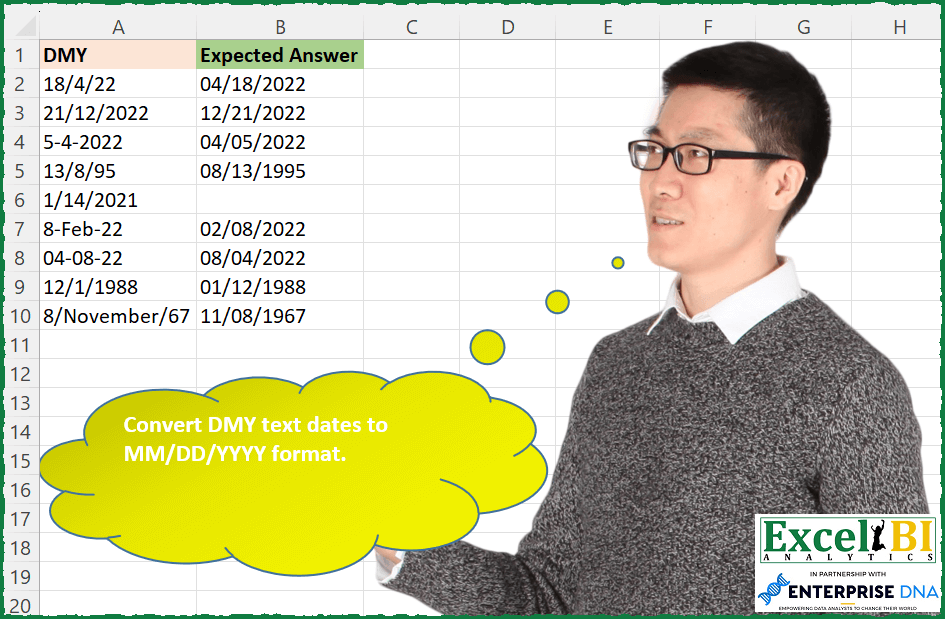
Convert DMY text dates to MM/DD/YYYY format.
📌 Challenge Details and Links
ExcelBI Excel Challenge Number: 181
Challenge Difficulty: ⭐️⭐️
📥Download Sample File
📥Link to the solutions on LinkedIn
Solving the challenge of Convert Dates to US Format with Power Query
Power Query solution 1 for Convert Dates to US Format, proposed by Bo Rydobon 🇹🇭:
let
  Source = Excel.CurrentWorkbook(){[Name = "Table1"]}[Content],
  MDY = Table.TransformRows(
    Source,
    each try Date.ToText(Date.From([DMY], "en-GB"), "MM/dd/yyyy") otherwise null
  )
in
  MDY
Power Query solution 2 for Convert Dates to US Format, proposed by Zoran Milokanović:
let
  Source = Excel.CurrentWorkbook(){[Name = "Input"]}[Content],
  Solution = Table.TransformRows(
    Source,
    each Date.ToText(
      try
        Date.FromText([DMY], [Format = "dd/M/yy"])
      otherwise
        try
          Date.FromText([DMY], [Format = "dd/M/yyyy"])
        otherwise
          try
            Date.FromText([DMY], [Format = "dd/M/yyyy"])
          otherwise
            try
              Date.FromText([DMY], [Format = "d-M-yyyy"])
            otherwise
              try
                Date.FromText([DMY], [Format = "d-MMM-yy", Culture = "en-US"])
              otherwise
                try
                  Date.FromText([DMY], [Format = "dd-MM-yy"])
                otherwise
                  try Date.FromText([DMY], [Format = "d/MMMM/yy", Culture = "en-US"]) otherwise null,
      [Format = "MM/dd/yyyy", Culture = "en-US"]
    )
  )
in
  Solution
Power Query solution 3 for Convert Dates to US Format, proposed by Aditya Kumar Darak 🇮🇳:
let
  Source = Excel.CurrentWorkbook(){[Name = "data"]}[Content],
  Return = Table.AddColumn(
    Source,
    "Answer",
    each try Date.ToText(Date.From([DMY], "en-in"), "MM/dd/yyyy") otherwise null
  )
in
  Return
Power Query solution 4 for Convert Dates to US Format, proposed by Alejandro Simón 🇵🇦 🇪🇸:
let
 Source = Excel.CurrentWorkbook(){[Name="Table1"]}[Content],
 Sol = Table.AddColumn(Source, "Answer", each try
let
a = _,
b = Splitter.SplitTextByAnyDelimiter({"/","-"})([DMY]),
c = List.Transform(b, each try Number.From(_) otherwise Date.Month(Date.From(Text.Start(_,3)&"/"&Text.From(2023)))),
d = hashtag#date(c{2}, c{1}, c{0})
in d otherwise null
)[[Answer]]
in
 Sol
Power Query solution 5 for Convert Dates to US Format, proposed by Luan Rodrigues:
let
  Fonte = Tabela1,
  res = Table.AddColumn(
    Fonte,
    "Personalizar",
    each try Date.ToText(Date.From([DMY]), "MM/dd/yyyy") otherwise null
  )
in
  res
Power Query solution 6 for Convert Dates to US Format, proposed by Guillermo Arroyo:
let
  Origen = Excel.CurrentWorkbook(){[Name = "Tabla1"]}[Content],
  a = Table.AddColumn(
    Origen,
    "Expected Answer",
    each Date.ToText(
      Date.FromText([DMY], [Culture = "es-ES"]),
      [Format = "MM/dd/yyyy", Culture = "us-US"]
    )
  ),
  b = Table.ReplaceErrorValues(a, {{"Expected Answer", null}})
in
  b
Power Query solution 7 for Convert Dates to US Format, proposed by Rushikesh K.:
let
  Source = Excel.CurrentWorkbook(){[Name = "Table1"]}[Content],
  #"Changed Type" = Table.TransformColumnTypes(Source, {{"DMY", type text}}),
  #"Parsed Date" = Table.TransformColumns(
    #"Changed Type",
    {{"DMY", each Date.From(DateTimeZone.From(_)), type date}}
  ),
  #"Split Column by Delimiter" = Table.SplitColumn(
    Table.TransformColumnTypes(#"Parsed Date", {{"DMY", type text}}, "en-IN"),
    "DMY",
    Splitter.SplitTextByDelimiter("-"),
    {"DMY.1", "DMY.2", "DMY.3"}
  ),
  #"Added Custom" = Table.AddColumn(
    #"Split Column by Delimiter",
    "Custom",
    each [DMY.2] & "-" & [DMY.1] & "-" & [DMY.3]
  ),
  #"Removed Columns" = Table.RemoveColumns(#"Added Custom", {"DMY.1", "DMY.2", "DMY.3"})
in
  #"Removed Columns"
Solving the challenge of Convert Dates to US Format with Excel
Excel solution 1 for Convert Dates to US Format, proposed by Bo Rydobon 🇹🇭:
=MAP(A2:A10,LAMBDA(z,LET(t,TEXTSPLIT(z,,{"/","-"}),TEXT(TAKE(t,1)&TEXT(INDEX(t,2)&-99,"mmm")&DROP(t,2),"mm/dd/e;;;"))))Excel solution 2 for Convert Dates to US Format, proposed by Bo Rydobon 🇹🇭:
=TEXT(A2:A10,"mm/dd/e;;;")

For US regional setting M/D/YY
=MAP(A2:A10,LAMBDA(z,LET(t,TEXTSPLIT(z,,{"/","-"}),TEXT(IFERROR(--INDEX(t,2)&-TAKE(t,1)&-DROP(t,2),z),"MM/DD/e;;;"))))
Excel solution 3 for Convert Dates to US Format, proposed by Rick Rothstein:
=MAP(A2:A10,LAMBDA(a,LET(t,TEXTSPLIT(a,{"/","-"}),d,INDEX(t,,1),m,INDEX(t,,2),y,INDEX(t,,3),mm,IF(ISNUMBER(0+m),m,XMATCH(m&"*",TEXT(28*SEQUENCE(12),"mmmm"),2)),IF(0+mm>12,"",DATE(IF(LEN(y)<3,19+(0+y<30)&y,y),mm,d)))))Excel solution 4 for Convert Dates to US Format, proposed by Rick Rothstein:
=IFERROR(MAP(A2:A10,LAMBDA(a,LET(s,SUBSTITUTE(a,"/","-"),t,TEXTSPLIT(s,"-"),IF(ISNUMBER(0+INDEX(t,,2)),0+TEXTJOIN("/",,INDEX(t,,{2,1,3})),0+s)))),"")Excel solution 5 for Convert Dates to US Format, proposed by John V.:
=TEXT(A2:A10,"mm/dd/yyy;;;")

In another configuration, including DMY too, could be:
✅ =MAP(A2:A10,LAMBDA(x,LET(d,TEXTSPLIT(x,{"/";"-"}),m,INDEX(d,2),IFERROR(TEXT(YEAR(x)&"-"&IFERROR(--m,MONTH(1&m))&"-"&INDEX(d,1),"mm/dd/yyy"),""))))
Excel solution 6 for Convert Dates to US Format, proposed by محمد حلمي:
=LET(
I,MAP(A2:A10,LAMBDA(A,LET(
E,TEXTSPLIT(A,{"/","-"})+0,
N,DROP(E,,2),
RIGHT(0&IFERROR(INDEX(E,,2),MONTH(A)),2)
&"/"&
RIGHT(0&TAKE(E,,1),2)
&"/"&
IF(LEN(N)=4,N,IF(N+0>50,19&N,20&N))))),
IF(LEFT(I,2)+0>12,"",I))
Excel solution 7 for Convert Dates to US Format, proposed by 🇰🇷 Taeyong Shin:
=MAP(A2:A10, LAMBDA(m, LET( s, TEXTSPLIT(m, {"/","-"}), IFERROR(TEXT(--IF(OR(s > "9999"), m, TEXTJOIN("-", , INDEX(s, {3,2,1}))), "mm/dd/e"), ""))))Excel solution 8 for Convert Dates to US Format, proposed by Kris Jaganah:
=IFERROR(TEXT(DATEVALUE(A2:A10),"MM/DD/YYYY"),"")Excel solution 9 for Convert Dates to US Format, proposed by Aditya Kumar Darak 🇮🇳:
=IFERROR(TEXT(--A2:A10, "mm/dd/e"), "")

For others very simple approach
1. Text To Columns --> Delimited --> No Delimiter --> Date DMY
2. Use =IFERROR(TEXT(--A2:A10, "mm/dd/e"), "")
Excel solution 10 for Convert Dates to US Format, proposed by Timothée BLIOT:
=LET(A, A2:A10, MM,VSTACK(TEXT(DATE(2000,SEQUENCE(12),1),"mmmm"),TEXT(DATE(2000,SEQUENCE(12),1),"mmm")),
B, MAP(A, LAMBDA(a, REDUCE(a,MM, LAMBDA(x,y, SUBSTITUTE(x,y, INDEX(VSTACK(SEQUENCE(12),SEQUENCE(12)),XMATCH(y,MM)) ))) )),
C, MAP(B, LAMBDA(a, LET(Y, TEXTAFTER(a,{"/","-"},2)*1,
YY,IF(LEN(Y)=2,IF(Y<50,20&Y,19&Y),Y)*1,
M, TEXTBEFORE(TEXTAFTER(a,{"/","-"}),{"/","-"})*1,
D, TEXTBEFORE(a,{"/","-"})*1, IF(M<=12,DATE(YY,M,D),"")) )), TEXT(C,"MM/DD/YYYY"))
Excel solution 11 for Convert Dates to US Format, proposed by Gerson Pineda:
=IFERROR(LET(d,A2:A10,f,"mm/dd/yyyy",IFERROR(TEXT(--d,f),TEXT(--(LEFT(d,5)&RIGHT(d,3)),f))),"")Excel solution 12 for Convert Dates to US Format, proposed by Guillermo Arroyo:
=MAP(A2:A10,LAMBDA(a,LET(b,TEXTSPLIT(a,{"/","-"}),IFERROR(TEXT(DATE(LET(y,INDEX(b,1,3),IF(--y<=23,2000+y,y)),MONTH(INDEX(b,1,2)&-1),INDEX(b,1,1)),"mm/dd/yyyy"),""))))Excel solution 13 for Convert Dates to US Format, proposed by Quadri Olayinka Atharu:
=TEXT(IFERROR(DATEVALUE(A2:A10),""),"MM/DD/YYYY")
=TEXT(IFERROR(A2:A10+0,""),"MM/DD/YYYY")
Excel solution 14 for Convert Dates to US Format, proposed by Gabriel Raigosa:
=IFERROR(TEXT(MAP(A2:A10,LAMBDA(x,LET(d,TEXTSPLIT(x,{"/","-"}),DATEVALUE(INDEX(d,1)&"/"&LEFT(INDEX(d,2),3)&"/"&INDEX(d,3))))),"mm/dd/yyyy"),"")

▶️ES:
 =SI.ERROR(TEXTO(MAP(A2:A10,LAMBDA(x,LET(d,DIVIDIRTEXTO(x,{"/","-"}),FECHANUMERO(INDICE(d,1)&"/"&IZQUIERDA(INDICE(d,2),3)&"/"&INDICE(d,3))))),"mm/dd/yyyy"),"")
Excel solution 15 for Convert Dates to US Format, proposed by Stevenson Yu:
=LET(
A, SUBSTITUTE(SUBSTITUTE(A2:A10,"/"," "),"-"," "),
B, DATEVALUE(TEXTBEFORE(TEXTAFTER(A," ")," ")&"/"&TEXTBEFORE(A," ")&"/"&TEXTAFTER(A," ",2)),
IFERROR(IFERROR(B,A+0),""))

Character count: 177

If I don't have to consider the date already in m/dd/yyyy format:

=LET(
A, SUBSTITUTE(A2:A10,"-","/"),
B, DATEVALUE(TEXTBEFORE(TEXTAFTER(A,"/"),"/")&"/"&TEXTBEFORE(A,"/")&"/"&TEXTAFTER(A,"/",2)),
IFERROR(B,A+0))
Excel solution 16 for Convert Dates to US Format, proposed by Rakesh Reezhwani (MBA):
=TEXT (IFERROR((DATE(year(SUBSTITUTE(C3,"-",”/"))), MONTH (SUBSTITUTE(C3,"-", " ") ), DAY (SUBSTITUTE(C3, "-", " /"))))., (DATE (VEAR(SUBSTITUTE(C3," .", "/") ), MONTH (SUBSTITUTE(C3," ", " /“),.
[C3,".",." /"))))),"dd-MMM-YYYY")
&&&