
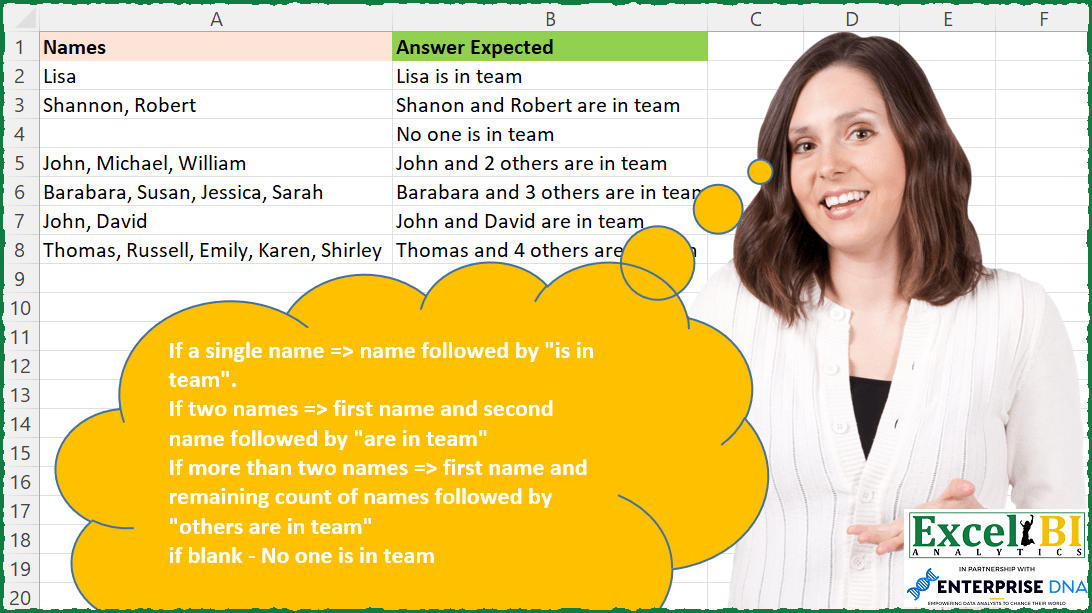
If a single name => name followed by “is in team”. If two names => first name and second name followed by “are in team” If more than two names => first name and remaining count of names followed by “others are in team” if blank => No one is in team
📌 Challenge Details and Links
ExcelBI Excel Challenge Number: 176
Challenge Difficulty: ⭐️
📥Download Sample File
📥Link to the solutions on LinkedIn
Solving the challenge of Name Team Statement with Power Query
Power Query solution 1 for Name Team Statement, proposed by Bo Rydobon 🇹🇭:
let
  Source = Excel.CurrentWorkbook(){[Name = "Table1"]}[Content],
  Ans = Table.TransformRows(
    Source,
    each
      let
        b = Text.Split([Names], ", "),
        c = List.Count(b),
        d = try
          b{0}
            & (
              if c = 1 then
                " is"
              else
                " and " & (if c > 2 then Text.From(c - 1) & " others" else b{1}) & " are"
            )
        otherwise
          "No one is"
      in
        d & " in team"
  )
in
  Ans
Power Query solution 2 for Name Team Statement, proposed by Zoran Milokanović:
let
  Source = Excel.CurrentWorkbook(){[Name = "Input"]}[Content],
  Solution = Table.TransformRows(
    Source,
    each
      let
        n = [Names],
        l = if n is null then {} else Text.Split(n, ", "),
        c = List.Count(l)
      in
        if c = 0 then
          "No one is in team"
        else if c = 1 then
          l{0} & " is in team"
        else if c = 2 then
          l{0} & " and " & l{1} & " are in team"
        else
          l{0} & " and " & Text.From(c - 1) & " others are in team"
  )
in
  Solution
Power Query solution 3 for Name Team Statement, proposed by Aditya Kumar Darak 🇮🇳:
let
  Source = Excel.CurrentWorkbook(){[Name = "data"]}[Content],
  Return = Table.AddColumn(
    Source,
    "Answer",
    each [
      S = Text.Split([Names], ", "),
      C = List.Count(S),
      R = (
        try

            if C = 1 then
              S{0} & " is"
            else if C = 2 then
              S{0} & " and " & S{1} & " are"
            else
              S{0} & " and " & Text.From(C - 1) & " others are"
        otherwise
          "No one is"
      )
        & " in team"
    ][R]
  )
in
  Return
Power Query solution 4 for Name Team Statement, proposed by Alejandro Simón 🇵🇦 🇪🇸:
let
  Source = Excel.CurrentWorkbook(){[Name = "Table1"]}[Content],
  Sol = Table.AddColumn(
    Source,
    "Answer",
    each
      let
        a = _,
        b = Text.Split(a[Names], ","),
        c = try List.Count(b) otherwise null,
        d = try

            if c = 1 then
              b{0} & " is in team"
            else if c = 2 then
              b{0} & " and " & b{1} & " are in team"
            else if c > 2 then
              b{0} & " and " & Text.From(c - 1) & " others are in team"
            else
              null
        otherwise
          "No one is in team"
      in
        d
  )[[Answer]]
in
  Sol
Power Query solution 5 for Name Team Statement, proposed by Luan Rodrigues:
let
  Fonte = Tabela1,
  list = {"is in team", "are in team", "others are in team", "No one is in team"},
  res = Table.AddColumn(
    Fonte,
    "Contagem",
    each [
      a = try List.Count(Text.Split([Names], ", ")) otherwise null,
      b = try

          if a = 1 then
            Text.Combine({[Names], list{0}}, " ")
          else if a = 2 then
            Text.Replace(Text.Combine({[Names], list{1}}, " "), ",", " and")
          else if a > 2 then
            Text.Combine(
              {List.First(Text.Split([Names], ", ")), " and", Text.From(a - 1), list{2}},
              " "
            )
          else
            null
      otherwise
        list{3}
    ][b]
  )
in
  res
Power Query solution 6 for Name Team Statement, proposed by Brian Julius:
let
  Source = Excel.CurrentWorkbook(){[Name = "Table1"]}[Content],
  AddAnswer = Table.AddColumn(
    Source,
    "Answer",
    each [
      a = Text.Split(Text.Trim([Names]), ","),
      a2 = List.Transform(a, each Text.Trim(_)),
      b = List.Count(a2),
      c = b - 1,
      d = a{0},
      e = Text.Trim(a{1}),
      f = try

          if b = 0 then
            "No one is in team"
          else if b = 1 then
            d & " is in team"
          else if b = 2 then
            d & " and " & e & " are in team"
          else if b >= 3 then
            d & " and " & Text.From(c) & " others are in team"
          else
            null
      otherwise
        null
    ][f]
  )
in
  AddAnswer
Power Query solution 7 for Name Team Statement, proposed by Guillermo Arroyo:
let
  Origen = Excel.CurrentWorkbook(){[Name = "Tabla1"]}[Content],
  a = Table.AddColumn(
    Origen,
    "Aux",
    each List.Count(List.Select(Text.ToList([Names]), each _ = ","))
  ),
  b = Table.AddColumn(
    a,
    "Answer Expected",
    each
      if [Names] = null then
        "No one is in team"
      else if [Aux] = 0 then
        [Names] & " is in team"
      else if [Aux] = 1 then
        Text.Replace([Names], ",", " and") & " are in team"
      else
        Text.BeforeDelimiter([Names], ",") & " and " & Text.From([Aux]) & " others are in team"
  ),
  c = Table.SelectColumns(b, {"Answer Expected"})
in
  c
Power Query solution 8 for Name Team Statement, proposed by Udit Chatterjee:
let
  Source = xlProblem176,
  cleanSource = Table.ReplaceValue(Source, null, "", Replacer.ReplaceValue, {"Names"}),
  addCustomColumn = Table.AddColumn(
    cleanSource,
    "Expected Sentence",
    each
      let
        names = [Names],
        namesList = Text.Split(names, ", "),
        namesCount = List.Count(namesList),
        conditionalResult =
          if namesCount = 1 and Text.Trim(namesList{0}) = "" then
            "No one is in team"
          else if namesCount = 1 then
            Text.Trim(namesList{0}) & " is in team"
          else if namesCount = 2 then
            Text.Trim(namesList{0}) & " and " & Text.Trim(namesList{1}) & " are in team"
          else if namesCount > 2 then
            Text.Trim(namesList{0})
              & " and "
              & Number.ToText(namesCount - 1)
              & " others are in team"
          else
            ""
      in
        conditionalResult,
    type text
  ),
  keepRequiredCol = Table.SelectColumns(addCustomColumn, {"Expected Sentence"})
in
  keepRequiredCol
Solving the challenge of Name Team Statement with Excel
Excel solution 1 for Name Team Statement, proposed by Bo Rydobon 🇹🇭:
=MAP(A2:A8,LAMBDA(a,LET(b,TEXTSPLIT(a,,", "),c,ROWS(b),IF(a="","No one is",TAKE(b,1)&IF(c=1," is"," and "&IF(c>2,c-1&" others",DROP(b,1))&" are"))&" in team")))Excel solution 2 for Name Team Statement, proposed by Bo Rydobon 🇹🇭:
=LET(a,A2:A8,c,LEN(a)-LEN(SUBSTITUTE(a,",",)),IF(c,TEXTBEFORE(a,",")&" and "&IF(c>1,c&" others",TEXTAFTER(a," "))&" are",IF(a="","No one",a)&" is")&" in team")Excel solution 3 for Name Team Statement, proposed by Rick Rothstein:
=LET(t," in team",a,A2:A8,c,LEN(a),n,(c>0)+(c-LEN(SUBSTITUTE(a,",",""))),IF(n=0,"No one is"&t,IF(n=1,a&" is"&t,IF(n=2,SUBSTITUTE(a,","," and")&" are"&t,LEFT(a,FIND(",",a)-1)&" and "&n-1&" others are"&t))))Excel solution 4 for Name Team Statement, proposed by John V.:
=LET(n,A2:A8,s,",",c,LEN(n)-LEN(SUBSTITUTE(n,s,))+(n>0),p,TEXTBEFORE(n&s,s,1+(c=2)),SUBSTITUTE(IF(c,p,"No one")&REPT(", "&c-1&" others",c>2)&IF(c<2," is"," are")&" in team",s," and"))Excel solution 5 for Name Team Statement, proposed by محمد حلمي:
=MAP(A2:A8,LAMBDA(a,LET(
v,TEXTSPLIT(a,,", "),
r,ROWS(v),
e," in team",
l,TAKE(v,1),
u," are"&e,
n," and ",
IF(a="","No one"&e,
IFS(r=1,v&" is"&e,
r=2,l&n&DROP(v,1)&u,
r>2,l&n&r-1&" others" &u)))))
Excel solution 6 for Name Team Statement, proposed by Kris Jaganah:
=LET(a,A2:A8,b,LEN(a)-LEN(SUBSTITUTE(a,",","")),c,IF(a="",0,b+1),d,TEXTBEFORE(a,",",,,,a),e,TEXTAFTER(a,", ",,,,IF(c=1,"is","No one is")),IF(c=1,d&" "&e,IF(c=2,d&" and "&e&" are",IF(c>2,d&" and "&b&" others are",e)))&" in team")Excel solution 7 for Name Team Statement, proposed by Julian Poeltl:
=MAP(A2:A8,LAMBDA(N,LET(L,LEN(N)-LEN(SUBSTITUTE(N,",","")),S,SWITCH(L,0,1,1,2,3),IF(N="","No one is",CHOOSE(S,N&" is",SUBSTITUTE(N,","," and")&" are",TEXTBEFORE(N,",")&" and "&L &" others are"))&" in team")))Excel solution 8 for Name Team Statement, proposed by Aditya Kumar Darak 🇮🇳:
=MAP(
 A2:A8,
 LAMBDA(a,
 LET(
 s, TEXTSPLIT(a, , ", "),
 c, IFERROR(ROWS(s), 0),
 r, SWITCH(
 c,
 0, "No one is",
 1, s & " is",
 2, TEXTJOIN(" and ", 1, s) & " are",
 TAKE(s, 1) & " and " & c - 1 & " others are"
 ) & " in team",
 r
 )
 )
)
Excel solution 9 for Name Team Statement, proposed by Timothée BLIOT:
=MAP(A2:A8,LAMBDA(a,SWITCH(IF(a<>"",COUNTA(TEXTSPLIT(a,", ")),0), 0,"No one is", 1,a&" is", 2,TEXTBEFORE(a,",")&" and"&TEXTAFTER(a,",")&" are", TEXTBEFORE(a,",")&" and "&COUNTA(TEXTSPLIT(a,", "))-1&" others are")))Excel solution 10 for Name Team Statement, proposed by Hussein SATOUR:
=MAP(A2:A8, LAMBDA(x, IFERROR(LET(a,TEXTSPLIT(x,", "),b,COUNTA(a),SWITCH(b,1,a&" is",2,CHOOSECOLS(a,1)&" and "&CHOOSECOLS(a,2)&" are",TAKE(a,,1)&" and "&b-1&" others are")),"No one is") &" in team"))Excel solution 11 for Name Team Statement, proposed by Sunny Baggu:
=LET(_tbl,{0,"No one is in team";1," is in team";2," are in team";3," others are in team"},
_rno,MAP(A2:A8,LAMBDA(a,IFERROR(ROWS(TEXTSPLIT(a,,", ")),0))),
_rnodetails,XLOOKUP(_rno,TAKE(_tbl,,1),TAKE(_tbl,,-1),,-1),
_names,MAP(A2:A8,_rno,LAMBDA(a,b,IFS(b=0,"",
b=1,a,
b=2,TEXTJOIN(" and ",TRUE,TEXTSPLIT(a,,", ")),b>=3," "&TEXTBEFORE(a,", ")& " and "&(b-1)))),TRIM(_names&_rnodetails))
Excel solution 12 for Name Team Statement, proposed by LEONARD OCHEA 🇷🇴:
=MAP(A2:A8,LAMBDA(a,LET(mn,TEXTSPLIT(a,", "),n,(a<>"")*COUNTA(mn),IF(n=1,a&" is",IF(n=2,SUBSTITUTE(a,", "," and ")&" are",IF(n>2,TAKE(mn,,1)&" and "&n-1&" others are","No one is")))&" in team")))Excel solution 13 for Name Team Statement, proposed by Md. Zohurul Islam:
=LET(u,A2:A8,sq,SEQUENCE(4,,0),
st,VSTACK("No one is in team","is in team","are in team","others are in team"),
n,MAP(u,LAMBDA(x,LET(a,TEXTSPLIT(x,", "),IF(x="",0,COUNTA(a))))),
m,XLOOKUP(n,sq,st,,-1),
w,MAP(u,m,LAMBDA(x,y,LET(a,TEXTSPLIT(x,", "),b,COUNTA(a),IFS(b=1,a&" "&y,b=2,TAKE(a,,1) &" and "&TAKE(a,,-1) &" "&y,
TRUE,TAKE(a,,1) & " and "&b-1&" "&y)))),
z,IFERROR(w,"No one is in team"),
z)
Excel solution 14 for Name Team Statement, proposed by Tolga Demirci, PMP, PMI-ACP, MOS-Expert:
=MAP(A2:A8;LAMBDA(x;LET(w;TEXTSPLIT(x;", ");q;COUNTA(TEXTSPLIT(x;", "));IFS(AND(x<>"";q=1);x&" is in the team";q=2;TAKE(w;;1)&" and "&TAKE(w;;-1)&" are in the team";q>2;TAKE(w;;1) & " and " & q-1 & " others are in the team";x="";"No one is in team"))))Excel solution 15 for Name Team Statement, proposed by Stefan Olsson:
=ArrayFormula(
LET(
n, A2:A8,
nc, LEN(REGEXREPLACE(n, "[^,]", "")),
IFS(
n="", "No one is",
nc=0, n&" is",
nc, REGEXREPLACE(n, "(^w+), (.*)", "$1 and " & IF(nc=1, "$2", nc & " others") & " are")
)&" in team"))
Excel solution 16 for Name Team Statement, proposed by Guillermo Arroyo:
=LET(m;A2:A8;l;LEN(m)-LEN(SUBSTITUTE(m;",";""));IFS(m="";"No one is";l=0;m&" is";l=1;SUBSTITUTE(m;",";" and")&" are";l>=2;TEXTBEFORE(m;",")&" and "&l&" others are"))Excel solution 17 for Name Team Statement, proposed by Daniel Garzia:
=MAP(A2:A8;LAMBDA(a;LET(_l;LEN(a);_c;_l-LEN(SUBSTITUTE(a;" ";""));
IFS(_l=0;"No one is in team";_c=0;a&" is in team";_c=1;SUBSTITUTE(a;", ";" and ")&" are in team";_c>1;TEXTBEFORE(a;", ")&" and "&_c&" others are in team"))))
Excel solution 18 for Name Team Statement, proposed by Miguel Angel Franco García:
=LET(a;DIVIDIRTEXTO(A2;",");SI(A2="";" Nadie está en el equipo";SI(CONTARA(a)=1; A2&" está en equipo";SI(CONTARA(a)=2;INDICE(a;; 1)&" y "&INDICE(a;; 2)&" están en equipo";SI(CONTARA(a)>2;INDICE(a;; 1)&" y "&CONTARA(a)-1&" otros están en equipo")))))Excel solution 19 for Name Team Statement, proposed by Hussain Ali Nasser:
=MAP($A$2:$A$8, LAMBDA(_range, LET( _cellblank,ISBLANK(_range), _numpeople,COUNTA(TEXTSPLIT(_range,",",,0)), _peoplenames,TEXTSPLIT(_range,",",,0), _numcommas,_numpeople-1, _locationcomma,IFERROR(SEARCH(",",_range),0), IF( _cellblank=FALSE, TRIM( SWITCH(TRUE, _numpeople>2,LEFT(_range,_locationcomma-1)&" and "&_numcommas&" others are in team", _numpeople=2,TEXTJOIN(" and ",,_peoplenames)&" are in team", _numpeople=1,_range&" is in team","" )), "No one is in team" ))) )Excel solution 20 for Name Team Statement, proposed by Rushikesh K.:
=IF(ISBLANK(A9),"No one is in Team",IF((LEN(A9) - LEN(SU&BSTITUTE(A9,",","")) +1)=1,A9 &" is in team", IF((LEN(A9) - LEN(SUBSTITUTE(A9,",","")) + 1)=2,LEFT(A9,SEARCH(",",A9)-1) & " and " & RIGHT(A9,SEARCH(",",A9)-1) & " are in team", IF((LEN(A9) - LEN(SUBSTITUTE(A9,",","")) +1)>2,LEFT(A9,SEARCH(",",A9)-1) & " and " & LEN(A9) - LEN(SUBSTITUTE(A9,",","")) & " others are in team", )) ))Excel solution 21 for Name Team Statement, proposed by Emad Falahnezhad:
=IF(LEN(TRIM(A1))-LEN(SUBSTITUTE(A1;" ";""))+1>2;LEFT(A1;SEARCH(" ";A1;1)-2)&" and "&LEN(TRIM(A1))-LEN(SUBSTITUTE(A1;" ";""))&" other are in team";
IF(LEN(TRIM(A1))-LEN(SUBSTITUTE(A1;" ";""))+1=2;LEFT(A1;SEARCH(",";A1)-1)&" and "&MID(A1;SEARCH(" ";A1;1)+1;LEN(A1)-SEARCH(" ";A1;1)+1)&" are in team";IF(LEN(A1)>0;A1&" is in team";"no one in team")))
&&