
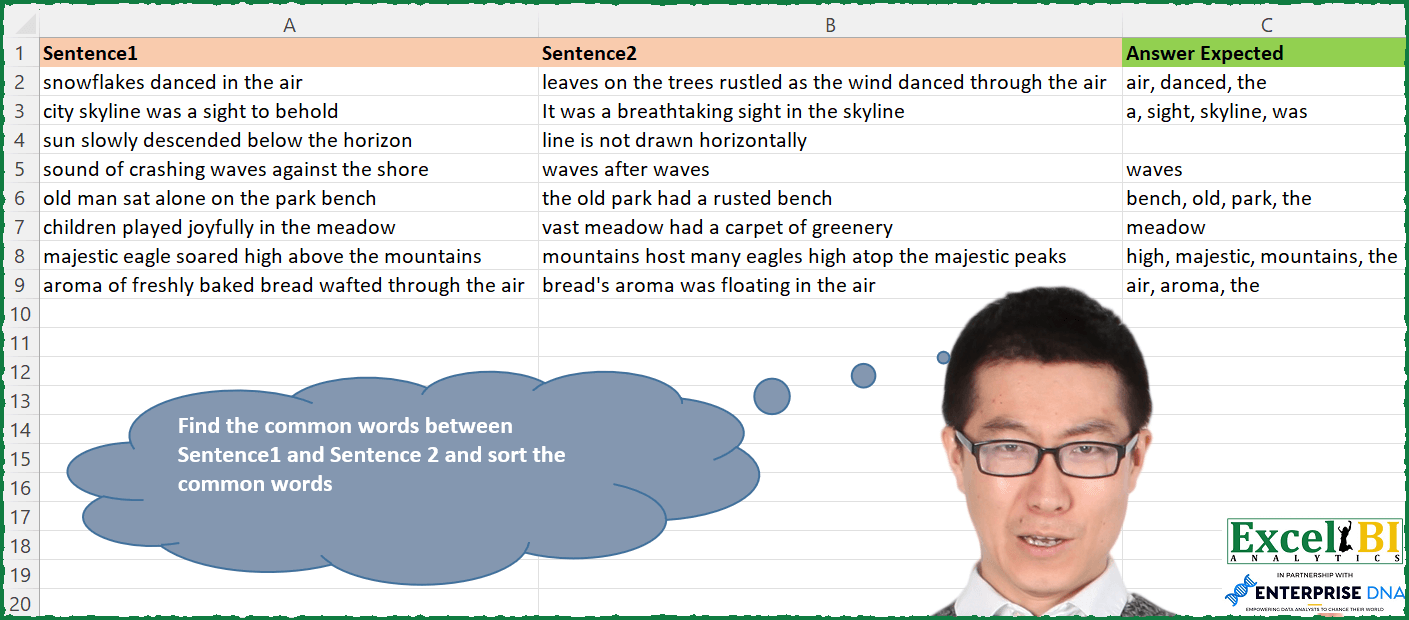
Find the common words between Sentence1 and Sentence 2 and sort the common words
📌 Challenge Details and Links
ExcelBI Excel Challenge Number: 175
Challenge Difficulty: ⭐️
📥Download Sample File
📥Link to the solutions on LinkedIn
Solving the challenge of Common Words Between Sentences with Power Query
Power Query solution 1 for Common Words Between Sentences, proposed by Bo Rydobon 🇹🇭:
let
  Source = Excel.CurrentWorkbook(){[Name = "Table_Table1"]}[Content],
  Ans = List.Transform(
    Table.ToRows(Source),
    each Text.Combine(List.Sort(List.Intersect(List.Transform(_, each Text.Split(_, " ")))), ", ")
  )
in
  Ans
Power Query solution 2 for Common Words Between Sentences, proposed by Zoran Milokanović:
let
  S = Table.TransformRows(
    Excel.CurrentWorkbook(){[Name = "Input"]}[Content],
    each Text.Combine(
      List.Sort(List.Intersect({Text.Split([Sentence1], " "), Text.Split([Sentence2], " ")})),
      ", "
    )
  )
in
  S
Power Query solution 3 for Common Words Between Sentences, proposed by Aditya Kumar Darak 🇮🇳:
let
  Source = Excel.CurrentWorkbook(){[Name = "data"]}[Content],
  Return = Table.AddColumn(
    Source,
    "Common",
    each [
      S1 = Text.Split([Sentence1], " "),
      S2 = Text.Split([Sentence2], " "),
      C  = List.Intersect({S1, S2}),
      S  = List.Sort(C),
      R  = Text.Combine(S, ", ")
    ][R]
  )
in
  Return
Power Query solution 4 for Common Words Between Sentences, proposed by Alejandro Simón 🇵🇦 🇪🇸:
let
  Source = Excel.CurrentWorkbook(){[Name = "Table1"]}[Content],
  Sol = Table.AddColumn(
    Source,
    "Answer",
    each
      let
        a = Record.ToList(_),
        b = List.Transform(a, each Text.Split(_, " "))
      in
        Text.Combine(List.Sort(List.Intersect({b{0}, b{1}})), ", ")
  )[[Answer]]
in
  Sol
Power Query solution 5 for Common Words Between Sentences, proposed by Luan Rodrigues:
let
  Fonte = Tabela1,
  res = Table.AddColumn(
    Fonte,
    "Personalizar",
    each [
      a = Text.Split([Sentence1], " "),
      b = Text.Split([Sentence2], " "),
      c = Text.Combine(List.Sort(List.Intersect({a, b})), ", ")
    ][c]
  )
in
  res
Power Query solution 6 for Common Words Between Sentences, proposed by Brian Julius:
let
  Source = Excel.CurrentWorkbook(){[Name = "Table1"]}[Content],
  AddAnswer = Table.AddColumn(
    Source,
    "Answer",
    each [
      a = Text.Split([Sentence1], " "),
      b = Text.Split([Sentence2], " "),
      c = List.Intersect({a, b}),
      d = List.Sort(c),
      e = Text.Combine(d, ", ")
    ][e]
  )
in
  AddAnswer
Power Query solution 7 for Common Words Between Sentences, proposed by Venkata Rajesh:
Create a custom column with below login
[_s2 = [Sentence2],
_Result = Text.Combine(List.Sort(List.Select(Text.Split([Sentence1], " "), each List.Contains(Text.Split(_s2 ," "), _))), ", ")][_Result]
Power Query solution 8 for Common Words Between Sentences, proposed by Guillermo Arroyo:
let
  Origen = Excel.CurrentWorkbook(){[Name = "Tabla1"]}[Content],
  a = List.Zip(
    {
      List.Transform(Origen[Sentence1], each Text.Split(_, " ")),
      List.Transform(Origen[Sentence2], each Text.Split(_, " "))
    }
  ),
  b = List.Transform(a, each Text.Combine(List.Sort(List.Intersect({_{0}, _{1}})), ", "))
in
  b
Power Query solution 9 for Common Words Between Sentences, proposed by Udit Chatterjee:
let
  fxCommonWords = (sentenceA as text, sentenceB as text) =>
    let
      listA       = Text.Split(Text.Lower(sentenceA), " "),
      listB       = Text.Split(Text.Lower(sentenceB), " "),
      commonItems = List.Sort(List.Intersect({listA, listB})),
      commonWords = Text.Combine(commonItems, ", ")
    in
      commonWords,
  Source = xlProblem175,
  addFunctionCol = Table.AddColumn(
    Source,
    "Common Words",
    each fxCommonWords([Sentence1], [Sentence2]),
    type text
  ),
  keepRequiredCol = Table.SelectColumns(addFunctionCol, {"Common Words"})
in
  keepRequiredCol
Solving the challenge of Common Words Between Sentences with Excel
Excel solution 1 for Common Words Between Sentences, proposed by Bo Rydobon 🇹🇭:
=MAP(A2:A9,B2:B9,LAMBDA(a,b,LET(c,TEXTSPLIT(a," "),TEXTJOIN(", ",,SORT(UNIQUE(XLOOKUP(TEXTSPLIT(b,," "),c,c,"")))))))Excel solution 2 for Common Words Between Sentences, proposed by Rick Rothstein:
=IFERROR(MAP(MAP(A2:A9,B2:B9,LAMBDA(a,b,TRIM(REDUCE("",TEXTSPLIT(a," "),LAMBDA(a,x,a&" "&IF(ISNUMBER(SEARCH(" "&x&" "," "&b&" ")),x,"")))))),LAMBDA(w,TEXTJOIN(", ",,SORT(TEXTSPLIT(w," "),,,1)))),"")Excel solution 3 for Common Words Between Sentences, proposed by Rick Rothstein:
=MAP(A2:A9,B2:B9,LAMBDA(a,b,LET(t,TEXTSPLIT(a," "),TEXTJOIN(", ",,SORT(UNIQUE(TOCOL(IF(t=TEXTSPLIT(b,," "),t,""))))))))Excel solution 4 for Common Words Between Sentences, proposed by John V.:
=MAP(A2:A9,B2:B9,LAMBDA(a,b,LET(s,TEXTSPLIT(a," "),TEXTJOIN(", ",,SORT(UNIQUE(TOCOL(REPT(s,s=TEXTSPLIT(b,," ")))))))))Excel solution 5 for Common Words Between Sentences, proposed by Kris Jaganah:
=MAP(A2:A9,B2:B9,LAMBDA(x,y,LET(a,TEXTSPLIT(y,," "),TEXTJOIN(", ",1,SORT(XLOOKUP(TEXTSPLIT(x,," "),a,a,""))))))Excel solution 6 for Common Words Between Sentences, proposed by Aditya Kumar Darak 🇮🇳:
=MAP(
 A2:A9,
 B2:B9,
 LAMBDA(a, b,
 LET(
 s, TEXTSPLIT(b, , " "),
 f, FILTER(s, ISNUMBER(FIND(s, a)), ""),
 u, SORT(UNIQUE(f)),
 r, ARRAYTOTEXT(u),
 r
 )
 )
)
Excel solution 7 for Common Words Between Sentences, proposed by Timothée BLIOT:
=LET(A,A2:A9, B,B2:B9,
MAP(SEQUENCE(ROWS(A)), LAMBDA(n, ARRAYTOTEXT( SORT(LET(Z, MAP(TEXTSPLIT(INDEX(A,n)," "), LAMBDA(x, IF(ISNUMBER(XMATCH(x,TEXTSPLIT(INDEX(B,n)," "))),x,"") )), FILTER(Z, Z<>"","") ),,1,1) )) ) )
Excel solution 8 for Common Words Between Sentences, proposed by Hussein SATOUR:
=IFERROR(MAP(A2:A9,B2:B9, LAMBDA(x,y, LET(a, TEXTSPLIT(x,," "), TEXTJOIN(", ",,SORT(FILTER(a, NOT(ISNA(XMATCH(a, TEXTSPLIT(y, " ")))))))))),"")Excel solution 9 for Common Words Between Sentences, proposed by Oscar Mendez Roca Farell:
=MAP(A2:A9, B2:B9, LAMBDA(a, b, LET(_s, TEXTSPLIT(a," ", ,1), TEXTJOIN(", ", 1, ORDER( FILTER(_s, IFERROR( SEARCH("* "&_s&" *", " "&b&" "), ), ""), , ,1)))))Excel solution 10 for Common Words Between Sentences, proposed by Sunny Baggu:
=MAP(A2:A9,B2:B9,LAMBDA(a,b,LET(_s1,TEXTSPLIT(a,," "),
_s2,TEXTSPLIT(b,," "),TEXTJOIN(", ",,XLOOKUP(SORT(_s1),_s2,_s2,"")))))
Excel solution 11 for Common Words Between Sentences, proposed by LEONARD OCHEA 🇷🇴:
=MAP(A2:A9,B2:B9,LAMBDA(s_1,s_2,LET(set_1,TEXTSPLIT(s_1," "),TEXTJOIN(",",1,SORT(IF(BYCOL(set_1=TOCOL(TEXTSPLIT(s_2," ")),LAMBDA(w,OR(w))),set_1,""),,,1)))))Excel solution 12 for Common Words Between Sentences, proposed by Md. Zohurul Islam:
=MAP(A2:A9,B2:B9,LAMBDA(x,y,LET(a,TEXTSPLIT(x,," "),b,TEXTSPLIT(y,," "),ARRAYTOTEXT(SORT(FILTER(a,ISNUMBER(XMATCH(a,b)),""))))))Excel solution 13 for Common Words Between Sentences, proposed by Charles Roldan:
=BYROW(SUBSTITUTE(A2:B9, " ", ", "), LAMBDA(x,
LET(f, LAMBDA(t, UNIQUE(TEXTSPLIT(t, , ", "))),
REDUCE(, x, LAMBDA(a, b, ARRAYTOTEXT(SORT(
FILTER(f(a), ISNUMBER(XMATCH(f(a), f(b))), ""))))))))
Excel solution 14 for Common Words Between Sentences, proposed by Tolga Demirci, PMP, PMI-ACP, MOS-Expert:
=MAP(A2:A9;B2:B9;LAMBDA(p;q;TEXTJOIN("; ";;LET(o;TOCOL(TEXTSPLIT(q;" "));i;IFERROR(INDEX(o;XMATCH(TOCOL(TEXTSPLIT(p;" "));o;0));"");SORT(FILTER(i;i<>"");;1;)))))Excel solution 15 for Common Words Between Sentences, proposed by Stefan Olsson:
=MAP(A2:A9, B2:B9,
LAMBDA(words, sentence,
TEXTJOIN(", ", 1,
BYROW(SORT(TRANSPOSE(SPLIT(words, " ", 1, 1)), 1, 1),
LAMBDA(word,
IFERROR(REGEXEXTRACT(sentence, "b"&word&"b"), )
)))))
Excel solution 16 for Common Words Between Sentences, proposed by Guillermo Arroyo:
=MAP(A2:A9;B2:B9;LAMBDA(a;b;LET(f;TEXTSPLIT(a;;" ");TEXTJOIN(", ";;UNIQUE(XLOOKUP(SORT(TEXTSPLIT(b;;" "));f;f;""))))))Excel solution 17 for Common Words Between Sentences, proposed by Daniel Garzia:
=MAP(A2:A9;B2:B9;LAMBDA(a;b;LET(_s1;TEXTSPLIT(a;;" ");_s2;TEXTSPLIT(b;;" ");
IFERROR(TEXTJOIN(", ";;SORT(FILTER(_s1;ISNUMBER(XMATCH(_s1;_s2)))));""))))
Excel solution 18 for Common Words Between Sentences, proposed by Mohamed Helmy:
=MAP(A2:A9,B2:B9,LAMBDA(A,B,LET(
c,TEXTSPLIT(A,," "),
ARRAYTOTEXT( SORT(UNIQUE( FILTER(c,ISNUMBER(
XMATCH(c,TEXTSPLIT(B,," "))),"")))))))
Excel solution 19 for Common Words Between Sentences, proposed by Rayan S.:
=MAP(
 A2:A9,
 B2:B9,
 LAMBDA(x, y,
 LET(
 a, SORT(TEXTSPLIT(x, , " ")),
 b, SORT(TEXTSPLIT(y, , " ")),
 TEXTJOIN(", ", , IFERROR(IF(XMATCH(a, b, 0) > 0, a), ""))
 )
 )
)
Excel solution 20 for Common Words Between Sentences, proposed by Miguel Angel Franco García:
=UNIRCADENAS(","; VERDADERO;SI. ERROR(BUSCARX(ORDENAR(ENCOL(DIVIDIRTEXTO(A2;" ")));ORDENAR(ENCOL(DIVIDIRTEXTO(B2;" ")));ORDENAR(ENCOL(DIVIDIRTEXTO(B2;" "))));""))Excel solution 21 for Common Words Between Sentences, proposed by Hussain Ali Nasser:
=MAP(A2:A9,B2:B9,LAMBDA(_sen1,_sen2,LET(_split1,UNIQUE(TEXTSPLIT(_sen1," ")),_split2,UNIQUE(TEXTSPLIT(_sen2," ")),_lookup,XLOOKUP(_split1,_split2,_split2),_filteredlookup,FILTER(_lookup,ISNA(_lookup)=FALSE),IFERROR(TEXTJOIN(", ",TRUE,SORT(_filteredlookup,1,1,1)),""))))&&&