
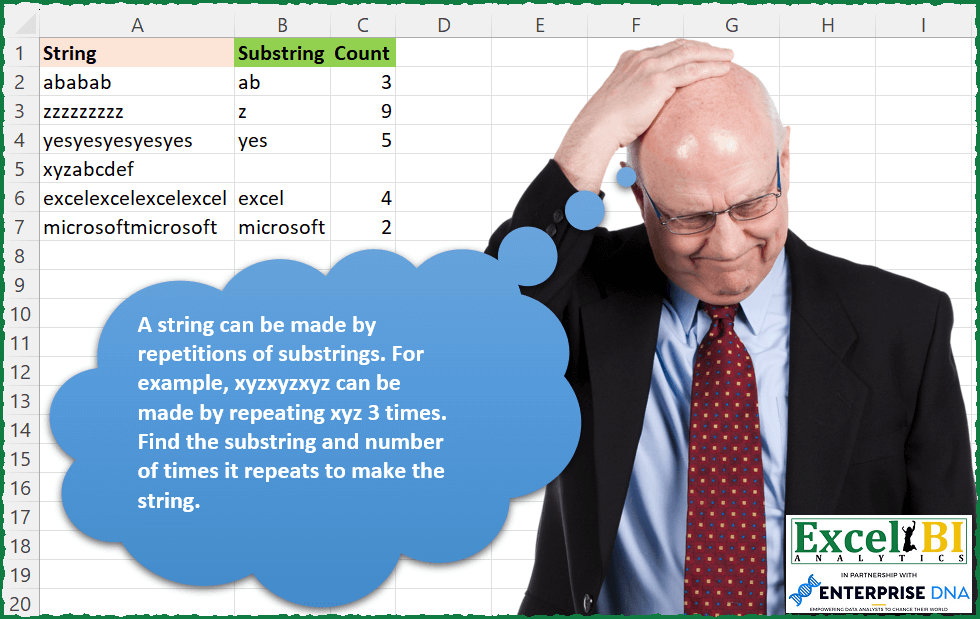
A string can be made by repetitions of substrings. For example, xyzxyzxyz can be made by repeating xyz 3 times. Find the substring and number of times it repeats to make the string.
📌 Challenge Details and Links
ExcelBI Excel Challenge Number: 171
Challenge Difficulty: ⭐️
📥Download Sample File
📥Link to the solutions on LinkedIn
Solving the challenge of Substring Repeat Detection with Power Query
Power Query solution 1 for Substring Repeat Detection, proposed by Bo Rydobon 🇹🇭:
let
  Source = Excel.CurrentWorkbook(){[Name = "Table1"]}[Content],
  Res = Table.FromRows(
    Table.TransformRows(
      Source,
      each
        let
          m = 1
            + List.PositionOf(
              List.Transform(
                {1 .. Text.Length([String])},
                (n) => Text.Replace([String], Text.Start([String], n), "")
              ),
              ""
            ),
          l = Text.Length([String]) / m
        in
          if l > 1 then {Text.Start([String], m), l} else {null, null}
    ),
    {"Substring", "Count"}
  )
in
  Res
Power Query solution 2 for Substring Repeat Detection, proposed by Zoran Milokanović:
let
  Source = Excel.CurrentWorkbook(){[Name = "Input"]}[Content],
  AddedCalculation = Table.AddColumn(
    Source,
    "Calculation",
    each
      let
        c = Text.ToList([String])
      in
        List.Accumulate(
          List.Positions(c),
          [Substring = "", Count = ""],
          (s, d) =>
            let
              w = List.Transform(List.Split(c, d + 1), each Text.Combine(_))
            in
              if List.Count(List.Distinct(w)) = 1 and List.Count(w) > 1 and s[Count] = "" then
                [Substring = w{0}, Count = List.Count(w)]
              else
                s
        )
  ),
  Solution = Table.FromRecords(AddedCalculation[Calculation])
in
  Solution
Power Query solution 3 for Substring Repeat Detection, proposed by 🇰🇷 Taeyong Shin:
let
  Source = Excel.CurrentWorkbook(){[Name = "tblData"]}[Content],
  AddRecd = Table.AddColumn(
    Source,
    "Record",
    each [
      str = [String],
      n = List.Generate(() => 1, each Text.Replace(str, Text.Start(str, _), "") <> "", each _ + 1),
      max = List.Max(n) + 1 ?? 1,
      Div = Text.Length(str) / max,
      Sub = Text.Start(str, max),
      Recd = if Div = 1 then [Substring = null, Count = null] else [Substring = Sub, Count = Div]
    ][Recd],
    type [Substring = text, Count = number]
  ),
  ExpandRecd = Table.ExpandRecordColumn(AddRecd, "Record", Record.FieldNames(AddRecd{0}[Record]))[
    [Substring],
    [Count]
  ]
in
  ExpandRecd
Power Query solution 4 for Substring Repeat Detection, proposed by Aditya Kumar Darak 🇮🇳:
let
  Source = Excel.CurrentWorkbook(){[Name = "data"]}[Content],
  Calculate = Table.AddColumn(
    Source,
    "Record",
    each [
      T = [String],
      L = Text.Length(T),
      G = {1 .. L},
      C = List.Transform(
        G,
        (f) =>
          [
            R   = Text.Range(T, 0, f),
            Rpt = L / f,
            Int = Number.IntegerDivide(Rpt, 1),
            TF  = Text.Repeat(R, Int) = T,
            O   = [Sub = R, Count = Int, TF = TF]
          ][O]
      ),
      F = List.First(List.Select(C, (f) => f[TF] and f[Count] <> 1))
    ][F]
  ),
  Return = Table.ExpandRecordColumn(Calculate, "Record", {"Sub", "Count"})
in
  Return
Power Query solution 5 for Substring Repeat Detection, proposed by Alejandro Simón 🇵🇦 🇪🇸:
let
  Source = Excel.CurrentWorkbook(){[Name = "Table1"]}[Content],
  Calculo = Table.AddColumn(
    Source,
    "Custom",
    each [
      a = Text.ToList([String]),
      b = List.Transform(
        {1 .. List.Count(a)},
        (x) => List.Transform(List.Split(a, x), (y) => Text.Combine(y, ""))
      ),
      c = List.Transform(b, each List.Distinct(_)),
      d = List.Select(c, each List.Count(_) = 1){0},
      Substring = if List.Count(a) <> Text.Length(d{0}) then d{0} else null,
      Count = List.Count(a) / Text.Length(Substring)
    ][[Substring], [Count]]
  ),
  Sol = Table.ExpandRecordColumn(Calculo, "Custom", {"Substring", "Count"})[[Substring], [Count]]
in
  Sol
Power Query solution 6 for Substring Repeat Detection, proposed by Alexis Olson:
let
  Source = Excel.CurrentWorkbook(){[Name = "data"]}[Content],
  #"Added Custom" = Table.AddColumn(
    Source,
    "Custom",
    each
      let
        len = Text.Length([String]),
        lst = Text.ToList([String]),
        divisors = List.Select({1 .. Number.RoundDown(len / 2)}, each Number.Mod(len, _) = 0),
        partitions = List.Transform(divisors, each List.Split(lst, _)),
        filter = List.First(List.Select(partitions, each List.Union(_) = List.First(_))),
        result =
          if filter = null then
            null
          else
            [Substring = Text.Combine(List.First(filter)), Count = List.Count(filter)]
      in
        result
  ),
  #"Expanded Custom" = Table.ExpandRecordColumn(
    #"Added Custom",
    "Custom",
    {"Substring", "Count"},
    {"Substring", "Count"}
  )
in
  #"Expanded Custom"
Power Query solution 7 for Substring Repeat Detection, proposed by Victor Wang:
let
  Source = Excel.CurrentWorkbook(){[Name = "Table1"]}[Content],
  getSubstring = Table.AddColumn(
    Source,
    "Substring",
    each [
      str = [String],
      letters = Text.ToList(str),
      delim = List.Transform(
        {1 .. List.Count(letters)},
        each List.RemoveItems(Text.Split(str, Text.Range(str, 0, _)), {""})
      ),
      pos = List.PositionOf(List.Transform(delim, List.Count), 0) + 1,
      sub = if pos = Text.Length(str) then null else Text.Range(str, 0, pos)
    ][sub]
  ),
  getCount = Table.AddColumn(
    getSubstring,
    "Count",
    each if [Substring] = null then null else List.Count(Text.Split([String], [Substring])) - 1
  )
in
  getCount
Power Query solution 8 for Substring Repeat Detection, proposed by Guillermo Arroyo:
let
  Origen = Excel.CurrentWorkbook(){[Name = "Tabla1"]}[Content],
  a = Table.AddColumn(
    Origen,
    "Elements",
    each
      let
        l = Text.Length([String]),
        m = (n as number) as any =>
          if n = l then
            null
          else
            let
              o = Text.ToList(Text.Range([String], 0, n)),
              p = Text.Remove([String], o)
            in
              if p = "" then n else @m(n + 1)
      in
        m(0)
  ),
  b = Table.AddColumn(
    a,
    "Substring",
    each if [Elements] = null then null else Text.Middle([String], 0, [Elements])
  ),
  c = Table.AddColumn(b, "Count", each Text.Length([String]) / [Elements]),
  d = Table.SelectColumns(c, {"Substring", "Count"})
in
  d
Power Query solution 9 for Substring Repeat Detection, proposed by Challa Sai Kumar Reddy:
let
  Source = Excel.CurrentWorkbook(){[Name = "tblData"]}[Content],
  AddRecd = Table.AddColumn(
    Source,
    "Record",
    each
      let
        str = [String],
        n = List.Generate(() => 1, each Text.Replace(str, Text.Start(str, _), "") <> "", each _ + 1),
        max = List.Max(n) + 1 ?? 1,
        Div = Text.Length(str) / max,
        Sub = Text.Start(str, max)
      in
        if Div = 1 then [Substring = null, Count = null] else [Substring = Sub, Count = Div],
    type [Substring = text, Count = number]
  ),
  ExpandRecd = Table.ExpandRecordColumn(AddRecd, "Record", Record.FieldNames(AddRecd{0}[Record]))[
    [Substring],
    [Count]
  ]
in
  ExpandRecd
Solving the challenge of Substring Repeat Detection with Excel
Excel solution 1 for Substring Repeat Detection, proposed by Bo Rydobon 🇹🇭:
=LET(a,A2:A7,s,SEQUENCE(20),m,MAP(A2:A7,LAMBDA(a,MAX((s*90+TOROW(s))*(a=REPT(LEFT(a,TOROW(s)),s))))),IF(INT(m/90)>1,HSTACK(LEFT(a,MOD(m,90)),INT(m/90)),{"",""}))Excel solution 2 for Substring Repeat Detection, proposed by Bo Rydobon 🇹🇭:
=LET(a,A2:A7,m,MAP(a,LAMBDA(a,XMATCH("",SUBSTITUTE(a,LEFT(a,SEQUENCE(20)),)))),l,LEN(a)/m,IF(l>1,HSTACK(LEFT(a,m),l),""))Excel solution 3 for Substring Repeat Detection, proposed by Bo Rydobon 🇹🇭:
=LET(a,A2:A7,s,SEQUENCE(20),t,TOROW(s),m,MAP(a,LAMBDA(a,MAX((s*90+t)*(a=REPT(LEFT(a,t),s))))),l,INT(m/90),IF(l>1,HSTACK(LEFT(a,MOD(m,90)),l),""))Excel solution 4 for Substring Repeat Detection, proposed by Rick Rothstein:
=LET(r,A2:A7,f,LAMBDA(a,MAP(a,LAMBDA(x,LET(s,SEQUENCE(LEN(x)/2),MIN(IF(SUBSTITUTE(x,LEFT(x,s),"")="",s,"")))))),HSTACK(LEFT(r,f(r)),IFERROR(LEN(r)/f(r),"")))Excel solution 5 for Substring Repeat Detection, proposed by John V.:
=DROP(REDUCE(0,A2:A7,LAMBDA(i,x,LET(n,LEN(x),b,MAP(SEQUENCE(n/2),LAMBDA(y,--AND(LEFT(x,y)=MID(x,SEQUENCE(n/y,,,y),y)))),p,XMATCH(1,b),VSTACK(i,IFNA(HSTACK(LEFT(x,p),n/p),{"",""}))))),1)

✅=DROP(REDUCE(0,A2:A7,LAMBDA(i,x,LET(b,XMATCH("",SUBSTITUTE(x,LEFT(x,ROW(1:30)),)),c,LEN(x)/b,VSTACK(i,REPT(HSTACK(LEFT(x,b),c),c>1))))),1)
Excel solution 6 for Substring Repeat Detection, proposed by محمد حلمي:
=LET(r,A2:A7,v,MAP(r,LAMBDA(x,LET(
s,SEQUENCE(LEN(x)),i,MID(x,s,s),TAKE(FILTER(i,""=
BYROW(i,LAMBDA(a,CONCAT(TEXTSPLIT(x,a))))),-1)))),
IFERROR(HSTACK(v,LEN(r)/LEN(v)),""))
Excel solution 7 for Substring Repeat Detection, proposed by محمد حلمي:
=REDUCE(B1:C1,A2:A7,LAMBDA(a,d, LET(
x,LEFT(d,SEQUENCE(LEN(d)/2)),i,MAP(x,LAMBDA(a,CONCAT(TEXTSPLIT(d,a)))),VSTACK(a,HSTACK(@FILTER(x,i="",""),@FILTER(LEN(d)/LEN(x),i="",""))))))
Excel solution 8 for Substring Repeat Detection, proposed by محمد حلمي:
=LET(v,MAP(A2:A7,LAMBDA(o,LET(p,LEN(o),y,LEFT(o,SEQUENCE(p-1)),TAKE(FILTER(y,MAP(y,LAMBDA(a,LET(v,LEN(a),
r,MID(o,TAKE(SEQUENCE(,p,,v),,p-v+1),v),
BYROW(a=FILTER(r,LEN(r)),LAMBDA(a,AND(a))))))),1)))),
IFERROR(HSTACK(v,LEN(A2:A7)/LEN(v)),""))
Excel solution 9 for Substring Repeat Detection, proposed by 🇰🇷 Taeyong Shin:
=LET(d,A2:A7,s,REGEXREPLACE(d,"^(.+?)1|.","$1"),HSTACK(s,IFERROR(LEN(d)/LEN(s),"")))Excel solution 10 for Substring Repeat Detection, proposed by 🇰🇷 Taeyong Shin:
=SCAN( "", HSTACK(A2:A7, A2:A7), LAMBDA(a,c,
 LET(
 chr, LEFT(c, SEQUENCE(LEN(c) - 1)),
 txt, FILTER(chr, LEN(SUBSTITUTE(c, chr, )) = 0, ""),
 s, @TAKE(txt, 1),
 IF(a <> s, s, IFERROR(LEN(c) / LEN(s), ""))
 )
))
Excel solution 11 for Substring Repeat Detection, proposed by 🇰🇷 Taeyong Shin:
=LET(
 Substring, LAMBDA(string,
 LET(
 Fx, LAMBDA(ME,str,[n],
 LET(
 sub, LEFT(str, n + 1),
 IF( SUBSTITUTE(str, sub, ) = "", HSTACK(sub, LEN(str) / LEN(sub)), ME(ME, str, n + 1) )
 )
 ),
 Fx(Fx, string)
 )
 ),
 Stack, LAMBDA(ME,range,r,
 LET(
 value, Substring( @INDEX(range, r) ),
 v, IF(@INDEX(value, , 2) = 1, T(N(value)), value),
 IF(r = ROWS(range), v, VSTACK( v, ME(ME, range, r + 1) ) )
 )
 ),
 Stack(Stack, A2:A7, 1)
)
Excel solution 12 for Substring Repeat Detection, proposed by Kris Jaganah:
=LET(p,MAP(A2:A7,LAMBDA(x,LET(b,LEN(x),c,b/SEQUENCE(b-2,,2),d,FILTER(c,MOD(c,1)=0),e,LEFT(x,d),g,REPT(LEFT(x,d),b/d),i,FILTER(HSTACK(d,g),g=x),j,FILTER(i,TAKE(i,,1)=MIN(TAKE(i,,1))),k,LEFT(x,TAKE(j,,1)),l,HSTACK(k,b/TAKE(j,,1)),TEXTJOIN("#",1,IFERROR(IF(REPT(LEFT(x),b)=x,HSTACK(LEFT(x),b),l),""))))),HSTACK(TEXTBEFORE(p,"#",,,,""),TEXTAFTER(p,"#",,,,"")))Excel solution 13 for Substring Repeat Detection, proposed by Timothée BLIOT:
=MAP(A2:A7,B2:B7,LAMBDA(a,b,IFERROR((LEN(a)-LEN(SUBSTITUTE(a,b,"")))/LEN(b),"")))Excel solution 14 for Substring Repeat Detection, proposed by Hussein SATOUR:
=TEXTSPLIT(CONCAT(
 MAP(A2:A7,
 LAMBDA(y,
 LET(
 a, SUBSTITUTE(y, MID(y, SEQUENCE(LEN(y)), SEQUENCE(, LEN(y))), ""),
 b, BYCOL(a, LAMBDA(x, SUM((x = "") * 1))),
 c, XMATCH(MAX(b), b),
 d, CHOOSECOLS(a, c),
 e, IFERROR(INDEX(d, XMATCH(FALSE, d = "")), LEFT(y)),
 f, SUM((d = "") * 1),
 IF(f = 1, " ,", e & "/" & f & ","))))), "/", ",", 1,, "")
Excel solution 15 for Substring Repeat Detection, proposed by Oscar Mendez Roca Farell:
=DROP(IFNA(REDUCE("", A2:A7, LAMBDA(i, x, LET(_l, LEN(x),_e, MID(x, 1, SEQUENCE(_l)), _n, _l/SEQUENCE(_l), VSTACK(i, TAKE(FILTER(HSTACK(_e, _n),(REPT(_e, _n)=x)*(_n>1),""),1))))),""),1)Excel solution 16 for Substring Repeat Detection, proposed by Bhavya Gupta:
=LET(str,A2:A7,substr,MAP(str,LAMBDA(s,LEFT(s,XMATCH(1,FIND(REPLACE(s,1,SEQUENCE(LEN(s)-1),""),s))))),IFNA(HSTACK(substr,LEN(str)/LEN(substr)),""))Excel solution 17 for Substring Repeat Detection, proposed by Md. Zohurul Islam:
=IFNA(REDUCE({"Substring","Count"},A2:A7,LAMBDA(y,x,LET(
sq,SEQUENCE(LEN(x)),
a,MID(x,sq,1),
b,UNIQUE(a),
c,MAX(XMATCH(b,a)),
d,CONCAT(TAKE(a,c)),
e,DROP(TEXTSPLIT(x,LEFT(d,2)),,1),
f,COUNTA(e),
n,IF(f<2,"",f),
g,IF(n="","",HSTACK(d,n)),
h,VSTACK(y,g),h))),"")
Excel solution 18 for Substring Repeat Detection, proposed by Charles Roldan:
=LET(_Build, LAMBDA(f, LAMBDA(a, f(f, a, "")))(LAMBDA(f,x,y,
LET(Rest, SUBSTITUTE(x, y, ""),
IF(Rest="", REPT(y, NOT(x=y)), f(f, x, y&LEFT(Rest)))))),
Strings, A2:A7, Subs, MAP(Strings, _Build),
HSTACK(Subs, IFERROR(LEN(S&trings)/LEN(Subs), "")))
Excel solution 19 for Substring Repeat Detection, proposed by Tolga Demirci, PMP, PMI-ACP, MOS-Expert:
=MAP(A2:A7;LAMBDA(w;LET(q;MID(w;SEQUENCE(LEN(w));1);x;LEN(w)/LEN(TEXTJOIN(;;INDEX(q;ROW(INDIRECT("A1:"&"A"&FIND(RIGHT(TEXTJOIN(;;UNIQUE(q));1);w;1))))));IF(x=1;"";x))))Excel solution 20 for Substring Repeat Detection, proposed by Guillermo Arroyo:
=DROP(REDUCE("",A2:A7,LAMBDA(i,j,LET(l,LEN(j),n,XMATCH("",SUBSTITUTE(j,MID(j,1,SEQUENCE(l)),"")),VSTACK(i,IF(n=l,{"",""},HSTACK(MID(j,1,n),l/n)))))),1)Excel solution 21 for Substring Repeat Detection, proposed by Viswanathan M B:
=LET(Fn,
 LAMBDA(Txt,
 LET(sqn, SEQUENCE(LEN(Txt)-1),
 sub, SUBSTITUTE(Txt, LEFT(Txt, sqn), ""),
 pos, MATCH("", sub, 0),
 substr, IF(ISNA(pos),"",LEFT(Txt,pos)),
 Ns, IF(substr="","NA",LEN(Txt)/pos),
 HSTACK(substr, Ns)
 )
 ),
 Fn(A2))
Excel solution 22 for Substring Repeat Detection, proposed by Craig Hatmaker:
=LAMBDA(String, [Counter],
 LET(
 Counter,    IF(ISOMITTED(Counter), 1, Counter),
 SubString,  LEFT(String, Counter),
 Reps,       LEN(String) / Counter,
 IF( REPT(SubString, Reps) = String,
 HSTACK(SubString, Reps),
 Repetitionsλ(String, Counter + 1)
 )
 )
)

In cell B2 use this to call the LAMBDA =Repetitionsλ(A2)
Excel solution 23 for Substring Repeat Detection, proposed by Patrick O'Beirne:
=LET(n,LET(i,SEQUENCE(LEN(A7)),MATCH(TRUE, A7=REPT(LEFT(A7,i),LEN(A7)/i),0)),HSTACK(LEFT(A7,n),LEN(A7)/n))Excel solution 24 for Substring Repeat Detection, proposed by Stéphane T.:
=LET(y;MAP(A2:A7;LAMBDA(x;LET(_t;STXT(x;1;SEQUENCE(NBCAR(x)));CHOISIRLIGNES(FILTRE(_t;(_t<>x)*(SUBSTITUE(x;_t;"")=""));1))));SIERREUR(ASSEMB.H(y;NBCAR(A2:A7)/NBCAR(y));""))Excel solution 25 for Substring Repeat Detection, proposed by Ben Gutscher:
=IFERROR(LET(substringlen,SEQUENCE(LEN(A2)),substring,LEFT(A2,substringlen),TAKE(FILTER(IF(REPT(substring,LEN(A2)/substringlen)=A2,HSTACK(substring,LEN(A2)/substringlen)),(REPT(substring,LEN(A2)/substringlen)=A2)*(substringlen<>LEN(A2))),1)),"")Solving the challenge of Substring Repeat Detection with Excel VBA
Excel VBA solution 1 for Substring Repeat Detection, proposed by Aditya Kumar Darak 🇮🇳:
Here is one way out in Excel.
=LET(
 _d, A2:A7,
 _sub, MAP(
 _d,
 LAMBDA(a,
 LET(
 seq, SEQUENCE(LEN(a)),
 s, MID(a, 1, seq),
 rpt, LEN(a) / seq,
 tf, (REPT(s, rpt) = a) * (rpt <> 1),
 r, XLOOKUP(1, tf, s, ""),
 r
 )
 )
 ),
 _cnt, IFERROR(LEN(_d) / LEN(_sub), ""),
 _r, HSTACK(_sub, _cnt),
 _r
)
Here:
d = Data
sub = Sub String
seq = Sequence
s = Split
rpt = Repeat Number
tf = checked if text is repeating and not 1
r = Return
cnt = Count
&&