
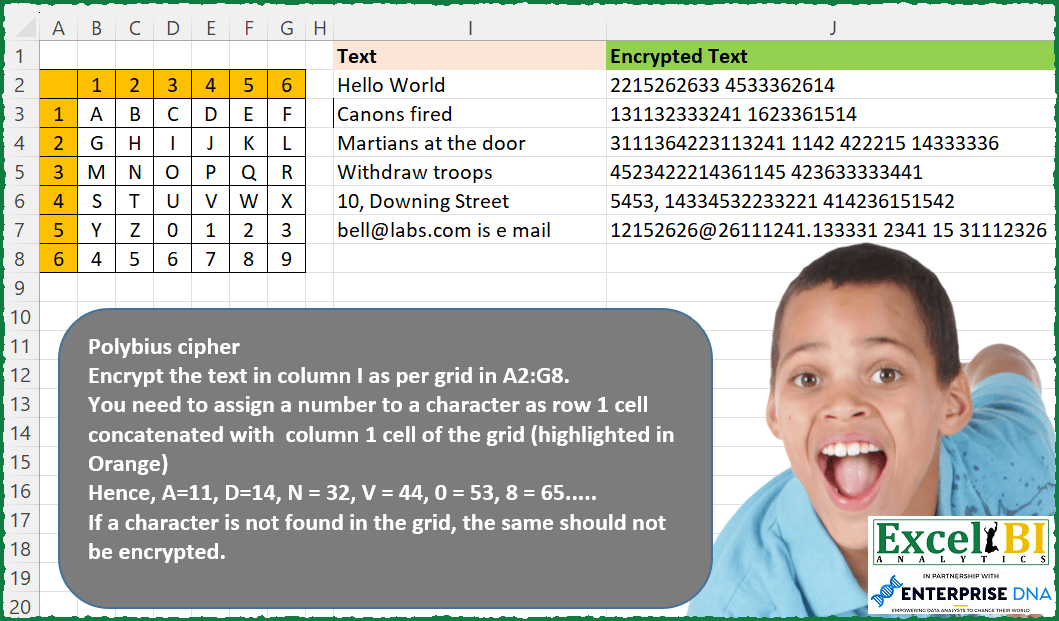
Polybius cipher Encrypt the text in column I as per grid in A2:G8. You need to assign a number to a character as row 1 cell concatenated with column 1 cell of the grid (highlighted in Orange) Hence, A=11, D=14, N = 32, V = 44, 0 = 53, 8 = 65….. If a character is not found in the grid, the same should not be encrypted.
📌 Challenge Details and Links
ExcelBI Excel Challenge Number: 155
Challenge Difficulty: ⭐️
📥Download Sample File
📥Link to the solutions on LinkedIn
Solving the challenge of Polybius Cipher Encrypt with Power Query
Power Query solution 1 for Polybius Cipher Encrypt, proposed by Zoran Milokanović:
let
  Source = Excel.CurrentWorkbook(){[Name = "TableText"]}[Content],
  SourceGrid = Excel.CurrentWorkbook(){[Name = "TableGrid"]}[Content],
  UnpivotedColumns = Table.UnpivotOtherColumns(SourceGrid, {" "}, "Column", "Character"),
  PrepareMapping = Table.CombineColumns(
    Table.TransformColumnTypes(UnpivotedColumns, {{" ", type text}}, "hr-HR"),
    {" ", "Column"},
    Combiner.CombineTextByDelimiter("", QuoteStyle.None),
    "Number"
  ),
  FormatCharacterAsText = Table.TransformColumnTypes(PrepareMapping, {{"Character", type text}}),
  ReorderedColumns = Table.ReorderColumns(FormatCharacterAsText, {"Character", "Number"}),
  MappingToList = Table.ToRows(ReorderedColumns),
  AddedEncryptedText = Table.AddColumn(
    Source,
    "Encrypted Text",
    each Text.Combine(
      List.ReplaceMatchingItems(Text.ToList([Text]), MappingToList, Comparer.OrdinalIgnoreCase)
    )
  ),
  Solution = AddedEncryptedText[[Encrypted Text]]
in
  Solution
Power Query solution 2 for Polybius Cipher Encrypt, proposed by Luan Rodrigues:
let
  Fonte = Tabela2,
  tab =
    let
      a = Table.UnpivotOtherColumns(Tabela1, {"Column1"}, "Atributo", "Valor"),
      b = Table.AddColumn(a, "sub", each Text.From([Column1]) & Text.From([Atributo])),
      c = Table.TransformColumnTypes(b, {{"Valor", type text}})[[Valor], [sub]]
    in
      List.Zip(Table.ToColumns(c)),
  res = Table.AddColumn(
    Fonte,
    "Personalizar",
    each Text.Combine(
      List.ReplaceMatchingItems(Text.ToList([Text]), tab, Comparer.OrdinalIgnoreCase)
    )
  )
in
  res
Power Query solution 3 for Polybius Cipher Encrypt, proposed by Victor Wang:
let
  Source = Excel.CurrentWorkbook(){[Name = "Text"]}[Content],
  Custom = Table.AddColumn(
    Source,
    "Encrypted Text",
    let
      cipher = Table.ToRecords(
        Table.TransformColumns(Table.RemoveColumns(Cipher, "Column1"), {}, Text.From)
      )
    in
      each
        let
          l = Text.ToList([Text])
        in
          Text.Combine(
            List.Transform(
              l,
              (a) =>
                let
                  u = Text.Upper(a),
                  f = List.FindText(cipher, u){0}
                in
                  try
                    (
                      Text.From(List.PositionOf(cipher, f) + 1)
                        & List.Select(Record.FieldNames(f), (b) => Record.Field(f, b) = u){0}
                    )
                  otherwise
                    u
            )
          )
  )
in
  Custom
Power Query solution 4 for Polybius Cipher Encrypt, proposed by Jan Willem Van Holst:
let
 Source = your matrix
 Unpivoted = Table.UnpivotOtherColumns(Source, {"row"}, "Attribute", "Input"),
 code = Table.CombineColumns(Unpivoted,{"row", "Attribute"},Combiner.CombineTextByDelimiter("", QuoteStyle.None),"Merged"),
 inputTable = your inputTable
 Dupl = Table.DuplicateColumn(inputTable, "Text", "split"),
 Upper = Table.TransformColumns(Dupl,{{"split", Text.Upper, type text}}),
 Split = Table.ExpandListColumn(Table.TransformColumns(Upper, {{"split", Splitter.SplitTextByRepeatedLengths(1), let itemType = (type nullable text) meta [Serialized.Text = true] in type {itemType}}}), "split"),
 Merged = Table.Buffer(Table.NestedJoin(Split, {"split"}, code, {"Input"}, "code", JoinKind.LeftOuter)),
 Expand = Table.ExpandTableColumn(Merged, "code", {"Merged"}, {"Merged"}),
 Replaced = Table.ReplaceValue(Expand,each [Merged] ,each [split],(a,b,c)=> if b = null then c else b ,{"Merged"}),
 Grouped = Table.Group(Replaced, {"Text"}, {{"Answer", each Text.Combine(_[Merged])}})
in
 Grouped
Solving the challenge of Polybius Cipher Encrypt with Excel
Excel solution 1 for Polybius Cipher Encrypt, proposed by Bo Rydobon 🇹🇭:
=BYROW(MID(I2:I7,SEQUENCE(,50),1),LAMBDA(m,CONCAT(IFNA(XLOOKUP(m,TOCOL(B3:G8&""),TOCOL(A3:A8&B2:G2)),m))))Excel solution 2 for Polybius Cipher Encrypt, proposed by Rick Rothstein:
=MAP(I2:I7,LAMBDA(a,REDUCE("",MID(a,SEQUENCE(LEN(a)),1),LAMBDA(a,x,LET(f,SEARCH(x,"ABCDEFGHIJKLMNOPQRSTUVWXYZ0123456789"),a&IFERROR(INT((f-1)/6)+1&MOD(f-1,6)+1,x))))))Excel solution 3 for Polybius Cipher Encrypt, proposed by 🇰🇷 Taeyong Shin:
=MAP(I2:I7, LAMBDA(m, REDUCE("", MID(m, SEQUENCE(LEN(m)), 1), LAMBDA(a,c, a & LEFT(CONCAT(REPT(A3:A8 & B2:G2, B3:G8 & "" = c)) & c, 2)))))Excel solution 4 for Polybius Cipher Encrypt, proposed by Kris Jaganah:
=MAP(I2:I7,LAMBDA(x,LET(a,TOCOL(A3:A8&B2:G2&B3:G8),b,MID(x,SEQUENCE(LEN(x)),1),CONCAT(IFNA(XLOOKUP(b,RIGHT(a),LEFT(a,2)),b)))))Excel solution 5 for Polybius Cipher Encrypt, proposed by Julian Poeltl:
=MAP(I2:I7,LAMBDA(T,LET(L,TOCOL(B3:G8),N,TOCOL(A3:A8&B2:G2),SP,MID(T,SEQUENCE(LEN(T)),1),SC,IFERROR(--SP,SP),CONCAT(MAP(SC,LAMBDA(A,XLOOKUP(A,L,N,A)))))))Excel solution 6 for Polybius Cipher Encrypt, proposed by Aditya Kumar Darak 🇮🇳:
=LET(
 _cd, TOCOL(A3:A8 & B2:G2),
 _chr, TRIM(TOCOL(B3:G8)),
 _txt, I2:I7,
 _e1, LAMBDA(x, MID(x, SEQUENCE(LEN(x)), 1)),
 _e2, LAMBDA(a, CONCAT(IFERROR(XLOOKUP(_e1(a), _chr, _cd), _e1(a)))),
 _r, MAP(_txt, _e2),
 _r
)
Excel solution 7 for Polybius Cipher Encrypt, proposed by Timothée BLIOT:
=LET(A,B3:G8, B,I2:I7, T, MAKEARRAY(6,6, LAMBDA(x,y, x&y)),
MAP(B, LAMBDA(b, CONCAT(MAP(SEQUENCE(LEN(b)), LAMBDA(z, XLOOKUP(MID(b,z,1),TEXT(TOCOL(A),"0"),TOCOL(T),MID(b,z,1)) ))) )) )
Excel solution 8 for Polybius Cipher Encrypt, proposed by Oscar Mendez Roca Farell:
=LET(_s, SEQUENCE(36)-1,_m, HSTACK(TOCOL(B3:G8),INT(_s/6)+1&MOD(_s,6)+1),_f, LAMBDA(i, MID(i, SEQUENCE(LEN(i)),1)),MAP(I2:I7,LAMBDA(a, CONCAT(IFNA(VLOOKUP(_f(a),_m,2,),_f(a))))))Excel solution 9 for Polybius Cipher Encrypt, proposed by Sunny Baggu:
=MAP(I2:I7,LAMBDA(a,
LET(_inp,TOCOL(B3:G8&","&A3:A8&B2:G2),
_tbl,DROP(REDUCE("",_inp,LAMBDA(a,v,VSTACK(a,TEXTSPLIT(v,",")))),1),
_m,MID(a,SEQUENCE(LEN(a)),1),
_num,IFERROR(XLOOKUP(_m,DROP(_tbl,,-1),DROP(_tbl,,1)),_m),
CONCAT(_num))))
Excel solution 10 for Polybius Cipher Encrypt, proposed by Abdallah Ally:
=MAP(I2:I7,LAMBDA(a,REDUCE("",MID(a,SEQUENCE(LEN(a)),1),LAMBDA(x,y,IFERROR(x&VLOOKUP(y,HSTACK(VSTACK(CHAR(SEQUENCE(26,,65)),CHAR(SEQUENCE(10,,48))),TOCOL(TOCOL(SEQUENCE(6))&TOROW(SEQUENCE(6)))),2,FALSE),x&y)))))Excel solution 11 for Polybius Cipher Encrypt, proposed by Bhavya Gupta:
=LET(e,TOCOL(A3:A8&B2:G2),c,TOCOL(B3:G8)&"",MAP(I2:I7,LAMBDA(x,LET(k,RIGHT(LEFT(x,SEQUENCE(LEN(x)))),CONCAT(IFNA(XLOOKUP(k,c,e),k))))))Excel solution 12 for Polybius Cipher Encrypt, proposed by Md. Zohurul Islam:
=LET(u,TOCOL(A3:A8&B2:G2),v,TOCOL(B3:G8),w,I2:I7,
ans,MAP(w,LAMBDA(y,LET(p,TEXTSPLIT(y," "),q,MAP(p,LAMBDA(x,LET(a,MID(x,SEQUENCE(LEN(x)),1),b,IFERROR(ABS(a),a),CONCAT(IFNA(XLOOKUP(b,v,u),b))))),r,TEXTJOIN(" ",,q),r))),
VSTACK("Encrypted Text",ans))
Excel solution 13 for Polybius Cipher Encrypt, proposed by Tolga Demirci, PMP, PMI-ACP, MOS-Expert:
=MAP(I2:I7;LAMBDA(y;TEXTJOIN(;;MAP(MID(y;SEQUENCE(LEN(y));1);LAMBDA(x;LET(i;SEQUENCE(;6;;0)*SEQUENCE(6;) &SEQUENCE(6;;;0)*SEQUENCE(;6);p;IFERROR(VALUE(IF(ISNUMBER(FIND(UPPER(x);$B$3:$G$8;1));i;""));"");IF(MAX(p)=0;x;MAX(p))))))))Excel solution 14 for Polybius Cipher Encrypt, proposed by Tolga Demirci, PMP, PMI-ACP, MOS-Expert:
=MAP(I2:I7;LAMBDA(y;TEXTJOIN(;;MAP(MID(y;SEQUENCE(LEN(y));1);LAMBDA(x;SUM(IFERROR(VALUE(IF(ISNUMBER(FIND(UPPER(x);$B$3:$G$8;1));SEQUENCE(;6;;0)*SEQUENCE(6;)&SEQUENCE(6;;;0)*SEQUENCE(;6);""));"")))))))Excel solution 15 for Polybius Cipher Encrypt, proposed by Julien Lacaze:
=LET(letters,TOCOL(TEXT(B3:G8,"0")),codes,TOCOL(A3:A8&B2:G2),text,UPPER(I2:I7),
split,LAMBDA(t,MID(t,SEQUENCE(LEN(t)),1)),
MAP(text,LAMBDA(a,LET(t,split(a),CONCAT(IFERROR(XLOOKUP(t,letters,codes),t))))))
Excel solution 16 for Polybius Cipher Encrypt, proposed by Guillermo Arroyo:
=MAP(I2:I7,LAMBDA(t,REDUCE("",MID(t,SEQUENCE(LEN(t)),1),LAMBDA(x,y,x&XLOOKUP(y,TOCOL(TEXT(B3:G8,"0")),TOCOL(A3:A8&B2:G2),y,0,1)))))Excel solution 17 for Polybius Cipher Encrypt, proposed by Quadri Olayinka Atharu:
=LET(a,TEXTJOIN("|",1,I2:I7),b,MID(a,SEQUENCE(LEN(a)),1),
r,IFERROR(MAP(b,LAMBDA(x,TOCOL(IF(B3:G8=x,A3:A8&B2:G2,NA()),2))),b),
TEXTSPLIT(CONCAT(r),,"|"))
Excel solution 18 for Polybius Cipher Encrypt, proposed by Mohamed Helmy:
=MAP(I2:I7,LAMBDA(a,LET(
c,MID(a,SEQUENCE(LEN(a)),1),
CONCAT(IFNA(XLOOKUP(c,
TOCOL(B3:G8)&"",TOCOL(A3:A8&B2:G2)),c)))))
Solving the challenge of Polybius Cipher Encrypt with Python in Excel
Python in Excel solution 1 for Polybius Cipher Encrypt, proposed by Alejandro Campos:
polybius_square = {
 'A': '11', 'B': '12', 'C': '13', 'D': '14', 'E': '15', 'F': '16',
 'G': '21', 'H': '22', 'I': '23', 'J': '24', 'K': '25', 'L': '26',
 'M': '31', 'N': '32', 'O': '33', 'P': '34', 'Q': '35', 'R': '36',
 'S': '41', 'T': '42', 'U': '43', 'V': '44', 'W': '45', 'X': '46',
 'Y': '51', 'Z': '52', '0': '53', '1': '54', '2': '55', '3': '56',
 '4': '61', '5': '62', '6': '63', '7': '64', '8': '65', '9': '66',
}
def encrypt_polybius(text):
 text = text.upper()
 encrypted = []
 for char in text:
 if char in polybius_square:
 encrypted.append(polybius_square[char])
 elif char == ' ':
 encrypted.append(' ')
 else:
 encrypted.append(char)
 return ''.join(encrypted)
texts = xl("I2:I7")[0]
encrypted_texts = [encrypt_polybius(text) for text in texts]
encrypted_texts
&&&