
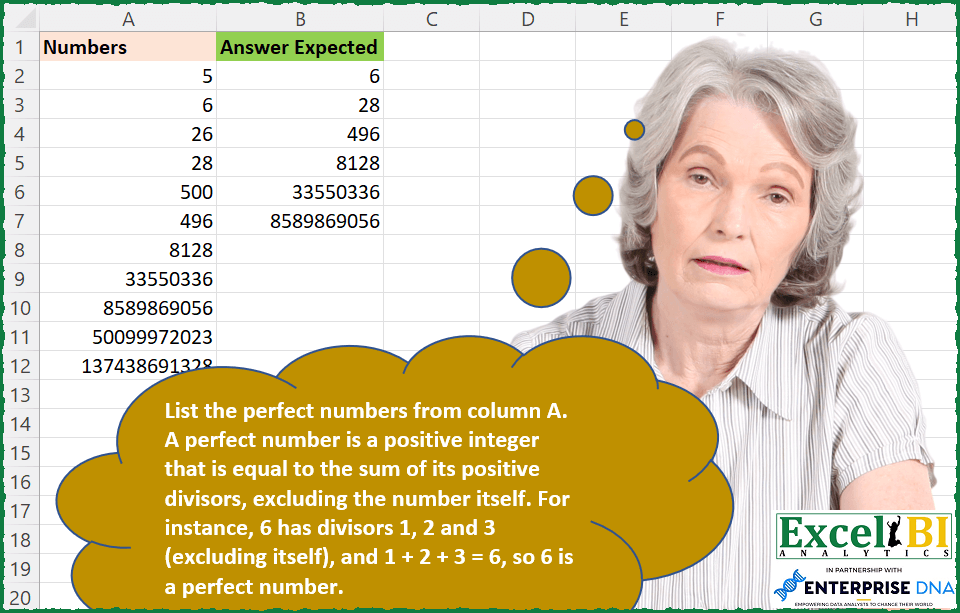
List the perfect numbers from column A. A perfect number is a positive integer that is equal to the sum of its positive divisors, excluding the number itself. For instance, 6 has divisors 1, 2 and 3 (excluding itself), and 1 + 2 + 3 = 6, so 6 is a perfect number.
📌 Challenge Details and Links
ExcelBI Excel Challenge Number: 149
Challenge Difficulty: ⭐️
📥Download Sample File
📥Link to the solutions on LinkedIn
Solving the challenge of Perfect Numbers Detection with Power Query
_x000D_Power Query solution 1 for Perfect Numbers Detection, proposed by Bo Rydobon 🇹🇭:
let
  Source = Excel.CurrentWorkbook(){[Name = "Table1"]}[Content],
  Sel = Table.SelectRows(
    Source,
    each List.Sum(
      List.Transform(
        {1 .. Number.RoundDown(Number.Sqrt([Numbers]))},
        (n) => if Number.Mod([Numbers], n) = 0 then n + [Numbers] / n else 0
      )
    )
      = 2
      * [Numbers]
  )
in
SelPower Query solution 2 for Perfect Numbers Detection, proposed by Zoran Milokanović:
let
  Source = Excel.CurrentWorkbook(){[Name = "Input"]}[Content],
  AddedPerfectNumber = Table.AddColumn(
    Source,
    "Answer Expected",
    each List.Accumulate(
      {2 .. Number.RoundDown(Number.Sqrt([Numbers]))},
      1,
      (s, d) =>
        if Number.Mod([Numbers], d) = 0 then
          (if d * d <> [Numbers] then s + d + [Numbers] / d else s + d)
        else
          s
    )
  ),
  Solution = Table.SelectRows(
    AddedPerfectNumber,
    each [Answer Expected] <> 1 and [Answer Expected] = [Numbers]
  )[[Answer Expected]]
in
SolutionPower Query solution 3 for Perfect Numbers Detection, proposed by Aditya Kumar Darak 🇮🇳:
let
  Source = Excel.CurrentWorkbook(){[Name = "data"]}[Content],
  Max    = Number.IntegerDivide(Number.Log(List.Max(Source[Numbers]), 2), 2),
  List   = List.Transform({1 .. Max}, each Number.Power(2, _) * (Number.Power(2, _ + 1) - 1)),
  Return = Table.SelectRows(Source, each List.Contains(List, [Numbers]))
in
ReturnPower Query solution 4 for Perfect Numbers Detection, proposed by Alejandro Simón 🇵🇦 🇪🇸:
leta, no se como manejar números grande en PQ.  Les dejo  lo que hice, por si alguien puede ayudarme con lo que me falta. Funciona bien hasta el No. 33550336.

let
 Source = Excel.CurrentWorkbook(){[Name="Table1"]}[Content],
 Sol = Table.SelectRows(Table.AddColumn(Source, "Custom", each List.Sum(List.Transform(List.Select(List.Transform({2..[Numbers]}, (x)=> Text.From([Numbers]/x)), each not Text.Contains(_,".")), Number.From))), each [Numbers]=[Custom])
in
 Sol

Cualquier consejo es más que bienvenido.


        Show translation


Show translation of this commentPower Query solution 5 for Perfect Numbers Detection, proposed by Brian Julius:
let
  Source = Table.FromRows(
    Json.Document(
      Binary.Decompress(
        Binary.FromText(
          "NYvBDcAwCAN34d0H4EBgFpT912hL6ccnn+UqMjpXkXfqIBrG3Fz56ZAZADMGxlpkeLL5f8rMrazoLtgLzy54z+cG",
          BinaryEncoding.Base64
        ),
        Compression.Deflate
      )
    ),
    let
      _t = ((type nullable text) meta [Serialized.Text = true])
    in
      type table [Numbers = _t]
  ),
  ReType = Table.TransformColumnTypes(Source, {{"Numbers", Int64.Type}}),
  RScript = R.Execute(
    "library(numbers)#(lf)data <- dataset#(lf)#(lf)numbers_list <- data$Numbers#(lf)divisors_list <- lapply(numbers_list, divisors)#(lf)divisors_head <- lapply(divisors_list, head, -1)#(lf)divisors_sum <- sapply(divisors_head, sum)#(lf)df <- cbind.data.frame( numbers_list, divisors_sum)",
    [dataset = ReType]
  ),
  ExtractResults = Table.SelectRows(RScript, each ([Name] = "df")),
  Expand = Table.SelectRows(
    Table.ExpandTableColumn(
      ExtractResults,
      "Value",
      {"numbers_list", "divisors_sum"},
      {"numbers_list", "divisors_sum"}
    ),
    each [numbers_list] = [divisors_sum]
  ),
  Clean = Table.RenameColumns(
    Table.SelectColumns(Expand, "numbers_list"),
    {"numbers_list", "Answer"}
  )
in
CleanSolving the challenge of Perfect Numbers Detection with Excel
_x000D_Excel solution 1 for Perfect Numbers Detection, proposed by Bo Rydobon 🇹🇭:
=TOCOL(MAP(A2:A12,LAMBDA(a,LET(b,SEQUENCE(a^0.5),a/(2*a=SUM(IF(MOD(a,b),,b+a/b)))))),3)Excel solution 2 for Perfect Numbers Detection, proposed by John V.:
=LET(a,A2:A12,FILTER(a,a=MAP(a,LAMBDA(n,REDUCE(1,1+SEQUENCE(n^0.5-1),LAMBDA(i,x,i+IF(MOD(n,x),,x+n/x)))))))

Find maximum perfect number with 15 digits and lookup it:
✅ =LET(s,ROW(1:24),TOCOL(VLOOKUP(A2:A12,2^s*(2^(1+s)-1),1,),2))Excel solution 3 for Perfect Numbers Detection, proposed by محمد حلمي:
=LET(a,A2:A12,r,ROW(1:20),FILTER(a,ISNUMBER(XMATCH(a,2^r*(2^(r+1)-1)))))Excel solution 4 for Perfect Numbers Detection, proposed by محمد حلمي:
=FILTER(A2:A12,ISNUMBER(XMATCH(A2:A12,LET(r,SEQUENCE(20),2^r*(2^(r+1)-1)))))Excel solution 5 for Perfect Numbers Detection, proposed by محمد حلمي:
=FILTER(A2:A12,MAP(A2:A12,LAMBDA(a,LET(
v,LOG(a,2)/2,
r,INT(v),
2^r*(2^(r+1)-1)=a))))Excel solution 6 for Perfect Numbers Detection, proposed by محمد حلمي:
=LET(r,SEQUENCE(20),2^r*(2^(r+1)-1))Excel solution 7 for Perfect Numbers Detection, proposed by محمد حلمي:
= perfect number

=2^ROW(1:20)*(2^(ROW(1:20)+1)-1)Excel solution 8 for Perfect Numbers Detection, proposed by Kris Jaganah:
=FILTER(A2:A12,A2:A12=MAP(A2:A12,LAMBDA(x,LET(a,SCAN(x,SEQUENCE(20),LAMBDA(p,q,p/2)),b,x/a,c,MOD(x,b),IFERROR(SUM(FILTER(HSTACK(a,b),c=0),1),0)))))Excel solution 9 for Perfect Numbers Detection, proposed by Julian Poeltl:
=FILTER(A2:A12;MAP(A2:A12;LAMBDA(N;LET(S;SEQUENCE(SQRT(N-1));A;N/S;SUM(IF(A=INT(A);S+A;0))/2)=N)))Excel solution 10 for Perfect Numbers Detection, proposed by Aditya Kumar Darak 🇮🇳:
=FILTER(
 A2:A12,
 MAP(
 A2:A12,
 LAMBDA(a,
 LET(
 sq, SEQUENCE(SQRT(a)),
 md, MOD(a, sq),
 f1, FILTER(sq, md = 0, ),
 f2, a / f1,
 r, SUM(f1, f2) = 2 * a,
 r
 )
 )
 )
)Excel solution 11 for Perfect Numbers Detection, proposed by Timothée BLIOT:
=FILTER(A2:A12, MAP(A2:A12, LAMBDA(z, LET(A,SEQUENCE(z^0.5), B,MOD(z,A), D,FILTER(A,B=0), E,z/D, SUM(D,E)=2*z)) ))

This was more of a math challenge than an Excel challenge for me. Finding out that all perfect numbers are prime numbers helped since I could limit the sequence of primary divisors up to n^(1/2)Excel solution 12 for Perfect Numbers Detection, proposed by Sunny Baggu:
=LET(_n,SEQUENCE(20),num,2^_n*(2^(_n+1)-1),TOCOL(XLOOKUP(num,A2:A12,A2:A12),3))Excel solution 13 for Perfect Numbers Detection, proposed by Charles Roldan:
=LET(_ISPRIME, LAMBDA(n, IFS(MOD(n, 1), FALSE, n=2, TRUE, 1,
 AND(MOD(n, SEQUENCE(SQRT(n), , 2))))),
_ISPERFECT, LAMBDA(x, LET(m, (SQRT(8*x + 1) - 1)/2, q, LOG(m + 1, 2),
 AND(_ISPRIME(m), _ISPRIME(q)))),
FILTER(A2:A12, MAP(A2:A12, _ISPERFECT)))Excel solution 14 for Perfect Numbers Detection, proposed by Tolga Demirci, PMP, PMI-ACP, MOS-Expert:
=LET(a;MAP(A2:A12;LAMBDA(p;LET(i;MIN(IF(p/SEQUENCE(1048570)=INT(p/SEQUENCE(1048570));p/SEQUENCE(1048570);""));j;p/MIN(IF(p/SEQUENCE(1048570)=INT(p/SEQUENCE(1048570));p/SEQUENCE(1048570);""));m;IF(INT(p/SEQUENCE(j))=p/SEQUENCE(j);p/SEQUENCE(j);"");n;IF(i/SEQUENCE(i)=INT(i/SEQUENCE(i));i/SEQUENCE(i);"");IF(SUM(m)-MAX(m)+SUM(n)-MAX(n)=p;p;""))));FILTER(a;a<>""))Excel solution 15 for Perfect Numbers Detection, proposed by Mohamed Helmy:
= perfect number

=2^ROW(1:20)*(2^(ROW(1:20)+1)-1)Excel solution 16 for Perfect Numbers Detection, proposed by Mohamed Helmy:
=FILTER(A2:A12,MAP(A2:A12,LAMBDA(a,LET(v,LOG(a,2)/2,r,INT(v),2^r*(2^(r+1)-1)=a))))Excel solution 17 for Perfect Numbers Detection, proposed by Mohamed Helmy:
=FILTER(A2:A12,MAP(A2:A12,LAMBDA(a,LET(r,INT(LOG(a,2)/2),2^r*(2^(r+1)-1)=a))))Excel solution 18 for Perfect Numbers Detection, proposed by Mohamed Helmy:
=LET(a,A2:A12,r,ROW(1:20),FILTER(a,ISNUMBER(XMATCH(a,2^r*(2^(r+1)-1)))))Solving the challenge of Perfect Numbers Detection with Python in Excel
_x000D_Python in Excel solution 1 for Perfect Numbers Detection, proposed by Alejandro Campos:
def es_numero_perfecto(n):
 if n < 2:
 return False
 suma_divisores = 1
 for i in range(2, int(n**0.5) + 1):
 if n % i == 0:
 suma_divisores += i
 if i != n // i:
 suma_divisores += n // i
 return suma_divisores == n
numeros = xl("A2:A12")[0]
numeros_perfectos = [num for num in numeros if es_numero_perfecto(num)]
df = pd.DataFrame(numeros_perfectos, columns=['Numeros Perfectos'])
df