
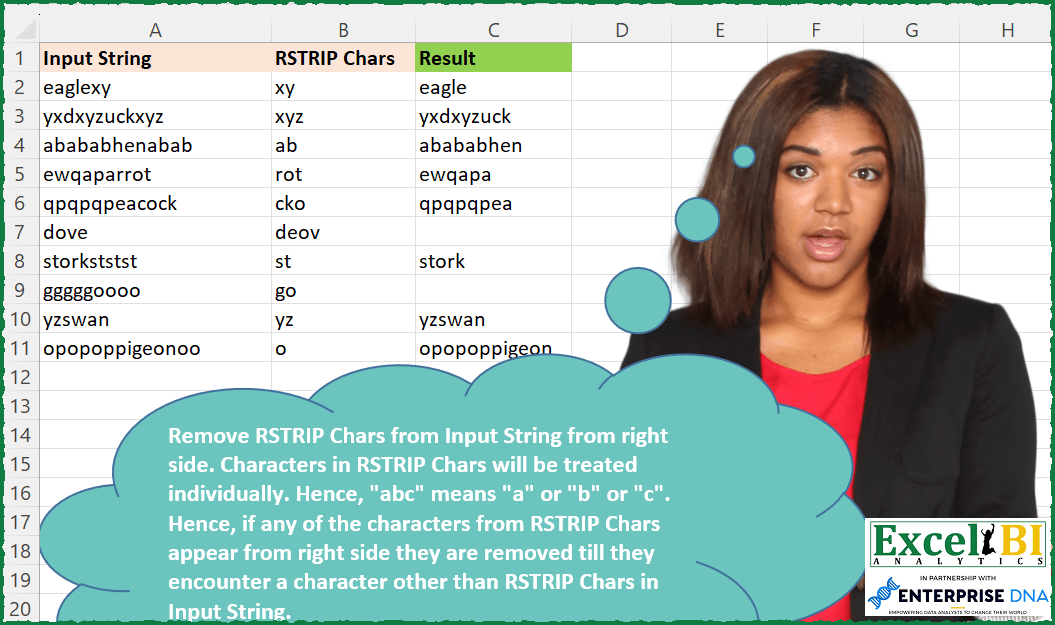
Remove RSTRIP Chars from Input String from right side. Characters in RSTRIP Chars will be treated individually. Hence, “abc” means “a” or “b” or “c”. Hence, if any of the characters from RSTRIP Chars appear from right side they are removed till they encounter a character other than RSTRIP Chars in Input String.
📌 Challenge Details and Links
ExcelBI Excel Challenge Number: 145
Challenge Difficulty: ⭐️⭐️
📥Download Sample File
📥Link to the solutions on LinkedIn
Solving the challenge of Right Strip Given Chars with Power Query
Power Query solution 1 for Right Strip Given Chars, proposed by Zoran Milokanović:
let
  Source = Excel.CurrentWorkbook(){[Name = "Input"]}[Content],
  AddedResult = Table.AddColumn(
    Source,
    "Result",
    each Text.TrimEnd([Input String], Text.ToList([RSTRIP Chars]))
  )[[Result]]
in
  AddedResult
Power Query solution 2 for Right Strip Given Chars, proposed by Aditya Kumar Darak 🇮🇳:
let
  Source = Excel.CurrentWorkbook(){[Name = "data"]}[Content],
  Return = Table.AddColumn(
    Source,
    "Output",
    each [
      Old     = Text.ToList([RSTRIP Chars]),
      Replace = List.Accumulate(Old, [Input String], (a, b) => Text.Replace(a, b, " ")),
      Trim    = Text.TrimEnd(Replace),
      Len     = Text.Length(Trim),
      Return  = Text.Start([Input String], Len)
    ][Return]
  )
in
  Return
Power Query solution 3 for Right Strip Given Chars, proposed by Alejandro Simón 🇵🇦 🇪🇸:
let
  Source = Excel.CurrentWorkbook(){[Name = "Table1"]}[Content],
  Sol = Table.AddColumn(
    Source,
    "Result",
    each Text.TrimEnd([Input String], Text.ToList([RSTRIP Chars]))
  )
in
  Sol
Power Query solution 4 for Right Strip Given Chars, proposed by Luan Rodrigues:
let
  Fonte = Tabela1,
  res = Table.AddColumn(
    Fonte,
    "Personalizar",
    each Text.TrimEnd([Input String], Text.ToList([RSTRIP Chars]))
  )
in
  res
Power Query solution 5 for Right Strip Given Chars, proposed by Bhavya Gupta:
let
  Source = Excel.CurrentWorkbook(){[Name = "Table1"]}[Content],
  Final = Table.AddColumn(
    Source,
    "Result",
    each Text.Combine(
      List.RemoveLastN(Text.ToList([Input String]), (x) => Text.Contains([RSTRIP Chars], x))
    )
  )
in
  Final
Power Query solution 6 for Right Strip Given Chars, proposed by Rafael González B.:
let
  Source = Excel.CurrentWorkbook(){[Name = "Strings"]}[Content],
  StripTable = Table.TransformColumns(
    Source,
    {"RSTRIP Chars", each Table.FromList(Text.ToList(_), Splitter.SplitByNothing(), {"RSTRIP"})}
  ),
  StringTable = Table.TransformColumns(
    StripTable,
    {
      "Input String",
      each Table.FromList(Text.ToList(_), Splitter.SplitByNothing(), {"InputString"})
    }
  ),
  Result = Table.RemoveColumns(
    Table.AddColumn(
      StringTable,
      "Result",
      each Text.Combine(
        List.Reverse(
          Table.Skip(
            Table.ReverseRows(
              Table.Join([Input String], "InputString", [RSTRIP Chars], "RSTRIP", 1)
            ),
            each [RSTRIP] <> null
          )[InputString]
        )
      )
    ),
    {"Input String", "RSTRIP Chars"}
  )
in
  Result
Power Query solution 7 for Right Strip Given Chars, proposed by Jan Willem Van Holst:
let
  Source = Table.FromRows(
    Json.Document(
      Binary.Decompress(
        Binary.FromText(
          "LY5RDsMgDEPvwndvhPqRQcQmJkKBtcDp59DGkiM/xVKsNUzhy32YzcD2zZrRfR/z5yJ80bkwvVRvTrrAYYr5OihTKdLA1BUeWcXkxEVgF2VhLycjepZz5dqkxNpUwPXuBh3BAIW7N2a9KCE/r0hW5U9gSesOZ/sf",
          BinaryEncoding.Base64
        ),
        Compression.Deflate
      )
    ),
    let
      _t = ((type nullable text) meta [Serialized.Text = true])
    in
      type table [#"Input String" = _t, #"RSTRIP Chars" = _t]
  ),
  #"Added Custom" = Table.AddColumn(
    Source,
    "Answer",
    each
      let
        RstripList = Text.ToList([RSTRIP Chars]),
        split = Splitter.SplitTextByCharacterTransition(
          (c) => not List.Contains(RstripList, c),
          RstripList
        )([Input String]),
        startWith =
          if Text.StartsWith([Input String], [RSTRIP Chars]) and List.Count(split) = 1 then
            true
          else
            false,
        listRemove = if startWith then split else List.RemoveLastN(split, 1),
        combine = Text.Combine(listRemove, "")
      in
        combine
  )
in
  #"Added Custom"
Power Query solution 8 for Right Strip Given Chars, proposed by Udit Chatterjee:
let
  fxRSTRIPExtracts = (InputText as text, RSTRIPChars as text) =>
    let
      mainText = InputText,
      charsRSTRIP = RSTRIPChars,
      // create reverse list from input text and a simple list of RSTRIP chars
      mainTextReveseList = List.Reverse(Text.ToList(mainText)),
      charsRSTRIPList = Text.ToList(charsRSTRIP),
      // get the list index of the character from the reverse list if the character in RSTRIP not found and get the length of string if it found
      conditionalList = List.Transform(
        List.Positions(mainTextReveseList),
        each
          if List.Contains(charsRSTRIPList, mainTextReveseList{_}) then
            Text.Length(mainText)
          else
            _
      ),
      // get the min. of index number
      minCharsToRemoveFromRight = List.Min(conditionalList),
      requiredText = Text.Start(mainText, Text.Length(mainText) - minCharsToRemoveFromRight)
    in
      requiredText,
  Source = Challenge145,
  customFunctionInvoke = Table.AddColumn(
    Source,
    "Required Text",
    each fxRSTRIPExtracts([Input String], [RSTRIP Chars]),
    type text
  )
in
  customFunctionInvoke
Power Query solution 9 for Right Strip Given Chars, proposed by Thomas DUCROQUETZ:
let
  Source = YourRawData,
  stripChar = Table.AddColumn(
    Source,
    "Result",
    each
      let
        rstripChars = Text.ToList([RSTRIP Chars]),
        InputText = [Input String],
        genResult = List.Generate(
          () => InputText,
          each List.Contains(rstripChars, Text.End(_, 1)),
          each Text.Start(_, Text.Length(_) - 1),
          each Text.Start(_, Text.Length(_) - 1)
        )
      in
        List.Last(genResult) ?? InputText,
    type text
  )
in
  stripChar
Solving the challenge of Right Strip Given Chars with Excel
Excel solution 1 for Right Strip Given Chars, proposed by Bo Rydobon 🇹🇭:
=MAP(A2:A11,B2:B11,LAMBDA(a,b,LEFT(a,XMATCH(0,1-ISERR(FIND(MID(0&a,SEQUENCE(30),1),b)),,-1)-1)))Excel solution 2 for Right Strip Given Chars, proposed by Bo Rydobon 🇹🇭:
=REDUCE(A2:A11,SEQUENCE(30),LAMBDA(a,v,LEFT(a,LEN(a)-ISNUMBER(FIND(RIGHT(0&a),B2:B11)))))Excel solution 3 for Right Strip Given Chars, proposed by محمد حلمي:
=MAP(A2:A11,B2:B11,LAMBDA(a,b,IFNA(LEFT(a,
XMATCH(1,--ISERR(FIND(MID(a,SEQUENCE(99),1),b)),,-1)),"")))
Excel solution 4 for Right Strip Given Chars, proposed by محمد حلمي:
=LET(
r,A2:A11,
s,SEQUENCE(,99),
LEFT(r,BYROW(IF(ISERR(FIND(MID(r,s,1),B2:B11)),s),
LAMBDA(a,MAX(a)))))
Excel solution 5 for Right Strip Given Chars, proposed by 🇰🇷 Taeyong Shin:
=LET(
 Fx, LAMBDA(ME,a,b,
 IF(OR(ISERR(FIND(RIGHT(a), b)), NOT(LEN(a))), a, ME(ME, LEFT(a, LEN(a) - 1), b))
 ),
 MAP(A2:A11, B2:B11, LAMBDA(a,b, Fx(Fx, a, b)))
)
Excel solution 6 for Right Strip Given Chars, proposed by Kris Jaganah:
=MAP(A2:A11,B2:B11,LAMBDA(x,y,LET(a,MID(x,SEQUENCE(LEN(x),,LEN(x),-1),1),b,MID(y,SEQUENCE(LEN(y),,LEN(y),-1),1),c,FILTER(a,SCAN("",XLOOKUP(a,b,b,1),LAMBDA(p,q,IF(p=1,1,q)))=1),IFERROR(CONCAT(SORTBY(c,SEQUENCE(ROWS(c)),-1)),""))))Excel solution 7 for Right Strip Given Chars, proposed by Julian Poeltl:
=MAP(A2:A11,B2:B11,LAMBDA(I,L,LET(SP,LAMBDA(A,MID(A,SEQUENCE(LEN(A)),1)),ISP,SP(I),IFNA(CONCAT(TAKE(ISP,XMATCH(FALSE,ISNUMBER(XMATCH(ISP,SP(L))),,-1))),""))))Excel solution 8 for Right Strip Given Chars, proposed by Aditya Kumar Darak 🇮🇳:
=MAP(
 A2:A11,
 B2:B11,
 LAMBDA(a, b,
 LET(
 s, MID(a, SEQUENCE(LEN(a)), 1),
 b, COUNTIFS(b, "*" & s & "*"),
 mt, IFNA(XMATCH(0, b, , -1), 0),
 r, LEFT(a, mt),
 r
 )
 )
)
Excel solution 9 for Right Strip Given Chars, proposed by Timothée BLIOT:
=MAP(A2:A11,B2:B11,LAMBDA(x,y,LET(A,MID(x,SEQUENCE(LEN(x),,LEN(x),-1),1),B,MID(y,SEQUENCE(LEN(y)),1),C,IFERROR(CONCAT(FILTER(A,SCAN(1,A,LAMBDA(a,v,IF(ISNUMBER(XMATCH(v,B)),a,a+1)))>1)),""),IFERROR(CONCAT(MID(C,SEQUENCE(LEN(C),,LEN(C),-1),1)),""))))Excel solution 10 for Right Strip Given Chars, proposed by Md. Zohurul Islam:
=MAP(A2:A11,B2:B11,LAMBDA(x,y,LET(
sq,SEQUENCE(LEN(x)),
a,MID(x,sq,1),
b,MID(y,SEQUENCE(LEN(y)),1),
c,IFNA(XMATCH(a,b),0),
d,XLOOKUP(0,c,sq,0,,-1),
e,IFNA(LEFT(x,d),""),
e)))
Excel solution 11 for Right Strip Given Chars, proposed by Charles Roldan:
=IFNA(MAP(A2:A11, B2:B11, LAMBDA(x,y, LEFT(x, XMATCH(TRUE, ISERR(FIND(MID(x, SEQUENCE(LEN(x)), 1), y)), , -1)))), "")Excel solution 12 for Right Strip Given Chars, proposed by Jaroslaw Kujawa:
=MAP(A2:A11, B2:B11,
LAMBDA(x, y,LET(a, MID(x, SEQUENCE(LEN(x), , LEN(x), -1), 1),b, MID(y, SEQUENCE(LEN(y)), 1),c, XMATCH("na", IFNA(XMATCH(a, b), "na"))-1,IFNA(LEFT(x, LEN(x)-c), ""))))
Excel solution 13 for Right Strip Given Chars, proposed by Stefan Olsson:
=ArrayFormula(REGEXREPLACE(A2:A11, "["& B2:B11&"]*$", ""))Excel solution 14 for Right Strip Given Chars, proposed by Guillermo Arroyo:
=MAP(A2:A11,B2:B11,LAMBDA(i,j,LET(g,LAMBDA(a,x,y,IF(OR(RIGHT(x)=MID(j,SEQUENCE(LEN(j)),1)),a(a,MID(x,1,y-1),y-1),x)),g(g,i,LEN(i)))))Solving the challenge of Right Strip Given Chars with SQL
SQL solution 1 for Right Strip Given Chars, proposed by Zoran Milokanović:
WITH /* Vertica Analytic Database v9.2.0-7 */
INPUT
AS
(
 SELECT 'eaglexy' AS INPUT_STRING, 'xy' AS RSTRIP_CHARS UNION ALL
 SELECT 'yxdxyzuckxyz' AS INPUT_STRING, 'xyz' AS RSTRIP_CHARS UNION ALL
 SELECT 'abababhenabab' AS INPUT_STRING, 'ab' AS RSTRIP_CHARS UNION ALL
 SELECT 'ewqaparrot' AS INPUT_STRING, 'rot' AS RSTRIP_CHARS UNION ALL
 SELECT 'qpqpqpeacock' AS INPUT_STRING, 'cko' AS RSTRIP_CHARS UNION ALL
 SELECT 'dove' AS INPUT_STRING, 'deov' AS RSTRIP_CHARS UNION ALL
 SELECT 'storkststst' AS INPUT_STRING, 'st' AS RSTRIP_CHARS UNION ALL
 SELECT 'gggggoooo' AS INPUT_STRING, 'go' AS RSTRIP_CHARS UNION ALL
 SELECT 'yzswan' AS INPUT_STRING, 'yz' AS RSTRIP_CHARS UNION ALL
 SELECT 'opopoppigeonoo' AS INPUT_STRING, 'o' AS RSTRIP_CHARS
)
SELECT RTRIM(I.INPUT_STRING, I.RSTRIP_CHARS) AS RESULT
FROM INPUT I
;
&&&