
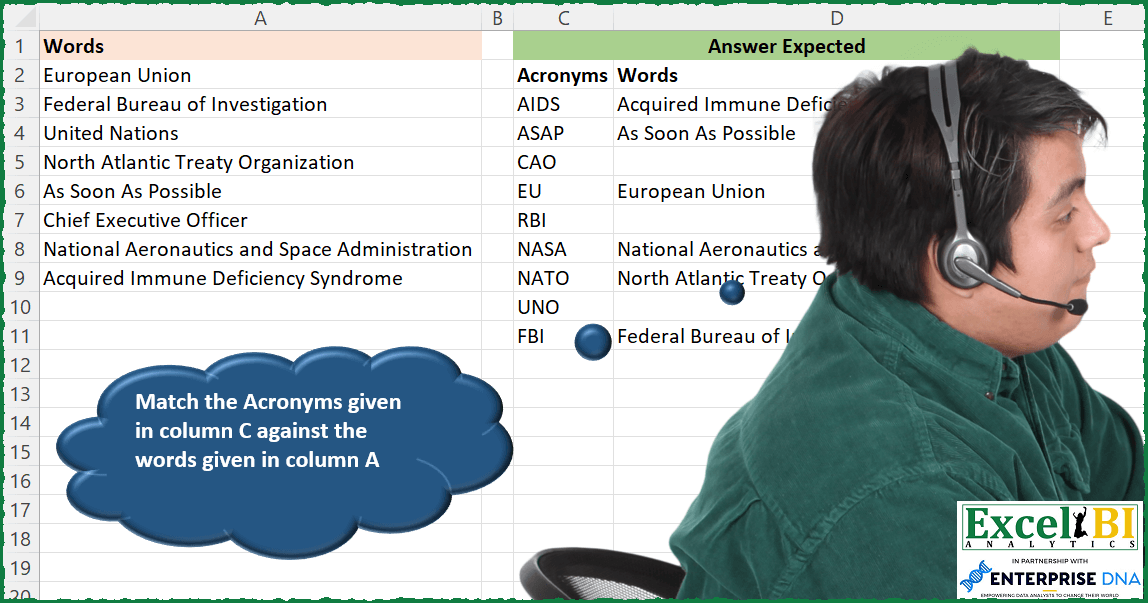
Match the Acronyms given in column C against the words given in column A
📌 Challenge Details and Links
ExcelBI Excel Challenge Number: 144
Challenge Difficulty: ⭐️
📥Download Sample File
📥Link to the solutions on LinkedIn
Solving the challenge of Match Acronyms with Words with Power Query
Power Query solution 1 for Match Acronyms with Words, proposed by Bo Rydobon 🇹🇭:
let
  Source = Excel.CurrentWorkbook(){[Name = "Table1"]}[Content],
  Ac = Table.AddColumn(Source, "Ac", each Text.Select([Words], {"A" .. "Z"})),
  Join = Table.AddColumn(
    Excel.CurrentWorkbook(){[Name = "Table2"]}[Content],
    "Words",
    each Ac{[Ac = [Acronyms]]}?[Words]?
  )
in
  Join
Power Query solution 2 for Match Acronyms with Words, proposed by Zoran Milokanović:
let
  Source = Excel.CurrentWorkbook(){[Name = "TableAcronyms"]}[Content],
  AddedOrdering = Table.AddIndexColumn(Source, "Ordering", 1, 1, Int64.Type),
  TableWords = Excel.CurrentWorkbook(){[Name = "TableWords"]}[Content],
  AddedAcronyms = Table.AddColumn(
    TableWords,
    "Acronyms",
    each Text.Combine(
      List.Select(
        List.Transform(Text.Split([Words], " "), each Text.Start(_, 1)),
        each _ = Text.Upper(_)
      )
    )
  ),
  MergedQueries = Table.NestedJoin(
    AddedOrdering,
    {"Acronyms"},
    AddedAcronyms,
    {"Acronyms"},
    "TableWords",
    JoinKind.LeftOuter
  ),
  ExpandedTableWords = Table.ExpandTableColumn(MergedQueries, "TableWords", {"Words"}, {"Words"}),
  MaintainOrdering = Table.Sort(ExpandedTableWords, {{"Ordering", Order.Ascending}}),
  Solution = MaintainOrdering[[Acronyms], [Words]]
in
  Solution
Power Query solution 3 for Match Acronyms with Words, proposed by Aditya Kumar Darak 🇮🇳:
let
  Data = Excel.CurrentWorkbook(){[Name = "data"]}[Content],
  Acronym = Table.AddColumn(Data, "Acronym", each Text.Select([Words], {"A" .. "Z"})),
  Criteria = Excel.CurrentWorkbook(){[Name = "criteria"]}[Content],
  Reutrn = Table.AddColumn(
    Criteria,
    "Return",
    each try Acronym{[Acronym = [Acronyms]]}[Words] otherwise null
  )
in
  Reutrn
Power Query solution 4 for Match Acronyms with Words, proposed by Alejandro Simón 🇵🇦 🇪🇸:
let
  Source = Excel.CurrentWorkbook(){[Name = "Table1"]}[Content],
  Words = Table.AddColumn(
    Source,
    "Custom",
    each Text.Combine(List.RemoveMatchingItems(Text.ToList([Words]), {"a" .. "z"} & {" "}), "")
  ),
  Acronyms = Excel.CurrentWorkbook(){[Name = "Table2"]}[Content],
  Added = Table.AddColumn(
    Acronyms,
    "Words",
    each
      if List.Contains(Words[Custom], [Acronyms]) then
        List.ReplaceMatchingItems({[Acronyms]}, List.Zip({Words[Custom], Words[Words]}))
      else
        null
  ),
  Sol = Table.ExpandListColumn(Added, "Words")
in
  Sol
Power Query solution 5 for Match Acronyms with Words, proposed by Luan Rodrigues:
let
  Fonte = Data,
  Fonte1 = Fonte{[Name = "Tabela1"]}[Content],
  tab = Table.AddColumn(Fonte1, "Personalizar", each Text.Select([Words], {"A" .. "Z"})),
  Fonte2 = Fonte{[Name = "Tabela2"]}[Content],
  mesc = Table.NestedJoin(Fonte2, {"Acronyms"}, tab, {"Personalizar"}, "Fonte2", JoinKind.LeftOuter),
  res = Table.ExpandTableColumn(mesc, "Fonte2", {"Words"}, {"Words"})
in
  res
Power Query solution 6 for Match Acronyms with Words, proposed by Brian Julius:
let
  Source = Excel.CurrentWorkbook(){[Name = "Table1"]}[Content],
  AcronymsTable = Table.PromoteHeaders(Table.SelectColumns(Source, "Answer Expected")),
  WordsTable = Table.DuplicateColumn(
    Table.SelectRows(Table.SelectColumns(Source, "Words"), each [Words] <> null),
    "Words",
    "Words2"
  ),
  Split = Table.ExpandListColumn(
    Table.TransformColumns(
      WordsTable,
      {
        {
          "Words2",
          Splitter.SplitTextByDelimiter(" ", QuoteStyle.Csv),
          let
            itemType = (type nullable text) meta [Serialized.Text = true]
          in
            type {itemType}
        }
      }
    ),
    "Words2"
  ),
  Filter = Table.SelectRows(Split, each [Words2] = Text.Proper([Words2])),
  FirstLetter = Table.SplitColumn(
    Filter,
    "Words2",
    Splitter.SplitTextByPositions({0, 1}, false),
    {"Words2.1", "Words2.2"}
  ),
  Group = Table.Group(FirstLetter, {"Words"}, {"Abbrev", each Text.Combine([Words2.1], null)}),
  Join = Table.RemoveColumns(
    Table.Join(AcronymsTable, "Acronyms", Group, "Abbrev", JoinKind.LeftOuter),
    "Abbrev"
  )
in
  Join
Power Query solution 7 for Match Acronyms with Words, proposed by Rafael González B.:
let
  T1 = Table.TransformColumnTypes(
    Excel.CurrentWorkbook(){[Name = "Words"]}[Content],
    {{"Words", type text}}
  ),
  T2 = Table.TransformColumnTypes(
    Excel.CurrentWorkbook(){[Name = "Acronyms"]}[Content],
    {{"Acronyms", type text}}
  ),
  GetAcronyms = Table.AddColumn(
    T1,
    "Acronyms1",
    each Text.Combine(List.RemoveMatchingItems(Text.ToList([Words]), {"a" .. "z", " "}))
  ),
  Combine = Table.RemoveColumns(
    Table.Join(T2, "Acronyms", GetAcronyms, "Acronyms1", 1),
    {"Acronyms1"}
  )
in
  Combine
Power Query solution 8 for Match Acronyms with Words, proposed by Krzysztof Kominiak:
let
  tData = Table.AddColumn(
    Excel.CurrentWorkbook(){[Name = "Table1"]}[Content],
    "Acr",
    each Text.Select([Words], {"A" .. "Z"})
  ),
  tAcr = Excel.CurrentWorkbook(){[Name = "Table2"]}[Content],
  Result = Table.AddColumn(
    tAcr,
    "Result",
    each try Table.SelectRows(tData, (x) => x[Acr] = [Acronyms])[Words]{0} otherwise null
  )
in
  Result
Power Query solution 9 for Match Acronyms with Words, proposed by Jan Willem Van Holst:
let
  Source = Table.FromRows(
    Json.Document(
      Binary.Decompress(
        Binary.FromText(
          "TY7BbsJAEEN/xcq5P5G2IHEBpJRTxGHZncBIySzMziLC1zNKVZWTJcvPdt83q6r5SkFwEM7SHD/6Zk2JNIz4rEqhIg/YyJ2K8TnYX8bTRgnbxSmLtc1qF7Q2BjGO+HHYZuz0HISf/2Rb0OUscN3nUvg00uJ/XZgGrB4Uq/GdsBsGjqS/1Qvul1pSVw/EgiAJ3TVEQpsmFi6mbyvxVln94WaaqhC+yduYJM7oZkmaJ189vgA=",
          BinaryEncoding.Base64
        ),
        Compression.Deflate
      )
    ),
    let
      _t = ((type nullable text) meta [Serialized.Text = true])
    in
      type table [Words = _t]
  ),
  Acro = Table.FromRows(
    Json.Document(
      Binary.Decompress(
        Binary.FromText(
          "i45WcvR0CVaK1QEygh0DwAxnR38w7RoKpoKcPMG0H1ABlBECURDqB6HdQCpiAQ==",
          BinaryEncoding.Base64
        ),
        Compression.Deflate
      )
    ),
    let
      _t = ((type nullable text) meta [Serialized.Text = true])
    in
      type table [Acronyms = _t]
  ),
  #"Added Custom" = Table.AddColumn(
    Source,
    "Custom",
    each Text.Combine(
      List.RemoveMatchingItems(
        List.Transform(Text.Split([Words], " "), each Text.Start(_, 1)),
        {"a" .. "z"}
      )
    )
  ),
  Merged = Table.NestedJoin(
    Acro,
    {"Acronyms"},
    #"Added Custom",
    {"Custom"},
    "Table",
    JoinKind.LeftOuter
  ),
  #"Expanded Table" = Table.ExpandTableColumn(Merged, "Table", {"Words"}, {"Words"})
in
  #"Expanded Table"
Power Query solution 10 for Match Acronyms with Words, proposed by Udit Chatterjee:
let
  // define the two sources
  acronymsSource = #"Challenge-144_b",
  wordsSource = #"Challenge-144_a",
  // extract acronyms from words
  ccExtractedAcronyms = Table.AddColumn(
    wordsSource,
    "Acronyms",
    each Text.Combine(
      List.Transform(
        Text.Split([Words], " "),
        each if Text.At(_, 0) = Text.Lower(Text.At(_, 0)) then "" else Text.At(_, 0)
      )
    ),
    type text
  ),
  // add index to maintain order in "Acronyms" source
  addIndexAcronymsSource = Table.AddIndexColumn(acronymsSource, "Index", 0, 1, Int64.Type),
  // left outer join with acronym source to get corresponding words
  joinWithAcronymsSource = Table.NestedJoin(
    addIndexAcronymsSource,
    {"Acronyms"},
    ccExtractedAcronyms,
    {"Acronyms"},
    "acronymsSource",
    JoinKind.LeftOuter
  ),
  expandTable = Table.ExpandTableColumn(
    joinWithAcronymsSource,
    "acronymsSource",
    {"Words"},
    {"Words"}
  ),
  // sort by index and remove index
  sortedByIndex = Table.Sort(expandTable, {{"Index", Order.Ascending}}),
  removeIndexCol = Table.RemoveColumns(sortedByIndex, {"Index"})
in
  removeIndexCol
Power Query solution 11 for Match Acronyms with Words, proposed by Sue Bayes:
let
  Source = Excel.CurrentWorkbook(){[Name = "Table1"]}[Content],
  Acronyms = Excel.CurrentWorkbook(){[Name = "Table2"]}[Content],
  Dup = Table.DuplicateColumn(Source, "Words", "Dup"),
  Split = Table.ExpandListColumn(
    Table.TransformColumns(
      Dup,
      {
        {
          "Words",
          Splitter.SplitTextByDelimiter(" ", QuoteStyle.Csv),
          let
            itemType = (type nullable text) meta [Serialized.Text = true]
          in
            type {itemType}
        }
      }
    ),
    "Words"
  ),
  Extract = Table.TransformColumns(Split, {{"Words", each Text.Start(_, 1), type text}}),
  AddCol = Table.AddColumn(
    Extract,
    "Custom",
    each if List.ContainsAny(Text.ToList([Words]), {"a" .. "z"}) then 1 else 0
  ),
  Filter = Table.SelectRows(AddCol, each ([Custom] = 0)),
  Grp = Table.Group(
    Filter,
    {"Dup"},
    {{"all", each _, type table [Words = text, Dup = text, Custom = number]}}
  ),
  Combine = Table.AddColumn(Grp, "Custom", each Text.Combine([all][Words]))[[Dup], [Custom]],
  Merge = Table.NestedJoin(
    Acronyms,
    {"Acronyms"},
    Combine,
    {"Custom"},
    "Custom",
    JoinKind.LeftOuter
  ),
  Expand = Table.Sort(Table.ExpandTableColumn(Merge, "Custom", {"Dup"}, {"Dup"}), "Acronyms")
in
  Expand
Power Query solution 12 for Match Acronyms with Words, proposed by Dominic Walsh:
let
  Short  = Excel.CurrentWorkbook(){[Name = "Table2"]}[Content],
  Source = Excel.CurrentWorkbook(){[Name = "Table1"]}[Content],
  ACR    = Table.AddColumn(Source, "Acronyms", each Text.Select([Words], {"A" .. "Z"})),
  Join   = Table.Buffer(Table.NestedJoin(Short, "Acronyms", ACR, "Acronyms", "Table")),
  Expand = Table.ExpandTableColumn(Join, "Table", {"Words"}, {"Words"})
in
  Expand
Power Query solution 13 for Match Acronyms with Words, proposed by Sam Thompson:
let
  Source = Excel.CurrentWorkbook(){[Name = "rng_in"]}[Content],
  #"Inserted Removed Characters" = Table.AddColumn(
    Source,
    "Removed Characters",
    each Text.Remove([Column1], {" ", "a" .. "z"}),
    type text
  )
in
  #"Inserted Removed Characters"
Solving the challenge of Match Acronyms with Words with Excel
Excel solution 1 for Match Acronyms with Words, proposed by Bo Rydobon 🇹🇭:
=XLOOKUP(C3:C11,MAP(A2:A9,LAMBDA(a,CONCAT(TEXTSPLIT(a,CHAR(SEQUENCE(26,,97))," ",1)))),A2:A9,"")Excel solution 2 for Match Acronyms with Words, proposed by Bo Rydobon 🇹🇭:
=MAP(C3:C11,LAMBDA(c,XLOOKUP(TEXTJOIN(" ",,MID(c,SEQUENCE(LEN(c)),1)&"*"),A2:A9,A2:A9,"",2)))

Fix NAS
=MAP(C3:C11,LAMBDA(c,LET(x,XLOOKUP(TEXTJOIN("* ",,MID(c,SEQUENCE(LEN(c)),1))&{"*";"* *"},A2:A9,A2:A9,"",2),REPT(TAKE(x,1),DROP(x,1)=""))))
Excel solution 3 for Match Acronyms with Words, proposed by Rick Rothstein:
=LET(a,A2:A9,z,MAP(a,LAMBDA(w,LET(m,MID(w,SEQUENCE(LEN(w)),1),CONCAT(IF(ABS(CODE(m)-77.5)<13,m,""))))),XLOOKUP(C3:C11,z,a,""))Excel solution 4 for Match Acronyms with Words, proposed by John V.:
=XLOOKUP(C3:C11,MAP(A2:A9,LAMBDA(x,LET(a,LEFT(TEXTSPLIT(x," ")),CONCAT(REPT(a,EXACT(a,UPPER(a))))))),A2:A9,"")
✅ =XLOOKUP(C3:C11,MAP(A2:A9,LAMBDA(x,LET(a,LEFT(TEXTSPLIT(x," ")),CONCAT(REPT(a,CODE(a)<91))))),A2:A9,"")
Excel solution 5 for Match Acronyms with Words, proposed by محمد حلمي:
=XLOOKUP(C3:C11,
MAP(A2:A9,LAMBDA(a,LET(
c,LEFT(TEXTSPLIT(a," ")),CONCAT(IF(CODE(c)<91,c,""))))),A2:A9,"")
Excel solution 6 for Match Acronyms with Words, proposed by محمد حلمي:
=XLOOKUP(C3:C11,MAP(A2:A9,LAMBDA(a,
CONCAT(TRIM(TEXTSPLIT(a,CHAR(ROW(97:122))))))),A2:A9,"")
Excel solution 7 for Match Acronyms with Words, proposed by 🇰🇷 Taeyong Shin:
=XLOOKUP(C3:C11,REGEXREPLACE(A2:A9,"b([A-Z])|[a-z]*bs*","$1"),A2:A9,"")

=XLOOKUP(TRIM(REGEXREPLACE(C3:C11,"(.)","$1* ")),A2:A9,A2:A9," ", 2)
Excel solution 8 for Match Acronyms with Words, proposed by 🇰🇷 Taeyong Shin:
=XLOOKUP(C3:C11, REDUCE(A2:A9, CHAR(VSTACK(SEQUENCE(26) + 96, 32)), LAMBDA(a,b, SUBSTITUTE(a, b, ))), A2:A9, "")Excel solution 9 for Match Acronyms with Words, proposed by Kris Jaganah:
=LET(a,A2:A9,b,C3:C11,c,MAP(a,LAMBDA(x,LET(e,LEFT(TEXTSPLIT(x," ")),TEXTJOIN("",1,IF(CODE(e)>90,"",e))))),HSTACK(b,XLOOKUP(b,c,a,"")))Excel solution 10 for Match Acronyms with Words, proposed by Aditya Kumar Darak 🇮🇳:
=LET(
 _d, A2:A9,
 _ct, C3:C11,
 _e, LAMBDA(a,
 LET(
 s, MID(a, SEQUENCE(LEN(a)), 1),
 cd, CODE(s),
 f, FILTER(s, (cd > 64) * (cd < 91)),
 r, CONCAT(f),
 r
 )
 ),
 _ac, MAP(_d, _e),
 _r, XLOOKUP(_ct, _ac, _d, ""),
 _r
)
Excel solution 11 for Match Acronyms with Words, proposed by Timothée BLIOT:
=LET(W, A2:A9, T, TEXTSPLIT(TEXTJOIN("/",,A2:A9)," ","/",,,""), A, C3:C11,
B,BYROW(T, LAMBDA(b, CONCAT(MAP(b, LAMBDA(x, IF(EXACT(LEFT(x),UPPER(LEFT(x))),UPPER(LEFT(x)),"") )) ) )),
MAP(A, LAMBDA(a, TEXT(XLOOKUP(a,B,W,"",0),"0") )))
Excel solution 12 for Match Acronyms with Words, proposed by Hussein SATOUR:
=LET(w, A2:A9, MAP(C3:C11, LAMBDA(y, IFERROR(FILTER(w, y= MAP(w,LAMB&DA(x,CONCAT(LEFT(TEXTSPLIT(SUBSTITUTE(SUBSTITUTE(x,"of",""), "and","")," ")))))), ""))))Excel solution 13 for Match Acronyms with Words, proposed by Duy Tùng:
=XLOOKUP(C3:C11,REGEXREPLACE(A2:A9,"[a-z]|s",""),A2:A9,"")Excel solution 14 for Match Acronyms with Words, proposed by Sunny Baggu:
=LET(_cri,MAP(A2:A9,LAMBDA(c,LET(_m,CODE(MID(c,SEQUENCE(LEN(c)),1)),CONCAT(CHAR(FILTER(_m,(_m>64)*(_m<91))))))),
MAKEARRAY(ROWS(C3:C11),1,LAMBDA(r,c,IFERROR(FILTER(A2:A9,INDEX(C3:C11,r,1)=_cri),""))))
Excel solution 15 for Match Acronyms with Words, proposed by Sunny Baggu:
=MAP(C3:C11,LAMBDA(a,XLOOKUP(CONCAT(EXPAND(MID(a,SEQUENCE(LEN(a)),1),LEN(a),2,"*")),A2:A9,A2:A9,"",2)))Excel solution 16 for Match Acronyms with Words, proposed by Sunny Baggu:
=XLOOKUP(C3:C11,

MAP(A2:A9,
    LAMBDA(a,
    LET(_code,
    CODE(
        LEFT(
            TEXTSPLIT(
                a&" ",
                " ",
                ,
                TRUE
            )
        )
    ),
    _char,
    CHAR(FILTER(_code,
    (_code>64)*(_code<91))),
    CONCAT(
        _char
    )))),

A2:A9,
    "")
Excel solution 17 for Match Acronyms with Words, proposed by Md. Zohurul Islam:
=LET(
u,A2:A9,
v,C3:C11,
s,SUBSTITUTE,
w,MAP(u,LAMBDA(x,LET(a,s(s(x,"and ",""),"of ",""),b,CONCAT(LEFT(TEXTSPLIT(a," "))),b))),
z,VSTACK("Words",XLOOKUP(v,w,u,"")),
z)
Excel solution 18 for Match Acronyms with Words, proposed by Charles Roldan:
=LET(a, "ABCDEFGHIJKLMNOPQRSTUVWXYZ",
f, LAMBDA(x, MID(x, SEQUENCE(LEN(x)), 1)),
g, LAMBDA(x, CONCAT(REPT(f(x), ISNUMBER(FIND(f(x), a))))),
XLOOKUP(C3:C11, MAP(A2:A9, g), A2:A9, ""))
Excel solution 19 for Match Acronyms with Words, proposed by Tolga Demirci, PMP, PMI-ACP, MOS-Expert:
IFERROR(INDEX(A2:A9;MATCH(C3:C11;MAP(A2:A9;LAMBDA(x;TEXTJOIN(;;LEFT(TEXTSPLIT(x;" ");1))));0));"")


        Show translation
Excel solution 20 for Match Acronyms with Words, proposed by Tolga Demirci, PMP, PMI-ACP, MOS-Expert:
=IFERROR(INDEX(A2:A9;MATCH(C3:C11;MAP(A2:A9;LAMBDA(x;LET(y;LEFT(TEXTSPLIT(x;" ");1);TEXTJOIN("";;IF(ISNUMBER(IFERROR(FIND(y;UPPER(y);1);""));UPPER(y);"")))));0));"")Excel solution 21 for Match Acronyms with Words, proposed by Stefan Olsson:
=BYROW(C3:C11,
LAMBDA(acronym,
{acronym, IFNA(FILTER(A2:A9, REGEXMATCH(A2:A9, JOIN(".*?s?", INDEX(MID(acronym, SEQUENCE(LEN(acronym)),1))))),)}
))
Excel solution 22 for Match Acronyms with Words, proposed by Stefan Olsson:
=BYROW(C3:C11,
LAMBDA(a,
{a, XLOOKUP(a, INDEX(REGEXREPLACE(A2:A9, "[^A-Z]", "")), A2:A9,"")}
))
Excel solution 23 for Match Acronyms with Words, proposed by Victor Momoh (MVP, MOS, R.Eng):
=XLOOKUP(C3:C11,MAP(A2:A9,LAMBDA(x,CONCAT(LET(a,LEFT(TEXTSPLIT(x," ")),IF(EXACT(a,UPPER(a)),a,""))))),A2:A9,"")Excel solution 24 for Match Acronyms with Words, proposed by Abhishek Kumar Jain:
=XLOOKUP(C3:C11,MAP(A2:A9,LAMBDA(x,CONCAT(LET(a,LEFT(TEXTSPLIT(x," ")),IF(CODE(a)>=90,"",a))))),A2:A9,"")Excel solution 25 for Match Acronyms with Words, proposed by Guillermo Arroyo:
=LET(w,A2:A9,b,MAP(w,LAMBDA(a,LET(c,TEXTSPLIT(a," "),n,CODE(c),CONCAT(IF(n<=90,CHAR(n),""))))),p,MAP(C3:C11,LAMBDA(d,XMATCH(d,b,0,1))),IFERROR(INDEX(w,p,1),""))
=LET(w,A2:A9,b,MAP(w,LAMBDA(a,LET(c,TEXTSPLIT(a," "),n,CODE(c),CONCAT(IF(n<=90,CHAR(n),""))))),MAP(C3:C11,LAMBDA(d,XLOOKUP(d,b,w,"",0,1))))
Excel solution 26 for Match Acronyms with Words, proposed by Anup Kumar:
=XLOOKUP(C3:C11,
BYROW(A2:A9,LAMBDA(txt,LET(
firstLetterArr,LEFT(TEXTSPLIT(txt,," "),1),
REDUCE("",firstLetterArr,LAMBDA(r,i, IF(AND(CODE(i)>64,CODE(i)<91),r&i, r&"")))
))),
A2:A9,"")
Excel solution 27 for Match Acronyms with Words, proposed by Ibrahim Sadiq:
=LET(a,A2:A9,b,C3:C11,c,REDUCE(a,VSTACK(CHAR(SEQUENCE(26,,97))," "),LAMBDA(x,y,SUBSTITUTE(x,y,""))),XLOOKUP(b,c,a,""))Excel solution 28 for Match Acronyms with Words, proposed by Rajan Verma:
=XLOOKUP(TEXTJOIN("*",TRUE,MID(D18,SEQUENCE(LEN(D18)),1)) &"*",$A$17:$A$19,$A$17:$A$19,,2,1)Solving the challenge of Match Acronyms with Words with SQL
SQL solution 1 for Match Acronyms with Words, proposed by Zoran Milokanović:
WITH /* Microsoft SQL Server 2019 */
ALPHABET
AS
(
 SELECT CHAR(ASCII('A')) AS CHR
 UNION ALL
 SELECT CHAR(ASCII(CHR) + 1) AS CHR
 FROM ALPHABET A
 WHERE
 ASCII(A.CHR) <> ASCII('Z')
)
SELECT
 TA.ACRONYMS
,TW.WORDS
FROM T_A TA
LEFT JOIN
(
 SELECT
 TW.WORDS
 ,REPLACE(TRANSLATE(TW.WORDS, TRANSLATE(TW.WORDS, A.ALPHABET, REPLICATE(' ', DATALENGTH(A.ALPHABET))), REPLICATE(' ', LEN(TRANSLATE(TW.WORDS, A.ALPHABET, REPLICATE(' ', DATALENGTH(A.ALPHABET)))))), ' ', '') AS ACRONYMS
 FROM T_W TW
 CROSS JOIN (SELECT STRING_AGG(A.CHR, '') AS ALPHABET FROM ALPHABET A) A
) TW ON TA.ACRONYMS = TW.ACRONYMS
;
&&