
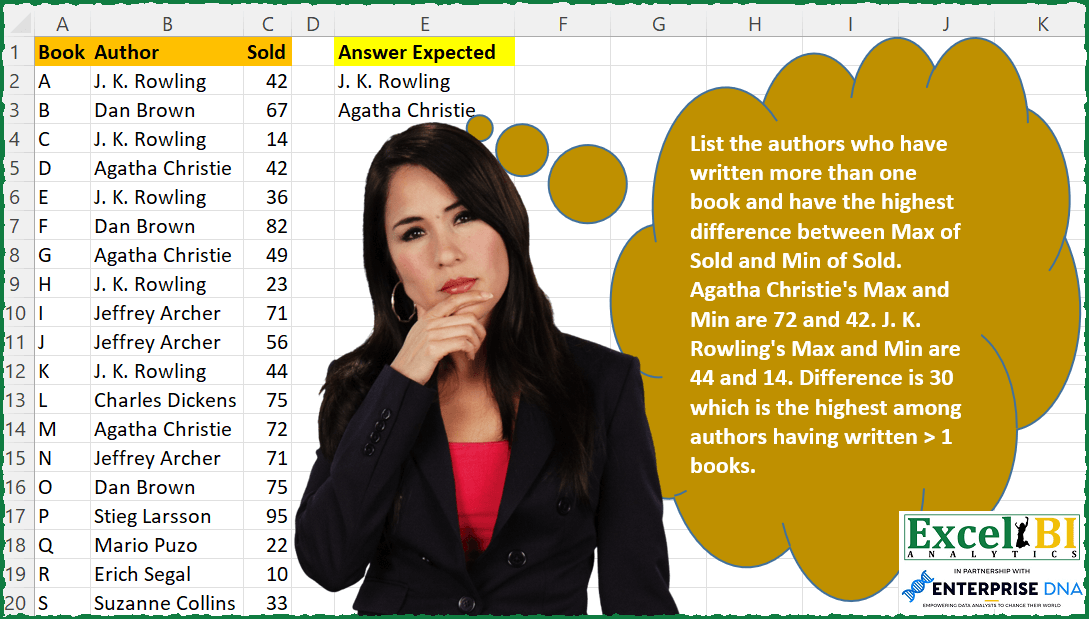
List the authors who have written more than one book and have the highest difference between Max of Sold and Min of Sold. Agatha Christie’s Max and Min are 72 and 42. J. K. Rowling’s Max and Min are 44 and 14. Difference is 30 which is the highest among authors having written > 1 books.
📌 Challenge Details and Links
ExcelBI Excel Challenge Number: 133
Challenge Difficulty: ⭐️
📥Download Sample File
📥Link to the solutions on LinkedIn
Solving the challenge of Author Sale Difference with Power Query
Power Query solution 1 for Author Sale Difference, proposed by Zoran Milokanović:
let
  Source = Excel.CurrentWorkbook(){[Name = "Authors"]}[Content],
  GroupedAuthors = Table.Group(
    Source,
    {"Author"},
    {
      {"Total", each Table.RowCount(_), Int64.Type},
      {"Highest Diff", each List.Max([Sold]) - List.Min([Sold]), type number}
    }
  ),
  FilteredMoreBooks = Table.SelectRows(GroupedAuthors, each ([Total] > 1)),
  GroupedByHighestDiff = Table.Group(
    FilteredMoreBooks,
    {"Highest Diff"},
    {{"Answer Expected", each _[Author]}}
  ),
  AddedRanking = Table.AddIndexColumn(GroupedByHighestDiff, "Ranking", 1, 1, Int64.Type),
  FilteredFirst = Table.SelectRows(AddedRanking, each ([Ranking] = 1)),
  ExpandedFirstAuthor = Table.ExpandListColumn(FilteredFirst, "Answer Expected")[[Answer Expected]]
in
  ExpandedFirstAuthor
Power Query solution 2 for Author Sale Difference, proposed by Aditya Kumar Darak 🇮🇳:
let
  Source = Excel.CurrentWorkbook(){[Name = "data"]}[Content],
  Grouped1 = Table.Group(
    Source,
    "Author",
    {{"Max", each List.Max([Sold])}, {"Min", each List.Min([Sold])}}
  ),
  Diff = Table.AddColumn(Grouped1, "Diff", each [Max] - [Min]),
  Grouped2 = Table.Group(Diff, "Diff", {"Group", each _}),
  Return = Table.Max(Grouped2, "Diff")[Group][[Author]]
in
  Return
Power Query solution 3 for Author Sale Difference, proposed by Alejandro Simón 🇵🇦 🇪🇸:
let
  Source = Excel.CurrentWorkbook(){[Name = "Table1"]}[Content],
  Grouped = Table.Group(
    Source,
    {"Author"},
    {
      {"Count", each Table.RowCount(_), Int64.Type},
      {
        "All",
        each
          let
            b = List.Max([Sold]) - List.Min([Sold])
          in
            b
      }
    }
  )[[Author], [All]],
  Sol = Table.SelectRows(Grouped, each [All] = List.Max(List.Distinct(Grouped[All])))[[Author]]
in
  Sol
Power Query solution 4 for Author Sale Difference, proposed by Luan Rodrigues:
let
  Fonte = Tabela1,
  gp = Table.Group(
    Fonte,
    {"Author"},
    {
      {
        "Contagem",
        each [
          b = List.Select({List.Count(_[Author])}, each _ > 1){0}?,
          c = {List.Sum({- List.Min(_[Sold]), List.Max(_[Sold])})}{0}?
        ]
      }
    }
  ),
  exp = Table.ExpandRecordColumn(gp, "Contagem", {"b", "c"}),
  res = Table.SelectRows(exp, each ([b] <> null) and ([c] = List.Max(exp[c])))[[Author]]
in
  res
Power Query solution 5 for Author Sale Difference, proposed by Brian Julius:
let
  Source = Excel.CurrentWorkbook(){[Name = "Table1"]}[Content],
  Group = Table.Group(
    Source,
    {"Author"},
    {{"Min", each List.Min([Sold]), type number}, {"Max", each List.Max([Sold]), type number}}
  ),
  Difference = Table.AddColumn(Group, "AnswerExpected", each [Max] - [Min]),
  MaxDiff = List.Max(Difference[AnswerExpected]),
  Final = Table.SelectColumns(
    Table.SelectRows(Difference, each [AnswerExpected] = MaxDiff),
    {"Author", "AnswerExpected"}
  )
in
  Final
Power Query solution 6 for Author Sale Difference, proposed by Jan Willem Van Holst:
let
  Source = Table.FromRows(
    Json.Document(
      Binary.Decompress(
        Binary.FromText(
          "fZFPi8IwEMW/ypCziNpq9Vjburv+2VV7LB5CiU3YksBEEf30TpKFBQneXubHvJk3aRqWswFbD2EzhKO59Up39E4n7DRo2JJkyTUs0dw06Vnmy0WkY5x6VJLMO36RHAqJyl6U+LerIn3JzKPVy6R56PiI2y08/IzYTRKPvhwS5zOKO+TYSoFUyMaerWNsGtbYxG4Rkm1JFpJjLyyUqv0V2jrPqYe76J5ZCPH9Zpmfl9x/fnuSNZl0sOVorXFoEdCB5I6jMrC/PoyLHKYcSVaoWgm16HjvvmTkQe28rg+utYDC9JTKLZ7QoU5P",
          BinaryEncoding.Base64
        ),
        Compression.Deflate
      )
    ),
    let
      _t = ((type nullable text) meta [Serialized.Text = true])
    in
      type table [Book = _t, Author = _t, Sold = _t]
  ),
  #"Changed Type" = Table.TransformColumnTypes(Source, {{"Sold", Int64.Type}}),
  #"Grouped Rows" = Table.Group(
    #"Changed Type",
    {"Author"},
    {{"diff", each List.Max([Sold]) - List.Min([Sold])}}
  ),
  #"Filtered Rows" = Table.SelectRows(
    #"Grouped Rows",
    each ([diff] = List.Max(#"Grouped Rows"[diff]))
  ),
  #"Removed Columns" = Table.RemoveColumns(#"Filtered Rows", {"diff"})
in
  #"Removed Columns"
Power Query solution 7 for Author Sale Difference, proposed by Sue Bayes:
let
  Source = Excel.CurrentWorkbook(){[Name = "Table1"]}[Content],
  ChangeType = Table.TransformColumnTypes(
    Source,
    {{"Book", type text}, {"Author", type text}, {"Sold", Int64.Type}}
  ),
  Group = Table.Group(
    ChangeType,
    {"Author"},
    {
      {"Count", each Table.RowCount(_), Int64.Type},
      {"all", each _, type table},
      {"First Amount Sold", each List.Min([Sold]), type number},
      {"Last Amount Sold", each List.Max([Sold]), type number}
    }
  ),
  Subtract = Table.AddColumn(
    Group,
    "Subtract",
    each [Last Amount Sold] - [First Amount Sold],
    type number
  ),
  Filter = Table.SelectRows(Subtract, each [Count] > 1),
  Select = Table.SelectColumns(Filter, {"Author", "Subtract"}),
  Max = List.Max(Select[Subtract]),
  FilterMax = Table.SelectColumns(Table.SelectRows(Select, each [Subtract] = Max), {"Author"})
in
  FilterMax
Solving the challenge of Author Sale Difference with Excel
Excel solution 1 for Author Sale Difference, proposed by Bo Rydobon 🇹🇭:
=LET(a,B2:B20,c,C2:C20,m,MAXIFS(c,a,a)-MINIFS(c,a,a),UNIQUE(FILTER(a,m=MAX(m))))Excel solution 2 for Author Sale Difference, proposed by Rick Rothstein:
=LET(b,B2:B20,u,UNIQUE(b),m,MAP(u,LAMBDA(x,LET(f,FILTER(C2:C20,b=x),MAX(f)-MIN(f)))),FILTER(u,m=MAX(m)))

Edit Note: Abhishek Kumar Jain has brought it to my attention that if every author only wrote one book, that the list should display the empty text string (""). Given the purpose of the challenge, I find it hard to believe that such a list would be created for inspection, BUT, in case Excel BI meant that to be the case, this modification to my formula should work...
=LET(b,B2:B20,c,C2:C20,u,UNIQUE(b),m,MAXIFS(c,b,u)-MINIFS(c,b,u),f,FILTER(u,m=MAX(m)),IF(COUNTA(f)=COUNTA(b),"",f))
Excel solution 3 for Author Sale Difference, proposed by Rick Rothstein:
=LET(b,B2:B20,c,C2:C20,m,MAXIFS(c,b,b)-MINIFS(c,b,b),UNIQUE(FILTER(b,m=MAX(m))))

Edit Note: Abhishek Kumar Jain has brought it to my attention that if every author only wrote one book, that the list should display the empty text string (""). Given the purpose of the challenge, I find it hard to believe that such a list would be created for inspection, BUT, in case Excel BI meant that to be the case, this modification to my formula should work...
=LET(b,B2:B20,c,C2:C20,m,MAXIFS(c,b,b)-MINIFS(c,b,b),IF(SUM(m),UNIQUE(FILTER(b,m=MAX(m))),""))
Excel solution 4 for Author Sale Difference, proposed by John V.:
=LET(b,B2:B20,c,C2:C20,d,MAXIFS(c,b,b)-MINIFS(c,b,b),UNIQUE(FILTER(b,d=MAX(d))))Excel solution 5 for Author Sale Difference, proposed by محمد حلمي:
=LET(
b,B2:B20,
c,C2:C20,
u,UNIQUE(b),
m,MAXIFS(c,b,u)-MINIFS(c,b,u),
FILTER(u,MAX(m)=m))
Excel solution 6 for Author Sale Difference, proposed by Kris Jaganah:
=LET(a,B2:B20,b,C2:C20,c,UNIQUE(B2:B20),d,MAXIFS(b,a,c)-MINIFS(b,a,c),FILTER(c,d=MAX(d)))Excel solution 7 for Author Sale Difference, proposed by Julian Poeltl:
=LET(A,B2:B20,S,C2:C20,U,UNIQUE(A),D,MAP(U,LAMBDA(B,LET(F,FILTER(S,A=B),IF(ROWS(F)>1,MAX(F)-MIN(F),0)))),FILTER(U,D>=MAX(D)))Excel solution 8 for Author Sale Difference, proposed by Aditya Kumar Darak 🇮🇳:
=LET(
 _d, A2:C20,
 _au, INDEX(_d, 0, 2),
 _uau, UNIQUE(_au),
 _sl, TAKE(_d, , -1),
 _mx, MAXIFS(_sl, _au, _uau),
 _mn, MINIFS(_sl, _au, _uau),
 _df, _mx - _mn,
 _r, FILTER(_uau, (_df = MAX(_df)) * _df, "None"),
 _r
)
Excel solution 9 for Author Sale Difference, proposed by Timothée BLIOT:
=LET(A, B2:B20, B, C2:C20, M, MAP(A, LAMBDA(x, MAX(FILTER(B, A=x))-MIN(FILTER(B, A=x)) )), UNIQUE(FILTER(A,M=MAX(M))))Excel solution 10 for Author Sale Difference, proposed by Hussein SATOUR:
=LET(a,
     B2:B20,
     b,
     C2:C20,
     c,
     MAXIFS(
         b,
         a,
         a
     ) - MINIFS(
         b,
         a,
         a
     ),
     UNIQUE(FILTER(a,
     (COUNTIF(
         a,
         a
     )>1) * (c = MAX(
         c
     )))))
Excel solution 11 for Author Sale Difference, proposed by Sunny Baggu:
=LET(_uA,UNIQUE(FILTER(B2:B20,COUNTIF(B2:B20,B2:B20)>1)),
_maxsold,MAP(_uA,LAMBDA(a,MAX(FILTER($C$2:$C$20,$B$2:$B$20=a)))),
_minsold,MAP(_uA,LAMBDA(a,MIN(FILTER($C$2:$C$20,$B$2:$B$20=a)))),
_diff,_maxsold-_minsold,
_maxdiff,MAX(_diff),
FILTER(_uA,_diff=_maxdiff
))
Excel solution 12 for Author Sale Difference, proposed by Md. Zohurul Islam:
=LET(
a,A2:A20,
b,B2:B20,
c,C2:C20,
unq,UNIQUE(b),
d,MAP(unq,LAMBDA(x,LET(
 p,SUM(ABS(b=x)),
 q,FILTER(c,b=x),
 s,MAX(q)-MIN(q),
 u,IF(p>1,s,0),
 u))),
e,XMATCH(d,MAX(d)),
f,FILTER(unq,ISNUMBER(e)),
f)
Excel solution 13 for Author Sale Difference, proposed by Charles Roldan:
=LET(Author, B2:B20, Sold, C2:C20, Range, MMULT(XLOOKUP(Author, SORTBY(Author, Sold), SORT(Sold), , , {1, -1}), {-1; 1}), UNIQUE(FILTER(Author, Range = MAX(Range))))Excel solution 14 for Author Sale Difference, proposed by Stefan Olsson:
=LAMBDA(authors,
IFNA(FILTER(INDEX(authors,,1), INDEX(authors,,2)=MAX(authors, 1)),"")
)(QUERY({A2:C20}, "Select Col2, Max(Col3)-Min(Col3) Group by Col2", 0))
Excel solution 15 for Author Sale Difference, proposed by Victor Momoh (MVP, MOS, R.Eng):
=LET(s,B2:B20,
t,C2:C20,
a,UNIQUE(s),
b,MAXIFS(t,s,a)-MINIFS(t,s,a),
FILTER(a,b=MAX(b)))
Excel solution 16 for Author Sale Difference, proposed by Abhishek Kumar Jain:
=0 and should be omitted.

=LET(
 a, B2:B20,
 b, C2:C20,
 c, UNIQUE(a),
 d, MAXIFS(b, a, c) - MINIFS(b, a, c),
 e, COUNTIF(a, c),
 IFERROR(FILTER(c, (e > 1) * (d = MAX(d))*(d>0)), "")
)
Excel solution 17 for Author Sale Difference, proposed by Abhishek Kumar Jain:
=LET(a,B2:B10,b,C2:C10,c,UNIQUE(a),d,HSTACK(c,MAXIFS(b,a,c)-MINIFS(b,a,c),COUNTIF(a,c)),IFERROR(FILTER(INDEX(d,,1),(INDEX(d,,3)>1)*(INDEX(d,,2)=MAX(INDEX(d,,2)))),""))Excel solution 18 for Author Sale Difference, proposed by Guillermo Arroyo:
=LET(_a,B2:B20,_s,C2:C20,_au,UNIQUE(_a),_m,MAP(_au,LAMBDA(_b,LET(_p,FILTER(_s,_a=_b),MAX(_p)-MIN(_p)))),FILTER(_au,_m=MAX(_m),""))Excel solution 19 for Author Sale Difference, proposed by Anup Kumar:
=LET(authorRange, B2:B20,
soldRange,C2:C20,
diffRange, MAXIFS(soldRange,authorRange,authorRange)-MINIFS(soldRange,authorRange,authorRange),
filterTopAuthor,FILTER(authorRange,diffRange=MAX(diffRange)),
SORT(UNIQUE(filterTopAuthor))
)
Excel solution 20 for Author Sale Difference, proposed by Mohamed Helmy:
=LET(b,B2:B20,c,C2:C20,u,UNIQUE(b),m,MAXIFS(c,b,u)-MINIFS(c,b,u),FILTER(u,MAX(m)=m))Excel solution 21 for Author Sale Difference, proposed by Rayan S.:
=LET(
 table, SORTBY(A2:C20, B2:B20, 1),
 Authors, UNIQUE(DROP(TAKE(table, , -2), , -1)),
 Max, MAP(
 Authors,
 LAMBDA(a, MAX(DROP(FILTER(table, DROP(TAKE(table, , -2), , -1) = a), , 2)))
 ),
 Min, MAP(
 Authors,
 LAMBDA(a, MIN(DROP(FILTER(table, DROP(TAKE(table, , -2), , -1) = a), , 2)))
 ),
 text, HSTACK(Authors, Max - Min + 0),
 SORT(TAKE(FILTER(text, TAKE(text, , -1) = MAX(TAKE(text, , -1))), , 1),,-1)
)
Excel solution 22 for Author Sale Difference, proposed by Viswanathan M B:
=let(Authors, unique(B2:B20),
 Diff, Maxifs(c2:c20, B2:B20, authors) - Minifs(c2:c20, b2:b20, authors),
 Filter(Authors, Diff = Max(diff))
Excel solution 23 for Author Sale Difference, proposed by roberto mensa:
=LET(
a,B2:B20,
h,ROWS(a),
v,TRANSPOSE(C2:C20),
b,ROW(a),
s,b-MIN(b),
x,SMALL(IF((a=TRANSPOSE(a)),v)+s*1000,(s+1)*h)-
SMALL(IF((a=TRANSPOSE(a)),v+s*1000),MMULT(--(b>TRANSPOSE(b)),COUNTIF(a,a))+1),
f,FREQUENCY(IF(x=MAX(x),MATCH(a,a,)),s+1),
INDEX(a&,SMALL(IF(f,s+1),ROW(INDIRECT("1:"&SUM(--(f>0))))))
)
Excel solution 24 for Author Sale Difference, proposed by roberto mensa:
=LET(
a,B2:B20,
h,ROWS(a),
v,TRANSPOSE(C2:C20),
b,ROW(a),
s,b-MIN(b),
x,IF(COUNTIF(a,a)>1,SMALL(IF((a=TRANSPOSE(a)),v)+s*1000,(s+1)*h)-SMALL(IF((a=TRANSPOSE(a)),v+s*1000),MMULT(--(b>TRANSPOSE(b)),COUNTIF(a,a))+1)),
f,FREQUENCY(IF(x=LARGE(x,1),MATCH(a,a,)),s+1),INDEX(a,SMALL(IF(f,s+1),ROW(INDIRECT("1:"&SUM(--(f>0)))))))
Excel solution 25 for Author Sale Difference, proposed by Stevenson Yu:
=ARRAYFORMULA(LET(A, QUERY(B2:C20, "SELECT B, MAX(C)-MIN(C), COUNT(B) GROUP BY B"), B, INDEX(A,0,2)=MAX(INDEX(A,0,2)), C, INDEX(A,0,3)>1, INDEX(FILTER(A,B*C),0,1)))Excel solution 26 for Author Sale Difference, proposed by Stevenson Yu:
=LET(A,B2:C20,B,TAKE(A,,1),C,TAKE(A,,-1),
D,UNIQUE(B),
E,MAXIFS(C,B,D)-MINIFS(C,B,D),
FILTER(D,(E>0)*(E=MAX(E))))
Excel solution 27 for Author Sale Difference, proposed by Enrico Giorgi:
=LET(x,MAXIFS(C2:C20,B2:B20,B2:B20),y,MINIFS(C2:C20,B2:B20,B2:B20),z,x-y,SORT(UNIQUE(IF(z=MAX(z),B2:B20,"")),1,-1))

ITALIAN VERSION
=LET(x;MAX.PIÙ.SE(C2:C20;B2:B20;B2:B20);y;MIN.PIÙ.SE(C2:C20;B2:B20;B2:B20);z;x-y;DATI.ORDINA(UNICI(SE(z=MAX(z);B2:B20;""));1;-1))
Excel solution 28 for Author Sale Difference, proposed by Surendra Reddy:
=LET(a,C2:C20,b,B2:B20,c,(MAXIFS(a,b,b)-MINIFS(a,b,b)),UNIQUE(FILTER(b,c=MAX(c))))Excel solution 29 for Author Sale Difference, proposed by Kaushik Agarwal:
=LET(Author,UNIQUE(B2:B20),FilterOne,FILTER(Author,Author=Author>1),Sold,(MAXIFS(C2:C20,B2:B20,FilterOne)-MINIFS(C2:C20,B2:B20,FilterOne)),FILTER(FilterOne,Sold=MAX(Sold)))Solving the challenge of Author Sale Difference with Python in Excel
Python in Excel solution 1 for Author Sale Difference, proposed by Alejandro Campos:
df = xl("A1:C20", headers=True)
author_stats = df.groupby('Author')['Sold'].agg(['max', 'min', 'count'])
author_stats['Difference'] = author_stats['max'] - author_stats['min']
authors_with_multiple_books = author_stats[author_stats['count'] > 1]
max_difference = authors_with_multiple_books['Difference'].max()
top_authors = authors_with_multiple_books[authors_with_multiple_books['Difference'] == max_difference]
top_authors.index
&&