
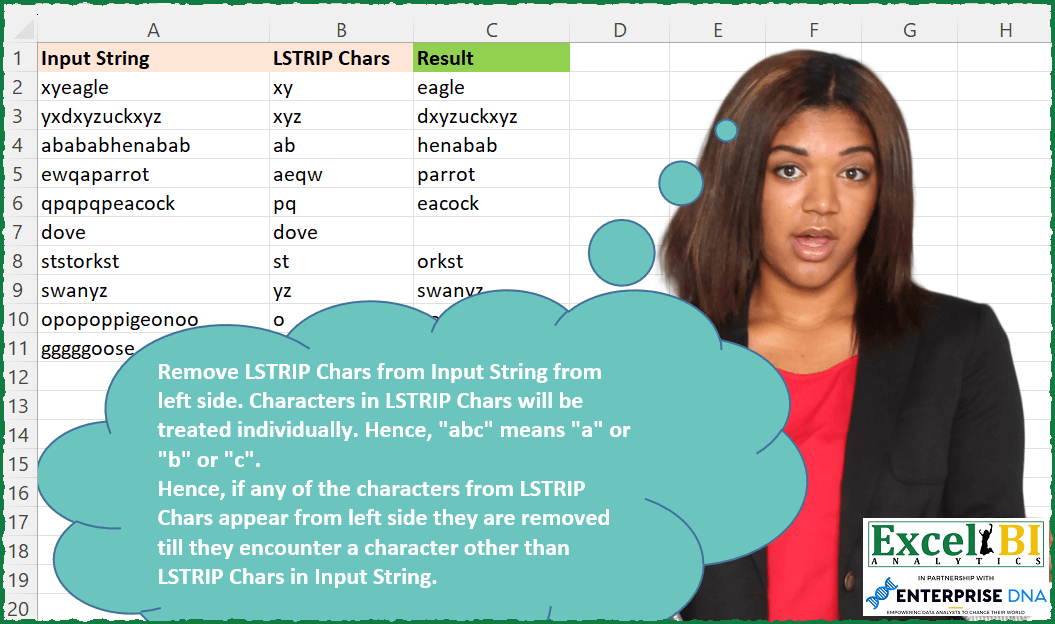
Remove LSTRIP Chars from Input String from left side. Characters in LSTRIP Chars will be treated individually. Hence, “abc” means “a” or “b” or “c”. Hence, if any of the characters from LSTRIP Chars appear from left side they are removed till they encounter a character other than LSTRIP Chars in Input String.
📌 Challenge Details and Links
ExcelBI Excel Challenge Number: 127
Challenge Difficulty: ⭐️⭐️
📥Download Sample File
📥Link to the solutions on LinkedIn
Solving the challenge of Left Strip Given Chars with Power Query
Power Query solution 1 for Left Strip Given Chars, proposed by Aditya Kumar Darak 🇮🇳:
let
  Source = Excel.CurrentWorkbook(){[Name = "data"]}[Content],
  Return = Table.AddColumn(
    Source,
    "Output",
    each Text.TrimStart([Input String], Text.ToList([LSTRIP Chars]))
  )
in
  Return
Power Query solution 2 for Left Strip Given Chars, proposed by Alejandro Simón 🇵🇦 🇪🇸:
let
  Source = Excel.CurrentWorkbook(){[Name = "Table1"]}[Content],
  Sol = Table.AddColumn(
    Source,
    "Result",
    each List.Accumulate(
      {Text.ToList([LSTRIP Chars])},
      [Input String],
      (s, c) => Text.TrimStart(s, c)
    )
  )[[Result]]
in
  Sol
Power Query solution 3 for Left Strip Given Chars, proposed by Luan Rodrigues:
let
  Fonte = Tabela1,
  result = Table.AddColumn(
    Fonte,
    "Personalizar",
    each [a = Text.ToList([LSTRIP Chars]), b = Text.TrimStart([Input String], a)][b]
  )
in
  result
Power Query solution 4 for Left Strip Given Chars, proposed by Brian Julius:
https://gist.github.com/bjulius/52f74c7229e2684923358ae7854c2de6
Power Query solution 5 for Left Strip Given Chars, proposed by Bhavya Gupta:
let
  Source = Excel.CurrentWorkbook(){[Name = "Table1"]}[Content],
  Final = Table.AddColumn(
    Source,
    "Result",
    each
      let
        Chr = Text.ToList([LSTRIP Chars])
      in
        Text.Combine(
          List.Skip(
            Splitter.SplitTextByCharacterTransition(Chr, (a) => not List.Contains(Chr, a))(
              [LSTRIP Chars] & [Input String]
            )
          )
        )
  )
in
  Final
Power Query solution 6 for Left Strip Given Chars, proposed by Jan Willem Van Holst:
let
  Source = Table.FromRows(
    Json.Document(
      Binary.Decompress(
        Binary.FromText(
          "Lc1bCgMhDAXQvfg9OxI/UifYYpnrq1Vn9U1CvZDogRjv3dpM6c3ukJsLh3d7nWvfn5ilmt7G9NA8+dImLkWZZ6VCrWGocZ2mtWiYImIWL9X0xFf3WNN3H32g5a6jUowmXbb2vxVFU16JcQHiME56gK7fpe5C+AE=",
          BinaryEncoding.Base64
        ),
        Compression.Deflate
      )
    ),
    let
      _t = ((type nullable text) meta [Serialized.Text = true])
    in
      type table [#"Input String" = _t, #"LSTRIP Chars" = _t]
  ),
  #"Added Custom" = Table.AddColumn(
    Source,
    "MyResult",
    each
      let
        ll = Splitter.SplitTextByRepeatedLengths(1)([LSTRIP Chars]),
        remove = List.Generate(
          () => [Input String],
          each Text.PositionOfAny(_, ll) = 0,
          each Text.RemoveRange(_, 0)
        ),
        result =
          if Text.PositionOfAny([Input String], ll) <> 0 then
            [Input String]
          else
            Text.RemoveRange(List.Last(remove), 0)
      in
        result
  )
in
  #"Added Custom"
Solving the challenge of Left Strip Given Chars with Excel
Excel solution 1 for Left Strip Given Chars, proposed by Bo Rydobon 🇹🇭:
=LET(
    r,
    LAMBDA(
        r,
        a,
        b,
        LET(
            c,
            MID(
                b,
                SEQUENCE(
                    LEN(
                        b
                    )
                ),
                1
            ),
            IF(
                OR(
                    LEFT(
                        a
                    )=c
                ),
                r(
                    r,
                    MID(
                        a,
                        2,
                        99
                    ),
                    b
                ),
                a
            )
        )
    ),
    MAP(
        A2:A11,
        B2:B11,
        LAMBDA(
            a,
            b,
            r(
                r,
                a,
                b
            )
        )
    )
)
Excel solution 2 for Left Strip Given Chars, proposed by Bo Rydobon 🇹🇭:
=MAP(
    A2:A11,
    B2:B11,
    LAMBDA(
        a,
        b,
        IFNA(
            MID(
                a,
                MATCH(
                    "?*",
                    TEXTSPLIT(
                        a,
                        MID(
                            b,
                            SEQUENCE(
                                LEN(
                                    b
                                )
                            ),
                            1
                        )
                    ),

                ),
                99
            ),
            ""
        )
    )
)
Excel solution 3 for Left Strip Given Chars, proposed by Rick Rothstein:
=MAP(
    A2:A11,
    B2:B11,
    LAMBDA(
        a,
        b,
        LET(
            n,
            LEN(
                a
            ),
            s,
            SEQUENCE(
                n
            ),
            MID(
                a,
                MIN(
                    0+IF(
                        ISNUMBER(
                            -SEARCH(
                                MID(
                                    a,
                                    s,
                                    1
                                ),
                                b
                            )
                        ),
                        n+1,
                        s
                    )
                ),
                n
            )
        )
    )
)
Excel solution 4 for Left Strip Given Chars, proposed by John V.:
=MAP(
    A2:A11,
    B2:B11,
    LAMBDA(
        a,
        b,
        IFNA(
            MID(
                a,
                MATCH(
                    1,
                    --ISERR(
                        FIND(
                            MID(
                                a,
                                ROW(
                                    1:20
                                ),
                                1
                            ),
                            b
                        )
                    ),

                ),
                99
            ),
            ""
        )
    )
)
Excel solution 5 for Left Strip Given Chars, proposed by 🇰🇷 Taeyong Shin:
=LET(
 s,
     A2:A11,

 REDUCE("",
     SEQUENCE(
         MAX(
             LEN(
                 s
             )
         )
     ),
     LAMBDA(a,
    n,

 LET(
 c,
     MID(
         s,
          n,
          1
     ),

 a & REPT(c,
     NOT(ISNUMBER(
         FIND(
             c,
              B2:B11
         )
     ) * (a="")))
 )
 ))
)

Recursive
=LAMBDA(Input,
    LSTRIP,

 LET(
 nth,
     MAX(
         LEN(
             Input
         )
     ),

 Func,
     LAMBDA(ME,
    str,
    wt,
    [num],
    [a],

 LET(
 n,
     num + 1,

 chr,
     MID(
         str,
          n,
          1
     ),

 IF(n > nth,
     a,
     a & ME(ME,
     str,
     wt,
     n,
     REPT(chr,
     NOT(ISNUMBER(
         FIND(
             chr,
              wt
         )
     ) * (a = ""))) ))
 )
 ),

 Func(
     Func,
      Input,
      LSTRIP
 )
 )
)(A2:A11,
     B2:B11)
Excel solution 6 for Left Strip Given Chars, proposed by 🇰🇷 Taeyong Shin:
=LET(
    R,
    LAMBDA(
        R,
        x,
        LET(
            b,
            ISERR(
                FIND(
                    LEFT(
                        x
                    ),
                    B2:B11
                )
            ),
            IF(
                AND(
                    b
                ),
                IFERROR(
                    x,
                    ""
                ),
                R(
                    R,
                    RIGHT(
                        x,
                        LEN(
                        x
                    )-NOT(
                    b
                )
                    )
                )
            )
        )
    ),
    R(
        R,
        A2:A11
    )
)
Excel solution 7 for Left Strip Given Chars, proposed by 🇰🇷 Taeyong Shin:
=REGEXEXTRACT(
    A2:A11,
    "^["&B2:B11&"]*K.*"
)
Excel solution 8 for Left Strip Given Chars, proposed by Kris Jaganah:
=MAP(A2:A11,
    B2:B11,
    LAMBDA(p,
    q,
    LET(c,
    MID(
        p,
        SEQUENCE(
            LEN(
                p
            )
        ),
        1
    ),
    d,
    SCAN(,
    IFNA(
        XMATCH(
            c,
            MID(
                q,
                SEQUENCE(
                    LEN(
                        q
                    )
                ),
                1
            ),
            0
        ),
        0
    ),
    LAMBDA(x,
    y,
    (IF(
        y=0,
        0,
        x
    )))),
    IFERROR(
        CONCAT(
            FILTER(
                c,
                d=0
            )
        ),
        ""
    ))))
Excel solution 9 for Left Strip Given Chars, proposed by Julian Poeltl:
=MAP(
    A2:A11,
    B2:B11,
    LAMBDA(
        I,
        L,
        LET(
            SP,
            LAMBDA(
                A,
                MID(
                    A,
                    SEQUENCE(
                        LEN(
                            A
                        )
                    ),
                    1
                )
            ),
            ISP,
            SP(
                I
            ),
            IFNA(
                CONCAT(
                    DROP(
                        ISP,
                        XMATCH(
                            FALSE,
                            ISNUMBER(
                                XMATCH(
                                    ISP,
                                    SP(
                                        L
                                    )
                                )
                            )
                        )-1
                    )
                ),
                ""
            )
        )
    )
)
Excel solution 10 for Left Strip Given Chars, proposed by Hussein SATOUR:
=MAP(
    A2:A11,
     B2:B11,

    LAMBDA(
        x,
         y,

        LET(
            a,
             MID(
                 x,
                  SEQUENCE(
                      LEN(
                          x
                      )
                  ),
                  1
             ),

            IFERROR(
                CONCAT(
                    DROP(
                        a,
                        XMATCH(
                            0,
                            IFERROR(
                                FIND(
                                    a,
                                    y
                                ),
                                0
                            )
                        )-1
                    )
                ),
                ""
            )

        )
    )
)
Excel solution 11 for Left Strip Given Chars, proposed by Sunny Baggu:
=MAP(
    A2:A11,
    B2:B11,
    LAMBDA(
        a,
        b,
        LET(

            _inp,
            MID(
                a,
                SEQUENCE(
                    LEN(
                        a
                    )
                ),
                1
            ),

            _lst,
            MID(
                b,
                SEQUENCE(
                    LEN(
                        b
                    )
                ),
                1
            ),

            _sub,
            REDUCE(
                a,
                _lst,
                LAMBDA(
                    a,
                    v,
                    SUBSTITUTE(
                        a,
                        v,
                        ""
                    )
                )
            ),

            _fl,
            LEFT(
                _sub
            ),

            _flno,
            MATCH(
                _fl,
                _inp,
                0
            ),

            IFERROR(
                MID(
                    a,
                    _flno,
                    LEN(
                        a
                    )
                ),
                ""
            )
        )
    )
)
Excel solution 12 for Left Strip Given Chars, proposed by Md. Zohurul Islam:
=MAP(
    A2:A11,
    B2:B11,
    LAMBDA(
        x,
        y,
        LET(

            sq,
            SEQUENCE(
                LEN(
                    x
                )
            ),

            a,
            MID(
                x,
                sq,
                1
            ),

            b,
            MID(
                y,
                SEQUENCE(
                    LEN(
                        y
                    )
                ),
                1
            ),

            d,
            XMATCH(
                a,
                b
            ),

            e,
            MIN(
                FILTER(
                    sq,
                    ISERROR(
                        d
                    )
                )
            ),

            f,
            IFERROR(
                CONCAT(
                    FILTER(
                        a,
                        sq>=e
                    )
                ),
                ""
            ),

            f
        )
    )
)
Excel solution 13 for Left Strip Given Chars, proposed by Charles Roldan:
=LET(
     LSTRIP,
     LAMBDA(
          textString,
         illegalChars,
          IFNA(

              RIGHT(
                   textString,
                   1 + LEN(
                        textString
                   ) - XMATCH(
                        TRUE,
                        ISERR(

                            FIND(
                                 MID(
                                      textString,
                                      SEQUENCE(
                                           LEN(
                        textString
                   )
                                      ),
                                      1
                                 ),
                                 illegalChars
      &                      )
                        )
                   )
              ),
               ""
          )
     ),

    MAP(
         A2:A11,
         B2:B11,
         LSTRIP
    )
)
Excel solution 14 for Left Strip Given Chars, proposed by Charles Roldan:
=MAP(
    A2:A11,
     B2:B11,
     LAMBDA(
         x,
         y,
          IFNA(
              RIGHT(
                  x,
                   1 + LEN(
                       x
                   ) - XMATCH(
                       TRUE,
                        ISERR(
                            FIND(
                                MID(
                                    x,
                                     SEQUENCE(
                                         LEN(
                       x
                   )
                                     ),
                                     1
                                ),
                                 y
                            )
                        )
                   )
              ),
               ""
          )
     )
)
Excel solution 15 for Left Strip Given Chars, proposed by Stefan Olsson:
=arrayformula(
    REGEXEXTRACT(
        A2:A11,
        "["&B2:B11&"]*(.*)"
    )
)
Excel solution 16 for Left Strip Given Chars, proposed by Abhishek Kumar Jain:
=MAP(
    A2:A11,
    B2:B11,
    LAMBDA(
        x,
        y,
        LET(
            a,
            MID(
                x,
                SEQUENCE(
                    LEN(
                        x
                    )
                ),
                1
            ),
            b,
            MID(
                y,
                SEQUENCE(
                    LEN(
                        y
                    )
                ),
                1
            ),
            IFERROR(
                MID(
                    x,
                    XMATCH(
                        "",
                        IFERROR(
                            XMATCH(
                                a,
                                b
                            ),
                            ""
                        )
                    ),
                    LEN(
                        x
                    )
                ),
                ""
            )
        )
    )
)
Excel solution 17 for Left Strip Given Chars, proposed by Michael Szczesny:
=REDUCE(
    $A$2:$A$11,
    $B$2:$B$11,
    LAMBDA(
        a,
        b,
        SUBSTITUTE(
            a,
            b,
            ""
        )
    )
)
Solving the challenge of Left Strip Given Chars with Python in Excel
Python in Excel solution 1 for Left Strip Given Chars, proposed by Alejandro Campos:
df = xl("A1:B11", headers=True)
df['Output String'] = df.apply(lambda r: r['Input String'].lstrip(r['LSTRIP Chars']), axis=1)
df
Solving the challenge of Left Strip Given Chars with SQL
SQL solution 1 for Left Strip Given Chars, proposed by Zoran Milokanović:
WITH /* Vertica Analytic Database v9.2.0-7 */
DATA
AS
(
 SELECT 'xyeagle' AS INPUT_STRING, 'xy' AS LSTRIP_CHARS UNION ALL
 SELECT 'yxdxyzuckxyz' AS INPUT_STRING, 'xyz' AS LSTRIP_CHARS UNION ALL
 SELECT 'abababhenabab' AS INPUT_STRING, 'ab' AS LSTRIP_CHARS UNION ALL
 SELECT 'ewqaparrot' AS INPUT_STRING, 'aeqw' AS LSTRIP_CHARS UNION ALL
 SELECT 'qpqpqpeacock' AS INPUT_STRING, 'pq' AS LSTRIP_CHARS UNION ALL
 SELECT 'dove' AS INPUT_STRING, 'dove' AS LSTRIP_CHARS UNION ALL
 SELECT 'ststorkst' AS INPUT_STRING, 'st' AS LSTRIP_CHARS UNION ALL
 SELECT 'swanyz' AS INPUT_STRING, 'yz' AS LSTRIP_CHARS UNION ALL
 SELECT 'opopoppigeonoo' AS INPUT_STRING, 'o' AS LSTRIP_CHARS UNION ALL
 SELECT 'gggggoose' AS INPUT_STRING, 'gs' AS LSTRIP_CHARS
)
SELECT
 D.INPUT_STRING
,D.LSTRIP_CHARS
,LTRIM(D.INPUT_STRING, D.LSTRIP_CHARS) AS RESULT
FROM DATA D
;
&&