
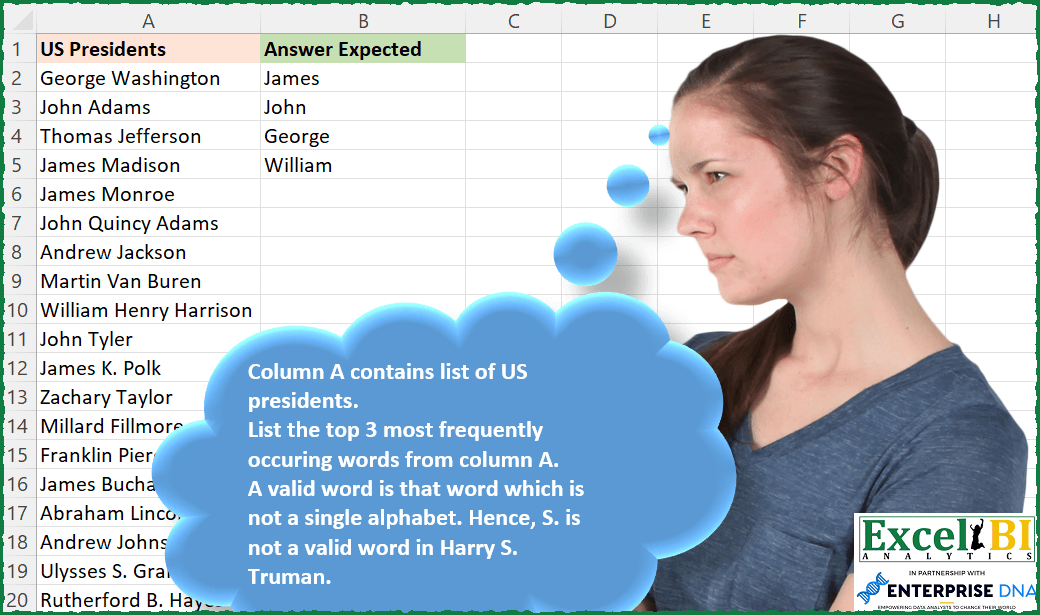
Column A contains list of US presidents. List the top 3 most frequently occurring words from column A. A valid word is that word which is not a single alphabet. Hence, S. is not a valid word in Harry S. Truman. This is a case insensitive problem.
📌 Challenge Details and Links
ExcelBI Excel Challenge Number: 123
Challenge Difficulty: ⭐️⭐️
📥Download Sample File
📥Link to the solutions on LinkedIn
Solving the challenge of Top Words in Presidents with Power Query
Power Query solution 1 for Top Words in Presidents, proposed by Bo Rydobon 🇹🇭:
let
  Source = Excel.CurrentWorkbook(){[Name = "Table1"]}[Content],
  Split = Table.ExpandListColumn(
    Table.TransformColumns(
      Source,
      {"US Presidents", Splitter.SplitTextByAnyDelimiter({". ", " "}, QuoteStyle.None)}
    ),
    "US Presidents"
  ),
  Group = Table.Sort(
    Table.Group(Split, {"US Presidents"}, {{"Count", each Table.RowCount(_)}}),
    {{"Count", 1}}
  ),
  Filtered = Table.SelectRows(
    Group,
    each [Count] >= Group[Count]{3} and Text.Length([US Presidents]) > 1
  )[US Presidents]
in
  Filtered
Power Query solution 2 for Top Words in Presidents, proposed by Aditya Kumar Darak 🇮🇳:
let
  Source = Excel.CurrentWorkbook(){[Name = "data"]}[Content],
  TopN = 3,
  Transform = Table.ExpandListColumn(
    Table.TransformColumns(Source, {"US Presidents", each Text.SplitAny(_, " .")}),
    "US Presidents"
  ),
  Group = Table.Group(Transform, {"US Presidents"}, {{"Count", each Table.RowCount(_)}}),
  Filter = Table.SelectRows(Group, each [US Presidents] <> "" and Text.Length([US Presidents]) > 1),
  TopNFilter = Table.SelectRows(Filter, each [Count] >= List.MaxN(Filter[Count], TopN){TopN - 1}),
  Return = Table.Sort(TopNFilter, {{"Count", 1}})[[US Presidents]]
in
  Return
Power Query solution 3 for Top Words in Presidents, proposed by Luan Rodrigues:
let
  Fonte = Tabela1,
  tab = Table.FromList(
    List.Select(
      List.Combine(
        Table.AddColumn(Fonte, "Personalizar", each Text.Split([US Presidents], " "))[Personalizar]
      ),
      each Text.Contains(_, ".") = false
    ),
    null,
    {"US Presidents"}
  ),
  gp = Table.Group(tab, {"US Presidents"}, {{"Contagem", each Table.RowCount(_)}}),
  result = Table.MaxN(gp, "Contagem", each [Contagem] > 2)[[US Presidents]]
in
  result
Power Query solution 4 for Top Words in Presidents, proposed by Brian Julius:
let
  Source = Excel.CurrentWorkbook(){[Name = "Table1"]}[Content],
  Split = Table.ExpandListColumn(
    Table.TransformColumns(
      Source,
      {
        {
          "US Presidents",
          Splitter.SplitTextByDelimiter(" ", QuoteStyle.Csv),
          let
            itemType = (type nullable text) meta [Serialized.Text = true]
          in
            type {itemType}
        }
      }
    ),
    "US Presidents"
  ),
  ReplacePer = Table.ReplaceValue(Split, ".", "", Replacer.ReplaceText, {"US Presidents"}),
  FilterInitials = Table.SelectRows(ReplacePer, each Text.Length([US Presidents]) > 1),
  Group = Table.Group(
    FilterInitials,
    {"US Presidents"},
    {
      {"Count", each Table.RowCount(_), Int64.Type},
      {"All", each _, type table [US Presidents = nullable text]}
    }
  ),
  AddRank = Table.AddRankColumn(
    Group,
    "Rank",
    {"Count", Order.Descending},
    [RankKind = RankKind.Dense]
  ),
  Filter = Table.RenameColumns(
    Table.SelectColumns(Table.SelectRows(AddRank, each [Rank] <= 3), "US Presidents"),
    {"US Presidents", "Answer Expected"}
  )
in
  Filter
Power Query solution 5 for Top Words in Presidents, proposed by Bhavya Gupta:
let
  Source = Excel.CurrentWorkbook(){[Name = "Table1"]}[Content],
  Transform = Table.ExpandListColumn(
    Table.TransformColumns(
      Source,
      {
        {
          "US Presidents",
          each List.Select(
            Text.Split(_, " "),
            each Text.Length(Text.Select(_, {"A" .. "Z", "a" .. "z"})) > 1
          )
        }
      }
    ),
    "US Presidents"
  ),
  G_1 = Table.Group(Transform, {"US Presidents"}, {{"Count", each Table.RowCount(_), Int64.Type}}),
  G_2 = Table.Group(G_1, {"Count"}, {{"All", each [US Presidents]}}),
  Final = List.Combine(Table.FirstN(Table.Sort(G_2, {{"Count", Order.Descending}}), 3)[All])
in
  Final
Power Query solution 6 for Top Words in Presidents, proposed by Venkata Rajesh:
let
  Source = Data[US Presidents],
  Words = List.Combine(List.Transform(Source, each Text.Split(_, " "))),
  List = List.Select(Words, each Text.Length(Text.Select(_, {"A" .. "Z", "a" .. "z"})) > 1),
  Max = List.Max(
    List.Transform(
      List,
      each
        let
          name = _
        in
          List.Count(List.Select(List, each _ = name))
    )
  ),
  Result = List.Distinct(
    List.Select(
      List,
      each
        let
          name = _
        in
          List.Count(List.Select(List, each _ = name)) > Max - 3
    )
  )
in
  Result
Power Query solution 7 for Top Words in Presidents, proposed by Krzysztof Kominiak:
let
  Source = Excel.CurrentWorkbook(){[Name = "Table1"]}[Content],
  AddNames = Table.ExpandListColumn(
    Table.AddColumn(
      Source,
      "Answer Expected",
      each List.RemoveFirstN(
        List.Reverse(
          List.Select(Text.Split(Text.Remove([US Presidents], "."), " "), each Text.Length(_) > 1)
        ),
        1
      )
    )[[Answer Expected]],
    "Answer Expected"
  ),
  GroupRows = Table.Group(
    AddNames,
    {"Answer Expected"},
    {{"Count", each Table.RowCount(_), type number}}
  ),
  Result = Table.Sort(
    Table.SelectRows(GroupRows, each [Count] >= List.MaxN(GroupRows[Count], 3){2}),
    {{"Count", Order.Descending}, {"Answer Expected", Order.Ascending}}
  )[[Answer Expected]]
in
  Result
Power Query solution 8 for Top Words in Presidents, proposed by Jan Willem Van Holst:
let
  Source = YourData,
  #"Split Column by Delimiter" = Table.ExpandListColumn(
    Table.TransformColumns(
      Source,
      {
        {
          "US Presidents",
          Splitter.SplitTextByDelimiter(" ", QuoteStyle.Csv),
          let
            itemType = (type nullable text) meta [Serialized.Text = true]
          in
            type {itemType}
        }
      }
    ),
    "US Presidents"
  ),
  #"Replaced Value" = Table.ReplaceValue(
    #"Split Column by Delimiter",
    ".",
    "",
    Replacer.ReplaceText,
    {"US Presidents"}
  ),
  #"Filtered Rows" = Table.SelectRows(#"Replaced Value", each Text.Length([US Presidents]) <> 1),
  #"Grouped Rows" = Table.Group(
    #"Filtered Rows",
    {"US Presidents"},
    {{"Count", each Table.RowCount(_), Int64.Type}}
  ),
  #"Filtered Rows1" = Table.SelectRows(
    #"Grouped Rows",
    each List.Contains(List.FirstN(List.Sort(#"Grouped Rows"[Count], Order.Descending), 3), [Count])
  ),
  #"Sorted Rows" = Table.Sort(
    #"Filtered Rows1",
    {{"Count", Order.Descending}, {"US Presidents", Order.Ascending}}
  ),
  #"Removed Columns" = Table.RemoveColumns(#"Sorted Rows", {"Count"})
in
  #"Removed Columns"
Power Query solution 9 for Top Words in Presidents, proposed by CA Vikal Jain:
let
 Source = Excel.CurrentWorkbook(){[Name="Table1"]}[Content],
 #"Split Column by Delimiter" = Table.SplitColumn(Source, "US Presidents", Splitter.SplitTextByDelimiter(" ", QuoteStyle.Csv), {"US Presidents.1", "US Presidents.2", "US Presidents.3"}),
 Tocol = Table.FromList(List.Combine(Table.ToColumns(#"Split Column by Delimiter"))),
 #"Grouped Rows" = Table.Group(Tocol, {"Column1"}, {{"Count", each Table.RowCount(_), Int64.Type}}),
 #"Filtered Rows" = Table.SelectRows(#"Grouped Rows", each ([Column1] <> "")),
 Results" = Table.FirstN(Table.Sort(#"Filtered Rows",{{"Count", Order.Descending}}),3)
in
Results
Solving the challenge of Top Words in Presidents with Excel
Excel solution 1 for Top Words in Presidents, proposed by Bo Rydobon 🇹🇭:
=LET(
    w,
    SORT(
        TEXTSPLIT(
            CONCAT(
                A2:A47&" "
            ),
            ,
            " "
        )
    ),
    u,
    UNIQUE(
        w
    ),
    c,
    XMATCH(
        u,
        w,
        ,
        -1
    )-XMATCH(
        u,
        w
    ),
    FILTER(
        SORTBY(
            u,
            -c
        ),
        SORT(
            c,
            ,
            -1
        )>=LARGE(
            c,
            3
        )
    )
)
Excel solution 2 for Top Words in Presidents, proposed by Rick Rothstein:
=LET(
    a,
    A2:A47,
    t,
    TEXTSPLIT(
        TEXTJOIN(
            " ",
            ,
            a
        ),
        ,
        " "
    ),
    u,
    UNIQUE(
        FILTER(
            t,
            LEN(
                t
            )>2
        )
    ),
    c,
    COUNTIF(
        a,
        "*"&u&"*"
    ),
    FILTER(
        u,
        c>=LARGE(
            UNIQUE(
                c
            ),
            3
        )
    )
)
Excel solution 3 for Top Words in Presidents, proposed by John V.:
=LET(w,
    TEXTSPLIT(
        CONCAT(
            A2:A47&" "
        ),
        ,
        " "
    ),
    u,
    UNIQUE(
        FILTER(
            w,
            LEN(
                w
            )>2
        )
    ),
    n,
    MAP(u,
    LAMBDA(x,
    SUM(--(w=x)))),
    s,
    SORT(
        HSTACK(
            n,
            u
        ),
        ,
        -1
    ),
    FILTER(
        DROP(
            s,
            ,
            1
        ),
        TAKE(
            s,
            ,
            1
        )>=LARGE(
            n,
            3
        )
    ))

✅=LET(w,
    TEXTSPLIT(
        CONCAT(
            A2:A47&" "
        ),
        ,
        " "
    ),
    u,
    UNIQUE(
        FILTER(
            w,
            LEN(
                w
            )>2
        )
    ),
    n,
    MAP(u,
    LAMBDA(x,
    SUM(--(w=x)))),
    FILTER(
        SORTBY(
            u,
            n,
            -1
        ),
        SORT(
            n,
            ,
            -1
        )>=LARGE(
            n,
            3
        )
    ))
Excel solution 4 for Top Words in Presidents, proposed by محمد حلمي:
=LET(
a,
    TEXTSPLIT(
        CONCAT(
            A2:A47&" "
        ),
        ,
        " "
    ),

v,
    UNIQUE(
        a
    ),

r,
    MAP(v,
    LAMBDA(c,
    SUM(--(c=a)))),

FILTER(
    SORTBY(
        v,
        r,
        -1
    ),
    SORT(
        r,
        ,
        -1
    )>=LARGE(
        r,
        3
    )
))
Excel solution 5 for Top Words in Presidents, proposed by 🇰🇷 Taeyong Shin:
=LET(
    t,
    TEXTSPLIT(
        TEXTJOIN(
            " ",
            ,
            A2:A47
        ),
        ,
        " "
    ),
    g,
    GROUPBY(
        t,
        t,
        ROWS,
        ,
        0,
        -2
    ),
    TAKE(
        g,
        XMATCH(
            LARGE(
                g,
                3
            ),
            DROP(
                g,
                ,
                1
            ),
            ,
            -1
        ),
        1
    )
)
Excel solution 6 for Top Words in Presidents, proposed by 🇰🇷 Taeyong Shin:
=LET(
    t,
    TEXTSPLIT(
        TEXTJOIN(
            " ",
            ,
            A2:A47
        ),
        ,
        " "
    ),
    R,
    LAMBDA(
        R,
        num,
        [i],
        LET(
            k,
            MODE.MULT(
                num
            ),
            v,
            INDEX(
                t,
                k,
                1
            ),
            IF(
                i+1<3,
                VSTACK(
                    v,
                    R(
                        R,
                        FILTER(
                            num,
                            ISNA(
                                XMATCH(
                                    num,
                                    k
                                )
                            )
                        ),
                        i+1
                    )
                ),
                v
            )
        )
    ),
    R(
        R,
        XMATCH(
            t,
            t
        )
    )
)
Excel solution 7 for Top Words in Presidents, proposed by 🇰🇷 Taeyong Shin:
=LET(

     str,
     TEXTSPLIT(
         TEXTJOIN(
             " ",
              ,
              A2:A47
         ),
          ,
          " "
     ) & " ",

     u,
     UNIQUE(
         str
     ),

     n,
     COUNTIF(
         A2:A47,
          "*" & u & "*"
     ),

     TOCOL(
         SORTBY(
             IF(
                 n >= LARGE(
                     n,
                      3
                 ),
                  u,
                  x
             ),
              -n
         ),
          2
     )

)


=LET(

     str,
     TEXTSPLIT(
         CONCAT(
             A2:A47 & " "
         ),
          ,
          " ",
          1
     ),

     n,
     XMATCH(
         str,
          UNIQUE(
         str
     )
     ),

     frq,
     FREQUENCY(
         n,
          n
     ),

     TOCOL(
         SORTBY(
             IF(
                 frq >= LARGE(
                     frq,
                      3
                 ),
                  str,
                  x
             ),
              -frq
         ),
          2
     )

)


=LET(

     str,
     SORT(
         TEXTSPLIT(
             CONCAT(
                 A2:A47 & " "
             ),
              ,
              " ",
              1
         )
     ),

     u,
     UNIQUE(
         str
     ),

     n,
     XMATCH(
         u,
          str,
          ,
          -1
     ) - XMATCH(
         u,
          str
     ),

     TOCOL(
         SORTBY(
             IF(
                 n >= LARGE(
                     n,
                      3
                 ),
                  u,
                  x
             ),
              -n
         ),
          2
     )

)
Excel solution 8 for Top Words in Presidents, proposed by Kris Jaganah:
=LET(a,
    A2:A47,
    b,
    TRIM(
        TEXTSPLIT(
            TEXTJOIN(
                " ",
                TRUE,
                IFERROR(
                    REPLACE(
                        a,
                        FIND(
                            ".",
                            a
                        )-1,
                        2,
                        ""
                    ),
                    a
                )
            ),
            ,
            " "
        )
    ),
    c,
    UNIQUE(
        FILTER(
            b,
            b<>""
        )
    ),
    d,
    MAP(c,
    LAMBDA(x,
    SUM(--(x=b)))),
    e,
    SORTBY(
        HSTACK(
            c,
            d
        ),
        d,
        -1
    ),
    FILTER(CHOOSECOLS(
        e,
        1
    ),
    (CHOOSECOLS(
        e,
        2
    )>=LARGE(
        CHOOSECOLS(
        e,
        2
    ),
        3
    ))))
Excel solution 9 for Top Words in Presidents, proposed by Julian Poeltl:
=LET(
    N,
    TEXTSPLIT(
        TEXTJOIN(
            " ",
            ,
            A2:A47
        ),
        ,
        " "
    ),
    F,
    FILTER(
        N,
        LEN(
            N
        )>2
    ),
    U,
    UNIQUE(
        F
    ),
    C,
    MAP(
        U,
        LAMBDA(
            A,
            ROWS(
                FILTER(
                    F,
                    F=A
                )
            )
        )
    ),
    S,
    SORTBY(
        U,
        C,
        -1
    ),
    SC,
    SORT(
        C,
        ,
        -1
    ),
    FILTER(
        S,
        SC>=LARGE(
            C,
            3
        )
    )
)
Excel solution 10 for Top Words in Presidents, proposed by Aditya Kumar Darak 🇮🇳:
=LET(
 _n,
     3,

 _d,
     A2:A47,

 _e,
     LAMBDA(
         a,
          b,
          VSTACK(
              a,
               TEXTSPLIT(
                   b,
                    ,
                    {" ",
                    "."},
                    1
               )
          )
     ),

 _s,
     REDUCE(
         "",
          _d,
          _e
     ),

 _m,
     XMATCH(
         _s,
          _s
     ),

 _fq,
     DROP(
         FREQUENCY(
             _m,
              _m
         ),
          -1
     ),

 _f,
     FILTER(HSTACK(
         _s,
          _fq
     ),
     (_fq >= LARGE(
         _fq,
          _n
     )) * (LEN(
         _s
     ) > 1)),

 _r,
     TAKE(
         SORT(
             _f,
              2,
              -1
         ),
          ,
          1
     ),

 _r
)
Excel solution 11 for Top Words in Presidents, proposed by Timothée BLIOT:
=LET(A,
     SUBSTITUTE(
         A2:A47,
         ".",
         ""
     ),

B,
     TEXTSPLIT(
         TEXTJOIN(
             "/",
             ,
             A
         ),
         " ",
         "/"
     ),

C,
     TOCOL(
         IF(
             LEN(
                 B
             )=1,
             "",
             B
         ),
         3
     ),

D,
     MAP(C,
    LAMBDA(a,
    MIN(
        LEN(
            a
        ),
        1
    )*SUMPRODUCT(1*(C=a)))),

E,
     LARGE(
         UNIQUE(
             D
         ),
         3
     ),
     UNIQUE(
         FILTER(
             SORTBY(
                 C,
                 D,
                 -1
             ),
             SORT(
                 D,
                 ,
                 -1
             )>=E
         )
     ))
Excel solution 12 for Top Words in Presidents, proposed by Hussein SATOUR:
=LET(
 t,
     TEXTSPLIT(
         CONCAT(
             A2:A47& " "
         ),
          ,
          " "
     ),

 a,
     FILTER(
         t,
          LEN(
              t
          ) > 2
     ),
     b,
     UNIQUE(
         a
     ),

 c,
     MAP(b,
     LAMBDA(x,
     SUM((a=x)*1))),

 FILTER(
     HSTACK(
         b,
          c
     ),
      c > LARGE(
          UNIQUE(
              c
          ),
           4
      )
 ))
Excel solution 13 for Top Words in Presidents, proposed by Md. Zohurul Islam:
=LET(
    z,
    A2:A47,

    P,
    DROP(
        REDUCE(
            "",
            z,
            LAMBDA(
                x,
                y,
                VSTACK(
                    x,
                    TOCOL(
                        TEXTSPLIT(
                            y,
                            " "
                        )
                    )
                )
            )
        ),
        1
    ),

    Q,
    LEN(
        P
    ),

    S,
    FILTER(
        P,
        Q>2
    ),

    U,
    UNIQUE(
        SORT(
            S
        )
    ),

    V,
    MAP(
        U,
        LAMBDA(
            a,
            SUM(
                ABS(
                    S=a
                )
            )
        )
    ),

    rng,
    SORTBY(
        HSTACK(
            U,
            V
        ),
        V,
        -1
    ),

    W,
    FILTER(
        rng,
        TAKE(
            rng,
            ,
            -1
        )>=3
    ),

    result,
    TAKE(
        W,
        ,
        1
    ),

    result
)
Excel solution 14 for Top Words in Presidents, proposed by Charles Roldan:
=LET(
    f,
    LAMBDA(
        x,
        TEXTSPLIT(
            TEXTJOIN(
                " ",
                ,
                x
            ),
            ,
            " "
        )
    ),
    Names,
    f(
        A2:A47
    ),

    _COUNTIF,
    LAMBDA(
        a,
        b,
        BYROW(
            TOROW(
                a
            )=b,
            LAMBDA(
                x,
                SUM(
                    --x
                )
            )
        )
    ),

    Words,
    UNIQUE(
        Names
    ),
    Counts,
    _COUNTIF(
        Names,
        Words
    ),

    f(
        MAP(
            LARGE(
                Counts,
                SEQUENCE(
                    3
                )
            ),

            LAMBDA(
                x,
                TEXTJOIN(
                    " ",
                    ,
                    FILTER(
                        Words,
                        Counts=x
                    )
                )
            )
        )
    )
)
Excel solution 15 for Top Words in Presidents, proposed by Stefan Olsson:
=INDEX(

    SORTN(

        QUERY(

            TRANSPOSE(
                SPLIT(
                    REGEXREPLACE(
                        TEXTJOIN(
                            " ",
                             true,
                             A2:A50
                        ),
                         " w.? ",
                         " "
                    ),
                     " ",
                     true,
                     true
                )
            ),

            "select Col1, count(Col1) group by Col1 order by count(Col1) desc Label count(Col1) ''",
            0
        ),

        3,
         3,
         2,
         false
    )
    ,
    ,
    1
)
Excel solution 16 for Top Words in Presidents, proposed by Guillermo Arroyo:
=LET(n,
    TEXTSPLIT(
        TEXTJOIN(
            " ",
            ,
            SUBSTITUTE(
                A2:A47,
                ".",
                ""
            )
        ),
        ,
        " "
    ),
    f,
    FILTER(
        n,
        LEN(
            n
        )>1
    ),
    un,
    UNIQUE(
        f
    ),
    p,
    MMULT(--(un=TRANSPOSE(
        f
    )),
    SEQUENCE(
        ROWS(
        f
    ),
        ,
        1,
        0
    )),
    q,
    AGGREGATE(
        14,
        4,
        p,
        {1;2;3}
    ),
    FILTER(SORTBY(
        un,
        p,
        -1
    ),
    MMULT(--(SORT(
        p,
        ,
        -1
    )=TRANSPOSE(
        q
    )),
    {1;1;1})))
Excel solution 17 for Top Words in Presidents, proposed by Quadri Olayinka Atharu:
=LET(a,
    TOCOL(
        TEXTSPLIT(
            TEXTJOIN(
                "|",
                ,
                A2:A47,
                ,

            ),
            "|",
            " ",
            0,
            ,
            ""
        )
    ),

b,
    SUBSTITUTE(
        a,
        ".",
        ""
    ),

c,
    FILTER(b,
    (b<>"")*(LEN(
        b
    )>1)),

d,
    MAP(
        c,
        LAMBDA(
            x,
            SUM(
                N(
                    x=c
                )
            )
        )
    ),

UNIQUE(FILTER(c,
    (d>=LARGE(
        UNIQUE(
            d
        ),
        3
    )))))
Solving the challenge of Top Words in Presidents with SQL
SQL solution 1 for Top Words in Presidents, proposed by Zoran Milokanović:
WITH /* Microsoft SQL Server 2019 */
DATA_PREP
AS
(
 SELECT
 VALUE
 ,COUNT(*) AS OCCURRENCE
 FROM DATA D
 CROSS APPLY STRING_SPLIT(D.US_PRESIDENTS, ' ')
 WHERE
 1 = 1
 AND CHARINDEX('.', VALUE) = 0
 GROUP BY
 VALUE
)
SELECT
 F.VALUE AS ANSWER_EXPECTED
FROM
(
 SELECT
 DP.VALUE
 ,DENSE_RANK() OVER (ORDER BY DP.OCCURRENCE DESC) AS TOP_N
 FROM DATA_PREP DP
) F
WHERE
 F.TOP_N <= 3
ORDER BY
 F.TOP_N
,F.VALUE
;
&&