
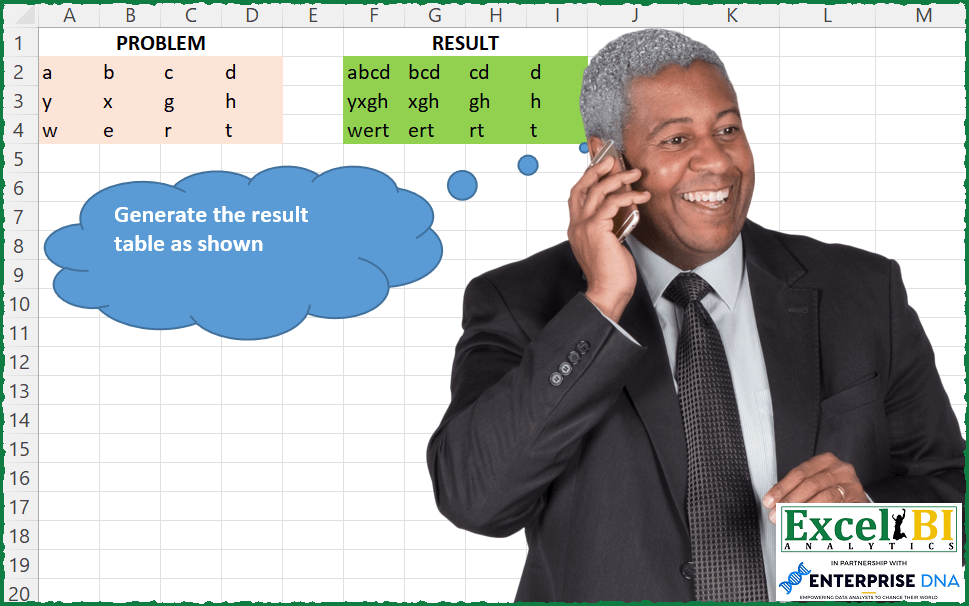
Where Tn = T(n-2) & T(n-1) and & was concatenation operator. In this challenge, you will need to concat starting from right and go to left.
📌 Challenge Details and Links
ExcelBI Excel Challenge Number: 120
Challenge Difficulty: ⭐️⭐️
📥Download Sample File
📥Link to the solutions on LinkedIn
Solving the challenge of Reverse Concatenation Order with Power Query
Power Query solution 1 for Reverse Concatenation Order, proposed by Aditya Kumar Darak 🇮🇳:
let
  Source = Excel.CurrentWorkbook(){[Name = "data"]}[Content],
  ToRows = Table.ToRows(Source),
  Transform = List.Transform(
    ToRows,
    (f) => List.Transform({0 .. List.Count(f) - 1}, (x) => Text.Combine(List.Skip(f, x), ""))
  ),
  Result = Table.FromRows(Transform)
in
  Result
Power Query solution 2 for Reverse Concatenation Order, proposed by Luan Rodrigues:
let
  Fonte = Tabela1,
  tab = Table.AddColumn(
    Fonte,
    "Personalizar",
    each [
      a = Record.FieldValues(_),
      b = {1 .. List.Count(a)},
      c = Text.Combine(
        List.Reverse(
          List.Transform(b, (x) => Text.Combine(List.LastN(List.Transform(a, Text.From), x)))
        ),
        ","
      )
    ][c]
  )[Personalizar],
  Result = Table.FromList(tab)
in
  Result
Power Query solution 3 for Reverse Concatenation Order, proposed by Brian Julius:
let
  Source = Excel.CurrentWorkbook(){[Name = "Table1"]}[Content],
  ToRecs = List.Transform(Table.ToRecords(Source), Record.ToList),
  ToTable = Table.FromList(ToRecs, Splitter.SplitByNothing(), null, null, ExtraValues.Error),
  AddCountList = Table.AddColumn(ToTable, "Custom", each {0 .. List.Count([Column1]) - 1}),
  AddIndex = Table.AddIndexColumn(AddCountList, "Index", 1, 1, Int64.Type),
  Expand = Table.ExpandListColumn(AddIndex, "Custom"),
  Rem1stN = Table.AddColumn(Expand, "Custom.1", each List.RemoveFirstN([Column1], [Custom])),
  Extract = Table.TransformColumns(
    Rem1stN,
    {"Custom.1", each Text.Combine(List.Transform(_, Text.From)), type text}
  ),
  Remove = Table.SelectColumns(Extract, {"Custom", "Index", "Custom.1"}),
  Pivot = Table.Pivot(
    Table.TransformColumnTypes(Remove, {{"Custom", type text}}, "en-US"),
    List.Distinct(Table.TransformColumnTypes(Remove, {{"Custom", type text}}, "en-US")[Custom]),
    "Custom",
    "Custom.1"
  ),
  RemoveIdx = Table.RemoveColumns(Pivot, {"Index"}),
  Demote = Table.DemoteHeaders(RemoveIdx),
  RemoveTop1 = Table.Skip(Demote, 1)
in
  RemoveTop1
Power Query solution 4 for Reverse Concatenation Order, proposed by Matthias Friedmann:
let
 Source = Excel.CurrentWorkbook(){[Name = "Scan"]}[Content],
 Accumulate = Table.FromRows(
 Table.TransformRows(Source,
 each List.RemoveLastN(List.Accumulate(List.Reverse(Record.ToList(_)), {""}, (s, c) => {c & List.First(s)} & s))
 )
 )
in
 Accumulate

let
 Source = Excel.CurrentWorkbook(){[Name = "Scan"]}[Content],
 Custom = Table.FromList(
 Table.TransformRows(
 Source,
 each Text.Combine(
 List.Transform(
 List.Reverse({1 .. Table.ColumnCount(Source)}),
 (x) => Text.Combine(List.LastN(Record.ToList(_), x))
 ),
 ", "
 )
 )
 )
in
 Custom
Power Query solution 5 for Reverse Concatenation Order, proposed by Victor Wang:
let
  Source = Excel.CurrentWorkbook(){[Name = "Table2"]}[Content],
  Result = Table.Combine(
    Table.TransformRows(
      Source,
      each [
        l = Record.ToList(_),
        r = Table.FromColumns(
          List.Transform({0 .. List.Count(l) - 1}, each {Text.Combine(List.Skip(l, _))})
        )
      ][r]
    )
  )
in
  Result
Power Query solution 6 for Reverse Concatenation Order, proposed by Venkata Rajesh:
let
  Source = Data,
  Result = Table.FromRows(
    Table.AddColumn(
      Source,
      "Custom",
      each
        let
          _row   = Record.ToList(_),
          _count = List.Count(_row),
          _list  = List.Transform({0 .. _count - 1}, each Text.Combine(List.Skip(_row, _), ""))
        in
          _list
    )[Custom]
  )
in
  Result
Power Query solution 7 for Reverse Concatenation Order, proposed by Krzysztof Kominiak:
let
  Source = Excel.CurrentWorkbook(){[Name = "Table1"]}[Content],
  Base = Table.AddColumn(Source, "Ls", each Record.ToList(_))[[Ls]],
  ListAccum = List.Accumulate(
    {0 .. Table.ColumnCount(Source) - 1},
    Base,
    (s, c) => Table.AddColumn(s, "Col" & Text.From(c + 1), each Text.Combine(List.Range([Ls], c)))
  ),
  Result = Table.SelectColumns(ListAccum, List.Range(Table.ColumnNames(ListAccum), 1))
in
  Result
Power Query solution 8 for Reverse Concatenation Order, proposed by Jan Willem Van Holst:
let
  Source = Table.FromRows(
    Json.Document(
      Binary.Decompress(
        Binary.FromText(
          "i45WSlTSUUoC4mQgTlGK1YlWqgSyKoA4HYgzwCLlQFYqEBcBcYlSbCwA",
          BinaryEncoding.Base64
        ),
        Compression.Deflate
      )
    ),
    let
      _t = ((type nullable text) meta [Serialized.Text = true])
    in
      type table [Column1 = _t, Column2 = _t, Column3 = _t, Column4 = _t]
  ),
  base = Table.CombineColumns(
    Source,
    {"Column1", "Column2", "Column3", "Column4"},
    Combiner.CombineTextByDelimiter("", QuoteStyle.None),
    "Merged"
  ),
  iterations = Text.Length(Table.FirstValue(base)) - 1,
  fx = (inputTable, n) =>
    if n = 1 then
      Table.AddColumn(inputTable, "C" & Text.From(n), each Text.End([Merged], n))
    else
      Table.AddColumn(@fx(inputTable, n - 1), "C" & Text.From(n), each Text.End([Merged], n)),
  _table = fx(base, iterations),
  _columns = List.Reverse(List.Skip(Table.ColumnNames(_table)))
in
  Table.ReorderColumns(_table, _columns)
Power Query solution 9 for Reverse Concatenation Order, proposed by Jan Willem Van Holst:
let
  Source = Table.FromRows(
    Json.Document(
      Binary.Decompress(
        Binary.FromText(
          "i45WSlTSUUoC4mQgTlGK1YlWqgSyKoA4HYgzwCLlQFYqEBcBcYlSbCwA",
          BinaryEncoding.Base64
        ),
        Compression.Deflate
      )
    ),
    let
      _t = ((type nullable text) meta [Serialized.Text = true])
    in
      type table [Column1 = _t, Column2 = _t, Column3 = _t, Column4 = _t]
  ),
  #"Merged Columns" = Table.CombineColumns(
    Source,
    {"Column1", "Column2", "Column3", "Column4"},
    Combiner.CombineTextByDelimiter("", QuoteStyle.None),
    "Merged"
  ),
  base = #"Merged Columns"[Merged],
  acc = List.Accumulate(
    List.Reverse({1 .. Text.Length(base{0})}),
    {},
    (s, c) => s & {List.Transform(base, each Text.End(_, c))}
  ),
  result = Table.FromColumns(acc)
in
  result
Solving the challenge of Reverse Concatenation Order with Excel
Excel solution 1 for Reverse Concatenation Order, proposed by Bo Rydobon 🇹🇭:
=MAP(
    A2:D4,
    LAMBDA(
        a,
        CONCAT(
            TAKE(
                a:D2,
                -1
            )
        )
    )
)
Excel solution 2 for Reverse Concatenation Order, proposed by Rick Rothstein:
=MID(
    CONCAT(
        A2:D2
    ),
    {1,
    2,
    3,
    4},
    4
)
Excel solution 3 for Reverse Concatenation Order, proposed by Rick Rothstein:
=MID(
    BYROW(
        A2:D4,
        LAMBDA(
            x,
            CONCAT(
                x
            )
        )
    ),
    SEQUENCE(
        ,
        4
    ),
    SEQUENCE(
        ,
        4,
        5,
        -1
    )
)
Excel solution 4 for Reverse Concatenation Order, proposed by محمد حلمي:
=RIGHT(

    MID(

        CONCAT(
            A2:D4
        ),

        SEQUENCE(
            3,
            ,
            ,
            4
        ),
        4
    ),

    SEQUENCE(
        ,
        4,
        4,
        -1
    )
)
Excel solution 5 for Reverse Concatenation Order, proposed by محمد حلمي:
=LET(
    s,
    SEQUENCE(
        3,
        4
    ),

    MID(
        CONCAT(
            A2:D4
        ),

        s,
        SEQUENCE(
            3,
            ,
            4,
            4
        )+SEQUENCE(
            ,
            4
        )^0-s
    )
)
Excel solution 6 for Reverse Concatenation Order, proposed by محمد حلمي:
=RIGHT(
    MID(
        CONCAT(
            A2:D4
        ),
        {1;5;9},
        4
    ),
    {4,
    3,
    2,
    1}
)
Excel solution 7 for Reverse Concatenation Order, proposed by 🇰🇷 Taeyong Shin:
=MAP(
    A2:D4,
     LAMBDA(
         x,
          CONCAT(
              TAKE(
                  x:D4,
                   1
              )
          )
     )
)
Excel solution 8 for Reverse Concatenation Order, proposed by Kris Jaganah:
=MAP(
    A2:D4,
    LAMBDA(
        a,
        CONCAT(
            TAKE(
                D2:a,
                -1
            )
        )
    )
)
Excel solution 9 for Reverse Concatenation Order, proposed by Aditya Kumar Darak 🇮🇳:
=MAKEARRAY(

     ROWS(
         A2:D4
     ),

     COLUMNS(
         A2:D4
     ),

     LAMBDA(
         r,
          c,
          CONCAT(
              DROP(
                  INDEX(
                      A2:D4,
                       r,
                       0
                  ),
                   ,
                   c - 1
              )
          )
     )

)
Excel solution 10 for Reverse Concatenation Order, proposed by Timothée BLIOT:
=LET(
    A,
    A2:D4,
     X,
     ROWS(
         A
     ),
     Y,
     COLUMNS(
         A
     ),
     SORTBY(
         MAKEARRAY(
             X,
             Y,
              LAMBDA(
                  x,
                  y,
                   CONCAT(
                       INDEX(
                           A,
                           x,
                           SEQUENCE(
                               y
                           )
                       )
                   )
              )
         ),
          SEQUENCE(
              ,
              Y,
              Y,
              -1
          )
     )
)
Excel solution 11 for Reverse Concatenation Order, proposed by Hussein SATOUR:
=LET(
    a,
     A2:D4,
     b,
     COLUMNS(
         a
     ),

     c,
     MOD(
         SEQUENCE(
             ROWS(
         a
     ),
              b,
              COUNTA(
         a
     ),
              -1
         ),
          b
     ),

     MAP(
         a,
          IF(
              c=0,
               b,
               c
          ),
          LAMBDA(
              x,
               y,
               CONCAT(
                   OFFSET(
                       x,
                        0,
                        0,
                        ,
                        y
                   )
               )
          )
     )
)
Excel solution 12 for Reverse Concatenation Order, proposed by 🇮🇷 Navid Esmaeilzadeh اسماعیل زاده:
=MID(
    CONCAT(
        $A2:$D2
    ),
    COLUMN(
        A1:D1
    ),
    LEN(
        CONCAT(
        $A2:$D2
    )
    )-COLUMN(
        A1:D1
    )+1
)
Excel solution 13 for Reverse Concatenation Order, proposed by Stefan Olsson:
=BYROW(
    A2:D4,

    LAMBDA(
        rr,

        SCAN(
            JOIN(
                "",
                 "_",
                 rr
            ),
             rr,

            LAMBDA(
                a,
                 b,

                REGEXEXTRACT(
                    a,
                     ".(.*)"
                )

            )
        )
    )
)
Excel solution 14 for Reverse Concatenation Order, proposed by Victor Momoh (MVP, MOS, R.Eng):
=MAKEARRAY(
    ROWS(
        B2:E4
    ),
    COLUMNS(
        B2:E4
    ),
    LAMBDA(
        r,
        c,
        CONCAT(
            DROP(
                INDEX(
                    B2:E4,
                    r,
                    0
                ),
                ,
                c-1
            )
        )
    )
)

=MAP(A2:D4,
    LAMBDA(x,
    CONCAT(DROP(CHOOSEROWS(
        A2:D4,
        ROW(
            x
        )-1
    ),
    ,
    (COLUMN(
            x
        )-1)))))

=MAP(
    A2:D4,
    LAMBDA(
        x,
        CONCAT(
            DROP(
                D4:x,
                ROW(
            x
        )-4
            )
        )
    )
)
Excel solution 15 for Reverse Concatenation Order, proposed by Salah Eddine Mha:
=TEXTJOIN(
    "",
    ,
    A2:$D2
)
Or
=CONCAT(
    A2:$D2
)
Excel solution 16 for Reverse Concatenation Order, proposed by Bob Umlas:
=TEXTJOIN(
    A2:$D2
)
Solving the challenge of Reverse Concatenation Order with SQL
SQL solution 1 for Reverse Concatenation Order, proposed by Zoran Milokanović:
WITH /* Microsoft SQL Server 2019 */
DATA_PREP
AS
(
 SELECT
 U.ORDERING
 ,U.COLUMNS
 ,U.VALUE
 FROM
 (
 SELECT
 ROW_NUMBER() OVER (ORDER BY (SELECT 1)) AS ORDERING, P.A, P.B, P.C, P.D
 FROM PROBLEM P
 ) S
 UNPIVOT
 (
 VALUE FOR COLUMNS IN ("A", "B", &"C", "D")
 ) U
),
CALC
AS
(
 SELECT
 DP1.ORDERING
 ,DP1.COLUMNS
 ,STRING_AGG(DP2.VALUE, '') WITHIN GROUP (ORDER BY DP2.COLUMNS) AS VALUE
 FROM DATA_PREP DP1
 JOIN DATA_PREP DP2 ON DP1.ORDERING = DP2.ORDERING
 AND DP2.COLUMNS >= DP1.COLUMNS
 GROUP BY
 DP1.ORDERING
 ,DP1.COLUMNS
)
SELECT
 P.A AS F, P.B AS G, P.C AS H, P.D AS I
FROM CALC C
PIVOT
(
 MAX(C.VALUE)
 FOR C.COLUMNS IN ([A], [B], [C], [D])
) P
ORDER BY
 P.ORDERING
;
&&