
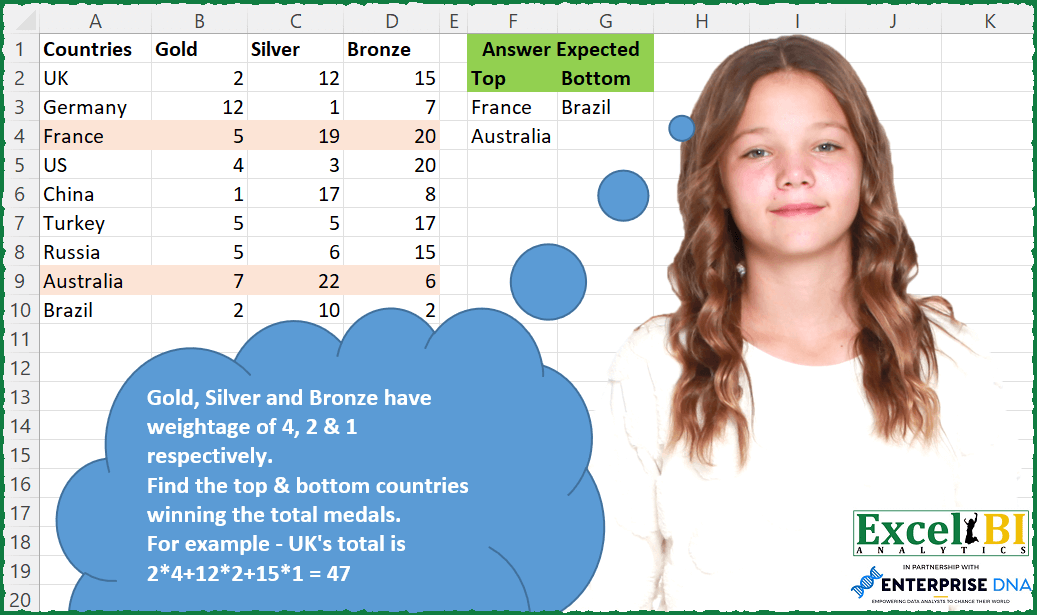
Gold, Silver and Bronze have weightage of 4, 2 & 1 respectively. Find the top & bottom countries winning the total medals. For example – UK’s total is 2*4+12*2+15*1 = 47
📌 Challenge Details and Links
ExcelBI Excel Challenge Number: 117
Challenge Difficulty: ⭐️⭐️
📥Download Sample File
📥Link to the solutions on LinkedIn
Solving the challenge of Top Countries by Medals with Power Query
Power Query solution 1 for Top Countries by Medals, proposed by Bo Rydobon 🇹🇭:
let
  Source = Excel.CurrentWorkbook(){[Name = "Table1"]}[Content],
  Apoint = Table.AddColumn(Source, "Pt", each [Gold] * 4 + [Silver] * 2 + [Bronze]),
  Rs = Table.FromColumns(
    List.Accumulate(
      {List.Max(Apoint[Pt]), List.Min(Apoint[Pt])},
      {},
      (s, l) => s & {Table.SelectRows(Apoint, each [Pt] = l)[Countries]}
    ),
    {"Top", "Bottom"}
  )
in
  Rs
Power Query solution 2 for Top Countries by Medals, proposed by Aditya Kumar Darak 🇮🇳:
let
  Source = Excel.CurrentWorkbook(){[Name = "data"]}[Content],
  TotalScore = Table.AddColumn(
    Source,
    "Score",
    each List.Sum(List.Transform(List.Zip({List.Skip(Record.ToList(_)), {4, 2, 1}}), List.Product))
  ),
  Grouped = Table.Group(TotalScore, {"Score"}, {{"Rows", each _}}),
  MaxMin = {Table.Max(Grouped, "Score")[Rows][Countries]}
    & {Table.Min(Grouped, "Score")[Rows][Countries]},
  Result = Table.FromColumns(MaxMin, {"Top", "Bottom"})
in
  Result
Power Query solution 3 for Top Countries by Medals, proposed by Alejandro Simón 🇵🇦 🇪🇸:
let
  Source = Excel.CurrentWorkbook(){[Name = "Table1"]}[Content],
  Totales = Table.AddColumn(
    Source,
    "Totales",
    each
      let
        a = _,
        b = List.Skip(Record.ToList(a)),
        c = 4 * b{0} + 2 * b{1} + b{2}
      in
        c
  ),
  Solucion = Table.FromColumns(
    {
      Table.SelectRows(Totales, each ([Totales] = List.Max(Totales[Totales])))[Countries],
      Table.SelectRows(Totales, each ([Totales] = List.Min(Totales[Totales])))[Countries]
    },
    {"Top", "Bottom"}
  )
in
  Solucion
Power Query solution 4 for Top Countries by Medals, proposed by Luan Rodrigues:
let
  Fonte = Tabela1,
  gp = Table.Group(
    Fonte,
    {},
    {
      {
        "Contagem",
        each [
          a      = _,
          b      = Table.AddColumn(a, "Calc", each [Gold] * 4 + [Silver] * 2 + [Bronze] * 1),
          Top    = Table.SelectRows(b, each [Calc] = List.Max(b[Calc]))[Countries],
          Bottom = Table.SelectRows(b, each [Calc] = List.Min(b[Calc]))[Countries],
          c      = {Top} & {Bottom}
        ][c]
      }
    }
  ),
  Result = Table.FromColumns(Table.ExpandListColumn(gp, "Contagem")[Contagem], {"Top", "Bottom"})
in
  Result
Power Query solution 5 for Top Countries by Medals, proposed by Brian Julius:
let
  Source = Excel.CurrentWorkbook(){[Name = "Table2"]}[Content],
  AddWeighted = Table.AddColumn(Source, "Weighted", each ([Gold] * 4) + ([Silver] * 2) + [Bronze]),
  AddMinMax = Table.AddColumn(
    AddWeighted,
    "MinMax",
    each [
      b = List.Max(AddWeighted[Weighted]),
      c = List.Min(AddWeighted[Weighted]),
      d = if [Weighted] = b then "Max" else if [Weighted] = c then "Min" else ""
    ][d]
  ),
  Pivot = Table.FromColumns(
    List.Transform(
      List.LastN(
        Table.ToColumns(
          Table.Pivot(AddMinMax, List.Distinct(AddMinMax[MinMax]), "MinMax", "Countries")
        ),
        2
      ),
      List.RemoveNulls
    ),
    {"Top", "Bottom"}
  )
in
  Pivot
Power Query solution 6 for Top Countries by Medals, proposed by Bhavya Gupta:
let
  Source = Excel.CurrentWorkbook(){[Name = "Table1"]}[Content],
  Recs = Table.CombineColumnsToRecord(Source, "Points", {"Gold", "Silver", "Bronze"}),
  TransformedCol = Table.TransformColumns(
    Recs,
    {
      {
        "Points",
        (a) => List.Sum(List.Transform(List.Zip({{4, 2, 1}, Record.ToList(a)}), List.Product))
      }
    }
  ),
  Grouped = Table.Group(TransformedCol, {"Points"}, {{"Countries", each [Countries]}}),
  Sorted = Table.Sort(Grouped, {{"Points", Order.Descending}})[Countries],
  ExpectedOutput = Table.FromColumns({List.First(Sorted)} & {List.Last(Sorted)}, {"Top", "Bottom"})
in
  ExpectedOutput
Power Query solution 7 for Top Countries by Medals, proposed by Matthias Friedmann:
let
  Source = Excel.CurrentWorkbook(){[Name = "Medals"]}[Content],
  Weighted = Table.AddColumn(Source, "Weighted", each 4 * [Gold] + 2 * [Silver] + [Bronze]),
  Top = Table.SelectRows(Weighted, each ([Weighted] = List.Max(Weighted[Weighted])))[Countries],
  Button = Table.SelectRows(Weighted, each ([Weighted] = List.Min(Weighted[Weighted])))[Countries],
  FromColumns = Table.FromColumns({Top} & {Button}, {"Top", "Button"})
in
  FromColumns
Power Query solution 8 for Top Countries by Medals, proposed by Rafael González B.:
let

 Source = Excel.CurrentWorkbook(){[Name="Table1"]}[Content],
 Points = Table.ToRecords(
 hashtag#table(
 type table[
 Gold = number,
 Silver = number,
 Bronze = number
 ],
 {
 {4,2,1}
 }
 )){0},
 AddCol = Table.AddColumn(Source, "Total_Points", each let x = _
 in
 (Record.Field(x,"Gold")* Record.Field(Points, "Gold"))+
 (Record.Field(x,"Silver")* Record.Field(Points, "Silver"))+
 (Record.Field(x,"Bronze")* Record.Field(Points, "Bronze"))
),
 SortPoints = Table.Sort(AddCol,{{"Total_Points", Order.Descending}}),
 RemoveCol = Table.RemoveColumns(SortPoints,{"Gold", "Silver", "Bronze"}),

See next Comment
Power Query solution 9 for Top Countries by Medals, proposed by Jan Willem Van Holst:
let
  Source = Table.FromRows(
    Json.Document(
      Binary.Decompress(
        Binary.FromText(
          "i45WCvVW0lEyAmJDMGGqFKsTreSeWpSbmFcJFwVic7CEW1FiXnIqkGsKErYEaTUAS4QGA9kmQGyMEHPOyMxLhGo3NAcSFmDhkNKi7NRKqBmmEDmQeFBpcXFmIlTMDOEYx9LikqLEHLAUyBQjI7A8SMqpKLEqMwfmAQMwIzYWAA==",
          BinaryEncoding.Base64
        ),
        Compression.Deflate
      )
    ),
    let
      _t = ((type nullable text) meta [Serialized.Text = true])
    in
      type table [Countries = _t, Gold = _t, Silver = _t, Bronze = _t]
  ),
  #"Unpivoted Other Columns" = Table.UnpivotOtherColumns(
    Source,
    {"Countries"},
    "Attribute",
    "Value"
  ),
  #"Changed Type" = Table.TransformColumnTypes(#"Unpivoted Other Columns", {{"Value", Int64.Type}}),
  #"Added Custom" = Table.AddColumn(
    #"Changed Type",
    "Weighted",
    each Record.Field([Gold = 4, Silver = 2, Bronze = 1], [Attribute]) * [Value]
  ),
  #"Grouped Rows" = Table.Group(
    #"Added Custom",
    {"Countries"},
    {{"Total", each List.Sum([Weighted]), type number}}
  ),
  _listtop = Table.SelectRows(#"Grouped Rows", each [Total] = List.Max(#"Grouped Rows"[Total]))[
    Countries
  ],
  _listbottom = Table.SelectRows(#"Grouped Rows", each [Total] = List.Min(#"Grouped Rows"[Total]))[
    Countries
  ],
  _result = Table.FromColumns({_listtop, _listbottom}, {"Top", "Bottom"})
in
  _result
Power Query solution 10 for Top Countries by Medals, proposed by Ian Segard:
let Source = Excel.CurrentWorkbook(){[Name="Table27"]}[Content], #"Changed Type" = Table.TransformColumnTypes(Source,{{"Countries", type text}, {"Gold", Int64.Type}, {"Silver", Int64.Type}, {"Bronze", Int64.Type}}), #"Added Custom" = Table.AddColumn(#"Changed Type", "Custom", each 4*[Gold]+2*[Silver]+[Bronze]), #"Added Custom2" = Table.AddColumn(#"Added Custom", "Custom.2", each List.Max(Table.Column( #"Added Custom", "Custom"))), #"Added Custom3" = Table.AddColumn(#"Added Custom2", "Custom.3", each List.Min(Table.Column( #"Added Custom", "Custom"))), #"Merged Queries" = Table.NestedJoin(#"Added Custom3", {"Custom.2"}, #"Added Custom3", {"Custom"}, "Added Custom3", JoinKind.LeftOuter), #"Expanded Added Custom3" = Table.ExpandTableColumn(#"Merged Queries", "Added Custom3", {"Countries"}, {"Countries.1"}),
Solving the challenge of Top Countries by Medals with Excel
Excel solution 1 for Top Countries by Medals, proposed by Bo Rydobon 🇹🇭:
=LET(
    c,
    A2:A10,
    p,
    MMULT(
        B2:D10,
        {4;2;1}
    ),
    IFNA(
        HSTACK(
            FILTER(
                c,
                p=MAX(
                    p
                )
            ),
            FILTER(
                c,
                p=MIN(
                    p
                )
            )
        ),
        ""
    )
)
Excel solution 2 for Top Countries by Medals, proposed by Rick Rothstein:
=LET(
    a,
    A2:A10,
    t,
    MAP(
        B2:B10,
        C2:C10,
        D2:D10,
        LAMBDA(
            x,
            y,
            z,
            4*x+2*y+z
        )
    ),
    IFERROR(
        HSTACK(
            FILTER(
                a,
                t=MAX(
                    t
                )
            ),
            FILTER(
                a,
                t=MIN(
                    t
                )
            )
        ),
        ""
    )
)
Excel solution 3 for Top Countries by Medals, proposed by John V.:
=LET(
    s,
    MMULT(
        B2:D10,
        {4;2;1}
    ),
    f,
    LAMBDA(
        x,
        FILTER(
            A2:A10,
            s=AGGREGATE(
                x,
                ,
                s,
                1
            )
        )
    ),
    IFNA(
        HSTACK(
            f(
                14
            ),
            f(
                15
            )
        ),
        ""
    )
)

✅=LET(
    c,
    A2:A10,
    t,
    MMULT(
        B2:D10,
        {4;2;1}
    ),
    IFNA(
        HSTACK(
            FILTER(
                c,
                t=MAX(
                    t
                )
            ),
            FILTER(
                c,
                t=MIN(
                    t
                )
            )
        ),
        ""
    )
)
Excel solution 4 for Top Countries by Medals, proposed by محمد حلمي:
=LET(

    e,
    MMULT(
        B2:D10*{4,
        2,
        1},
        {1;1;1}
    ),

    r,
    MAX(
        e
    ),

    m,
    MIN(
        e
    ),

    IFNA(
        HSTACK(

            FILTER(
                A2:A10,
                e=r
            ),
            FILTER(
                A2:A10,
                e=m
            )
        ),
        ""
    )
)
Excel solution 5 for Top Countries by Medals, proposed by محمد حلمي:
=LET(

    a,
    A2:A10,

    e,
    MMULT(
        B2:D10*{4,
        2,
        1},
        {1;1;1}
    ),

    IFNA(
        HSTACK(

            FILTER(
                a,
                e=MAX(
                    e
                )
            ),
            FILTER(
                a,
                e=MIN(
                    e
                )
            )
        ),
        ""
    )
)
Excel solution 6 for Top Countries by Medals, proposed by Kris Jaganah:
=LET(a,
    A2:A10,
    b,
    (B2:B10*4)+(C2:C10*2)+D2:D10,
    IFERROR(
        HSTACK(
            FILTER(
                a,
                b=LARGE(
                    b,
                    1
                )
            ),
            FILTER(
                a,
                b=SMALL(
                    b,
                    1
                )
            )
        ),
        ""
    ))
Excel solution 7 for Top Countries by Medals, proposed by Aditya Kumar Darak 🇮🇳:
=LET(

     _d,
     A2:D10,

     _ts,
     BYROW(
         DROP(
             _d,
              ,
              1
         ),
          LAMBDA(
              a,
               SUM(
                   a * {4,
                    2,
                    1}
               )
          )
     ),

     _mm,
     AGGREGATE(
         {14,
          15},
          4,
          _ts,
          1
     ),

     _e,
     LAMBDA(
         a,
          b,
          HSTACK(
              a,
               FILTER(
                   A2:A10,
                    _ts = b
               )
          )
     ),

     _r,
     IFNA(
         DROP(
             REDUCE(
                 "",
                  _mm,
                  _e
             ),
              ,
              1
         ),
          ""
     ),

     _r

)
Excel solution 8 for Top Countries by Medals, proposed by Timothée BLIOT:
=LET(
    A,
     A2:A10,
     G,
     B2:B10*4,
     S,
     C2:C10*2,
     B,
    D2:D10,
     T,
    SORT(
        HSTACK(
            A,
            G+S+B
        ),
        2,
        -1
    ),

    IFERROR(
        HSTACK(
            FILTER(
                INDEX(
                    T,
                    ,
                    1
                ),
                INDEX(
                    T,
                    ,
                    2
                )=MAX(
                    INDEX(
                    T,
                    ,
                    2
                )
                )
            ),
            FILTER(
                INDEX(
                    T,
                    ,
                    1
                ),
                INDEX(
                    T,
                    ,
                    2
                )=MIN(
                    INDEX(
                    T,
                    ,
                    2
                )
                )
            )
        ),
        ""
    )
)
Excel solution 9 for Top Countries by Medals, proposed by Hussein SATOUR:
=LET(

     c,
     A2:A10,

     t,
     MMULT(
         B2:D10,
          {4; 2; 1}
     ),

     IFERROR(
         HSTACK(
             FILTER(
                 c,
                  t = MAX(
                      t
                  )
             ),
              FILTER(
                  c,
                   t = MIN(
                      t
                  )
              )
         ),
          ""
     )

)
Excel solution 10 for Top Countries by Medals, proposed by Md. Zohurul Islam:
=LET(

    p,
    A2:A10,

    q,
    B2:D10,

    r,
    HSTACK(
        "Top",
        "Bottom"
    ),

    a,
    q*{4,
    2,
    1},

    b,
    BYROW(
        a,
        SUM
    ),

    d,
    FILTER(
        p,
        b=MAX(
            b
        )
    ),

    e,
    FILTER(
        p,
        b=MIN(
            b
        )
    ),

    f,
    IFNA(
        HSTACK(
            d,
            e
        ),
        ""
    ),

    g,
    VSTACK(
        r,
        f
    ),

    g
)
Excel solution 11 for Top Countries by Medals, proposed by Charles Roldan:
=LET(
    Countries,
     A2:A10,
     Counts,
     B2:D10,

    Worth,
     {4;2;1},
     Points,
     MMULT(
         Counts,
          Worth
     ),

    TRANSPOSE(
        TEXTSPLIT(

            TEXTJOIN(
                ", ",
                 ,
                 BYCOL(
                     AGGREGATE(
                         {14,
                         15},
                          ,
                          Points,
                          1
                     ),
                      LAMBDA(
                          y,

                          TEXTJOIN(
                              "; ",
                               ,
                               FILTER(
                                   Countries,
                                    Points = y
                               )
                          )
                      )
                 )
            ),
             "; ",
             ", ",
             ,
             ,
             ""
        )
    )
)
Excel solution 12 for Top Countries by Medals, proposed by Jaroslaw Kujawa:
=LET(
    a,
    A3:D11,
    b,
    BYROW(
        DROP(
            a,
            ,
            1
        ),
        LAMBDA(
            x,
            SUM(
                x*{4,
                2,
                1}
            )
        )
    ),
    VSTACK(
        {"Top",
        "Bottom"},
        IFNA(
            HSTACK(
                TAKE(
                    FILTER(
                        a,
                        b=MAX(
                            b
                        )
                    ),
                    ,
                    1
                ),
                TAKE(
                    FILTER(
                        a,
                        b=MIN(
                            b
                        )
                    ),
                    ,
                    1
                )
            ),
            ""
        )
    )
)
Excel solution 13 for Top Countries by Medals, proposed by Abhishek Kumar Jain:
=LET(
    a,
    A2:A10,
    b,
    BYROW(
        B2:D10,
        LAMBDA(
            x,
            SUMPRODUCT(
                x,
                {4,
                2,
                1}
            )
        )
    ),
    c,
    FILTER(
        a,
        b=MAX(
            b
        )
    ),
    d,
    FILTER(
        a,
        b=MIN(
            b
        )
    ),
    IFERROR(
        HSTACK(
            c,
            d
        ),
        ""
    )
)
Excel solution 14 for Top Countries by Medals, proposed by Guillermo Arroyo:
=LET(
    m,
    A2:D10,
    c,
    TAKE(
        m,
        ,
        1
    ),
    a,
    DROP(
        m,
        ,
        1
    ),
    r,
    MMULT(
        a,
        {4;2;1}
    ),
    v,
    r=AGGREGATE(
        {14,
        15},
        4,
        r,
        1
    ),
    IFNA(
        HSTACK(
            FILTER(
                c,
                TAKE(
                    v,
                    ,
                    1
                ),
                ""
            ),
            FILTER(
                c,
                TAKE(
                    v,
                    ,
                    -1
                ),
                ""
            )
        ),
        ""
    )
)
Excel solution 15 for Top Countries by Medals, proposed by Enrico Giorgi:
=LET(
    x,MMULT(
        B2:D10,{4;
        2;
        1}
    ),SORT(
        UNIQUE(
            IF(
                x=MAX(
                    x
                ),A2:A10,""
            )
        ),,-1
    )
)

ITALIAN VERSION
=LET(
    x;
    MATR.PRODOTTO(
        B2:D10;
        {4.2.1}
    );
    DATI.ORDINA(
        UNICI(
            SE(
                x=MAX(
                    x
                );
                A2:A10;
                ""
            )
        );
        ;
        -1
    )
)

To retrieve the bottom countries, enter the following formula in G3:

ENGLISH VERSION
=LET(
    x,MMULT(
        B2:D10,{4;
        2;
        1}
    ),SORT(
        UNIQUE(
            IF(
                x=MIN(
                    x
                ),A2:A10,""
            )
        ),,-1
    )
)

ITALIAN VERSION
=LET(
    x;
    MATR.PRODOTTO(
        B2:D10;
        {4.2.1}
    );
    DATI.ORDINA(
        UNICI(
            SE(
                x=MIN(
                    x
                );
                A2:A10;
                ""
            )
        );
        ;
        -1
    )
)
Excel solution 16 for Top Countries by Medals, proposed by Surendra Reddy:
=B2*4+C2*2+D2*1

For Top: =FILTER(
    A2:A10,
    E2:E10=MAX(
        E2:E10
    )
)
For Bottom: =FILTER(
    A2:A10,
    E2:E10=MIN(
        E2:E10
    )
)
Excel solution 17 for Top Countries by Medals, proposed by Ali ELBaitam:
=CountryTotals):

=LET(
    Countries,
     rngCountries,

     Scores,
     rngMedalsWon*rngMedalWeights,

     BYROW(
         Scores,
          LAMBDA(
              row,
               SUM(
                   row
               )
          )
     )
)

The answer for the challenge is in two cells: one for Top countries that could be anywhere (e.g: B14):
=VSTACK(
    "Top",

     FILTER(
         rngCountries,
          CountryTotals=MAX(
              CountryTotals
          )
     )
)

and for bottom countries in C14:
=VSTACK(
    "Bottom",

     FILTER(
         rngCountries,
          CountryTotals=MIN(
              CountryTotals
          )
     )
)
Solving the challenge of Top Countries by Medals with SQL
SQL solution 1 for Top Countries by Medals, proposed by Zoran Milokanović:
WITH /* Microsoft SQL Server 2019 */
DATA_PREP
AS
(
 SELECT
 ROW_NUMBER() OVER (ORDER BY (SELECT 1)) AS ORDERING
 ,D.COUNTRIES
 ,4 * D.GOLD + 2 * D.SILVER + D.BRONZE AS WEIGHTAGE
 FROM DATA D
),
CALC
AS
(
 SELECT
 DP.ORDERING
 ,DP.COUNTRIES
 ,DENSE_RANK() OVER (ORDER BY DP.WEIGHTAGE) AS BOTTOM_N
 ,ROW_NUMBER() OVER (ORDER BY DP.WEIGHTAGE, DP.ORDERING) AS BOTTOM_POS
 ,DENSE_RANK() OVER (ORDER BY DP.WEIGHTAGE DESC) AS TOP_N
 ,ROW_NUMBER() OVER (ORDER BY DP.WEIGHTAGE DESC, DP.ORDERING) AS TOP_POS
 FROM DATA_PREP DP
)
SELECT
 ISNULL(T.COUNTRIES, '') AS "TOP"
,ISNULL(B.COUNTRIES, '') AS BOTTOM
FROM
FULL JOIN
ORDER BY
 ISNULL(T.TOP_POS, B.BOTTOM_POS)
;
&&