
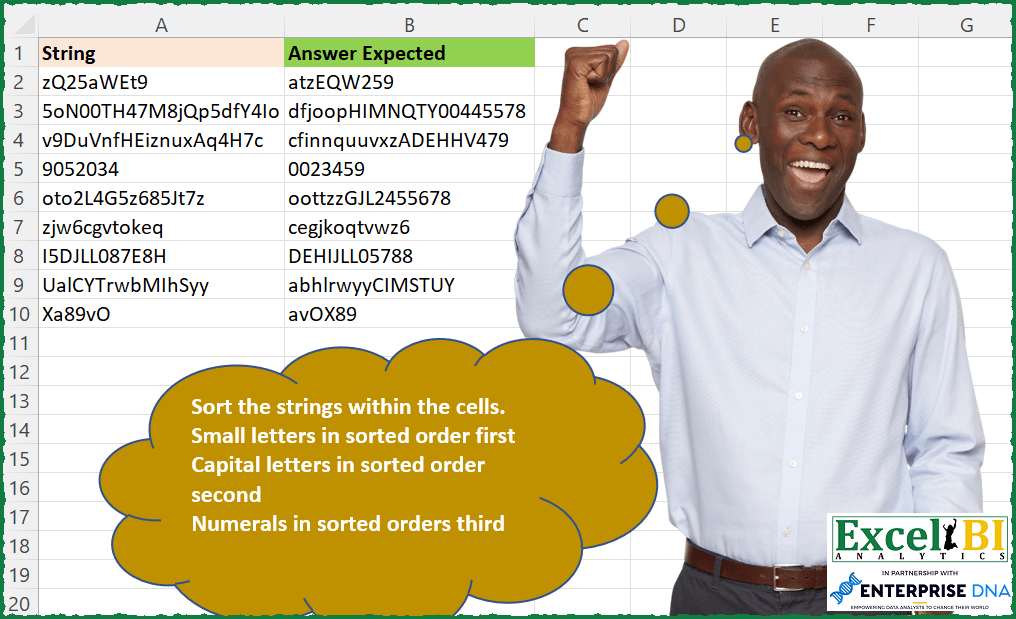
Sort the strings within the cells. Small letters in sorted order first Capital letters in sorted order second Numerals in sorted order third
📌 Challenge Details and Links
ExcelBI Excel Challenge Number: 116
Challenge Difficulty: ⭐️
📥Download Sample File
📥Link to the solutions on LinkedIn
Solving the challenge of Sort by Type and Case with Power Query
Power Query solution 1 for Sort by Type and Case, proposed by Bo Rydobon 🇹🇭:
let
  Source = Excel.CurrentWorkbook(){[Name = "Table1"]}[Content],
  Rs = Table.TransformColumns(
    Source,
    {
      "String",
      each Text.Combine(
        List.Sort(
          Text.ToList(_),
          {{each Character.ToNumber(_) > 96, 1}, {each Character.ToNumber(_) > 64, 1}, {each _, 0}}
        )
      )
    }
  )
in
  Rs
Power Query solution 2 for Sort by Type and Case, proposed by Aditya Kumar Darak 🇮🇳:
let
  Source = Excel.CurrentWorkbook(){[Name = "data"]}[Content],
  Result = Table.AddColumn(
    Source,
    "Sorted",
    each [
      a = Text.ToList([String]),
      b = List.Sort(
        a,
        (x, y) =>
          Value.Compare(
            List.PositionOf({"a" .. "z", "A" .. "Z", "0" .. "9"}, x),
            List.PositionOf({"a" .. "z", "A" .. "Z", "0" .. "9"}, y)
          )
      ),
      c = Text.Combine(b)
    ][c]
  )
in
  Result
Power Query solution 3 for Sort by Type and Case, proposed by Alejandro Simón 🇵🇦 🇪🇸:
let
 Source = Excel.CurrentWorkbook(){[Name="Table1"]}[Content],
 Solucion = Table.AddColumn(Source, "Answer Expected", each Text.Combine(List.Sort(Text.ToList(Text.Select([String],{"a".."z"})))&List.Sort(Text.ToList(Text.Select([String],{"A".."Z"})))&List.Sort(Text.ToList(Text.Select([String],{"0".."9"}))),""))[[Answer Expected]]
in
 Solucion

Query 2, igual a la anterior, pero más ordenada,

let
 Source = Excel.CurrentWorkbook(){[Name="Table1"]}[Content],
 Solucion = Table.AddColumn(Source, "Answer Expected", each
[
a = Text.Combine,
b = List.Sort,
c = Text.ToList,
d = Text.Select,
e = Text.Combine(b(c(d([String],{"a".."z"})))&b(c(d([String],{"A".."Z"})))&b(c(d([String],{"0".."9"}))))][e])[[Answer Expected]]
in
 Solucion
Power Query solution 4 for Sort by Type and Case, proposed by Luan Rodrigues:
let
  Fonte = Tabela1,
  Result = Table.AddColumn(
    Fonte,
    "Personalizar",
    each [
      a = List.Sort(Text.ToList(Text.Select([String], {"a" .. "z"}))),
      b = List.Sort(Text.ToList(Text.Select([String], {"A" .. "Z"}))),
      c = List.Sort(Text.ToList(Text.Select([String], {"0" .. "9"}))),
      d = Text.Combine(a & b & c)
    ][d]
  )
in
  Result
Power Query solution 5 for Sort by Type and Case, proposed by Brian Julius:
let
  AddParse = Table.AddColumn(
    Excel.CurrentWorkbook(){[Name = "Table1"]}[Content],
    "Answer Expected",
    each [
      lower = Text.Combine(
        List.Sort(Text.ToList(Text.Select([String], {"a" .. "z"})), Order.Ascending),
        null
      ),
      upper = Text.Combine(
        List.Sort(Text.ToList(Text.Select([String], {"A" .. "Z"})), Order.Ascending),
        null
      ),
      nums = Text.Combine(
        List.Sort(Text.ToList(Text.Select([String], {"0" .. "9"})), Order.Ascending),
        null
      ),
      result = lower & upper & nums
    ][result]
  )
in
  AddParse
Power Query solution 6 for Sort by Type and Case, proposed by Matthias Friedmann:
letters-numbers-symbols-from-strings-in-power-query-with-text-select-and-text-remove
let
 Source = Excel.CurrentWorkbook(){[Name="SortString"]}[Content],
 Sorted = Table.TransformColumns(Source, {{"String", each Text.Combine(
 List.Sort(Text.ToList(Text.Select (_, {"a".."z"} ))) &
 List.Sort(Text.ToList(Text.Select (_, {"A".."Z"} ))) &
 List.Sort(Text.ToList(Text.Select (_, {"0".."9"} )))
 )}})
in
 Sorted
Power Query solution 7 for Sort by Type and Case, proposed by Victor Wang:
let
  Source = Excel.CurrentWorkbook(){[Name = "Table1"]}[Content],
  Result = List.Transform(
    Source[String],
    each Text.Combine(
      List.Sort(Text.ToList(_), each List.PositionOf({"a" .. "z", "A" .. "Z", "0" .. "9"}, _))
    )
  )
in
  Result
Power Query solution 8 for Sort by Type and Case, proposed by Bankim Ghosh:
let
  Source = Excel.CurrentWorkbook(){[Name = "String"]}[Content],
  Sorted = Table.AddColumn(
    Source,
    "Answer Expected",
    each
      let
        _List           = Text.ToList([String]),
        small_letters   = List.Sort(List.Select(_List, each List.Contains({"a" .. "z"}, _))),
        capital_letters = List.Sort(List.Select(_List, each List.Contains({"A" .. "Z"}, _))),
        numerals        = List.Sort(List.Select(_List, each List.Contains({"0" .. "9"}, _)))
      in
        small_letters & capital_letters & numerals
  ),
  Result = Table.TransformColumns(
    Sorted,
    {"Answer Expected", each Text.Combine(List.Transform(_, Text.From))}
  )
in
  Result
Solving the challenge of Sort by Type and Case with Excel
Excel solution 1 for Sort by Type and Case, proposed by Bo Rydobon 🇹🇭:
=MAP(A2:A10,
    LAMBDA(a,
    LET(m,
    MID(
        a,
        SEQUENCE(
            LEN(
                a
            )
        ),
        1
    ),
    CONCAT(SORTBY(m,
    -(CODE(
        m
    )>96)-ISERR(
        -m
    ),
    ,
    m,
    )))))
Excel solution 2 for Sort by Type and Case, proposed by Rick Rothstein:
=MAP(A2:A10,
    LAMBDA(x,
    LET(t,
    SORT(
        CODE(
            MID(
                x,
                SEQUENCE(
                    LEN(
                        x
                    )
                ),
                1
            )
        )
    ),
    SUBSTITUTE(CONCAT(CHAR(VSTACK(FILTER(
        t,
        t>96,
        1
    ),
    FILTER(t,
    (t>64)*(t<91),
    1),
    FILTER(
        t,
        t<58,
        1
    )))),
    CHAR(
        1
    ),
    ""))))
Notice the SUBSTITUTE function I used where I replace CHAR(
        1
    ) with ""... that was needed because when you specify 1 or TRUE for the optional 3rd argument for the FILTER function in order to handle the error when there is no filtered result,
     the function still returns a character,
     one whose ASCII value is 1. So,
     while without the substitute the expected text and the formula text "look" identical,
     they are not due to the non-printing CHAR(
        1
    )
Excel solution 3 for Sort by Type and Case, proposed by John V.:
=MAP(A2:A10,
    LAMBDA(x,
    LET(s,
    MID(
        x,
        SEQUENCE(
            LEN(
                x
            )
        ),
        1
    ),
    c,
    CODE(
        s
    ),
    CONCAT(SORTBY(s,
    (c<91)+(c<58),
    ,
    s,
    )))))
Excel solution 4 for Sort by Type and Case, proposed by محمد حلمي:
=MAP(A2:A10,
    LAMBDA(R,
    LET(
v,
    MID(
        R,
        SEQUENCE(
            LEN(
                R
            )
        ),
        1
    ),

A,
    LAMBDA(E,
    R,
    IFERROR(CONCAT(
SORT(FILTER(v,
    (CODE(
        v
    )>E)*(CODE(
        v
    )
Excel solution 5 for Sort by Type and Case, proposed by محمد حلمي:
=MAP(A2:A10,
    LAMBDA(R,
    LET(
v,
    MID(
        R,
        SEQUENCE(
            LEN(
                R
            )
        ),
        1
    ),

n,
    CODE(
        v
    ),

A,
    LAMBDA(E,
    R,

CONCAT(SORT(FILTER(v,
    (n>E)*(n
Excel solution 6 for Sort by Type and Case, proposed by 🇰🇷 Taeyong Shin:
=MAP(
    A2:A10,
    LAMBDA(
        x,
        REDUCE(
            "",
            {"[a-z]",
            "[A-Z]",
            "d"},
            LAMBDA(
                a,
                v,
                a&CONCAT(
                    SORT(
                        IFNA(
                            REGEXEXTRACT(
                                x,
                                v,
                                1
                            ),
                            ""
                        ),
                        ,
                        ,
                        1
                    )
                )
            )
        )
    )
)
Excel solution 7 for Sort by Type and Case, proposed by Kris Jaganah:
=BYROW(A2:A10,LAMBDA(x,LET(a,MID(x,SEQUENCE(,LEN(x)),1),b,CODE(a),c,IF(b<59,b*10,IF(b>96,b/10,b)),d,CONCAT(SORTBY(a,c,1)),d)))Excel solution 8 for Sort by Type and Case, proposed by Kris Jaganah:
=MAP(
    A2:A10,
    LAMBDA(
        x,
        LET(
            a,
            MID(
                x,
                SEQUENCE(
                    LEN(
                        x
                    )
                ),
                1
            ),
            b,
            CODE(
                a
            ),
            CONCAT(
                SORTBY(
                    a,
                    IFS(
                        b<59,
                        b*9,
                        b>96,
                        b/9,
                        1,
                        b
                    )
                )
            )
        )
    )
)
Excel solution 9 for Sort by Type and Case, proposed by Julian Poeltl:
=MAP(A2:A10,
    LAMBDA(S,
    LET(SP,
    MID(
        S,
        SEQUENCE(
            LEN(
                S
            )
        ),
        1
    ),
    ST,
    SORT(
        SP
    ),
    C,
    CODE(
        ST
    ),
    O,
    IFS((C>96)*(C<123),
    1,
    (C>64)*(C<91),
    2,
    1,
    3),
    CONCAT(
        SORTBY(
            ST,
            O
        )
    ))))
Excel solution 10 for Sort by Type and Case, proposed by Aditya Kumar Darak 🇮🇳:
=LET(

     _d,
     A2:A10,

     _so,
     VSTACK(

          TOCOL(
              SEQUENCE(
                  26
              ) + {96,
               64},
               ,
               1
          ),

          SEQUENCE(
              10,
               ,
               48
          )

     ),

     _e,
     LAMBDA(
         a,

          LET(

               cd,
               CODE(
                   MID(
                       a,
                        SEQUENCE(
                            LEN(
                                a
                            )
                        ),
                        1
                   )
               ),

               st,
               SORTBY(
                   cd,
                    XMATCH(
                        cd,
                         _so
                    )
               ),

               r,
               CONCAT(
                   CHAR(
                       st
                   )
               ),

               r

          )

     ),

     _r,
     MAP(
         _d,
          _e
     ),

     _r

)
Excel solution 11 for Sort by Type and Case, proposed by Timothée BLIOT:
=LET(A, A2:A10,
K, SEQUENCE(10,,0),
L, CHAR(SEQUENCE(26,,97)),
M, CHAR(SEQUENCE(26,,65)),

F, LAMBDA(X, BYROW(A, LAMBDA(a, CONCAT(TEXTSPLIT(a,X)) ))),
G, LAMBDA(Y, IFERROR(MAP(Y, LAMBDA(a, CONCAT(SORT(MID(a,SEQUENCE(LEN(a)),1))))),"")),

T, HSTACK( G(F(VSTACK(K,M))), G(F(VSTACK(K,L))), G(F(VSTACK(M,L))) ),

BYROW (T, LAMBDA(a, CONCAT(a))))
Excel solution 12 for Sort by Type and Case, proposed by Hussein SATOUR:
=MAP(
    A2:A10,
    LAMBDA(
        x,
        LET(
            a,
            MID(
                x,
                SEQUENCE(
                    LEN(
                        x
                    )
                ),
                1
            ),
            b,
            CODE(
                a
            ),
            CONCAT(
                SORTBY(
                    a,
                    IFS(
                        b<58,
                        3,
                        b<91,
                        2,
                        TRUE,
                        1
                    ),
                    ,
                    b,

                )
            )
        )
    )
)
Excel solution 13 for Sort by Type and Case, proposed by Md. Zohurul Islam:
=LET(
    z,
    A2:A10,

    _s1,
    SEQUENCE(
        26,
        ,
        97
    ),

    _s2,
    SEQUENCE(
        26,
        ,
        65
    ),

    _s3,
    SEQUENCE(
        10,
        ,
        48
    ),

    s,
    VSTACK(
        _s1,
        _s2,
        _s3
    ),

    P,
    MAP(
        z,
        LAMBDA(
            x,
            LET(
                a,
                CODE(
                    MID(
                        x,
                        SEQUENCE(
                            LEN(
                                x
                            )
                        ),
                        1
                    )
                ),
                b,
                XMATCH(
                    a,
                    s
                ),
                d,
                SORT(
                    b
                ),
                e,
                XLOOKUP(
                    d,
                    b,
                    a
                ),
                f,
                CONCAT(
                    CHAR(
                        e
                    )
                ),
                f
            )
        )
    ),

    P
)
Excel solution 14 for Sort by Type and Case, proposed by Stefan Olsson:
=MAP(A2:A10,
     LAMBDA(_s,

 LAMBDA(
     s,

      REGEXREPLACE(
          s,
           "[^a-z]",
           ""
      )&
      REGEXREPLACE(
          s,
           "[^A-Z]",
           ""
      )&
      REGEXREPLACE(
          s,
           "[^0-9]",
           ""
      )

 )
 (TEXTJOIN(
     "",
       FALSE,

      SORT(
          TRANSPOSE(
              REGEXEXTRACT(
                  _s&"",&
                    REPT(
                        "(.)",
                          LEN(
                              _s
                          )
                    )
              )
          )
      )

 ))
))
Excel solution 15 for Sort by Type and Case, proposed by Abhishek Kumar Jain:
=MAP(A2:A10,

LAMBDA(x,

LET(a,
    CODE(
        MID(
            x,
            SEQUENCE(
                LEN(
                    x
                )
            ),
            1
        )
    ),

b,
    (a>96)*(a<123),

c,
    (a>64)*(a<90),

d,
    (a>47)*(a<58),

z,
    IFERROR(
        CONCAT(
            CHAR(
                SORT(
                    FILTER(
                        a,
                        b=1
                    )
                )
            )
        ),
        ""
    )&IFERROR(
        CONCAT(
            CHAR(
                SORT(
                    FILTER(
                        a,
                        c=1
                    )
                )
            )
        ),
        ""
    )&IFERROR(
        CONCAT(
            CHAR(
                SORT(
                    FILTER(
                        a,
                        d=1
                    )
                )
            )
        ),
        ""
    ),
    z)))
Excel solution 16 for Sort by Type and Case, proposed by Guillermo Arroyo:
=CLEAN(MAP(A2:A10,
    LAMBDA(s,
    LET(m,
    SORT(
        CODE(
            MID(
                s,
                SEQUENCE(
                    ,
                    LEN(
                        s
                    )
                ),
                1
            )
        ),
        ,
        1,
        1
    ),
    CONCAT(MAP({97;65;48},
    {122;90;57},
    LAMBDA(i,
    j,
    CONCAT(CHAR(FILTER(m,
    (m>=i)*(m<=j),
    12))))))))))
Excel solution 17 for Sort by Type and Case, proposed by roberto mensa:
=LET(
    a,
    "ABCDEFGHIJKLMNOPQRSTUVWXYZ",
    b,
    LOWER(
        a
    )&a&"0123456789",
    TEXTJOIN(
        ,
        ,
        MID(
            b,
            SORT(
                FIND(
                    MID(
                        A2,
                        SEQUENCE(
                            LEN(
                                A2
                            ),
                            ,
                            1
                        ),
                        1
                    ),
                    b
                )
            ),
            1
        )
    )
)
Excel solution 18 for Sort by Type and Case, proposed by Tushar Mehta:
=LAMBDA(
    rng,
    LET(

         _name,
        "by_cell_sort_characters_ascending_a_to_z_A_to_Z_1_to_9",

         MAP(
             rng,
             LAMBDA(
                 x,

                  LET(

                       rng,
                      MID(
                          x,
                          SEQUENCE(
                              LEN(
                                  x
                              )
                          ),
                          1
                      ),

                       coded,
                      CODE(
                          rng
                      )+IF(
                          CODE(
                          rng
                      )<=CODE(
                          "9"
                      ),
                          300,
                          IF(
                              CODE(
                          rng
                      )<=CODE(
                          "Z"
                      ),
                              200,
                              0
                          )
                      ),

                       sorted,
                      SORTBY(
                          rng,
                          coded
                      ),

                       TEXTJOIN(
                           "",
                           TRUE,
                           sorted
                       )
                  )
             )
         )
    )
)(B10:B18)
Excel solution 19 for Sort by Type and Case, proposed by Ali ELBaitam:
=MAP(
    A2:A10,
     SortedChars
).
/* Generic Functions used */
/* converts a cell value to a vertical or horizontal array
 curtesy of @Owen Price */
Characters =
LAMBDA(
    rng,
     vertical,

     LET(
         chars,
          MID(
              rng,
               SEQUENCE(
                   LEN(
                       rng
                   )
               ),
               1
          ),

          IF(
              vertical,
               chars,
               TRANSPOSE(
                   chars
               )
          )
     )

);
/* a curried function used to create boolean lambdas
 IsLower?,
     IsUpper?,
     IsDigit?
 takes two characters and returns a lambda */
CharType =
LAMBDA(
    a,
     b,

     LAMBDA(
         c,

          AND(
              CODE(
                  c
              ) >= CODE(
                  a
              ),

               CODE(
                  c
              ) <= CODE(
                  b
              )
          )

     )
);
IsLower? = CharType(
    "a",
     "z"
);
IsUpper? = CharType(
    "A",
     "Z"
);
IsDigit?   = CharType(
    0,
     9
);
/* Filters an array using a lambda. The lambda
 is used to create the FILTER include criteria
 array */
FilterByLambda =
LAMBDA(
    arr,
     fn,

     FILTER(
         arr,
          MAP(
              arr,
               fn
          )
     )
)
Excel solution 20 for Sort by Type and Case, proposed by Sergey Korolev:
=TEXTJOIN(
    ,
    ,
    REPLACE(
        SORT(
            MAKEARRAY(
                LEN(
                    A2
                ),
                ,
                LAMBDA(
                    r,
                    c,
                    LET(
                        a,
                        MID(
                            A2,
                            r,
                            1
                        ),
                        IF(
                            ISERROR(
                                VALUE(
                                    a
                                )
                            ),
                            IF(
                                EXACT(
                                    a,
                                    LOWER(
                                    a
                                )
                                ),
                                1,
                                2
                            ),
                            3
                        )&a
                    )
                )
            )
        ),
        1,
        1,

    )
)
Solving the challenge of Sort by Type and Case with SQL
SQL solution 1 for Sort by Type and Case, proposed by Zoran Milokanović:
WITH /* Microsoft SQL Server 2019 */
DATA_PREP
AS
(
 SELECT
 ROW_NUMBER() OVER (ORDER BY (SELECT 1)) AS ORDERING
 ,D.STRING
 ,1 AS SEQ
 ,LEN(D.STRING) AS LENGTH
 FROM DATA D
),
CALC
AS
(
 SELECT
 DP.ORDERING
 ,DP.STRING
 ,DP.SEQ
 ,DP.LENGTH
 ,SUBSTRING(DP.STRING, DP.SEQ, 1) AS CHAR
 FROM DATA_PREP DP
 UNION ALL
 SELECT
 C.ORDERING
 ,C.STRING
 ,C.SEQ + 1 AS SEQ
 ,C.LENGTH
 ,SUBSTRING(C.STRING, C.SEQ + 1, 1) AS CHAR
 FROM CALC C
 WHERE
 C.SEQ < C.LENGTH
)
SELECT
FROM CALC C
GROUP BY
 C.ORDERING
ORDER BY
 C.ORDERING
;
&&