
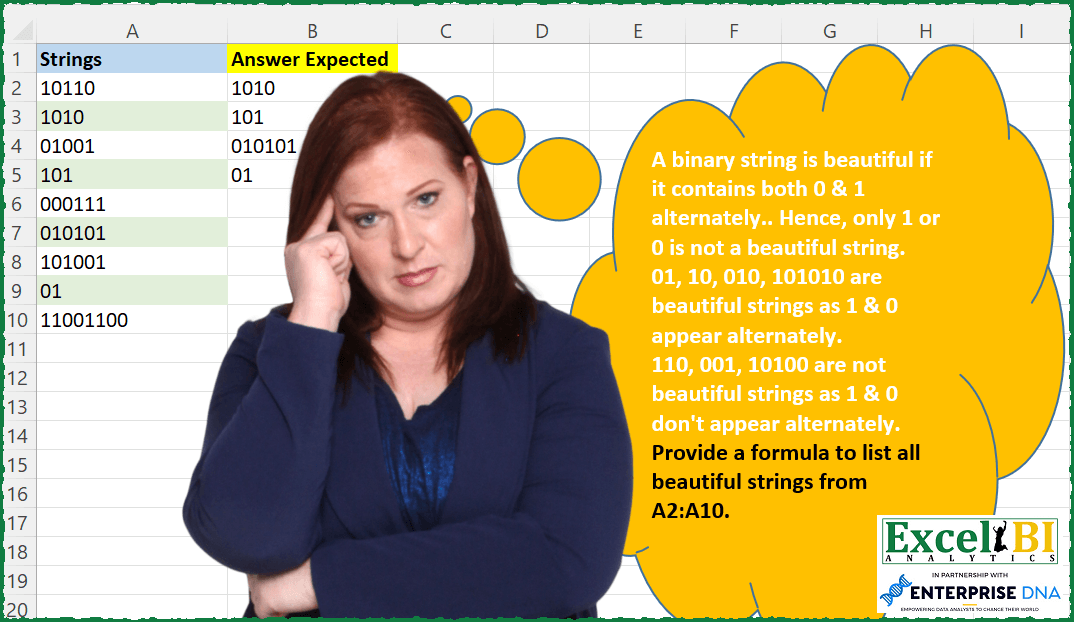
A binary string is beautiful if it contains both 0 & 1 alternately.. Hence, only 1 or 0 is not a beautiful string. 01, 10, 010, 101010 are beautiful strings as 1 & 0 appear alternately. 110, 001, 10100 are not beautiful strings as 1 & 0 don’t appear alternately. Provide a formula to list all beautiful strings from A2:A10.
📌 Challenge Details and Links
ExcelBI Excel Challenge Number: 115
Challenge Difficulty: ⭐️
📥Download Sample File
📥Link to the solutions on LinkedIn
Solving the challenge of Find Beautiful Binary Strings with Power Query
Power Query solution 1 for Find Beautiful Binary Strings, proposed by Bo Rydobon 🇹🇭:
let
  Source = Excel.CurrentWorkbook(){[Name = "Table1"]}[Content],
  Rs     = Table.SelectRows(Source, each Text.PositionOf(Text.Repeat("10", 9), [Strings]) >= 0)
in
  Rs
Power Query solution 2 for Find Beautiful Binary Strings, proposed by Bo Rydobon 🇹🇭:
let
  Source = Excel.CurrentWorkbook(){[Name = "Table1"]}[Content],
  Rs = Table.SelectRows(
    Source,
    each Text.Replace(Text.Replace([Strings], "11", ""), "00", "") = [Strings]
  )
in
  Rs
Power Query solution 3 for Find Beautiful Binary Strings, proposed by Aditya Kumar Darak 🇮🇳:
let
  Source = Excel.CurrentWorkbook(){[Name = "data"]}[Content],
  Calculation = Table.AddColumn(
    Source,
    "Calc",
    each [
      a = Text.PositionOf([Strings], "1", Occurrence.All),
      b = List.Transform(a, (f) => Number.Mod(f, 2)),
      c = List.Count(List.Distinct(b)) = 1
    ][c]
  ),
  Result = Table.SelectRows(Calculation, each ([Calc] = true))[[Strings]]
in
  Result
Power Query solution 4 for Find Beautiful Binary Strings, proposed by Alejandro Simón 🇵🇦 🇪🇸:
let
  Source = Excel.CurrentWorkbook(){[Name = "Table1"]}[Content],
  Calc = Table.AddColumn(
    Source,
    "New",
    each
      let
        a = _,
        b = Text.ToList([Strings]),
        c = List.Distinct(List.Alternate(b, 1, 1, 1)),
        d = List.Distinct(List.Alternate(b, 1, 1, 0)),
        e = List.Count(d) = 1 and List.Count(c) = 1
      in
        e and c <> d
  ),
  Solucion = Table.SelectRows(Calc, each ([New] = true))[[Strings]]
in
  Solucion
Power Query solution 5 for Find Beautiful Binary Strings, proposed by Luan Rodrigues:
let
  Fonte = Tabela1,
  Result = Table.SelectRows(
    Fonte,
    each not Text.Contains([Strings], "11") and not Text.Contains([Strings], "00")
  )
in
  Result
Power Query solution 6 for Find Beautiful Binary Strings, proposed by Brian Julius:
let
  Source = Excel.CurrentWorkbook(){[Name = "Table1"]}[Content],
  ListAlternates = Table.AddColumn(
    Source,
    "Custom",
    each [
      a            = Text.ToList([Strings]),
      odd          = List.Alternate(a, 1, 1, 1),
      even         = List.Alternate(a, 1, 1, 0),
      oddDistinct  = List.Count(List.Distinct(odd)),
      evenDistinct = List.Count(List.Distinct(even)),
      bothDistinct = oddDistinct + evenDistinct
    ][bothDistinct]
  ),
  FilterNClean = Table.RemoveColumns(
    Table.SelectRows(ListAlternates, each ([Custom] = 2)),
    "Custom"
  )
in
  FilterNClean
Power Query solution 7 for Find Beautiful Binary Strings, proposed by Matthias Friedmann:
let
  Source = Excel.CurrentWorkbook(){[Name = "Strings"]}[Content],
  #"Filtered Rows" = Table.SelectRows(
    Source,
    each
      let
        list = Text.ToList([Strings])
      in
        List.Count(List.Distinct(List.Alternate(list, 1, 1)))
          = 1 and List.Count(List.Distinct(List.Alternate(list, 1, 1, 1)))
          = 1 and list{0}
          <> list{1}
  )
in
  #"Filtered Rows"
Power Query solution 8 for Find Beautiful Binary Strings, proposed by Antriksh Sharma:
let
  Source = Table,
  AddedCustom = Table.AddColumn(
    Source,
    "Custom",
    each
      let
        First     = List.Alternate(Text.ToList([Strings]), 1, 1, 0),
        Second    = List.Alternate(Text.ToList([Strings]), 1, 1, 1),
        Intersect = List.Intersect({First, Second}),
        Result    = List.Count(Intersect) = 0
      in
        Result
  ),
  FilteredRows = Table.SelectRows(AddedCustom, each [Custom] = true)[[Strings]]
in
  FilteredRows
Power Query solution 9 for Find Beautiful Binary Strings, proposed by Victor Wang:
let
  Source = Excel.CurrentWorkbook(){[Name = "Table1"]}[Content],
  Result = Table.SelectRows(
    Source,
    each List.Count(Splitter.SplitTextByAnyDelimiter({"00", "11"})([Strings])) = 1
  )
in
  Result
Power Query solution 10 for Find Beautiful Binary Strings, proposed by Jan Willem Van Holst:
let
  Source = Table.FromRows(
    Json.Document(
      Binary.Decompress(
        Binary.FromText(
          "i45WMjQwNDRQitUBsyAMIG1gCBOCiAAFDA1hkoYIWZhCmAhIAIiVYmMB",
          BinaryEncoding.Base64
        ),
        Compression.Deflate
      )
    ),
    let
      _t = ((type nullable text) meta [Serialized.Text = true])
    in
      type table [Strings = _t]
  ),
  #"Added Custom" = Table.AddColumn(
    Source,
    "Custom",
    (x) =>
      let
        toList = Splitter.SplitTextByRepeatedLengths(2)(x[Strings]),
        myList = List.ReplaceMatchingItems(toList, {{"1", "10"}, {"0", "01"}})
      in
        List.MatchesAll(myList, each _ = "10" or List.MatchesAll(myList, each _ = "01"))
  ),
  #"Filtered Rows" = Table.SelectRows(#"Added Custom", each ([Custom] = true)),
  #"Removed Columns" = Table.RemoveColumns(#"Filtered Rows", {"Custom"})
in
  #"Removed Columns"
Power Query solution 11 for Find Beautiful Binary Strings, proposed by Thomas DUCROQUETZ:
let
  Source = Excel.CurrentWorkbook(){[Name = "Table1"]}[Content],
  Select = Table.SelectRows(
    Source,
    each
      let
        ListStrings = Text.ToList([Strings]),
        CompareNext = List.Accumulate(
          List.RemoveLastN(List.Positions(ListStrings), 1),
          {},
          (state, current) => state & {ListStrings{current} <> ListStrings{current + 1}}
        )
      in
        List.AllTrue(CompareNext)
  )
in
  Select
Solving the challenge of Find Beautiful Binary Strings with Excel
Excel solution 1 for Find Beautiful Binary Strings, proposed by Bo Rydobon 🇹🇭:
=FILTER(
    A2:A10,
    MMULT(
        --ISERR(
            FIND(
                {11,
                "00"},
                A2:A10
            )
        ),
        {1;1}
    )=2
)
Excel solution 2 for Find Beautiful Binary Strings, proposed by Bo Rydobon 🇹🇭:
=FILTER(
    A2:A10,
    MAP(
        A2:A10,
        LAMBDA(
            a,
            AND(
                MMULT(
                    -MID(
                        a,
                        SEQUENCE(
                            LEN(
                                a
                            )-1
                        )+{0,
                        1},
                        1
                    ),
                    {1;-1}
                )
            )
        )
    )
)
Excel solution 3 for Find Beautiful Binary Strings, proposed by Bo Rydobon 🇹🇭:
=TOCOL(
    IF(
        FIND(
            A2:A10,
            REPT(
                10,
                9
            )
        ),
        A2:A10
    ),
    3
)
Excel solution 4 for Find Beautiful Binary Strings, proposed by Bo Rydobon 🇹🇭:
=LET(
    z,
    A2:A10,
    FILTER(
        z,
        SUBSTITUTE(
            SUBSTITUTE(
                z,
                11,

            ),
            "00",

        )=z
    )
)
Excel solution 5 for Find Beautiful Binary Strings, proposed by Bo Rydobon 🇹🇭:
=FILTER(
    A2:A10,
    ISNUMBER(
        FIND(
            A2:A10,
            REPT(
                10,
                9
            )
        )
    )
)
Excel solution 6 for Find Beautiful Binary Strings, proposed by Rick Rothstein:
=FILTER(
    A2:A10,
    1-ISERR(
        FIND(
            A2:A10,
            REPT(
                10,
                9
            )
        )
    )
)
Excel solution 7 for Find Beautiful Binary Strings, proposed by Rick Rothstein:
=LET(
    a,
    A2:A10,
    FILTER(
        a,
        ISERR(
            FIND(
                "00",
                a
            )
        )*ISERR(
            FIND(
                "11",
                a
            )
        )
    )
)
Excel solution 8 for Find Beautiful Binary Strings, proposed by Rick Rothstein:
=LET(
    a,
    A2:A10,
    FILTER(
        a,
        TEXTSPLIT(
            a,
            {"00",
            11}
        )=a
    )
)
Excel solution 9 for Find Beautiful Binary Strings, proposed by Rick Rothstein:
=LET(
    a,
    A2:A10,
    f,
    FILTER(
        a,
        ISERR(
            FIND(
                "11",
                a
            )
        )
    ),
    FILTER(
        f,
        ISERR(
            FIND(
                "00",
                f
            )
        )
    )
)

=FILTER(
    A2:A10,
    BYROW(
        0+ISERR(
            FIND(
                {"00",
                "11"},
                A2:A10
            )
        ),
        LAMBDA(
            x,
            SUM(
                x
            )=2
        )
    )
)
Excel solution 10 for Find Beautiful Binary Strings, proposed by John V.:
=FILTER(
    A2:A10,
    MAP(
        A2:A10,
        LAMBDA(
            s,
            AND(
                BYROW(
                    --MID(
                        s,
                        SEQUENCE(
                            LEN(
                                s
                            )-1
                        ),
                        2
                    )={10,
                    1},
                    LAMBDA(
                        x,
                        OR(
                            x
                        )
                    )
                )
            )
        )
    )
)

✅=FILTER(
    A2:A10,
    MAP(
        A2:A10,
        LAMBDA(
            x,
            AND(
                MMULT(
                    --MID(
                        x,
                        SEQUENCE(
                            LEN(
                            x
                        )-1
                        )+{0,
                        1},
                        1
                    ),
                    {1;1}
                )=1
            )
        )
    )
)

✅=FILTER(
    A2:A10,
    MAP(
        A2:A10,
        LAMBDA(
            x,
            AND(
                MOD(
                    --MID(
                        x,
                        SEQUENCE(
                            LEN(
                            x
                        )-1
                        ),
                        2
                    ),
                    9
                )=1
            )
        )
    )
)
Excel solution 11 for Find Beautiful Binary Strings, proposed by محمد حلمي:
=LET(
    a,
    A2:A10,

    FILTER(
        a,
        ISERROR(
            FIND(
                "00",
                a
            )
        )*ISERROR(
            FIND(
                11,
                a
            )
        )
    )
)
Excel solution 12 for Find Beautiful Binary Strings, proposed by Kris Jaganah:
=FILTER(A2:A10,
    (IFERROR(
        FIND(
            "11",
            A2:A10
        ),
        0
    )+IFERROR(
        FIND(
            "00",
            A2:A10
        ),
        0
    ))=0)
Excel solution 13 for Find Beautiful Binary Strings, proposed by Kris Jaganah:
=FILTER(
    A2:A10,
    SUBSTITUTE(
        A2:A10,
        "00",
        ""
    )=SUBSTITUTE(
        A2:A10,
        "11",
        ""
    )
)
Excel solution 14 for Find Beautiful Binary Strings, proposed by Kris Jaganah:
=FILTER(
    A2:A10,
    BYROW(
        A2:A10,
        LAMBDA(
            x,
            CONCAT(
                TEXTSPLIT(
                    x,
                    "11"
                )
            )
        )
    )=BYROW(
        A2:A10,
        LAMBDA(
            y,
            CONCAT(
                TEXTSPLIT(
                    y,
                    "00"
                )
            )
        )
    )
)
Excel solution 15 for Find Beautiful Binary Strings, proposed by Julian Poeltl:
=FILTER(
    A2:A10,
    MAP(
        A2:A10,
        LAMBDA(
            S,
            LET(
                SP,
                MID(
                    S,
                    SEQUENCE(
                        LEN(
                            S
                        )
                    ),
                    1
                ),
                SUM(
                    --DROP(
                        DROP(
                            SP,
                            1
                        )=SP,
                        -1
                    )
                )
            )
        )
    )=0
)
Excel solution 16 for Find Beautiful Binary Strings, proposed by Julian Poeltl:
=FILTER(
    A2:A10,
    MAP(
        A2:A10,
   &     LAMBDA(
            S,
            LET(
                SP,
                MID(
                    S,
                    SEQUENCE(
                        LEN(
                            S
                        )
                    ),
                    1
                ),
                SUM(
                    --DROP(
                        DROP(
                            SP,
                            1
                        )=SP,
                        -1
                    )
                )
            )
        )
    )=0
)
Excel solution 17 for Find Beautiful Binary Strings, proposed by Aditya Kumar Darak 🇮🇳:
=FILTER(
    A2:A10,
     MAP(
         A2:A10,
          LAMBDA(
              a,
               AND(
                   BYROW(
                       MID(
                           a,
                            SEQUENCE(
                                LEN(
                                    a
                                ) - 1
                            ) + {0,
                           1},
                            1
                       ),
                        LAMBDA(
                            x,
                             XOR(
                                 --x
                             )
                        )
                   )
               )
          )
     )
)
Excel solution 18 for Find Beautiful Binary Strings, proposed by Aditya Kumar Darak 🇮🇳:
=FILTER(
    A2:A10,
     MAP(
         A2:A10,
          LAMBDA(
              a,
               LET(
                   splt,
                    MID(
                        a,
                         SEQUENCE(
                             LEN(
                                 a
                             )
                         ),
                         1
                    ),
                    r,
                    AND(
                        DROP(
                            splt,
                             1
                        ) <> DROP(
                            splt,
                             -1
                        )
                    ),
                    r
               )
          )
     )
)
Excel solution 19 for Find Beautiful Binary Strings, proposed by Timothée BLIOT:
=LET(A,
    A2:A10,
     FILTER(A,
    MAP(A,
     LAMBDA(a,
     NOT(--(SUM(
         --ISNUMBER(
             SEARCH(
                 {"11",
                 "00"},
                 a
             )
         )
     )>0))))))
Excel solution 20 for Find Beautiful Binary Strings, proposed by Jaroslaw Kujawa:
=LET(
    x,
    BYROW(
        range,
        LAMBDA(
            a,
            IF(
                SUM(
                    ABS(
                        MID(
                            a,
                            SEQUENCE(
                                ,
                                LEN(
                                    a
                                )-1,
                                2
                            ),
                            1
                        )-MID(
                            a,
                            SEQUENCE(
                                ,
                                LEN(
                                    a
                                )-1
                            ),
                            1
                        )
                    )
                )=LEN(
                                    a
                                )-1,
                a,

            )
        )
    ),
    FILTER(
        x,
        x
    )
)
Excel solution 21 for Find Beautiful Binary Strings, proposed by Stefan Olsson:
=QUERY(
    {A1:A11},
    "Where Not Col1 Matches '.*00.*|.*11.*|^.$'",
    1
)
Excel solution 22 for Find Beautiful Binary Strings, proposed by Abhishek Kumar Jain:
=FILTER(
    A2:A10,
    NOT(
        ISERR(
            FIND(
                A2:A10,
                REPT(
                    10,
                    9
                )
            )
        )
    )
)
Excel solution 23 for Find Beautiful Binary Strings, proposed by Abhishek Kumar Jain:
=LET(
    z,
    A2:A10,
    FILTER(
        z,
        ISERR(
            FIND(
                "11",
                z
            )
        )+ISERR(
            FIND(
                "00",
                z
            )
        )=2
    )
)
Excel solution 24 for Find Beautiful Binary Strings, proposed by Fábio Gatti:
=FILTER(A2:A10,
    MAP(A2:A10,
    LAMBDA(x,
    EXACT(x,
    LET(vL,
    LEFT(
        x
    ),
    CONCAT(MOD((vL="1")+SEQUENCE(
        LEN(
        x
    )
    )-1,
    2)))))))
Excel solution 25 for Find Beautiful Binary Strings, proposed by Tushar Mehta:
=LET(rng,
    A2:A10,

 TwoUnequal,
    LAMBDA(
        s,
        n,
        MID(
            s,
            n,
            1
        )<>MID(
            s,
            n+1,
            1
        )
    ),

 FILTER(rng,
    MAP(rng,
    LAMBDA(aVal,
    (LEN(
        aVal
    )>=2)*AND(
        TwoUnequal(
            aVal,
            SEQUENCE(
                LEN(
        aVal
    )-1
            )
        )
    )))))
Excel solution 26 for Find Beautiful Binary Strings, proposed by Tushar Mehta:
=LET(frng,
    A2:A10,
    FILTER(frng,
    MAP(frng,
    LAMBDA(rng,
    (LEN(
        rng
    )>=2)*(SUM(--((MID(
        rng,
        SEQUENCE(
            LEN(
        rng
    )-1
        ),
        1
    ))<>(MID(
        rng,
        SEQUENCE(
            LEN(
        rng
    )-1,
            ,
            2
        ),
        1
    ))))=LEN(
        rng
    )-1)))))
Excel solution 27 for Find Beautiful Binary Strings, proposed by Ali ELBaitam:
=LET(
    rng,
    A2:A10,

     FILTER(
         rng,
         MAP(
             rng,
             Beautiful?
         )
     )
)
Solving the challenge of Find Beautiful Binary Strings with Excel VBA
Excel VBA solution 1 for Find Beautiful Binary Strings, proposed by Rick Rothstein:
' BinaryString argument can be a maximum
' total of 96 digits (either 0's or 1's)
Function BinToDec(BinaryString As String) As Variant
 Dim X As Integer
 For X = 0 To Len(BinaryString) - 1
 If X > 48 Then
 BinToDec = CDec(BinToDec) + Val(Mid(BinaryString, _
 Len(BinaryString) - X, 1)) * _
 Else
 BinToDec = CDec(BinToDec) + Val(Mid(BinaryString, _
 Len(BinaryString) - X, 1)) * CDec(2 ^ X)
 End If
 Next
 If Len(BinToDec) > 10 Then BinToDec = CStr(BinToDec)
End Function
Solving the challenge of Find Beautiful Binary Strings with SQL
SQL solution 1 for Find Beautiful Binary Strings, proposed by Zoran Milokanović:
SELECT /* Microsoft SQL Server 2019 */
 F.STRINGS AS ANSWER_EXPECTED
FROM
(
 SELECT
 ROW_NUMBER() OVER (ORDER BY (SELECT 1)) AS ORDERING
 ,D.STRINGS
 FROM DATA D
) F
WHERE
 F.STRINGS NOT LIKE '%11%'
AND F.STRINGS NOT LIKE '%00%'
AND LEN(F.STRINGS) > 1
ORDER BY
 F.ORDERING
;
&&