
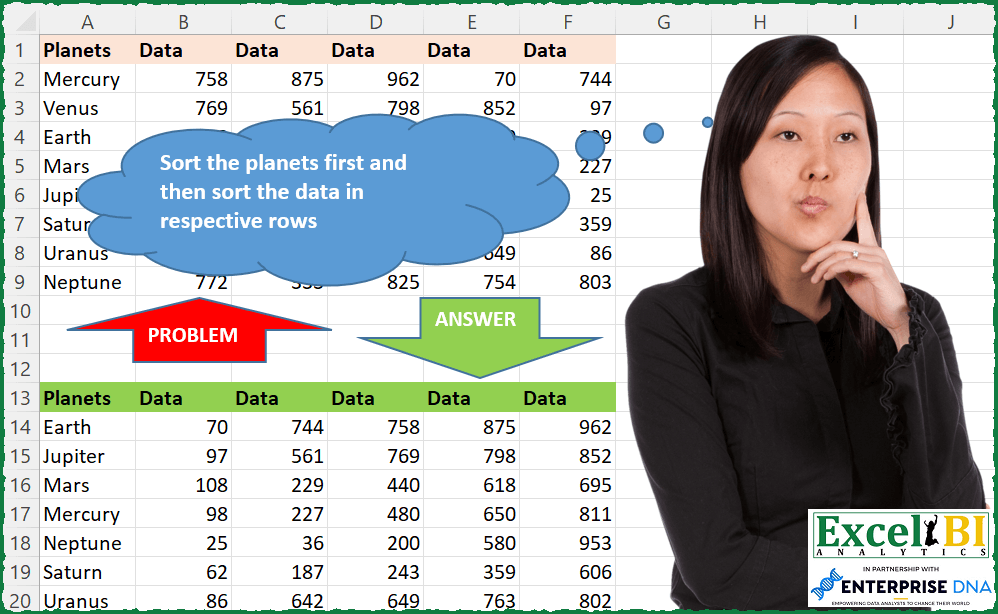
Sort the planets first and then sort the data in respective rows Note – I have updated the file but picture will continue to show wrong data.
📌 Challenge Details and Links
ExcelBI Excel Challenge Number: 113
Challenge Difficulty: ⭐️⭐️
📥Download Sample File
📥Link to the solutions on LinkedIn
Solving the challenge of Sort Planets and Data with Power Query
Power Query solution 1 for Sort Planets and Data, proposed by Bo Rydobon 🇹🇭:
let
  Source = Excel.CurrentWorkbook(){[Name = "Table1"]}[Content],
  Rs = Table.FromRows(
    List.Sort(
      List.Transform(Table.ToRows(Source), each {_{0}} & List.Sort(List.Skip(_))),
      each _{0}
    ),
    Table.ColumnNames(Source)
  )
in
  Rs
Power Query solution 2 for Sort Planets and Data, proposed by Aditya Kumar Darak 🇮🇳:
let
  Source = Excel.CurrentWorkbook(){[Name = "data"]}[Content],
  SortedPlanet = Table.Sort(Source, {{"Planets", Order.Ascending}}),
  SortedData = List.Transform(Table.ToRows(SortedPlanet), each {_{0}} & List.Sort(List.Skip(_, 1))),
  Result = Table.FromRows(SortedData, Table.ColumnNames(SortedPlanet))
in
  Result
Power Query solution 3 for Sort Planets and Data, proposed by Alejandro Simón 🇵🇦 🇪🇸:
let
  Source = Excel.CurrentWorkbook(){[Name = "Table1"]}[Content],
  SortedRows = Table.Sort(Source, {{"Planets", Order.Ascending}}),
  ColList = Table.AddColumn(
    SortedRows,
    "Custom",
    each {List.First(Record.ToList(_))} & List.Sort(List.Skip(Record.ToList(_)))
  ),
  Solucion = Table.FromRows(ColList[Custom], Table.ColumnNames(Source))
in
  Solucion
Power Query solution 4 for Sort Planets and Data, proposed by Brian Julius:
let
  Source = Table.Sort(
    Excel.CurrentWorkbook(){[Name = "Table1"]}[Content],
    {"Planets", Order.Ascending}
  ),
  UnpivotOther = Table.RemoveColumns(
    Table.UnpivotOtherColumns(Source, {"Planets"}, "Attribute", "Value"),
    "Attribute"
  ),
  Group = Table.Group(
    UnpivotOther,
    {"Planets"},
    {{"All", each _, type table [Planets = text, Value = number]}}
  ),
  SortNIndex = Table.AddColumn(Group, "Sorted", each Table.Sort([All], {"Value", Order.Ascending})),
  AddIdx = Table.RemoveColumns(
    Table.AddColumn(SortNIndex, "AddIdxData", each Table.AddIndexColumn([Sorted], "Index", 1, 1)),
    {"All", "Sorted", "Planets"}
  ),
  Expand = Table.ExpandTableColumn(
    AddIdx,
    "AddIdxData",
    {"Planets", "Value", "Index"},
    {"Planets", "Value", "Index"}
  ),
  AddHeader = Table.RemoveColumns(
    Table.AddColumn(Expand, "Header", each "Data" & Number.ToText([Index])),
    "Index"
  ),
  Pivot = Table.Pivot(AddHeader, List.Distinct(AddHeader[Header]), "Header", "Value")
in
  Pivot
Power Query solution 5 for Sort Planets and Data, proposed by 🇮🇷 Navid Esmaeilzadeh اسماعیل زاده:
let
  Source = Excel.CurrentWorkbook(){[Name = "Table1"]}[Content],
  CT = Table.TransformColumnTypes(
    Source,
    {
      {"Planets", type text},
      {"Data", Int64.Type},
      {"Data2", Int64.Type},
      {"Data3", Int64.Type},
      {"Data4", Int64.Type},
      {"Data5", Int64.Type}
    }
  ),
  UPO = Table.UnpivotOtherColumns(CT, {"Planets"}, "Attribute", "Value"),
  SR = Table.Sort(UPO, {{"Planets", Order.Ascending}, {"Value", Order.Ascending}}),
  AI = Table.AddIndexColumn(SR, "Index", 1, 1, Int64.Type),
  ROC = Table.SelectColumns(AI, {"Planets", "Value", "Index"}),
  GR = Table.Group(
    ROC,
    {"Planets"},
    {{"All", each _, type table [Planets = nullable text, Value = number, Index = number]}}
  ),
  AC = Table.AddColumn(GR, "CU", each Table.AddIndexColumn([All], "Index.", 1, 1)),
  ROC1 = Table.SelectColumns(AC, {"CU"}),
  EX = Table.ExpandTableColumn(
    ROC1,
    "CU",
    {"Planets", "Value", "Index."},
    {"Planets", "Value", "Index."}
  ),
  CT1 = Table.TransformColumnTypes(EX, {{"Index.", type text}}),
  ADC = Table.AddColumn(CT1, "D", each "Data" & [#"Index."]),
  RC = Table.SelectColumns(ADC, {"Planets", "D", "Value"}),
  A = Table.Pivot(RC, List.Distinct(RC[D]), "D", "Value", List.Sum)
in
  A
Power Query solution 6 for Sort Planets and Data, proposed by Matthias Friedmann:
let
  Source      = Excel.CurrentWorkbook(){[Name = "Planets"]}[Content],
  Planets     = List.Sort(Source[Planets]),
  Data        = Table.FromRows(List.Transform((Table.ToRows(Source)), each List.Sort(List.Skip(_)))),
  FromColumns = Table.FromColumns({Planets} & Table.ToColumns(Data), Table.ColumnNames(Source))
in
  FromColumns
Power Query solution 8 for Sort Planets and Data, proposed by Krzysztof Kominiak:
let
  Source = Table.FromRows(
    Json.Document(
      Binary.Decompress(
        Binary.FromText(
          "NZC7DgIhEEX/hXoLXjPAB9iYaGO02WxBDIk2mw1C4d/LHWJzM48zdxjWVV1Kffb6VYsKFIfGQEMTW1Q0xHu1Lat6lL1/kHMaSmwQJxkhwCkIdsq1vUbKBi2joZzg6T3srE3CXXKFm48oThsDS6ZJTbdzP96tVCwU0GqoY8yQQ4GEu+XW645xjZ683sQAwANzNLfea/5fgTJ7gFFbiXFXZOGu5Wh9LwADms4Bj5bkn7wMObVtPw==",
          BinaryEncoding.Base64
        ),
        Compression.Deflate
      )
    ),
    let
      _t = ((type nullable text) meta [Serialized.Text = true])
    in
      type table [Planets = _t, Data = _t, Data2 = _t, Data3 = _t, Data4 = _t, Data5 = _t]
  ),
  subCols = List.Select(Table.ColumnNames(Source), each Text.StartsWith(_, "Data")),
  ToRecs = Table.Sort(Table.CombineColumnsToRecord(Source, "Subs", subCols), {"Planets"}),
  Result = Table.ExpandRecordColumn(
    Table.TransformColumns(
      ToRecs,
      {
        "Subs",
        each Record.FromList(
          List.Sort(List.Transform(Record.ToList(_), each Number.From(_))),
          subCols
        )
      }
    ),
    "Subs",
    subCols
  )
in
  Result
Power Query solution 9 for Sort Planets and Data, proposed by Jan Willem Van Holst:
let
  Source = Excel.CurrentWorkbook(){[Name = "Table1"]}[Content],
  #"Changed Type" = Table.TransformColumnTypes(
    Source,
    {
      {"Planets", type text},
      {"Data", Int64.Type},
      {"Data2", Int64.Type},
      {"Data3", Int64.Type},
      {"Data4", Int64.Type},
      {"Data5", Int64.Type}
    }
  ),
  #"Added Custom" = Table.AddColumn(
    #"Changed Type",
    "Custom",
    each List.Sort(List.Skip(Record.ToList(_)))
  ),
  #"Removed Columns" = Table.RemoveColumns(
    #"Added Custom",
    {"Data", "Data2", "Data3", "Data4", "Data5"}
  ),
  #"Sorted Rows" = Table.Sort(#"Removed Columns", {{"Planets", Order.Ascending}}),
  #"Extracted Values" = Table.TransformColumns(
    #"Sorted Rows",
    {"Custom", each Text.Combine(List.Transform(_, Text.From), ","), type text}
  ),
  #"Split Column by Delimiter" = Table.SplitColumn(
    #"Extracted Values",
    "Custom",
    Splitter.SplitTextByDelimiter(",", QuoteStyle.Csv),
    {"Custom.1", "Custom.2", "Custom.3", "Custom.4", "Custom.5"}
  ),
  #"Changed Type1" = Table.TransformColumnTypes(
    #"Split Column by Delimiter",
    {
      {"Custom.1", Int64.Type},
      {"Custom.2", Int64.Type},
      {"Custom.3", Int64.Type},
      {"Custom.4", Int64.Type},
      {"Custom.5", Int64.Type}
    }
  )
in
  #"Changed Type1"
Solving the challenge of Sort Planets and Data with Excel
Excel solution 1 for Sort Planets and Data, proposed by Bo Rydobon 🇹🇭:
=LET(
    z,
    SORT(
        A2:F9
    ),
    REDUCE(
        A1:F1,
        SEQUENCE(
            ROWS(
                z
            )
        ),
        LAMBDA(
            a,
            n,
            VSTACK(
                a,
                HSTACK(
                    INDEX(
                        z,
                        n,
                        1
                    ),
                    DROP(
                        SORT(
                            INDEX(
                                z,
                                n,

                            ),
                            ,
                            ,
                            1
                        ),
                        ,
                        -1
                    )
                )
            )
        )
    )
)
Excel solution 2 for Sort Planets and Data, proposed by Bo Rydobon 🇹🇭:
=LET(
    z,
    A2:F9,
    VSTACK(
        A1:F1,
        MAP(
            z,
            LAMBDA(
                a,
                IFERROR(
                    SMALL(
                        INDEX(
                            SORT(
                                z
                            ),
                            ROWS(
                                A2:a
                            ),

                        ),
                        COLUMNS(
                                A2:a
                            )-1
                    ),
                    INDEX(
                        SORT(
                                z
                            ),
                        ROWS(
                                A2:a
                            ),
                        1
                    )
                )
            )
        )
    )
)
Excel solution 3 for Sort Planets and Data, proposed by Rick Rothstein:
=HSTACK(
    SORT(
        A2:A9
    ),
    MAKEARRAY(
        8,
        5,
        LAMBDA(
            r,
            c,
            INDEX(
                SORT(
                    INDEX(
                        DROP(
                            SORTBY(
                                A2:F9,
                                A2:A9
                            ),
                            ,
                            1
                        ),
                        r
                    ),
                    ,
                    ,
                    1
                ),
                ,
                c
            )
        )
    )
)
Excel solution 4 for Sort Planets and Data, proposed by John V.:
=REDUCE(
    A1:F1,
    ROW(
        1:8
    ),
    LAMBDA(
        i,
        x,
        VSTACK(
            i,
            INDEX(
                SORT(
                    INDEX(
                        SORT(
                            A2:F9
                        ),
                        x,

                    ),
                    ,
                    ,
                    1
                ),
                {6,
                1,
                2,
                3,
                4,
                5}
            )
        )
    )
)

Without titles and Without Reduce:
✅=SORT(
    HSTACK(
        A2:A9,
        MAKEARRAY(
            8,
            5,
            LAMBDA(
                r,
                c,
                INDEX(
                    SORT(
                        INDEX(
                            B2:F9,
                            r,

                        ),
                        ,
                        ,
                        1
                    ),
                    c
                )
            )
        )
    )
)
Excel solution 5 for Sort Planets and Data, proposed by محمد حلمي:
=HSTACK(
    SORT(
        A2:A9
    ),
    MAKEARRAY(
        8,
        5,
        LAMBDA(
            r,
            c,
            INDEX(
                SORT(
                    INDEX(
                        B2:F9,
                        r,

                    ),
                    ,
                    ,
                    1
                ),
                ,
                c
            )
        )
    )
)

#2
=HSTACK(
    SORT(
        A2:A9
    ),
    TEXTSPLIT(
         CONCAT(
             BYROW(
                 B2:F9,
                 LAMBDA(
                     a,
                     CONCAT(
                         SORT(
                             a,
                             ,
                             ,
                             1
                         )&" "
                     )
                 )
             )&"-"
         ),
        " ",
        "-",
        1
    )+0
)

#3
=HSTACK(
    VSTACK(
        A1,
        SORT(
        A2:A9
    )
    ),
    REDUCE(
        B1:F1,
        SEQUENCE(
            ROWS(
                B2:F9
            )
        ),
        LAMBDA(
            a,
            d,
            VSTACK(
                a,
                SORT(
                    INDEX(
                        B2:F9,
                        d,

                    ),
                    ,
                    ,
                    1
                )
            )
        )
    )
)
Excel solution 6 for Sort Planets and Data, proposed by Julian Poeltl:
=VSTACK(
    A1:F1,
    HSTACK(
        SORT(
            A2:A9
        ),
        TEXTSPLIT(
            TEXTJOIN(
                "|",
                ,
                BYROW(
                    SORTBY(
                        B2:F9,
                        A2:A9,
                        1
                    ),
                    LAMBDA(
                        A,
                        TEXTJOIN(
                            ",",
                            ,
                            SORT(
                                A,
                                ,
                                ,
                                1
                            )
                        )
                    )
                )
            ),
            ",",
            "|"
        )*1
    )
)
Excel solution 7 for Sort Planets and Data, proposed by Aditya Kumar Darak 🇮🇳:
=LET(

     _d,
     A1:F9,

     _h,
     TAKE(
         _d,
          1
     ),

     _b,
     DROP(
         _d,
          1
     ),

     _s1,
     SORT(
         _b,
          1
     ),

     _seq,
     SEQUENCE(
         ROWS(
             _s1
         )
     ),

     _e,
     LAMBDA(
         a,
          b,

          VSTACK(

               a,

               HSTACK(

                    INDEX(
                        _s1,
                         b,
                         1
                    ),

                    SORT(
                        INDEX(
                            DROP(
                                _s1,
                                 ,
                                 1
                            ),
                             b,
                             0
                        ),
                         ,
                         ,
                         1
                    )

               )

          )

     ),

     _s2,
     REDUCE(
         _h,
          _seq,
          _e
     ),

     _s2

)
Excel solution 8 for Sort Planets and Data, proposed by Timothée BLIOT:
=LET(
    A,
    SORT(
        A2:F9
    ),
    HSTACK(
        DROP(
            A,
            ,
            -5
        ),
        TEXTSPLIT(
            TEXTJOIN(
                "/",
                ,
                BYROW(
                    DROP(
                        A,
                        ,
                        1
                    ),
                    LAMBDA(
                        a,
                        TEXTJOIN(
                            ",",
                            ,
                            SORT(
                                TRANSPOSE(
                                    a
                                )
                   &         )
                        )
                    )
                )
            ),
            ",",
            "/",
            1,
            ,
            ""
        )
    )
)
Excel solution 9 for Sort Planets and Data, proposed by Md. Zohurul Islam:
=LET(

    p,
    A2:F9,

    q,
    B1:F1,

    r,
    B1:F1,

    a,
    SORT(
        p,
        1
    ),

    b,
    DROP(
        a,
        ,
        1
    ),

    d,
    BYROW(
        b,
        LAMBDA(
            x,
            LET(
                a,
                SEQUENCE(
                    ,
                    COUNT(
                        x
                    )
                ),
                b,
                SMALL(
                    x,
                    a
                ),
                d,
                TEXTJOIN(
                    "-",
                    1,
                    b
                ),
                d
            )
        )
    ),

    e,
    REDUCE(
        r,
        d,
        LAMBDA(
            u,
            v,
            VSTACK(
                u,
                --TEXTSPLIT(
                    v,
                    "-"
                )
            )
        )
    ),

    f,
    VSTACK(
        A1,
        TAKE(
        a,
        ,
        1
    )
    ),

    g,
    HSTACK(
        f,
        e
    ),
    g
)
Excel solution 10 for Sort Planets and Data, proposed by Charles Roldan:
=VSTACK(A1:F1, SORT(HSTACK(A2:A9, --TEXTSPLIT(TEXTJOIN(";" ,, BYROW(B2:F9, LAMBDA(x, TEXTJOIN("," ,, SORT(x, , , 1))))), "," , ";")), 1))Excel solution 11 for Sort Planets and Data, proposed by Stefan Olsson:
=LAMBDA(
    P,

    QUERY(

        BYROW(
            QUERY(
                {P},
                 "Select * order by Col1",
                 1
            ),

            LAMBDA(
                br,

                TRANSPOSE(
                    SORT(
                        TRANSPOSE(
                            br
                        )
                    )
                )

            )
        ),

        "Select "&TEXTJOIN(
            ", Col",
             TRUE,
             "Col"&COLUMNS(
                 P
             ),
             SEQUENCE(
                 COLUMNS(
                 P
             )-1
             )
        ),
        1
    )

)(A1:F9)
Excel solution 12 for Sort Planets and Data, proposed by Victor Momoh (MVP, MOS, R.Eng):
=LET(
    a,
    B2:F9,
    SORTBY(
        HSTACK(
            A2:A9,
            MAKEARRAY(
                8,
                5,
                LAMBDA(
                    r,
                    c,
                    INDEX(
                        SORT(
                            INDEX(
                                a,
                                r
                            ),
                            ,
                            ,
                            1
                        ),
                        ,
                        c
                    )
                )
            )
        ),
        A2:A9
    )
)

Much longer with REDUCE,
     but just to make a point!!
=LET(
    s,
    A2:A9,
    a,
    MATCH(
        SORT(
            s
        ),
        s,
        0
    ),

    HSTACK(
        SORT(
            s
        ),
        DROP(
            REDUCE(
                "",
                a,
                LAMBDA(
                    x,
                    y,
                    VSTACK(
                        x,
                        SORT(
                            INDEX(
                                B2:F9,
                                y,
                                0
                            ),
                            ,
                            ,
                            1
                        )
                    )
                )
            ),
            1
        )
    )
)
Excel solution 13 for Sort Planets and Data, proposed by Abhishek Kumar Jain:
=LET(
    a,
    A2:A9,
    b,
    B2:F9,
    c,
    SORT(
        a&", "&BYROW(
            b,
            LAMBDA(
                x,
                ARRAYTOTEXT(
                    SMALL(
                        x,
                        SEQUENCE(
                            ,
                            5
                        )
                    )
                )
            )
        )
    ),
    TEXTSPLIT(
        TEXTJOIN(
            "|",
            TRUE,
            c
        ),
        ", ",
        "|"
    )
)
Excel solution 14 for Sort Planets and Data, proposed by Guillermo Arroyo:
=LET(
    m,
    SORT(
        A2:F9,
        1,
        1,
        0
    ),

     n,
    ROWS(
        m
    ),

     p,
    TAKE(
        m,
        ,
        1
    ),

     d,
    DROP(
        m,
        ,
        1
    ),

     f,
    LAMBDA(
        a,
        b,
        c,
        IF(
            c>n,
            b,
            a(
                a,
                VSTACK(
                    DROP(
                        b,
                        1
                    ),
                    SORT(
                        TAKE(
                        b,
                        1
                    ),
                        1,
                        1,
                        1
                    )
                ),
                c+1
            )
        )
    ),

     HSTACK(
         p,
         f(
             f,
             d,
             1
         )
     )
)
Excel solution 15 for Sort Planets and Data, proposed by Guillermo Arroyo:
=LET(
    m,
    A2:F9,

     n,
    ROWS(
        m
    ),

     p,
    SORT(
        TAKE(
            m,
            ,
            1
        )
    ),

     d,
    DROP(
            m,
            ,
            1
        ),

     f,
    LAMBDA(
        a,
        b,
        c,
        IF(
            c>n,
            b,
            a(
                a,
                VSTACK(
                    DROP(
                        b,
                        1
                    ),
                    SORT(
                        TAKE(
                        b,
                        1
                    ),
                        1,
                        1,
                        1
                    )
                ),
                c+1
            )
        )
    ),

     HSTACK(
         p,
         f(
             f,
             d,
             1
         )
     )
)
Excel solution 16 for Sort Planets and Data, proposed by Diarmuid Early:
=LET(
    headers,
    A1:F1,
     planets,
    A2:A9,
     data,
    B2:F9,

     VSTACK(
         headers,
         HSTACK(
             SORT(
                 planets
             ),

              MAKEARRAY(
                  ROWS(
                      data
                  ),
                  COLUMNS(
                      data
                  ),

                   LAMBDA(
                       r,
                       c,
                       INDEX(
                           SORT(
                               INDEX(
                                   data,
                                   r
                               ),
                               ,
                               ,
                               1
                           ),
                           c
                       )
                   )
              )
         )
     )
)

A slight tweak makes it work for the amended version too:
=LET(
    headers,
    A1:F1,
     planets,
    A2:A9,
     data,
    SORTBY(
        B2:F9,
        planets
    ),

     VSTACK(
         headers,
         HSTACK(
             SORT(
                 planets
             ),

              MAKEARRAY(
                  ROWS(
                      data
                  ),
                  COLUMNS(
                      data
                  ),

                   LAMBDA(
                       r,
                       c,
                       INDEX(
                           SORT(
                               INDEX(
                                   data,
                                   r
                               ),
                               ,
                               ,
                               1
                           ),
                           c
                       )
                   )
              )
         )
     )
)

(Edited to remove the extra comma in the second one)
Excel solution 17 for Sort Planets and Data, proposed by Surendra Reddy:
=SORT(
    A2:A9
)

To Sort Data
=SORTBY(
    XLOOKUP(
        A14,
        $A$2:$A$9,
        $B$2:$F$9
    ),
    XLOOKUP(
        A14,
        $A$2:$A$9,
        $B$2:$F$9
    )
)
Solving the challenge of Sort Planets and Data with Python in Excel
Python in Excel solution 1 for Sort Planets and Data, proposed by Alejandro Campos:
data = xl("A1:F9", headers=True)
col_Planets = data['Planets'].values
sorted_rows = np.array([np.sort(data.iloc[i, 1:].values) for i in range(len(data))])
combined_array = np.hstack((col_Planets.reshape(-1, 1), sorted_rows))
sorted_combined_array = combined_array[combined_array[:, 0].argsort()]
result_df = pd.DataFrame(sorted_combined_array, columns=['Planets'] + [f'Data' for i in range(sorted_rows.shape[1])])
result_df
Solving the challenge of Sort Planets and Data with SQL
SQL solution 1 for Sort Planets and Data, proposed by Zoran Milokanović:
SELECT /* Microsoft SQL Server 2019 */
 P.PLANETS
,P.[1] AS DATA
,P.[2] AS DATA
,P.[3] AS DATA
,P.[4] AS DATA
,P.[5] AS DATA
FROM
(
 SELECT
 U.PLANETS
 ,U.VALUE
 ,ROW_NUMBER() OVER (PARTITION BY U.PLANETS ORDER BY U.VALUE) AS ORDERING
 FROM DATA D
 UNPIVOT
 (
 VALUE FOR DATA IN (DATA1, DATA2, DATA3, DATA4, DATA5)
 ) U
) T
PIVOT
(
 SUM(T.VALUE)
 FOR T.ORDERING IN ([1], [2], [3], [4], [5])
) P
ORDER BY
 1
;
&&