
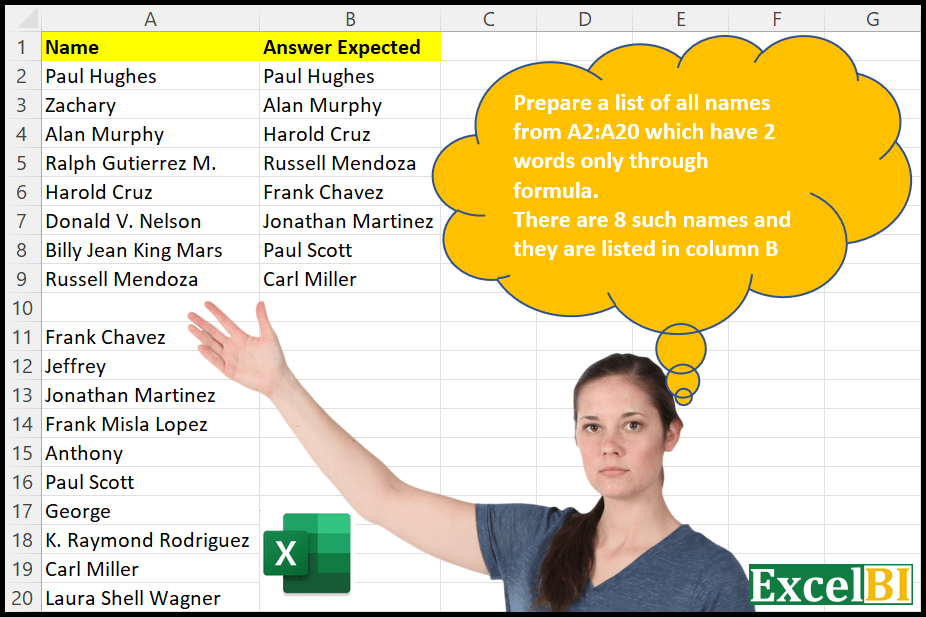
Provide a formula to list all names in A2:A20 which has two words only. Expected answer shown in column B.
📌 Challenge Details and Links
ExcelBI Excel Challenge Number: 10
Challenge Difficulty: ⭐️
📥Download Sample File
📥Link to the solutions on LinkedIn
Solving the challenge of List Names with Two Words with Power Query
Power Query solution 1 for List Names with Two Words, proposed by Aditya Kumar Darak 🇮🇳:
let
  Source = Excel.CurrentWorkbook(){[Name = "data"]}[Content],
  Calculation = Table.AddColumn(
    Source,
    "Split",
    each try List.Count(Text.PositionOf([Name], " ", Occurrence.All)) = 1 otherwise false
  ),
  Final = Table.SelectRows(Calculation, each ([Split] = true))[[Name]]
in
  Final
Power Query solution 2 for List Names with Two Words, proposed by Aditya Kumar Darak 🇮🇳:
let
  Source = Excel.CurrentWorkbook(){[Name = "data"]}[Content],
  Calculation = Table.AddColumn(
    Source,
    "Split",
    each try List.Count(Text.Split([Name], " ")) = 2 otherwise false
  ),
  Final = Table.SelectRows(Calculation, each ([Split] = true))[[Name]]
in
  Final
Power Query solution 3 for List Names with Two Words, proposed by Brian Julius:
let
  Source = #"Names Raw",
  CountSpaces = Table.AddColumn(
    Source,
    "Count Spaces",
    each Text.Length(Text.Select(Text.Trim([Name]), {" "}))
  ),
  #"Filtered Rows" = Table.SelectRows(CountSpaces, each ([Count Spaces] = 1)),
  #"Removed Columns" = Table.RemoveColumns(#"Filtered Rows", {"Count Spaces"})
in
  #"Removed Columns"
Power Query solution 4 for List Names with Two Words, proposed by Melissa de Korte:
let
  Source = Excel.CurrentWorkbook(){[Name = "Table1"]}[Content],
  FilterRows = Table.SelectRows(
    Source,
    each List.Count(try Text.Split([Name], " ") otherwise {}) = 2
  )
in
  FilterRows
Power Query solution 5 for List Names with Two Words, proposed by Kamaalpreet Sudan PMO-CP®, PgMP®, PMP®, PMI-ACP®:
let
  Source = Excel.CurrentWorkbook(){[Name = "Table1"]}[Content],
  #"Added Custom" = Table.AddColumn(
    Source,
    "Custom",
    each List.Count(Text.PositionOf([Name], " ", Occurrence.All))
  ),
  #"Filtered Rows1" = Table.SelectRows(#"Added Custom", each [Custom] = 1),
  #"Removed Other Columns1" = Table.SelectColumns(#"Filtered Rows1", {"Name"})
in
  #"Removed Other Columns1"
Power Query solution 6 for List Names with Two Words, proposed by Joe Jones-Jennings:
let
  Source = Excel.CurrentWorkbook(){[Name = "Table1"]}[Content],
  #"Changed Type" = Table.TransformColumnTypes(Source, {{"Name", type text}}),
  #"Duplicated Column" = Table.DuplicateColumn(#"Changed Type", "Name", "Name - Copy"),
  #"Split Column by Delimiter" = Table.SplitColumn(
    #"Duplicated Column",
    "Name - Copy",
    Splitter.SplitTextByDelimiter(" ", QuoteStyle.Csv),
    {"Name - Copy.1", "Name - Copy.2", "Name - Copy.3", "Name - Copy.4", "Name - Copy.5"}
  ),
  #"Changed Type1" = Table.TransformColumnTypes(
    #"Split Column by Delimiter",
    {
      {"Name - Copy.1", type text},
      {"Name - Copy.2", type text},
      {"Name - Copy.3", type text},
      {"Name - Copy.4", type text},
      {"Name - Copy.5", type text}
    }
  ),
  #"Filtered Rows" = Table.SelectRows(
    #"Changed Type1",
    each ([#"Name - Copy.2"] <> null) and ([#"Name - Copy.3"] = null)
  ),
  #"Removed Other Columns" = Table.SelectColumns(#"Filtered Rows", {"Name"})
in
  #"Removed Other Columns"
Solving the challenge of List Names with Two Words with Excel
Excel solution 1 for List Names with Two Words, proposed by محمد حلمي:
=LET(

    a,
    IFERROR(
        IFNA(
            TEXTAFTER(
                A2:A20,
                " ",
                {1,
                2}
            ),
            1
        ),

    ),

    FILTER(
        A2:A20,

        ISTEXT(
            INDEX(
                a,
                ,
                1
            )
        )*ISNUMBER(
            INDEX(
                a,
                ,
                2
            )
        )
    )
)
Excel solution 2 for List Names with Two Words, proposed by محمد حلمي:
=FILTER(
    A2:A20;
    LEN(
        A2:A20
    )-LEN(
        SUBSTITUTE(
            A2:A20;
            " ";
            ""
        )
    )=1
)
Excel solution 3 for List Names with Two Words, proposed by 🇰🇷 Taeyong Shin:
=LET(
    d,
    A2:A20,
    FILTER(
        d,
        COUNTIFS(
            d,
            d,
            d,
            "* *",
            d,
            "<>* * *"
        )
    )
)
REGEX
=TOCOL(
    REGEXEXTRACT(
        A2:A20,
        "^w+ w+$"
    ),
    2
)
Excel solution 4 for List Names with Two Words, proposed by Julian Poeltl:
=LET(
    N,
    A2:A20,
    FILTER(
        N,
        LEN(
            N
        )-LEN(
            SUBSTITUTE(
                N,
                " ",
                ""
            )
        )=1
    )
)
Excel solution 5 for List Names with Two Words, proposed by Aditya Kumar Darak 🇮🇳:
= FILTER(

     name,

     LEN(
         TRIM(
             name
         )
     )
     - LEN(

          SUBSTITUTE(
              TRIM(
             name
         ),
               " ",
               ""
          )
     )
     = 1
)
Excel solution 6 for List Names with Two Words, proposed by Timothée BLIOT:
=FILTER(TRIM(A2:A20),LEN(TRIM(A2:A20))-LEN(SUBSTITUTE(TRIM(A2:A20)," ",""))=1,"no value")Excel solution 7 for List Names with Two Words, proposed by Hussein SATOUR:
=FILTER(A2:A20, LEN(A2:A20) - LEN(SUBSTITUTE(A2:A20, " ","")) = 1)Excel solution 8 for List Names with Two Words, proposed by Duy Tùng:
=FILTER(A2:A20,LEN(REGEXREPLACE(A2:A20,"[a-z]|s",""))=2)Excel solution 9 for List Names with Two Words, proposed by Abdallah Ally:
=FILTER(
    A2:A20,
    ISNUMBER(
        FIND(
            " ",
            A2:A20,
            1
        )
    )*ISERROR(
        FIND(
            " ",
            A2:A20,
            FIND(
                " ",
                A2:A20,
                1
            )+1
        )
    )
)

ALSO

=FILTER(A2:A20,
    (LEN(
        A2:A20
    )-LEN(
        SUBSTITUTE(
            A2:A20,
            " ",
            ""
        )
    ))=1)
Excel solution 10 for List Names with Two Words, proposed by Bhavya Gupta:
=FILTER(
    A2:A20,

    BYROW(
        A2:A20,

        LAMBDA(
            x,
            IFERROR(
                ROWS(
                    TEXTSPLIT(
                        TRIM(
                            x
                        ),
                        ,
                        " ",
                        TRUE
                    )
                ),
                0
            )
        )
    )=2
)
Excel solution 11 for List Names with Two Words, proposed by Charles Roldan:
=LET(
 FilterBy,
     LAMBDA(
         f,
          LAMBDA(
              x,
               FILTER(
                   x,
                    f(
                        x
                    )
               )
          )
     ),

 NumChar,
     LAMBDA(
         a,
          LAMBDA(
              x,
               LEN(
                        x
                    ) - LEN(
                   SUBSTITUTE(
                       x,
                        a,
                        ""
                   )
               )
          )
     ),

 Equals,
     LAMBDA(
         c,
          LAMBDA(
              x,
               x = c
          )
     ),

 B,
     LAMBDA(
         f,
          LAMBDA(
              g,
               LAMBDA(
                   x,
                    f(
                        g(
                        x
                    )
                    )
               )
          )
     ),

 FilterBy(B(
     Equals(
         1
     )
 )(NumChar(
     " "
 )))
)(A2:A20)
Excel solution 12 for List Names with Two Words, proposed by 🇮🇷 Navid Esmaeilzadeh اسماعیل زاده:
={IFERROR(
    INDIRECT(
        "A"&SMALL(
            IF(
                LEN(
                    TRIM(
                        $A$2:$A$20
                    )
                )-LEN(
                    SUBSTITUTE(
                        TRIM(
                        $A$2:$A$20
                    ),
                        " ",
                        ""
                    )
                )=1,
                ROW(
                        $A$2:$A$20
                    ),
                ""
            ),
            ROW(
                A1
            )
        )
    ),
    ""
)
Excel solution 13 for List Names with Two Words, proposed by CA Raghunath Gundi:
=FILTER(B6:B24,LEN(B6:B24)-LEN(SUBSTITUTE(B6:B24," ",""))=1)Excel solution 14 for List Names with Two Words, proposed by Jardiel Euflázio:
=FILTER(

A2:A20,
LEN(A2:A20)-LEN(SUBSTITUTE(A2:A20," ",""))=1

)
Excel solution 15 for List Names with Two Words, proposed by Victor Momoh (MVP, MOS, R.Eng):
=FILTER(
    A2:A20,
    LEN(
        A2:A20
    )-LEN(
        SUBSTITUTE(
            A2:A20,
            " ",
            ""
        )
    )=1
)

Messing around with TEXTBEFORE&TEXTAFTER,

=FILTER(
    $A$2:$A$20,
    IFERROR(
        TEXTBEFORE(
            A2:A20,
            " ",
            1
        )=TEXTBEFORE(
            A2:A20,
            " ",
            -1,
            ,
            1
        ),
        0
    )
)

Another variant
=FILTER(
    A2:A20,
    IFERROR(
        A2:A20=TEXTBEFORE(
            A2:A20&" ",
            " ",
            2
        ),
        0
    )
)
Excel solution 16 for List Names with Two Words, proposed by Cary Ballard, DML:
=FILTER(A2:A20, LEN(A2:A20) - LEN(SUBSTITUTE(A2:A20, " ","")) = 1)Excel solution 17 for List Names with Two Words, proposed by RIJESH T.:
=LET(
    n,
    A2:A20,
    FILTER(
        n,
        MAP(
            n,
            LAMBDA(
                a,
                COUNTA(
                    TEXTSPLIT(
                        a,
                        " "
                    )
                )
            )
        )=2
    )
)
Excel solution 18 for List Names with Two Words, proposed by Viswanathan M B:
=Filter(A2:A10, (len(A2:A10) - 1 = len(Substitute(A2:A10, " ",""))))Excel solution 19 for List Names with Two Words, proposed by Juliano Santos Lima:
=FILTER(A2:A20,LEN(A2:A20)-LEN(SUBSTITUTE(A2:A20," ",""))=1)Excel solution 20 for List Names with Two Words, proposed by Ibrahim Sadiq:
=TEXTSPLIT(
    TEXTJOIN(
        ",",
        TRUE,
        IF(
            LEN(
                A2:A20
            )-LEN(
                SUBSTITUTE(
                    A2:A20,
                    " ",
                    ""
                )
            )=1,
            A2:A20,
            ""
        )
    ),
    ,
    ","
)

Most efficient formula
=FILTER(
    A2:A20,
    LEN(
                A2:A20
            )-LEN(
        SUBSTITUTE(
            A2:A20,
            " ",
            ""
        )
    )=1
)
Excel solution 21 for List Names with Two Words, proposed by Amr Tawfik CMA®,FMVA,Lean Coach:
=FILTER(
    A2:A20,
    MAP(
        A2:A20,
        LAMBDA(
            x,
            COUNTA(
                TEXTSPLIT(
                    x,
                    " "
                )
            )
        )
    )=2
)
Excel solution 22 for List Names with Two Words, proposed by Thiago da Silva Romeiro:
=UNIQUE(

     IF(

          LEN(
              A2:A20
          )-1 =
          LEN(
              SUBSTITUTE(
                  A2:A20,
                  " ",
                  ""
              )
          );
          A2:A20,
         ""

     )
     ,
    ,
     TRUE

)
Solving the challenge of List Names with Two Words with Python in Excel
Python in Excel solution 1 for List Names with Two Words, proposed by Aditya Kumar Darak 🇮🇳:
data = xl("A1:A20", True)
result = data[
 data["Name"].map(lambda x: len(x.split(" ")) == 2 if x else False)
].reset_index(drop=True)
result
&&&