
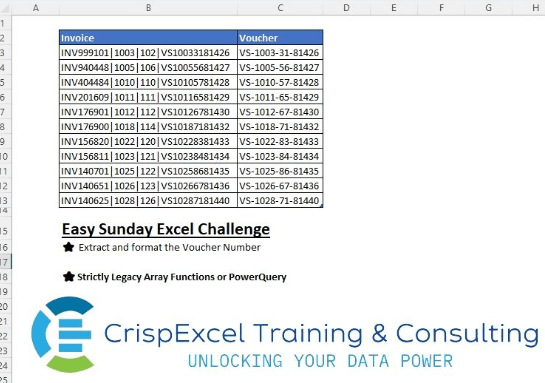
Extract and format the voucher number Strictly Legacy array function or PQ Nelson Mwangi
📌 Challenge Details and Links
Challenge Number: 8
Challenge Difficulty: ⭐
📥Download Sample File
📥Link to the solutions on LinkedIn
Solving the challenge of Extract and Format a Text String with Power Query
Power Query solution 1 for Extract and Format a Text String, proposed by Kris Jaganah:
let
  Source = Excel.CurrentWorkbook(){[Name = "Table23"]}[Content],
  Answer = Table.AddColumn(
    Source,
    "Answer",
    each Text.Combine(
      {
        Text.Middle([Invoice], 19, 2),
        "-",
        Text.Middle([Invoice], 10, 4),
        "-",
        Text.Middle([Invoice], 25, 2),
        "-",
        Text.Middle([Invoice], 27)
      }
    )
  )
in
  Answer
Power Query solution 2 for Extract and Format a Text String, proposed by Kris Jaganah:
let
  Source = Excel.CurrentWorkbook(){[Name = "Table23"]}[Content],
  Ans = Table.AddColumn(
    Source,
    "Answer",
    each Text.Combine(
      Splitter.SplitTextByLengths({2, 4, 2, 5})(List.Last(Text.Split([Invoice], "|"))),
      "-"
    )
  )
in
  Ans
Power Query solution 3 for Extract and Format a Text String, proposed by Alejandro Simón 🇵🇦 🇪🇸:
let
  Source = Excel.CurrentWorkbook(){[Name = "Table2"]}[Content],
  Sol = Table.AddColumn(
    Source,
    "Answer",
    each
      let
        a = Text.Split([Invoice], "|"),
        b = List.Last(a),
        c = {2, 4, 2, 5},
        d = Splitter.SplitTextByLengths(c)(b)
      in
        Text.Combine(d, "-")
  )[[Answer]]
in
  Sol
Power Query solution 4 for Extract and Format a Text String, proposed by Brian Julius:
let
 Source = TableRaw,
 RunRScript = R.Execute("library(stringr)#(lf)data <- dataset#(lf)invoices <- data$Invoice#(lf)pattern <- ""([A-Z]{2})(\d{4})(\d{2})(\d{5})$""#(lf)voucher_codes <- str_extract(invoices, pattern)#(lf)formatted_vouchers <- str_replace_all(voucher_codes, pattern, ""\1-\2-\3-\4"")#(lf)df <- data.frame(Invoice = invoices, ExtractedVoucher = formatted_vouchers)#(lf)df",[dataset=Source]),
 Filter = Table.SelectRows(RunRScript, each ([Name] = "df")),
 Expand = Table.RemoveColumns( Table.ExpandTableColumn(Filter, "Value", {"Invoice", "ExtractedVoucher"}, {"Invoice", "ExtractedVoucher"}), "Name")
in
 Expand
Power Query solution 5 for Extract and Format a Text String, proposed by Bhavya Gupta:
let
  Source = Table.FromRows(
    Json.Document(
      Binary.Decompress(
        Binary.FromText(
          "VdAxDoMwDIXhuzB3sJ8dJzlCly6VWKrehMPXLxaIDomQ+GR+/Plsz9c+51TRQ0UsLxz7m4+mQx2xfR+FXNwHUcsrCrUWRP1Ey3i+Vzk0D5FK60TjRBANmUT5zTwLaTSieSLtMVeTIlE1KYKTTP6QEGWYeqHRGW64UDaCCDkJ1QQMI7I7Yo4gV4Bqgg0n8gu59NWEXAGqCW1wBdZuKNpCkcgKRYXHHXGIIMNRy0SFe/7d9wc=",
          BinaryEncoding.Base64
        ),
        Compression.Deflate
      )
    ),
    let
      _t = ((type nullable text) meta [Serialized.Text = true])
    in
      type table [Invoice = _t]
  ),
  Output = Table.AddColumn(
    Source,
    "Voucher",
    each Text.Combine(
      Splitter.SplitTextByLengths({2, 4, 2, 5})(Text.AfterDelimiter([Invoice], "|", 2)),
      "-"
    )
  )
in
  Output
Power Query solution 6 for Extract and Format a Text String, proposed by Daniel Madhadha:
let
  Source = Excel.CurrentWorkbook(){[Name = "Table1"]}[Content],
  Ans = Table.AddColumn(
    Source,
    "Soln",
    each Text.Combine(
      Splitter.SplitTextByLengths({2, 4, 2, 5})(List.Last(Text.Split([Invoice], "|"))),
      "-"
    )
  )
in
  Ans
Power Query solution 7 for Extract and Format a Text String, proposed by Nelson Mwangi:
let
  Source = Excel.CurrentWorkbook(){[Name = "Invoice"]}[Content],
  DupCol = Table.DuplicateColumn(Source, "Invoice", "Invoice - Copy"),
  SplitCol = Table.SplitColumn(
    DupCol,
    "Invoice - Copy",
    Splitter.SplitTextByEachDelimiter({"|"}, null, true),
    {"Invoice - Copy.1", "Voucher"}
  ),
  DelCol = Table.RemoveColumns(SplitCol, {"Invoice - Copy.1"}),
  ColNames = List.Transform({1 .. 4}, each Text.From(_)),
  SplitByPosition = Table.SplitColumn(
    DelCol,
    "Voucher",
    Splitter.SplitTextByPositions({0, 2, 6, 8}, false),
    ColNames
  ),
  MergeCols = Table.CombineColumns(
    SplitByPosition,
    ColNames,
    Combiner.CombineTextByDelimiter("-"),
    "Voucher"
  )
in
  MergeCols
Solving the challenge of Extract and Format a Text String with Excel
Excel solution 1 for Extract and Format a Text String, proposed by Rick Rothstein:
=TEXT(
   RIGHT(
       B3,
       11),
   "VS-0000-00-00000")

If they might not always be "VS",
    then this formula would work...

=TEXT(
   RIGHT(
       B3,
       11),
   """"&MID(
       B3,
       20,
       2)&"""-0000-00-00000")
Excel solution 2 for Extract and Format a Text String, proposed by Rick Rothstein:
=MID(
   B3,
   20,
   2)&"-"&MID(
   B3,
   22,
   4)&"-"&MID(
   B3,
   26,
   2)&"-"&RIGHT(
   B3,
   5)

=REPLACE(
   REPLACE(
       REPLACE(
           RIGHT(
               B3,
               13),
           9,
           0,
           "-"),
       7,
       0,
       "-"),
   3,
   0,
   "-")
Excel solution 3 for Extract and Format a Text String, proposed by محمد حلمي:
=MID(
   B3,
   20,
   2)&TEXT(
   RIGHT(
       B3,
       11),
   "-0000-00-00000")
Excel solution 4 for Extract and Format a Text String, proposed by Kris Jaganah:
=REDUCE(
   TEXTAFTER(
       Table23[Invoice],
       "|",
       -1),
   {3,
   8,
   11},
   LAMBDA(
       x,
       y,
       REPLACE(
           x,
           y,
           0,
           "-")))
Excel solution 5 for Extract and Format a Text String, proposed by Abdallah Ally:
=LET(
   a,
   RIGHT(
       B3,
       13),
   TEXTJOIN(
       "-",
       ,
       MID(
           a,
           {1,
           3,
           7,
           9},
           {2,
           4,
           2,
           5})))
Excel solution 6 for Extract and Format a Text String, proposed by Abdallah Ally:
="VS-"&TEXT(
   RIGHT(
       B3,
       11),
   "0000-00-00000")
Excel solution 7 for Extract and Format a Text String, proposed by Mey Tithveasna:
=TEXT(
   RIGHT(
       B3,
       11),
   """VS""-0000-00-00000")
Excel solution 8 for Extract and Format a Text String, proposed by Mey Tithveasna:
=TEXT(
   RIGHT(
       B3,
       11),
   "VS-0000-00-00000")
Excel solution 9 for Extract and Format a Text String, proposed by Pieter de Bruijn:
=TEXT(
   RIGHT(
       B3,
       11),
   "VS-#-##-#####")
Excel solution 10 for Extract and Format a Text String, proposed by Hazem Hassan:
="VS-"&TEXT(
   TEXTAFTER(
       B3:B13,
       "VS"),
   "0000-00-00000")
Excel solution 11 for Extract and Format a Text String, proposed by Hazem Hassan:
=MID(
   B3,
   20,
   2)&"-"&TEXT(
   RIGHT(
       B3,
       11),
   "0000-00-00000")
Excel solution 12 for Extract and Format a Text String, proposed by Rajesh Sinha:
=TEXTJOIN(
   "-",
    TRUE,
    MID(
        A2,
         {1,
        3,
        7,
        9},
         {2,
        4,
        2,
        5}))
Excel solution 13 for Extract and Format a Text String, proposed by Duncan Salmon:
=TEXTJOIN(
   "-",
    TRUE,
    MID(
        RIGHT(
            $B3,
            13),
         {1,
        3,
        7,
        9},
         {2,
        4,
        2,
        5}))