
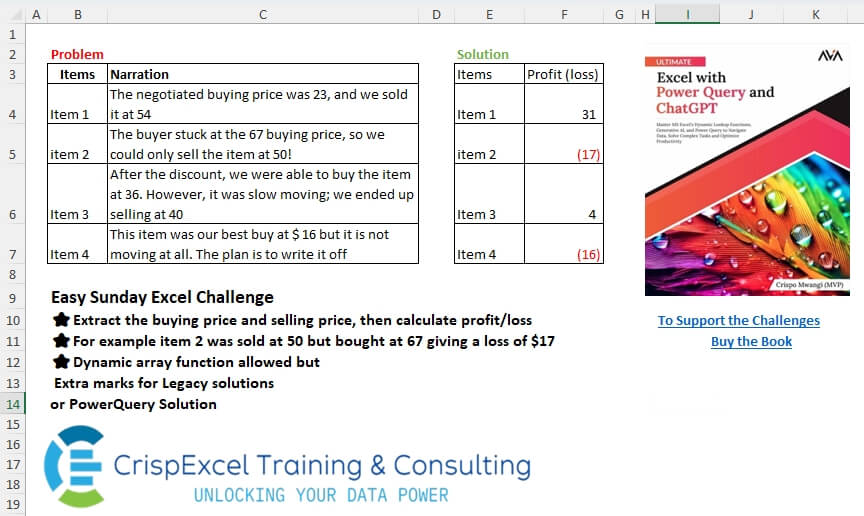
Extract the buying and selling prices, then calculate profit/loss. For example, item 2 was sold at 50 but bought at 6,7, giving a loss of $17 Dynamic array function allowed, but Extra marks for Legacy solutions or PowerQuery Solution
📌 Challenge Details and Links
Challenge Number: 71
Challenge Difficulty: ⭐
📥Download Sample File
📥Link to the solutions on LinkedIn
Solving the challenge of Extract and SuM with Power Query
Power Query solution 1 for Extract and SuM, proposed by Kris Jaganah:
let
  A = Excel.CurrentWorkbook(){[Name = "Table1"]}[Content],
  B = Table.AddColumn(
    A,
    "Profit (loss)",
    each [
      a = List.Transform(
        {0, 2},
        (v) => Number.From(Text.Middle(Text.Select([Narration], {"0" .. "9"}), v, 2))
      ),
      b = (a{1}? ?? 0) - a{0}
    ][b]
  )
in
  B
Power Query solution 2 for Extract and SuM, proposed by Brian Julius:
let
  Source = #"Problem (Sheet1)",
  RScript = R.Execute(
    "library(stringr)#(lf)df <- dataset#(lf)df$NumsText <- sapply(str_extract_all(df$Narration, ""d+""), function(x) paste(x, collapse = "", ""))#(lf)print(df)",
    [dataset = Source]
  ),
  df = RScript{[Name = "df"]}[Value],
  Split = Table.SplitColumn(df, "NumsText", Splitter.SplitTextByDelimiter(","), {"Buy", "Sell"}),
  Coal = Table.TransformColumnTypes(
    Table.AddColumn(Split, "Coal", each [Sell] ?? 0),
    {{"Coal", Int64.Type}, {"Buy", Int64.Type}}
  ),
  AddPL = Table.AddColumn(Coal, "Profit (loss)", each [Coal] - [Buy]),
  Clean = Table.RemoveColumns(AddPL, {"Buy", "Sell", "Coal"})
in
  Clean
Power Query solution 3 for Extract and SuM, proposed by Meganathan Elumalai:
let
  Source = Excel.CurrentWorkbook(){[Name = "Table1"]}[Content],
  Transform = Table.TransformColumns(
    Source,
    {
      "Narration",
      each [
        l = {"0" .. "9"},
        lst = List.Transform(
          Splitter.SplitTextByCharacterTransition((c) => not List.Contains(l, c), l)(_),
          (f) => Number.From(Text.Select(f, l))
        ),
        fin = try lst{2} - lst{1} otherwise 0 - lst{1}
      ][fin]
    }
  ),
  Result = Table.RenameColumns(Transform, {{"Narration", "Profit (Loss)"}})
in
  Result
Power Query solution 4 for Extract and SuM, proposed by Peter Krkos:
PowerQuery solution:
= Table.AddColumn(Source, "Profit (loss)", each
 [ a = List.Transform(List.Select(Text.SplitAny([Narration], " ,!."), (x)=> Value.FromText(x) is number), Number.From),
 b = (a{1}? ?? 0) - a{0}
 ][b], Int64.Type)[[Items], [#"Profit (loss)"]]
Power Query solution 5 for Extract and SuM, proposed by Alexandre Garcia:
let
  H = Excel.CurrentWorkbook(){[Name = "Table1"]}[Content],
  P = {"0" .. "9"},
  L = Table.ToList(
    H,
    each {
      _{0},
      ((b) => b{1} - b{0})(
        List.Transform(
          Splitter.SplitTextByCharacterTransition(P, (x) => not List.Contains(P, x))(_{1}),
          each Number.From(Text.Select(_, P)) ?? 0
        )
      )
    }
  ),
  C = Table.FromRows(L, {"Items", "Profit (loss)"})
in
  C
Power Query solution 6 for Extract and SuM, proposed by Krzysztof Kominiak:
let
  Source = Excel.CurrentWorkbook(){[Name = "Table1"]}[Content],
  Result = Table.AddColumn(
    Source,
    "Profit [loss]",
    each [
      a = List.Select(Text.Split(Text.Select([Narration], {" ", "0" .. "9"}), " "), (x) => x <> ""),
      b = try (- Number.From(a{0}) + Number.From(a{1})) otherwise - Number.From(a{0})
    ][b]
  )[[Items], [#"Profit [loss]"]]
in
  Result
Solving the challenge of Extract and SuM with Excel
Excel solution 1 for Extract and SuM, proposed by Rick Rothstein:
=MAP(
   C4:C7,
   LAMBDA(
       x,
       LET(
           t,
           TEXTSPLIT(
               x,
               TEXTSPLIT(
                   x,
                   SEQUENCE(
                       10,
                       ,
                       0),
                   ,
                   1),
               ,
               1),
           IF(
               COUNTA(
                   t)=1,
               -t,
               SUM(
                   t*{-1,
                   1})))))
Excel solution 2 for Extract and SuM, proposed by 🇰🇷 Taeyong Shin:
=MMULT(
   --REGEXREPLACE(
       C4:C7,
       "^.*?(bd+b)(?:.*((?1)))?.*",
       {"$1",
       "${2:-0}"}),
   {-1;1})
Excel solution 3 for Extract and SuM, proposed by Kris Jaganah:
=MAP(
   C4:C7,
   LAMBDA(
       x,
       MMULT(
           EXPAND(
               --REGEXEXTRACT(
                   x,
                   "[0-9]+",
                   1),
               ,
               2,
               0),
           {-1;1})))
Excel solution 4 for Extract and SuM, proposed by Hussein SATOUR:
=MAP(
   C4:C7,
   LAMBDA(
       x,
       SUM(
           LET(
               a,
               REGEXEXTRACT(
                   x,
                   "d+",
                   1),
               a*IF(
                   COUNTA(
                       a)=1,
                   -1,
                   {-1,
                   1})))))
Excel solution 5 for Extract and SuM, proposed by Oscar Mendez Roca Farell:
=MAP(
   C4:C7,
   LAMBDA(
       a,
       SUM(
           IFNA(
               REGEXEXTRACT(
                   a&" 0",
                   "d+",
                   1)*{-1,
               1},
               ))))
Excel solution 6 for Extract and SuM, proposed by Sunny Baggu:
=MAP(

    C4:C7,

    LAMBDA(
        a,

         SUM(

              TAKE(

                   HSTACK(

                        --TEXTSPLIT(
                            a,
                             TEXTSPLIT(
                                 a,
                                  ,
                                  SEQUENCE(
                                      10,
                                       ,
                                       0),
                                  1),
                             ,
                             1),

                        0
                        ),

                   ,

                   2
                   ) * {-1,
              1}
              )
         )
   )
Excel solution 7 for Extract and SuM, proposed by Pieter de B.:
=GROUPBY(
   B4:B7,
   MAP(
       C4:C7,
       LAMBDA(
           y,
           LET(
               z,
               REGEXEXTRACT(
                   y,
                   "[0-9]+",
                   1),
               SUM(
                   z*TAKE(
                       {-1,
                       1},
                       ,
                       COUNTA(
                           z)))))),
   SUM,
   ,
   0)

Or after seeing Kris Jaganah I realize I missed out on Expand:
=GROUPBY(
   B4:B7,
   MAP(
       C4:C7,
       LAMBDA(
           y,
           SUM(
               EXPAND(
                   REGEXEXTRACT(
                       y,
                       "[0-9]+",
                       1),
                   ,
                   2,
                   0)*{-1,
               1}))),
   SUM,
   ,
   0)
Excel solution 8 for Extract and SuM, proposed by Hamidi Hamid:
=LET(
   x,
   DROP(
       IFERROR(
           TEXTSPLIT(
               CONCAT(
                   "/"&C4:C7&","&"!"&"."),
               {" ",
               ",",
               ".",
               "!"},
               "/")*1,
           ""),
       1),
   xu,
   BYROW(
       x,
       LAMBDA(
           a,
           XLOOKUP(
               TRUE,
               a<>"",
               a,
               0,
               0,
               1))),
   xd,
   BYROW(
       x,
       LAMBDA(
           a,
           XLOOKUP(
               TRUE,
               a<>"",
               a,
               0,
               0,
               -1))),
   HSTACK(
       B4:B7,
       IF(
           xu=xd,
           -xd,
           xd-xu)))
Excel solution 9 for Extract and SuM, proposed by Asheesh Pahwa:
=HSTACK(
   B4:B7,
   MAP(
       C4:C7,
       LAMBDA(
           x,
           LET(
               s,
               --TEXTSPLIT(
                   x,
                   TEXTSPLIT(
                       x,
                       SEQUENCE(
                           10,
                           ,
                           0),
                       ,
                       1),
                   ,
                   1),
               IF(
                   COUNTA(
                       s)=1,
                   -s,
                   SUM(
                       s*{-1,
                       1}))))))
Excel solution 10 for Extract and SuM, proposed by Meganathan Elumalai:
=MAP(
   C4:C7,
   LAMBDA(
       x,
       MMULT(
           --EXPAND(
               TEXTSPLIT(
                   x,
                   TEXTSPLIT(
                       x,
                       SEQUENCE(
                           ,
                           10,
                           0),
                       ,
                       1),
                   ,
                   1),
               ,
               2,
               0),
           {-1;1})))
Excel solution 11 for Extract and SuM, proposed by Eddy Wijaya:
=REDUCE(
   E3:F3,
   C4:C7,
   LAMBDA(
       a,
       v,
       VSTACK(
           a,
           LET(

               t,
               TOROW(
                   --TEXTSPLIT(
                       v,
                       {" ",
                       ",",
                       "!"}),
                   3),

               a,
               IF(
                   COLUMNS(
                       t)=1,
                   HSTACK(
                       t,
                       0),
                   t),

               pl,
               BYROW(
                   a,
                   LAMBDA(
                       r,
                       TAKE(
                           r,
                           ,
                           -1)-@r)),

               HSTACK(
                   "Item "&XMATCH(
                       v,
                       C4:C7,
                       0),
                   pl)))))
Excel solution 12 for Extract and SuM, proposed by Mey Tithveasna:
=LET(
   t,
   MAP(
       A2:A5,
       LAMBDA(
           a,
           TEXTJOIN(
               ",",
               ,
               REGEXEXTRACT(
                   a,
                   "d+",
                   1)))),
   res,
   IFNA(
       TEXTAFTER(
           t,
           ",")-
       TEXTBEFORE(
           t,
           ","),
       -t),
   res)
Excel solution 13 for Extract and SuM, proposed by Erdit Qendro:
=LET(
   ar,
   B4:C7,

   x,
   BYROW(
       DROP(
           ar,
           ,
           1),

       LAMBDA(
           a,
           TEXTJOIN(
               " | ",
               ,
               REGEXEXTRACT(
                   a,
                   "(d+)",
                   1)))),

   prls,
   IFERROR(
       TEXTAFTER(
           x,
           " | ")-TEXTBEFORE(
           x,
           " | "),
       -x),

   VSTACK(
       {"Items",
       "Profit (loss)"},

       HSTACK(
           TAKE(
           ar,
           ,
           1),
           prls)))
Excel solution 14 for Extract and SuM, proposed by Ernesto Vega Castillo:
=LET(
   i,
   B4:B7,
   a,
   IFNA(
       WRAPROWS(
           --REGEXEXTRACT(
               CONCAT(
                   C4:C7),
               "[0-9]+",
               1,
               1),
           2),
       0),
   HSTACK(
       i,
       DROP(
           TAKE(
               a,
               ,
               2)-TAKE(
               a,
               ,
               1),
           ,
           1)))
Solving the challenge of Extract and SuM with Python
Python solution 1 for Extract and SuM, proposed by Konrad Gryczan, PhD:
import pandas as pd
import re
path = "files/Challenge1225.xlsx"
input = pd.read_excel(path, usecols="B:C", skiprows=2, nrows=5)
test = pd.read_excel(path, usecols="E:F", skiprows=2, nrows=5).rename(columns=lambda col: re.sub(r'.1$', '', col))
input = input.assign(
 Narration=input['Narration'].str.split(r'[,.]')
).explode('Narration').dropna(subset=['Narration'])
input['action'] = input['Narration'].str.extract(r'(sell|sold|buy)', expand=False)
input = input.dropna(subset=['action'])
input['amount'] = input['Narration'].str.extract(r'(d+)').astype('int64')
input.loc[input['action'] == 'buy', 'amount'] *= -1
result = input.groupby('Items', sort=False)['amount'].sum().rename('Profit (loss)').reset_index()
print(result.equals(test)) # True
Solving the challenge of Extract and SuM with Python in Excel
Python in Excel solution 1 for Extract and SuM, proposed by Alejandro Campos:
import re
df = xl("B3:C7", headers=True)
def extract_prices(narration, item_name):
 if item_name == "Item 4": return 16, 0
 prices = re.findall(r'd+', narration)
 return (int(prices[0]), int(prices[1])) if len(prices) >= 2 else (0, 0)
df[['Buying Price', 'Selling Price']] = df.apply(lambda x: pd.Series(extract_prices(x['Narration'], x['Items'])), axis=1)
df['Profit/Loss'] = df['Selling Price'] - df['Buying Price']
df[['Items', 'Buying Price', 'Selling Price', 'Profit/Loss']]
Solving the challenge of Extract and SuM with R
R solution 1 for Extract and SuM, proposed by Konrad Gryczan, PhD:
library(tidyverse)
library(readxl)
path = "files/Challenge1225.xlsx"
input = read_excel(path, range = "B3:C7")
test  = read_excel(path, range = "E3:F7")
result = input %>%
 separate_rows(Narration, sep = "[,.]") %>%
 mutate(action = case_when(
 str_detect(Narration, "sell|sold") ~ "sell",
 str_detect(Narration, "buy") ~ "buy",
 TRUE ~ NA_character_
 ))  %>%
 na.omit() %>%
 mutate(amount = as.numeric(str_extract(Narration, "\d+")) * ifelse(action == "buy", -1, 1)) %>%
 summarise(`Profit (loss)` = sum(amount), .by = Items)
all.equal(result, test, check.attributes = FALSE)
#> [1] TRUE