
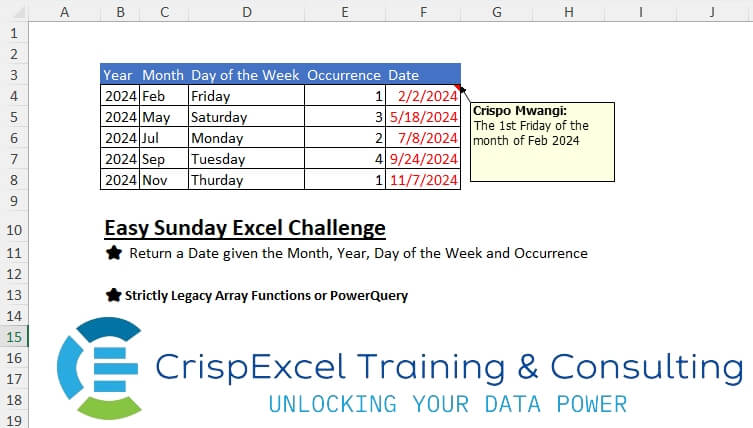
Return a Date given the Month, Year, Day of the Week and Occurrence Strictly Legacy Array Functions or PowerQuery
📌 Challenge Details and Links
Challenge Number: 7
Challenge Difficulty: ⭐⭐⭐
📥Download Sample File
📥Link to the solutions on LinkedIn
Solving the challenge of Return a Date given the Month, Year, Day of the Week and Occurrence with Power Query
Power Query solution 1 for Return a Date given the Month, Year, Day of the Week and Occurrence, proposed by Kris Jaganah:
let
 Source = Excel.CurrentWorkbook(){[Name="Table1"]}[Content],
 Answer = Table.AddColumn(Source, "Date", each let a = [Day of the Week] in List.Last( List.FirstN(List.Select(List.Dates(Date.FromText("1"&[Month]&Text.From( [Year])),31,
hashtag
#duration (1,0,0,0)), each Date.DayOfWeekName(_) = a ), [Occurrence])))
in
 Answer
Power Query solution 2 for Return a Date given the Month, Year, Day of the Week and Occurrence, proposed by Alejandro Simón 🇵🇦 🇪🇸:
let
 Source = Excel.CurrentWorkbook(){[Name="Table1"]}[Content],
 Sol = Table.AddColumn(Source, "Date", (x)=>
 let
 a = List.Dates(
hashtag
#date(x[Year],1,1), 366, Duration.From(1)),
 b = List.Select(a, each Text.Start(Date.MonthName(_, "En-us"),3)= x[Month] and
 Date.DayOfWeekName(_, "En-us")=x[Day of the Week]){x[Occurrence]-1}
 in b)
in
 Sol
Power Query solution 3 for Return a Date given the Month, Year, Day of the Week and Occurrence, proposed by Brian Julius:
let
 Source = Excel.CurrentWorkbook(){[Name="Table1"]}[Content],
 AddCal = Table.AddColumn(Source, "Date", each [
 Pick = [Occurrence] - 1,
 SelMon = [Month],
 SelYear = [Year],
 SelDay = [Day of the Week],
 Cal = List.Dates(
hashtag
#date(2024,1,1), 366,
hashtag
#duration(1,0,0,0)),
 Mon = List.Transform(Cal, each Text.Start( Date.MonthName(_), 3)),
 Day = List.Transform(Cal, each Date.DayOfWeekName( _)),
 Yr = List.Transform(Cal, each Date.Year( _ )),
 Tab2 = Table.FromColumns( {Cal, Mon, Day, Yr}, {"Cal", "Mon", "Day", "Yr"}),
 Filter = Table.SelectRows(Tab2, each [Mon] = SelMon and [Day] = SelDay and [Yr] = SelYear )[Cal]{Pick}
 ][Filter])
in
 AddCal
Power Query solution 4 for Return a Date given the Month, Year, Day of the Week and Occurrence, proposed by Bhavya Gupta:
let
 Source = Table.FromRows(Json.Document(Binary.Decompress(Binary.FromText("i45WMjIwMlHSUXJLTQKRRZkpiZVAhqFSrA5czhcsFJxYUloEkTVGlvUqzQGpyc+DyBkhywWnFgDJkNLUYoikCbKkX34ZSDKjtKgYbmksAA==", BinaryEncoding.Base64), Compression.Deflate)), {"Year", "Month", "Day of the Week", "Occurrence"}),
 Output = Table.AddColumn(Source, "Date", each [dt = Date.From("1-" & [Month] & Text.From([Year])), lDays = List.Select(List.Dates(dt, Date.DaysInMonth(dt)-1,
hashtag
#duration(1, 0, 0, 0)), (d)=> Date.ToText(d,"dddd") = [Day of the Week]){Number.From([Occurrence])-1}][lDays])
in
 Output
Solving the challenge of Return a Date given the Month, Year, Day of the Week and Occurrence with Excel
Excel solution 1 for Return a Date given the Month, Year, Day of the Week and Occurrence, proposed by Bo Rydobon 🇹🇭:
=(C4&B4)-MATCH(D4,
   TEXT((C4&B4)-ROW(
       $1:$7),
   "dddd"),)+E4*7

=(C4&B4)-WEEKDAY(
   C4&B4,
   MATCH(
       D4,
       TEXT(
           ROW(
       $1:$7),
           "dddd"),
       )+10)+E4*7

=WORKDAY.INTL(
   C4&B4,
   E4,
   SUBSTITUTE(
       1111111,
       1,
       0,
       MATCH(
           LEFT(
               D4,
               3),
           TEXT(
               ROW(
                   $2:$8),
               "ddd"),
           )))
Excel solution 2 for Return a Date given the Month, Year, Day of the Week and Occurrence, proposed by Rick Rothstein:
=LET(m,
   MONTH(
       C4:C8&B4:B8),
   d,
   DATE(
       B4:B8,
       m,
       1),
   d+7*E4:E8-WEEKDAY(d+7-(FIND(
       LEFT(
           D4:D8,
           2),
       "SuMoTuWeThFrSa")+1)/2))
Excel solution 3 for Return a Date given the Month, Year, Day of the Week and Occurrence, proposed by محمد حلمي:
=(x-WEEKDAY(
   d)<0)*7+x-WEEKDAY(
   d)+d+(E4-1)*7


x :
=VLOOKUP(
   LEFT(
       Sheet1!$D4,
       3),
   {"Sun",
   1;"Mon",
   2;"Tue",
   3;"Wed",
   4;"Thu",
   5;"Fri",
   6;"Sat",
   7},
   2,
   )

d :

=DATE(
   Sheet1!B4,
   MONTH(
       1&Sheet1!C4),
   1)
Excel solution 4 for Return a Date given the Month, Year, Day of the Week and Occurrence, proposed by Abdallah Ally:
=MAP(
   B4:B8,
   C4:C8,
   D4:D8,
   E4:E8,
   LAMBDA(
       w,
       x,
       y,
       z,
       LET(
           a,
           1&x&w,
           b,
            EOMONTH(
                a,
                0),
           c,
           SEQUENCE(
               b-a+1,
               ,
               a),
           SMALL(
               FILTER(
                   c,
                   TEXT(
                       c,
                       "ddd") = LEFT(
                       y,
                       3),
                   ""),
               z))))
Excel solution 5 for Return a Date given the Month, Year, Day of the Week and Occurrence, proposed by JvdV –:
=(C4&B4)+MATCH(
   D4,
   TEXT(
       ROW(
           $1:$7)&C4&B4,
       "dddd"),
   )+E4*7-8

Previously:

=SMALL(IF(TEXT((C4&B4)+ROW(
   $1:$31)-1,
   "dddd")=D4,
   (C4&B4)+ROW(
   $1:$31)-1),
   E4)
Excel solution 6 for Return a Date given the Month, Year, Day of the Week and Occurrence, proposed by Crispo Mwangi:
=SMALL(FILTERXML(CONCAT("<t><s>",
   TEXT((C4&B4)+ROW(
       $1:$31)-1,
   "</s><s>dddd</s><s>d/m/e</s><s>"),
   "</s></t>"),
   "//s[preceding::*[1]='"&LOWER(
       D4)&"']"),
   E4)

Just remove the LOWER function in the XPath
=SMALL(FILTERXML(CONCAT("<t><s>",
   TEXT((C4&B4)+ROW(
       $1:$31)-1,
   "</s><s>dddd</s><s>d/m/e</s><s>"),
   "</s></t>"),
   "//s[preceding::*[1]='"&D4&"']"),
   E4)