
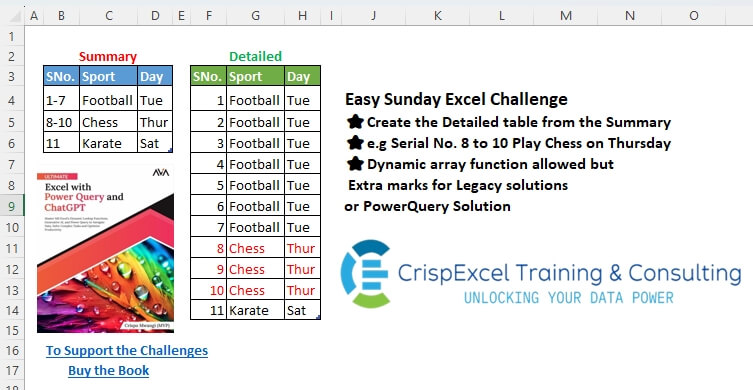
Create the Detailed table from the Summary e.g. Serial No. 8 to 10 Play Chess on Thursday Dynamic array function allowed, but Extra marks for Legacy Solutions or PowerQuery Solutions
📌 Challenge Details and Links
Challenge Number: 65
Challenge Difficulty: ⭐
📥Download Sample File
📥Link to the solutions on LinkedIn
Solving the challenge of Create a Detailed Table with Power Query
Power Query solution 1 for Create a Detailed Table, proposed by Zoran Milokanović:
let
  Source = Excel.CurrentWorkbook(){[Name = "tblAppointment"]}[Content],
  _ = Table.FromRows(
    List.TransformMany(
      Table.ToRows(Source),
      (i) =>
        let
          _ = each Number.From(_(Text.From(i{0}), "-"))
        in
          {_(Text.BeforeDelimiter) .. _(Text.AfterDelimiter) ?? i{0}},
      (i, _) => {_, i{1}, i{2}}
    ),
    Value.Type(Source)
  )
in
  _
Power Query solution 2 for Create a Detailed Table, proposed by Kris Jaganah:
let
  A = Excel.CurrentWorkbook(){[Name = "tblAppointment"]}[Content],
  B = Table.TransformColumns(
    A,
    {
      "SNo.",
      each [
        a = List.Transform(Text.Split(_, "-"), Number.From),
        b = try {a{0} .. a{1}} otherwise {_}
      ][b]
    }
  ),
  C = Table.ExpandListColumn(B, "SNo.")
in
  C
Power Query solution 3 for Create a Detailed Table, proposed by Aditya Kumar Darak 🇮🇳:
let
  Source = Excel.CurrentWorkbook(){[Name = "tblAppointment"]}[Content],
  Transform = Table.TransformColumns(
    Source,
    {"SNo.", each Expression.Evaluate("{" & Text.Replace(Text.From(_), "-", "..") & "}")}
  ),
  Return = Table.ExpandListColumn(Transform, "SNo.")
in
  Return
Power Query solution 4 for Create a Detailed Table, proposed by Alejandro Simón 🇵🇦 🇪🇸:
let
  Source = Excel.CurrentWorkbook(){[Name = "tblAppointment"]}[Content],
  Lista = Table.TransformColumns(
    Source,
    {
      {
        "SNo.",
        (x) =>
          let
            a = x,
            b = try List.Transform(Text.Split(a, "-"), Number.From) otherwise {x},
            c = {b{0} .. List.Last(b)}
          in
            c
      }
    }
  ),
  Sol = Table.ExpandListColumn(Lista, "SNo.")
in
  Sol
Power Query solution 5 for Create a Detailed Table, proposed by Brian Julius:
let
  Source = Excel.CurrentWorkbook(){[Name = "tblAppointment"]}[Content],
  Split = Table.SplitColumn(
    Table.TransformColumnTypes(Source, {{"SNo.", type text}}),
    "SNo.",
    Splitter.SplitTextByDelimiter("-"),
    {"Start", "End"}
  ),
  Retype = Table.TransformColumnTypes(Split, {{"Start", type number}, {"End", type number}}),
  MakeList = Table.AddColumn(Retype, "SNo.", each try {[Start] .. [End]} otherwise {[Start]}),
  Clean = Table.SelectColumns(Table.ExpandListColumn(MakeList, "SNo."), {"SNo.", "Sport", "Day"})
in
  Clean
Power Query solution 6 for Create a Detailed Table, proposed by Abdallah Ally:
let
  Source = Excel.CurrentWorkbook(){[Name = "tblAppointment"]}[Content],
  Result = Table.ExpandListColumn(
    Table.TransformColumns(
      Source,
      {
        "SNo.",
        each [
          a = List.Transform(Text.Split(Text.From(_), "-"), Number.From),
          b = {a{0} .. List.Last(a)}
        ][b]
      }
    ),
    "SNo."
  )
in
  Result
Power Query solution 7 for Create a Detailed Table, proposed by Seokho MOON:
let
  Source = Excel.CurrentWorkbook(){[Name = "tblAppointment"]}[Content],
  Rows = List.Accumulate(
    Table.ToRows(Source),
    {},
    (a, v) =>
      [
        A =
          if v{0} is number then
            {v{0}, v{0}}
          else
            List.Transform(Text.Split(v{0}, "-"), each Number.From(_)),
        B = a & List.Transform({A{0} .. A{1}}, each {_, v{1}, v{2}})
      ][B]
  ),
  Res = Table.FromRows(Rows, Table.ColumnNames(Source))
in
  Res
Power Query solution 8 for Create a Detailed Table, proposed by Meganathan Elumalai:
let
  Source = Excel.CurrentWorkbook(){[Name = "tblAppointment"]}[Content],
  Result = Table.ExpandListColumn(
    Table.TransformColumns(
      Source,
      {{"SNo.", each Expression.Evaluate("{" & Text.Replace(Text.From(_), "-", "..") & "}")}}
    ),
    "SNo."
  )
in
  Result
Power Query solution 9 for Create a Detailed Table, proposed by Peter Krkos:
let
  TransformedSNo = Table.TransformColumns(
    Source,
    {
      "SNo.",
      each
        let
          a = List.Transform(Splitter.SplitTextByDelimiter("-")(_), Number.From)
        in
          {a{0} .. (a{1}? ?? a{0})},
      type {Int64.Type}
    }
  ),
  ExpandedSNo = Table.ExpandListColumn(TransformedSNo, "SNo.")
in
  ExpandedSNo
Power Query solution 10 for Create a Detailed Table, proposed by CA Raghunath Gundi:
let
  Source = Excel.CurrentWorkbook(){[Name = "tblAppointment"]}[Content],
  Split = Table.SplitColumn(
    Table.TransformColumnTypes(Source, {{"SNo.", type text}}, "en-IN"),
    "SNo.",
    Splitter.SplitTextByDelimiter("-", QuoteStyle.Csv),
    {"From", "To"}
  ),
  SNo = Table.AddColumn(
    Split,
    "S.No",
    each
      if [To] = null then
        {Number.From([From]) .. Number.From([From])}
      else
        {Number.From([From]) .. Number.From([To])}
  ),
  Result = Table.ExpandListColumn(SNo, "S.No")[[S.No], [Sport], [Day]]
in
  Result
Solving the challenge of Create a Detailed Table with Excel
Excel solution 1 for Create a Detailed Table, proposed by Bo Rydobon 🇹🇭:
=REDUCE(
   B3:D3,
   B4:B6,
   LAMBDA(
       a,
       v,
       IFNA(
           VSTACK(
               a,
               LET(
                   n,
                   --TEXTSPLIT(
                       v,
                       "-"),
                   SEQUENCE(
                       MAX(
                           n)-@n+1,
                       ,
                       @n))),
           XLOOKUP(
               v,
               B4:B6,
               B4:D6))))
Excel solution 2 for Create a Detailed Table, proposed by Kris Jaganah:
=REDUCE(
   {"SNo.",
   "Sport",
   "Day"},
   tblAppointment[SNo.],
   LAMBDA(
       x,
       y,
       VSTACK(
           x,
           LET(
               a,
               --TEXTSPLIT(
                   y,
                   "-"),
               b,
               MIN(
                   a),
               c,
               SEQUENCE(
                   MAX(
                   a)-b+1,
                   ,
                   b),
               HSTACK(
                   c,
                   IF(
                       c,
                       ""&OFFSET(
                           y,
                           ,
                           1,
                           ,
                           2)))))))
Excel solution 3 for Create a Detailed Table, proposed by Hussein SATOUR:
=DROP(
   REDUCE(
       "",
       SEQUENCE(
           11),
       LAMBDA(
           x,
           y,
           VSTACK(
               x,
               HSTACK(
                   y,
                   XLOOKUP(
                       y,
                       --TEXTAFTER(
                           B4:B6,
                           "-"),
                       C4:D6,
                       ,
                       1))))),
   1)
Excel solution 4 for Create a Detailed Table, proposed by Oscar Mendez Roca Farell:
=LET(
   n,
   MONTH(
       B4:B6&-25),
   s,
   SEQUENCE(
       MAX(
           n)),
   VSTACK(
       B3:D3,
       HSTACK(
           s,
           INDEX(
               C4:D6,
               MATCH(
                   s,
                   VSTACK(
                       0,
                       n+1)),
               {1,
               2}))))
Excel solution 5 for Create a Detailed Table, proposed by Duy Tùng:
=REDUCE(
   B3:D3,
   D4:D6,
   LAMBDA(
       x,
       y,
       LET(
           u,
           TAKE(
               B6:y,
               1),
           VSTACK(
               x,
               CHOOSE(
                   {1,
                   2,
                   3},
                   ROW(
                       INDIRECT(
                           "a"&SUBSTITUTE(
                               TAKE(
                                   u,
                                   ,
                                   1),
                               "-",
                               ":a"))),
                   INDEX(
                       u,
                       ,
                       2),
                   INDEX(
                       u,
                       ,
                       3))))))
Excel solution 6 for Create a Detailed Table, proposed by Sunny Baggu:
=LET(

    _v,
    IFNA(
        TEXTAFTER(
            B4:B6,
             "-") - TEXTBEFORE(
            B4:B6,
             "-"),
         0) + 1,

    _s,
    SEQUENCE(
        SUM(
            _v)),

    HSTACK(

         VSTACK(
             B3,
              _s),

         REDUCE(

              C3:D3,

              SEQUENCE(
                  ROWS(
            _v)),

              LAMBDA(
                  x,
                   y,

                   VSTACK(

                        x,

                        LET(
                            _r,
                             INDEX(
                                 C4:D6,
                                  y,
                                  ),
                             IFNA(
                                 EXPAND(
                                     _r,
                                      INDEX(
                                          _v,
                                           y,
                                           1)),
                                  _r))
                        )
                   )
              )
         )
   )
Excel solution 7 for Create a Detailed Table, proposed by Pieter de B.:
=LET(a,
   B4:B6,
   s,
   --TEXTBEFORE(
       a,
       "-",
       ,
       ,
       ,
       a),
   e,
   --TEXTAFTER(
       a,
       "-",
       ,
       ,
       ,
       a),
   m,
   SEQUENCE(
       ,
       MAX(
           e)),
   L,
   LAMBDA(x,
   TOCOL(IFS((s<=m)*(e>=m),
   x),
   2)),
   HSTACK(
       L(
           m),
       L(
           C4:C6),
       L(
           D4:D6)))
Excel solution 8 for Create a Detailed Table, proposed by Pieter de B.:
=LET(
   x,
   --TEXTAFTER(
       B4:B6,
       "-",
       ,
       ,
       ,
       B4:B6),
   s,
   SEQUENCE(
       MAX(
           x)),
   HSTACK(
       s,
       CHOOSEROWS(
           C4:D6,
           XMATCH(
               s,
               x,
               1))))
Excel solution 9 for Create a Detailed Table, proposed by Hamidi Hamid:
=LET(
   f,
   LAMBDA(
       c,
       LET(
           x,
           IFERROR(
               TEXTAFTER(
                   B4:B6,
                   "-",
                   ),
               B4:B6)*1-IFERROR(
               TEXTBEFORE(
                   B4:B6,
                   "-",
                   ),
               B4:B6)*1+1,
           r,
           TOCOL(
               REDUCE(
                   "",
                   REPT(
                       c&"-",
                       x),
                   LAMBDA(
                       a,
                       b,
                       VSTACK(
                           a,
                           TEXTSPLIT(
                               b,
                               "-",
                               )))),
               3),
           FILTER(
               r,
               r<>""))),
   HSTACK(
       SEQUENCE(
           ROWS(
               f(
                   C4:C6))),
       f(
                   C4:C6),
       f(
           D4:D6)))
Excel solution 10 for Create a Detailed Table, proposed by Asheesh Pahwa:
=LET(
   s,
   B4:B6,
   t,
   TEXTAFTER(
       s,
       "-",
       ,
       ,
       ,
       s),
   _t,
   TEXTBEFORE(
       s,
       "-",
       ,
       ,
       ,
       s),
   d,
   t-_t+1,
   r,
   DROP(
       REDUCE(
           "",
           SEQUENCE(
               3),
           LAMBDA(
               x,
               y,
               VSTACK(
                   x,
                   LET(
                       s,
                       SEQUENCE(
                           @INDEX(
                               d,
                               y,
                               ))&"-"&INDEX(
                           C4:C6,
                           y,
                           )&"-"&INDEX(
                           D4:D6,
                           y,
                           ),
                       s)))),
       1),

   REDUCE(
       F3:H3,
       r,
       LAMBDA(
           x,
           y,
           VSTACK(
               x,
               TEXTSPLIT(
                   y,
                   "-")))))
Excel solution 11 for Create a Detailed Table, proposed by ferhat CK:
=LET(
   r,
   SEQUENCE(
       MAX(
           --IFNA(
               TEXTAFTER(
                   B4:B6,
                   "-"),
               B4:B6))),
   a,
   LAMBDA(
       x,
       XLOOKUP(
           r,
           NUMBERVALUE(
               LEFT(
                   B4:B6,
                   FIND(
                       "-",
                       B4:B6)-1)),
           x,
           "",
           -1)),
   HSTACK(
       r,
       a(
           C4:C6),
       a(
           D4:D6)))
Excel solution 12 for Create a Detailed Table, proposed by Meganathan Elumalai:
=REDUCE(
   B3:D3,
   B4:B6,
   LAMBDA(
       a,
       v,
       VSTACK(
           a,
           LET(
               x,
               --TEXTSPLIT(
                   v,
                   ,
                   "-"),
               s,
               SEQUENCE(
                   MAX(
                       x)-MIN(
                       x)+1,
                   ,
                   MIN(
                       x)),
               HSTACK(
                   s,
                   IFS(
                       s,
                       OFFSET(
                           v,
                           ,
                           1,
                           1,
                           2)))))))
Excel solution 13 for Create a Detailed Table, proposed by Ernesto Vega Castillo:
=REDUCE({"SNo.",
   "Sport",
   "Day"},
   B4:B6,
   LAMBDA(e,
   c,
   VSTACK(e,
   LET(r,
   --REGEXEXTRACT(
       c,
       "[0-9]+",
       1),
   s,
   SEQUENCE((MAX(
       r)-MIN(
       r)+1),
   ,
   MIN(
       r)),
   HSTACK(
       s,
       IF(
           s,
           ""&OFFSET(
               c,
               ,
               1,
               ,
               2)))))))
Solving the challenge of Create a Detailed Table with Python
Python solution 1 for Create a Detailed Table, proposed by Konrad Gryczan, PhD:
import pandas as pd
path = "files/Ex-Challenge 06 2025.xlsx"
input = pd.read_excel(path, usecols="B:D", skiprows=2, nrows=3)
test = pd.read_excel(path, usecols="F:H", skiprows=2, nrows=12).rename(columns=lambda x: x.replace('.1', ''))
input[['start', 'end']] = input['SNo.'].str.split('-', expand=True)
input['start'] = input['start'].fillna(input['SNo.'])
input['end'] = input['end'].fillna(input['SNo.'])
input['start'] = input['start'].fillna(0).astype(int)
input['end'] = input['end'].fillna(input['start']).astype(int)
input['SNo.'] = input.apply(lambda row: list(range(row['start'], row['end']+1)), axis=1)
input = input.explode('SNo.')
result = input[['SNo.', 'Sport', 'Day']].reset_index(drop=True)
result['SNo.'] = result['SNo.'].astype('int64')
print(result.equals(test)) # True
Python solution 2 for Create a Detailed Table, proposed by Abdallah Ally:
import pandas as pd
file_path = 'Ex-Challenge 06 2025.xlsx'
df = pd.read_excel(io=file_path, usecols='B:D', skiprows=2, nrows=3)
# Perform data manipulation
df['SNo.'] = (
 df['SNo.']
 .map(str)
 .str.split('-')
 .map(lambda x: range(int(x[0]), int(x[-1]) + 1))
)
df = df.explode(column='SNo.', ignore_index=True)
df
Solving the challenge of Create a Detailed Table with R
R solution 1 for Create a Detailed Table, proposed by Konrad Gryczan, PhD:
library(tidyverse)
library(readxl)
path = "files/Ex-Challenge 06 2025.xlsx"
input = read_excel(path, range = "B3:D6")
test = read_excel(path, range = "F3:H14")
result = input %>%
 separate(SNo., into = c("start", "end"), sep = "-", fill = "right", convert = TRUE) %>%
 mutate(SNo. = map2(start, coalesce(end, start), seq)) %>%
 unnest(SNo.) %>%
 select(SNo., Sport, Day)
all.equal(result, test)
#> [1] TRUE