
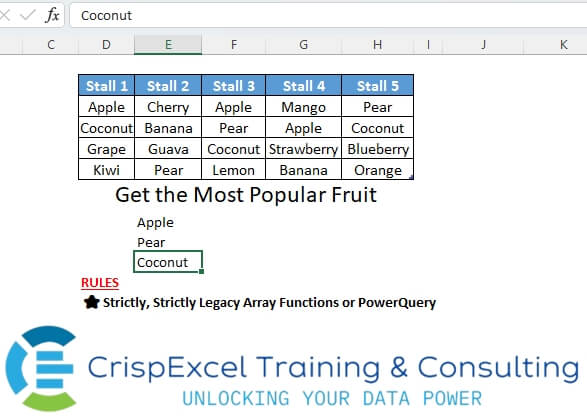
Get the most popular fruit in the 5 stalls: Rule: Strictly, Strictly Legacy array function or Power Query
📌 Challenge Details and Links
Challenge Number: 6
Challenge Difficulty: ⭐⭐
📥Download Sample File
📥Link to the solutions on LinkedIn
Solving the challenge of Return the Most Repeated Item in Columns with Power Query
Power Query solution 1 for Return the Most Repeated Item in Columns, proposed by Alejandro Simón 🇵🇦 🇪🇸:
let
  Source = Excel.CurrentWorkbook(){[Name = "Stalls"]}[Content],
  Tabla  = Table.FromColumns({List.Combine(Table.ToRows(Source))}, {"Col"}),
  Grupos = Table.Group(Tabla, {"Col"}, {{"Freq", each Table.RowCount(_)}}),
  Sol    = Table.SelectRows(Grupos, each [Freq] = List.Max(Grupos[Freq]))[Col]
in
  Sol
Power Query solution 2 for Return the Most Repeated Item in Columns, proposed by Alejandro Simón 🇵🇦 🇪🇸:
let
  Source = Excel.CurrentWorkbook(){[Name = "Stalls"]}[Content],
  Lista  = List.Combine(Table.ToRows(Source)),
  Unicos = List.Distinct(Lista),
  Conteo = List.Transform(Unicos, each {_} & {List.Count(List.Select(Lista, (x) => x = _))}),
  Max    = List.Max(List.Transform(Conteo, each _{1})),
  Sol    = List.Transform(List.Select(Conteo, each _{1} = Max), each _{0})
in
  Sol
Power Query solution 3 for Return the Most Repeated Item in Columns, proposed by Brian Julius:
let
  Source = Excel.CurrentWorkbook(){[Name = "Stalls"]}[Content],
  Demote = Table.Transpose(Table.DemoteHeaders(Source)),
  UnpivotOther = Table.UnpivotOtherColumns(Demote, {"Column1"}, "Attribute", "Fruit"),
  Group = Table.AddRankColumn(
    Table.Group(UnpivotOther, {"Fruit"}, {{"Count", each Table.RowCount(_), Int64.Type}}),
    "Rank",
    {"Count", Order.Descending},
    [RankKind = RankKind.Dense]
  ),
  Clean = Table.SelectColumns(
    Table.Sort(Table.SelectRows(Group, each ([Rank] = 1)), {"Fruit", Order.Ascending}),
    "Fruit"
  )
in
  Clean
Power Query solution 4 for Return the Most Repeated Item in Columns, proposed by Nelson Mwangi:
let
  Source = Excel.CurrentWorkbook(){[Name = "Stalls"]}[Content],
  Unpivot = Table.UnpivotOtherColumns(Source, {}, "Attribute", "Value"),
  Group = Table.Group(
    Unpivot,
    {"Value"},
    {{"Count", each Table.RowCount(Table.Distinct(_)), type number}}
  ),
  CalcMaximum = List.Max(Group[Count]),
  FilterMax = Table.SelectRows(Group, each [Count] = CalcMaximum),
  DeleteCount = Table.RemoveColumns(FilterMax, {"Count"}),
  RenameCol = Table.RenameColumns(DeleteCount, {{"Value", "Fruit"}})
in
  RenameCol
Solving the challenge of Return the Most Repeated Item in Columns with Excel
Excel solution 1 for Return the Most Repeated Item in Columns, proposed by Rick Rothstein:
=LET(
   d,
   D3:H6,
   c,
   COUNTIF(
       d,
       d),
   UNIQUE(
       TOCOL(
           IF(
               c=MAX(
                   c),
               d,
               1/0),
           2)))
Excel solution 2 for Return the Most Repeated Item in Columns, proposed by محمد حلمي:
=IFERROR(
   INDEX(
       j,
       SMALL(
           IF(
               w=MAX(
                   w),
               n),
           ROW(
               A1))),
   "")


x =Sheet1!$D$3:$H$6
i =MOD(
   n-1,
   4)+1
v =INT((n-1)/4)+1
w =FREQUENCY(
   u,
   u)
n =ROW(
   Sheet1!$1:$20)
j =INDEX(
   x,
   N(
       IF(
           1,
           i)),
   N(
       IF(
           1,
           v)))
u =MATCH(
   j,
   j,
   )

Notes Row(
   1:20)
Excel solution 3 for Return the Most Repeated Item in Columns, proposed by محمد حلمي:
=LET(
   d,
   D3:H6,
   e,
   COUNTIF(
       d,
       d),
   UNIQUE(
       TOCOL(
           IFS(
               e=MAX(
                   e),
               d),
           2)))
Excel solution 4 for Return the Most Repeated Item in Columns, proposed by 🇰🇷 Taeyong Shin:
=LET(
   d,
   TOCOL(
       D3:H6),
   u,
   UNIQUE(
       d),
   INDEX(
       u,
       MODE.MULT(
           XMATCH(
               d,
               u)),
       ))
Excel solution 5 for Return the Most Repeated Item in Columns, proposed by Oscar Mendez Roca Farell:
=LET(
   _t,
    TOCOL(
        Stalls),
   _x,
    XMATCH(
        _t,
        _t),
   _f,
    DROP(
        FREQUENCY(
            _x,
            _x),
        -1),
    FILTER(
        _t,
        _f=MAX(
            _f)))
Excel solution 6 for Return the Most Repeated Item in Columns, proposed by Pieter de B.:
=TEXTJOIN(
   ",",
   1,
   REPT(
       D3:H6,
       COUNTIF(
           D3:H6,
           D3:H6)=MAX(
           COUNTIF(
           D3:H6,
           D3:H6))))
Excel solution 7 for Return the Most Repeated Item in Columns, proposed by Mey Tithveasna:
=LET(
   d,
   TOCOL(
       D3:H6),
   u,
    UNIQUE(
        d),
   INDEX(
       u,
       MODE(
           XMATCH(
               d,
               u))))