
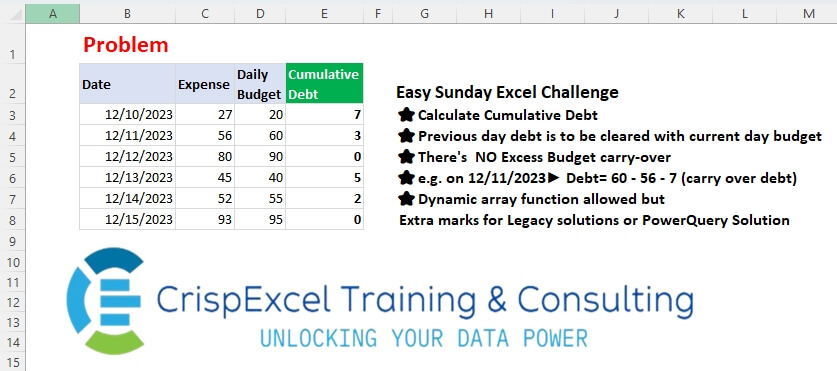
Calculate Cumulative Debt Previous day debt is to be cleared with current day budget There’s NO Excess Budget carry-over e.g. on 12/11/2023► Debt= 60 – 56 – 7 (carry over debt) Dynamic array function allowed but Extra marks for Legacy solutions or PowerQuery Solution
📌 Challenge Details and Links
Challenge Number: 55
Challenge Difficulty: ⭐⭐
📥Download Sample File
📥Link to the solutions on LinkedIn
Solving the challenge of Calculating Cumulative Debt with Power Query
Power Query solution 1 for Calculating Cumulative Debt, proposed by Zoran Milokanović:
let
  Source = Excel.CurrentWorkbook(){[Name = "Input"]}[Content],
  S = Table.FromRows(
    List.Accumulate(
      Table.ToRows(Source),
      {},
      (b, n) =>
        let
          l = List.Last(b, {0, 0, 0, 0}),
          d = n{1} - n{2} + l{3}
        in
          b & {n & {Byte.From(d >= 0) * d}}
    ),
    Table.ColumnNames(Source) & {"Cumulative Debt"}
  )
in
  S
Power Query solution 2 for Calculating Cumulative Debt, proposed by Kris Jaganah:
let
  A = Excel.CurrentWorkbook(){[Name = "Table1"]}[Content],
  B = Table.ToRows(A),
  C = List.Transform(B, each _{1} - _{2}),
  D = List.Accumulate(C, {}, (x, y) => x & {List.Max({0, List.Last(x, 0) + y})}),
  E = Table.FromColumns(List.Zip(B) & {D}, Table.ColumnNames(A) & {"Cumulative Debt"})
in
  E
Power Query solution 3 for Calculating Cumulative Debt, proposed by Alejandro Simón 🇵🇦 🇪🇸:
let
  Source = Excel.CurrentWorkbook(){[Name = "Table1"]}[Content],
  A = List.Transform(List.Zip(List.Skip(Table.ToColumns(Source))), each _{0} - _{1}),
  Sol = List.Skip(
    List.Accumulate(
      A,
      {0},
      (s, c) =>
        s
          & (
            {
              let
                a = List.Last(s) + c,
                b = if a < 0 then 0 else a
              in
                b
            }
          )
    )
  )
in
  Sol
Power Query solution 4 for Calculating Cumulative Debt, proposed by Abdallah Ally:
let
  Source = Excel.CurrentWorkbook(){[Name = "Table1"]}[Content],
  Generate = List.Generate(
    () => [R = 0, D = Source[Daily Budget]{0} - Source[Expense]{0}, C = if D >= 0 then 0 else - D],
    each [R] < Table.RowCount(Source),
    each [
      R = [R] + 1,
      D = Source[Daily Budget]{R} - Source[Expense]{R},
      C = if D - [C] > 0 then 0 else - D + [C]
    ],
    each [C]
  ),
  Cols = Table.ColumnNames(Source) & {"Cumulative Debt"},
  FromCols = Table.FromColumns(Table.ToColumns(Source) & {Generate}, Cols),
  Result = Table.TransformColumnTypes(FromCols, {"Date", type date})
in
  Result
Power Query solution 5 for Calculating Cumulative Debt, proposed by Seokho MOON:
let
  Source = Excel.CurrentWorkbook(){[Name = "Table1"]}[Content],
  Res = Table.AddColumn(Source, "Cumulative Debt", F),
  F = each [
    A = Table.SelectRows(Source, (x) => x[Date] <= [Date]),
    B = List.Zip({A[Expense], A[Daily Budget]}),
    C = List.Accumulate(B, 0, (a, v) => List.Max({0, a + v{0} - v{1}}))
  ][C]
in
  Res
Solving the challenge of Calculating Cumulative Debt with Excel
Excel solution 1 for Calculating Cumulative Debt, proposed by Kris Jaganah:
=SCAN(
   0,
   C3:C8-D3:D8,
   LAMBDA(
       x,
       y,
       MAX(
           x+y,
           0)))
Excel solution 2 for Calculating Cumulative Debt, proposed by Julian Poeltl:
=SCAN(
   0,
   C3:C8-D3:D8,
   LAMBDA(
       A,
       B,
       MAX(
           A+B,
           0)))
Excel solution 3 for Calculating Cumulative Debt, proposed by Aditya Kumar Darak 🇮🇳:
=SCAN(
   0,
    C3:C8 - D3:D8,
    LAMBDA(
        a,
        b,
         MAX(
             a + b,
              0)))
Excel solution 4 for Calculating Cumulative Debt, proposed by Abdallah Ally:
=SCAN(0,
   C3:C8-D3:D8,
   LAMBDA(x,
   y,
   (x>=-y)*(x+y)))
Excel solution 5 for Calculating Cumulative Debt, proposed by Pieter de B.:
=SCAN(
   ,
   C3:C8-D3:D8,
   LAMBDA(
       a,
       b,
       MAX(
           a+b,
           0)))
Excel solution 6 for Calculating Cumulative Debt, proposed by Mey Tithveasna:
=SCAN(
   0,
   C3:C8-D3:D8,
   LAMBDA(
       x,
       y,
       MAX(
           0,
           x+y)))
Excel solution 7 for Calculating Cumulative Debt, proposed by Mey Tithveasna:
=MAX(
   0,
   C3-D3+E2)
Excel solution 8 for Calculating Cumulative Debt, proposed by red craven:
=> In cell N3
=MAX(
   N2+C3-D3,
   0)
drag down

Dynamic
=SCAN(
   ,
   C3:C8-D3:D8,
   LAMBDA(
       x,
       y,
       MAX(
           x+y,
           0)))
Excel solution 9 for Calculating Cumulative Debt, proposed by Tomasz Jakóbczyk:
=SCAN(
   0,
   C3:C8-D3:D8,
   LAMBDA(
       t,
       v,
       IF(
           t+v<0,
           0,
           t+v)))
Excel solution 10 for Calculating Cumulative Debt, proposed by Md. Shah Alam, Microsoft Certified Trainer:
=IF(
   C3+F2-D3<0,
   0,
   C3+F2-D3)
Dynamic: =SCAN(
   0,
   C3:C8-D3:D8,
   LAMBDA(
       x,
       y,
       IF(
           x+y<0,
           0,
           x+y)))
Solving the challenge of Calculating Cumulative Debt with Python
Python solution 1 for Calculating Cumulative Debt, proposed by Konrad Gryczan, PhD:
import pandas as pd
from itertools import accumulate
path = "files/Excel Challenge 15th Dec.xlsx"
input = pd.read_excel(path, usecols="B:D", skiprows=1, nrows=7)
test = pd.read_excel(path, usecols="E", skiprows=1, nrows=7)
input['Debt'] = input['Expense'] - input['Daily Budget']
input['Cumulative_Debt'] = list(accumulate(input['Debt'], lambda cum, debt: max(cum + debt, 0)))
print(input['Cumulative_Debt'].equals(test['Cumulative Debt'])) # True
Solving the challenge of Calculating Cumulative Debt with Python in Excel
Python in Excel solution 1 for Calculating Cumulative Debt, proposed by Aditya Kumar Darak 🇮🇳:
#PythonInExcel
data = xl("B2:D8", headers=True)
strt = 0
data["Cumulative Debt"] = [
 (strt := max(strt + i, 0)) for i in data["Expense"] - data["Daily Budget"]
]
data
Solving the challenge of Calculating Cumulative Debt with R
R solution 1 for Calculating Cumulative Debt, proposed by Konrad Gryczan, PhD:
library(tidyverse)
library(readxl)
path = "files/Excel Challenge 15th Dec.xlsx"
input = read_excel(path, range = "B2:D8")
test = read_excel(path, range = "E2:E8")
result = input %>%
 mutate(
 Debt = Expense - `Daily Budget`,
 Cumulative_Debt = accumulate(Debt, ~ max(.x + .y, 0), .init = 0)[-1]
 )
all.equal(result$Cumulative_Debt, test$`Cumulative Debt`)
#> [1] TRUE