
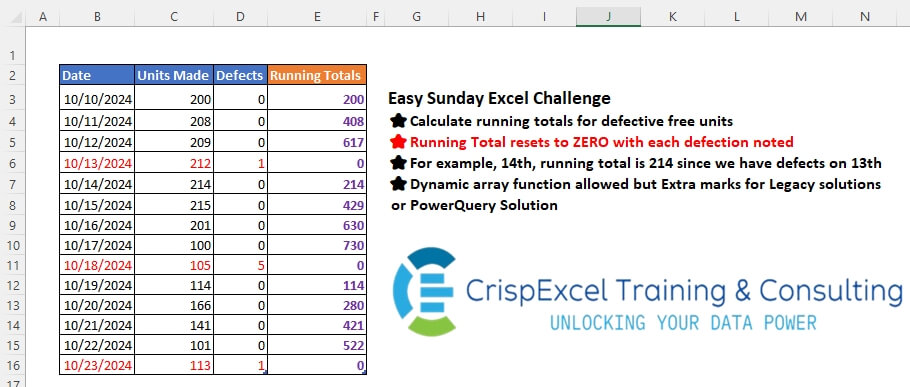
Calculate running totals for defective free units Running Total resets to ZERO with each defection noted For example, on the 14th, the running total is 214 since we have defects on the 13th Dynamic array function allowed, but Extra marks for Legacy solutions or PowerQuery Solution
📌 Challenge Details and Links
Challenge Number: 51
Challenge Difficulty: ⭐
📥Download Sample File
📥Link to the solutions on LinkedIn
Solving the challenge of Resetting Running Totals with Power Query
Power Query solution 1 for Resetting Running Totals, proposed by Omid Motamedisedeh:
let
  Source = Excel.CurrentWorkbook(){[Name = "tblStock"]}[Content],
  re = Table.AddColumn(
    Source,
    "Custom",
    each List.Sum(
      Table.LastN(Table.FirstN(Source, (x) => x[Date] <= [Date]), (x) => x[Defects] = 0)[Units Made]
    )
      ?? 0
  )
in
  re
Power Query solution 2 for Resetting Running Totals, proposed by Zoran Milokanović:
let
  Source = Excel.CurrentWorkbook(){[Name = "tblStock"]}[Content],
  S = Table.FromRows(
    List.Accumulate(
      Table.ToRows(Source),
      {},
      (b, n) => b & {n & {{List.Last(b, {0, 0, 0, 0}){3} + n{1}, 0}{Byte.From(n{2} = 1)}}}
    ),
    Table.ColumnNames(Source) & {"Running Totals"}
  )
in
  S
Power Query solution 3 for Resetting Running Totals, proposed by Zoran Milokanović:
let
  Source = Excel.CurrentWorkbook(){[Name = "tblStock"]}[Content],
  S = Table.AddColumn(
    Source,
    "Running Totals",
    each List.Sum(
      Table.LastN(Table.FirstN(Source, Table.PositionOf(Source, _) + 1), each [Defects] = 0)[
        Units Made
      ]
    )
      ?? 0
  )
in
  S
Power Query solution 4 for Resetting Running Totals, proposed by Zoran Milokanović:
let
  Source = Excel.CurrentWorkbook(){[Name = "tblStock"]}[Content],
  S = Table.Combine(
    Table.Group(
      Source,
      "Defects",
      {
        "R",
        (t) =>
          Table.AddColumn(
            t,
            "Running Totals",
            each {List.Sum(List.FirstN(t[Units Made], Table.PositionOf(t, _) + 1)), 0}{
              Byte.From([Defects] = 1)
            }
          )
      },
      0,
      (b, n) => Byte.From(b <> n)
    )[R]
  )
in
  S
Power Query solution 5 for Resetting Running Totals, proposed by Kris Jaganah:
let
  A = Excel.CurrentWorkbook(){[Name = "tblStock"]}[Content],
  B = Table.AddIndexColumn(A, "Index", 1, 1, Int64.Type),
  C = Table.AddColumn(B, "UD", each [Units Made] + [Defects] / 10),
  D = Table.AddColumn(
    C,
    "Running Totals",
    each List.Accumulate(
      List.FirstN(C[UD], [Index]),
      0,
      (x, y) => if Number.Round(x + y) = x + y then x + y else 0
    )
  ),
  E = Table.SelectColumns(D, {"Date", "Units Made", "Running Totals"})
in
  E
Power Query solution 6 for Resetting Running Totals, proposed by Aditya Kumar Darak 🇮🇳:
let
  Source = Excel.CurrentWorkbook(){[Name = "tblStock"]}[Content],
  ToRecords = Table.ToRecords(Source),
  Generate = List.Generate(
    () => [a = - 1, z = 0],
    each [a] < List.Count(ToRecords),
    each [
      a = [a] + 1,
      b = ToRecords{a},
      c = b[Defects],
      d = b[Units Made],
      z = if c = 1 then 0 else [z] + d
    ],
    each [b] & [Running Totals = [z]]
  ),
  Return = Table.FromRecords(List.Skip(Generate))
in
  Return
Power Query solution 7 for Resetting Running Totals, proposed by Alejandro Simón 🇵🇦 🇪🇸:
let
  Source = Excel.CurrentWorkbook(){[Name = "tblStock"]}[Content],
  LG = List.Combine(
    List.Skip(
      List.Generate(
        () => [x = 0, k = {0}],
        each [x] <= Table.RowCount(Source),
        each [
          x = [x] + 1,
          k = if Source[Defects]{[x]} = 0 then {List.Last([k]) + Source[Units Made]{[x]}} else {0}
        ],
        each [k]
      )
    )
  ),
  Sol = Table.FromColumns(
    Table.ToColumns(Source) & {LG},
    Table.ColumnNames(Source) & {"Running Totals"}
  )
in
  Sol
Power Query solution 8 for Resetting Running Totals, proposed by Alejandro Simón 🇵🇦 🇪🇸:
let
  Source = Excel.CurrentWorkbook(){[Name = "tblStock"]}[Content],
  Group = List.Combine(
    Table.Group(
      Source,
      {"Defects"},
      {
        {
          "A",
          each
            let
              a = _,
              b = a[Defects]{0},
              c = a[Units Made],
              d =
                if b = 1 then
                  {0}
                else
                  List.Transform({1 .. List.Count(c)}, each List.Sum(List.FirstN(c, _)))
            in
              d
        }
      },
      0
    )[A]
  ),
  Sol = Table.FromColumns(
    Table.ToColumns(Source) & {Group},
    Table.ColumnNames(Source) & {"Running Totals"}
  )
in
  Sol
Power Query solution 9 for Resetting Running Totals, proposed by Brian Julius:
let
  Source = Table.TransformColumnTypes(
    Excel.CurrentWorkbook(){[Name = "tblStock"]}[Content],
    {"Date", Date.Type}
  ),
  AddGrp = Table.FillUp(
    Table.AddColumn(Source, "Grp", each if [Defects] = 1 then [Date] else null),
    {"Grp"}
  ),
  Group = Table.Group(
    AddGrp,
    {"Grp"},
    {{"All", each Table.RemoveColumns(Table.AddIndexColumn(_, "Idx", 1, 1), "Grp")}}
  ),
  AddRT = Table.AddColumn(
    Group,
    "RT",
    each [
      a = [All],
      b = [All][Units Made],
      c = List.Transform(b, each List.Sum(List.FirstN(b, List.PositionOf(b, _) + 1))),
      d = Table.ToColumns(a) & {c},
      e = Table.FromColumns(d),
      f = Table.AddColumn(e, "Runnning Totals", each if [Column3] = 1 then 0 else [Column5]),
      g = Table.RemoveColumns(f, {"Column4", "Column5"})
    ][g]
  ),
  Exp = Table.ExpandTableColumn(
    Table.SelectColumns(AddRT, "RT"),
    "RT",
    {"Column1", "Column2", "Column3", "Runnning Totals"},
    {"Date", "Units Made", "Defects", "Runnning Totals"}
  )
in
  Exp
Power Query solution 10 for Resetting Running Totals, proposed by Abdallah Ally:
let
  Source = Excel.CurrentWorkbook(){[Name = "tblStock"]}[Content],
  Accum = List.Accumulate(
    {0 .. Table.RowCount(Source) - 1},
    {},
    (x, y) => x & {(List.Last(x, 0) + Source[Units Made]{y}) * Number.Abs(Source[Defects]{y} - 1)}
  ),
  Columns = Table.ColumnNames(Source) & {"Running Totals"},
  FromCols = Table.FromColumns(Table.ToColumns(Source) & {Accum}, Columns),
  Result = Table.TransformColumnTypes(FromCols, {"Date", type date})
in
  Result
Power Query solution 11 for Resetting Running Totals, proposed by Abdallah Ally:
let
  Source = Excel.CurrentWorkbook(){[Name = "tblStock"]}[Content],
  Generate = List.Generate(
    () => [C = 0, T = Source[Units Made]{0} * Number.Abs(Source[Defects]{0} - 1)],
    each [C] < Table.RowCount(Source),
    each [C = [C] + 1, T = ([T] + Source[Units Made]{C}) * Number.Abs(Source[Defects]{C} - 1)],
    each [T]
  ),
  Columns = Table.ColumnNames(Source) & {"Running Totals"},
  FromCols = Table.FromColumns(Table.ToColumns(Source) & {Generate}, Columns),
  Result = Table.TransformColumnTypes(FromCols, {"Date", type date})
in
  Result
Power Query solution 12 for Resetting Running Totals, proposed by Abdallah Ally:
let
  Source = Excel.CurrentWorkbook(){[Name = "tblStock"]}[Content],
  Accum = List.Accumulate(
    {0 .. Table.RowCount(Source) - 1},
    {},
    (x, y) =>
      x
        & {
          (List.Last(x, 0) + Source[Units Made]{y})
            * Byte.From(not Logical.From(Source[Defects]{y}))
        }
  ),
  Columns = Table.ColumnNames(Source) & {"Running Totals"},
  FromCols = Table.FromColumns(Table.ToColumns(Source) & {Accum}, Columns),
  Result = Table.TransformColumnTypes(FromCols, {"Date", type date})
in
  Result
Power Query solution 13 for Resetting Running Totals, proposed by Abdallah Ally:
let
  Source = Excel.CurrentWorkbook(){[Name = "tblStock"]}[Content],
  Generate = List.Generate(
    () => [C = 0, M = Byte.From(not Logical.From(Source[Defects]{0})), T = Source[Units Made]{0}],
    each [C] < Table.RowCount(Source),
    each [
      C = [C] + 1,
      M = Byte.From(not Logical.From(Source[Defects]{C})),
      T = ([T] + Source[Units Made]{C}) * M
    ],
    each [T]
  ),
  Columns = Table.ColumnNames(Source) & {"Running Totals"},
  FromCols = Table.FromColumns(Table.ToColumns(Source) & {Generate}, Columns),
  Result = Table.TransformColumnTypes(FromCols, {"Date", type date})
in
  Result
Power Query solution 14 for Resetting Running Totals, proposed by 🇮🇷 Navid Esmaeilzadeh اسماعیل زاده:
let
  S = Excel.CurrentWorkbook(){[Name = "tblStock"]}[Content],
  A = Table.AddIndexColumn(S, "Index", 1, 1),
  B = Table.AddColumn(A, "I", each if [Defects] = 1 then [Index] else null),
  C = Table.FillUp(B, {"I"}),
  D = Table.Group(C, {"I"}, {{"T", each _}}),
  E = Table.AddColumn(D, "T2", each Table.AddIndexColumn([T], "Ind.", 0, 1)),
  F = Table.AddColumn(
    E,
    "R",
    each List.RemoveLastN(
      List.Skip(List.Accumulate([T][#"Units Made"], {0}, (S, C) => S & {List.Last(S) + C}), 1),
      1
    )
      & {0}
  ),
  G = Table.SelectColumns(F, {"T2", "R"}),
  H = Table.ExpandTableColumn(
    G,
    "T2",
    {"Date", "Units Made", "Defects", "Index", "I", "Ind."},
    {"Date", "Units Made", "Defects", "Index", "I", "Ind."}
  ),
  I = Table.AddColumn(H, "Running Total", each [R]{[#"Ind."]}),
  J = Table.SelectColumns(I, {"Date", "Units Made", "Defects", "Running Total"})
in
  J
Power Query solution 15 for Resetting Running Totals, proposed by Mihai Radu O:
let
  Source = Excel.CurrentWorkbook(){[Name = "tblStock"]}[Content],
  r = [
    um = Source[Units Made],
    df = List.Transform(Source[Defects], (x) => Byte.From(x = 0)),
    a = List.Generate(
      () => [x = 0, y = um{0}],
      each [x] < List.Count(um),
      each [x = [x] + 1, y = ([y] + um{x}) * df{x}],
      each [y]
    )
  ][a]
in
  r
Power Query solution 16 for Resetting Running Totals, proposed by Krzysztof Kominiak:
let
  Source = Excel.CurrentWorkbook(){[Name = "tblStock"]}[Content],
  Result = Table.Combine(
    Table.Group(
      Source,
      {"Defects"},
      {
        {
          "NT",
          each Table.FromColumns(
            Table.ToColumns(_)
              & {
                if List.Count([Units Made]) = 1 then
                  {0}
                else
                  List.Accumulate(
                    [Units Made],
                    {},
                    (s, c) => s & {if List.IsEmpty(s) then c else List.Last(s) + c}
                  )
              },
            Table.ColumnNames(Source) & {"Running Totals"}
          )
        }
      },
      0
    )[NT]
  )
in
  Result
Solving the challenge of Resetting Running Totals with Excel
Excel solution 1 for Resetting Running Totals, proposed by Rick Rothstein:
=SCAN(
   0,
   C3:C16,
   LAMBDA(
       a,
       x,
       IF(
           OFFSET(
               x,
               ,
               1),
           0,
           a+x)))
Excel solution 2 for Resetting Running Totals, proposed by 🇰🇷 Taeyong Shin:
=SCAN(,
   C3:C16*(1-D3:D16),
   LAMBDA(a,
   v,
   (v>0)*a+v))
Excel solution 3 for Resetting Running Totals, proposed by Julian Poeltl:
=SCAN(
   0,
   IF(
       D3:D16=0,
       C3:C16,
       0),
   LAMBDA(
       A,
       B,
       IF(
           B>0,
           A+B,
           0)))
Excel solution 4 for Resetting Running Totals, proposed by Aditya Kumar Darak 🇮🇳:
=IF(

    [@Defects],

    0,

    SUM(

         [@[Units Made]],

         INDEX(

              tblStock[[
             hashtag
             #All],
             [Running Total]],

              ROWS(
                  [@[Running Total]]:tblStock[[
                  hashtag
                  #Headers],
                  [Running Total]]) - 1
              )
         )
   )
Excel solution 5 for Resetting Running Totals, proposed by Hussein SATOUR:
=SCAN(0,
   C3:C16&D3:D16,
   LAMBDA(x,
   y,
   (x+LEFT(
       y,
       3))*(1-RIGHT(
       y))))
Excel solution 6 for Resetting Running Totals, proposed by Oscar Mendez Roca Farell:
=SUM(
   C$3:tblStock2[@[Units Made]])-IFERROR(
   LOOKUP(
       2,
        1/D$3:tblStock2[@Defects],
        MMULT(
            N(
                B$3:tblStock2[@Date]>=TRANSPOSE(
                    B$3:tblStock2[@Date])),
             C$3:tblStock2[@[Units Made]])),
    )

Dynamic Array:

=SCAN( ,
    C3:C16*(1-D3:D16),
    LAMBDA(i,
    x,
    (x>0)*(i+x)))
Excel solution 7 for Resetting Running Totals, proposed by Duy Tùng:
=SCAN(0,
   C3:C16,
   LAMBDA(x,
   y,
   (OFFSET(
       y,
       ,
       1)=0)*(x+y)))
Excel solution 8 for Resetting Running Totals, proposed by Sunny Baggu:
=SCAN(
0,

(1 - D3:D16) * C3:C16,

LAMBDA(
    a,
     v,
     IF(
         v,
          a + v,
          v)))
Excel solution 9 for Resetting Running Totals, proposed by Asheesh Pahwa:
=SCAN(
   0,
   C3:C16,
   LAMBDA(
       x,
       y,

       IF(
           OFFSET(
               y,
               0,
               1)=0,
           x+y,
           0)))
Excel solution 10 for Resetting Running Totals, proposed by Imam Hambali:
=DROP(
   SCAN(
       0,
       C3:D16,
        LAMBDA(
            x,
            y,
             IF(
                 TAKE(
                     y,
                     ,
                     -1)=1,
                  0,
                  x+TAKE(
                      y,
                      ,
                      1)))),
   ,
   1)
Excel solution 11 for Resetting Running Totals, proposed by Mey Tithveasna:
=SCAN(
   0,
   C3:C16,
   LAMBDA(
       a,
       v,
       IF(

           OFFSET(
               v,
               0,
               1)=0,
           a+v,
           )))
Excel solution 12 for Resetting Running Totals, proposed by Milan Shrimali:
=scan(
   0,
   MAP(
       C2:C15,
       D2:D15,
       lambda(
           x,
           y,
           if(
               x*y=0,
               x,
               0))),
   lambda(
       x,
       y,
       if(
           y=0,
           0,
           x+y)))
Excel solution 13 for Resetting Running Totals, proposed by Peter Bartholomew:
= SCAN(0,
    (1-defects)*units,
    CONDITIONALSUMλ)

CONDITIONALSUMλ
= LAMBDA(
   acc,
   v,
    IF(
        v,
         acc+v,
         0))
Excel solution 14 for Resetting Running Totals, proposed by Tomasz Jakóbczyk:
=SCAN(
   0,
   C3:C16,
   LAMBDA(
       t,
       v,
       IF(
           OFFSET(
               v,
               ,
               1)=0,
           t+v,
           0)))
Excel solution 15 for Resetting Running Totals, proposed by Petya Koleva:
=IF(
   ISNUMBER(
       C2)=FALSE,
   C3,
   IF(
       D3>0,
       0,
       F2+C3))
Excel solution 16 for Resetting Running Totals, proposed by abdelaziz allam:
=SCAN(
   0,
   tblStock[Units Made],
   LAMBDA(
       a,
       b,
       IF(
           OFFSET(
               b,
               ,
               1)=0,
           a+b,
           0)))
Excel solution 17 for Resetting Running Totals, proposed by Philip Kinuthia:
=IF(
   AND(
       D3=0,
       B3=MIN(
           $B$3:$B$16)),
   C3,
   IF(
       D3=0,
       C3+IF(
           B3=MIN(
           $B$3:$B$16),
           0,
           OFFSET(
               E3,
               -1,
               0)),
       0))
Solving the challenge of Resetting Running Totals with Python
Python solution 1 for Resetting Running Totals, proposed by Konrad Gryczan, PhD:
import pandas as pd
path = "files/Excel Challenge October 17th.xlsx"
input = pd.read_excel(path, usecols="B:D", skiprows=1, nrows=15)
test = pd.read_excel(path, usecols="E", skiprows=1, nrows=15)
input['group'] = (input['Defects'] != input['Defects'].shift()).cumsum()
input['Running Totals'] = input.groupby('group')['Units Made'].cumsum().where(input['Defects'] != 1, 0)
print(input['Running Totals'].eq(test['Running Totals']).all()) # True
Python solution 2 for Resetting Running Totals, proposed by Abdallah Ally:
import pandas as pd
# Create a running total function
def get_running_total(x, y):
 values = [x[0]]
 for i in range(1, len(x)):
 values.append((values[-1] + x[i]) * int(y[i] != 1))
 return values

file_path = 'Excel Challenge October 17th.xlsx'
df = pd.read_excel(file_path, usecols='B:D', skiprows=1)
# Perform data manipulation
df['Running Totals'] = get_running_total(df['Units Made'], df['Defects'])
df
Solving the challenge of Resetting Running Totals with Python in Excel
Python in Excel solution 1 for Resetting Running Totals, proposed by Alejandro Campos:
My
#PythonExcel solution
df = xl("tblStock[
#Todo]", headers=True)
running_total = 0
df["Running Totals"] = [
 (running_total := 0 if defect else running_total + units)
 for units, defect in zip(df["Units Made"], df["Defects"])
]
df
Python in Excel solution 2 for Resetting Running Totals, proposed by Aditya Kumar Darak 🇮🇳:
#PythonInExcel
data = xl("tblStock[
#All]", headers=True)
rt = data["Units Made"] * (1 - data["Defects"])
start = 0
data["Running total"] = [(start := 0 if i == 0 else start + i) for i in rt]
data
Solving the challenge of Resetting Running Totals with R
R solution 1 for Resetting Running Totals, proposed by Konrad Gryczan, PhD:
library(tidyverse)
library(readxl)
path = "files/Excel Challenge October 17th.xlsx"
input = read_excel(path, range = "B2:D16")
test = read_excel(path, range = "E2:E16")
result = input %>%
 mutate(group = consecutive_id(Defects)) %>%
 mutate(`Running Totals` = ifelse(Defects != 1, cumsum(`Units Made`), 0), .by = group)

all.equal(result$`Running Totals`, test$`Running Totals`)
# [1] TRUE