
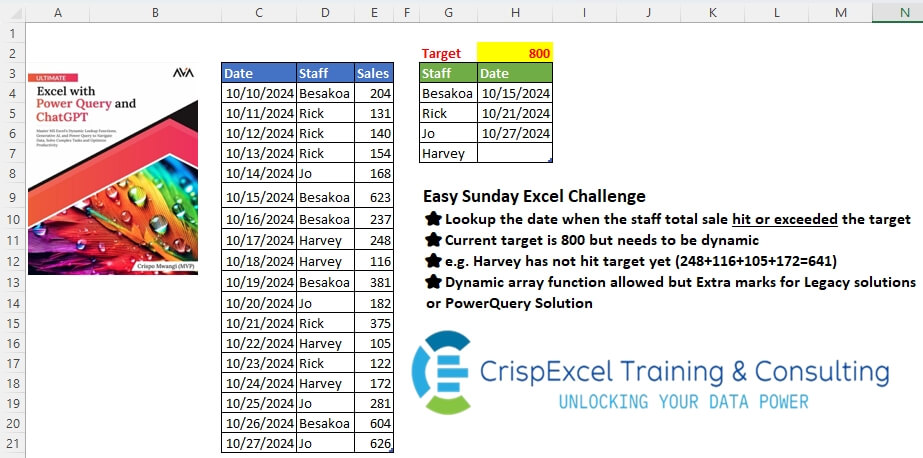
Lookup the date when the staff total sales hit or exceeded the target Current target is 800, but needs to be dynamic e.g. Harvey has not hit the target yet (248+116+105+172=641) Dynamic array function allowed, but Extra marks for Legacy solutions or PowerQuery Solution
📌 Challenge Details and Links
Challenge Number: 49
Challenge Difficulty: ⭐
📥Download Sample File
📥Link to the solutions on LinkedIn
Solving the challenge of Lookup Date When Target was Hit with Power Query
Power Query solution 1 for Lookup Date When Target was Hit, proposed by Omid Motamedisedeh:
let
  Source = Excel.CurrentWorkbook(){[Name = "tblSales"]}[Content],
  parameter = 800,
  #"Grouped Rows" = Table.Group(
    Source,
    {"Staff"},
    {
      "Date",
      each List.First(
        List.Accumulate(
          _[Date],
          {},
          (a, b) =>
            if List.Sum(Table.SelectRows(_, (x) => x[Date] <= b)[Sales]) >= parameter then
              a & {b}
            else
              a
        )
      )
    }
  )
in
  #"Grouped Rows"
Power Query solution 2 for Lookup Date When Target was Hit, proposed by Kris Jaganah:
let
  A = Excel.CurrentWorkbook(){[Name = "Table6"]}[Content],
  B = Table.Group(
    A,
    {"Staff"},
    {
      "Date",
      each
        let
          a = Table.AddIndexColumn(_, "Id", 1)
        in
          Table.SelectRows(a, each List.Sum(List.FirstN(a[Sales], [Id])) >= 800)[Date]{0}?
    }
  )
in
  B
Power Query solution 3 for Lookup Date When Target was Hit, proposed by Alejandro Simón 🇵🇦 🇪🇸:
let
 a = _,
 b = Table.AddIndexColumn(a, "Idx",1),
 c = Table.AddColumn(b, "A", each List.Sum(List.FirstN(b[Sales], [Idx]))),
 d = Table.SelectRows(c, each [A]>=800){0}?
 in d}}),
Sol = Table.ExpandRecordColumn(Tbl, "A", {"Date"})
in
Sol
Power Query solution 4 for Lookup Date When Target was Hit, proposed by Brian Julius:
let
  Threshold = 800,
  Source = Excel.CurrentWorkbook(){[Name = "tblSales"]}[Content],
  Group = Table.Group(
    Source,
    {"Staff"},
    {
      {
        "All",
        each
          let
            AddIndex = Table.AddIndexColumn(_, "Index", 1, 1),
            AddRunningTotal = Table.AddColumn(
              AddIndex,
              "RunTot",
              (currentRow) => List.Sum(List.FirstN(AddIndex[Sales], currentRow[Index]))
            )
          in
            AddRunningTotal
      }
    }
  ),
  Exp = Table.Join(
    Source,
    "Staff",
    Table.PrefixColumns(
      Table.SelectRows(
        Table.ExpandTableColumn(Group, "All", {"Date", "RunTot"}, {"Date", "RunTot"}),
        each [RunTot] >= Threshold
      ),
      "x"
    ),
    "x.Staff",
    JoinKind.LeftOuter
  ),
  Regroup = Table.Group(Exp, {"Staff"}, {{"Date", each List.Min([x.Date])}})
in
  Regroup
Power Query solution 5 for Lookup Date When Target was Hit, proposed by Ramiro Ayala Chávez:
let
  S = Excel.CurrentWorkbook(){[Name = "Table1"]}[Content],
  Target = 800,
  a = Table.Group(S, {"Staff"}, {"G", each _}),
  Fx = (x) =>
    let
      A = Table.AddIndexColumn(x, "I", 1),
      B = Table.AddColumn(A, "RT", each List.Sum(List.Range(A[Sales], 0, [I])))
    in
      B,
  b = Table.AddColumn(a, "A", each Fx([G]))[[Staff], [A]],
  c = Table.TransformColumns(
    b,
    {"A", each Table.FirstN(Table.SelectRows(_, each [RT] >= Target), 1)}
  ),
  Sol = Table.ExpandTableColumn(c, "A", {"Date"})
in
  Sol
Power Query solution 6 for Lookup Date When Target was Hit, proposed by 🇮🇷 Navid Esmaeilzadeh اسماعیل زاده:
let
  Tar = Excel.CurrentWorkbook(){[Name = "Target"]}[Content],
  S = Excel.CurrentWorkbook(){[Name = "tblSales"]}[Content],
  A = Table.Group(S, {"Staff"}, {{"T", each _}}),
  B = Table.AddColumn(
    A,
    "C",
    each
      let
        A = List.Skip(List.Accumulate([T][Sales], {0}, (S, C) => S & {List.Last(S) + C}), 1),
        B = List.Transform(A, each if _ >= Tar[Column1]{0} then _ else null),
        C = Table.FromColumns({[T][Date], B}, {"Date", "RT"}),
        D = Table.First(Table.SelectRows(C, each [RT] >= Tar[Column1]{0}))
      in
        D
  ),
  C = Table.SelectColumns(B, {"Staff", "C"}),
  D = Table.ExpandRecordColumn(C, "C", {"Date"}, {"Date"}),
  E = Table.TransformColumnTypes(D, {{"Date", type date}})
in
  E
Power Query solution 7 for Lookup Date When Target was Hit, proposed by Ahmed Ariem:
let
  f = (w) =>
    Table.Group(
      w,
      "Staff",
      {
        "Date",
        (x) =>
          Table.SelectRows(
            Table.AddColumn(
              x,
              "Flag",
              each List.Sum(List.RemoveLastN(x[Sales], (p) => p <> [Sales]))
            ),
            (x) => x[Flag] >= 800
          )[Date]{0}?
      }
    ),
  Source = Excel.CurrentWorkbook(){[Name = "tblSales"]}[Content],
  Types = Table.TransformColumnTypes(
    Source,
    {{"Date", type date}, {"Staff", type text}, {"Sales", Int64.Type}}
  ),
  final = f(Types)
in
  final
Solving the challenge of Lookup Date When Target was Hit with Excel
Excel solution 1 for Lookup Date When Target was Hit, proposed by Bo Rydobon 🇹🇭:
=GROUPBY(
   D4:D21,
   E4:E21*10^6+C4:C21,
   LAMBDA(
       s,
       IFNA(
           MOD(
               @INDEX(
                   s,
                   XMATCH(
                       H2,
                       SCAN(
                           ,
                           INT(
                               s%%%),
                           SUM),
                       1)),
               10^6),
           "")),
   ,
   0,
   2)
Excel solution 2 for Lookup Date When Target was Hit, proposed by Kris Jaganah:
=LET(
   p,
   D4:D21,
   q,
   UNIQUE(
       p),
   VSTACK(
       {"Staff",
       "Date"},
       HSTACK(
           q,
           MAP(
               q,
               LAMBDA(
                   x,
                   LET(
                       a,
                       GROUPBY(
                           C4:C21,
                           E4:E21,
                           SUM,
                           ,
                           0,
                           ,
                           p=x),
                       XLOOKUP(
                           H2,
                           SCAN(
                               ,
                               DROP(
                                   a,
                                   ,
                                   1),
                               SUM),
                           TAKE(
                                   a,
                                   ,
                                   1),
                           "",
                           1)))))))
Excel solution 3 for Lookup Date When Target was Hit, proposed by Julian Poeltl:
=LET(
   S,
   D4:D21,
   Q,
   E4:E21,
   D,
   C4:C21,
   U,
   UNIQUE(
       S),
   HSTACK(
       U,
       MAP(
           U,
           LAMBDA(
               A,
               LET(
                   R,
                   SCAN(
                       ,
                       FILTER(
                           Q,
                           S=A),
                       SUM),
                   Dt,
                   FILTER(
                       D,
                       S=A),
                   XLOOKUP(
                       H2,
                       R,
                       Dt,
                       "",
                       1))))))
Excel solution 4 for Lookup Date When Target was Hit, proposed by Aditya Kumar Darak 🇮🇳:
=LET(

    _trgt,
    H2,

    _dts,
    tblSales[Date],

    _sls,
    tblSales[Sales],

    _stf,
    tblSales[Staff],

    _rt,
    SUMIFS(
        _sls,
         _dts,
         "<=" & _dts,
         _stf,
         _stf),

    _fltr,
    FILTER(
        HSTACK(
            _dts,
             _stf),
         _rt >= _trgt),

    _rtrn,
    GROUPBY(
        TAKE(
            _fltr,
             ,
             -1),
         TAKE(
             _fltr,
              ,
              1),
         MIN,
         ,
         0),

    _rtrn
   )
Excel solution 5 for Lookup Date When Target was Hit, proposed by Hussein SATOUR:
=LET(
   t,
   tblSales[Staff],
   d,
   FILTER(
       tblSales[Date],
       t=[@Staff]),
   s,
   SCAN(
       0,
       FILTER(
           tblSales[Sales],
           t=[@Staff]),
       SUM),
   IFNA(
       XLOOKUP(
           $G$2,
           s,
           d,
           ,
           1),
       ""))
Excel solution 6 for Lookup Date When Target was Hit, proposed by Oscar Mendez Roca Farell:
=LET(
   s,
    D4:D21,
    u,
    UNIQUE(
        s),
    HSTACK(
        u,
         IFNA(
             VLOOKUP(
                 u,
                  FILTER(
                      IF(
                          {1,
                          0},
                           s,
                           C4:C21),
                       MAP(
                           s,
                            E4:E21,
                            LAMBDA(
                                d,
                                 e,
                                 SUMIFS(
                                     E4:e,
                                      D4:d,
                                      d)))>=H2),
                  2,
                 ),
              "")))
Legacy:
=IFERROR(AGGREGATE(15,
   6,
   tblSales[Date]/(tblSales[Staff]=[@Staff])/(MMULT(N(
       tblSales[Date]>=TRANSPOSE(
           tblSales[Date])),
   (tblSales[Sales]*(tblSales[Staff]=[@Staff])))>=H$2),
   1),
   "")
Excel solution 7 for Lookup Date When Target was Hit, proposed by Sunny Baggu:
=LET(
_u,
    UNIQUE(
        tblSales[Staff]),

HSTACK(
_u,

MAP(
_u,

LAMBDA(x,

TAKE(
FILTER(
tblSales[Date],

SCAN(
0,

(tblSales[Staff] = x) * (tblSales[Sales]),

LAMBDA(
    a,
     v,
     a + v)) >= H2,

""),

1)))))
Excel solution 8 for Lookup Date When Target was Hit, proposed by Md. Zohurul Islam:
=LET(

   staff,
   Table25[Staff],

   target,
   H2,

   dates,
   tblSales4[Date],

   stf,
   tblSales4[Staff],

   sls,
   tblSales4[Sales],

   a,
   DROP(
       REDUCE(
           "",
           staff,
           LAMBDA(
               x,
               y,
               LET(
                   p,
                   FILTER(
                       HSTACK(
                           dates,
                           sls),
                       stf=y),
                   q,
                   HSTACK(
                       y,
                       p),
                   r,
                   IFNA(
                       VSTACK(
                           x,
                           q),
                       0),
                   r))),
       1),

   b,
   TAKE(
       a,
       ,
       1),

   dts,
   CHOOSECOLS(
       a,
       2),

   sales,
   TAKE(
       a,
       ,
       -1),

   names,
   SCAN(
       ,
       b,
       LAMBDA(
           x,
           y,
           IF(
               y=0,
               x,
               y))),

   c,
   DROP(
       REDUCE(
           "",
           staff,
           LAMBDA(
               x,
               y,
               LET(
                   aa,
                   FILTER(
                       sales,
                       names=y),
                   bb,
                   SCAN(
                       ,
                       aa,
                       LAMBDA(
                           u,
                           v,
                           u+v)),
                   cc,
                   VSTACK(
                       x,
                       bb),
                   cc))),
       1),

   d,
   MAP(
       c,
       LAMBDA(
           x,
           IF(
               x>=target,
               1,
               0))),

   e,
   SCAN(
       ,
       d,
       LAMBDA(
           x,
           y,
           IF(
               y>0,
               x+y,
               0))),

   rng,
   HSTACK(
       names,
       dts),

   f,
   FILTER(
       rng,
       e=1),

   g,
   MAP(
       staff,
       LAMBDA(
           x,
           XLOOKUP(
               x,
               TAKE(
                   f,
                   ,
                   1),
               TAKE(
                   f,
                   ,
                   -1),
               ""))),

   result,
   HSTACK(
       staff,
       g),

   Report,
   VSTACK(
       {"Staff",
       "Date"},
       result),

   Report)
Excel solution 9 for Lookup Date When Target was Hit, proposed by Asheesh Pahwa:
=LET(
   s,
   E4:E21,
   dt,
   C4:C21,
   st,
   D4:D21,
   u,
   UNIQUE(
       st),
   DROP(
       REDUCE(
           "",
           u,
           LAMBDA(
               x,
               y,
               VSTACK(
                   x,
                   LET(
                       f,
                       FILTER(
                           HSTACK(
                               dt,
                               s),
                           st=y),
                       sc,
                       SCAN(
                           0,
                           TAKE(
                               f,
                               ,
                               -1),
                           LAMBDA(
                               x,
                               y,
                               x+y))>=H2,
                       HSTACK(
                           y,
                           IFNA(
                               INDEX(
                                   TAKE(
                                       f,
                                       ,
                                       1),
                                   XMATCH(
                                       TRUE,
                                       sc)),
                               "")))))),
       1))
Excel solution 10 for Lookup Date When Target was Hit, proposed by Ankur Sharma:
=MAP(
   G4#,
    LAMBDA(
        St,

        LET(
            Dt,
             FILTER(
                 tblSales[Date],
                  tblSales[Staff] = St),

            Sa,
             FILTER(
                tblSales[Sales],
                 tblSales[Staff] = St),

            CuSa,
             SCAN(
                 0,
                  Sa,
                  LAMBDA(
                      IV,
                      ScSa,
                       SUM(
                           IV,
                            ScSa))),

            IFERROR(
                CHOOSEROWS(
                    Dt,
                     XMATCH(
                         800,
                          CuSa,
                          1)),
                 ""))))
Excel solution 11 for Lookup Date When Target was Hit, proposed by JvdV –:
=LET(
   s,
   GROUPBY(
       D4:D21,
       MAP(
           C4:C21,
           D4:D21,
           E4:E21,
           LAMBDA(
               a,
               b,
               c,
               IF(
                   SUMIF(
                       D4:b,
                       b,
                       E4:c)>=H2,
                   a,
                   10^6))),
       MIN,
       ,
       0,
       2),
   IF(
       s=10^6,
       "",
       s))
Excel solution 12 for Lookup Date When Target was Hit, proposed by Imam Hambali:
=LET(
s,
    SORT(
        tblSales,
        {2,
        1}),

target,
    H2,

cc,
    CHOOSECOLS,

c,
    0+(cc(
        s,
        2)<> DROP(
        VSTACK(
            0,
             cc(
        s,
        2)),
        -1)),

l,
    LAMBDA(
        y,
         MID(
             y,
             2,
              LEN(
                  y))*1),

acc,
    SCAN(
        0,
        c&cc(
            s,
            3),
         LAMBDA(
             x,
             y,
              IF(
                  LEFT(
                  y)*1=1,
                  l(
                  y),
                  l(
                  y)+x))),

us,
    UNIQUE(
        tblSales[Staff]),

xl,
    BYROW(us,
    LAMBDA(x,
    XLOOKUP(1,
    (x=cc(
        s,
        2))*(acc>=target),
   cc(
       s,
       1),
   ""))),

VSTACK(
   Table2[
   hashtag
   #Headers],
    HSTACK(
        us,
        xl)))
Excel solution 13 for Lookup Date When Target was Hit, proposed by Eddy Wijaya:
=LET(

   st,
   tblSales[Staff],

   st_u,
   UNIQUE(
       st),

   VSTACK(
       Table2[
       hashtag
       #Headers],
       HSTACK(
           st_u,
           MAP(
               st_u,
               LAMBDA(
                   m,
                   LET(

                       d,
                       FILTER(
                           tblSales,
                           st=m),

                       c,
                       SCAN(
                           0,
                           TAKE(
                               d,
                               ,
                               -1),
                           LAMBDA(
                               a,
                               v,
                               a+v)),

                       XLOOKUP(
                           H2,
                           c,
                           TAKE(
                               d,
                               ,
                               1),
                           "",
                           1)))))))
Excel solution 14 for Lookup Date When Target was Hit, proposed by Milan Shrimali:
=LET(
   STF,
   UNIQUE(
       D4:D21),

   B,
   BYROW(
       STF,
       LAMBDA(
           X,
           TOROW(
               LET(
                   A,
                   FILTER(
                       FILTER(
                           C4:E21,
                           D4:D21=X),
                       {1,
                       0,
                       1}),

                   B,
                   SCAN(
                       0,
                       CHOOSECOLS(
                           A,
                           2),
                       LAMBDA(
                           X,
                           Y,
                           X+Y)),
                   MAP(
                       CHOOSECOLS(
                           A,
                           1),
                       B,
                       LAMBDA(
                           X,
                           Y,
                           IF(
                               Y>=H2,
                               X,
                               ""))))))),
   HSTACK(
       STF,
       BYROW(
           B,
           LAMBDA(
               X,
               CHOOSECOLS(
                   IFERROR(
                       FILTER(
                           X,
                           X<>""),
                       ""),
                   1)))))
Excel solution 15 for Lookup Date When Target was Hit, proposed by Peter Bartholomew:
= LET(

    names,
    UNIQUE(
        tblSales[Staff]),

    keyDates,
    MAP(
        names,
         LAMBDA(
             n,

              LET(

                   dates,
                   FILTER(
                       tblSales[Date],
                        tblSales[Staff]=n),

                   sales,
                   FILTER(
                       tblSales[Sales],
                        tblSales[Staff]=n),

                   accumulatedSales,
                   SCAN(
                       0,
                        sales,
                        SUM),

                   XLOOKUP(
                       target,
                        accumulatedSales,
                        dates,
                        "Target not reached",
                       1)
                   )
              )),

    HSTACK(
        names,
         keyDates)
    )
Excel solution 16 for Lookup Date When Target was Hit, proposed by Songglod Petchamras:
=LET(
   s,
   UNIQUE(
       tblSales[Staff]),
   HSTACK(
       s,
       MAP(
           s,
           LAMBDA(
               x,
               LET(
                   d,
                   FILTER(
                       tblSales,
                       tblSales[Staff]=x),
                   i,
                   SCAN(
                       0,
                       INDEX(
                           d,
                           0,
                           3),
                       LAMBDA(
                           a,
                           v,
                           IF(
                               a+v>=H2,
                               1,
                               a+v))),
                   XLOOKUP(
                       1,
                       i,
                       INDEX(
                           d,
                           0,
                           1),
                       ""))))))
Solving the challenge of Lookup Date When Target was Hit with Python
Python solution 1 for Lookup Date When Target was Hit, proposed by Konrad Gryczan, PhD:
import pandas as pd
path = "files/Excel Challenge October 27th.xlsx"
input = pd.read_excel(path, usecols="C:E", skiprows=2, nrows=19)
test = pd.read_excel(path, usecols="G:H", skiprows=2, nrows=5).dropna().rename(columns=lambda x: x.replace('.1', ''))
test['Date'] = pd.to_datetime(test['Date'])
threshold = 800
result = (input[input.groupby('Staff')['Sales'].cumsum() >= threshold]
 .drop_duplicates('Staff')
 .assign(Date=lambda df: pd.to_datetime(df['Date']))
 .loc[:, ['Staff', 'Date']]
 .sort_values(by='Date')
 .reset_index(drop=True))
print(result.equals(test)) # True
Solving the challenge of Lookup Date When Target was Hit with Python in Excel
Python in Excel solution 1 for Lookup Date When Target was Hit, proposed by Alejandro Campos:
My
#PythonExcel solution
df = xl("tblSales[
#Todo]", headers=True)
target_sales = xl("G2")
df['Cumulative_Sales'] = df.groupby('Staff')['Sales'].cumsum()
result = pd.DataFrame(df['Staff'].unique(), columns=['Staff']).merge(
 df[df['Cumulative_Sales'] >= target_sales].groupby('Staff').first().reset_index()[['Staff', 'Date', 'Cumulative_Sales']],
 on='Staff', how='left'
)
result[['Cumulative_Sales', 'Date']] = result[['Cumulative_Sales', 'Date']].fillna(' ')
result
Python in Excel solution 2 for Lookup Date When Target was Hit, proposed by Ümit Barış Köse, MSc:
df = xl("tblSales4[
#All]", headers=True)
df['Date'] = pd.to_datetime(df['Date'], format='%d.%m.%Y')
target = xl("K2")
sales_totals = {}
for _, row in df.iterrows():
 staff = row['Staff']
 sales = row['Sales']
 sales_totals.setdefault(staff, {'total': 0, 'date': None})
 sales_totals[staff]['total'] += sales
 if sales_totals[staff]['total'] >= target and sales_totals[staff]['date'] is None:
 sales_totals[staff]['date'] = row['Date']
results = [
 {'Staff': staff, 'Date': info['date'].strftime('%d.%m.%Y') if info['date'] else ''}
 for staff, info in sales_totals.items()
]
results_df = pd.DataFrame(results)
Solving the challenge of Lookup Date When Target was Hit with R
R solution 1 for Lookup Date When Target was Hit, proposed by Konrad Gryczan, PhD:
library(tidyverse)
library(readxl)
path = "files/Excel Challenge October 27th.xlsx"
input = read_excel(path, range = "C3:E21")
test = read_excel(path, range = "G3:H7") %>% na.omit() %>% mutate(Date = as.Date(Date))
threshold = 800
result = input %>%
 group_by(Staff) %>%
 filter(cumsum(Sales) >= threshold) %>%
 slice(1) %>%
 mutate(Date = as.Date(Date)) %>%
 select(Staff, Date) %>%
 arrange(Date)
all.equal(result, test, check.attributes = FALSE)