
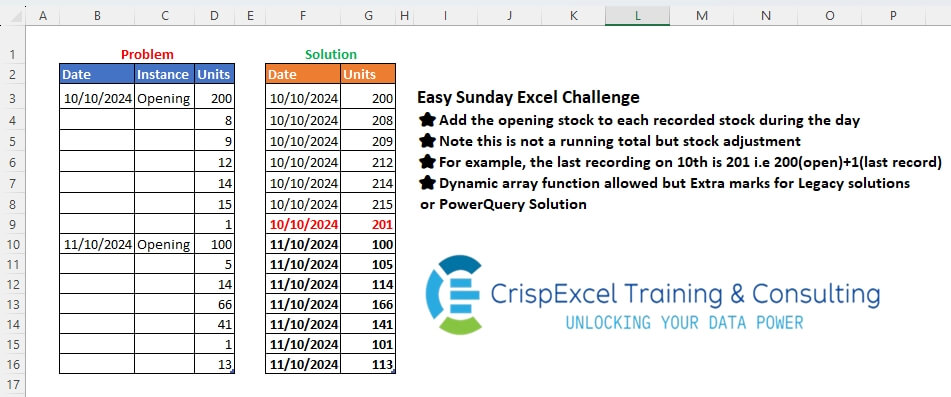
Add the opening stock to each recorded stock during the day Note that this is not a running total but a stock adjustment For example, the last recording on the 10th is 201, i.e 200(open)+1(last record) Dynamic array function allowed, but Extra marks for Legacy solutions or PowerQuery Solution
📌 Challenge Details and Links
Challenge Number: 47
Challenge Difficulty: ⭐
📥Link to the solutions on LinkedIn
Solving the challenge of Fill Down using dynamic arrays. with Power Query
Power Query solution 1 for Fill Down using dynamic arrays., proposed by Zoran Milokanović:
let
  Source = Excel.CurrentWorkbook(){[Name = "tblStock"]}[Content],
  S = Table.FromRows(
    List.TransformMany(
      List.RemoveNulls(Source[Date]),
      each
        let
          t = Table.Skip(Source, (r) => r[Date] <> _),
          f = t[Units]{0}
        in
          {f}
            & Table.FirstN(
              Table.Skip(Table.TransformColumns(t, {"Units", each _ + f})),
              (r) => r[Date] = null
            )[Units],
      (i, _) => {i, _}
    ),
    {"Date", "Units"}
  )
in
  S
Power Query solution 2 for Fill Down using dynamic arrays., proposed by Kris Jaganah:
let
  A = Excel.CurrentWorkbook(){[Name = "tblStock"]}[Content],
  B = Table.FillDown(A, {"Date"}),
  C = Table.AddColumn(
    B,
    "An",
    each
      let
        a = if [Instance] = null then null else [Units]
      in
        a
  ),
  D = Table.FillDown(C, {"An"}),
  E = Table.AddColumn(D, "Unit", each if [Instance] <> null then [An] else [Units] + [An])[
    [Date],
    [Unit]
  ],
  F = Table.RenameColumns(E, {{"Unit", "Units"}})
in
  F
Power Query solution 3 for Fill Down using dynamic arrays., proposed by Alejandro Simón 🇵🇦 🇪🇸:
let
  Source = Excel.CurrentWorkbook(){[Name = "tblStock"]}[Content],
  Group = Table.Group(
    Source,
    "Date",
    {
      {
        "Units",
        each {[Units]{0}} & List.Transform(List.RemoveFirstN([Units]), (x) => [Units]{0} + x)
      }
    },
    0,
    (a, b) => Number.From(b <> null)
  ),
  Sol = Table.ExpandListColumn(Group, "Units")
in
  Sol
Power Query solution 4 for Fill Down using dynamic arrays., proposed by Luan Rodrigues:
let
  Fonte = tblStock,
  grp = Table.Group(
    Fonte,
    "Date",
    {
      {
        "tab",
        each
          let
            a = _[Units],
            b = {a{0}} & List.Transform(List.Skip(a), (x) => a{0} + x)
          in
            b
      }
    },
    0,
    (x, y) => Number.From(y <> null)
  ),
  exp = Table.ExpandListColumn(grp, "tab")
in
  exp
Power Query solution 5 for Fill Down using dynamic arrays., proposed by Brian Julius:
let
  Source = Table.FillDown(
    Table.RemoveColumns(
      Table.TransformColumnTypes(
        Excel.CurrentWorkbook(){[Name = "tblStock"]}[Content],
        {"Date", Date.Type}
      ),
      "Instance"
    ),
    {"Date"}
  ),
  Group = Table.Group(Source, {"Date"}, {{"All", each _}}),
  TransUnits = Table.AddColumn(
    Group,
    "Ans",
    each [
      a = [All][Units],
      b = List.First(a),
      c = List.Transform(List.Skip(a, 1), each b + _),
      d = {b} & {c}{0}
    ][d]
  ),
  Ans = Table.RenameColumns(
    Table.RemoveColumns(Table.ExpandListColumn(TransUnits, "Ans"), "All"),
    {"Ans", "Units"}
  )
in
  Ans
Power Query solution 6 for Fill Down using dynamic arrays., proposed by Abdallah Ally:
let
  Source = Excel.CurrentWorkbook(){[Name = "tblStock2"]}[Content],
  FillDown = Table.FillDown(Source, {"Date"}),
  Transform = List.Transform(
    List.Distinct(FillDown[Date]),
    each [
      a = Table.SelectRows(FillDown, (x) => x[Date] = _),
      b = Table.TransformRows(
        a,
        each [[Date]] & [Units = [Units] + Byte.From([Instance] = null) * a[Units]{0}]
      )
    ][b]
  ),
  FromRecords = Table.FromRecords(List.Combine(Transform)),
  Result = Table.TransformColumnTypes(FromRecords, {"Date", type date})
in
  Result
Power Query solution 7 for Fill Down using dynamic arrays., proposed by Ramiro Ayala Chávez:
let
  S = Excel.CurrentWorkbook(){[Name = "Table1"]}[Content],
  a = Table.TransformColumnTypes(Table.RemoveColumns(S, "Instance"), {"Units", type text}),
  b = Table.AddColumn(a, "A", each if [Date] <> null then [Units] else null),
  c = Table.AddColumn(
    Table.FillDown(b, {"A"}),
    "B",
    each
      if [Date] <> null then
        [Units]
      else if Text.Length([Units]) = 2 then
        Text.RemoveRange([A], 1, 2) & [Units]
      else
        Text.RemoveRange([A], 2) & [Units]
  ),
  Sol = Table.RenameColumns(Table.FillDown(c, {"Date"})[[Date], [B]], {"B", "Units"})
in
  Sol
Power Query solution 8 for Fill Down using dynamic arrays., proposed by 🇮🇷 Navid Esmaeilzadeh اسماعیل زاده:
let
  S = Excel.CurrentWorkbook(){[Name = "tblStock"]}[Content],
  A = Table.FillDown(S, {"Date"}),
  B = Table.TransformColumnTypes(A, {{"Date", type date}}),
  C = Table.Group(B, {"Date"}, {{"T", each _}}),
  D = Table.AddColumn(
    C,
    "Units",
    each
      let
        A = [T][Units]{0},
        B = {A} & List.Transform(List.Skip([T][Units], 1), each _ + A)
      in
        B
  ),
  E = Table.SelectColumns(D, {"Date", "Units"}),
  F = Table.ExpandListColumn(E, "Units")
in
  F
Power Query solution 9 for Fill Down using dynamic arrays., proposed by Ahmed Ariem:
let
  f = (w) =>
    Table.Combine(
      Table.Group(
        w,
        "Date",
        {
          "tmp",
          (x) =>
            [
              a = Table.AddColumn(
                x,
                "Unit",
                each if [Date] <> null then 0 + [Units] else [Units] + x[Units]{0}
              ),
              b = Table.FillDown(a, {"Date"})
            ][b][[Date], [Unit]]
        },
        0,
        (a, b) => Number.From(b <> null)
      )[tmp]
    ),
  Source = f(Excel.CurrentWorkbook(){[Name = "tblStock"]}[Content])
in
  Source
Solving the challenge of Fill Down using dynamic arrays. with Excel
Excel solution 1 for Fill Down using dynamic arrays., proposed by Bo Rydobon 🇹🇭:
=LET(x,
   B3:B16,
   v,
   D3:D16,
   d,
   SCAN(
       ,
       x,
       MAX),
   HSTACK(d,
   LOOKUP(
       d,
       x,
       v)*(x=0)+v))
Excel solution 2 for Fill Down using dynamic arrays., proposed by Rick Rothstein:
=IF(
   B3="",
   MAX(
       B$2:B2),
   B3)

Put this formula in cell G2 and copy down...
=IF(
   B3="",
   LOOKUP(
       9^9,
       B$3:B3,
       D$3:D3)+D3,
   D3)
Excel solution 3 for Fill Down using dynamic arrays., proposed by Rick Rothstein:
=HSTACK(
   SCAN(
       ,
       B3:B16,
       MAX),
   MAP(
       B3:B16,
       D3:D16,
       LAMBDA(
           b,
           d,
           IF(
               b="",
               LOOKUP(
                   9^9,
                   B3:b,
                   D3:d)+d,
               d))))
Excel solution 4 for Fill Down using dynamic arrays., proposed by 🇰🇷 Taeyong Shin:
=LET(
   u,
   D3:D16,
   d,
   B3:B16,
   s,
   SCAN(
       ,
       d,
       MAX),
   HSTACK(
       s,
       NOT(
           d)*u+XLOOKUP(
           s,
           s,
           u)))
Excel solution 5 for Fill Down using dynamic arrays., proposed by Kris Jaganah:
=LET(
   a,
   tblStock[Date],
   b,
   tblStock[Units],
   c,
   SCAN(
       ,
       a,
       LAMBDA(
           x,
           y,
           IF(
               y,
               y,
               x))),
   d,
   SCAN(
       0,
       a,
       LAMBDA(
           x,
           y,
           IF(
               y,
               OFFSET(
                   y,
                   ,
                   2),
               x))),
   VSTACK(
       {"Date",
       "Units"},
       HSTACK(
           c,
           IF(
               a,
               b,
               d+b))))
Excel solution 6 for Fill Down using dynamic arrays., proposed by Julian Poeltl:
=LET(
   I,
   tblStock[Date],
   U,
   tblStock[Units],
   D,
   HSTACK(
       SCAN(
           "",
           I,
           LAMBDA(
               A,
               B,
               IF(
                   B="",
                   A,
                   B)))),
   HSTACK(
       D,
       XLOOKUP(
           D,
           I,
           U)+IF(
           I="",
           U,
           0)))
Excel solution 7 for Fill Down using dynamic arrays., proposed by Hussein SATOUR:
=LET(
   d,
   B3:B16,
   u,
   D3:D16,
   a,
   SCAN(
       ,
       d,
       LAMBDA(
           x,
           y,
           IF(
               y="",
               x,
               y))),
   HSTACK(
       a,
       XLOOKUP(
           a,
           d,
           u)+IF(
           C3:C16="Opening",
           0,
           u)))
Excel solution 8 for Fill Down using dynamic arrays., proposed by Oscar Mendez Roca Farell:
=LOOKUP(2,
   1/(B$3:B3>0),
   B$3:B3)
For Units: =LOOKUP(2,
   1/(B$3:B3>0),
   D$3:D3)+D3*(B3=0)

Dynamic Array:
=LET(d,
    B3:B16,
    u,
    D3:D16,
    m,
    SCAN(
        ,
         d,
         MAX),
    HSTACK(m,
    (d=0)*u+INDEX(
        u,
         XMATCH(
             m,
              d))))
Excel solution 9 for Fill Down using dynamic arrays., proposed by Sunny Baggu:
=HSTACK(
SCAN(
    "",
     tblStock[Date],
     LAMBDA(
         x,
          y,
          IF(
              y = "",
               x,
               y))),

SCAN(

     0,

     IF(

          tblStock[Instance] = tblStock[@Instance],

          tblStock[Units],

          0
          ),

     LAMBDA(
         a,
          v,
          IF(
              v = 0,
               a,
               v))
     ) + tblStock[Units] * (tblStock[Instance] <> tblStock[@Instance]))
Excel solution 10 for Fill Down using dynamic arrays., proposed by Md. Zohurul Islam:
=LET(

    A,
    tblStock221[Date],

    B,
    tblStock221[Instance],

    C,
    tblStock221[Units],

    dates,
    SCAN(
        0,
         A,
         LAMBDA(
             x,
              y,
              MAX(
                  x,
                   y))),

    E,
    XLOOKUP(
        dates,
         dates,
         C),

    F,
    ROW(
        C),

    G,
    B = 0,

    H,
    F / G,

    J,
    XLOOKUP(
        F,
         H,
         C,
         0),

    units,
    E + J,

    result,
    HSTACK(
        dates,
         units),

    header,
    {"Date",
    "Units"},

    Report,
    VSTACK(
        header,
         result),

    Report
   )
Excel solution 11 for Fill Down using dynamic arrays., proposed by Hamidi Hamid:
=LET(
   x,
   IF(
       C3:C16<>"",
       D3:D16,
       ""),
   y,
   IF(
       C3:C16<>"",
       0,
       D3:D16),
   z,
   SCAN(
       ,
       x,
       LAMBDA(
           a,
           b,
           IF(
               b<>"",
               b,
               a))),
   HSTACK(
       SCAN(
           ,
           B3:B16,
           LAMBDA(
               a,
               b,
               IF(
                   b<>"",
                   b,
                   a))),
       y+z))
Excel solution 12 for Fill Down using dynamic arrays., proposed by Asheesh Pahwa:
=LET(
   d,
   B3:B16,
   un,
   D3:D16,
   sc,
   SCAN(
       ,
       d,
       LAMBDA(
           x,
           y,
           IF(
               y,
               y,
               x))),
   u,
   UNIQUE(
       sc),
   DROP(
       REDUCE(
           "",
           u,
           LAMBDA(
               x,
               y,
               VSTACK(
                   x,
                   LET(
                       f,
                       FILTER(
                           un,
                           sc=y),
                       t,
                       TAKE(
                           f,
                           1),
                       s,
                       t+DROP(
                           f,
                           1),
                       IFNA(
                           HSTACK(
                               y,
                               VSTACK(
                                   t,
                                   s)),
                           y))))),
       1))
Excel solution 13 for Fill Down using dynamic arrays., proposed by Ankur Sharma:
=HSTACK(
   MAP(
       tblStock[Date],
        LAMBDA(
            z,
             TEXT(
                 IF(
                     z <> "",
                      z,
                      MAX(
                          B3:z)),
                  "dd-mmm-yyyy"))),
    MAP(
        tblStock[Date],
         tblStock[Units],
         LAMBDA(
             y,
             z,
              IF(
                  y <> "",
                   z,
                   FILTER(
                       tblStock[Units],
                        tblStock[Date] = MAX(
                            B3:y)) + z))))
Excel solution 14 for Fill Down using dynamic arrays., proposed by Milan Shrimali:
=let(
   a,
   filter(
       B3:D16,
       C3:C16<>""),
   tbl1,
   hstack(
       byrow(
           choosecols(
               a,
               3),
           lambda(
               x,
               arrayformula(
                   match(
                       x,
                       D3:D16,
                       0)+1))),
       a),
   fnl,
   hstack(
       byrow(
           D3:D16,
           lambda(
               x,
               xlookup(
                   row(
                       x),
                   choosecols(
                       tbl1,
                       1),
                   choosecols(
                       tbl1,
                       2,
                       3,
                       4),
                   "",
                   -1))),
       D3:D16),
   hstack(
       choosecols(
           fnl,
           1),
       byrow(
           fnl,
           lambda(
               x,
               if(
                   choosecols(
                       x,
                       3)=CHOOSECOLS(
                       x,
                       4),
                   choosecols(
                       x,
                       3),
                   choosecols(
                       x,
                       3)+CHOOSECOLS(
                       x,
                       4))))))
Excel solution 15 for Fill Down using dynamic arrays., proposed by Tomasz Jakóbczyk:
=SCAN(
   tblStock[@Date],
   tblStock[Date],
   LAMBDA(
       t,
       v,
       IF(
           ISBLANK(
               v),
           t,
           v)))
G3:=IF(
   F2<>F3,
   tblStock[@Units],
   SUM(
       XLOOKUP(
           F3,
           $F$3:F3,
           $D$3:D3,
           ,
           0,
           1),
       XLOOKUP(
           F3,
           $F$3:F3,
           $D$3:D3,
           ,
           0,
           -1)))
Excel solution 16 for Fill Down using dynamic arrays., proposed by Md. Shah Alam, Microsoft Certified Trainer:
=DROP(
   --TEXTSPLIT(
       CONCAT(
           " "&TOCOL(
               TOCOL(
                   tblStock2[Date],
                   3)&"/"&LET(
                   x,
                   WRAPROWS(
                       tblStock2[Units],
                       7),
                   HSTACK(
                       TAKE(
                           x,
                           ,
                           1),
                       DROP(
                           x,
                           ,
                           1)+TAKE(
                           x,
                           ,
                           1))))),
       "/",
       " "),
   1)
Excel solution 17 for Fill Down using dynamic arrays., proposed by Petya Koleva:
=HSTACK(IF(
   C3="Opening",
   B3,
   XLOOKUP(
       "Opening",
       $C$2:C2,
       $B$2:B2,
       ,
       ,
       -1)),
   IF(C3="Opening",
   D3,
   XLOOKUP(1,
   ($B$3:$B$16=IF(
       C3="Opening",
       B3,
       XLOOKUP(
           "Opening",
           $C$2:C2,
           $B$2:B2,
           ,
           ,
           -1)))*($C$3:$C$16="Opening"),
   $D$3:$D$16)+D3))
Solving the challenge of Fill Down using dynamic arrays. with Python
Python solution 1 for Fill Down using dynamic arrays., proposed by Konrad Gryczan, PhD:
import pandas as pd
path = "files/Excel Challenge October 13th.xlsx"
input = pd.read_excel(path, usecols="B:D", skiprows=1, nrows=15)
test = pd.read_excel(path, usecols="F:G", skiprows=1, nrows=15).rename(columns=lambda x: x.replace('.1', ''))
input['Date'] = input['Date'].ffill()
input['open'] = input.groupby('Date')['Units'].transform('first')
input['Units'] = input.apply(lambda row: row['open'] + row['Units'] if pd.isna(row['Instance']) else row['Units'], axis=1)
result = input[['Date', 'Units']]
print(result.equals(test))  # True
Python solution 2 for Fill Down using dynamic arrays., proposed by Luan Rodrigues:
Py Soluiton!
import pandas as pd
file = 'Excel Challenge October 13th.xlsx'
df = pd.read_excel(file,usecols="B:D",skiprows=1)
df['Date'] = df['Date'].ffill()
def grp(x):
 a = x['Units'].values
 b = [y + a[:1] for y in a[1:]]
 c = [a[:1]] + b
 rst = pd.DataFrame(c,columns=['Units']).reset_index(drop=True)
 rst['Date'] = x['Date'].values
 return rst
df_grp = df.groupby('Date', group_keys=False).apply(grp)
df_fim = df_grp[['Date','Units']]
print(df_fim)
Solving the challenge of Fill Down using dynamic arrays. with Python in Excel
Python in Excel solution 1 for Fill Down using dynamic arrays., proposed by Abdallah Ally:
df = xl("tblStock[
#All]", headers=True)
# Perform data manipulation
df['Date'] = df['Date'].ffill()
dfs = []
for date in df['Date'].unique():
 dfd = df[df['Date'] == date].reset_index(drop=True)
 dfd['Units'] = dfd.apply(
 lambda x: x[2] + int(pd.isna(x[1])) * first, axis=1
 )
 dfs.append(dfd)

df = pd.concat(dfs, ignore_index=True)[['Date', 'Units']]
df
Python in Excel solution 2 for Fill Down using dynamic arrays., proposed by Ümit Barış Köse, MSc:
I optimized my previous solution
df = xl("tblStock[
#All]", headers=True)
df['Date'] = df['Date'].ffill()
df['Base_Units'] = df['Units'].where(df['Instance'] == 'Opening').ffill()
df_result = df.assign(Units=df['Base_Units'] + df['Units'].where(df['Instance'] != 'Opening', 0))[['Date', 'Units']]
Python in Excel solution 3 for Fill Down using dynamic arrays., proposed by Ümit Barış Köse, MSc:
df=xl("tblStock[
#All]", headers=True)
df['Date'] = df['Date'].ffill()
opening_mask = df['Instance'] == 'Opening'
df['Base_Units'] = df['Units'].where(opening_mask)
df['Base_Units'] = df['Base_Units'].ffill()
df['Result_Units'] = df['Base_Units'] + df['Units'].where(~opening_mask, 0)
df_result = df[['Date', 'Result_Units']].rename(columns={'Result_Units': 'Units'})
Solving the challenge of Fill Down using dynamic arrays. with R
R solution 1 for Fill Down using dynamic arrays., proposed by Konrad Gryczan, PhD:
library(tidyverse)
library(readxl)
path = "files/Excel Challenge October 13th.xlsx"
input = read_excel(path, range = "B2:D16")
test = read_excel(path, range = "F2:G16")
result = input %>%
 fill(Date, .direction = "down") %>%
 group_by(Date) %>%
 mutate(open = first(Units)) %>%
 mutate(Units = ifelse(is.na(Instance) , open + Units, Units)) %>%
 select(Date, Units)
all.equal(result, test, check.attributes = FALSE)
# [1] TRUE