
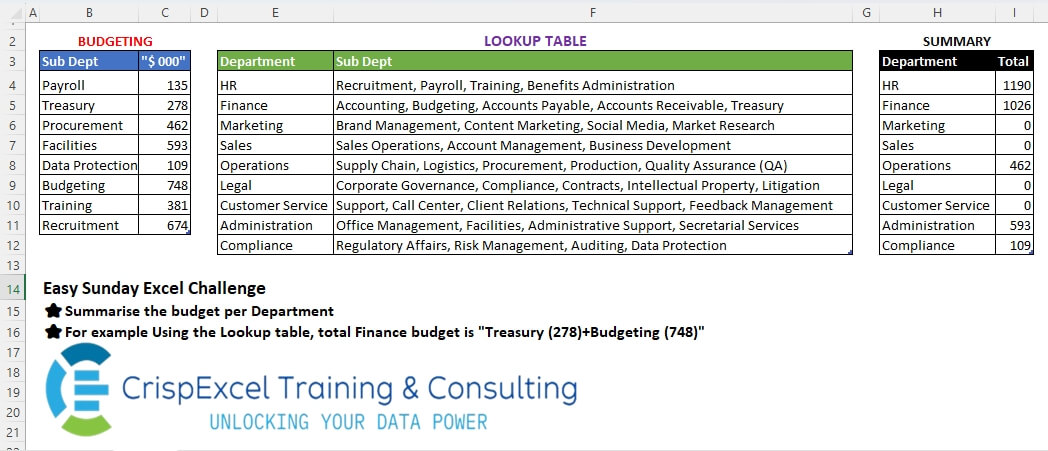
Summarise the budget per Department For example, Using the Lookup table, the total Finance budget is “Treasury (278)+Budgeting (748)”
📌 Challenge Details and Links
Challenge Number: 44
Challenge Difficulty: ⭐
📥Link to the solutions on LinkedIn
Solving the challenge of Lookup and Sum with Power Query
Power Query solution 1 for Lookup and Sum, proposed by Zoran Milokanović:
let
  Source = each Excel.CurrentWorkbook(){[Name = _]}[Content],
  S = Table.TransformRows(
    Source("tblLookup"),
    each List.Sum(
      List.Transform(
        Text.Split([Sub Dept], ", "),
        each Source("tblBudget"){[Sub Dept = _]}?[#"""$ 000"""]? ?? 0
      )
    )
  )
in
  S
Power Query solution 2 for Lookup and Sum, proposed by Kris Jaganah:
let
  A = (x) => Excel.CurrentWorkbook(){[Name = x]}[Content],
  B = Table.AddColumn(
    A("tblLookup"),
    "Total",
    each List.Sum(
      Table.Combine(
        List.Transform(
          Text.Split([Sub Dept], ", "),
          each Table.SelectRows(A("tblBudget"), (x) => x[Sub Dept] = _)
        )
      )[#"""$ 000"""]
    )
  )[[Department], [Total]]
in
  B
Power Query solution 3 for Lookup and Sum, proposed by Alejandro Simón 🇵🇦 🇪🇸:
let
  Source = Excel.CurrentWorkbook(){[Name = "tblBudget"]}[Content],
  tblLookup = Excel.CurrentWorkbook(){[Name = "tblLookup"]}[Content],
  Sol = Table.RemoveColumns(
    Table.AddColumn(
      tblLookup,
      "Total",
      (x) =>
        let
          a = Text.Split(x[Sub Dept], ", "),
          b = Source,
          c = List.Transform(
            a,
            each Table.SelectRows(b, (y) => _ = y[Sub Dept])[#"""$ 000"""]{0}? ?? 0
          )
        in
          List.Sum(c)
    ),
    "Sub Dept"
  )
in
  Sol
Power Query solution 4 for Lookup and Sum, proposed by Abdallah Ally:
let
  f = each Excel.CurrentWorkbook(){[Name = _]}[Content],
  Budget = Table.RenameColumns(f("tblBudget"), {"""$ 000""", "Amount"}),
  Transform1 = Table.TransformColumns(f("tblLookup"), {"Sub Dept", each Text.Split(_, ", ")}),
  Expand = Table.ExpandListColumn(Transform1, "Sub Dept"),
  Join = Table.Join(
    Expand,
    "Sub Dept",
    Table.PrefixColumns(Budget, "B"),
    "B.Sub Dept",
    JoinKind.LeftOuter
  ),
  Result = Table.Group(Join, "Department", {"Total", each List.Sum([B.Amount]) ?? 0})
in
  Result
Power Query solution 5 for Lookup and Sum, proposed by Abdallah Ally:
let
  Lookup = Excel.CurrentWorkbook(){[Name = "tblLookup"]}[Content],
  Budget = Excel.CurrentWorkbook(){[Name = "tblBudget"]}[Content],
  Result = Table.AddColumn(
    Lookup,
    "Total",
    each List.Sum(
      List.Transform(
        Text.Split([Sub Dept], ", "),
        each try Budget[#"""$ 000"""]{List.PositionOf(Budget[Sub Dept], _)} otherwise 0
      )
    )
  )[[Department], [Total]]
in
  Result
Power Query solution 6 for Lookup and Sum, proposed by Meganathan Elumalai:
let
  Source = Excel.CurrentWorkbook(){[Name = "tblLookup"]}[Content],
  Budget = Table.ToRows(Excel.CurrentWorkbook(){[Name = "tblBudget"]}[Content]),
  Result = Table.TransformColumns(
    Source,
    {
      {
        "Sub Dept",
        each List.Sum(
          List.Transform(
            List.ReplaceMatchingItems(Text.Split(_, ", "), Budget),
            each try Number.From(_) otherwise 0
          )
        )
      }
    }
  )
in
  Result
Power Query solution 7 for Lookup and Sum, proposed by Yaroslav Drohomyretskyi:
let
  Source = Excel.CurrentWorkbook(){[Name = "tblLookup"]}[Content],
  Result = Table.AddColumn(
    Source,
    "Total",
    each List.Sum(
      let
        curDept = Text.Split([Sub Dept], ", ")
      in
        Table.SelectRows(
          Excel.CurrentWorkbook(){[Name = "tblBudget"]}[Content],
          each List.Contains(curDept, _[Sub Dept])
        )[#"""$ 000"""]
    )
      ?? 0
  )
in
  Result
Power Query solution 8 for Lookup and Sum, proposed by Ahmed Ariem:
let
  f = (x) => List.Sum(List.Transform(Text.Split(x, ", "), (w) => Record.FieldOrDefault(rec, w, 0))),
  t = (x) => Excel.CurrentWorkbook(){[Name = x]}[Content],
  rec = Record.FromList(t("tblBudget")[#"""$ 000"""], t("tblBudget")[Sub Dept]),
  Lookup = t("tblLookup"),
  Trans = Table.TransformColumns(Lookup, {"Sub Dept", f})
in
  Trans
Power Query solution 9 for Lookup and Sum, proposed by Nelson Mwangi:
let
  Budget = Excel.CurrentWorkbook(){[Name = "tblBudget"]}[Content],
  Lookup = Excel.CurrentWorkbook(){[Name = "tblLookup"]}[Content],
  SplitSubDept = Table.TransformColumns(
    Lookup,
    {"Sub Dept", each List.Transform(Text.Split(_, ","), Text.Trim)}
  ),
  Expand = Table.ExpandListColumn(SplitSubDept, "Sub Dept"),
  Merge = Table.NestedJoin(Expand, {"Sub Dept"}, Budget, {"Sub Dept"}, "Expand"),
  ExpandMerge = Table.ExpandTableColumn(Merge, "Expand", {"""$ 000"""}),
  Group = Table.Group(ExpandMerge, {"Department"}, {"Total", each List.Sum([#"""$ 000"""])})
in
  Group
Solving the challenge of Lookup and Sum with Excel
Excel solution 1 for Lookup and Sum, proposed by Bo Rydobon 🇹🇭:
=HSTACK(
   E4:E12,
   MAP(
       F4:F12,
       LAMBDA(
           a,
           SUM(
               XLOOKUP(
                   TEXTSPLIT(
                       a,
                       ", "),
                   B4:B11,
                   C4:C11,
                   0)))))
Excel solution 2 for Lookup and Sum, proposed by Rick Rothstein:
=HSTACK(
   E4:E12,
   MAP(
       F4:F12,
       LAMBDA(
           f,
           SUM(
               IFERROR(
                   0+TEXTSPLIT(
                       REDUCE(
                           f,
                           SEQUENCE(
                               COUNT(
                                   C4:C11)),
                           LAMBDA(
                               a,
                               x,
                               SUBSTITUTE(
                                   a,
                                   INDEX(
                                       B4:B11,
                                       x),
                                   INDEX(
                                       C4:C11,
                                       x)))),
                       ", "),
                   0)))))
Excel solution 3 for Lookup and Sum, proposed by Rick Rothstein:
=HSTACK(
   E4:E12,
   MAP(
       F4:F12,
       LAMBDA(
           x,
           SUM(
               FILTER(
                   C4:C11,
                   1-ISERR(
                       FIND(
                           B4:B11,
                           x)),
                   0)))))

Note: This formula works because all the sub-dept's are unique (that is,
    none are wholly embedded within any other sub-dept)
Excel solution 4 for Lookup and Sum, proposed by Rick Rothstein:
=HSTACK(
   E4:E12,
   MAP(
       F4:F12,
       LAMBDA(
           x,
           SUM(
               IFNA(
                   XLOOKUP(
                       TEXTSPLIT(
                           x,
                           ", "),
                       B4:B11,
                       C4:C11),
                   0)))))
Excel solution 5 for Lookup and Sum, proposed by Julian Poeltl:
=MAP(
   F4:F12;LAMBDA(
       A;SUM(
           XLOOKUP(
               TEXTSPLIT(
                   A;", ");B4:B11;C4:C11;0))))

With Labeling & Headers:
=VSTACK(
   HSTACK(
       "Department",
       "Total"),
   HSTACK(
       H4:H12,
       MAP(
           F4:F12,
           LAMBDA(
               A,
               SUM(
                   XLOOKUP(
                       TEXTSPLIT(
                           A,
                           ", "),
                       B4:B11,
                       C4:C11,
                       0))))))
Excel solution 6 for Lookup and Sum, proposed by Hussein SATOUR:
=MAP(
   F4:F12,
   LAMBDA(
       x,
       SUM(
           XLOOKUP(
               TEXTSPLIT(
                   x,
                   ", "),
               B4:B11,
               C4:C11,
               0))))
Excel solution 7 for Lookup and Sum, proposed by Oscar Mendez Roca Farell:
=HSTACK(
   E4:E12,
    MMULT(
        IFERROR(
            FIND(
                TOROW(
                    B4:B11),
                 F4:F12)^0,
            ),
         C4:C11))

Or alternatively

=HSTACK(
   E4:E12,
    BYROW(
        IFERROR(
            SEARCH(
                TOROW(
                    B4:B11),
                 F4:F12)^0,
             ) *TOROW(
            C4:C11),
         SUM))
Excel solution 8 for Lookup and Sum, proposed by Pieter de B.:
=HSTACK(
   H4:H12,
   MMULT(
       1-ISERR(
           FIND(
               ", "&TOROW(
                   B4:B11)&", ",
               ", "&F4:F12&", ")),
       C4:C11))
Excel solution 9 for Lookup and Sum, proposed by Hamidi Hamid:
=LET(
   x,
   DROP(
       IFERROR(
           REDUCE(
               0,
               F4:F12,
               LAMBDA(
                   a,
                   b,
                   VSTACK(
                       a,
                       TEXTSPLIT(
                           b,
                           ",",
                           1)))),
           ""),
       1),
   z,
   MAP(
       TRIM(
           x),
       LAMBDA(
           a,
           IFERROR(
               VLOOKUP(
                   a,
                   B4:C11,
                   2,
                   0),
               ""))),
   HSTACK(
       E4:E12,
       BYROW(
           z,
           LAMBDA(
               a,
               SUM(
                   a)))))
Excel solution 10 for Lookup and Sum, proposed by Asheesh Pahwa:
=HSTACK(
   E4:E12,
   MAP(
       F4:F12,
       LAMBDA(
           x,
           SUM(
               IF(
                   N(
                       ISNUMBER(
                           FIND(
                               B4:B11,
                               x))),
                   C4:C11,
                   "")))))
Excel solution 11 for Lookup and Sum, proposed by ferhat CK:
=HSTACK(
   E4:E12,
   BYROW(
       F4:F12,
       LAMBDA(
           x,
           SUMPRODUCT(
               IFNA(
                   XMATCH(
                       B4:B11,
                       x,
                       3),
                   0),
               C4:C11))))
Excel solution 12 for Lookup and Sum, proposed by Meganathan Elumalai:
=CHOOSE(
   {1,
   2},
   E4,
   SUMPRODUCT(
       IFERROR(
           VLOOKUP(
               FILTERXML(
                   ""&SUBSTITUTE(
                       F4,
                       ", ",
                       "")&"",
                   "//B"),
               tblBudget,
               2,
               0),
           0)))
Excel solution 13 for Lookup and Sum, proposed by Eddy Wijaya:
=LET(

   d,
   tblLookup,

   dept,
   tblBudget,

   s_d,
   DROP(
       REDUCE(
           0,
           TAKE(
               d,
               ,
               -1),
           LAMBDA(
               a,
               v,
               VSTACK(
                   a,

                   LET(

                       sp,
                       TEXTSPLIT(
                           v,
                           ,
                           ", "),

                       SUM(
                           MAP(
                               sp,
                               LAMBDA(
                                   m,
                                   XLOOKUP(
                                       m,
                                       TAKE(
                                           dept,
                                           ,
                                           1),
                                       TAKE(
                                           dept,
                                           ,
                                           -1),
                                       0)))))))),
       1),

   HSTACK(
       TAKE(
           d,
           ,
           1),
       s_d))
Excel solution 14 for Lookup and Sum, proposed by Mey Tithveasna:
=HSTACK(E4:E12,
   MAP(F4:F12,
   LAMBDA(x,
   SUM(--(ISNUMBER(
       SEARCH(
           B4:B11,
           x)))*C4:C11,
   0))))
Excel solution 15 for Lookup and Sum, proposed by Milan Shrimali:
=let(
   a,
   E4:F12,
    hstack(
        choosecols(
            a,
            1),

        byrow(
            BYROW(
                arrayformula(
                    trim(
                        SPLIT(
                            choosecols(
                                a,
                                2),
                            ","))),
                lambda(
                    x,
                    BYCOL(
                        x,
                        lambda(
                            x,
                            --SUBSTITUTE(
                                x,
                                x,
                                XLOOKUP(
                                    x,
                                    B4:B11,
                                    C4:C11,
                                    0)))))),
            lambda(
                x,
                sum(
                    x)))))
Excel solution 16 for Lookup and Sum, proposed by Ernesto Vega Castillo:
=BYROW(
   F4:F12,
   LAMBDA(
       a,
       LET(
           b,
           a,
           c,
           TEXTSPLIT(
               b,
               ,
               ", "),
           SUM(
               XLOOKUP(
                   c,
                   $B$4:$B$11,
                   $C$4:$C$11,
                   0)))))
Excel solution 17 for Lookup and Sum, proposed by Petya Koleva:
=IFERROR(
   SUM(
       FILTER(
           $C$4:$C$11,
           XLOOKUP(
               "*"&$B$4:$B$11&"*",
               $F$4:$F$12,
               $E$4:$E$12,
               ,
               2)=H4)),
   0)
Solving the challenge of Lookup and Sum with Python
Python solution 1 for Lookup and Sum, proposed by Konrad Gryczan, PhD:
import pandas as pd
path = "files/Excel Challenge September 22nd.xlsx"
input1 = pd.read_excel(path, usecols="B:C", skiprows=2, nrows=8, names=["sub_dept", "money"])
input2 = pd.read_excel(path, usecols="E:F", skiprows=2, nrows=9, names=["department", "sub_dept"])
test = pd.read_excel(path, usecols="H:I", skiprows=2, nrows=9, names=["department", "total"])
 .sort_values(by=['total', "department"], ascending=False)
 .reset_index(drop=True)
lookup = (input2.assign(sub_dept=input2['sub_dept'].str.split(', '))
 .explode('sub_dept')
 .merge(input1, on='sub_dept', how='left')
 .groupby('department', as_index=False)['money'].sum()
 .sort_values(by=['money', 'department'], ascending=False)
 .reset_index(drop=True))
lookup['money'] = lookup['money'].astype('int64')
lookup.columns = test.columns
print(lookup.equals(test)) # True
Solving the challenge of Lookup and Sum with Python in Excel
Python in Excel solution 1 for Lookup and Sum, proposed by Ümit Barış Köse, MSc:
#PythonInExcel Solution
departments_df = xl("E3:F12", headers=True)
sub_dept_df = xl("B3:C11", headers=True)
sub_dept_dict = dict(zip(sub_dept_df['Sub Dept'], sub_dept_df['"$ 000"']))
result = {}
for _, row in departments_df.iterrows():
 department = row['Department']
 sub_depts = row['Sub Dept'].split(', ')
 total_value = sum(sub_dept_dict.get(sub_dept, 0) for sub_dept in sub_depts)
 result[department] = total_value
result_df = pd.DataFrame(list(result.items()), columns=['Department', 'Total Value ($ 000)'])
result_df
Python in Excel solution 2 for Lookup and Sum, proposed by George Mount:
https://github.com/stringfestdata/crispo-excel-challenge/raw/refs/heads/main/crispo-excel-challenge-gjm-solution-09222024.xlsx
# Data import
budget_df = xl("tblBudget[
#All]", headers=True)
lookup_df = xl("tblLookup[
#All]", headers=True)
lookup_df['Sub Dept'] = lookup_df['Sub Dept'].str.split(', ')
lookup_exploded = lookup_df.explode('Sub Dept')
# Merging tables on sub-department
merged_df = lookup_exploded.merge(budget_df, on='Sub Dept', how='left')
# Grouping by department and summing budgets
department_budget = merged_df.groupby('Department')['"$ 000"'].sum().reset_index()
ordered_department_budget = department_budget.set_index('Department').reindex(lookup_df['Department']).reset_index()
# Final table
ordered_department_budget
Solving the challenge of Lookup and Sum with R
R solution 1 for Lookup and Sum, proposed by Konrad Gryczan, PhD:
library(tidyverse)
library(readxl)
path = "files/Excel Challenge September 22nd.xlsx"
input1 = read_excel(path, range = "B3:C11") %>% janitor::clean_names()
input2 = read_excel(path, range = "E3:F12") %>% janitor::clean_names()
test = read_excel(path, range = "H3:I12")
lookup = input2 %>%
 separate_rows(sub_dept, sep = ", ") %>%
 left_join(input1, by = "sub_dept") %>%
 replace_na(list(x000 = 0)) %>%
 summarise(total = sum(x000), .by = department)
all.equal(test$total, lookup$Total, check.attributes = FALSE)
#> [1] TRUE
Solving the challenge of Lookup and Sum with Excel VBA
Excel VBA solution 1 for Lookup and Sum, proposed by Kris Jaganah:
=HSTACK(tblLookup[Department],MAP(tblLookup[Sub Dept],LAMBDA(x,SUM(IFNA(VLOOKUP(TEXTSPLIT(x,,", "),tblBudget[
#All],2,0),0)))))
Excel VBA solution 2 for Lookup and Sum, proposed by Sunny Baggu:
=HSTACK(
 tblLookup[Department],
 MAP(
 tblLookup[Sub Dept],
 LAMBDA(a, SUM(XLOOKUP(TEXTSPLIT(a, , ", "), B4:B11, C4:C11, 0)))
 )
)
Excel VBA solution 3 for Lookup and Sum, proposed by Sunny Baggu:
=HSTACK(
 tblLookup[Department],
 MAP(
 tblLookup[Sub Dept],
 LAMBDA(a,
 SUM(
 (tblBudget[Sub Dept] = TEXTSPLIT(a, ", ")) *
 tblBudget["$ 000"]
 )
 )
 )
)
Excel VBA solution 4 for Lookup and Sum, proposed by Imam Hambali:
=LET(
a, DROP(TRIM(TEXTSPLIT(TEXTJOIN("",1,SUBSTITUTE(","&tblLookup[Sub Dept],",",";"&tblLookup[Department]&"-")),"-",";")),1),
b, XLOOKUP(TAKE(a,,-1),tblBudget[Sub Dept],tblBudget["$ 000"],0),
c, HSTACK(TAKE(a,,1),b),
d, GROUPBY(TAKE(c,,1),TAKE(c,,-1),SUM,0,0),
VSTACK({"Department","Total"},SORTBY(d, XMATCH(TAKE(d,,1),tblLookup[Department])))
)
Excel VBA solution 5 for Lookup and Sum, proposed by Mahmoud Bani Asadi:
Another legacy formula:
=TRANSPOSE(MMULT(TRANSPOSE(ROW(INDIRECT("1:"&ROWS(tblBudget))))^0,IFERROR(SEARCH(tblBudget[Sub Dept],TRANSPOSE(tblLookup[Sub Dept]))^0,)*tblBudget["$ 000"]))
Excel VBA solution 6 for Lookup and Sum, proposed by Mahmoud Bani Asadi:
Legacy formula:
=SUMPRODUCT(IFERROR(SEARCH(tblBudget[Sub Dept],F4)^0*tblBudget["$ 000"],))
Excel VBA solution 7 for Lookup and Sum, proposed by Md Ismail Hosen:
=MAP(
 tblLookup[Sub Dept],
 LAMBDA(SubDept,
 SUM(
 IFNA(
 XLOOKUP(
 TEXTSPLIT(SubDept, ", "),
 tblBudget[Sub Dept],
 tblBudget["$ 000"]
 ),
 0
 )
 )
 )
)
Excel VBA solution 8 for Lookup and Sum, proposed by Songglod Petchamras:
=HSTACK(tblLookup[Department],MAP(tblLookup[Sub Dept],LAMBDA(d,SUM(XLOOKUP(TEXTSPLIT(d,,", "),tblBudget[Sub Dept],tblBudget["$ 000"],0)))))Excel VBA solution 9 for Lookup and Sum, proposed by abdelaziz allam:
=HSTACK(tblLookup[Department],MAP(tblLookup[Sub Dept],LAMBDA(a,SUM(IFNA(XLOOKUP(TEXTSPLIT(SUBSTITUTE(a," ",""),","),tblBudget[Sub Dept],tblBudget["$ 000"]),0)))))