
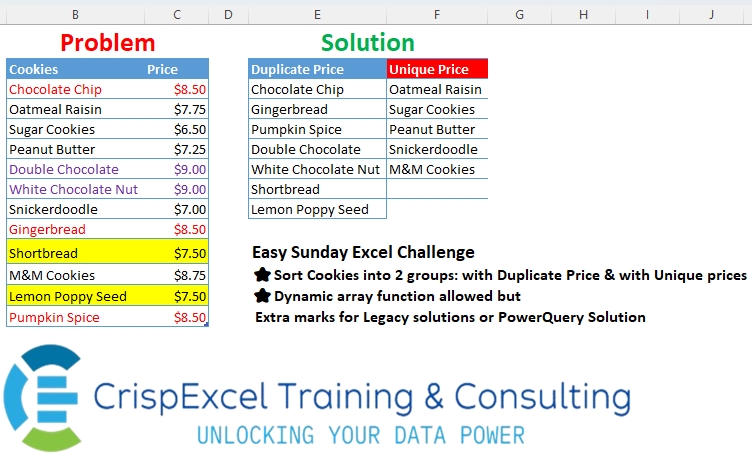
Sort Cookies into 2 groups: with Duplicate Price & with Unique prices Dynamic array function allowed but Extra marks for Legacy solutions or PowerQuery Solution.
📌 Challenge Details and Links
Challenge Number: 38
Challenge Difficulty: ⭐
📥Link to the solutions on LinkedIn
Solving the challenge of Grouping Data with Power Query
Power Query solution 1 for Grouping Data, proposed by Zoran Milokanović:
let
  Source = Excel.CurrentWorkbook(){[Name = "Cookies"]}[Content],
  F = each Table.SelectRows(
    Source,
    (r) => List.Count(List.PositionOf(Source[Price], r[Price], 2)) = 1 = _
  )[Cookies],
  S = Table.FromColumns({F(false), F(true)}, {"Duplicate Price", "Unique Price"})
in
  S
Power Query solution 2 for Grouping Data, proposed by Kris Jaganah:
let
  Source = Excel.CurrentWorkbook(){[Name = "Cookies4"]}[Content],
  Coun = Table.AddColumn(
    Source,
    "Count",
    each
      if Table.RowCount(Table.SelectRows(Source, (x) => x[Price] = [Price])) > 1 then
        "Duplicate Price"
      else
        "Unique Price"
  ),
  Group = Table.Group(Coun, {"Count"}, {"All", each Table.AddIndexColumn(_, "I", 1, 1)}),
  Xpand = Table.ExpandTableColumn(Group, "All", {"Cookies", "I"}),
  Pivot = Table.Pivot(Xpand, List.Distinct(Xpand[Count]), "Count", "Cookies"),
  Rmov = Table.RemoveColumns(Pivot, {"I"})
in
  Rmov
Power Query solution 3 for Grouping Data, proposed by Aditya Kumar Darak 🇮🇳:
let
  Source    = Excel.CurrentWorkbook(){[Name = "Cookies"]}[Content],
  Group     = Table.Group(Source, "Price", {"A", each [Cookies]}),
  Duplicate = List.Combine(Table.SelectRows(Group, each List.Count([A]) > 1)[A]),
  Unique    = List.Difference(Source[Cookies], Duplicate),
  Return    = Table.FromColumns({Duplicate, Unique}, type table [Duplicate = text, Unique = text])
in
  Return
Power Query solution 4 for Grouping Data, proposed by Alejandro Simón 🇵🇦 🇪🇸:
let
  Source = Excel.CurrentWorkbook(){[Name = "Cookies"]}[Content],
  Group  = Table.Group(Source, {"Price"}, {{"A", each [Cookies]}, {"B", each Table.RowCount(_)}}),
  Dup    = List.Combine(Table.SelectRows(Group, each [B] > 1)[A]),
  NoDup  = List.Difference(Source[Cookies], Dup),
  Sol    = Table.FromRows(List.Zip({Dup, NoDup}), {"Duplicate Price", "Unique Price"})
in
  Sol
Power Query solution 5 for Grouping Data, proposed by Brian Julius:
let
  Source = Excel.CurrentWorkbook(){[Name = "Cookies"]}[Content],
  Group = Table.ExpandListColumn(
    Table.RemoveColumns(
      Table.Group(
        Source,
        {"Price"},
        {{"Count", each if Table.RowCount(_) > 1 then 0 else 1}, {"All", each [Cookies]}}
      ),
      "Price"
    ),
    "All"
  ),
  Partition = Table.FromColumns(
    List.Transform(
      Table.Partition(Group, "Count", 2, each _),
      each Table.ToList(Table.SelectColumns(_, "All"))
    ),
    {"Duplicate Price", "Unique Price"}
  )
in
  Partition
Power Query solution 6 for Grouping Data, proposed by 🇵🇪 Ned Navarrete C.:
let
  Source = Excel.CurrentWorkbook(){[Name = "Cookies"]}[Content],
  Grouped = Table.Group(Source, {"Price"}, {{"X", each [Cookies]}})[X],
  C = List.Combine,
  S = List.Select,
  N = List.Count,
  R = Table.FromColumns(
    {C(S(Grouped, each N(_) > 1)), C(S(Grouped, each N(_) = 1))},
    {"Duplicate Price", "Unique Price"}
  )
in
  R
Power Query solution 7 for Grouping Data, proposed by Ramiro Ayala Chávez:
let
  S   = Excel.CurrentWorkbook(){[Name = "Table1"]}[Content],
  a   = Table.Group(S, {"Price"}, {"G", each [Cookies]})[G],
  b   = List.Combine(List.Select(a, each List.Count(_) > 1)),
  c   = List.Combine(List.Select(a, each List.Count(_) = 1)),
  Sol = Table.FromRows(List.Zip({b, c}), {"Duplicate Price", "Unique Price"})
in
  Sol
Power Query solution 8 for Grouping Data, proposed by 🇮🇷 Navid Esmaeilzadeh اسماعیل زاده:
let
  S = Excel.CurrentWorkbook(){[Name = "Cookies"]}[Content],
  A = Table.TransformColumnTypes(S, {{"Cookies", type text}, {"Price", type number}}),
  B = Table.Group(
    A,
    {"Price"},
    {{"Count", each Table.RowCount(_), Int64.Type}, {"Tbl", each _[Cookies]}}
  ),
  C = Table.ExpandListColumn(B, "Tbl"),
  D = Table.SelectRows(C, each [Count] > 1),
  E = Table.SelectColumns(D, {"Tbl"}),
  G = C,
  H = Table.SelectRows(G, each [Count] = 1),
  I = Table.SelectColumns(H, {"Tbl"}),
  J = Table.FromColumns({E[Tbl], I[Tbl]}, {"Duplicate Price", "Unique Price"})
in
  J
Power Query solution 9 for Grouping Data, proposed by CA Raghunath Gundi:
let
  Source          = Excel.CurrentWorkbook(){[Name = "Cookies_Table"]}[Content],
  #"Grouped Rows" = Table.Group(Source, {"Price"}, {{"A", each [Cookies]}}),
  Duplicate       = List.Combine(Table.SelectRows(#"Grouped Rows", each List.Count([A]) > 1)[A]),
  Unique          = List.Combine(Table.SelectRows(#"Grouped Rows", each List.Count([A]) = 1)[A]),
  Result          = Table.FromColumns({Duplicate, Unique})
in
  Result
Power Query solution 10 for Grouping Data, proposed by Yaroslav Drohomyretskyi:
let
  Source = Excel.CurrentWorkbook(){[Name = "Cookies"]}[Content],
  G = Table.Group(
    Source,
    {"Price"},
    {
      {"U", each if List.Count(_[Cookies]) = 1 then _[Cookies] else null},
      {"D", each if List.Count(_[Cookies]) > 1 then _[Cookies] else null}
    }
  ),
  D = List.Combine(List.RemoveNulls(G[D])),
  U = List.Combine(List.RemoveNulls(G[U])),
  R = Table.FromColumns({D, U}, {"Duplicate Price", "Unique Price"})
in
  R
Power Query solution 11 for Grouping Data, proposed by Mihai Radu O:
let
  Source = Excel.CurrentWorkbook(){[Name = "Cookies3"]}[Content],
  Custom1 = [
    ck = Source[Cookies],
    p = Source[Price],
    b = List.Distinct(p),
    c = List.Select(b, (x) => List.Count(List.PositionOf(p, x, Occurrence.All)) > 1),
    d = List.RemoveNulls(
      List.Transform(List.Zip({ck, p}), (x) => if List.Contains(c, x{1}) then x{0} else null)
    ),
    e = List.RemoveNulls(
      List.Transform(List.Zip({ck, p}), (x) => if not List.Contains(c, x{1}) then x{0} else null)
    ),
    f = Table.FromColumns({d, e}, {"DP", "UP"})
  ][f]
in
  Custom1
Power Query solution 12 for Grouping Data, proposed by Daniel Madhadha:
let
  Source = Excel.CurrentWorkbook(){[Name = "Cookies"]}[Content],
  Group = Table.Group(
    Source,
    {"Price"},
    {{"Type", each if Table.RowCount(_) > 1 then "Duplicate" else "Unique"}}
  ),
  Merge = Table.ExpandTableColumn(
    Table.NestedJoin(Source, {"Price"}, Group, {"Price"}, "Type"),
    "Type",
    {"Type"}
  ),
  Dup = Table.SelectRows(Merge, each ([Type] = "Duplicate"))[Cookies],
  Uni = Table.SelectRows(Merge, each ([Type] = "Unique"))[Cookies],
  Res = Table.FromColumns({Dup, Uni}, {"Duplicate Price", "Unique Price"})
in
  Res
Power Query solution 13 for Grouping Data, proposed by Daniel Madhadha:
let
  Source = Excel.CurrentWorkbook(){[Name = "Cookies"]}[Content],
  GroupedData = Table.Group(
    Source,
    {"Price"},
    {
      {"Count", each Table.RowCount(_), Int64.Type},
      {"Cookies", each _, type table [Cookies = nullable text, Price = nullable number]}
    }
  ),
  DuplicatePrices = Table.SelectRows(GroupedData, each [Count] > 1),
  ExpandedDuplicates = Table.ExpandTableColumn(DuplicatePrices, "Cookies", {"Cookies"}, {"Cookies"}),
  UniquePrices = Table.SelectRows(GroupedData, each [Count] = 1),
  ExpandedUniques = Table.ExpandTableColumn(UniquePrices, "Cookies", {"Cookies"}, {"Cookies"}),
  Duplicates = ExpandedDuplicates[Cookies],
  Uniques = ExpandedUniques[Cookies],
  Res = Table.FromColumns({Duplicates, Uniques}, {"Duplicate Price", "Unique Price"})
in
  Res
Power Query solution 14 for Grouping Data, proposed by Nelson Mwangi:
let
  Source = Excel.CurrentWorkbook(){[Name = "Cookies"]}[Content],
  Group = Table.Group(
    Source,
    {"Price"},
    {{"Type", each if Table.RowCount(_) > 1 then "Dup" else "Uni"}}
  ),
  Merge = Table.ExpandTableColumn(
    Table.NestedJoin(Source, {"Price"}, Group, {"Price"}, "Type"),
    "Type",
    {"Type"}
  ),
  Dup = Table.SelectRows(Merge, each ([Type] = "Dup"))[Cookies],
  Uni = Table.SelectRows(Merge, each ([Type] = "Uni"))[Cookies],
  Combine = Table.FromColumns({Dup, Uni}, {"Duplicate Price", "Unique Price"})
in
  Combine
Power Query solution 15 for Grouping Data, proposed by Marc Wring:
let
  Source = Excel.CurrentWorkbook(){[Name = "Cookies"]}[Content],
  #"Changed Type" = Table.TransformColumnTypes(
    Source,
    {{"Cookies", type text}, {"Price", type number}}
  ),
  #"Grouped Rows" = Table.Group(
    #"Changed Type",
    {"Price"},
    {{"AllItems", each _, type table [Cookies = nullable text, Price = nullable number]}}
  ),
  #"Added Custom" = Table.AddColumn(
    #"Grouped Rows",
    "Duplicate",
    each if Table.RowCount([AllItems]) > 1 then "Duplicate" else "Unique"
  ),
  #"Expanded AllItems" = Table.ExpandTableColumn(
    #"Added Custom",
    "AllItems",
    {"Cookies"},
    {"AllItems.Cookies"}
  ),
  #"Removed Columns" = Table.RemoveColumns(#"Expanded AllItems", {"Price"}),
  Duplicate = Table.SelectRows(#"Removed Columns", each ([Duplicate] = "Duplicate")),
  Unique = Table.SelectRows(#"Removed Columns", each ([Duplicate] = "Unique")),
  #"Duplicate List" = Duplicate[AllItems.Cookies],
  #"Unique List" = Unique[AllItems.Cookies],
  Result = Table.FromColumns(
    {#"Duplicate List", #"Unique List"},
    {"Duplicate Price", "Unique Price"}
  )
in
  Result
Solving the challenge of Grouping Data with Excel
Excel solution 1 for Grouping Data, proposed by Rick Rothstein:
=LET(
   b,
   B3:B14,
   c,
   C3:C14,
   n,
   COUNTIF(
       c,
       c),
   VSTACK(
       {"Duplicate Price",
       "Unique Price"},
       IFNA(
           HSTACK(
               FILTER(
                   b,
                   n>1),
               FILTER(
                   b,
                   n=1)),
           "")))
Excel solution 2 for Grouping Data, proposed by Kris Jaganah:
=LET(
   a,
   Cookies3[Cookies],
   b,
   Cookies3[Price],
   c,
   UNIQUE(
       b,
       ,
       1),
   IFNA(
       HSTACK(
           FILTER(
               a,
               ISNA(
                   XMATCH(
                       b,
                       c))),
           XLOOKUP(
               c,
               b,
               a)),
       ""))
Excel solution 3 for Grouping Data, proposed by Julian Poeltl:
=LET(
   C,
   B3:B14,
   P,
   C3:C14,
   IFNA(
       HSTACK(
           FILTER(
               C,
               MAP(
                   P,
                   LAMBDA(
                       A,
                       ROWS(
                           FILTER(
                               P,
                               P=A))>1))),
           XLOOKUP(
               UNIQUE(
                   P,
                   ,
                   1),
               P,
               C)),
       ""))
Excel solution 4 for Grouping Data, proposed by Hussein SATOUR:
=LET(
   c,
   B3:B14,
   p,
   C3:C14,
   a,
   COUNTIF(
       p,
       p),
   IFNA(
       HSTACK(
           FILTER(
               c,
               a>1),
           FILTER(
               c,
               a=1)),
       ""))
Excel solution 5 for Grouping Data, proposed by Oscar Mendez Roca Farell:
=LET(
   c,
    COUNTIF(
        C3:C14,
         C3:C14),
    WRAPCOLS(
        SORTBY(
            B3:B14,
             -c),
         SUM(
             N(
                 c>1)),
         ""))
Excel solution 6 for Grouping Data, proposed by Sunny Baggu:
=LET(

    p,
    Cookies[Price],

    c,
    Cookies[Cookies],

    v,
    UNIQUE(
        VSTACK(
            UNIQUE(
                p),
             UNIQUE(
                 p,
                  ,
                  1)),
         ,
         1),

    dp,
    FILTER(
        c,
         BYROW(
             TOROW(
                 v) = p,
              LAMBDA(
                  a,
                   OR(
                       a)))),

    up,
    XLOOKUP(
        UNIQUE(
                 p,
                  ,
                  1),
         p,
         c),

    IFNA(
        HSTACK(
            dp,
             up),
         "")
   )
Excel solution 7 for Grouping Data, proposed by 🇵🇪 Ned Navarrete C.:
=LET(
   f,
   COUNTIF(
       C3:C14,
       C3:C14),
   IFNA(
       HSTACK(
           FILTER(
               B3:B14,
               f>1),
           FILTER(
               B3:B14,
               f=1)),
       ""))
Excel solution 8 for Grouping Data, proposed by Md. Zohurul Islam:
=LET(

    A,
    {"Duplicate Price",
    "Unique Price"},

    LokupArray,
    C3:C14,

    RetrnArray,
    B3:B14,

    UniqLokupVal,
    UNIQUE(
        LokupArray,
         ,
         1),

    UniqPrice,
    XLOOKUP(
        UniqLokupVal,
         LokupArray,
         RetrnArray),

    P,
    IFERROR(
        XMATCH(
            LokupArray,
             UniqLokupVal,
             0),
         "x"),

    DuplicatePrice,
    FILTER(
        RetrnArray,
         P = "x"),

    result,
    IFNA(
        HSTACK(
            DuplicatePrice,
             UniqPrice),
         ""),

    Report,
    VSTACK(
        A,
         result),

    Report
   )
Excel solution 9 for Grouping Data, proposed by Hamidi Hamid:
=LET(
   c,
   Cookies[Cookies],
   p,
   Cookies[Price],
   x,
   COUNTIF(
       p,
       p)&"-"&ROW(
       p),
   w,
   TEXTBEFORE(
       x,
       "-",
       1),
   z,
   IF(
       w*1>1,
       x,
       ""),
   q,
   IF(
       z="",
       1/0,
       XLOOKUP(
           z,
           z,
           c,
           "")),
   f,
   TOCOL(
       q,
       3),
   s,
   TEXTSPLIT(
       c,
       f),
   d,
   TOCOL(
       IF(
           s="",
           1/0,
           s),
       3),
   k,
   IFERROR(
       HSTACK(
           f,
           d),
       ""),
   k)
Excel solution 10 for Grouping Data, proposed by Asheesh Pahwa:
=LET(p,
   C3:C14,
   m,
   MAP(p,
   LAMBDA(x,
   SUM(--(p=x)))),
   IFNA(
       HSTACK(
           FILTER(
               B3:B14,
               m>1),
           FILTER(
               B3:B14,
               m=1)),
       ""))
Excel solution 11 for Grouping Data, proposed by Thang Van:
=LET(
   a,
   Cookies[Cookies],
   b,
   Cookies[Price],
   duplicate_price,
   FILTER(
       a,
       COUNTIF(
           b,
           b)>1),
   unique_price,
   FILTER(
       a,
       COUNTIF(
           b,
           b)=1),
   IFERROR(
       HSTACK(
           duplicate_price,
           unique_price),
       ""))
Excel solution 12 for Grouping Data, proposed by Ankur Sharma:
=LET(
   a,
    Cookies[Cookies],
    b,
    Cookies[Price],
    c,
    COUNTIFS(
        b,
         b),
    VSTACK(
        {"Duplicate Price",
         "Unique Price"},
         IFERROR(
             HSTACK(
                 FILTER(
                     a,
                      c > 1),
                  FILTER(
                      a,
                       c = 1)),
              "")))
Excel solution 13 for Grouping Data, proposed by CA Raghunath Gundi:
=IFERROR(
   HSTACK(

       FILTER(
           Cookies_,
           COUNTIF(
               Price,
               Price)>1),

       FILTER(
           Cookies_,
           COUNTIF(
               Price,
               Price)=1)),

   "")
Excel solution 14 for Grouping Data, proposed by Eddy Wijaya:
=VSTACK(
   E2:F2,

   LET(

       tab,
       BYROW(
           Cookies[Price],
           LAMBDA(
               r,
               COUNTIF(
                   Cookies[Price],
                   r)&","&OFFSET(
                   r,
                   ,
                   -1))),

       MID(
           IFNA(
               HSTACK(
                   FILTER(
                       tab,
                       LEFT(
                           tab,
                           1)<>"1"),

                   FILTER(
                       tab,
                       LEFT(
                           tab,
                           1)="1")),
               ""),
           3,
           1000)))
Excel solution 15 for Grouping Data, proposed by Gerson Pineda:
=LET(
   k,
   B3:B14,
   p,
   C3:C14,
   l,
   COUNTIF(
       p,
       p),
   IFNA(
       HSTACK(
           FILTER(
               k,
               l>1),
           FILTER(
               k,
               l=1)),
       ""))
Excel solution 16 for Grouping Data, proposed by Mey Tithveasna:
=IFERROR(INDEX(B:B,
   AGGREGATE(15,
   6,
   ROW(
       $B$3:$B$14)/(COUNTIFS(
       $C$3:$C$14,
       $C$3:$C$14)>1),
   ROWS(
       E$4:E4))),
   "")
=IFERROR(INDEX(B:B,
   AGGREGATE(15,
   6,
   ROW(
       $B$3:$B$14)/(COUNTIFS(
       $C$3:$C$14,
       $C$3:$C$14)=1),
   ROWS(
       E$4:E4))),
   "")
Excel solution 17 for Grouping Data, proposed by Mey Tithveasna:
=LET(Cookies,
   B3:B14,
   i,
   COUNTIFS(
       C3:C14,
       C3:C14),
   IFNA(HSTACK(FILTER
(Cookies,
   i>1),
   FILTER(
       Cookies,
       i=1)),
   ""))
Excel solution 18 for Grouping Data, proposed by Milan Shrimali:
=LET(
   A,
   A1:B12,
   B,
   BYCOL(
       CHOOSECOLS(
           A,
           2),
       LAMBDA(
           X,
           HSTACK(
               CHOOSECOLS(
                   A,
                   1),
               ARRAYFORMULA(
                   COUNTIF(
                       X,
                       X))))),
   DUP,
   FILTER(
       CHOOSECOLS(
           B,
           1),
       CHOOSECOLS(
           B,
           2)>1),
   UNQ,
   FILTER(
       CHOOSECOLS(
           B,
           1),
       CHOOSECOLS(
           B,
           2)=1),
   IFERROR(
       VSTACK(
           HSTACK(
               "DUPLICATE",
               "UNIQUE"),
           HSTACK(
               DUP,
               UNQ)),
       ""))
Excel solution 19 for Grouping Data, proposed by El Badlis Mohd Marzudin:
=LET(
   c,
   B3:B14,
   p,
   C3:C14,
   a,
   FILTER(
       c,
       IFNA(
           XMATCH(
               p,
               UNIQUE(
                   p,
                   ,
                   1)),
           0)),
   IFNA(
       HSTACK(
           FILTER(
               c,
               NOT(
                   IFNA(
                       XMATCH(
                           c,
                           a),
                       0))),
           a),
       ""))
Excel solution 20 for Grouping Data, proposed by Tomasz Jakóbczyk:
=IFNA(
   HSTACK(
       FILTER(
           Cookies[Cookies],
           COUNTIF(
               Cookies[Price],
               Cookies[Price])>1),
       XLOOKUP(
           UNIQUE(
               Cookies[Price],
               FALSE,
               TRUE),
           Cookies[Price],
           Cookies[Cookies],
           "",
           0,
           1)),
   "")
Excel solution 21 for Grouping Data, proposed by Daniel Madhadha:
=LET(
    β,
   C3:C14,
   α,
   B3:B14,
   γ,
   COUNTIF(
       β,
        β),
   δ,
    FILTER(
        α,
         γ > 1),
      ε,
    FILTER(
        α,
         γ = 1),
     HSTACK(
        δ,
         ε) )
Solving the challenge of Grouping Data with Python
Python solution 1 for Grouping Data, proposed by Konrad Gryczan, PhD:
import pandas as pd
path = "files/Excel Challenge 11th August.xlsx"
input = pd.read_excel(path, usecols="B:C", skiprows=1)
test  = pd.read_excel(path, usecols="E:F", skiprows=1, nrows = 7)
input['Count'] = input.groupby('Price')['Price'].transform('count')
dupes = input["Cookies"][input['Count'] > 1].reset_index(drop=True)
unique = input["Cookies"][input['Count'] == 1].reset_index(drop=True)
print(sorted(dupes) == sorted(test["Duplicate Price"]) and sorted(unique) == sorted(test["Unique Price"][0:5]))
# True
Solving the challenge of Grouping Data with R
R solution 1 for Grouping Data, proposed by محمد حلمي:
=LET(b,B3:B14,c,C3:C14,e,COUNTIF(c,c),IFNA(HSTACK(
FILTER(SORTBY(b,-e),SORT(-e)<-1),FILTER(b,e=1)),""))
R solution 2 for Grouping Data, proposed by Konrad Gryczan, PhD:
Didn't make structure, but data are validated
library(tidyverse)
library(readxl)
path = "files/Excel Challenge 11th August.xlsx"
input = read_excel(path, range = "B2:C14")
test = read_excel(path, range = "E2:F9")
dup_test = pull(test, `Duplicate Price`) %>% sort()
uniq_test = pull(test, `Unique Price`) %>% sort()
result = input %>%
 mutate(unique = n(), .by = Price) %>%
 mutate(uniqueness = if_else(unique == 1, "Unique Price", "Duplicata Price")) %>%
 select(Cookies, uniqueness)
dup_result = filter(result, uniqueness == "Duplicata Price") %>% pull(Cookies) %>% sort()
uniq_result = filter(result, uniqueness == "Unique Price") %>% pull(Cookies) %>% sort()
identical(dup_test, dup_result) && identical(uniq_test, uniq_result)
#> [1] TRUE