
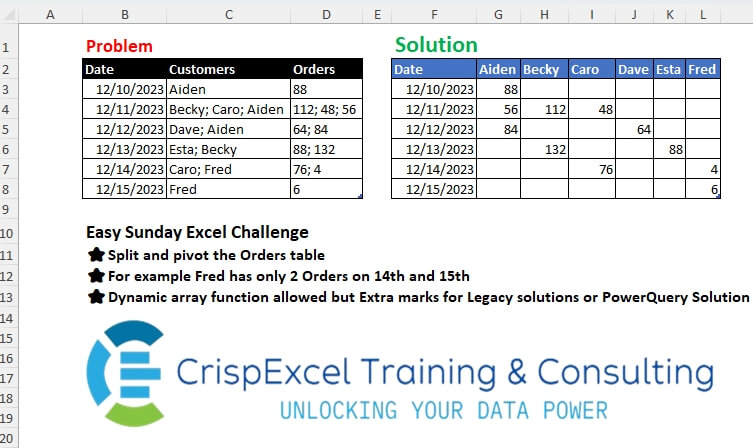
Split and pivot the Orders table For example, Fred has only 2 Orders on the 14th and 15th Dynamic array function allowed, but Extra marks for Legacy solutions or PowerQuery Solution
📌 Challenge Details and Links
Challenge Number: 34
Challenge Difficulty: ⭐
📥Link to the solutions on LinkedIn
Solving the challenge of Split and Pivot Data with Power Query
Power Query solution 1 for Split and Pivot Data, proposed by Zoran Milokanović:
let
  Source = Table.TransformColumns(
    Excel.CurrentWorkbook(){[Name = "Orders"]}[Content],
    {{"Customers", T}, {"Orders", T}}
  ),
  T = each Text.Split(_, "; "),
  H = List.Distinct(List.Combine(Source[Customers])),
  S = Table.FromRows(
    List.TransformMany(
      Table.ToRows(Source),
      each {H},
      (i, _) => {i{0}} & List.Transform(_, each ({null} & i{2}){List.PositionOf(i{1}, _) + 1})
    ),
    {"Date"} & H
  )
in
  S
Power Query solution 2 for Split and Pivot Data, proposed by Kris Jaganah:
let
  Source = Excel.CurrentWorkbook(){[Name = "Orders4"]}[Content],
  Ans = Table.AddColumn(
    Source,
    "Ans",
    each [
      a = Text.Split([Customers], "; "),
      b = Text.Split([Orders], "; "),
      c = List.Transform({0 .. List.Count(a) - 1}, each a{_} & ";" & b{_})
    ][c]
  ),
  Xpand = Table.ExpandListColumn(Ans, "Ans"),
  Split = Table.SplitColumn(Xpand, "Ans", Splitter.SplitTextByDelimiter(";"), {"1", "2"}),
  Rmove = Table.RemoveColumns(Split, {"Customers", "Orders"}),
  Pivot = Table.Pivot(
    Rmove,
    List.Distinct(Rmove[#"1"]),
    "1",
    "2",
    each List.First(List.Transform(_, Number.From))
  )
in
  Pivot
Power Query solution 3 for Split and Pivot Data, proposed by Aditya Kumar Darak 🇮🇳:
let
  Source = Excel.CurrentWorkbook(){[Name = "Orders"]}[Content],
  Transform = Table.TransformRows(
    Source,
    each [
      Fields = Text.Split([Customers], "; "),
      Values = Text.Split([Orders], "; "),
      Record = [Date = [Date]] & Record.FromList(Values, Fields)
    ][Record]
  ),
  Cols = Record.FieldNames(Record.Combine(Transform)),
  Table = Table.FromRecords(Transform, Cols, MissingField.UseNull),
  Return = Table.TransformColumns(
    Table,
    {"Date", (x) as date => Date.From(x)},
    (x) as nullable number => Number.From(x)
  )
in
  Return
Power Query solution 4 for Split and Pivot Data, proposed by Alejandro Simón 🇵🇦 🇪🇸:
let
  Source = Excel.CurrentWorkbook(){[Name = "Orders"]}[Content],
  Pros = Table.AddColumn(
    Source,
    "A",
    each
      let
        a = Text.Split([Customers], "; "),
        b = Text.Split([Orders], "; "),
        c = Table.PromoteHeaders(Table.FromColumns(List.Zip({a, b})))
      in
        c
  )[[Date], [A]],
  Sol = Table.ExpandTableColumn(
    Pros,
    "A",
    List.Sort(
      List.Distinct(List.Combine(List.Transform(Source[Customers], each Text.Split(_, "; "))))
    )
  )
in
  Sol
Power Query solution 5 for Split and Pivot Data, proposed by Brian Julius:
let
  Source = Table.TransformColumnTypes(
    Excel.CurrentWorkbook(){[Name = "Orders"]}[Content],
    {"Date", Date.Type}
  ),
  Restructrure = Table.TransformColumnTypes(
    Table.ExpandTableColumn(
      Table.RemoveColumns(
        Table.AddColumn(
          Source,
          "Ans",
          each [
            a = Text.Split([Customers], "; "),
            b = Text.Split([Orders], "; "),
            c = List.Zip({a, b}),
            d = Table.Transpose(Table.FromColumns(c))
          ][d]
        ),
        {"Customers", "Orders"}
      ),
      "Ans",
      {"Column1", "Column2"}
    ),
    {"Column2", Int64.Type}
  ),
  Piv = Table.Pivot(Restructrure, List.Distinct(Restructrure[Column1]), "Column1", "Column2")
in
  Piv
Power Query solution 6 for Split and Pivot Data, proposed by 🇵🇪 Ned Navarrete C.:
let
  Source = Excel.CurrentWorkbook(){[Name = "Orders"]}[Content],
  List = List.Accumulate(
    {"Customers", "Orders"},
    Source,
    (s, c) => Table.TransformColumns(s, {{c, each Text.Split(_, "; ")}})
  ),
  Table = Table.AddColumn(
    List,
    "X",
    each Table.FromColumns({[Customers], [Orders]}, {"Customer", "Orders"})
  )[[Date], [X]],
  Expand = Table.ExpandTableColumn(Table, "X", {"Customer", "Orders"}),
  Pivoted = Table.Pivot(Expand, List.Distinct(Expand[Customer]), "Customer", "Orders")
in
  Pivoted
Power Query solution 7 for Split and Pivot Data, proposed by Ankur Sharma:
let
 Source = Excel.CurrentWorkbook(){[Name="Orders"]}[Content],
 #"Changed Type" = Table.TransformColumnTypes(Source,{{"Date", type date}, {"Customers", type text}, {"Orders", type text}}),
 #"Added Custom" = Table.AddColumn(#"Changed Type", "Custom", each let
 CustSplit = Text.Split([Customers], "; "),
 OrdSplit = Text.Split([Orders], "; "),
 CustOrd = Table.FromColumns({CustSplit, OrdSplit})
in
 CustOrd),
 #"Expanded Custom" = Table.ExpandTableColumn(#"Added Custom", "Custom", {"Column1", "Column2"}, {"Column1", "Column2"}),
 #"Removed Columns" = Table.RemoveColumns(#"Expanded Custom",{"Customers", "Orders"}),
 #"Pivoted Column" = Table.Pivot(#"Removed Columns", List.Distinct(List.Sort(#"Removed Columns"[Column1])), "Column1", "Column2")
in
 #"Pivoted Column"

Best Wishes!
Power Query solution 8 for Split and Pivot Data, proposed by Yaroslav Drohomyretskyi:
let
  Source = Excel.CurrentWorkbook(){[Name = "Orders"]}[Content],
  ListZip = Table.ExpandListColumn(
    Table.AddColumn(
      Source,
      "Custom",
      each List.Zip({Text.Split([Customers], "; "), Text.Split([Orders], "; ")})
    ),
    "Custom"
  ),
  Customer = Table.AddColumn(ListZip, "Customer", each [Custom]{0}),
  Order = Table.AddColumn(Customer, "Order", each Number.FromText([Custom]{1})),
  Pivot = Table.TransformColumnTypes(
    Table.Pivot(
      Table.RemoveColumns(Order, {"Customers", "Orders", "Custom"}),
      List.Distinct(Order[Customer]),
      "Customer",
      "Order",
      List.Sum
    ),
    {{"Date", type date}}
  )
in
  Pivot
Power Query solution 9 for Split and Pivot Data, proposed by Ahmed Ariem:
let
  f = (x, y) =>
    [
      a = Text.Split(x, "; "),
      b = List.Transform(Text.Split(y, "; "), Number.From),
      c = Table.FromRows(List.Zip({a, b}), {"Customers", "Orders"})
    ][c],
  Source = Excel.CurrentWorkbook(){[Name = "Orders"]}[Content],
  from = Table.TransformColumnTypes(
    Source,
    {{"Date", type date}, {"Customers", type text}, {"Orders", type text}}
  ),
  AddColumn = Table.AddColumn(from, "newtabl", each f([Customers], [Orders]))[[Date], [newtabl]],
  Expand = Table.ExpandTableColumn(
    AddColumn,
    "newtabl",
    {"Customers", "Orders"},
    {"Customers", "Orders"}
  ),
  Pivot = Table.Pivot(Expand, List.Distinct(Expand[Customers]), "Customers", "Orders")
in
  Pivot
Power Query solution 10 for Split and Pivot Data, proposed by Masoud Karami:
let
  Source = Excel.CurrentWorkbook(){[Name = "Table1"]}[Content],
  Un = Table.UnpivotOtherColumns(Source, {"Date"}, "At", "Va"),
  SP = Table.SplitColumn(
    Table.TransformColumnTypes(Un, {{"Va", type text}}, "en-US"),
    "Va",
    Splitter.SplitTextByDelimiter(";", QuoteStyle.Csv),
    {"Va.1", "Va.2", "Va.3"}
  ),
  Un2 = Table.UnpivotOtherColumns(SP, {"Date", "At"}, "At.1", "Va"),
  Pi = Table.Pivot(Un2, List.Distinct(Un2[At]), "At", "Va"),
  Re = Table.RemoveColumns(Pi, {"At.1"}),
  Tr = Table.TransformColumns(
    Re,
    {{"Customers", Text.Trim, type text}, {"Orders", Text.Trim, type text}}
  ),
  Pi2 = Table.Pivot(Tr, List.Distinct(Tr[Customers]), "Customers", "Orders")
in
  Pi2
Power Query solution 11 for Split and Pivot Data, proposed by Nelson Mwangi:
let
  Source = Excel.CurrentWorkbook(){[Name = "Orders"]}[Content],
  SplitCustomer = Table.ExpandListColumn(
    Table.TransformColumns(Source, {"Customers", Splitter.SplitTextByDelimiter("; ")}),
    "Customers"
  ),
  Group = Table.Group(
    SplitCustomer,
    {"Date"},
    {"Data", each Table.AddIndexColumn(_, "Index", 0, 1), type table}
  ),
  TransforData = Table.TransformColumns(
    Group,
    {
      "Data",
      each
        let
          Column  = Table.AddColumn(_, "List", each Text.Split([Orders], ";")),
          Column2 = Table.AddColumn(Column, "Value", each [List]{[Index]})
        in
          Column2
    }
  ),
  Expand = Table.ExpandTableColumn(TransforData, "Data", {"Customers", "Value"}),
  Pivot = Table.Pivot(Expand, List.Distinct(Expand[Customers]), "Customers", "Value")
in
  Pivot
Power Query solution 12 for Split and Pivot Data, proposed by Marc Wring:
let
  Source = Table.TransformColumnTypes(
    Excel.CurrentWorkbook(){[Name = "Orders"]}[Content],
    {"Date", Date.Type}
  ),
  #"Customers List" = Table.AddColumn(Source, "CustomerList", each Text.Split([Customers], ";")),
  #"Orders List" = Table.AddColumn(#"Customers List", "OrderList", each Text.Split([Orders], ";")),
  #"Added Custom" = Table.AddColumn(
    #"Orders List",
    "Join",
    each List.Zip({Text.Split([Customers], ";"), Text.Split([Orders], ";")})
  ),
  #"Removed Columns" = Table.RemoveColumns(
    #"Added Custom",
    {"Orders", "CustomerList", "OrderList", "Customers"}
  )
in
  #"Removed Columns"
Solving the challenge of Split and Pivot Data with Excel
Excel solution 1 for Split and Pivot Data, proposed by محمد حلمي:
=REDUCE(
   G2:L2,
   D3:D8,
   LAMBDA(
       a,
       v,
       VSTACK(
           a,
           XLOOKUP(

               TAKE(
                   a,
                   1),
               TEXTSPLIT(
                   @+v:C8,
                   "; "),
               --TEXTSPLIT(
                   v,
                   ";"),
               ""))))
Excel solution 2 for Split and Pivot Data, proposed by 🇰🇷 Taeyong Shin:
=LET(
   f,
   LAMBDA(
       x,
       TEXTSPLIT(
           TEXTAFTER(
               "; "&x,
               "; ",
               SEQUENCE(
                   ,
                   10)),
           "; ")),
   d,
   --f(
       D3:D8),
   PIVOTBY(
       TOCOL(
           IF(
               d,
               B3:B8),
           2),
       TOCOL(
           f(
               C3:C8),
           2),
       --TOCOL(
           d,
           2),
       SUM,
       ,
       0,
       ,
       0))
Excel solution 3 for Split and Pivot Data, proposed by Julian Poeltl:
=LET(
   R,
   WRAPROWS(
       TEXTSPLIT(
           TEXTJOIN(
               ";",
               ,
               BYROW(
                   B3:D8,
                   LAMBDA(
                       A,
                       TEXTJOIN(
                           ";",
                           ,
                           INDEX(
                               A,
                               ,
                               1)&";"&TEXTSPLIT(
                               INDEX(
                                   A,
                                   ,
                                   2),
                               "; ")&";"&TEXTSPLIT(
                               INDEX(
                                   A..3),
                               "; "))))),
           ";"),
       3),
   C,
   IFERROR(
       R*1,
       R),
   D,
   TAKE(
       C,
       ,
       1),
   N,
   CHOOSECOLS(
       C,
       2),
   P,
   TAKE(
       C,
       ,
       -1),
   UD,
   UNIQUE(
       D),
   UN,
   TOROW(
       UNIQUE(
           N)),
   VSTACK(
       HSTACK(
           "Date",
           UN),
       HSTACK(
           UD,
           IFERROR(
               XLOOKUP(
                   UD&UN,
                   D&N,
                   P),
               ""))))
Excel solution 4 for Split and Pivot Data, proposed by Hussein SATOUR:
=LET(
   d,
   B3:B8,
   f,
   LAMBDA(
       z,
       w,
       TEXTSPLIT(
           XLOOKUP(
               z,
               d,
               w),
           ,
           "; ")),
   a,
   DROP(
       REDUCE(
           "",
           d,
           LAMBDA(
               x,
               y,
               VSTACK(
                   x,
                   IFNA(
                       HSTACK(
                           y,
                           f(
                               y,
                               C3:C8),
                           f(
                               y,
                               D3:D8)),
                       y)))),
       1),
   PIVOTBY(
       INDEX(
           a,
           ,
           1),
       INDEX(
           a,
           ,
           2),
       --INDEX(
           a,
           ,
           3),
       SUM,
       ,
       0,
       ,
       0))
Excel solution 5 for Split and Pivot Data, proposed by Oscar Mendez Roca Farell:
=LET(
   F,
    LAMBDA(
        i,
         TEXTSPLIT(
             CONCAT(
                 i&"|"),
              "; ",
              "|",
              1)),
    d,
    B3:B8,
    c,
    F(
        C3:C8),
    u,
    UNIQUE(
        TOROW(
            c,
             2),
         1),
    VSTACK(
        HSTACK(
            B2,
             u),
         HSTACK(
             d,
              XLOOKUP(
                  d&u,
                   TOCOL(
                       d&c,
                        2),
                   -TOCOL(
                       -F(
                           D3:D8),
                        2),
                   ""))))
Excel solution 6 for Split and Pivot Data, proposed by Duy Tùng:
=LET(
   a,
   UNIQUE(
       TEXTSPLIT(
           TEXTJOIN(
               "; ",
               ,
               C3:C8),
           "; "),
       1),
   REDUCE(
       a,
       D3:D8,
       LAMBDA(
           x,
           v,
           VSTACK(
               x,
               IFNA(
                   VLOOKUP(
                       a,
                       GROUPBY(
                           TEXTSPLIT(
                               @+C8:v,
                               ,
                               "; "),
                           --TEXTSPLIT(
                               v,
                               ,
                               "; "),
                           SUM),
                       2,
                       ),
                   "")))))
Excel solution 7 for Split and Pivot Data, proposed by Sunny Baggu:
=LET(

    e,
    LAMBDA(
        t,
         TEXTSPLIT(
             ARRAYTOTEXT(
                 t),
              "; ",
              ", ",
              1)),

    a,
    e(
        Orders4[Customers]),

    b,
    e(
        Orders4[Orders]),

    c,
    UNIQUE(
        TOROW(
            a,
             3),
         1),

    v,
    REDUCE(

         Orders4[Date],

         c,

         LAMBDA(
             x,
              y,

              HSTACK(
                  x,
                   BYROW(
                       IFNA(
                           IF(
                               a = y,
                                b,
                                0),
                            0) + 0,
                        LAMBDA(
                            a,
                             MAX(
                                 a))))
              )
         ),

    VSTACK(
        HSTACK(
            B2,
             c),
         v)
   )
Excel solution 8 for Split and Pivot Data, proposed by Abdallah Ally:
=LET(
   a,
   DROP(
       REDUCE(
           "",
           B3:B8,
           LAMBDA(
               x,
               y,
               LET(
                   b,
                   TEXTSPLIT(
                        OFFSET(
                            y,
                            ,
                            1),
                       ,
                       "; "),
                   c,
                   --TEXTSPLIT(
                       OFFSET(
                           y,
                           ,
                           2),
                       ,
                       "; "),
                   VSTACK(
                       x,
                       HSTACK(
                            EXPAND(
                                y,
                                COUNTA(
                                    b),
                                ,
                                y),
                           b,
                           c))))),
       1),
   PIVOTBY(
       CHOOSECOLS(
           a,
           1),
       CHOOSECOLS(
           a,
           2),
       CHOOSECOLS(
           a,
           3),
       SUM,
       ,
       0,
       ,
       0))
Excel solution 9 for Split and Pivot Data, proposed by 🇵🇪 Ned Navarrete C.:
=LET(
   i,
   "; ",
   x,
   C3:C8,
   d,
   REPT(
       B3:B8&i,
       LEN(
           x)-LEN(
           SUBSTITUTE(
               x,
               ";",
               ""))+1),
   e,
   LAMBDA(
       m,
       TEXTSPLIT(
           CONCAT(
               m),
           ,
           i,
           1)),
   PIVOTBY(
       --e(
           d),
       e(
           x&i),
       --e(
           D3:D8&i),
       SUM,
       ,
       0,
       ,
       0))
Excel solution 10 for Split and Pivot Data, proposed by Hamidi Hamid:
=LET(
   nm,
   TOCOL(
       REDUCE(
           ,
           C3:C8,
           LAMBDA(
               a,
               b,
               IFERROR(
                   VSTACK(
                       a,
                       TEXTSPLIT(
                           b,
                           "; ")),
                   1/0))),
       3),
   nt,
   IFERROR(
       REDUCE(
           ,
           D3:D8,
           LAMBDA(
               a,
               b,
               IFERROR(
                   VSTACK(
                       a,
                       TEXTSPLIT(
                           b,
                           ", "))*1,
                   1/0))),
       1/0),
   ntt,
   TOCOL(
       nt,
       3),
   nmu,
   SORT(
       UNIQUE(
           TOROW(
               nm,
               3),
           1),
       ,
       ,
       1),
   dtt,
   TOCOL(
       IF(
           nt<>"",
           B3:B8,
           1/0),
       3),
   HSTACK(
       B2:B8,
       VSTACK(
           nmu,
           XLOOKUP(
               B3:B8&nmu,
               dtt&nm,
               ntt,
               ""))))
Excel solution 11 for Split and Pivot Data, proposed by Meganathan Elumalai:
=INDEX(
   FILTERXML(
       ""&SUBSTITUTE(
           SUBSTITUTE(
               CONCAT(
                   "; "&$C$3:$C$8),
               "; ",
               "",
               1),
           "; ",
           "")&"",
       "//B[not(preceding::*=.)]"),
   COLUMNS(
       $N$13:N13))
Excel solution 12 for Split and Pivot Data, proposed by Meganathan Elumalai:
=IFERROR(
   INDEX(
       FILTERXML(
           ""&SUBSTITUTE(
               INDEX(
                   $D$3:$D$8,
                   INDEX(
                       ROW(
                           INDIRECT(
                               "1:"&ROWS(
                                   $C$3:$C$8)))/ISNUMBER(
                           SEARCH(
                               N$13,
                               $C$3:$C$8)),
                       ROWS(
                           $N$14:N14))),
               "; ",
               "")&"",
           "//B"),
       XMATCH(
           N$13,
           FILTERXML(
               ""&SUBSTITUTE(
                   INDEX(
                       $C$3:$C$8,
                       INDEX(
                           ROW(
                               INDIRECT(
                                   "1:"&ROWS(
                                   $C$3:$C$8)))/ISNUMBER(
                           SEARCH(
                               N$13,
                               $C$3:$C$8)),
                           ROWS(
                           $N$14:N14))),
                   "; ",
                   "")&"",
               "//B"),
           0)),
   "")
Excel solution 13 for Split and Pivot Data, proposed by Mey Tithveasna:
=IFERROR(
   --INDEX(
       TEXTSPLIT(
           $D3,
           ";"),
       XMATCH(
           G$2,
           TEXTSPLIT(
               $C3,
               ";"))),
   "")
Excel solution 14 for Split and Pivot Data, proposed by Peter Bartholomew:
= LET(
ToListλ,
    LAMBDA(
        x,
         TEXTSPLIT(
             TEXTJOIN(
                 ";",
                 ,
                 x),
             ,
             ";")),

dateList,
    ToListλ(REGEXREPLACE(
        Customers,
        "w+",
        Date)),

nameList,
    ToListλ(Customers),

orderList,
    ToListλ(Orders),

PIVOTBY(
    VALUE(
        dateList),
     nameList,
     VALUE(
         orderList),
     SUM,
    ,
    0,
    ,
    0))
Excel solution 15 for Split and Pivot Data, proposed by El Badlis Mohd Marzudin:
=LET(
   f,
    LAMBDA(
        x,
        TEXTSPLIT(
            TEXTJOIN(
                "; ",
                ,
                x),
            ,
            "; ")),
    d,
    REPT(
        Orders[Date]&"; ",
        MAP(
            Orders[Customers],
            LAMBDA(
                x,
                 COUNTA(
                     TEXTSPLIT(
                         x,
                         "; "))))),
    dd,
    REPLACE(
        d,
        LEN(
            d)-1,
        2,
        ""),
    PIVOTBY(
        f(
            dd)+0,
        f(
            Orders[Customers]),
        f(
            Orders[Orders])+0,
        SINGLE,
        ,
        0,
        ,
        0))
Solving the challenge of Split and Pivot Data with Python
Python solution 1 for Split and Pivot Data, proposed by Konrad Gryczan, PhD:
#Python
import pandas as pd
path = "files/Excel Challenge 14th July.xlsx"
input = pd.read_excel(path, usecols="B:D", skiprows=1, nrows = 6)
test = pd.read_excel(path, usecols="F:L", skiprows=1, nrows = 6)
test.columns = test.columns.str.replace(".1", "")
result = input.assign(Customers=input.Customers.str.split("; "),
 Orders=input.Orders.str.split("; "))
 .explode(["Customers", "Orders"])
 .pivot(index="Date", columns="Customers", values="Orders")
 .reset_index()
result[result.columns[1:]] = result[result.columns[1:]].apply(pd.to_numeric).fillna(" ")
result.columns.name = None
test = test.fillna(" ")
print(result.equals(test)) # True
Solving the challenge of Split and Pivot Data with Python in Excel
Python in Excel solution 1 for Split and Pivot Data, proposed by Abdallah Ally:
df = xl("B2:D8", headers=True)
# Perform data wrangling
df['Customers'] = df['Customers'].str.split("; ")
df['Orders'] = df['Orders'].str.split("; ")
df = df.explode(column=['Customers', 'Orders'])
df['Orders'] = df['Orders'].astype(int)
df = df.pivot(
 columns='Customers',
 index='Date',
 values='Orders'
).fillna('').reset_index()
df.columns.name = None
df
Solving the challenge of Split and Pivot Data with R
R solution 1 for Split and Pivot Data, proposed by Konrad Gryczan, PhD:
#RStats
library(tidyverse)
library(readxl)
path = "files/Excel Challenge 14th July.xlsx"
input = read_xlsx(path, range = "B2:D8")
test = read_xlsx(path, range = "F2:L8")
result = input %>%
 separate_rows(c(Customers, Orders), sep = "; ") %>%
 pivot_wider(names_from = Customers, values_from = Orders) %>%
 mutate(across(-c(1), ~as.numeric(.)))
all.equal(result, test)
#> [1] TRUE