
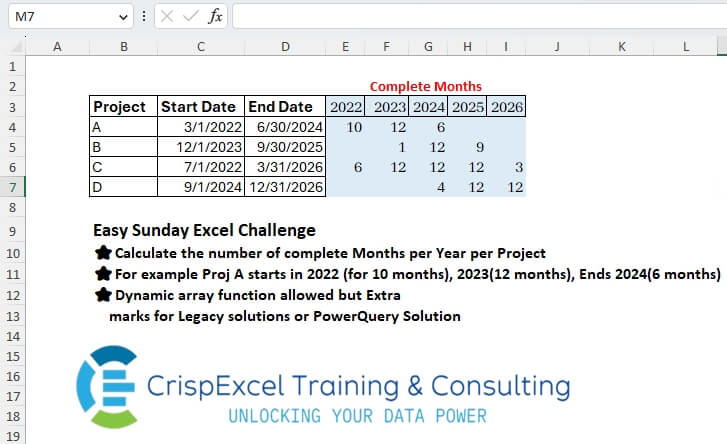
Calculate the number of complete Months per Year per Project For example, Proj A starts in 2022 (for 10 months), 2023(12 months), Ends 2024(6 months) Dynamic array function allowed, but Extra marks for Legacy solutions or PowerQuery Solution
📌 Challenge Details and Links
Challenge Number: 32
Challenge Difficulty: ⭐
📥Link to the solutions on LinkedIn
Solving the challenge of Extract Complete Months with Power Query
Power Query solution 1 for Extract Complete Months, proposed by Kris Jaganah:
let
  Source = Excel.CurrentWorkbook(){[Name = "Table1"]}[Content],
  Years = Table.ExpandListColumn(
    Table.AddColumn(
      Source,
      "Years",
      each {Date.Year(List.Min(Source[#"Start Date "])) .. Date.Year(List.Max(Source[End Date]))}
    ),
    "Years"
  ),
  Mths = Table.AddColumn(
    Years,
    "Months",
    each
      let
        a = [End Date],
        b = [#"Start Date "],
        c = Date.Year(a),
        d = Date.Year(b),
        e = Date.Month(a),
        f = Date.Month(b),
        g = [Years],
        h = if g = d then 13 - f else if g > d and g < c then 12 else if g = c then e else null
      in
        h
  ),
  Type = Table.TransformColumnTypes(Mths, {{"Years", type text}}),
  Pivot = Table.Pivot(Type, List.Distinct(Type[Years]), "Years", "Months", List.Sum)
in
  Pivot
Power Query solution 2 for Extract Complete Months, proposed by Alejandro Simón 🇵🇦 🇪🇸:
let
  Source = Excel.CurrentWorkbook(){[Name = "Table1"]}[Content],
  Pros = Table.AddColumn(
    Source,
    "A",
    each
      let
        a = {Number.From([#"Start Date "]) .. Number.From([End Date])},
        b = List.Distinct(
          List.Transform(a, each {Date.Year(Date.From(_)), Date.Month(Date.From(_))})
        ),
        c = Table.FromRows(b)
      in
        c
  )[[Project], [A]],
  Expand = Table.ExpandTableColumn(Pros, "A", {"Column1", "Column2"}),
  Sol = Table.Pivot(
    Table.TransformColumnTypes(Expand, {{"Column1", type text}}),
    List.Distinct(Table.TransformColumnTypes(Expand, {{"Column1", type text}})[Column1]),
    "Column1",
    "Column2",
    List.Count
  )
in
  Sol
Power Query solution 3 for Extract Complete Months, proposed by Brian Julius:
let
  Source = Excel.CurrentWorkbook(){[Name = "Table1"]}[Content],
  DateList = Table.ExpandListColumn(
    Table.AddColumn(
      Source,
      "Date",
      each List.Transform(
        {Number.From([#"Start Date "]) .. Number.From([End Date])},
        each Date.From(_)
      )
    ),
    "Date"
  ),
  Day = Table.AddColumn(DateList, "Day", each Date.Day([Date]), Int64.Type),
  Month = Table.AddColumn(Day, "Month", each Date.Month([Date]), Int64.Type),
  Year = Table.AddColumn(Month, "Year", each Date.Year([Date]), Int64.Type),
  Group = Table.RemoveColumns(
    Table.Group(
      Year,
      {"Project", "Start Date ", "End Date", "Month", "Year"},
      {"Complete", each if Table.RowCount(_) = List.Max([Day]) then 1 else 0}
    ),
    "Month"
  ),
  Pivot = Table.Pivot(
    Table.TransformColumnTypes(Group, {{"Year", type text}}, "en-US"),
    List.Distinct(Table.TransformColumnTypes(Group, {{"Year", type text}}, "en-US")[Year]),
    "Year",
    "Complete",
    List.Sum
  ),
  Retype = Table.TransformColumnTypes(Pivot, {{"Start Date ", type date}, {"End Date", type date}})
in
  Retype
Power Query solution 4 for Extract Complete Months, proposed by 🇮🇷 Navid Esmaeilzadeh اسماعیل زاده:
let
  Source = Excel.CurrentWorkbook(){[Name = "Table1"]}[Content],
  #"Added Custom" = Table.AddColumn(
    Source,
    "L",
    each List.Transform(
      {Number.From([#"Start Date "]) .. Number.From([End Date])},
      each Date.From(_)
    )
  ),
  #"Expanded L" = Table.ExpandListColumn(#"Added Custom", "L"),
  #"Inserted Year" = Table.AddColumn(#"Expanded L", "Year", each Date.Year([L]), Int64.Type),
  #"Inserted Month Name" = Table.AddColumn(
    #"Inserted Year",
    "Month Name",
    each Date.MonthName([L]),
    type text
  ),
  #"Grouped Rows" = Table.Group(
    #"Inserted Month Name",
    {"Project", "Year", "Month Name"},
    {{"Count", each Table.RowCount(_), Int64.Type}}
  ),
  #"Grouped Rows1" = Table.Group(
    #"Grouped Rows",
    {"Project", "Year"},
    {{"Count", each Table.RowCount(_), Int64.Type}}
  ),
  #"Pivoted Column" = Table.Pivot(
    Table.TransformColumnTypes(#"Grouped Rows1", {{"Year", type text}}, "en-US"),
    List.Distinct(
      Table.TransformColumnTypes(#"Grouped Rows1", {{"Year", type text}}, "en-US")[Year]
    ),
    "Year",
    "Count",
    List.Sum
  )
in
  #"Pivoted Column"
Power Query solution 5 for Extract Complete Months, proposed by Yaroslav Drohomyretskyi:
let
 Source = Excel.CurrentWorkbook(){[Name="Table1"]}[Content],
 Dates = Table.ExpandListColumn(Table.AddColumn(Table.TransformColumnTypes(Source,{{"Start Date ", type date}, {"End Date", type date}}), "Dates", each List.Dates([#"Start Date "], Duration.Days([End Date] -[#"Start Date "]) +1 ,
hashtag
#duration(1,0,0,0) )), "Dates"),
 YearMonth = Table.AddColumn( Table.AddColumn(Dates, "Year", each Date.Year([Dates]), Int64.Type), "Month", each Date.Month([Dates]), Int64.Type),
 Group = Table.Group(YearMonth, {"Project", "Start Date ", "End Date", "Year", "Month"}, {{"Count", each Table.RowCount(_), Int64.Type}}),
 Pivot = Table.Pivot(Table.TransformColumnTypes(Table.Group(Table.SelectRows(Table.AddColumn(Group, "Custom", each if Date.DaysInMonth(
hashtag
#date([Year],[Month],1))=[Count] then 1 else null), each [Custom] <> null and [Custom] <> ""), {"Project", "Start Date ", "End Date", "Year"}, {{"Count", each Table.RowCount(_), Int64.Type}}), {{"Year", type text}}, "en-US"), List.Distinct(Table.TransformColumnTypes(Group, {{"Year", type text}}, "en-US")[Year]), "Year", "Count", List.Sum)
in
 Pivot
Power Query solution 6 for Extract Complete Months, proposed by Mahmoud Bani Asadi:
let
  Source = Excel.CurrentWorkbook(){[Name = "Table1"]}[Content],
  ChType = Table.TransformColumnTypes(Source, {{"Start Date", type date}, {"End Date", type date}}),
  Custom = Table.AddColumn(
    ChType,
    "Custom",
    each [
      a = {Number.From([Start Date]) .. Number.From([End Date])},
      b = List.Transform(a, each Date.ToText(Date.From(_), "yyy/MM")),
      c = List.Transform(List.Distinct(b), each Text.Start(_, 4)),
      d = Table.AddColumn(Table.FromList(c), "i", each 1),
      e = Table.Pivot(d, List.Distinct(d[Column1]), "Column1", "i", List.Sum)
    ][e]
  ),
  Custom1 = Table.ExpandTableColumn(
    Custom,
    "Custom",
    Table.ColumnNames(Table.Combine(Custom[Custom]))
  )
in
  Custom1
Power Query solution 7 for Extract Complete Months, proposed by Mahmoud Bani Asadi:
let
  Source = Excel.CurrentWorkbook(){[Name = "Table1"]}[Content],
  ChType = Table.TransformColumnTypes(Source, {{"Start Date", type date}, {"End Date", type date}}),
  Custom = Table.AddColumn(
    ChType,
    "Custom",
    each Table.PromoteHeaders(
      Table.Transpose(
        Table.Group(
          Table.FromList(
            List.Transform(
              List.Distinct(
                List.Transform(
                  {Number.From([Start Date]) .. Number.From([End Date])},
                  each Date.ToText(Date.From(_), "yyy/MM")
                )
              ),
              each Text.Start(_, 4)
            )
          ),
          "Column1",
          {"x", Table.RowCount}
        )
      )
    )
  ),
  Expand = Table.ExpandTableColumn(
    Custom,
    "Custom",
    List.Transform(
      {Date.Year(List.Min(Custom[Start Date])) .. Date.Year(List.Max(Custom[End Date]))},
      Text.From
    )
  )
in
  Expand
Power Query solution 8 for Extract Complete Months, proposed by Nelson Mwangi:
let
 Source = Excel.CurrentWorkbook(){[Name = "Table1"]}[Content],
 DateList = Table.AddColumn(Source, "Custom", each [
 Start =Date.From([#"Start Date "]),
 End  =Date.From( [End Date]),
 Dates = List.Dates(Start, Duration.Days(End - Start) + 1,
hashtag
#duration(1, 0, 0, 0))
 ][Dates]),
 Expand = Table.ExpandListColumn(DateList, "Custom"),
 MonthYear = Table.AddColumn(Expand, "Period", each [Year = Date.Year([Custom]), Month = Date.Month([Custom])]),
 Xpand = Table.ExpandRecordColumn(MonthYear, "Period", {"Year", "Month"}),
 RemoveCols = Table.SelectColumns(Xpand, {"Project", "Year", "Month"}),
 TypeText = Table.TransformColumnTypes(RemoveCols, {{"Year", type text}}),
 Group = Table.Group(TypeText, {"Project", "Year"}, {{"Count", each Table.RowCount(Table.Distinct(_)), Int64.Type}}),
 Pivot = Table.Pivot(Group, List.Distinct(TypeText[Year]), "Year", "Count", List.Sum)
in
 Pivot
Solving the challenge of Extract Complete Months with Excel
Excel solution 1 for Extract Complete Months, proposed by Bo Rydobon 🇹🇭:
=LET(
   s,
   +C4:C7,
   n,
   YEARFRAC(
       s,
       D4:D7+1)*12,
   m,
   SEQUENCE(
       ,
       MAX(
           n),
       0),
   y,
   IFS(
       m
Excel solution 2 for Extract Complete Months, proposed by Rick Rothstein:
=LET(r,
   C4:D7,
   m,
   MIN(
       YEAR(
           r)),
   y,
   SEQUENCE(
       ,
       MAX(
       YEAR(
           r))-m+1,
       m),
   s,
   0+TEXTSPLIT(TEXTJOIN("|",
   ,
   MAP(C4:C7,
   D4:D7,
   LAMBDA(c,
   d,
   LET(u,
   0+LEFT(
       UNIQUE(
           TEXT(
               SEQUENCE(
                   ,
                   d-c+1,
                   c),
               "em"),
           1),
       4),
   MID(REDUCE("",
   y,
   LAMBDA(a,
   x,
   a&"-"&SUM(0+(u=x)))),
   2,
   99))))),
   "-",
   "|"),
   VSTACK(
       y,
       IF(
           s,
           s,
           "")))
Excel solution 3 for Extract Complete Months, proposed by محمد حلمي:
=REDUCE(SORT(
   UNIQUE(
       TOROW(
           YEAR(
               C4:D7)),
       1),
   ,
   ,
   1),
   D4:D7,
   LAMBDA(a,
   v,

VSTACK(a,
   LET(k,
   TAKE(
       a,
       1),
   j,
   TAKE(
       v:C7,
       1),
   y,
   YEAR(
       j),
   e,
   XLOOKUP(
       k,
       y,
       {13,
       0}-MONTH(
       j),
       0),
   IFS(e,
   ABS(
       e),
   (k<@+y)+(k>MAX(
       y)),
   "",
   1,
   12)))))
////
TAKE(
       a,
       1) = SORT(
   UNIQUE(
       TOROW(
           YEAR(
               C4:D7)),
       1),
   ,
   ,
   1)
TAKE(
       v:C7,
       1)
Excel solution 4 for Extract Complete Months, proposed by Julian Poeltl:
=LET(
   T,
   C4:D7,
   UY,
   UNIQUE(
       SORT(
           YEAR(
               TOCOL(
                   T)))),
   SP,
   --TEXTSPLIT(
       TEXTJOIN(
           "|",
           ,
           BYROW(
               T,
               LAMBDA(
                   A,
                   LET(
                       S,
                       SEQUENCE(
                           INDEX(
                               A,
                               ,
                               2)-INDEX(
                               A,
                               ,
                               1)+1,
                           ,
                           INDEX(
                               A,
                               ,
                               1)),
                       M,
                       RIGHT(
                           UNIQUE(
                               MONTH(
                                   S)&YEAR(
                                   S)),
                           4),
                       TEXTJOIN(
                           ",",
                           ,
                           MAP(
                               UY,
                               LAMBDA(
                                   B,
                                   COUNT(
                                       --IFERROR(
                                           FILTER(
                                               M,
                                               --M=B),
                                           ""))))))))),
       ",",
       "|"),
   VSTACK(
       TRANSPOSE(
           UY),
       IF(
           SP>0,
           SP,
           "")))
Excel solution 5 for Extract Complete Months, proposed by Aditya Kumar Darak 🇮🇳:
=IFERROR(
   DATEDIF(
       MAX(
           $C4,
            DATE(
                E$3,
                 1,
                 1)),
        MIN(
            $D4,
             DATE(
                 E$3,
                  12,
                  31)),
        "M") + 1,
    "")
Excel solution 6 for Extract Complete Months, proposed by Oscar Mendez Roca Farell:
=LET(c,
    E3:I3,
    m,
    --("1/1/"&c),
    d,
    D4:D7,
    e,
    EDATE(
        m,
        12),
    IF((YEAR(
        C4:C7)<=c)*(YEAR(
        d)>=c),
    DATEDIF(
        MAP(
            C4:C7&"|"&e&"|"&m,
             LAMBDA(
                 a,
                  MEDIAN(
                      --TEXTSPLIT(
                          a,
                           "|")))),
         IF(
             d<=e,
              EDATE(
                  +d,
                   1),
              e),
         "m"),
    ""))
Excel solution 7 for Extract Complete Months, proposed by Sunny Baggu:
=LET(

    _y,
    E3:I3,

    REDUCE(

         _y,

         SEQUENCE(
             ROWS(
                 C4:C7)),

         LAMBDA(
             x,
              y,

              VSTACK(

                   x,

                   LET(

                        _c1,
                        INDEX(
                            C4:C7,
                             y,
                             1),

                        _c2,
                        INDEX(
                            D4:D7,
                             y,
                             1),

                        LET(

                             _a,
                             EOMONTH(
                                 _c1,
                                  SEQUENCE(
                                      1 + DATEDIF(
                                          _c1,
                                           _c2,
                                           "M"),
                                       ,
                                       -1)) + 1,

                             _b,
                             BYCOL(
                                 N(
                                     YEAR(
                                         _a) = _y),
                                  LAMBDA(
                                      A,
                                       SUM(
                                           A))),

                             IF(
                                 _b,
                                  _b,
                                  "")
                             )
                        )
                   )
              )
         )
   )
Excel solution 8 for Extract Complete Months, proposed by Hamidi Hamid:
=INT(SUM(LET(x,
   SEQUENCE(
       366,
       ,
       DATE(
           E$3,
           1,
           1),
       1),
   (x>=$C4)*(x<=$D4)))/30)
Excel solution 9 for Extract Complete Months, proposed by Ankur Sharma:
=LET(a,
    C4:C7,
    b,
    D4:D7,
    c,
    YEAR(
        MIN(
            a)),
    d,
    SEQUENCE(
        ,
         YEAR(
             MAX(
                 b)) - c + 1,
         c),
    VSTACK(d,
    IFERROR(TEXTSPLIT(TEXTJOIN("$",
    ,
    MAP(a,
    b,
    LAMBDA(y,
    z,
    TEXTJOIN("@",
    ,
    IFERROR(EXPAND(" ",
    ,
    -(c - YEAR(
        y)),
    " "),
    ""),
    12 - MONTH(
        y) + 1,
    SEQUENCE(
        ,
         YEAR(
             z) - YEAR(
        y) - 1,
         12,
         0),
    MONTH(
             z))))),
    "@",
    "$"),
    "")))
Excel solution 10 for Extract Complete Months, proposed by Meganathan Elumalai:
=SUM(1*(TEXT(
   EOMONTH(
       $C4,
       ROW(
           INDIRECT(
               "1:"&DATEDIF(
                   $C4,
                   $D4,
                   "m")+1))-1),
   "yyyy")=(K$3&"")))
Excel solution 11 for Extract Complete Months, proposed by JvdV -:
=IFERROR(--TEXT(DATEDIF($C4,
   MIN($D4+1,
   ("12/31/"&E$3)+1),
   "m")-SUM(
       $D4:D4)+$D4,
   "[>0]"),
   "")
Excel solution 12 for Extract Complete Months, proposed by Gerson Pineda:
=DROP(REDUCE(1,
   E3:I3,
   LAMBDA(i,
   x,
   HSTACK(i,
   MAP(C4:C7,
   D4:D7,
   LAMBDA(s,
   e,
   SUM(--(YEAR(
       EOMONTH(
           s-1,
           SEQUENCE(
               DATEDIF(
                   s-1,
                   e,
                   "m"))))=x))))))),
   ,
   1)
Excel solution 13 for Extract Complete Months, proposed by Mey Tithveasna:
=MAX(0,
   INT((MIN($D4,
   --("31/12/"&E$3))-MAX($C4,
   --("1/1/"&E$3)))/30))
Excel solution 14 for Extract Complete Months, proposed by Mey Tithveasna:
=IFERROR(DATEDIF(MAX($C4,
   --("1/1/"&E$3)),
   MIN($D4,
   --("31/12/"&E$3)),
   "m")+1,
   "")
Excel solution 15 for Extract Complete Months, proposed by Milan Shrimali:
=let(
yr,

torow(
   sort(
       unique(
           arrayformula(
               year(
                   tocol(
                       C4:D7)))),
       1,
       1)),

vstack(yr,

map(C4:C7,
   D4:D7,
   lambda(x,
   y,

let(a,
   x,
   b,
   y,
   c,

map(
    a,
    b,
    lambda(
        x,
        y,

        let(
            a,
            SEQUENCE(
                DATEDIF(
                    x,
                    y,
                    "d"),
                1,
                x,
                1),
            arrayformula(
                hstack(
                    a,
                    month(
                        a),
                    year(
                        a)))))),

d,
   bycol(yr,
   lambda(x,

count(unique(filter(CHOOSECOLS(
    c,
    2),
    (choosecols(
        c,
        3)=x)))))),

bycol(
   d,
   lambda(
       x,
       if(
           x>0,
           x,
           ""))))))))
Excel solution 16 for Extract Complete Months, proposed by Peter Bartholomew:
= Breakdownλ(yearStart,
    5,
    @startDate,
    @endDate)

=LET(

    yearstart,
    DATE(
        SEQUENCE(
            1,
             n,
             2022),
         1,
         1),

    lower,
    SORT(
        HSTACK(
            yearstart,
             startDate),
         ,
         ,
        TRUE),

    upper,
    1 + SORT(
        HSTACK(
            yearstart,
             endDate),
         ,
         ,
        TRUE),

    months,
    DATEDIF(
        lower,
         upper,
         "M"),

    months
   )
Excel solution 17 for Extract Complete Months, proposed by Tomasz Jakóbczyk:
=IFS(

   YEAR(
       $D4)E$3,
   0,

   AND(
       YEAR(
       $C4)=YEAR(
       $D4),
       YEAR(
       $C4)=E$3,
       YEAR(
       $D4)=E$3),
   DATEDIF(
       $C4-1,
       $D4+1,
       "m"),

   AND(
       YEAR(
       $C4)$C4),
   12
   )
Excel solution 18 for Extract Complete Months, proposed by William Kiarie:
=IF(
   OR(
       DATE(
           E$3,
           12,
           31)<$C4,
       DATE(
           E$3,
           12,
           31)>$D4),
   "",
   IF(
        AND(
            $C4=DATE(
           E$3,
           12,
           31)),
        12,
        DATEDIF(
            $C4,
            DATE(
           E$3,
           12,
           31),
            "m")))
Solving the challenge of Extract Complete Months with Python
Python solution 1 for Extract Complete Months, proposed by Konrad Gryczan, PhD:
import pandas as pd
path = "files/Excel Challenge  30th June.xlsx"
input = pd.read_excel(path, usecols="B:D", skiprows=2, nrows=4)
test = pd.read_excel(path, usecols="E:I", skiprows=2, nrows=4).fillna(0).astype(int)
result = input.copy()
result['seq'] = result.apply(lambda x: pd.date_range(start=x["Start Date "], end=x["End Date"], freq='M'), axis=1)
result = result.explode('seq')
result['year'] = result['seq'].dt.year
result['val'] = 1
result = result[['Project', 'year', 'val']].
 pivot_table(index='Project', columns='year', values='val', aggfunc='sum').
 fillna(0).astype(int)
result = result.reset_index().drop(columns='Project')
print(result.equals(test))
Solving the challenge of Extract Complete Months with R
R solution 1 for Extract Complete Months, proposed by Konrad Gryczan, PhD:
library(tidyverse)
library(readxl)
path = "files/Excel Challenge 30th June.xlsx"
input = read_xlsx(path, range = "B3:D7")
test = read_xlsx(path, range = "E3:I7")
result = input %>%
 mutate(seq = map2(`Start Date`, `End Date`, seq, by = "month")) %>%
 unnest_longer(seq) %>%
 mutate(year = year(seq),
 val = 1) %>%
 select(Project, year, val) %>%
 pivot_wider(names_from = year, values_from = val, values_fn = sum) %>%
 select(-Project)
identical(result, test)
# [1] TRUE