
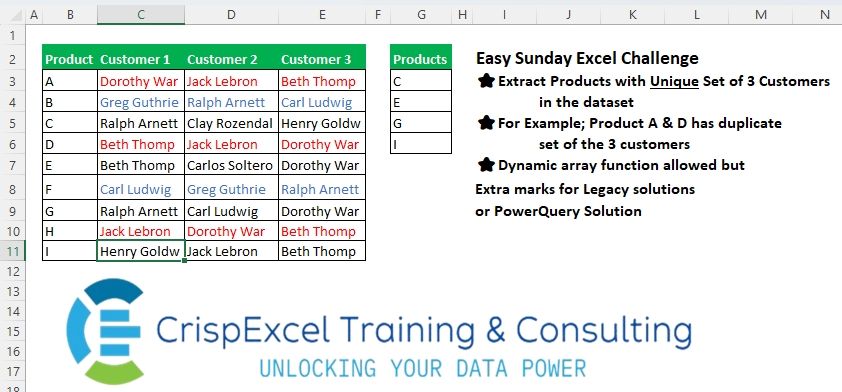
Extract Products with a Unique Set of 3 Customers in the whole dataset For Example, Product A & D has a duplicate set of the 3 customers Dynamic array function allowed but Extra marks for Legacy solutions or PowerQuery Solution.
📌 Challenge Details and Links
Challenge Number: 27
Challenge Difficulty: ⭐
📥Link to the solutions on LinkedIn
Solving the challenge of Lookup Unique Set of Duplicates with Power Query
Power Query solution 1 for Lookup Unique Set of Duplicates, proposed by Zoran Milokanović:
let
  Source = Excel.CurrentWorkbook(){[Name = "Input"]}[Content],
  R = Table.ToRows(Source),
  S = List.TransformMany(
    R,
    each {{}, {_{0}}}{
      Number.From(List.Count(List.Select(R, (r) => List.ContainsAll(r, List.Skip(_)))) = 1)
    },
    (i, _) => _
  )
in
  S
Power Query solution 2 for Lookup Unique Set of Duplicates, proposed by Kris Jaganah:
let
  Source = Excel.CurrentWorkbook(){[Name = "Table1"]}[Content],
  Unpivot = Table.UnpivotOtherColumns(Source, {"Product"}, "Attribute", "Value"),
  Group = Table.Group(Unpivot, {"Product"}, {"Com", each Text.Combine(List.Sort([Value]))}),
  Count = Table.Group(
    Group,
    {"Com"},
    {{"Count", each List.Count([Product])}, {"Products", each Text.Combine([Product])}}
  ),
  Keep = Table.SelectColumns(Table.SelectRows(Count, each ([Count] = 1)), {"Products"})
in
  Keep
Power Query solution 3 for Lookup Unique Set of Duplicates, proposed by Kris Jaganah:
let
  Source = Excel.CurrentWorkbook(){[Name = "Table1"]}[Content],
  Rec1 = Table.AddColumn(
    Source,
    "Rec",
    each Text.Combine(List.Sort(List.RemoveFirstN(Record.ToList(_), 1)))
  ),
  Group = Table.Group(
    Rec1,
    {"Rec"},
    {{"Count", each List.Count(_)}, {"Products", each Text.Combine([Product])}}
  ),
  Keep = Table.SelectColumns(Table.SelectRows(Group, each ([Count] = 1)), {"Products"})
in
  Keep
Power Query solution 4 for Lookup Unique Set of Duplicates, proposed by Aditya Kumar Darak 🇮🇳:
let
  Source = Excel.CurrentWorkbook(){[Name = "Table1"]}[Content],
  List   = Table.AddColumn(Source, "R", each List.Sort(List.Skip(Record.FieldValues(_)))),
  Group  = Table.Group(List, "R", {{"Product", each [Product]}, {"Count", Table.RowCount}}),
  Filter = Table.SelectRows(Group, each [Count] = 1)[[Product]],
  Return = Table.ExpandListColumn(Filter, "Product")
in
  Return
Power Query solution 5 for Lookup Unique Set of Duplicates, proposed by Alejandro Simón 🇵🇦 🇪🇸:
let
  Source = Excel.CurrentWorkbook(){[Name = "Table1"]}[Content],
  Reorder = List.Transform(Table.ToRows(Source), each List.Sort(List.Skip(_))),
  Unicos = List.Select(
    List.Distinct(Reorder),
    each List.Count(List.Select(Reorder, (x) => x = _)) = 1
  ),
  Sol = Table.SelectRows(
    Source,
    each List.ContainsAny(Unicos, {List.Sort(List.Skip(Record.ToList(_)))})
  )[[Product]]
in
  Sol
Power Query solution 6 for Lookup Unique Set of Duplicates, proposed by Brian Julius:
let
  Source = Excel.CurrentWorkbook(){[Name = "Table1"]}[Content],
  Unpivot = Table.RemoveColumns(Table.UnpivotOtherColumns(Source, {"Product"}, "X", "Cust"), "X"),
  Group = Table.Group(Unpivot, {"Product"}, {{"All", each List.Sort([Cust], Order.Ascending)}}),
  Extract = Table.TransformColumns(
    Group,
    {"All", each Text.Combine(List.Transform(_, Text.From), ",")}
  ),
  ReGroup = Table.Group(
    Extract,
    {"All"},
    {{"Count", each Table.RowCount(_), Int64.Type}, {"All.1", each _}}
  ),
  Expand = Table.ExpandTableColumn(ReGroup, "All.1", {"Product"}, {"Product"}),
  Filter = Table.SelectRows(Expand, each ([Count] = 1)),
  Clean = Table.SelectColumns(Filter, {"Product"})
in
  Clean
Power Query solution 7 for Lookup Unique Set of Duplicates, proposed by Ramiro Ayala Chávez:
let
  Source = Excel.CurrentWorkbook(){[Name = "Table1"]}[Content],
  T      = List.Transform,
  S      = List.Select,
  a      = T(Table.ToRows(Source), each List.Sort(List.Skip(_))),
  b      = List.Distinct(a),
  c      = List.Difference(a, b),
  d      = S(a, each _ <> c{0} and _ <> c{1} and _ <> c{2}),
  e      = List.Zip({Source[Product], a}),
  f      = T(S(e, each _{1} = d{0} or _{1} = d{1} or _{1} = d{2} or _{1} = d{3}), each _{0}),
  Sol    = Table.FromColumns({f}, {"Products"})
in
  Sol
Power Query solution 8 for Lookup Unique Set of Duplicates, proposed by 🇮🇷 Navid Esmaeilzadeh اسماعیل زاده:
let
  Source = Excel.CurrentWorkbook(){[Name = "Table1"]}[Content],
  #"Changed Type" = Table.TransformColumnTypes(
    Source,
    {
      {"Product", type text},
      {"Customer 1", type text},
      {"Customer 2", type text},
      {"Customer 3", type text}
    }
  ),
  #"Added Custom" = Table.AddColumn(
    #"Changed Type",
    "Help",
    each Text.Combine(List.Sort(List.Skip(Record.ToList(_), 1)), "-")
  ),
  #"Grouped Rows" = Table.Group(
    #"Added Custom",
    {"Help"},
    {
      {"Count", each Table.RowCount(_), Int64.Type},
      {
        "Tbl",
        each _,
        type table [
          Product = nullable text,
          Customer 1 = nullable text,
          Customer 2 = nullable text,
          Customer 3 = nullable text,
          Help = text
        ]
      }
    }
  ),
  #"Filtered Rows" = Table.SelectRows(#"Grouped Rows", each ([Count] = 1)),
  #"Expanded Tbl" = Table.ExpandTableColumn(
    #"Filtered Rows",
    "Tbl",
    {"Product", "Customer 1", "Customer 2", "Customer 3"},
    {"Product", "Customer 1", "Customer 2", "Customer 3"}
  ),
  #"Removed Other Columns" = Table.SelectColumns(
    #"Expanded Tbl",
    {"Product", "Customer 1", "Customer 2", "Customer 3"}
  )
in
  #"Removed Other Columns"
Power Query solution 9 for Lookup Unique Set of Duplicates, proposed by Mahmoud Bani Asadi:
Power query (M solution) in one step:
= Table.SelectRows(Table.Group(
 Table.CombineColumns(Source,List.Skip(Table.Schema(Source)[Name]),
 each Text.Combine(List.Sort(_)),
 "Combine")
, {"Combine"}, {{"Count", each Table.RowCount(_)}, {"Product", each [Product]{0}}}),each [Count]=1)[[Product]]
Power Query solution 10 for Lookup Unique Set of Duplicates, proposed by Mahmoud Bani Asadi:
let
  Source = Excel.CurrentWorkbook(){[Name = "Table1"]}[Content],
  #"Unpivoted Other Columns" = Table.UnpivotOtherColumns(Source, {"Product"}, "Attribute", "Value"),
  #"Grouped Rows" = Table.Group(
    #"Unpivoted Other Columns",
    {"Product"},
    {{"Count", each Text.Combine(List.Sort([Value])), Int64.Type}}
  ),
  #"Grouped Rows1" = Table.Group(
    #"Grouped Rows",
    {"Count"},
    {
      {"Count.1", each Table.RowCount(_), Int64.Type},
      {"Product", each List.Min([Product]), type text}
    }
  ),
  #"Filtered Rows" = Table.SelectRows(#"Grouped Rows1", each ([Count.1] = 1)),
  #"Removed Other Columns" = Table.SelectColumns(#"Filtered Rows", {"Product"})
in
  #"Removed Other Columns"
Power Query solution 11 for Lookup Unique Set of Duplicates, proposed by Mahmoud Bani Asadi:
let
  Source = Excel.CurrentWorkbook(){[Name = "Table1"]}[Content],
  Group1 = Table.Group(
    Source,
    {"Product"},
    {{"Combine", each Text.Combine(List.Sort(List.Skip(Table.ToRows(_){0})))}}
  ),
  Group2 = Table.SelectRows(
    Table.Group(
      Group1,
      {"Combine"},
      {{"Count", each Table.RowCount(_)}, {"Product", each [Product]{0}}}
    ),
    each [Count] = 1
  )[[Product]]
in
  Group2
Power Query solution 12 for Lookup Unique Set of Duplicates, proposed by Jyoti K:
let
  // Load the source data from the named table in the Excel workbook
  Source = Excel.CurrentWorkbook(){[Name = "Table1"]}[Content],
  // Add the "Merged" column by combining and sorting the Customer values
  InsertedMergedColumn = Table.AddColumn(
    Source,
    "Merged",
    each Text.Combine(List.Sort({[Customer 3], [Customer 1], [Customer 2]}), ",")
  ),
  // Group by the "Merged" column and create a nested table for each group
  GroupedRows = Table.Group(
    InsertedMergedColumn,
    {"Merged"},
    {
      {
        "Count",
        each _,
        type table [
          Product = nullable text,
          Customer 1 = nullable text,
          Customer 2 = nullable text,
          Customer 3 = nullable text,
          Merged = text
        ]
      }
    }
  ),
  // Add a new column to count the number of rows in each group
  AggregatedCount = Table.AddColumn(GroupedRows, "Count of Merged", each Table.RowCount([Count])),
  // Filter the grouped table to keep only the groups where the count is 1
  FilteredRows = Table.SelectRows(AggregatedCount, each [Count of Merged] = 1),
  // Expand the nested table to return to the original table structure
  ExpandedRows = Table.ExpandTableColumn(
    FilteredRows,
    "Count",
    {"Product", "Customer 1", "Customer 2", "Customer 3", "Merged"}
  )
in
  ExpandedRows
Solving the challenge of Lookup Unique Set of Duplicates with Python
Python solution 1 for Lookup Unique Set of Duplicates, proposed by Konrad Gryczan, PhD:
import pandas as pd
input = pd.read_excel("files/Excel Challenge 19th May.xlsx", usecols="B:E", skiprows=1, nrows=10)
test = pd.read_excel("files/Excel Challenge 19th May.xlsx", usecols= "G", skiprows=1, nrows=4)
result = input.assign(Combined=input.iloc[:, 1:4].apply(lambda x: ', '.join(sorted(x.dropna())), axis=1))
result = result.assign(n=result.groupby('Combined')['Combined'].transform('size')).query('n == 1').loc[:, ['Product']].reset_index(drop=True)
result.columns = ['Products']
print(result.equals(test))
Solving the challenge of Lookup Unique Set of Duplicates with Python in Excel
Python in Excel solution 1 for Lookup Unique Set of Duplicates, proposed by Abdallah Ally:
df = xl("B2:E11", headers=True)
# Perform data wrangling
df['Concat'] = df.apply(lambda x: ''.join(sorted(x[1:])), axis=1)
df['Unique'] = df['Concat'].map(lambda x: (df['Concat'] == x).sum() == 1)
df['Product'][df['Unique']]
Python in Excel solution 2 for Lookup Unique Set of Duplicates, proposed by Owen Price:
Here's a Python in Excel version.
I wanted to avoid sorting and concatenating, so:
Solving the challenge of Lookup Unique Set of Duplicates with R
R solution 1 for Lookup Unique Set of Duplicates, proposed by Konrad Gryczan, PhD:
library(tidyverse)
library(readxl)
input = read_excel("files/Excel Challenge 19th May.xlsx", range = "B2:E11")
test = read_excel("files/Excel Challenge 19th May.xlsx", range = "G2:G6")
result = input %>%
 mutate(Combined = pmap_chr(.[2:4], ~ toString(sort(c(...))))) %>%
 mutate(n = n(), .by = Combined) %>%
 filter(n == 1) %>%
 select(Products = Product)
identical(result, test)
#> [1] TRUE