
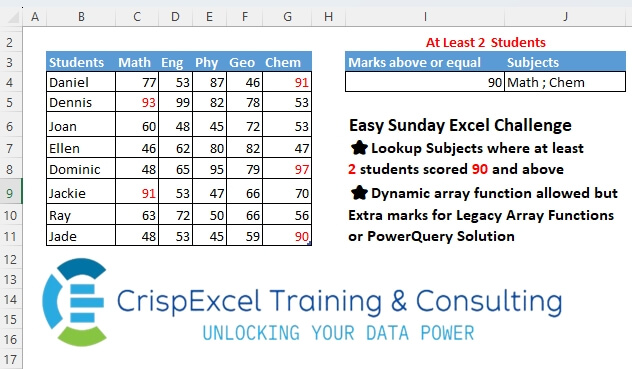
Lookup Subjects where at least 2 students scored 90 and above Dynamic array function allowed, but Extra marks for Legacy Array Functions or PowerQuery Solution
📌 Challenge Details and Links
Challenge Number: 19
Challenge Difficulty: ⭐
📥Download Sample File
📥Link to the solutions on LinkedIn
Solving the challenge of Lookup and Concat Data Using a Criteria with Power Query
Power Query solution 1 for Lookup and Concat Data Using a Criteria, proposed by Aditya Kumar Darak 🇮🇳:
let
  Source = Excel.CurrentWorkbook(){[Name = "Table1"]}[Content],
  Demoted = Table.DemoteHeaders(Source),
  ToCol = List.RemoveFirstN(Table.ToColumns(Demoted), 1),
  Select = List.Select(
    ToCol,
    each [
      RF     = List.RemoveFirstN(_, 1),
      Select = List.Select(RF, (f) => f >= 90),
      Count  = List.Count(Select) >= 2
    ][Count]
  ),
  Return = Text.Combine(List.Transform(Select, each _{0}), ", ")
in
  Return
Power Query solution 2 for Lookup and Concat Data Using a Criteria, proposed by Alejandro Simón 🇵🇦 🇪🇸:
let
  Source = Excel.CurrentWorkbook(){[Name = "Table1"]}[Content],
  Mark = Excel.CurrentWorkbook(){[Name = "Table2"]}[Content][Marks above or equal]{0},
  Count = List.Transform(
    List.Skip(Table.ToColumns(Source)),
    each List.Count(List.Select(_, (x) => x >= Mark))
  ),
  Pos = List.Transform(
    List.Select(List.Zip({{0 .. List.Count(Count) - 1}, Count}), each _{1} > 1),
    each _{0}
  ),
  Sol = Text.Combine(List.Transform(Pos, each Table.ColumnNames(Source){_ + 1}), "; ")
in
  Sol
Power Query solution 3 for Lookup and Concat Data Using a Criteria, proposed by Brian Julius:
let
  Source = Excel.CurrentWorkbook(){[Name = "Table1"]}[Content],
  Threshold = 90,
  UnpivotOther = Table.RemoveColumns(
    Table.UnpivotOtherColumns(Source, {"Students"}, "Subjects", "MarksGTE90"),
    "Students"
  ),
  Filter = Table.SelectRows(UnpivotOther, each [MarksGTE90] >= Threshold),
  Group = Table.Group(Filter, {"Subjects"}, {{"Count", each Table.RowCount(_), Int64.Type}}),
  Filter2 = Table.AddColumn(
    Table.RemoveColumns(Table.SelectRows(Group, each [Count] >= 2), "Count"),
    "MarksGreaterThanOrEqualTo",
    each Threshold
  ),
  Group2 = Table.Group(Filter2, {"MarksGreaterThanOrEqualTo"}, {{"Subjects", each [Subjects]}}),
  Extract = Table.TransformColumns(
    Group2,
    {"Subjects", each Text.Combine(List.Transform(_, Text.From), "; "), type text}
  )
in
  Extract
Power Query solution 4 for Lookup and Concat Data Using a Criteria, proposed by Bhavya Gupta:
let
  Source = Excel.CurrentWorkbook(){[Name = "Table1"]}[Content],
  #"Unpivoted Other Columns" = Table.UnpivotOtherColumns(Source, {"Students"}, "Subject", "Marks"),
  #"Filtered Rows" = Table.SelectRows(#"Unpivoted Other Columns", each [Marks] >= 90),
  #"Grouped Rows" = Table.Group(
    #"Filtered Rows",
    {"Subject"},
    {{"Count", each Table.RowCount(_), Int64.Type}}
  ),
  #"Filtered Rows1" = Table.SelectRows(#"Grouped Rows", each [Count] >= 2),
  #"Removed Other Columns" = Table.SelectColumns(#"Filtered Rows1", {"Subject"})
in
  #"Removed Other Columns"
Power Query solution 5 for Lookup and Concat Data Using a Criteria, proposed by Mahmoud Bani Asadi:
M code in one step:
= Text.Combine(Table.SelectRows(Record.ToTable( Record.FromList(List.Transform(List.Skip(Table.ToColumns(Source)),each List.Count(List.Select(_,each _>=90))),List.Skip(Table.ColumnNames(Source)))),each [Value]>1)[Name],", ")
Power Query solution 6 for Lookup and Concat Data Using a Criteria, proposed by Mahmoud Bani Asadi:
let
  Source    = Excel.CurrentWorkbook(){[Name = "Data"]}[Content],
  Unpivot   = Table.UnpivotOtherColumns(Source, {"Students"}, "Attribute", "Value"),
  Filter    = Table.SelectRows(Unpivot, each [Value] >= 90),
  Group     = Table.Group(Filter, {"Attribute"}, {{"Count", each Table.RowCount(_), Int64.Type}}),
  Filter2   = Table.SelectRows(Group, each [Count] > 1),
  DrillDown = Text.Combine(Filter2[Attribute], ", ")
in
  DrillDown
Solving the challenge of Lookup and Concat Data Using a Criteria with Excel
Excel solution 1 for Lookup and Concat Data Using a Criteria, proposed by Rick Rothstein:
=MID(
   IF(
       COUNTIF(
           C4:C11,
           ">="&I4)>1,
       "; "&C3,
       "")&IF(
       COUNTIF(
           D4:D11,
           ">="&I4)>1,
       "; "&D3,
       "")&IF(
       COUNTIF(
           E4:E11,
           ">="&I4)>1,
       "; "&E3,
       "")&IF(
       COUNTIF(
           F4:F11,
           ">="&I4)>1,
       "; "&F3,
       "")&IF(
       COUNTIF(
           G4:G11,
           ">="&I4)>1,
       "; "&G3,
       ""),
   3,
   99)

Dynamic Arrays...
=MID(
   CONCAT(
       BYCOL(
           C3:G11,
           LAMBDA(
               c,
               IF(
                   COUNTIF(
                       c,
                       ">="&I4)>1,
                   "; "&INDEX(
                       c,
                       1),
                   "")))),
   3,
   99)
Excel solution 2 for Lookup and Concat Data Using a Criteria, proposed by 🇰🇷 Taeyong Shin:
=TEXTJOIN(" ; ",
    ,
    REPT(C3:G3,
    MMULT(TRANSPOSE(
        N(
            +B4:B11) + 1),
    --(C4:G11 >= 90)) > 1))

365

=MID(
   REDUCE(
       "",
        C3:G3,
        LAMBDA(
            a,
            v,
             a & REPT(
                 " ; " & v,
                  COUNTIF(
                      XLOOKUP(
                          v,
                           C3:G3,
                           C4:G11),
                       ">=90") > 1))),
    4,
    99)
Excel solution 3 for Lookup and Concat Data Using a Criteria, proposed by Kris Jaganah:
=ARRAYTOTEXT(FILTER(Table1[[
hashtag
#Headers],
   [Math]:[Chem]],
   BYCOL(--(Table1[[Math]:[Chem]]>89),
   SUM)>1))
Excel solution 4 for Lookup and Concat Data Using a Criteria, proposed by Julian Poeltl:
=LET(T,
   Table1[
hashtag
#All],
   M,
   I4,
   FL,
   L_Flattena2DTableintoColumns(
       T),
   G,
   CHOOSECOLS(
       FL,
       3),
   S,
   CHOOSECOLS(
       FL,
       2),
   GN,
   G>=M,
   SU,
   UNIQUE(
       S),
   C,
   BYROW(SU,
   LAMBDA(A,
   COUNTA(FILTER(S,
   (S=A)*(GN=TRUE))))),
   TEXTJOIN(
       ", ",
       ,
       FILTER(
           SU,
           C>=2)))

Pre-programmed Lambdas:
L_Flattena2DTableintoColumns:
=LAMBDA(Table,
   LET(ROWS,
   ROWS(
       DROP(
           Table,
           1,
           1)),
   COLUMNS,
   COLUMNS(
       DROP(
           Table,
           1,
           1)),
   HRows,
   CHOOSEROWS(TAKE(
       Table,
       -ROWS,
       1),
   (ROUNDDOWN(
       SEQUENCE(
           ROWS*COLUMNS,
           ,
           0)/COLUMNS,
       0)+1)),
   HColumn,
   CHOOSEROWS(
       TOCOL(
           TAKE(
               Table,
               1,
               -COLUMNS)),
       L_RepeatingNumberSequence(
           COLUMNS,
           ROWS)),
   Data,
   TOCOL(
       DROP(
           Table,
           1,
           1)),
   HSTACK(
       HRows,
       HColumn,
       Data)))
L_RepeatingNumberSequence:
=LAMBDA(
   Numbers,
   Repetitions,
   IF(
       MOD(
           SEQUENCE(
               Numbers*Repetitions),
           Numbers)=0,
       Numbers,
       MOD(
           SEQUENCE(
               Repetitions*Numbers),
           Numbers)))
Excel solution 5 for Lookup and Concat Data Using a Criteria, proposed by Aditya Kumar Darak 🇮🇳:
=ARRAYTOTEXT(FILTER(C3:G3,
    BYCOL(--(C4:G11 >= I4),
    LAMBDA(
        a,
         SUM(
             a))) >= 2))
Excel solution 6 for Lookup and Concat Data Using a Criteria, proposed by Oscar Mendez Roca Farell:
=TEXTJOIN(
   "; ",
    ,
    REPT(
        C3:G3,
         MMULT(
             TOROW(
                 C4:C11)^0,
              N(
                  C4:G11>I4))>1))
Excel solution 7 for Lookup and Concat Data Using a Criteria, proposed by Sunny Baggu:
=LET(

    _n,
    MMULT(

         SEQUENCE(
             ,
              ROWS(
                  Table13[Students])) ^ 0,

         N(
             Table13[[Math]:[Chem]] >= 90)
         ),

    TEXTJOIN(

         " ; ",

         ,

         TOROW(
             IF(
                 _n >= 2,
                  Table13[[
                 hashtag
                 #Headers],
                 [Math]:[Chem]],
                  x),
              3)
         )
   )
Excel solution 8 for Lookup and Concat Data Using a Criteria, proposed by Sunny Baggu:
=TEXTJOIN(

    " ; ",

    ,

    FILTER(

         Table1[[
        hashtag
        #Headers],
        [Math]:[Chem]],

         BYCOL(
             N(
                 Table1[[Math]:[Chem]] >= 90),
              LAMBDA(
                  a,
                   SUM(
                       a))) >= 2
         )
   )
Excel solution 9 for Lookup and Concat Data Using a Criteria, proposed by Abdallah Ally:
=TEXTJOIN(
   " ; ",
   ,
   FILTER(
       C3:G3,
       BYCOL(
           IF(
               C4:G11>=90,
               1,
               0),
           LAMBDA(
               x,
                SUM(
                    x)))>1))
Excel solution 10 for Lookup and Concat Data Using a Criteria, proposed by Asheesh Pahwa:
=LET(mrks,
   F40:J47,
   sub,
   F39:J39,
   tf,
   --(mrks>=80),

TEXTJOIN(
   ",",
   1,
   FILTER(
       sub,
       BYCOL(
           tf,
           LAMBDA(
               x,
               SUM(
                   x)))>1)))
Excel solution 11 for Lookup and Concat Data Using a Criteria, proposed by CA Raghunath Gundi:
=TEXTJOIN(
   "; ",
   TRUE,
   FILTER(
       $C$3:$G$3,
       BYCOL(
           IF(
               C4:G11>=I4,
               1,
               0),
           LAMBDA(
               a,
               SUM(
                   a)))>=2))
Excel solution 12 for Lookup and Concat Data Using a Criteria, proposed by Milan Shrimali:
=LET(
   A,
   BYCOL(
       C3:G11,
       LAMBDA(
           X,
           COUNTIF(
               X,
               ">="&I4))),
   B,
   IF(
       A>=2,
       C3:G3,
       0),
   TEXTJOIN(
       " ; ",
       ,
       FILTER(
           B,
           ISTEXT(
               B)=TRUE)))
Excel solution 13 for Lookup and Concat Data Using a Criteria, proposed by Peter Bartholomew:
= LET(

    criterionMet?,
    BYCOL(
        scores,
         LAMBDA(
             s,
              COUNTIFS(
                  s,
                   ">=90"))) >= 2,

    TEXTJOIN(
        "; ",
        ,
        FILTER(
            subject,
             criterionMet?))
    )
Legacy solution
{= TEXTJOIN(
   ", ",
    ,
    IF(
        MMULT(
            SIGN(
                TRANSPOSE(
                    ISTEXT(
                        students))),
             SIGN(
                 scores>=90)) >= 2,
         subject,
         ""))
Excel solution 14 for Lookup and Concat Data Using a Criteria, proposed by Mahmoud Bani Asadi:
=TEXTJOIN(", ",
   ,
   IF(TRANSPOSE(
       ROW(
           INDIRECT(
               "1:"&COUNTA(
                   C2:G2))))*(MMULT(TRANSPOSE(
       ROW(
           INDIRECT(
               "1:"&COUNTA(
                   B3:B10))))^0,
   --(C3:G10>=90))>=2),
   C2:G2,
   ""))
Excel solution 15 for Lookup and Concat Data Using a Criteria, proposed by Mahmoud Bani Asadi:
=ARRAYTOTEXT(
   FILTER(
       C2:G2,
       BYCOL(
           N(
               C3:G10>=I4),
           SUM)>1))
Excel solution 16 for Lookup and Concat Data Using a Criteria, proposed by Mahmoud Bani Asadi:
=LET(
a,
   GROUPBY(TOCOL(
       IFNA(
           C2:G2,
           B3:B10)),
   TOCOL(
       C3:G10),
   LAMBDA(x,
   SUM(--(x>=I4))),
   ,
   0,
   -1),

ARRAYTOTEXT(
   TAKE(
       FILTER(
           a,
           TAKE(
               a,
               ,
               -1)>1),
       ,
       1)))
Excel solution 17 for Lookup and Concat Data Using a Criteria, proposed by Craig Hatmaker:
=TEXTJOIN(
    ";",
    ,

    FILTER(
         Table1[
        hashtag
        #Headers],

         BYCOL(
              Table1,
              LAMBDA(
                   Col,
                   LARGE(
                        Col,
                        2) >= 90))))