
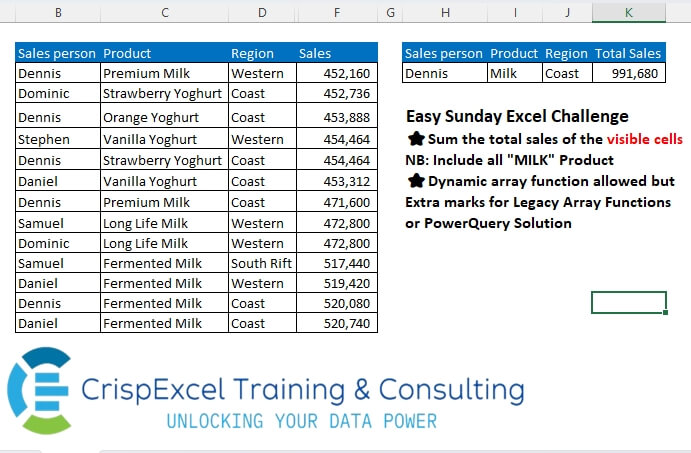
Sum the total sales of the visible cells NB: Include all “MILK” Product Dynamic array function allowed but Extra marks for Legacy Array Functions or PowerQuery Solution
📌 Challenge Details and Links
Challenge Number: 16
Challenge Difficulty: ⭐⭐
📥Download Sample File
📥Link to the solutions on LinkedIn
Solving the challenge of Sum Visible Rows Using a Criteria with Power Query
Power Query solution 1 for Sum Visible Rows Using a Criteria, proposed by Alejandro Simón 🇵🇦 🇪🇸:
let
  Source = Excel.CurrentWorkbook(){[Name = "Table1"]}[Content],
  Rows = Table.SelectRows(
    Source,
    each Text.Contains([A], "VISIBLE")
      and Text.Contains([Product], "Milk")
      and [Sales person]
      = "Dennis" and [Region]
      = "Coast"
  ),
  Milk = Table.TransformColumns(Rows, {"Product", each Text.Replace(_, _, "Milk")}),
  Sol = Table.Group(
    Milk,
    {"Sales person", "Product", "Region"},
    {{"Total Sales", each List.Sum([Sales])}}
  )
in
  Sol
Power Query solution 2 for Sum Visible Rows Using a Criteria, proposed by Brian Julius:
let
  Source = Excel.CurrentWorkbook(){[Name = "Table1"]}[Content],
  FilterVisible = Table.SelectRows(Source, each ([IsHidden] = "VISIBLE")),
  AddIsMilk = Table.AddColumn(
    FilterVisible,
    "IsMilk",
    each if Text.Contains([Product], "Milk") then "Milk" else "Non-Milk"
  ),
  GroupSum = Table.Group(
    AddIsMilk,
    {"IsMilk", "Sales person", "Region"},
    {
      {
        "All",
        each _,
        type table [
          IsHidden = text,
          Sales person = text,
          Product = text,
          Region = text,
          Date = datetime,
          Sales = number,
          IsMilk = text
        ]
      },
      {"Total Sales", each List.Sum([Sales]), type number}
    }
  ),
  Filter = Table.SelectRows(GroupSum, each ([IsMilk] = "Milk")),
  Clean = Table.RemoveColumns(Table.RenameColumns(Filter, {{"IsMilk", "Product"}}), "All"),
  Sort = Table.Sort(Clean, {{"Region", Order.Ascending}, {"Sales person", Order.Ascending}})
in
  Sort
Solving the challenge of Sum Visible Rows Using a Criteria with Excel
Excel solution 1 for Sum Visible Rows Using a Criteria, proposed by محمد حلمي:
=SUM((B3:B20=H3)*ISNUMBER(
   FIND(
       I3,
       C3:C20))*(D3:D20=J3)*F3:F20*
SUBTOTAL(
   103,
   OFFSET(
       C3,
       ROW(
           C3:C20)-3,
       )))
Excel solution 2 for Sum Visible Rows Using a Criteria, proposed by Kris Jaganah:
=SUM(MAP(
   F3:F20,
   LAMBDA(
       x,
       AGGREGATE(
           9,
           3,
           x)))*(B3:B20=H3)*(D3:D20=J3)*(RIGHT(
   C3:C20,
   4)=I3))
Excel solution 3 for Sum Visible Rows Using a Criteria, proposed by Julian Poeltl:
=SUM(BYROW(
   F3:F20,
   LAMBDA(
       ARR,
        AGGREGATE(
            9,
            7,
            ARR)))*(B3:B20=H3)*(D3:D20=J3)*(RIGHT(
   C3:C20,
   4)=I3))
Excel solution 4 for Sum Visible Rows Using a Criteria, proposed by Anjan Kumar Bose:
=SUMIFS(
   E2:E14,
   A2:A14,
   I2,
   C2:C14,
   K2,
   B2:B14,
   B2)+SUMIFS(
   E2:E14,
   A2:A14,
   I2,
   C2:C14,
   K2,
   B2:B14,
   B9)+SUMIFS(
   E2:E14,
   A2:A14,
   I2,
   C2:C14,
   K2,
   B2:B14,
   B11)
Excel solution 5 for Sum Visible Rows Using a Criteria, proposed by Rahim Zulfiqar Ali:
=SUM(FILTER(F2:F20,
   (B2:B20=H3)*(D2:D20=J3)*(ISNUMBER(
       SEARCH(
           I3,
           C2:C20))*(SUBTOTAL(
       103,
       OFFSET(
           B2,
           ROW(
               B2:B20)-MIN(
               ROW(
               B2:B20)),
           0))=1))))