
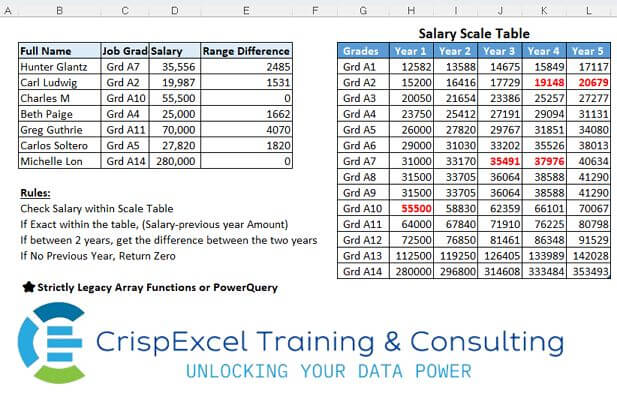
Rules: Check Salary within Scale Table If Exact within the table, (Salary-previous year Amount) If between 2 years, get the difference between the two years If No Previous Year, Return Zero Strictly Legacy Array Functions or PowerQuery
📌 Challenge Details and Links
Challenge Number: 14
Challenge Difficulty: ⭐⭐⭐
📥Download Sample File
📥Link to the solutions on LinkedIn
Solving the challenge of Lookup and Get the Difference with Power Query
Power Query solution 1 for Lookup and Get the Difference, proposed by Owen Price:
Decided to try a different approach with PQ.
Code:
https://gist.github.com/ncalm/8058e066c913e55b266dfc1115ad273b
Description (1 of 2 - continued below)
Power Query solution 2 for Lookup and Get the Difference, proposed by Nelson Mwangi:
let
  Source = Excel.CurrentWorkbook(){[Name = "tblSalary"]}[Content],
  Merge = Table.NestedJoin(Source, {"Job Grade "}, tblScale, {"Grades"}, "NewColumn"),
  Years = List.Skip(Table.ColumnNames(Table.Combine(Merge[NewColumn])), 1),
  XpandMerge = Table.ExpandTableColumn(Merge, "NewColumn", Years),
  CustomCol = Table.AddColumn(
    XpandMerge,
    "Range Difference",
    each
      if [Salary] <= [Year 1] then
        0
      else if [Salary] = [Year 2] then
        [Salary] - [Year 1]
      else if [Salary] = [Year 3] then
        [Salary] - [Year 2]
      else if [Salary] = [Year 4] then
        [Salary] - [Year 3]
      else if [Salary] = [Year 5] then
        [Salary] - [Year 4]
      else if [Salary] > [Year 1] and [Salary] < [Year 2] then
        [Year 2] - [Year 1]
      else if [Salary] > [Year 2] and [Salary] < [Year 3] then
        [Year 3] - [Year 2]
      else if [Salary] > [Year 3] and [Salary] < [Year 4] then
        [Year 4] - [Year 3]
      else
        [Year 5] - [Year 4]
  ),
  DeleteCols = Table.SelectColumns(
    CustomCol,
    {"Full Name", "Job Grade ", "Salary", "Range Difference"}
  )
in
  DeleteCols
Solving the challenge of Lookup and Get the Difference with Excel
Excel solution 1 for Lookup and Get the Difference, proposed by Bo Rydobon 🇹🇭:
=IFNA(
   INDEX(
       $H$4:$L$17-$G$4:$K$17,
       MATCH(
           C4,
           $G$4:$G$17,
           ),
       1+MATCH(
           D4-1,
           INDEX(
               $H$4:$L$17,
               MATCH(
           C4,
           $G$4:$G$17,
           ),
               ))),
   0)

=MAP(
   C4:C10,
   D4:D10,
   LAMBDA(
       j,
       s,
       LET(
           g,
           G4:G17,
           y,
           H4:L17,
           IFERROR(
               INDEX(
                   y-G4:L17,
                   XMATCH(
                       j,
                       g),
                   XMATCH(
                       s,
                       XLOOKUP(
                           j,
                           g,
                           y),
                       1)),
               ))))
Excel solution 2 for Lookup and Get the Difference, proposed by محمد حلمي:
= $G$3:$L$17

=IFERROR(
   IF(
       MATCH(
           D4,

           VLOOKUP(
               C4,
               e,
               COLUMN(
                   B:F),
               ),
           )=1,
       ,
       x),

   SUM(
       INDEX(

           VLOOKUP(
               C4,
               e,
               COLUMN(
                   B:F),
               ),

           N(
               IF(
                   1,
                   MATCH(
                       D4-1,

                       VLOOKUP(
               C4,
               e,
               COLUMN(
                   B:F),
               ))+{0,
                   1})))*{-1,
       1}))

Ctrl + Shift + Enter


x to make error to be iferror work if
Result IF is False


VLOOKUP(
   $C4,
   $G$4:$L$17,
   COLUMN(
                   B:F),
   )

To get all salaries for every one

COLUMN(
                   B:F) = {2,
   3,
   4,
   5,
   6}

N(IF(1,
    to make index work with some columns
(Not one ,
    Not all)
Excel solution 3 for Lookup and Get the Difference, proposed by محمد حلمي:
=IFERROR(
   SUM(
       INDEX(
           VLOOKUP(
               C4,
               G$4:L$17,
               {6,
               5,
               4,
               3,
               2},

               ),
           MATCH(
               D4,
               VLOOKUP(
                   C4,
                   G$4:L$17,
                   {6,
                   5,
                   4,
                   3,
                   2},
                   ),
               -1)+{0,
           1})*{1,
       -1}),
   )
Excel solution 4 for Lookup and Get the Difference, proposed by محمد حلمي:
=MAP(
   C4:C10,
   D4:D10,
   LAMBDA(
       c,
       d,
       LET(
           x,
           XLOOKUP(
               c,
               G4:G17,
               H4:L17),
           SUM(
               INDEX(
                   x,
                   XMATCH(
                       d,
                       x,
                       1)+{-1,
                   0})*{-1,
               1}))))
Excel solution 5 for Lookup and Get the Difference, proposed by محمد حلمي:
=IFERROR(
   IF(
       MATCH(
           D4,
           VLOOKUP(
               C4,
               e,
               rr,
               ),
           )=1,
       ,
       x),

   SUM(
       INDEX(
           VLOOKUP(
               C4,
               e,
               rr,
               ),
           N(
               IF(
                   1,
                   MATCH(
                       D4-0.1,

                       VLOOKUP(
               C4,
               e,
               rr,
               ))+{0,
                   1})))*{-1,
       1}))

Ctrl + Shift + Enter


e the name of table

rr name define refer to =COLUMN(
   b:f)
Excel solution 6 for Lookup and Get the Difference, proposed by Hussein SATOUR:
=MAP(
   C4:C10,
   D4:D10,
    LAMBDA(
        x,
        y,
         LET(
             a,
              TOCOL(
                  FILTER(
                      H4:L17,
                       G4:G17=x)),
              b,
              XMATCH(
                  y,
                  a),
              c,
              XMATCH(
                  y,
                  a,
                  1),
              IFNA(
                  IF(
                      b=1,
                       0,
                       y-INDEX(
                           a,
                            b-1)),
                   INDEX(
                       a,
                        c) - INDEX(
                       a,
                        c-1)))))
Excel solution 7 for Lookup and Get the Difference, proposed by JvdV -:
=SUM((($I$4:$L$17=D4)+($I$4:$L$17>D4)*($H$4:$K$17Excel solution 8 for Lookup and Get the Difference, proposed by Mey Tithveasna:
=SUM(((G$4:G$17=C4)*(H$4:K$17=D4))*(I$4:L$17-H$4:K$17))