
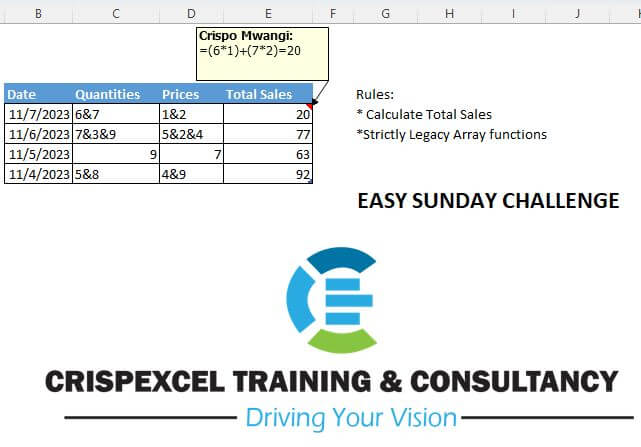
Calculate total sales Strictly Legacy array function Abdallah Ally Bhavya Gupta Richard Nero
📌 Challenge Details and Links
Challenge Number: 12
Challenge Difficulty: ⭐⭐⭐
📥Download Sample File
📥Link to the solutions on LinkedIn
Solving the challenge of Split, Multiply and Sum a Text String with Power Query
Power Query solution 1 for Split, Multiply and Sum a Text String , proposed by Luan Rodrigues:
let
  Fonte = Table1,
  res = Table.AddColumn(
    Fonte,
    "Personalizar",
    each List.Sum(
      List.Transform(
        List.Zip(
          {
            List.Transform(try Text.Split([Quantities], "&") otherwise {[Quantities]}, Number.From),
            List.Transform(try Text.Split([Prices], "&") otherwise {[Prices]}, Number.From)
          }
        ),
        List.Product
      )
    )
  )
in
  res
Power Query solution 2 for Split, Multiply and Sum a Text String , proposed by Luan Rodrigues:
let
  Fonte = Table1,
  res = Table.AddColumn(
    Fonte,
    "Personalizar",
    each List.Sum(
      List.Transform(
        List.Split(
          List.TransformMany(
            List.Zip(
              List.Transform(
                List.RemoveFirstN(Record.FieldValues(_), 1),
                each Text.Split(Text.From(_), "&")
              )
            ),
            each _,
            (x, y) => Number.From(y)
          ),
          2
        ),
        List.Product
      )
    )
  )
in
  res
Solving the challenge of Split, Multiply and Sum a Text String with Excel
Excel solution 1 for Split, Multiply and Sum a Text String , proposed by Rick Rothstein:
=SUM(
   IFERROR(
       TRIM(
           MID(
               SUBSTITUTE(
                   "&"&C5,
                   "&",
                   REPT(
                       " ",
                       99)),
               ROW(
                   $1:$9)*99,
               99))*TRIM(
           MID(
               SUBSTITUTE(
                   "&"&D5,
                   "&",
                   REPT(
                       " ",
                       99)),
               ROW(
                   $1:$9)*99,
               99)),
       0))
Excel solution 2 for Split, Multiply and Sum a Text String , proposed by محمد حلمي:
=SUM(
   TEXTSPLIT(
       C5,
       "&")*TEXTSPLIT(
       D5,
       "&"))
Excel solution 3 for Split, Multiply and Sum a Text String , proposed by محمد حلمي:
=SUM(
   IFERROR(
       INDEX(
           MID(
               C5,
               ROW(
                   $1:$10),
               COLUMN(
                   $A:$J))*MID(
               D5,
               ROW(
                   $1:$10),
               COLUMN(
                   $A:$J)),
           ,
           1),
       ))
Excel solution 4 for Split, Multiply and Sum a Text String , proposed by Abdallah Ally:
=MAP(
   Table1[Quantities],
   Table1[Prices],
   LAMBDA(
       x,
       y,
       SUM(
           TEXTSPLIT(
               x,
               "&")*TEXTSPLIT(
               y,
               "&"))))
Excel solution 5 for Split, Multiply and Sum a Text String , proposed by Owen Price:
=SUMPRODUCT(
   FILTERXML(
       "<x><n>"&SUBSTITUTE(
           C3,
           "&",
           "</n><n>")&"</n></x>",
       "//n"),
   FILTERXML(
       "<x><n>"&SUBSTITUTE(
           D3,
           "&",
           "</n><n>")&"</n></x>",
       "//n"))
Excel solution 6 for Split, Multiply and Sum a Text String , proposed by Mey Tithveasna:
=SUM(
   TEXTSPLIT(
       C5,
       "&")*TEXTSPLIT(
       D5,
       "&"))
Excel solution 7 for Split, Multiply and Sum a Text String , proposed by Edwin Tisnado:
=MAP(
   C3:C6,
   D3:D6,
   LAMBDA(
       x,
       y,
       LET(
           f,
           LAMBDA(
               a,
               TEXTSPLIT(
                   a,
                   "&")),
           SUM(
               f(
                   x)*f(
                   y)))))
Excel solution 8 for Split, Multiply and Sum a Text String , proposed by Rajesh Sinha:
=SUMPRODUCT(
   IFERROR(
       VALUE(
           FILTERXML(
               "<t><s>" & SUBSTITUTE(
                   C2,
                   "&",
                   "</s><s>") & "</s></t>",
               "//s")),
       0)*IFERROR(
       VALUE(
           FILTERXML(
               "<t><s>" & SUBSTITUTE(
                   D2,
                   "&",
                   "</s><s>") & "</s></t>",
               "//s")),
       0))}

or

{=SUM(
   FILTERXML(
       "<t><s>" & SUBSTITUTE(
           C2,
           "&",
           "</s><s>") & "</s></t>",
       "//s") * FILTERXML(
       "<t><s>" & SUBSTITUTE(
           D2,
           "&",
           "</s><s>") & "</s></t>",
       "//s"))}

or even this one,
   ,
   ,


=LET(
   splitB,
    FILTERXML(
        "<t><s>" & SUBSTITUTE(
            C2,
             "&",
             "</s><s>") & "</s></t>",
         "//s"),
    splitC,
    FILTERXML(
        "<t><s>" & SUBSTITUTE(
            D2,
             "&",
             "</s><s>") & "</s></t>",
         "//s"),

    total,
    SUMPRODUCT(
        splitB,
         splitC),
    total)