
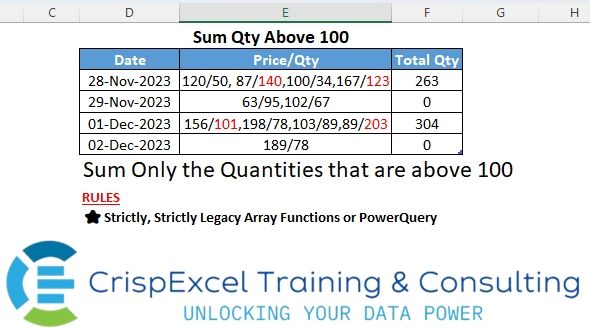
Sum only quantities above 100 Strictly use the Legacy array function or Power Query
📌 Challenge Details and Links
Challenge Number: 10
Challenge Difficulty: ⭐⭐⭐
📥Download Sample File
📥Link to the solutions on LinkedIn
Solving the challenge of Split and Sum a Text String Using a Criteria with Power Query
Power Query solution 1 for Split and Sum a Text String Using a Criteria, proposed by Brian Julius:
let
  Source = Table.DuplicateColumn(
    Table.SelectColumns(Excel.CurrentWorkbook(){[Name = "Table1"]}[Content], {"Date", "Price/Qty"}),
    "Price/Qty",
    "PriceQty2"
  ),
  SplitToRows = Table.ExpandListColumn(
    Table.TransformColumns(
      Source,
      {
        {
          "PriceQty2",
          Splitter.SplitTextByDelimiter(",", QuoteStyle.Csv),
          let
            itemType = (type nullable text) meta [Serialized.Text = true]
          in
            type {itemType}
        }
      }
    ),
    "PriceQty2"
  ),
  SplitToCols = Table.SplitColumn(
    SplitToRows,
    "PriceQty2",
    Splitter.SplitTextByEachDelimiter({"/"}, QuoteStyle.Csv, false),
    {"Price", "Qty"}
  ),
  Remove = Table.RemoveColumns(
    Table.TransformColumnTypes(SplitToCols, {{"Price", Int64.Type}, {"Qty", Int64.Type}}),
    "Price"
  ),
  AddQTYGT100 = Table.AddColumn(Remove, "QtyGT100", each if [Qty] > 100 then [Qty] else 0),
  GroupSum = Table.Group(
    AddQTYGT100,
    {"Date", "Price/Qty"},
    {{"Total Qty", each List.Sum([QtyGT100]), type number}}
  ),
  ReType = Table.TransformColumnTypes(GroupSum, {{"Date", type date}, {"Price/Qty", type text}})
in
  ReType
Power Query solution 2 for Split and Sum a Text String Using a Criteria, proposed by Nelson Mwangi:
let
  Source = Excel.CurrentWorkbook(){[Name = "Sales"]}[Content],
  Split1 = Table.SplitColumn(
    Source,
    "Price/Qty",
    Splitter.SplitTextByDelimiter(" , "),
    {"Price/Qty.1", "Price/Qty.2", "Price/Qty.3", "Price/Qty.4"}
  ),
  Unpivot = Table.UnpivotOtherColumns(Split1, {"Date"}, "Attribute", "Value"),
  Split2 = Table.SplitColumn(Unpivot, "Value", Splitter.SplitTextByDelimiter("/"), {"Price", "Qty"}),
  DataType = Table.TransformColumnTypes(Split2, {{"Qty", Int64.Type}}),
  Filter = Table.SelectRows(DataType, each [Qty] > 100),
  Group = Table.Group(Filter, {"Date"}, {{"Total Qty", each List.Sum([Qty]), type number}})
in
  Group
Solving the challenge of Split and Sum a Text String Using a Criteria with Excel
Excel solution 1 for Split and Sum a Text String Using a Criteria, proposed by Bo Rydobon 🇹🇭:
=SUM(
   --TEXT(
       FILTERXML(
           "<x><m>"&SUBSTITUTE(
               SUBSTITUTE(
                   E3,
                   "/",
                   "</m><n>"),
               ",",
               "</n><m>")&"</m></x>",
           "//n"),
       "[<100];0"))
Excel solution 2 for Split and Sum a Text String Using a Criteria, proposed by Rick Rothstein:
=SUM(IFERROR(TRIM(
   MID(
       SUBSTITUTE(
           "/"&SUBSTITUTE(
               E3,
               ",",
               "/"),
           "/",
           REPT(
               " ",
               300)),
       2*ROW(
           $1:$50)*300,
       300))*(LEN(
   TRIM(
       MID(
           SUBSTITUTE(
               "/"&SUBSTITUTE(
                   E3,
                   ",",
                   "/"),
               "/",
               REPT(
                   " ",
                   300)),
           2*ROW(
           $1:$50)*300,
           300)))>2),))
Excel solution 3 for Split and Sum a Text String Using a Criteria, proposed by محمد حلمي:
=SUM(IFERROR(IF((e)>99,
   e),))

e Name define refer to

=--(MID(
   Sheet1!E3,
   1+FIND(
       "/",
       Sheet1!E3,
       {1,
       7,
       14,
       21,
       28}),
   3))


or

=SUM(IFERROR(IF(
(--(MID(
   E3,
   1+FIND(
       "/",
       E3,
       {1,
       7,
       14,
       21,
       28}),
   3)))>99,

--MID(
   E3,
   1+FIND(
       "/",
       E3,
       {1,
       7,
       14,
       21,
       28}),
   3)),))
Excel solution 4 for Split and Sum a Text String Using a Criteria, proposed by Oscar Mendez Roca Farell:
=SUMPRODUCT(Rng_din*(--Rng_din>100))

where Rng_din is a named range with this formula:

=MID(SUBSTITUTE(
   SUBSTITUTE(
       !$E3,
       ",",
       "/"),
    "/",
    REPT(
        " ",
        50)),
    50*(2*ROW(
        !$A$1:INDEX(
            !$A:$A,
             LEN(
                 !$E3)-LEN(
                 SUBSTITUTE(
                     !$E3,
                     "/",
                     ""))))-1),
    50)
Excel solution 5 for Split and Sum a Text String Using a Criteria, proposed by Abdallah Ally:
=MAP(
   Sales[Price/Qty],
   LAMBDA(
       x,
       REDUCE(
           0,
           TRIM(
               TEXTSPLIT(
                   x,
                   ",")),
           LAMBDA(
               x,
               y,
               LET(
                   a,
                   --TEXTAFTER(
                       y,
                       "/"),
                   IF(
                       a>100,
                       x+a,
                       x))))))

=MAP(
   Sales[Price/Qty],
   LAMBDA(
       x,
       LET(
           a,
           TRIM(
               TEXTSPLIT(
                   x,
                   ",")),
           b,
           --TEXTAFTER(
               a,
               "/"),
           SUM(
               IF(
                   b>100,
                   b,
                   0)))))

=MAP(
   Sales[Price/Qty],
   LAMBDA(
       x,
       LET(
           a,
           TRIM(
               TEXTSPLIT(
                   x,
                   ",")),
           b,
           --TEXTAFTER(
               a,
               "/"),
           SUM(
               FILTER(
                   b,
                   b>100,
                   0)))))
Excel solution 6 for Split and Sum a Text String Using a Criteria, proposed by Ankur Sharma:
=BYROW(
   C3:C6,
    LAMBDA(
        a,
         LET(
             b,
              TEXTAFTER(
                  TEXTSPLIT(
                      a,
                       ", "),
                   "/"),
              SUM(
                 --FILTER(
                     b,
                      --b > 100,
                      0)))))
Excel solution 7 for Split and Sum a Text String Using a Criteria, proposed by JvdV –:
=IFERROR(
   SUM(
       FILTERXML(
           "<t><s>"&SUBSTITUTE(
               SUBSTITUTE(
                   E3,
                   "/",
                   ","),
               ",",
               "</s><s>")&"</s></t>",
           "//s[position()mod 2=0][.>100]")),
   )

Two predicates this time forming an and-ing construct:

* '[position()
Excel solution 8 for Split and Sum a Text String Using a Criteria, proposed by Edwin Tisnado:
=MAP(C3:C6,
   LAMBDA(x,
   LET(a,
   TAKE(
       --TEXTSPLIT(
           x,
           "/",
           ","),
       ,
       -1),
   SUM((a>100)*a))))