
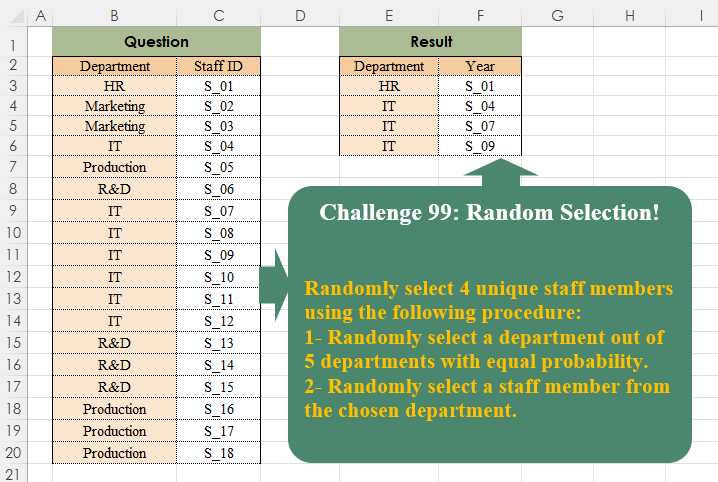
Randomly select 4 unique staff members using the following procedure: 1- Randomly select a department out of 5 departments with equal probability. 2- Randomly select a staff member from the chosen department.
📌 Challenge Details and Links
Challenge Number: 99
Challenge Difficulty: ⭐⭐⭐
📥Download Sample File
📥Link to the solutions on LinkedIn
Solving the challenge of Random Selection! Part 2 with Power Query
Power Query solution 1 for Random Selection! Part 2, proposed by Zoran Milokanović:
let
  Source = Excel.CurrentWorkbook(){[Name = "Input"]}[Content],
  D = List.Buffer(List.Sort(List.Distinct(Source[Department]), each Number.Random())),
  S = List.Buffer(List.Sort(List.Distinct(Source[Staff ID]), each Number.Random())),
  R = Table.FirstN(
    Table.Sort(Source, {each List.PositionOf(D, [Department]), each List.PositionOf(S, [Staff ID])}),
    4
  )
in
  R
Power Query solution 2 for Random Selection! Part 2, proposed by Brian Julius:
let
  Source = Table.RenameColumns(
    Excel.CurrentWorkbook(){[Name = "Table1"]}[Content],
    {"Staff ID", "StaffID"}
  ),
  AddRand = Table.Sort(
    Table.AddColumn(Source, "Rand", each Number.Random()),
    {"Rand", Order.Ascending}
  ),
  Gen = List.Generate(
    () => [
      x = 0,
      a = List.Distinct(AddRand[Department]),
      b = Number.RoundTowardZero(Number.RandomBetween(1, List.Count(a))),
      c = List.Last(List.FirstN(a, b)),
      z = AddRand,
      d = List.Max(
        Table.ToList(
          Table.SelectColumns(
            Table.FirstN(Table.SelectRows(z, each [Department] = c), 1),
            {"StaffID"}
          )
        )
      )
    ],
    each [x] < 4,
    each [
      test = [d],
      z = Table.SelectRows([z], each [StaffID] <> test),
      a = List.Distinct(z[Department]),
      b = Number.RoundTowardZero(Number.RandomBetween(1, List.Count(a))),
      c = List.Last(List.FirstN(a, b)),
      d = List.Max(
        Table.ToList(
          Table.SelectColumns(
            Table.FirstN(Table.SelectRows(z, each [Department] = c), 1),
            {"StaffID"}
          )
        )
      ),
      x = [x] + 1
    ],
    each [d]
  ),
  ToTable = Table.ReorderColumns(
    Table.Join(
      Table.FromList(Gen, Splitter.SplitByNothing(), {"StaffID"}, null),
      "StaffID",
      Source,
      "StaffID"
    ),
    {"StaffID", "Department"}
  )
in
  ToTable
Power Query solution 3 for Random Selection! Part 2, proposed by Szabolcs Phraner:
let
Department = Input { Number.Round( Number.RandomBetween(0,StaffID_Count),0) },
StaffID_Position = Number.Round( Number.RandomBetween(0,List.Count(Department[Staff ID])-1 ),0)
in Table.InsertRows(s, 0, { Record.TransformFields( Department, {{"Staff ID", each _{StaffID_Position} }}) } )
)
in
 RandomSelection
Solving the challenge of Random Selection! Part 2 with Excel
Excel solution 1 for Random Selection! Part 2, proposed by Bo Rydobon 🇹🇭:
=LET(z,B3:C20,r,SORTBY(z,RANDARRAY(ROWS(z))),d,TAKE(r,,1),SORT(CHOOSEROWS(r,XMATCH(TAKE(UNIQUE(d),4),d)),2))Excel solution 2 for Random Selection! Part 2, proposed by Bo Rydobon 🇹🇭:
=LET(z,B3:C20,SORT(TAKE(SORTBY(z,RANDARRAY(ROWS(z))),4),2))Excel solution 3 for Random Selection! Part 2, proposed by محمد حلمي:
=TAKE(SORTBY(B3:C20,RANDARRAY(ROWS(B3:C20))),4)Excel solution 4 for Random Selection! Part 2, proposed by Julian Poeltl:
=LET(D,
    B3:B20,
    I,
    C3:C20,
    R,
    REDUCE(HSTACK(
        "Department",
        "Year"
    ),
    INDEX(
        D,
        RANDARRAY(
            4,
            1,
            1,
            ROWS(
                D
            ),
            1
        )
    ),
    LAMBDA(A,
    B,
    VSTACK(A,
    HSTACK(B,
    LET(F,
    FILTER(I,
    (D=B)*ISNA(
        XMATCH(
            I,
            TAKE(
                A,
                ,
                -1
            )
        )
    )),
    INDEX(
        F,
        RANDBETWEEN(
            1,
            ROWS(
                F
            )
        )
    )))))),
    VSTACK(
        TAKE(
            R,
            1
        ),
        SORT(
            DROP(
            R,
            1
        ),
            2
        )
    ))
Excel solution 5 for Random Selection! Part 2, proposed by Imam Hambali:
=LET(    ud,
     UNIQUE(
         B3:B20
     ),    f,
     LAMBDA(
         x,
          FILTER(
              R2:R19,
              Q2:Q19=x
          )
     ),    s,
     LAMBDA(
         x,
          TAKE(
              SORTBY(
                  f(
                      x
                  ),
                   RANDARRAY(
                       ROWS(
                           f(
                      x
                  )
                       )
                   )
              ),
              1
          )
     ),    rd,
     MAP(
         SEQUENCE(
             4
         ),
          LAMBDA(
              x,
               TAKE(
                   SORTBY(
                       ud,
                       RANDARRAY(
                           ROWS(
                               ud
                           )
                       )
                   ),
                   1
               )
          )
     ),    VSTACK(
        {"Department",
        "Year"},
         HSTACK(
             rd,
              BYROW(
                  rd,
                   LAMBDA(
                       x,
                        s(
                      x
                  )
                   )
              )
         )
    ))
Excel solution 6 for Random Selection! Part 2, proposed by Sunny Baggu:
=LET(     _ud,
     TAKE(
         SORTBY(
             UNIQUE(
                 B3:B20
             ),
              RANDARRAY(
                  5
              )
         ),
          4
     ),     _s,
     MAP(          _ud,          LAMBDA(
              x,

               LET(

                    _a,
                    FILTER(
                        C3:C20,
                         B3:B20 = x
                    ),

                    INDEX(
                        _a,
                         RANDBETWEEN(
                             1,
                              SUM(
                                  N(
                                      B3:B20 = x
                                  )
                              )
                         )
                    )

               )

          )     ),     TAKE(
         HSTACK(
             _ud,
              _s
         ),
          4
     ))
Excel solution 7 for Random Selection! Part 2, proposed by Bilal Mahmoud kh.:
=LET(
    A,
    INDEX(
        B3:B20,
        RANDARRAY(
            4,
            1,
            1,
            COUNTA(
                B3:B20
            ),
            1
        ),
        1
    ),
    B,
    MAP(
        A,
        LAMBDA(
            x,
            LET(
                a,
                FILTER(
                    C3:C20,
                    B3:B20=x
                ),
                CHOOSEROWS(
                    a,
                    RANDBETWEEN(
                        1,
                        COUNTA(
                            a
                        )
                    )
                )
            )
        )
    ),
    VSTACK(
        {"Dep.",
        "Staff ID"},
        HSTACK(
            A,
            B
        )
    )
)
Excel solution 8 for Random Selection! Part 2, proposed by ferhat CK:
=LET(
    a,
    TAKE(
        UNIQUE(
            BYROW(
                SEQUENCE(
                    1000
                ),
                LAMBDA(
                    x,
                    CHOOSEROWS(
                        B3:B20&"|"&C3:C20,
                        RANDBETWEEN(
                            1,
                            18
                        )
                    )
                )
            )
        ),
        5
    ),
    REDUCE(
        B2:C2,
        a,
        LAMBDA(
            x,
            y,
            VSTACK(
                x,
                TEXTSPLIT(
                    y,
                    "|"
                )
            )
        )
    )
)
or:
=TAKE(
    UNIQUE(
        REDUCE(
            B2:C2,
            SEQUENCE(
                    1000
                ),
            LAMBDA(
                x,
                y,
                VSTACK(
                    x,
                    CHOOSEROWS(
                        B3:C20,
                        RANDBETWEEN(
                            1,
                            18
                        )
                    )
                )
            )
        )
    ),
    6
)
Excel solution 9 for Random Selection! Part 2, proposed by Gerson Pineda:
=LET(
    d,
    B3:B20,
    u,
    UNIQUE(
        d
    ),
    TAKE(
        SORT(
            HSTACK(
                u,
                MAP(
                    u,
                    LAMBDA(
                        x,
                        INDEX(
                            FILTER(
                                C3:C20,
                                d=x
                            ),
                            RANDBETWEEN(
                                1,
                                COUNTIF(
                                    d,
                                    x
                                )
                            )
                        )
                    )
                ),
                RANDARRAY(
                    5
                )
            ),
            3
        ),
        4,
        2
    )
)
Excel solution 10 for Random Selection! Part 2, proposed by Md. Zohurul Islam:
=LET(     header,
     B2:C2,     A,
     B3:C20,     B,
     COUNTA(
         A
     ) / 2,     C,
     RANDARRAY(
         B,
          ,
          1,
          B,
          1
     ),     D,
     SORTBY(
         A,
          C
     ),     E,
     CHOOSEROWS(
         D,
          1,
          2,
          3,
          4
     ),     Report,
     VSTACK(
         header,
          E
     ),     Report)
Solving the challenge of Random Selection! Part 2 with R
R solution 1 for Random Selection! Part 2, proposed by Konrad Gryczan, PhD:
library(tidyverse)
library(readxl)

path = 'files/CH-099 Random Selection Part 2.xlsx'
input = read_excel(path, range = "B2:C20")

sample_dept_and_emp <- function(input,n) {
 n = 4
 n_distinct = n_distinct(input$Department)
 emp_per_dept = input %>% count(Department)

 repeat {
 sampled_departments = sample(unique(input$Department), n, replace = TRUE, prob = rep(1/n_distinct, n_distinct)) %>%
 tibble(Department = .) %>%
 mutate(nr = row_number(), .by = Department) %>%
 slice_max(nr, by = Department)
 check = sampled_departments %>%
 left_join(emp_per_dept, by = c("Department"))
 if (all(check$n >= check$nr)) {
 break
 }
 }

 sampled_employees = input %>%
 left_join(sampled_departments, by = "Department") %>%
 na.omit() %>%
 nest_by(Department, nr) %>%
 mutate(data = list(sample_n(data, nr, replace = F))) %>%
 unnest(data) %>%
 ungroup() %>%
 select(-nr)

 return(sampled_employees)
}

sample_dept_and_emp(input, 4)