
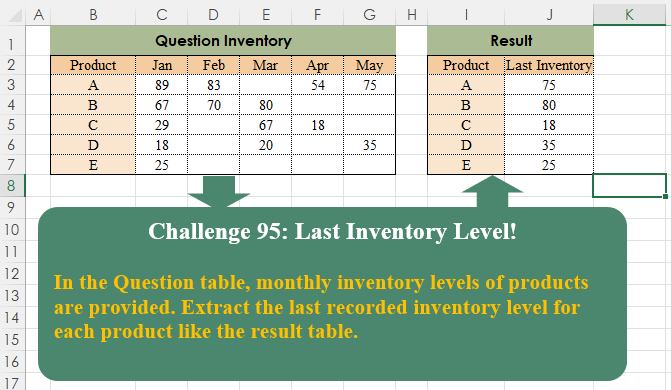
In the Question table, monthly inventory levels of products are provided. Extract the last recorded inventory level for each product like the result table.
📌 Challenge Details and Links
Challenge Number: 95
Challenge Difficulty: ⭐⭐⭐
📥Download Sample File
📥Link to the solutions on LinkedIn
Solving the challenge of Last Inventory Level! with Power Query
Power Query solution 1 for Last Inventory Level!, proposed by Zoran Milokanović:
let
  Source = Excel.CurrentWorkbook(){[Name = "Input"]}[Content],
  S = Table.FromList(
    Table.ToRows(Source),
    each
      let
        l = List.RemoveNulls(_)
      in
        {l{0}, List.Last(l)},
    {"Product", "Last Inventory"}
  )
in
  S
Power Query solution 2 for Last Inventory Level!, proposed by Zoran Milokanović:
let
  Source = Excel.CurrentWorkbook(){[Name = "Input"]}[Content],
  S = Table.CombineColumns(
    Source,
    {"Jan", "Feb", "Mar", "Apr", "May"},
    each List.Last(List.RemoveNulls(_)),
    "Last Inventory"
  )
in
  S
Power Query solution 3 for Last Inventory Level!, proposed by 🇵🇪 Ned Navarrete C.:
let
  Source = Excel.CurrentWorkbook(){[Name = "Table1"]}[Content],
  Grouped = Table.Group(
    Source,
    {"Product"},
    {
      {
        "Last Inventory",
        each List.Last(List.Select(Table.ToColumns(_), each List.NonNullCount(_) <> 0)){0}
      }
    }
  )
in
  Grouped
Power Query solution 4 for Last Inventory Level!, proposed by Brian Julius:
let
 Source = Excel.CurrentWorkbook(){[Name="Table1"]}[Content],
 UnpivOther = Table.UnpivotOtherColumns(Source, {"Product"}, "Attribute", "Value"),
 GroupLast = Table.Group(UnpivOther, {"Product"}, {{"Last Inventory", each List.Last( [Value])}})
in
 GroupLast

Here's the link to my earlier post:

https://www.linkedin.com/posts/brianjuliusdc_powerbi-powerquery-mcode-activity-7226411220537352192-U465?utm_source=share&utm_medium=member_desktop
Power Query solution 5 for Last Inventory Level!, proposed by Eric Laforce:
let
  Source = Excel.CurrentWorkbook(){[Name = "tData095"]}[Content],
  Transform = Table.TransformRows(
    Source,
    each {[Product], List.Last(List.RemoveNulls(Record.ToList(_)))}
  ),
  Result = Table.FromRows(Transform, {"Product", "Last Inventory"})
in
  Result
Power Query solution 6 for Last Inventory Level!, proposed by Konrad Gryczan, PhD:
let
  Source = Excel.CurrentWorkbook(){[Name = "Tabela1"]}[Content],
  #"Changed Type" = Table.TransformColumnTypes(
    Source,
    {
      {"Jan", Int64.Type},
      {"Feb", Int64.Type},
      {"Mar", Int64.Type},
      {"Apr", Int64.Type},
      {"May", Int64.Type}
    }
  ),
  #"Transposed Table" = Table.Transpose(#"Changed Type"),
  #"Promoted Headers" = Table.PromoteHeaders(#"Transposed Table", [PromoteAllScalars = true]),
  #"Changed Type1" = Table.TransformColumnTypes(
    #"Promoted Headers",
    {{"A", Int64.Type}, {"B", Int64.Type}, {"C", Int64.Type}, {"D", Int64.Type}, {"E", Int64.Type}}
  ),
  #"Filled Down" = Table.FillDown(#"Changed Type1", {"A", "B", "C", "D", "E"}),
  #"Removed Top Rows" = Table.Skip(#"Filled Down", 4),
  #"Demoted Headers" = Table.DemoteHeaders(#"Removed Top Rows"),
  #"Changed Type2" = Table.TransformColumnTypes(
    #"Demoted Headers",
    {
      {"Column1", type any},
      {"Column2", type any},
      {"Column3", type any},
      {"Column4", type any},
      {"Column5", type any}
    }
  ),
  #"Transposed Table1" = Table.Transpose(#"Changed Type2")
in
  #"Transposed Table1"
Power Query solution 7 for Last Inventory Level!, proposed by Luan Rodrigues:
let
  Fonte = Tabela1,
  add = Table.AddColumn(Fonte, "Result", each List.Last(List.RemoveNulls(Record.FieldValues(_))))[
    [Product],
    [Result]
  ]
in
  add
Power Query solution 8 for Last Inventory Level!, proposed by Rafael González B.:
let
Source = Excel.CurrentWorkbook(){0}[Content] ,
Result = Table.AddColumn(Source,
"Last Inventory",
each [May] ?? [Apr] ?? [Mar] ?? [Feb] ?? [Jan])
in
Result[[Product],[Last Inventory]]
🧙🏻♂️🧙🏻♂️🧙🏻♂️Power Query solution 9 for Last Inventory Level!, proposed by Ramiro Ayala Chávez:
let
S = Excel.CurrentWorkbook(){[Name="Table1"]}[Content],
a = List.Transform(Table.ToRows(S),List.RemoveNulls),
b = List.Transform(a, each {List.First(_)}&{List.Last(_)}),
Sol = Table.RenameColumns(Table.FromRows(b),{{"Column1","Product"},{"Column2","Last Inventory"}})
in
Sol
Power Query solution 10 for Last Inventory Level!, proposed by Aditya Kumar Darak 🇮🇳:
let
  Source = Excel.CurrentWorkbook(){[Name = "data"]}[Content],
  Return = Table.AddColumn(
    Source,
    "Last",
    each [L = Record.ToList(_), RN = List.RemoveNulls(L), R = List.Last(RN)][R]
  )[[Product], [Last]]
in
  Return
Power Query solution 11 for Last Inventory Level!, proposed by Alejandro Simón 🇵🇦 🇪🇸:
let
 Source = Excel.CurrentWorkbook(){[Name="Table1"]}[Content],
 Sol = Table.Group(Source, {"Product"}, {{"Last Inventory", each
let
a = _,
b = Table.ToRows(a){0},
c = List.RemoveNulls(b),
d = List.Last(c)
in d}})
in
 Sol
Power Query solution 12 for Last Inventory Level!, proposed by Kris Jaganah:
let
  Source = Excel.CurrentWorkbook(){[Name = "Table1"]}[Content],
  Ans = Table.Group(
    Source,
    {"Product"},
    {"Last Inventory", each List.Last(List.RemoveNulls(List.Combine(Table.ToRows(_))))}
  )
in
  Ans
Power Query solution 13 for Last Inventory Level!, proposed by Kris Jaganah:
let
  Source = Excel.CurrentWorkbook(){[Name = "Table1"]}[Content],
  Ans = Table.AddColumn(
    Source,
    "Last Inventory",
    each List.Last(List.RemoveNulls(Record.ToList(_)))
  ),
  Keep = Table.SelectColumns(Ans, {"Product", "Last Inventory"})
in
  Keep
Power Query solution 14 for Last Inventory Level!, proposed by Abdallah Ally:
let
  Source = Excel.CurrentWorkbook(){[Name = "Table1"]}[Content],
  Result = Table.AddColumn(
    Source,
    "Last Inventory",
    each List.Last(List.RemoveNulls(Record.FieldValues(_)))
  )[[Product], [#"Last Inventory"]]
in
  Result
Power Query solution 15 for Last Inventory Level!, proposed by Nelson Mwangi:
let
  Source = Excel.CurrentWorkbook(){[Name = "Table1"]}[Content],
  Unpivot = Table.UnpivotOtherColumns(Source, {"Product"}, "Attribute", "Value"),
  AddIndex = Table.AddIndexColumn(Unpivot, "Index", 1, 1, Int64.Type),
  Group = Table.Group(AddIndex, {"Product"}, {{"Last Index", each List.Max([Index]), type number}}),
  Merge = Table.NestedJoin(Group, {"Last Index"}, AddIndex, {"Index"}, "Group"),
  Expand = Table.ExpandTableColumn(Merge, "Group", {"Value"}, {"Last Inventory"}),
  DelCol = Table.RemoveColumns(Expand, {"Last Index"})
in
  DelCol
Power Query solution 16 for Last Inventory Level!, proposed by Yaroslav Drohomyretskyi:
let
  Source = Excel.CurrentWorkbook(){[Name = "Table1"]}[Content],
  Group = Table.Group(
    Source,
    {"Product"},
    {{"Last Inventory", each List.Last(List.RemoveNulls(Record.ToList(_{0})))}}
  )
in
  Group
Power Query solution 17 for Last Inventory Level!, proposed by 🇮🇷 Navid Esmaeilzadeh اسماعیل زاده:
let
  Source = Excel.CurrentWorkbook(){[Name = "Table1"]}[Content],
  #"Changed Type" = Table.TransformColumnTypes(
    Source,
    {
      {"Product", type text},
      {"Jan", Int64.Type},
      {"Feb", Int64.Type},
      {"Mar", Int64.Type},
      {"Apr", Int64.Type},
      {"May", Int64.Type}
    }
  ),
  #"Unpivoted Other Columns" = Table.UnpivotOtherColumns(
    #"Changed Type",
    {"Product"},
    "Attribute",
    "Value"
  ),
  #"Grouped Rows" = Table.Group(
    #"Unpivoted Other Columns",
    {"Product"},
    {{"Last Inventory", each List.Last([Value]), type number}}
  )
in
  #"Grouped Rows"
Power Query solution 18 for Last Inventory Level!, proposed by Ahmed Ariem:
let
  Source = Excel.CurrentWorkbook(){[Name = "tbl"]}[Content],
  AddColumn = Table.AddColumn(
    Source,
    "Last Inventory",
    each List.Last(List.RemoveNulls(Record.ToList(_)))
  )[[Product], [Last Inventory]]
in
  AddColumn
Power Query solution 19 for Last Inventory Level!, proposed by Albert Cid Cañigueral:
let
  Origen = Excel.CurrentWorkbook(){[Name = "Tabla1"]}[Content],
  a = Table.AddColumn(Origen, "Last Inventory", each List.Last(List.RemoveNulls(Record.ToList(_))))[
    [Product],
    [Last Inventory]
  ]
in
  a
Power Query solution 20 for Last Inventory Level!, proposed by CA Raghunath Gundi:
let
  Source = Excel.CurrentWorkbook(){[Name = "Table1"]}[Content],
  #"Unpivoted Other Columns" = Table.UnpivotOtherColumns(Source, {"Product"}, "Attribute", "Value"),
  #"Grouped Rows" = Table.AddColumn(
    Table.Group(#"Unpivoted Other Columns", {"Product"}, {{"A", each [Value]}}),
    "Result",
    each List.Last([A])
  ),
  Result = Table.RemoveColumns(#"Grouped Rows", {"A"})
in
  Result
Power Query solution 21 for Last Inventory Level!, proposed by Gerson Pineda:
let
  Source = Excel.CurrentWorkbook(){[Name = "Table1"]}[Content],
  FP1 = Table.AddColumn(Source, "Last", each List.Last(List.RemoveNulls(Record.ToList(_))))[
    [Product],
    [Last]
  ]
in
  FP1
Power Query solution 22 for Last Inventory Level!, proposed by Luke Jarych:
let
  Source = Excel.CurrentWorkbook(){[Name = "Table1"]}[Content],
  Headers = Table.PromoteHeaders(Source, [PromoteAllScalars = true]),
  Unpivoted = Table.UnpivotOtherColumns(Headers, {"Product"}, "Attribute", "Value"),
  Grouped = Table.Group(
    Unpivoted,
    "Product",
    {{"Last Inventory", each List.Last([Value]), type number}}
  )
in
  Grouped
Solving the challenge of Last Inventory Level! with Excel
Excel solution 1 for Last Inventory Level!, proposed by 🇰🇷 Taeyong Shin:
=HSTACK(
    B3:B7,
    BYROW(
        C3:G7,
        LAMBDA(
            r,
            1/LOOKUP(
                1,
                1/r
            )
        )
    )
)
Excel solution 2 for Last Inventory Level!, proposed by محمد حلمي:
=BYROW(
    C3:G7,
    LAMBDA(
        a,
        LOOKUP(
            99,
            a
        )
    )
)
Excel solution 3 for Last Inventory Level!, proposed by 🇵🇪 Ned Navarrete C.:
=HSTACK(
    B3:B7,
    BYROW(
        C3:G7,
        LAMBDA(
            r,
            LOOKUP(
                10^3,
                r
            )
        )
    )
)
Excel solution 4 for Last Inventory Level!, proposed by Aditya Kumar Darak 🇮🇳:
=HSTACK(
    B3:B7,
     BYROW(
         C3:G7,
          LAMBDA(
              a,
               TAKE(
                   TOCOL(
                       a,
                        1
                   ),
                    -1
               )
          )
     )
)
Excel solution 5 for Last Inventory Level!, proposed by Oscar Mendez Roca Farell:
=HSTACK(
    B3:B7,
     BYROW(
         C3:G7,
          LAMBDA(
              r,
               LOOKUP(
                   2,
                    1/r,
                    r
               )
          )
     )
)
Excel solution 6 for Last Inventory Level!, proposed by Julian Poeltl:
=HSTACK(
    B2:B7,
    VSTACK(
        "Last Inventory",
        TAKE(
            SCAN(
                ,
                C3:G7,
                LAMBDA(
                    A,
                    B,
                    IF(
                        B=0,
                        A,
                        B
                    )
                )
            ),
            ,
            -1
        )
    )
)
Excel solution 7 for Last Inventory Level!, proposed by Kris Jaganah:
=HSTACK(
    B3:B7,
    BYROW(
        C3:G7,
        LAMBDA(
            x,
            TAKE(
                TOROW(
                    x,
                    3
                ),
                ,
                -1
            )
        )
    )
)
Excel solution 8 for Last Inventory Level!, proposed by Abdallah Ally:
=REDUCE(
    {"Product",
    "Last Inventory"},
    B3:B7,
    LAMBDA(
        x,
        y,
         LET(
             a,
             OFFSET(
                 y,
                 ,
                 1,
                 ,
                 5
             ),
             VSTACK(
                 x,
                 HSTACK(
                     y,
                     TAKE(
                         FILTER(
                             a,
                             a<>""
                         ),
                         ,
                         -1
                     )
                 )
             )
         )
    )
)
Excel solution 9 for Last Inventory Level!, proposed by Abdallah Ally:
=VSTACK(
    {"Product",
    "Last Inventory"},
    HSTACK(
        B3:B7,
        BYROW(
            C3:G7,
             LAMBDA(
                 x,
                 TAKE(
                     FILTER(
                         x,
                         x<>""
                     ),
                     ,
                     -1
                 )
             )
        )
    )
)
Excel solution 10 for Last Inventory Level!, proposed by John Jairo Vergara Domínguez:
=BYROW(
    C3:G7,
    LAMBDA(
        r,
        LOOKUP(
            1,
            0/r,
            r
        )
    )
)
Excel solution 11 for Last Inventory Level!, proposed by Imam Hambali:
=HSTACK(
    B3:B7,
     BYROW(
         C3:G7,
          LAMBDA(
              x,
               XLOOKUP(
                   TRUE,
                    x>0,
                   x,
                   ,
                   ,
                   -1
               )
          )
     )
)
Excel solution 12 for Last Inventory Level!, proposed by Sunny Baggu:
=HSTACK(     B3:B7,     BYROW(
         C3:G7,
          LAMBDA(
              a,
               TAKE(
                   TOCOL(
                       a,
                        1
                   ),
                    -1
               )
          )
     ))
Excel solution 13 for Last Inventory Level!, proposed by Sunny Baggu:
=HSTACK(     B3:B7,     BYROW(
         C3:G7,
          LAMBDA(
              R,
               REDUCE(
                   "",
                    R,
                    LAMBDA(
                        a,
                         v,
                         IF(
                             v,
                              v,
                              a
                         )
                    )
               )
          )
     ))
Excel solution 14 for Last Inventory Level!, proposed by Sunny Baggu:
=LET(
 a,
     C3:G7, HSTACK(
 B3:B7, INDEX(
 a, SEQUENCE(
     ROWS(
         a
     )
 ), BYROW((a <> "") * SEQUENCE(
     ,
      COLUMNS(
         a
     )
 ),
     LAMBDA(
         a,
          MAX(
         a
     )
     ))
 )
 )
)
Excel solution 15 for Last Inventory Level!, proposed by Sunny Baggu:
=HSTACK(     B3:B7,     BYROW(
         C3:G7,
          LAMBDA(
              a,
               LOOKUP(
                   9.99E+307,
                    a
               )
          )
     ))
Excel solution 16 for Last Inventory Level!, proposed by Sunny Baggu:
=HSTACK(     B3:B7,     BYROW(          C3:G7,          LAMBDA(
              a,
               XLOOKUP(
                   TRUE,
                    a <> "",
                    a,
                    ,
                    ,
                    -1
               )
          )     ))
Excel solution 17 for Last Inventory Level!, proposed by Albert Cid Cañigueral:
=HSTACK(
    B3:B7,
    BYROW(
        C3:G7,
        LAMBDA(
            f,
            TAKE(
                TOCOL(
                    f,
                    3
                ),
                -1
            )
        )
    )
)
Excel solution 18 for Last Inventory Level!, proposed by Alok Kumar Jena:
=LOOKUP(
    999999999999999,
    B2:F2
)
Excel solution 19 for Last Inventory Level!, proposed by Andy Heybruch:
=HSTACK(
    B3:B7,
    BYROW(
        C3:G7,
        LAMBDA(
            a,
            TAKE(
                FILTER(
                    a,
                    a<>""
                ),
                ,
                -1
            )
        )
    )
)
Excel solution 20 for Last Inventory Level!, proposed by Ankur Sharma:
=BYROW(
    C3:G7,
     LAMBDA(
         a,
          TAKE(
              FILTER(
                  a,
                   a <> "",
                   ""
              ),
               ,
               -1
          )
     )
)
Excel solution 21 for Last Inventory Level!, proposed by Asheesh Pahwa:
=LET(
    I,
    IF(
        --ISNUMBER(
            C3:G7
        ),
        COLUMN(
            C3:G7
        )-1
    ),
    m,
    BYROW(
        I,
        LAMBDA(
            x,
            MAX(
                x
            )
        )
    ),
    d,
    DROP(
        REDUCE(
            "",
            SEQUENCE(
                5
            ),
            LAMBDA(
                a,
                v,
                VSTACK(
                    a,
                    INDEX(
                        B3:G7,
                        v,
                        INDEX(
                            m,
                            v,

                        )
                    )
                )
            )
        ),
        1
    ),    HSTACK(
        B3:B7,
        d
    )
)
Excel solution 22 for Last Inventory Level!, proposed by Asheesh Pahwa:
=HSTACK(
    B3:B7,
    BYROW(
        C3:G7,
        LAMBDA(
            x,
            TAKE(
                TOCOL(
                    x,
                    1
                ),
                -1
            )
        )
    )
)
Excel solution 23 for Last Inventory Level!, proposed by Asheesh Pahwa:
=HSTACK(
    B3:B7,
    DROP(
        REDUCE(
            "",
            SEQUENCE(
                5
            ),
            LAMBDA(
                x,
                y,
                VSTACK(
                    x,
                    LET(
                        I,
                        INDEX(
                            C3:G7,
                            y,

                        ),
                        TAKE(
                            FILTER(
                                I,
                                I<>""
                            ),
                            ,
                            -1
                        )
                    )
                )
            )
        ),
        1
    )
)
Excel solution 24 for Last Inventory Level!, proposed by Bilal Mahmoud kh.:
=VSTACK(
    {"Product",
    "Last inventory"},
    HSTACK(
        B2:B6,
        BYROW(
            C2:G6,
            LAMBDA(
                n,
                TAKE(
                    REDUCE(
                        ,
                        n,
                        LAMBDA(
                            x,
                            y,
                            IF(
                                y<>0,
                                VSTACK(
                                    x,
                                    y
                                ),
                                x
                            )
                        )
                    ),
                    -1
                )
            )
        )
    )
)
Excel solution 25 for Last Inventory Level!, proposed by CA Raghunath Gundi:
= BYROW(
    C3:G7,
     LAMBDA(
         a,
          LET(
              b,
              FILTER(
                  a,
                  a>0
              ),
               INDEX(
                   b,
                   ,
                   COUNT(
                       b
                   )
               )
          )
     )
)
Excel solution 26 for Last Inventory Level!, proposed by Eddy Wijaya:
=HSTACK(
    B3:B7,
    BYROW(
        C3:G7,
        LAMBDA(
            r,
            VALUE(
                TAKE(
                    TEXTSPLIT(
                        TEXTJOIN(
                            ",",
                            TRUE,
                            r
                        ),
                        ","
                    ),
                    ,
                    -1
                )
            )
        )
    )
)