
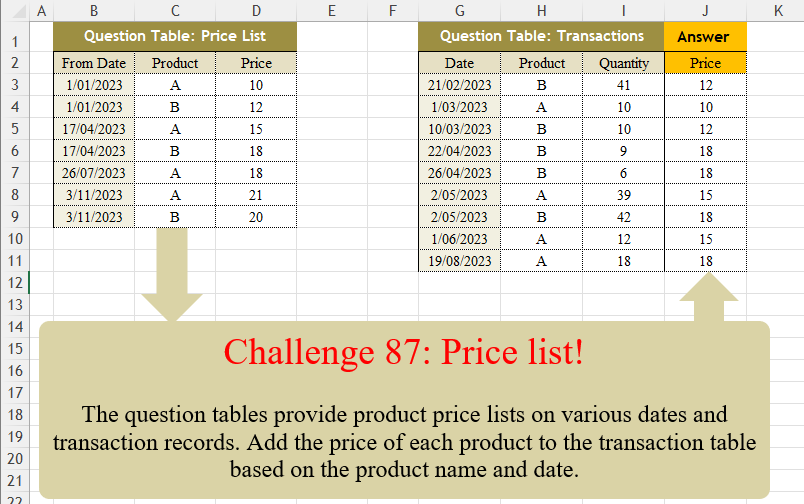
The question tables provide product price lists on various dates and transaction records. Add the price of each product to the transaction table based on the product name and date.
📌 Challenge Details and Links
Challenge Number: 87
Challenge Difficulty: ⭐⭐
📥Download Sample File
📥Link to the solutions on LinkedIn
📥Link to the solution on YouTube
Solving the challenge of Price List! with Power Query
Power Query solution 1 for Price List!, proposed by Zoran Milokanović:
let
  Source = each Excel.CurrentWorkbook(){[Name = _]}[Content],
  S = Table.AddColumn(
    Source("Transactions"),
    "Price",
    (r) =>
      List.Last(
        Table.SelectRows(
          Source("PriceList"),
          each [Product] = r[Product] and [From Date] <= r[Date]
        )[Price]
      )
  )
in
  S
Power Query solution 2 for Price List!, proposed by 🇵🇪 Ned Navarrete C.:
let
  S = Excel.CurrentWorkbook(){[Name = "Table2"]}[Content],
  R = Table.AddColumn(
    S,
    "Price",
    each [
      a = [Date],
      b = [Product],
      c = Table.SelectRows(Table1, each [From Date] <= a and [Product] = b),
      d = List.Last(c[Price])
    ][d]
  )
in
  R
Power Query solution 3 for Price List!, proposed by Luan Rodrigues:
let
  Fonte = Table.AddColumn(
    Tabela2,
    "Price",
    each Table.Max(
      Table.SelectRows(Tabela1, (x) => [Product] = x[Product] and x[From Date] < [Date]),
      {"Price"}
    )[Price]
  )
in
  Fonte
Power Query solution 4 for Price List!, proposed by Aditya Kumar Darak 🇮🇳:
let
  PriceList = Excel.CurrentWorkbook(){[Name = "PriceList"]}[Content],
  Transactions = Excel.CurrentWorkbook(){[Name = "Transactions"]}[Content],
  Return = Table.AddColumn(
    Transactions,
    "Price",
    each List.Last(
      Table.SelectRows(PriceList, (f) => [Product] = f[Product] and [Date] >= f[From Date])[Price]
    )
  )
in
  Return
Power Query solution 5 for Price List!, proposed by Alejandro Simón 🇵🇦 🇪🇸:
let
 Tbl1 = Excel.CurrentWorkbook(){[Name="Table1"]}[Content],
 Tbl2 = Excel.CurrentWorkbook(){[Name="Table2"]}[Content],
 Sol = Table.AddColumn(Tbl2, "Price", (x)=>
let
a = Tbl1,
b = Table.SelectRows(a, each [Product] = x[Product]
 and [From Date] <= x[Date]),
c = List.Last(b[Price])
in c)
in
 Sol
Power Query solution 6 for Price List!, proposed by Kris Jaganah:
let
  S = each Excel.CurrentWorkbook(){[Name = _]}[Content],
  P = Table.AddColumn(
    S("Table2"),
    "Price",
    each List.Last(
      Table.SelectRows(S("Table1"), (x) => x[Product] = [Product] and x[From Date] <= [Date])[Price]
    )
  )
in
  P
Power Query solution 7 for Price List!, proposed by Yaroslav Drohomyretskyi:
let
  Source = Excel.CurrentWorkbook(){[Name = "Data"]}[Content],
  Price = Table.AddColumn(
    Джерело,
    "Price",
    each
      let
        curProduct = [Product],
        curDate = [Date],
        filteredPrices = Table.SelectRows(
          Excel.CurrentWorkbook(){[Name = "Prices"]}[Content],
          each [Product] = curProduct and [From Date] <= curDate
        )
      in
        Table.Last(filteredPrices)[Price]
  )
in
  Price
Power Query solution 8 for Price List!, proposed by 🇮🇷 Navid Esmaeilzadeh اسماعیل زاده:
let
S1 = Excel.CurrentWorkbook(){[Name="Trans"]}[Content],
A = Table.TransformColumnTypes(S1,{{"Date", type date}}),
S2 = Excel.CurrentWorkbook(){[Name="Price"]}[Content],
B = Table.TransformColumnTypes(S2,{{"From Date", type date}}),
LD = if List.Max(A[Date])>List.Max(B[From Date]) then List.Max(A[Date]) else Date.AddMonths(List.Max(B[From Date]),3),
C = Table.Group(B, {"Product"}, {{"C", each _, type table [From Date=nullable date, Product=text, Price=number]}}),
MF=(T)=>
let
L = Table.AddIndexColumn(T, "I", 1, 1, Int64.Type),
M = Table.AddColumn(L, "Date", each {Number.From([From Date])..Number.From(try F1[From Date]{[I]} otherwise LD)}),
N = Table.SelectColumns(M,{"Date", "Product", "Price"}),
O = Table.ExpandListColumn(N, "Date"),
P = Table.TransformColumnTypes(O,{{"Date", type date}})
in
P,
D = Table.AddColumn(C, "MF", each MF([C])),
E = Table.SelectColumns(D,{"MF"}),
PL = Table.ExpandTableColumn(E, "MF", {"Date", "Product", "Price"}, {"Date", "Product", "Price"}),
F = Table.NestedJoin(A,{"Date","Product"},PL,{"Date","Product"},"Q"),
G = Table.ExpandTableColumn(F, "Q", {"Price"}, {"Price"}),
Sol = Table.Sort(G,{{"Date", Order.Ascending}, {"Product", Order.Ascending}})
in
Sol
Power Query solution 9 for Price List!, proposed by Ankur Sharma:
let
 Source = Excel.CurrentWorkbook(){[Name="Table2"]}[Content],
 #"Changed Type" = Table.TransformColumnTypes(Source,{{"Date", type date}, {"Product", type text}, {"Quantity", Int64.Type}}),
 Solution = Table.AddColumn(#"Changed Type", "Price", each let
 PT = PriceTable,
 Prod = _[Product],
 TrDt = _[Date],
 SelRows1 = Table.SelectRows(PT, each ([Product] = Prod) and ([From Date] <= TrDt)),
 SelRows2 = Table.Last(SelRows1)[Price]
in
 SelRows2)
in
 Solution

Best Wishes!
Power Query solution 10 for Price List!, proposed by Moisés Gonga:
let
 filteredTable = Table.SelectRows(productTable, each [Product] = productId and [From Date] <= transactionDate),
 latestRow = if Table.RowCount(filteredTable) > 0 then Table.Last(filteredTable) else null
 in
 if latestRow <> null then latestRow[Price] else null

2.From the transaction table, merge with the product table by the product column;
3.Invoke the function and pass the parameters.
Power Query solution 11 for Price List!, proposed by Szabolcs Phraner:
let
Source =...,
 SetDataTypes = Table.TransformColumns( Source,
{
 {"Date", each Date.FromText(_,[Format = "d/M/yyyy"]), type date},
 {"Quantity", Int64.From, Int64.Type}
}
),
//Filter Price Lists (as Inner Table) by Transaction (as Outer Table), get Price of the latest From Date
 AddPriceColumn = Table.AddColumn( SetDataTypes, "Price", (OT) => Table.Max( Table.SelectRows(PriceList, (IT) => OT[Product] = IT[Product] and OT[Date] >= IT[From Date] ), "From Date" )[Price], Int64.Type )
in
 AddPriceColumn
Solving the challenge of Price List! with Excel
Excel solution 1 for Price List!, proposed by محمد حلمي:
=LET(c,C3:C9&B3:B9,
INDEX(SORTBY(D3:D9,c),MATCH(H3:H11&G3:G11,SORT(c))))
Excel solution 2 for Price List!, proposed by محمد حلمي:
=XLOOKUP(
    H3:H11&G3:G11,
    C3:C9&B3:B9,
    D3:D9,
    ,
    -1
)
Excel solution 3 for Price List!, proposed by محمد حلمي:
=VLOOKUP(
    H3:H11&G3:G11,    SORT(
        HSTACK(
            C3:C9&B3:B9,
            D3:D9
        )
    ),
    2
)
Excel solution 4 for Price List!, proposed by محمد حلمي:
=LOOKUP(
    H3:H11&G3:G11,    SORT(
        HSTACK(
            C3:C9&B3:B9,
            D3:D9
        )
    )
)
Excel solution 5 for Price List!, proposed by 🇵🇪 Ned Navarrete C.:
=MAP(G3:G11,
    H3:H11,
    LAMBDA(a,
    b,
    @SORT(FILTER(D3:D9,
    (B3:B9<=a)*(C3:C9=b)),
    1,
    -1)))
Excel solution 6 for Price List!, proposed by Julian Poeltl:
=XLOOKUP(
    H3:H11&G3:G11,
    C3:C9&B3:B9,
    D3:D9,
    ,
    -1
)
Excel solution 7 for Price List!, proposed by Kris Jaganah:
=MAP(G3:G11,
    H3:H11,
    LAMBDA(x,
    y,
    MAX(FILTER(D3:D9,
    (C3:C9=y)*(B3:B9<=x)))))
Excel solution 8 for Price List!, proposed by Abdallah Ally:
=INDEX(
    D3:D9,
    XMATCH(
        H3:H11&G3:G11,
        C3:C9&B3:B9,
        -1
    )
)
Excel solution 9 for Price List!, proposed by Abdallah Ally:
=XLOOKUP(
    H3:H11&G3:G11,
    C3:C9&B3:B9,
    D3:D9,
    ,
    -1
)
Excel solution 10 for Price List!, proposed by Imam Hambali:
=MAP(G3:G11,
     H3:H11,
     LAMBDA(x,
    y,
     MAX((y=C3:C9)*1 * (x>=B3:B9)*1*D3:D9)))
Excel solution 11 for Price List!, proposed by Sunny Baggu:
=XLOOKUP(
    H3:H11 & G3:G11 & I3:I11,
     C3:C9 & B3:B9 & D3:D9,
     D3:D9,
     ,
     -1
)

or

=INDEX(
    D3:D9,
    XMATCH(
        H3:H11&G3:G11&I3:I11,
        C3:C9&B3:B9&D3:D9,
        -1
    )
)
Excel solution 12 for Price List!, proposed by abdelaziz allam:
=MAP(H5:H13,
    G5:G13,
    LAMBDA(z,
    x,
    LET(a,
    FILTER($B$3:$D$9,
    ($C$3:$C$9=z)*($B$3:$B$9
Excel solution 13 for Price List!, proposed by Andres Rojas Moncada:
=BUSCARX(
    H3:H11&G3:G11,
    C3:C9&B3:B9,
    D3:D9,
    ,
    -1
)
Excel solution 14 for Price List!, proposed by Ankur Sharma:
=MAP(
    G3:G11,
     H3:H11,
     LAMBDA(
         a,
          b,
          XLOOKUP(
              a,
               FILTER(
                   B3:B9,
                    C3:C9 = b
               ),
               FILTER(
                   D3:D9,
                    C3:C9 = b
               ),
               ,
               -1
          )
     )
)
Excel solution 15 for Price List!, proposed by Bilal Mahmoud kh.:
=MAP(H3:H11,
    G3:G11,
    LAMBDA(x,
    y,
    TAKE(FILTER(D3:D9,
    (C3:C9=x)*(B3:B9<=y)),
    -1)))
Excel solution 16 for Price List!, proposed by Hamidi Hamid:
=XLOOKUP(
    ROUNDUP(
        MONTH(
            G3:G11
        )/3,
        0
    )&H3:H11,
    ROUNDUP(
        MONTH(
            B3:B9
        )/3,
        0
    )&C3:C9,
    D3:D9,
    0,
    1
)
Excel solution 17 for Price List!, proposed by Hussein SATOUR:
=XLOOKUP(H3:H11&G3:G11,C3:C9&B3:B9,D3:D9,,-1)Excel solution 18 for Price List!, proposed by Mey Tithveasna:
=INDEX(
    D3:D9,
    XMATCH(
        H3:H11&G3:G11,
        C3:C9&B3:B9,
        -1
    )
)
Excel solution 20 for Price List!, proposed by Nicolas Micot:
=FILTRE($D$3:$D$9;
    ($B$3:$B$9=MAX.SI.ENS(
        $B$3:$B$9;
        $C$3:$C$9;
        H3;
        $B$3:$B$9;
        "<="&G3
    ))*($C$3:$C$9=H3))
Solving the challenge of Price List! with Python
Python solution 1 for Price List!, proposed by Konrad Gryczan, PhD:
import pandas as pd

path = 'CH-087 Price List.xlsx'
input1 = pd.read_excel(path, usecols= "B:D", skiprows= 1, nrows = 7)
input2 = pd.read_excel(path, usecols= "G:I", skiprows= 1, nrows = 9)
input2.columns = input2.columns.str.replace(".1", "")
test = pd.read_excel(path, usecols= "J", skiprows= 1, nrows = 9)
test.columns = test.columns.str.replace(".1", "")

result = input2.merge(input1, on = "Product", how = "left")
 .loc[lambda df: df['Date'] >= df['From Date']]
 .groupby(['Product', 'Date']).max()
 .sort_values(by = ['Date'], ascending = [True])
 .reset_index()

print(result["Price"].equals(test["Price"])) # True
Solving the challenge of Price List! with Python in Excel
Python in Excel solution 1 for Price List!, proposed by Abdallah Ally:
df1 = xl("B2:D9", headers=True)
df2 = xl("G2:I11", headers=True)

# Perform data munging
df3 = pd.merge(df2, df1, on='Product')
df3['Diff'] = (df3['Date'] - df3['From Date']).dt.days
df3['Diff'] = df3['Diff'].where(df3['Diff']>=0, np.nan)
df4 = df3.groupby(
 ['Date', 'Product', 'Quantity']
)['Diff'].min().reset_index()
df = pd.merge(df4, df3, on=['Product', 'Quantity', 'Diff'])

# Select the required columns
df = df.iloc[:, [0, 1, 2, 6]]
# Rename the columns
df.columns = df2.columns.tolist() + ['Price']

# Display the final results
df
Python in Excel solution 2 for Price List!, proposed by Alejandro Campos:
xl("B2:D9", headers=True), xl("G2:I11", headers=True)
price_list['From Date'], transactions['Date'] = map(lambda col: pd.to_datetime(col, format='%d/%m/%Y'),
 [price_list['From Date'], transactions['Date']])
transactions['Price'] = transactions.apply(lambda r: price_list.query("Product == @r.Product and `From Date` <= @r.Date")
 .sort_values('From Date', ascending=False)['Price'].iloc[0]
 if not price_list.query("Product == @r.Product and `From Date` <= @r.Date").empty
 else None, axis=1)
transactions
Solving the challenge of Price List! with R
R solution 1 for Price List!, proposed by Konrad Gryczan, PhD:
library(tidyverse)
library(readxl)
library(fuzzyjoin)

path = "files/CH-087 Price List.xlsx"
input1 = read_excel(path, range = "B2:D9")
input2 = read_excel(path, range = "G2:I11")
test = read_excel(path, range = "J2:J11")

result = input2 %>%
 fuzzy_left_join(input1, by = c("Product" = "Product", "Date" = "From Date"),
 match_fun = list(`==`, `>=`)) %>%
 filter(`From Date` == max(`From Date`), .by = c("Product.x", "Date"))

identical(result$Price, test$Price)
# [1] TRUE
R solution 2 for Price List!, proposed by Anil Kumar Goyal:
f we use rolling joins from non-equi joins in
hashtag
#dplyr, it is pretty easy

rates <- read_excel("OM Challanges/CH-087 Price List.xlsx", range = "B2:D9")

df <- read_excel("OM Challanges/CH-087 Price List.xlsx", range = "G2:I11")


df %>%
 left_join(
 rates,
 by = join_by(
 closest(Date >= `From Date`),
 Product == Product
 )
 ) %>%
 select(-`From Date`)