
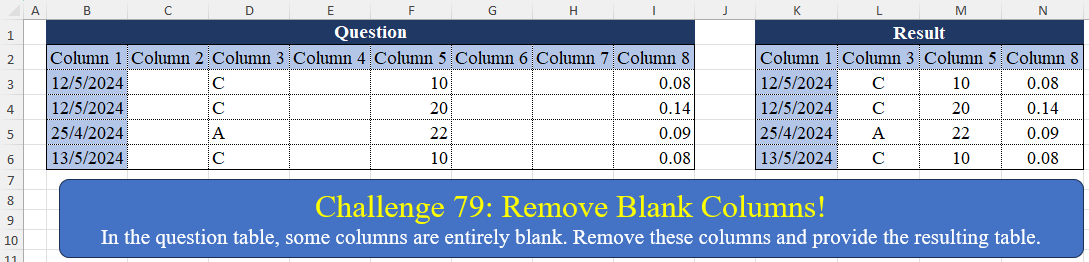
In the question table, some columns are entirely blank. Remove these columns and provide the resulting table.
📌 Challenge Details and Links
Challenge Number: 79
Challenge Difficulty: ⭐⭐
📥Download Sample File
📥Link to the solutions on LinkedIn
Solving the challenge of Remove Blank Columns! with Power Query
Power Query solution 1 for Remove Blank Columns!, proposed by Zoran Milokanović:
let
  Source = Excel.CurrentWorkbook(){[Name = "Input"]}[Content],
  S = Table.PromoteHeaders(
    Table.FromColumns(
      List.TransformMany(
        Table.ToColumns(Table.DemoteHeaders(Source)),
        each {{}, {_}}{Byte.From(List.Count(List.RemoveNulls(_)) > 1)},
        (i, _) => _
      )
    )
  )
in
  S
Power Query solution 2 for Remove Blank Columns!, proposed by Zoran Milokanović:
let
  Source = Excel.CurrentWorkbook(){[Name = "Input"]}[Content],
  S = Table.SelectColumns(
    Source,
    Table.SelectRows(Table.Buffer(Table.Profile(Source)), each [NullCount] <> [Count])[Column]
  )
in
  S
Power Query solution 3 for Remove Blank Columns!, proposed by Zoran Milokanović:
let
  Source = Excel.CurrentWorkbook(){[Name = "Input"]}[Content],
  U      = Table.UnpivotOtherColumns(Table.AddIndexColumn(Source, "I"), {"Column 1", "I"}, "A", "V"),
  P      = Table.RemoveColumns(Table.Sort(Table.Pivot(U, List.Distinct(U[A]), "A", "V"), "I"), "I")
in
  P
Power Query solution 4 for Remove Blank Columns!, proposed by Brian Julius:
let
  Source      = Excel.CurrentWorkbook(){[Name = "Table1"]}[Content],
  AddIndex    = Table.AddIndexColumn(Source, "Index", 0, 1, Int64.Type),
  UnpivOther  = Table.UnpivotOtherColumns(AddIndex, {"Index"}, "Attribute", "Value"),
  Pivot       = Table.Pivot(UnpivOther, List.Distinct(UnpivOther[Attribute]), "Attribute", "Value"),
  RemoveIndex = Table.RemoveColumns(Pivot, {"Index"})
in
  RemoveIndex
Power Query solution 5 for Remove Blank Columns!, proposed by Luan Rodrigues:
let
  Fonte = Table.DemoteHeaders(Tabela1),
  tab = Table.FromColumns(
    List.Select(Table.ToColumns(Fonte), each List.NonNullCount(List.RemoveFirstN(_, 1)) <> 0)
  ),
  res = Table.PromoteHeaders(tab)
in
  res
Power Query solution 6 for Remove Blank Columns!, proposed by Aditya Kumar Darak 🇮🇳:
let
  Source  = Excel.CurrentWorkbook(){[Name = "data"]}[Content],
  Profile = Table.Buffer(Table.Profile(Source)),
  Empty   = Table.SelectRows(Profile, each [Count] = [NullCount])[Column],
  Return  = Table.RemoveColumns(Source, Empty)
in
  Return
Power Query solution 7 for Remove Blank Columns!, proposed by Alejandro Simón 🇵🇦 🇪🇸:
let
  Source = Excel.CurrentWorkbook(){[Name = "Table1"]}[Content],
  NullCol = List.PositionOf(
    List.Transform(Table.ToColumns(Source), each List.Distinct(_)),
    {null},
    2
  ),
  Cols = List.Transform(NullCol, each Table.ColumnNames(Source){_}),
  Sol = Table.RemoveColumns(Source, Cols)
in
  Sol
Power Query solution 8 for Remove Blank Columns!, proposed by Alejandro Simón 🇵🇦 🇪🇸:
let
  Source = Excel.CurrentWorkbook(){[Name = "Table1"]}[Content],
  Pos    = List.PositionOf(Table.Profile(Source)[NullCount], 0, 2),
  Sol    = Table.SelectColumns(Source, List.Transform(Pos, each Table.ColumnNames(Source){_}))
in
  Sol
Power Query solution 9 for Remove Blank Columns!, proposed by Kris Jaganah:
let
  Source = Excel.CurrentWorkbook(){[Name = "Table1"]}[Content],
  Ans = Table.SelectColumns(
    Source,
    List.Select(Table.ColumnNames(Source), each List.NonNullCount(Table.Column(Source, _)) > 0)
  )
in
  Ans
Power Query solution 10 for Remove Blank Columns!, proposed by Abdallah Ally:
let
  Source = Excel.CurrentWorkbook(){[Name = "Table1"]}[Content],
  Columns = Table.ColumnNames(Source),
  FilteredColumns = List.Select(
    Columns,
    (x) => List.IsEmpty(List.RemoveNulls(Table.Column(Source, x)))
  ),
  Result = Table.RemoveColumns(Source, FilteredColumns)
in
  Result
Power Query solution 11 for Remove Blank Columns!, proposed by Nelson Mwangi:
let
  Source     = Excel.CurrentWorkbook(){[Name = "Table1"]}[Content],
  Col1       = List.FirstN(Table.ColumnNames(Source), 1),
  Unpivot    = Table.UnpivotOtherColumns(Source, {"Column 1"}, "A", "V"),
  Group      = Table.Group(Unpivot, {"A"}, {{"Count", each Table.RowCount(_), Int64.Type}})[A],
  SelectCols = Table.SelectColumns(Source, List.Combine({Col1, Group}))
in
  SelectCols
Power Query solution 12 for Remove Blank Columns!, proposed by Mahmoud Bani Asadi:
= Table.RemoveColumns(Source, Table.SelectRows(Table.SelectColumns(Table.Profile(Source),{"Column", "NullCount"}), each ([NullCount] = Table.RowCount(Source)))[Column])Power Query solution 13 for Remove Blank Columns!, proposed by Yaroslav Drohomyretskyi:
let
  Source = Excel.CurrentWorkbook(){[Name = "Table1"]}[Content],
  Remove = Table.SelectColumns(
    Source,
    Table.SelectRows(
      Table.AddColumn(
        Table.FromList(Table.ColumnNames(Source)),
        "Count",
        each List.NonNullCount(Table.Column(Source, [Column1]))
      ),
      each ([Count] <> 0)
    )[Column1]
  )
in
  Remove
Power Query solution 14 for Remove Blank Columns!, proposed by Masoud Karami:
let
  Source = Excel.CurrentWorkbook(){[Name = "Table1"]}[Content],
  A      = Table.AddIndexColumn(Source, "Index", 0, 1, Int64.Type),
  B      = Table.UnpivotOtherColumns(A, {"Index"}, "Attribute", "Value"),
  C      = Table.Pivot(B, List.Distinct(B[Attribute]), "Attribute", "Value"),
  D      = Table.RemoveColumns(C, {"Index"})
in
  D
Power Query solution 15 for Remove Blank Columns!, proposed by 🇮🇷 Navid Esmaeilzadeh اسماعیل زاده:
let
  S = Excel.CurrentWorkbook(){[Name = "Table1"]}[Content],
  A = Table.FromRows(
    List.Select(
      List.Zip({Table.ToColumns(S), Table.ColumnNames(S)}),
      each List.NonNullCount(_{0}) > 0
    )
  ),
  B = Table.FromColumns(A[Column1], A[Column2]),
  Sol = Table.TransformColumnTypes(
    B,
    {
      {"Column 1", type date},
      {"Column 3", type text},
      {"Column 5", Int64.Type},
      {"Column 8", type number}
    }
  )
in
  Sol
Power Query solution 16 for Remove Blank Columns!, proposed by CA Raghunath Gundi:
let
  Source           = Excel.CurrentWorkbook(){[Name = "Table1"]}[Content],
  Transposed_Table = Table.Transpose(Source),
  RemovedNulls     = Table.SelectRows(Transposed_Table, each [Column1] <> null and [Column1] <> ""),
  Result           = Table.Transpose(RemovedNulls)
in
  Result
Power Query solution 17 for Remove Blank Columns!, proposed by Meganathan Elumalai:
let
  Source = Excel.CurrentWorkbook(){[Name = "Table1"]}[Content],
  ColNms = List.Select(
    Table.ColumnNames(Source),
    (f) => not List.IsEmpty(List.RemoveNulls(Table.Column(Source, f)))
  ),
  Result = Table.FromColumns(
    List.Select(Table.ToColumns(Source), (I) => not List.IsEmpty(List.RemoveNulls(I))),
    ColNms
  )
in
  Result
Power Query solution 18 for Remove Blank Columns!, proposed by Thang Van:
let
  Source = Excel.CurrentWorkbook(){[Name = "Table1"]}[Content],
  blank_column = List.Transform(Table.ToColumns(Source), (a) => List.IsEmpty(List.RemoveNulls(a))),
  table_cols = Table.ColumnNames(Source),
  remove_cols = List.Transform(
    List.PositionOf(blank_column, true, Occurrence.All),
    each table_cols{_}
  ),
  res = Table.RemoveColumns(Source, remove_cols)
in
  res
Power Query solution 19 for Remove Blank Columns!, proposed by Szabolcs Phraner:
let
  Source = Table.FromRows(
    Json.Document(
      Binary.Decompress(
        Binary.FromText(
          "i45WMjTSN9U3MjAyUdJRAiJnCGVoAKGByEDPwEIpVgeXSiNklYYmYJVGpvomSCodoSqNkM20hJhpTJTtsQA=",
          BinaryEncoding.Base64
        ),
        Compression.Deflate
      )
    ),
    let
      _t = ((type nullable text) meta [Serialized.Text = true])
    in
      type table [
        #"Column 1" = _t,
        #"Column 2" = _t,
        #"Column 3" = _t,
        #"Column 4" = _t,
        #"Column 5" = _t,
        #"Column 6" = _t,
        #"Column 7" = _t,
        #"Column 8" = _t
      ]
  ),
  Buffer = Table.Buffer(Source),
  ColNames = Table.ColumnNames(Buffer),
  RemoveEmptyCols = Table.RemoveColumns(
    Buffer,
    List.Select(
      ColNames,
      each List.IsEmpty(List.RemoveMatchingItems(Table.Column(Buffer, _), {"", null}))
    )
  )
in
  RemoveEmptyCols
Power Query solution 20 for Remove Blank Columns!, proposed by Younes Ataei:
let
  Source               = Excel.CurrentWorkbook(){[Name = "Table1"]}[Content],
  #"Transposed Table"  = Table.Transpose(Source),
  #"Filtered Rows"     = Table.SelectRows(#"Transposed Table", each ([Column1] <> null)),
  #"Transposed Table1" = Table.Transpose(#"Filtered Rows")
in
  #"Transposed Table1"
Solving the challenge of Remove Blank Columns! with Excel
Excel solution 1 for Remove Blank Columns!, proposed by محمد حلمي:
=FILTER(B2:I6,B3:I3>0)Excel solution 2 for Remove Blank Columns!, proposed by Aditya Kumar Darak 🇮🇳:
=FILTER(
    B2:I6,
     BYCOL(
         B3:I6,
          LAMBDA(
              a,
               AND(
                   a <> ""
               )
          )
     )
)
Excel solution 3 for Remove Blank Columns!, proposed by Oscar Mendez Roca Farell:
=FILTER(
    B2:I6,
     MMULT(
         TOROW(
             B3:B6
         )^0,
          N(
              B3:I6>0
          )
     )
)
Excel solution 4 for Remove Blank Columns!, proposed by Julian Poeltl:
=LET(
    T,
    B2:I6,
    FILTER(
        T,
        BYCOL(
            T,
            LAMBDA(
                A,
                COUNTA(
                    A
                )
            )
        )>1
    )
)
Excel solution 5 for Remove Blank Columns!, proposed by Kris Jaganah:
=FILTER(
    B2:I6,
    BYCOL(
        B2:I6,
        COUNTA
    )>1
)
Excel solution 6 for Remove Blank Columns!, proposed by Mahmoud Bani Asadi:
=UNIQUE(
    B3:I6,
    1,
    1
)
Excel solution 7 for Remove Blank Columns!, proposed by Mahmoud Bani Asadi:
=FILTER(
    B2:I6,
    BYCOL(
        B3:I6,
        COUNTA
    )
)
Excel solution 8 for Remove Blank Columns!, proposed by Imam Hambali:
=INDEX(B2:I6,SEQUENCE(ROWS(B2:I6)),MATCH(TOROW(B3:I3,1),B3:I3,0))Excel solution 9 for Remove Blank Columns!, proposed by Sunny Baggu:
=FILTER(     B2:I6,     BYCOL(
         B3:I6 <> "",
          LAMBDA(
              a,
               AND(
                   a
               )
          )
     ))
Excel solution 10 for Remove Blank Columns!, proposed by Sunny Baggu:
=FILTER(
    B2:I6,
     B3:I3 <> ""
)
Excel solution 11 for Remove Blank Columns!, proposed by Andy Heybruch:
=FILTER(
    B2:I6,
    BYCOL(
        LEN(
            B3:I6
        ),
        LAMBDA(
            a,
            SUM(
                a
            )
        )
    )>0
)
Excel solution 12 for Remove Blank Columns!, proposed by Bilal Mahmoud kh.:
=TRANSPOSE(
    FILTER(
        TRANSPOSE(
            B2:I6
        ),
        CHOOSECOLS(
            TRANSPOSE(
            B2:I6
        ),
            2
        )<>""
    )
)
Excel solution 13 for Remove Blank Columns!, proposed by Hussein SATOUR:
=FILTER(
    B2:I6,
    B2:I2<>BYCOL(
        B2:I6,
        CONCAT
    )
)
Excel solution 14 for Remove Blank Columns!, proposed by Meganathan Elumalai:
=LET(Rng,
    Table1[

#All],
    FILTER(Rng,
    TRANSPOSE(MMULT(TRANSPOSE((Rng<>"")*1),
    SEQUENCE(
        ROWS(
            Rng
        ),
        ,
        1,
        0
    )))>1))
Excel solution 15 for Remove Blank Columns!, proposed by Mey Tithveasna:
=UNIQUE(
    B3:I6,
    TRUE,
     TRUE
)
Excel solution 16 for Remove Blank Columns!, proposed by Mey Tithveasna:
=FILTER(
    B2:I6,
    BYCOL(
        B3:I6,
        LAMBDA(
            b,
            COUNTA(
                b
            )>0
        )
    )
)
Excel solution 17 for Remove Blank Columns!, proposed by Milan Shrimali:
=unique(
    BYCOL(
        b2:I6,
        lambda(
            x,
            if(
                counta(
                    x
                )>1,
                x,
                ""
            )
        )
    ),
    1,
    1
)
Excel solution 18 for Remove Blank Columns!, proposed by Rayan Saud:
=FILTER(
    B2:I6,
    BYCOL(
        B3:I6,
        CONCAT
    )<>""
)
Solving the challenge of Remove Blank Columns! with Python
Python solution 1 for Remove Blank Columns!, proposed by Konrad Gryczan, PhD:
import pandas as pd

path = "CH-079 Remove Blank Columns.xlsx"

input = pd.read_excel(path, usecols="B:I", skiprows=1)
test  = pd.read_excel(path, usecols="K:N", skiprows=1)
test.columns = test.columns.str.replace('.1', '')

result = input.loc[:, input.columns[~input.isnull().all()]]
print(result.equals(test)) # True
Solving the challenge of Remove Blank Columns! with Python in Excel
Python in Excel solution 1 for Remove Blank Columns!, proposed by Abdallah Ally:
df = xl("B2:I6", headers=True)

# Drop columns if entirely blank
df = df.dropna(how='all', axis=1)

# Display the final dataset
df
Solving the challenge of Remove Blank Columns! with R
R solution 1 for Remove Blank Columns!, proposed by Konrad Gryczan, PhD:
library(tidyverse)
library(readxl)

path = "files/CH-079 Remove Blank Columns.xlsx"
input = read_excel(path, range = "B2:I6")
test = read_excel(path, range = "K2:N6")

result = input %>%
 select(-where(~all(is.na(.))))

identical(result, test)
# [1] TRUE